PMCL643 - Monitor Pelco - Free user manual and instructions
Find the device manual for free PMCL643 Pelco in PDF.


| Product Type | Surveillance Monitor |
| Brand | Pelco |
| Model | PMCL643 |
| Screen Size | 43 inches |
| Resolution | Full HD 1920x1080 |
| Display Technology | LED |
| Aspect Ratio | 16:9 |
| Brightness | 350 cd/m² |
| Contrast Ratio | 1200:1 (typical) |
| Response Time | 8 ms |
| Viewing Angles | 178° horizontal / 178° vertical |
| Video Inputs | HDMI, VGA, BNC (composite) |
| Power Supply | 100-240 V AC, 50/60 Hz |
| Power Consumption | 70 W (typical) |
| Dimensions (WxHxD, without stand) | 965 x 560 x 80 mm (est.) |
| Weight | 10 kg (est.) |
| VESA Mount Pattern | 200 x 200 mm |
| Key Features | 24/7 operation, landscape/portrait orientation, RS232 control |
| Maintenance & Cleaning | Clean with a soft, dry cloth; avoid liquids |
| Safety | Ensure proper ventilation; do not expose to moisture |
| Included Accessories | Remote control, power cable, VGA cable |
Frequently Asked Questions - PMCL643 Pelco
User questions about PMCL643 Pelco
0 question about this device. Answer the ones you know or ask your own.
Ask a new question about this device
Download the instructions for your Monitor in PDF format for free! Find your manual PMCL643 - Pelco and take your electronic device back in hand. On this page are published all the documents necessary for the use of your device. PMCL643 by Pelco.
USER MANUAL PMCL643 Pelco
by Schneider Electric

600 Series Video Surveillance Monitors
32" LED Monitor
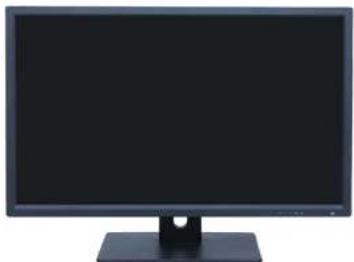
natural_image
Front view of a black desktop computer monitor with a stand (no visible text or labels)43", 50", 55" & 55" 4K LED Monitor
natural_image
Blank gray rectangle with no visible text, symbols, or featuresContents
for Wall Mount Monitor User Manual (10/16)....1
Important Notices Statement....3
Regulatory Notices....3
Radio and Television Interference 3
Korean Class B EMC 3
Warranty Statement....3
UL Safety Notices 3
Important Information 4
Safety Warning 4
Notes......4
Product Appearance....6
Performance Features 6
External Connections....6
Main Menu 7
Main Menu 7
Picture Menu....9
Audio Menu....9
Option Menu 9
Function Menu 10
Important Notices Statement
For information about Pelco's product-specific important notices and thereto related information, refer to www.pelco.com/legal.
REGULATORY NOTICES
This device complies with Part 15 of the FCC Rules. Operation is subject to the following two conditions: (1) this device may not cause harmful interference, and (2) this device must accept any interference received, including interference that may cause undesired operation.
RADIO AND TELEVISION INTERFERENCE
This equipment has been tested and found to comply with the limits of a Class B digital device, pursuant to Part 15 of the FCC Rules. These limits are designed to provide reasonable protection against harmful interference in a residential installation. This equipment generates, uses, and can radiate radio frequency energy and, if not installed and used in accordance with the instructions, may cause harmful interference to radio communications. However, there is no guarantee that the interference will not occur in a particular installation. If this equipment does cause harmful interference to radio or television reception, which can be determined by turning the equipment off and on, the user is encouraged to try to correct the interference by one or more of the following measures:
- Reorient or relocate the receiving antenna.
- Increase the separation between the equipment and the receiver.
- Connect the equipment into an outlet on a circuit different from that to which the receiver is connected.
- Consult the dealer or an experienced radio/TV technician for help.
You may also find helpful the following booklet, prepared by the FCC: "How to Identify and Resolve Radio-TV Interference Problems." This booklet is available from the U.S. Government Printing Office, Washington D.C. 20402.
Changes and modifications not expressly approved by the manufacturer or registrant of this equipment can void your authority to operate this equipment under Federal Communications Commission's rules.
CAN ICES-3 (B)/NMB-3(B)
KOREAN CLASS B EMC
Important Information
SAFETY WARNING
To use the product safely, correctly, and to keep users from suffering injury or property loss, please observe the following safety precautions when installing, using or maintaining.
Please read this handbook before operating the product and keep the handbook for future reference.
● Notice and observe all the warnings and illustrations.
- Do not adjust, maintain or modify if you do not have appropriate qualifications.
- Do not open or remove the rear cover, box or cover board of the product. Please contact the dealer or after-sales service center when in need of adjustment or maintenance.
- Do not place any items on the product. The product may be damaged if foreign objects enter the internal unit.
- Do not tread on or squeeze the power line, especially the plug or connection point of the power line to the product.
- Do not put the product in flammable or corrosive gaseous environment, which may cause fire or damage the product. Placing the product in proximity to flammable gas can easily result in a dangerous explosion.
- Please turn off power or unplug the power cable immediately if there is smoking, off-odor, or abnormal noise. Contact the after-sales service center for maintenance after confirming there is no more smoke or odor. Further use could result in fire.
- Only qualified service people can maintain. If the product gets any kind of damage, such as damage to the plug, foreign matter or liquid into the unit, exposure to rain or humidity, loss of function, or dropped, please contact dealer or after-sales service center.
- Do not expose the product to rain or chemicals. If the product is moist, allow to fully dry before plugging in or turning on power.
- Turn off the power when cleaning the product.
● Failure to properly secure all screws during installation can result in a fall of the product. Ensure all mounting hardware and other installation accessories are properly secured during installation.
- Do not press, stretch or heat the connecting lines, which might cause damage to it.
- Please firmly grasp the plug of the connecting line when inserting and removing. Pulling the connecting line might cause damage to it.
- Cut off power and the connecting line immediately and contact the after-sales service center if the product or the connecting line is damaged for some reason. Continued use without maintenance might cause smoking or off-odor.
- Do not hang or lean on the product. Doing so can cause the product to fall or become damaged. It may also cause injury to people. Pay special attention when children are nearby.
- Please turn off power for safety if not using the product for a long time.
- Do not let the connecting line get squeezed, buckled, pulled or twisted.
● Make sure the power is turned off and the connecting lines are removed when moving the product.
● Avoid collisions with the product. This may cause equipment failure.
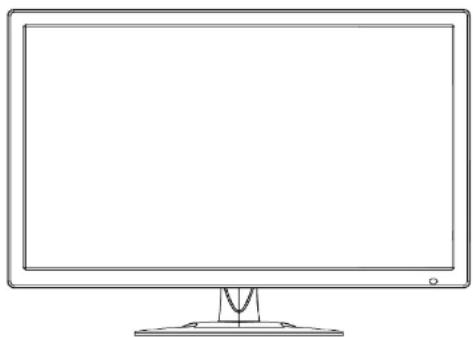
Product Appearance
natural_image
Line drawing of a flat-screen computer monitor with a stand (no text or symbols)(Photos are for reference only)
PERFORMANCE FEATURES
● Supports 3D comb-filter and 3D de-interlace.
● Low energy consumption, long service life.
● High contrast ratio and high luminance.
● Automatically eliminates ghosting.
● Rapid response times, no trailing image.
- Thin and light.
● Full-HD LCD panel with top-ranking video processing chip.

VGA INPUT: D-SUB 15 pins Connector
HDMI INPUT: HDMI Connector
BNC IN: BNC Connector
BNC OUT; BNC Connector
AUDIO IN: Phone Jack, Stereo
USB IN: Support USB update
DP INPUT: DisplayPort
RS232 IN: EIA-RS-232

Attention
Please turn off the power of the external device and the product when connecting.
Main Menu
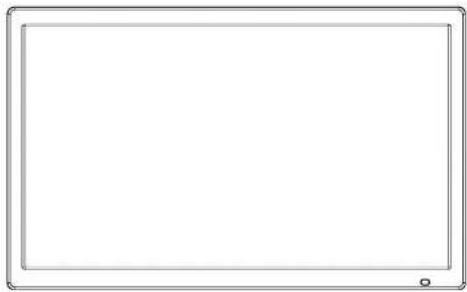
MAIN MENU
natural_image
Blank rectangular frame with rounded corners and a small circular mark at the bottom (no text or symbols)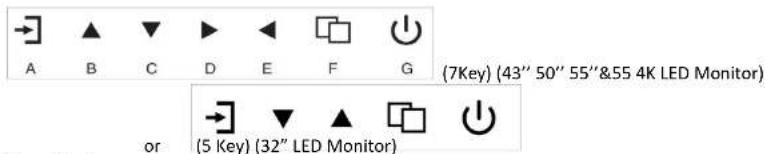
A. "Source" button
- Press the button to display all the signal channel menus.
B. "Upward" button
- Press the button to move the cursor to the needed function.
- Press the button to change the selected function in OSD menu item.
C. "Downward" button
- Press the button to move the cursor to the needed function.
PICTURE MENU
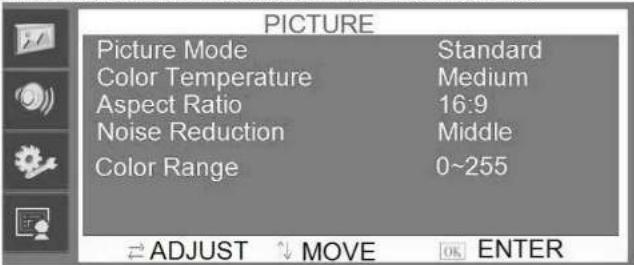
Picture menu can set picture mode, color temperature, aspect rao, noise reducon, and color range. Press ▲▼ buon to adjust value when item is selected, press menu buon to exit.
AUDIO MENU
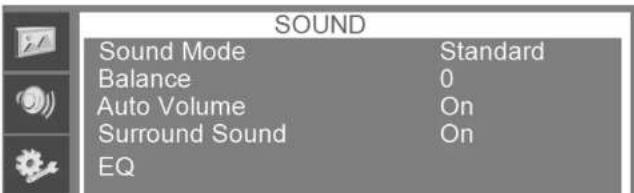
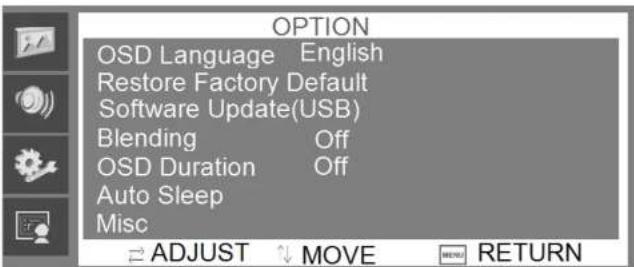
Audio menu can set sound mode, balance, auto volume, surround sound, and EQ. Press ▲▼ button to adjust value when item is selected, press menu button to exit.
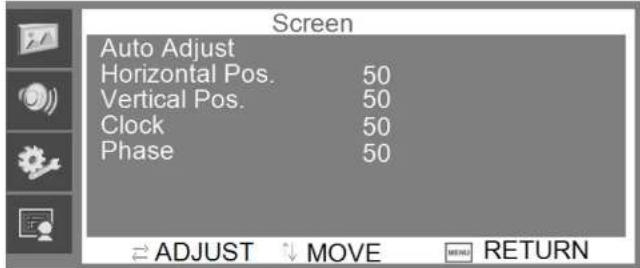
FUNCTION MENU
Screen menu can set auto adjust (automacally determine signal layout), horizontal posion, vercal posion, clock, and phase. Press ▲▼ buon to adjust value when item is selected, press menu button to exit.
Channel Selection
"Source" menu can select channel (Input). The options Include VGA, HDMI and so on. Press ▲▼ button to adjust value when item is selected, press menu button to exit.
Troubleshooting
Before consulting service staff, please use the following chart to attempt to diagnose the issue.
| Problem | FIX | |||||||||
| 1 | 2 | 3 | 4 | 5 | 6 | 7 | 8 | 9 | 10 | |
| No image or sound | ◎ | ◎ | ◎ | ◎ | ◎ | ◎ | ||||
| Inferior sound, normal image | ◎ | ◎ | ◎ | ◎ | ||||||
| Inferior image, normal sound | ◎ | ◎ | ◎ | ◎ | ◎ | ◎ | ◎ | |||
| Poor signal | ◎ | ◎ | ◎ | ◎ | ◎ | |||||
| Vague image | ◎ | ◎ | ◎ | ◎ | ||||||
| Double image | ◎ | ◎ | ◎ | ◎ | ||||||
| Interfering lines in image | ◎ | ◎ | ◎ | ◎ | ||||||
| Twisty image | ◎ | ◎ | ◎ | ◎ | ||||||
| Poor signal | ◎ | ◎ | ◎ | ◎ | ◎ | ◎ | ||||
| Rung stripe in image | ◎ | ◎ | ||||||||
| Image vertically scrolls | ⊕ | ◎ | ◎ | ◎ | ||||||
| Inferior color | ◎ | ◎ | ◎ | ◎ | ◎ | ◎ | ◎ | ◎ | ◎ | |
| No color | ◎ | ◎ | ◎ | ◎ | ◎ | ◎ | ||||
| Fix | |
| 1 | Switch to another channel or input. |
| 2 | Check whether the signal line is connected. |
| 3 | Check whether the signal line is connected. |
| 4 | Interference from by other electric appliance may be present. |
| 5 | Adjust ine tuning setting. |
| 6 | Adjust luminance setting. |
| 7 | Adjust contrast ratio setting. |
| 8 | Adjust color setting. |
| 9 | Check whether the system is set-up properly. |
| 10 | Check whether the power is on. |
Pelco Troubleshooting Contact Information
If the instructions provided fail to solve your problem, contact Pelco Product Support at 1-800-289-9100 (USA and Canada) or
+1-559-292-1981 (international) for assistance. Be sure to have the serial number available when calling.
Do not try to repair the unit yourself. Leave maintenance and repairs to qualified technical personnel only.
PELCO
by Schneider Electric

- Series Video Surveillance Monitors
- Contents
- Important Notices Statement
- REGULATORY NOTICES
- RADIO AND TELEVISION INTERFERENCE
- KOREAN CLASS B EMC
- Important Information
- SAFETY WARNING
- Product Appearance
- PERFORMANCE FEATURES
- Attention
- "Source" button
- "Upward" button
- "Downward" button
- PICTURE MENU
- AUDIO MENU
- FUNCTION MENU
- Channel Selection
- Troubleshooting
- Pelco Troubleshooting Contact Information
Brand : Pelco
Model : PMCL643
Category : Monitor