
CoolFreeze CF-50DZ - Cooler WAECO - Free user manual and instructions
Find the device manual for free CoolFreeze CF-50DZ WAECO in PDF.


| Product Type | Portable compressor cooler/freezer |
| Brand | Waeco |
| Model | CoolFreeze CF-50DZ |
| Total Capacity | 49 liters |
| Cooling Range | +10 °C to -18 °C (+50 °F to 0 °F) |
| Power Supply | 12/24 V DC (vehicle battery) and 100-240 V AC (mains) |
| Rated Current (12 V DC) | 7.0 A |
| Rated Current (24 V DC) | 3.0 A |
| Rated Current (100-240 V AC) | 1.3 to 0.7 A |
| Dimensions (W x H x D) | 630 x 480 x 360 mm |
| Weight | 19.8 kg |
| Refrigerant | R134a (CFC-free) |
| Battery Monitor | 3-level (LOW, MED, HIGH) to protect vehicle battery |
| Turbo Mode | Yes, for rapid cooling |
| Display | Digital temperature display with Celsius/Fahrenheit selection |
| Handles | Removable carrying handles (2 included) |
| Lid | Reversible (can be hinged from either side) |
| Interior Features | Removable plastic dividers and steel basket |
| Cleaning | Wipe with damp cloth; do not immerse in water |
| Defrosting | Manual defrost when ice layer forms |
| Safety Features | Reverse polarity protection, overvoltage protection, fuse |
| Replaceable Parts | Device fuse (T4.0AL 250V), plug fuse (8A 32V), light bulb |
| Warranty | General Waeco warranty conditions apply; require purchase receipt |
Frequently Asked Questions - CoolFreeze CF-50DZ WAECO
User questions about CoolFreeze CF-50DZ WAECO
0 question about this device. Answer the ones you know or ask your own.
Ask a new question about this device
Download the instructions for your Cooler in PDF format for free! Find your manual CoolFreeze CF-50DZ - WAECO and take your electronic device back in hand. On this page are published all the documents necessary for the use of your device. CoolFreeze CF-50DZ by WAECO.
USER MANUAL CoolFreeze CF-50DZ WAECO
Please read this operating manual carefully before starting the device. Keep it in a safe place for future reference. If the device is handed over to another person, this operating manual must be handed over along with the device.
Contents
1 Notes on using the manual 7
2 Safety instructions 7
2.1 General safety 8
2.2 Operating the device safely 9
3 Scope of delivery 10
4 Intended use 10
5 Function description 11
5.1 Operating and display elements 12
5.2 Accessories 14
6 Operation 14
6.1 Before initial use 14
6.2 Energy saving tips 15
6.3 Connecting the cooler 16
6.4 Using the battery monitor 17
6.5 Using the cooler 18
6.6 Setting the temperature 19
6.7 Using the Emergency Switch 20
6.8 Switching off the cooler 20
6.9 Defrosting the cooler 20
6.10 Replacing the device fuse (240V) 21
6.11 Replacing the plug fuse (12/24 V) 21
6.12 Replacing the light bulb 22
7 Cleaning and maintenance 22
8 Warranty 22
9 Troubleshooting 23
10 Disposal 24
11 Technical data 24
WAECO CoolFreeze


WRECO CoolFreeze
4

CF-25, CF-35, CF-40, CF-50, CF-60
5
CF-25
6
CF-35, CF-40, CF-50, CF-60
7

CF-35, CF-40, CF-50, CF-60
WAECO CoolFreeze

1 Notes on using the manual
The following symbols are used in this operating manual:

Caution!
Safety instruction: Failure to observe this instruction can cause personal injury or damage the device.

Caution!
Safety instruction: relating to a danger from an electrical current or voltage. Failure to observe this instruction can cause injury or damage the device and impair its function.

Note:
Supplementary information for operating the device.
▶Action: This symbol indicates that action is required on your part. The required action is described step-by-step.
√This symbol indicates the result of an action.
Fig. 2 1, page 3: This refers to an element in an illustration. In this case, item 1 in figure 2 on page 3.
Please observe the following safety instructions.
2 Safety instructions

- Caution!
WAECO International will not be held liable for claims for damage resulting from the following:
- Damage to the device resulting from mechanical influences and overvoltage
– Alterations to the device made without the explicit permission of WAECO International
- Use for purposes other than those described in the operating manual.
2.1 General safety

- Caution – Danger of electrocution!
- When using the device on boats: If the device is powered by the mains, ensure that the power supply is protected with a ground fault interrupter circuit.
- Check that the voltage specification on the type plate corresponds to that of the energy supply.
- Only connect the device as follows:
- With the cable supplied (Fig. 1, 2, page 4) to the cigarette lighter in the vehicle or to a 12/24V plug socket in the vehicle
- or with the enclosed connection cable (Fig. 1), page 4) to the 100-240 V AC mains (only CF-35, CF-40, CF-50, CF-60).
- If the connection cable is damaged, it must be replaced to prevent possible electrical hazards.
- Do not pull the plug out of the cigarette lighter or the socket by the cable.
- Pull out the connection cable:
– Before cleaning and maintenance
- After use
- Before changing a fuse
- Disconnect the cooling device and other power consuming devices from the battery before you connect the battery to a quick charging device. Overvoltage can damage the electronics of the device.

• Electronic devices are not toys!
Always keep and use the device out of the reach of children.
- Do not operate the device if it is visibly damaged.
- This device may only be repaired by qualified personnel. Inadequate repairs can lead to considerable hazards.
- Should your device need to be repaired, please contact WAECO customer service.
- Do not open the refrigerant circuit under any circumstances!
- The cooler is not suitable for transporting caustic materials or materials containing solvents.
- Food may only be stored in its original packaging or in suitable
2.2 Operating the device safely

- Caution – Danger of electrocution!
Do not touch exposed cables with your bare hands. This especially applies when operating the device from an AC mains. - Before starting the device, ensure that the power supply line and the plug are dry.
- Do not place any electrical devices inside the cooler.
- Set up the device in a dry location where it is protected against splashing water.
- Protect the device and the cable against rain and moisture.
- Do not place the device near naked flames or other heat sources (heaters, direct sunlight, gas ovens etc.)
• Caution! Danger of overheating!
Ensure at all times that there is sufficient ventilation so that the heat generated during normal operation is able to dissipate. Ensure that the ventilation slots are not covered. Make sure that the device is sufficiently far away from walls and other objects so that the air can circulate.
- Never immerse the device in water.
- Do not fill the inner container with ice or fluid.
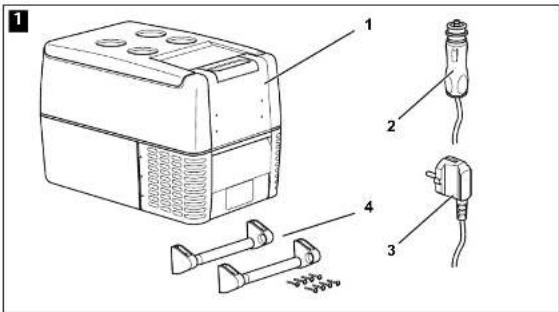
3 Scope of delivery
Fig. 1 page 4, shows the scope of delivery.
Item Quantity Description
| 1 1 Cooler | ||
| 2 1 Connection cable for 12/24 VDC connection | ||
| 3 | 1 (except CF-18, CF-25) Connection cable for 100 - 240 VAC connection | |
| 4 | 2 (except CF-18, CF-25) | Carrying handle, consisting of:- 2 holders- 1 handle- 4 fastening screws |
| - | 1 (CF-18 only) Plastic grille divider | |
| - | 1 (CF-35 only) Powdercoated steel evap. protector | |
| - | 1 (except CF-18, Powdercoated steel basket | |
| CF-25, (CF-3002) | ||
| - | 2 (CF-5002 only) | Powdercoated steel basket |
| - | 2 (CF-5002 only) | Internal compartment divider (plastic) |
| - | 1 Operating manual | |
4 Intended use


The cooler is suitable for cooling and freezing foods. The device is also suitable for use on boats.
The device is designed to be operated from a 12 VDC or 24 VDC on-board supply socket of a vehicle (e. g. cigarette lighter), boat or caravan as well as from a 100 - 240 V AC mains (for CF-18 and CF-25 an optional accessory adaptor is required for connection to AC mains power).

Caution - When cooling perishable medicines! If you wish to cool medicines, please check if the cooling capacity of the device is adequate for this purpose.
5 Function description
The cooler can chill products, keep them cool as well as freeze them. A low maintenance, CFC-free refrigerant circuit with compressor provides the cooling. The extra strong CFC-free insulation and powerful compressor ensure especially fast cooling.
The cooler is designed for mobile use and can be carried by using a folding carrying bracket (CF-18), two recessed grips (CF-25) or two removable carrying handles (CF-35, CF-40, CF-50, CF-60).
When used on boats, the cooler can withstand a constant heel (inclination) of 30°.
Scope of functions:
| CF-18 | CF-25 CF- | 35, CF-40, CF-50°, CF-60 | |
| Power supply with priority circuit for - - connecting to the AC mains | • | • | |
| Battery monitor for protecting the vehicle 2-level 3-level battery | |||
| Turbo mode for rapid cooling | - | • | • |
| Display with temperature gauge | - | • | • |
| Temperature setting With | rotary with two buttons in steps of 1 °C (2 °F) control | ||
| Removable carrying handles | - | - | • |
a Note: unless otherwise stated, throughout this manual CF-50 refers to both CF-50 AC and CF-50 ACDZ.
5.1 Operating and display elements
CF-25, CF-35, CF-40
Lock for lid: Fig. 21, page 4.
CF-18
Operating panel and connection socket (Fig. 3 page 4):
Item Description Explanation
| 1 TEMPERATURE Temperature controller, |
| cooling temperature at the end positions: |
| COLD: +10 °C (+50 °F) |
| FREEZE: -18 °C (0 °F) |
2 POWER Operating display
| LED is lit green: Device is switched on and ready for operation |
| LED is lit amber: Set temperature has been reached |
3 ERROR LED flashes red: Switched on device
is not ready for operation
4 BATTERY Switch-on device/battery monitor:
| MONITOR | 0: | Device is switched off |
| HIGH: | Device is switched on, battery monitor is in HIGH mode | |
| LOW: | Device is switched on, battery monitor is in LOW mode |
5 12/24V DC Connection socket DC voltage supply
CF-25, CF-35, CF-40, CF-50, CF-60
Operating panel (Fig. 4 page 5)
Item Description Explanation
1 ON Switches the cooler on or off when the
OFF button is pressed for between one and two seconds
2 POWER Status indication
LED lights up green: Compressor is on
LED lights up amber: Compressor is off
LED flashes amber: Voltage insufficient
3 ERROR LED flashes red: Device is switched on
but not ready for
operation
4 SET Selects the input mode
Temperature setting
- Celsius or Fahrenheit display
- Set battery monitor
5 - Display, shows the information
6 UP + Press once to increase the value
7 DOWN - Press once to decrease the value
CF-25
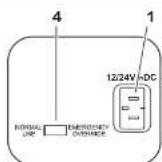
Connection socket (Fig. 5 page 5):
Item Description
1 Connection socket DC voltage supply
CF-35, CF-40, CF-50, CF-60
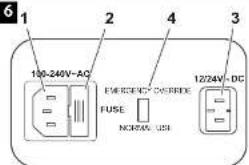
Connection sockets (Fig. 6 page 5):
Item Description
1 Connection socket AC voltage supply
5.2 Accessories
If you want to operate the coolers CF-18 and CF-25 from the 240 V AC mains, be sure to use the rectifier WAECO CoolPower EPS-816 (CF-18 only) or EPS-817 (CF-18 and CF-25).
6 Operation
6.1 Before initial use

Note
Before starting your new cooler for the first time, you should clean it inside and outside with a damp cloth for hygienic reasons (please also refer to the chapter "Cleaning and maintenance" on page 22).
Mounting the handles
CF-35, CF-40, CF-50, CF-60
The handles are enclosed unassembled. If you wish to attach the handles, proceed as follows:
▶ Make a handle by putting two holders (Fig. 7 1, page 5) and a handle (Fig. 7 2, page 5) together.
▶Fasten the grip with the enclosed screws in the holes provided.
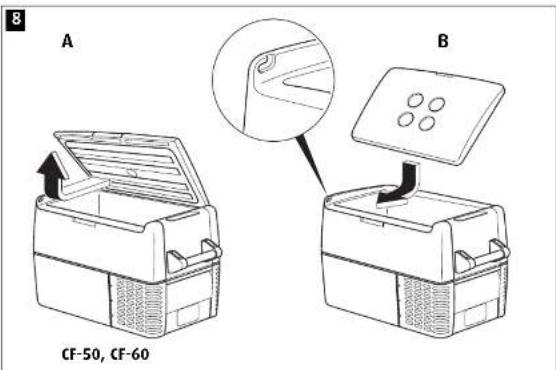
Turning the lid around
CF-50, CF-60
You can turn the lid around if you want to open the lid from the other side.
To do this, proceed as follows:
▶Open the lid and pull it out (Fig. ■ page 6).
▶Turn the lid.
▶Insert the lid in the lid holders on the opposite side of the cooler (Fig. 8 B, page 6).
Selecting the temperature units - °C or °F CF-25, CF-35, CF-40, CF-50, CF-60
You can switch the temperature display between Celsius and Fahrenheit. This is how to do it:
▶Switch on the cooler.
▶ Press the "SET" button (Fig. 4, 4, page 5) twice.
▶ Use the "UP +" (Fig. 4 6, page 5) and "DOWN -" (Fig. 4 7, page 5) buttons to select Celsius or Fahrenheit.
√The selected temperature units then appear in the display for a few seconds. The display flashes several times before it returns to the current temperature.
6.2 Energy saving tips
- Choose a well ventilated installation location which is protected from direct sunlight.
- Allow hot food to cool down first before you place it into the device.
●Do not open the cooler more often than necessary.
●Do not leave the lid open for longer than necessary.
●Defrost the cooler once a layer of ice forms.
●Avoid unnecessarily low temperatures.
6.3 Connecting the cooler
Connecting to a battery (Vehicle or boat)
The cooler can be operated with 12 V or 24 V DC.

Caution - Danger of damaging the device!
Disconnect the cooler and other consumer units from the battery before
you connect the battery to a quick charging device.
Overvoltage can damage the electronics of the device.
For safety reasons the cooler is equipped with an electronic system to prevent polarity reversal. This protects the cooler against short-circuiting when connecting to a battery.
▶ Plug the 12/24-V connection cable (Fig. 1 2, page 4) into the DC
voltage socket, the cigarette lighter or a 12 V or 24 V socket.
Connecting to a 100-240 V AC mains (E.g. in the home or office)

Caution - Danger of electrocution!
Never handle plugs and switches with wet hands or if you are standing on a wet surface.

Caution - Danger of electrocution!
If you are operating your cooler on board a boat from a mains
connection of 100-240 V AC, you must install a residual current circuit
breaker between the 100-240 V AC mains and the cooler.
Seek advice from a trained technician.
CF-35, CF-40, CF-50, CF-60
The coolers CF-35, CF-40, CF-50, CF-60 have an integrated multi-voltage power supply with priority circuit for connecting to an AC voltage source of 100–240 V. The priority circuit automatically switches the cooler to mains operation, if the device is connected to a 100–240 V AC mains, even if the 12/24 V connection cable is still attached.
When switching between the AC mains and the battery supply, the red LED may light up briefly.
- plus the 100 - 240 U connection cable /tria ■ 7, page A) into the
CF-18, CF-25
To operate the coolers CF-18 and CF-25 from the 220–240 V AC mains, use the optional accessory rectifier WAECO CoolPower EPS-816 (CF-18 only) or EPS-817 (CF-18 and CF-25).
6.4 Using the battery monitor

The device is equipped with a multi-level battery monitor that protects your vehicle battery against excessive discharging when the device is connected to the on-board 12/24 V supply.
If the cooler is operated when the vehicle ignition is switched off, the cooler switches off automatically as soon as the supply voltage falls below a set level. The cooler will switch back on once the battery has been recharged to the restart voltage level.

Note - during low voltage
When switched off by the battery monitor, the digital display (Fig. 45, page 5) goes blank and the power LED (Fig. 42, page 5) flashes amber.

Caution - Danger of damage!
When switched off by the battery monitor, the battery will no longer be fully charged. Avoid starting repeatedly or operating current consumers without longer charging phases. Ensure that the battery is recharged.
In "HIGH" mode, the battery monitor responds faster than at the levels "LOW" and "MED" (see the following table).
CF-18
CF-25, CF-35, CF-40, CF-50, CF-60
Battery monitor mode LOW HIGH LOW MED HIGH
Switch-off voltage at 12 V 10.4 V 11.5 V 10.1 V 11.4 V 11.8 V
Restart voltage at 12 V 11.5 V 12.5 V 11.1 V 12.2 V 12.6 V
Switch-off voltage at 24 V 22.1 V 24.0 V 21.5 V 24.1 V 24.6 V
Restart voltage at 24 V 23.6 V 25.4 V 22.9 V 25.3 V 26.2 V
The method of battery mode selection follows:
WRECO CoolFreeze Troubleshooting
CF-25, CF-35, CF-40, CF-50, CF-60
▶Switch on the cooler.
▶Press the "SET" button (Fig. 4, 4, page 5) three times.
▶ Use the "UP +" (Fig. 4 6, page 5) and "DOWN -" (Fig. 4 7, page 5) buttons to select the battery monitor mode.
▶Digital display will be as follows.

(LOW) (MED) (HIGH)

√The selected mode then appears in the display for a few seconds. The display flashes several times before it returns to the current temperature.

Note
When the cooler is supplied by the starter battery, select the battery monitor mode "HIGH". If the cooler is connected to a supply battery, the battery monitor mode "LOW" will suffice. If you wish to operate the cooler from the AC mains, set the battery monitor to the "LOW" position.
6.5 Using the cooler

Caution - Danger of overheating!
Ensure at all times that there is sufficient ventilation so that the heat generated during operation can dissipate. Ensure that the ventilation slots are not covered. Make sure that the device is sufficiently far away from walls and other objects so that the air can circulate.
▶Place the cooler on a firm foundation.
Make sure that the ventilation slots are not covered and that the heated air can dissipate.
▶Close the cooler, see "Connecting the cooler" on page 16.

Note
If you wish to operate the cooler from the AC mains, set the battery monitor to the "LOW" position.
A Caution - Banner from excessively low temperature!
CF-18
▶ Slide the sliding switch (Fig. 3 4, page 4) to "LOW" or "HIGH" battery protection (See 6.4 "using the battery monitor" for suitable level).
√The "POWER" LED is lit green.
√The cooler starts cooling the interior.
√When the cooling temperature has been reached, the "POWER" LED is lit amber.
CF-25, CF-35, CF-40, CF-50, CF-60
▶ Press the "ON/OFF" button (Fig. 4 1, page 5) and hold down for between one and two seconds.
√The "POWER" LED lights up.
√ The display (Fig. 4 5, page 5) switches on and shows the current temperature.

Note - Displayed temperatures (Digital display models only).
CF-25, CF-35, CF-40, CF-50, CF-60 (Not CF-50DZ)
The temperature displayed is that of the middle of the large interior compartment.
CF-50DZ
i With plastic dividers in: the display temperature is that of the middle of the freezer compartment (furthest away from control panel).
ii With plastic dividers removed: the actual compartment temperature will be considerably warmer than the displayed temperature.
ALL MODELS
Temperatures elsewhere in the compartment (away from centre) will deviate from the displayed temperature.
√The cooler starts cooling the interior.
Locking the cooler
▶Close the lid.
6.6 Setting the temperature
CF-18
▶Set the cooling temperature with the temperature controller (Fig. 3 1, page 4).
CF-25, CF-35, CF-40, CF-50, CF-60
▶ Press the "SET" button (Fig. 4 4, page 5) once.
▶ Use the "UP +" (Fig. 4 6, page 5) and "DOWN -" (Fig. 4 7, page 5) buttons to select the cooling temperature.
√The cooling temperature appears in the display for a few seconds. The display flashes several times and then the current temperature is displayed again.
6.7 Using The Emergency Switch
The emergency override switch (Fig. 5 & 6 4, page 5) is located in the connection panel.
▶For normal operation the switch should be in the 'NORMAL USE' position.
▶In the unlikely event of an electronic control failure slide the Switch to 'EMERGENCY OVERRIDE'.
NOTE: in this position the appliance will run all the time and will therefore perform as a freezer only.
6.8 Switching off the cooler
▶Empty the cooler.
▶Switch the cooler off.
▶Pull out the connection cable.
If you do not want to use the cooler for a longer period of time:
▶Leave the lid slightly open. This prevents odour build-up.
6.9 Defrosting the cooler
Humidity can form frost in the interior of the cooling device or on the evaporator. This reduces the cooling capacity. Defrost the device in good time to avoid this.
Caution - Danner of damaging the device!
▶Take out the contents of the cooling device.
▶If necessary, place them in another cooling device to keep them cool.
▶Switch off the device.
▶Leave the cover open.
▶Wipe off the defrosted water.
6.10 Replacing the device fuse (240V)
Only CF-35, CF-40, CF-50, CF-60

Caution - Danger of electrocution!
Disconnect the connection cable before you replace the device fuse.
▶ Pull off the connection cable.
Pry out the fuse insert (Fig. 6 2, page 5) with a screwdriver.
▶Replace the defective fuse with a new one that has the same rating (T4,0AL 250V).
▶Press the fuse insert back into the housing.
6.11 Replacing the plug fuse (12/24 V)
▶ Pull the adapter sleeve (Fig. ■ page 6) off of the plug.
▶ Unscrew the screw (Fig. 9 5, page 6) out of the upper half of the housing (Fig. 9 1, page 6).
▶Carefully raise the upper half of the housing from the lower (Fig. 96, page 6) half.
▶ Take out the contact pin (Fig. 9 3, page 6).
▶ Replace the defective fuse (Fig. 9 2, page 6) with a new one that has the same rating (8A 32V).
▶Re-assemble the plug in the reverse order.
6.12 Replacing the light bulb
Only CF-25, CF-35, CF-40, CF-50, CF-60
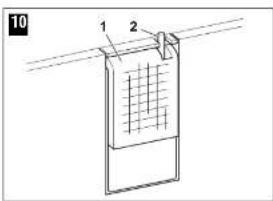
▶ Press the switch pin (Fig. 1C 2, page 6) downwards so that the transparent part (Fig. 1C 1, page 6) of the lamp can be removed at the front.
Replace the light bulb ensuring that: i) the LED's inside the bulb face toward the transparent cover ii) the polarity is correct. Test for operation and if the new bulb does not work fit it the other way around.
▶Press the lamp back into the housing.
7 Cleaning and maintenance

Caution - Danger of electrocution!
Always pull out the mains plug before you clean and service the device.

Caution - Danger of damaging the device!
Never clean the device under running water or in dish water. Do not use abrasive cleaning agents or hard objects during cleaning as these can damage the device.
Never use brushes, scouring pads or hard or pointed tools to remove ice or to loosen objects which have frozen in place.
▶Occasionally clean the inside of the device with a damp cloth.
8 Warranty
Our general warranty conditions apply. If the product is defective, please take it to the nearest authorised WAECO repair agent.
For warranty repair processing, please present copy of the receipt with purchase date.
9 Troubleshooting
| Fault | Possible cause | Suggested remedy |
| Device does not function, Power LED does not glow. | There is no voltage present in the 12/24 V socket (cigarette lighter) in your vehicle. | The ignition must be switched on in most vehicles to apply current to the cigarette lighter. |
| No voltage present in the AC voltage socket. | Try using another plug socket. | |
| The device fuse is defective. | Replace the device fuse, see “Replacing the device fuse” on page 21. | |
| The integrated mains adapter is defective. | This can only be repaired by an authorised repair centre. | |
| The device does not cool (plug is inserted, “POWER” LED is lit). | Defective component. | This can only be repaired by an authorised authorised repair centre. |
| The device does not cool (plug is inserted, “POWER” LED flashes + digital display blank). | Battery voltage is too low. | Test the battery and charge it as needed. |
| The device does not cool (plug is inserted, “ERROR” LED flashes) | The device has switched off due to an internal fault | This can only be repaired by an authorised repair centre |
| When operating from the 12/24-V socket (cigarette lighter): The ignition is on and the device is not working and the LED is not lit. | The cigarette lighter socket is dirty. This results in a poor electrical contact. | If the plug of your cooler becomes very warm in the cigarette lighter socket, either the lighter socket must be cleaned or the plug has not been assembled correctly. |
| The fuse of the 12/24 V plug has blown. | Replace the fuse in the cigarette lighter plug, see “Replacing the plug fuse (12/24 V)” on page 21. | |
| The vehicle fuse has blown. | Replace the vehicle’s 12/24 V socket fuse (usually 15 A). Please refer to your vehicle’s operating manual. | |
| The display shows an | The device has | This can only be repaired by an |
10 Disposal
Place the packaging material in the appropriate recycling waste bins wherever possible.

If you wish to finally dispose of the device, ask your local recycling centre or specialist dealer for details about how to do this in accordance with the applicable disposal regulations.
11 Technical data
| CF-18 CF-25 CF-35 | |||
| Overall capacity: 18 litres 23 litres 31 litres | |||
| Connection voltage: 12/24 V DC and 12/24 V DC | 100-240 V AC | ||
| Rated current:- 12 VDC: 3.1 A 6.8 A- 24 VDC: 1.9 A 3.0 A- 100-240 VAC: -- | 6.0 A3.0 A1.3 to 0.7 A | ||
| Cooling range: | +10 °C to -18 °C (+50 °F to 0 °F) | ||
| Dimensions (WxHxD)in mm: | 465x414x300 | 550x425x260 | 580x385x360 |
| Weight: | 11.5 kg | 12 kg | 15.5 kg |
| CF-40 | CF-50 | CF-60 | |
| Overall capacity: 37 litres 49 litres 59 litres | |||
| Connection voltage: | 12/24 V DC and 100-240 V AC | ||
| Rated current:- 12 VDC:- 24 VDC:- 100-240 VAC: | 6.0 A3.0 A1.3 to 0.7 A | 7.0 A 7.0 A3.0 A 3.0 A1.3 to 0.7 A | 1.3 to 0.7 A |
| Cooling range: | +10 °C to -18 °C (+50 °F to 0 °F) | ||
| Dimensions (WxHxD)in mm: | 580x445x360 | 630x480x360 | 630x580x360 |
| Weight: | 17 kg | CF-50 19 kgCF-50DZ 19.8 kg | 21.5 kg |
Test/certificates:

- 73/23/EEC - Low Voltage Electrical Equipment Directive

- 89/336/EEC - EMC Directive
-95/54/EEC
versions and delivery options may vary due to technical modifications.
This device is CFC-free. The coolant circuit contains R134a.
WAECO CoolFreeze
WAECO CoolFreeze
WAECO
mobile solutions
World Headquarters
D WAECO International GmbH · Hollefeldstraße 63 - D-48282 Emsdetten phone: +19 2572 879-195 fax: +19 2572 879-322 e-mail: info@wacco.de
Europe
CH WAECO (Schweiz) AG Riedackenstrasse 7a CH-8153 Rumlang (Zürich) phone: +41 44 8187171 fax: +41 44 8187191 e-mail: info@waeco.ch
OK WAECO Danmark A/S Ivoervej 2 DK-6540 Lunderskov phone: +45 75585966 fax: +45 75586307 e-mail: waeoc@waeco.dk
WAECO Ibérica S.A. Cari del Mio. 106 Poligono Industrial Les Corts E-08349 Cabrera de Mar (Barcelona) phone: +34 93 7502277 fax: +34 93 7500552 e-mail: info@wacoc.es
F WAECO Distribution SARL ZAC 2 - Les Portes de L'Ois Rue Isaac Newton - BP 59 F-60230 Chambly (Paris) phone: +33 1 30282020 fax: +33 1 30282010 e-mail: info@wacos.ln
WIN WAECO Finland 0Y Meslarinie 4 FIN-01730 Vantaa phone: +358 20 7413220 fax: +358 9 7593700 e-mail: waeco@waeco.fi
① WAECO Italcold SRL Via dell'Industria 4/0 1-10012 Calderaro di Reno (BC) phone: +39 051 727094 fax: +39 051 727687 e-mail: sales@waeco.it
WAECO Norge AS Leif Weldingsvei 16 N-3208 Sandefyord phone: +47 33428450 fax: +47 33428459 e-mail: limapost@waero.no
WI WAECO Benelux B.V. Erustreal 3 NL-4879 MP Etten-Leur phone: +31 76 5029000 fax: -31 76 5029060 e-mail: verkoop@waeco.nl
5 WAECO Svenska AB Gustaf Melins gata 7 5-12131 Vastra Frolunda (Göteborg) phone: +46 31 7341100 las: +46 31 7341101
UK WAECO UK Ltd. Dorset CT2 SLY - Unit 6 Roman Hill Business Park UK Broadmayne phone: +44 1305 854000 fax: +44 1305 854288 e-mail: sales@waeco.co.uk
- CONTENTS
- 1 NOTES ON USING THE MANUAL
- CAUTION
- NOTE
- 2 SAFETY INSTRUCTIONS
- 2.1 GENERAL SAFETY
- CAUTION – DANGER OF ELECTROCUTION
- ELECTRONIC DEVICES ARE NOT TOYS
- 2.2 OPERATING THE DEVICE SAFELY
- 3 SCOPE OF DELIVERY
- 4 INTENDED USE
- 5 FUNCTION DESCRIPTION
- 5.1 OPERATING AND DISPLAY ELEMENTS
- CF-25, CF-35, CF-40, CF-50, CF-60
- ITEM DESCRIPTION EXPLANATION
- CF-25
- ITEM DESCRIPTION
- CF-35, CF-40, CF-50, CF-60
- 5.2 ACCESSORIES
- 6 OPERATION
- 6.1 BEFORE INITIAL USE
- MOUNTING THE HANDLES
- TURNING THE LID AROUND
- CF-50, CF-60
- SELECTING THE TEMPERATURE UNITS - °C OR °F CF-25, CF-35, CF-40, CF-50, CF-60
- 6.2 ENERGY SAVING TIPS
- 6.3 CONNECTING THE COOLER
- CONNECTING TO A BATTERY (VEHICLE OR BOAT)
- CAUTION - DANGER OF DAMAGING THE DEVICE
- CONNECTING TO A 100-240 V AC MAINS (E.G. IN THE HOME OR OFFICE)
- CAUTION - DANGER OF ELECTROCUTION
- CF-18, CF-25
- 6.4 USING THE BATTERY MONITOR
- NOTE - DURING LOW VOLTAGE
- CAUTION - DANGER OF DAMAGE
- BATTERY MONITOR MODE LOW HIGH LOW MED HIGH
- WRECO COOLFREEZE TROUBLESHOOTING
- 6.5 USING THE COOLER
- CAUTION - DANGER OF OVERHEATING
- CF-18
- NOTE - DISPLAYED TEMPERATURES (DIGITAL DISPLAY MODELS ONLY)
- CF-25, CF-35, CF-40, CF-50, CF-60 (NOT CF-50DZ)
- CF-50DZ
- ALL MODELS
- LOCKING THE COOLER
- 6.6 SETTING THE TEMPERATURE
- 6.10 REPLACING THE DEVICE FUSE (240V)
- 6.11 REPLACING THE PLUG FUSE (12/24 V)
- 6.12 REPLACING THE LIGHT BULB
- ONLY CF-25, CF-35, CF-40, CF-50, CF-60
- 7 CLEANING AND MAINTENANCE
- 8 WARRANTY
- 10 DISPOSAL
- WAECO
- MOBILE SOLUTIONS
Brand : WAECO
Model : CoolFreeze CF-50DZ
Category : Cooler