DAC-8P - Audio/video converter DataVideo - Free user manual and instructions
Find the device manual for free DAC-8P DataVideo in PDF.


| Product Type | SDI to HDMI Converter |
| Brand | DataVideo |
| Model | DAC-8P |
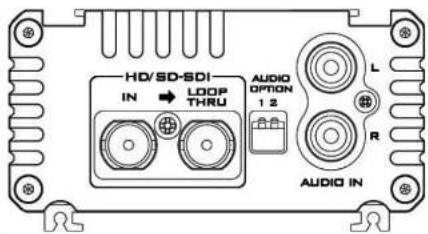
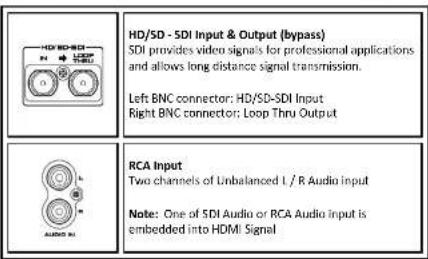
| Input Interface | 1x HD/SD-SDI (BNC) |
| Output Interfaces | 1x HD/SD-SDI Loop Through (BNC), 1x HDMI v1.2 |
| Supported HDMI Output Formats | 720x480i, 720x576i, 1280x720p (50/59.94/60 Hz), 1920x1080i (50/59.94/60 Hz), 1920x1080p (50/59.94/60 Hz) |
| 3G SDI Compliance | SMPTE 292, return loss >4.5 dB (3 GHz) |
| HD SDI Compliance | SMPTE 292, return loss >15 dB (5-750 MHz), >10 dB (750-1.5 GHz) |
| Cable Support (SDI) | Up to 100 m with 5C-FB cable |
| Dimensions (W x D x H) | 105 mm x 120 mm x 38 mm |
| Weight | 0.5 kg |
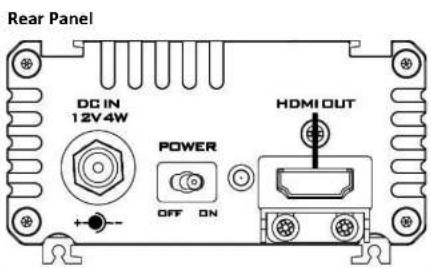
| Power Supply | DC 12V / 500mA (4W) |
| Operating Temperature | 0°C to 40°C (32°F to 102°F) |
| Operating Humidity | 10% to 90% (non-condensing) |
| Warranty | 1 year standard, extendable to 3 years with registration |
| Safety Precautions | Do not block ventilation; avoid water, excessive heat, and physical shock; use only specified power adapter; refer servicing to qualified personnel. |
| Cleaning Instructions | Unplug before cleaning; use a damp cloth; do not use liquid or aerosol cleaners. |
| Disposal | Comply with local WEEE regulations for electronic waste. |
| Supported Standards | FCC Part 15, CE Marking |
Frequently Asked Questions - DAC-8P DataVideo
User questions about DAC-8P DataVideo
0 question about this device. Answer the ones you know or ask your own.
Ask a new question about this device
Download the instructions for your Audio/video converter in PDF format for free! Find your manual DAC-8P - DataVideo and take your electronic device back in hand. On this page are published all the documents necessary for the use of your device. DAC-8P by DataVideo.
USER MANUAL DAC-8P DataVideo
natural_image
Illustration of a rectangular electronic device with cooling fins and ports (no visible text or symbols)SDI TO HDMI CONVERTER
DAC-8P
Instruction Manual
www.datavideo.com
Table of Contents
FCC COMPLIANCE STATEMENT 3
WARNINGS AND PRECAUTIONS 3
WARRANTY 5
STANDARD WARRANTY 5
THREE YEAR WARRANTY 5
DISPOSAL 6
FRONT PANEL....7
REAR PANEL 8
SPECIFICATIONS 10
SERVICE & SUPPORT....12
Disclaimer of Product & Services The information offered in this instruction manual is intended as a guide only. At all times, Dazwidco Technologies will try to give correct, complete and suitable information. However, Dazwidco Technologies cannot exclude that some information in this manual, from time to time, may not be correct or may be incomplete. This manual may contain typing errors, omissions or incorrect information. Dazwidco Technologies always recommend that you double check the information in this document for accuracy before making any purchase election or using the product. Dazwidco Technologies is not responsible for any omissions or errors, or for any subsequent loss or damage caused by using the information contained within this manual. Further access on the content of this manual or on the product can be obtained by contacting your local Dazwidco Office or dealer.
FCC Compliance Statement
This device complies with part 15 of the FCC rules. Operation is subject to the following two conditions:
[1] This device may not cause harmful interference, and
(2) This device must accept any interference received, including interference that may cause undesired operation.

Warnings and Precautions
- Read all of these warnings and save them for later reference.
- Follow all warnings and instructions marked on this unit.
- Unplug this unit from the wall outlet before cleaning. Do not use liquid or aerosol cleaners. Use a damp cloth for cleaning.
- Do not use this unit in or near water.
- Do not place this unit on an unstable cart, stand, or table. The unit may fall, causing serious damage.
- Slots and openings on the cabinet top, back, and bottom are provided for ventilation. To ensure safe and reliable operation of this unit, and to protect it from overheating, do not block or cover these openings. Do not place this unit on a bed, sofa, rug, or similar surface, as the ventilation openings on the bottom of the cabinet will be blocked. This unit should never be placed near or over a heat register or radiator. This unit should not be placed in a built-in installation unless proper ventilation is provided.
- This product should only be operated from the type of power source indicated on the marking label of the AC adapter. If you are not sure of the type of power available, consult your Datavideo dealer or your local power company.
- Do not allow anything to rest on the power cord. Do not locate this unit where the power cord will be walked on, rolled over, or otherwise stressed.
-
If an extension cord must be used with this unit, make sure that the total of the ampere ratings on the products plugged into the extension cord do not exceed the extension cord rating.
-
Make sure that the total amperes of all the units that are plugged into a single wall outlet do not exceed 15 amperes.
-
Never push objects of any kind into this unit through the cabinet ventilation slots, as they may touch dangerous voltage points or short out parts that could result in risk of fire or electric shock. Never spill liquid of any kind onto or into this unit.
-
Except as specifically explained elsewhere in this manual, do not attempt to service this product yourself. Opening or removing covers that are marked "Do Not Remove" may expose you to dangerous voltage points or other risks, and will void your warranty. Refer all service issues to qualified service personnel.
-
Unplug this product from the wall outlet and refer to qualified service personnel under the following conditions:
a. When the power cord is damaged or frayed;
b. When liquid has spilled into the unit;
c. When the product has been exposed to rain or water;
d. When the product does not operate normally under normal operating conditions. Adjust only those controls that are covered by the operating instructions in this manual; improper adjustment of other controls may result in damage to the unit and may often require extensive work by a qualified technician to restore the unit to normal operation:
e. When the product has been dropped or the cabinet has been damaged:
f. When the product has been dropped of the different has been damaged, when it is not being affected by the product. When the product exhibits a distinct change in performance, indicating a need for service.
Warranty
Standard Warranty
- Datavideo equipment are guaranteed against any manufacturing defects for one year from the date of purchase.
- The original purchase invoice or other documentary evidence should be supplied at the time of any request for repair under warranty.
- The product warranty period beings on the purchase date. If the purchase date is unknown, the product warranty period begins on the thirtieth day after shipment from a Datavideo office.
- Damage caused by accident, misuse, unauthorized repairs, sand, grit or water is not covered under warranty.
- Viruses and malware infections on the computer systems are not covered under warranty.
- Any errors that are caused by unauthorized third-party software installations, which are not required by our computer systems, are not covered under warranty.
- All mail or transportation costs including insurance are at the expense of the owner.
• All other claims of any nature are not covered.
• Cables and batteries are not covered under warranty.
• Warranty only valid in the country or region of purchase. - Your statutory rights are not affected.
Three Year Warranty
- All Datavideo products purchased after July 1st, 2017 are qualified for a free two years extension to the standard warranty, providing the product is registered with Datavideo within 30 days of purchase.
- Certain parts with limited lifetime expectancy such as LCD panels, DVD drives, Hard Drive, Solid State Drive, SD Card, USB Thumb Drive, Lighting, Camera module, PCIe Card are covered for 1 year.
- The three-year warranty must be registered on Datavideo's official website or with your local Datavideo office or one of its authorized distributors within 30 days of purchase.
Disposal

For EU Customers only - WEEE Marking
This symbol on the product or on its packaging indicates that this product must not be disposed of with your other household waste. Instead, it is your responsibility to dispose of your waste equipment by handing it over to a designated collection point for the recycling of waste electrical and electronic equipment. The separate collection and recycling of your waste equipment at the time of disposal will be required.
and ensure that it is recycled in a manner that protects human health and the environment. For more information about where you can drop off your waste equipment for recycling, please contact your local city office, your household waste disposal service or the shop where you purchased the product.

CE Marking is the symbol as shown on the left of this page. The letters "CE" are the abbreviation of French phrase "Conformité Européenne" which literally means "European Conformity". The term initially used was "EC Mark" and it was officially replaced by "CE Marking" in the Directive 93/68/EEC in 1993. "CE Marking" is now used in all EU official documents.
Front Panel
Specifications
| Input Interface | 1x HD/SD-SDI input |
| Outputs interface | 1x HD/SD-SDI output (Loop Thru)1x HDMI [V1.2] output |
| Supported HDMI Output Formats | 720x480 Interlace720x576 Interlace1280x720 / 50 / 59.94 / 60 Hz Progressive1920x1080 / 50 / 59.94 / 60 Hz Interlace1920x1080 / 50 / 59.94 / 60 Hz Progressive |
| 3G SDI Signal | SMPTE 292 standard complied withOutput return loss: More than 4.5 dB (3GHz)Rise time: Less than 130 psFall time: Less than 130 psDifference between rise time and fall time within 50 psAlignment jitter: Less than 0.3 UITiming jitter: Less than 2.0 UIRise time overshoot: 10%Fall time overshoot: 10%Equalizer uses 5C-FB cable support 100 meters |
| HD SDI Signal | SMPTE 292 standard complied withOutput return loss: More than 15 dB (5MHz to 750MHz / More than 10 dB (750MHz to 1.5 GHz)Output level: 0.8 V_pp ± 10% Rise time: Less than 270 psFall time: Less than 270 psDifference between rise time and fall time within 100 psAlignment jitter: Less than 0.2 UITiming jitter: Less than 1.0 UIEye aperture ratio: More than 90%DC offset: 0 ± 0.5V Equalizer uses 5C-FB cable support 100 meters |
| Operating Temperature | 0°C to 40°C (32°F to 102°F) |
| Humidity | 10% to 90% (non condensing) |
| Dimensions | 105mm (W) x 120mm (D) x 38mm (H) |
| Weight | 0.5 Kg |
| Power DC 12V / 500mA (4W) | |
Service & Support
It is our goal to make your products ownership a satisfying experience. Our supporting staff is available to assist you in setting up and operating your system. Please refer to our web site www.datavideo.com for answers to common questions, support requests or contact your local office below.
- D'artikelon Technology Universe 2
(2) 180-193.46 (25).
- 2013年1月1日
106-66(2) 38.3(5)
四、基金产品概况
2.3 算词的结构式
三、预计2017年1-3月
表决权:本次会议通过。
The 19th Mo. John's House
□001281
四)涉及法律、法规
证券代码:601494
■Pe. of service [1] telecomm
The other's head, 2p the a Div.5p
The quick brown fox jumps over the lazy dog.
■Se of service [16:46]
Eaton deo long Kong Ltd
- 陈小明
R: 10.3 (Ref: G, q
注:此议案的第2项。
- 电芯出引
1.00 €/m².45 € E-mail: e-bio@bino.com
■ 24th St. Agittan, UK
二、【6.修订条】
6.112. P=45.3% in 2017
注:b. in
院
五、本期现金流量
Fig.15-3024159
■ Part 1 (despite)
(2) 100% of the company is trading.
(1) Opel, P.O. (P.O.) (Hazgma), Chilco (Aol),
注:7.1.11 2014/2018
LICG/IEVAN
■
■ 24th St. Agitation
四、Ex-持仓:12m 7次
同 by 12 Fw (n=1 B w/ RSFC
四、审议通过事项
图
74:-65-6746-000
103 6242 581
■ P.m. (in'ght, w/er)
[Unreadable due to severe distortion and noise]
Tel: 40-87-2613 Copyright © 2019
- doi:10.168.com.cn
二、参与网络投票的议案
二、审议本章9541号
B. 17:25, Mr. L/M. (in M)
[Unreadable]
1.2、13.4、14.5、15.6
[五] 10.2.1 股票代码
后,以2019年
■ 2. All on, only device use be
(二)基金转换与赎回的安排
附:Chenkep.28
(四) 证券代码:603815
E: 10.4.
Tel: 1-812-438-712M
(2) 1.36% 理价
Email: 1081638150000000
(1) 2017年1月1日
四、备查文件(如图)
(3) 10.2.1.1.
(如:附注:表1-5)
(1) 64/458163
7.2.14.03.15
- We are a result of the
■ 2.5% 满足标准的说明
原“永年”版2011
图 1-3-2024年,2024年
四、本次决议事项概述
Slurst a/2010 radio> 2
Tel: -12-14039786
附表 35-1450926
■ 5.6m - d(1) (d, c)

Please visit our website for latest appraisal update.
www.datovides.com/index/ncp16.25
www.datsvideo.com/product/DAC-8P
datavideo
www.datavideo.com
All the trademarks are the properties of their respective owners.
Dalavideo Technologies Co., Ltd. All rights reserved 2018
Jul-12.2017
Brand : DataVideo
Model : DAC-8P
Category : Audio/video converter