
R240D - Wi-Fi repeater HUAWEI - Free user manual and instructions
Find the device manual for free R240D HUAWEI in PDF.


| Product Type | Wi-Fi Repeater (Remote Radio Unit) |
| Brand | Huawei |
| Model | R240D |
| Dimensions (W x D x H) | 140 mm x 86 mm x 25 mm (outside wall) |
| Weight | 0.2 kg |
| Power Input | 12V DC or PoE (802.3af/at) |
| Wireless Standards | IEEE 802.11a/b/g/n/ac |
| Frequency Bands | 2.4 GHz and 5 GHz |
| MIMO | 2x2 |
| Maximum Data Rate | 1.16 Gbps |
| Ethernet Ports | 4 x 10/100 Mbps (downlink) + 1 x 10/100/1000 Mbps (uplink) |
| Phone Port | 1 x POTS (RJ11) |
| Antenna | Built-in; 2 dBi (2.4 GHz), 3 dBi (5 GHz) |
| Indicator | Hidden LED (green/red) |
| Security | WPA/WPA2, 802.1X, WAPI, WIDS/WIPS |
| QoS | WMM, priority mapping |
| Management | AC unified management, Telnet/SSH, SNMP |
| Mounting | 86 mm junction box, wall/ceiling |
| Operating Temperature | 0°C to +40°C (0-1800m altitude) |
| Safety Compliance | UL 60950-1, IEC 60950-1, EN 60950-1 |
| Maintenance | Clean with dry cloth; avoid liquids |
| Spare Parts & Reparability | Limited; contact Huawei support for service |
Frequently Asked Questions - R240D HUAWEI
User questions about R240D HUAWEI
0 question about this device. Answer the ones you know or ask your own.
Ask a new question about this device
Download the instructions for your Wi-Fi repeater in PDF format for free! Find your manual R240D - HUAWEI and take your electronic device back in hand. On this page are published all the documents necessary for the use of your device. R240D by HUAWEI.
USER MANUAL R240D HUAWEI
natural_image
Abstract composition of blue circles and squares with a gray background, no text or symbols present.R230D&R240D
Product Description
Copyright © Huawei Technologies Co., Ltd. 2015. All rights reserved.
No part of this document may be reproduced or transmitted in any form or by any means without prior written consent of Huawei Technologies Co., Ltd.
Trademarks and Permissions

and other Huawei trademarks are trademarks of Huawei Technologies Co., Ltd.
All other trademarks and trade names mentioned in this document are the property of their respective holders.
Notice
The purchased products, services and features are stipulated by the contract made between Huawei and the customer. All or part of the products, services and features described in this document may not be within the purchase scope or the usage scope. Unless otherwise specified in the contract, all statements, information, and recommendations in this document are provided "AS IS" without warranties, guarantees or representations of any kind, either express or implied.
The information in this document is subject to change without notice. Every effort has been made in the preparation of this document to ensure accuracy of the contents, but all statements, information, and recommendations in this document do not constitute a warranty of any kind, express or implied.
Huawei Technologies Co., Ltd.
R230D&R240D
Product Description
About This Document
About This Document
Intended Audience
This document describes the positioning, characteristics, hardware structure, product features, and technical specifications of the RRU.
This document helps you understand the characteristics and features of the RRU.
This document is intended for:
● Network planning engineers
● Hardware installation engineers
- Commissioning engineer
● Data configuration engineers
● On-site maintenance engineers
● Network monitoring engineers
● System maintenance engineers
Symbol Conventions
R230D&R240D
Product Description
About This Document
| Symbol Description | |
| NOTICE | Indicates a potentially hazardous situation which, if not avoided, could result in equipment damage, data loss, performance deterioration, or unanticipated results.NOTICE is used to address practices not related to personal injury. |
| NOTE | Calls attention to important information, best practices and tips.NOTE is used to address information not related to personal injury, equipment damage, and environment deterioration. |
Change History
Changes between document issues are cumulative. The latest document issue contains all the changes made in previous issues.
Changes in Issue 02 (2015-10-31)
This version has the following updates:
Added the R230D.
Changes in Issue 01 (2015-08-31)
This is the initial commercial release.
R230D&R240D
Product Description Contents
Contents
About This Document....ii
1 Product Positioning and Characteristics....1
1.1 Product Positioning....1
1.2 Product Characteristics....2
2 Hardware Structure....4
2.1 R230D 4
2.2 R240D....7
3 Product Features....12
3.1 WLAN Features....12
3.2 Network Features....13
3.3 QoS Features....13
3.4 Security Features....13
3.5 Maintenance Features....14
3.6 BYOD....14
3.7 Spectrum Analysis....14
1 Product Positioning and Characteristics
1.1 Product Positioning
Product Overview
The R230D and R240D are remote radio units (RRUs) used in Huawei agile distributed Wi-Fi solution. They support PoE power supply, and are deployed indoors and connected to the central AP. The central AP and RRUs are connected through network cables, which greatly extends the coverage range, enhances flexibility in AP deployment and planning, and reduces the engineering construction costs. The central AP manages the RRUs and processes services in a centralized manner. The RRUs process radio signals independently. Such distributed architecture further improves the wireless access capability, creating optimal service experience for users.
The RRU uses an 86 mm plate in compliance with international standards and can be easily installed into a junction box in a room. It is equipped with a built-in antenna and a hidden indicator; therefore, installation of the RRU does not affect indoor decorations and designs. It also has an IEEE 802.11a/b/a/n/ac wireless module and can work on both 5 GHz and 2.4 GHz
Usage Scenario
Figure 1-1 Distributed wireless access

flowchart
graph TD
    A["AC"] --> B["Central AP"]
    B --> C["PoE switch"]
    C --> D["Corridor"]
    D --> E["Room 1"]
    D --> F["Room 2"]
    D --> G["..."]
    D --> H["Room N"]
    I["Network O&M center"] --> J["Network"]
    J --> K["AC"]
    L["Remote Radio Unit"] --> M["Room 1"]
    L --> N["Room 2"]
    L --> O["..."]
    L --> P["Room N"]
    Q["Room 1"] --> R["Coactor"]
    R --> S["Coactor"]
    T["Coactor"] --> U["Coactor"]
    V["Coactor"] --> W["Coactor"]
As shown in the figure, the downlink GE interfaces of the central AP support PoE power supply and can be directly connected to RRUs. The central AP can connect to more RRUs through a PoE switch. RRUs are deploved indoors and communicate with the central AP
R230D&R240D
Product Description
1 Product Positioning and Characteristics
802.11ac Gigabit Wireless Rate
The RRU complies with IEEE 802.11a/b/g/n/ac, supports 2x2 MIMO, works on both 2.4 and 5 GHz frequency bands, and provides strong signals and gigabit wireless rate.
Unique, Graceful Plate Design
The RRU is white in appearance and has heat emission holes and interfaces at the side and bottom. The mounting screws are hidden under the slide panel. The overall design is simple but graceful and blends well with the layout of hotels and apartments.
Easy to Install in a Standard 86-type Box
The RRU uses an 86 mm plate in compliance with international standards and can be easily installed into a junction box in a room, requiring no drilling or cabling.
Flexible Installation Modes
The R230D can be embedded into an 86-type box or mounted to a ceiling or wall. Its installation positions can be flexibly planned.
Hidden Indicator, Zero Impact on Sleep
The RRU uses a hidden indicator design. When being turned on, the indicator has soft light. The AC controls the switch of the indicator and turns off the indicator at nights to prevent blinking lights from affecting sleep of guests.
Four Downlink Ethernet Interfaces, Supporting Wired Access from Multiple Users
The R240D has four downlink 100M Ethernet interfaces that can process data concurrently. The interfaces can be connected to multiple terminals through network cables, such as the
R230D&R240D
Product Description
2 Hardware Structure
2 Hardware Structure
2.1 R230D
Appearance
Figure 2-1 shows the appearance of the R230D.
NOTE
The actual device appearance may be different from the following device appearance; these differences will not affect device functions.
Figure 2-1 R230D appearance

Figure 2-2 R230D ports
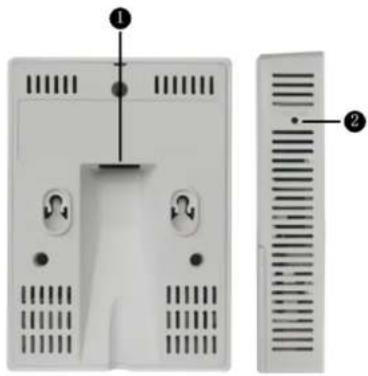
As shown in Figure 2-2, each port can be described as follows:
- ETH/PoE: 10/100M port used to connect to the wired Ethernet. The port can connect to a PoE power supply to provide power for the RRU.
- Default: Reset button used to restore factory settings if you hold down the button more than 3 seconds.
LED Indicator
The R230D provides only one indicator, as shown in Figure 2-3.
Figure 2-3 Indicator on the R230D
NOTE
● The indicator is located inside the panel, which turns on after the AP is powered on.
- Indicator colors may vary slightly at different temperature.
Table 2-1 Description of the indicator on the R230D
| Type Color Status | Description | ||
| Default status after power-on | Green Steady on The AP is just | powered on and the software is not started yet. | |
| Software startup status | Green Steady on after | blinking once | After the system is reset and starts uploading the software, the indicator blinks green once. Until the software is uploaded and started, the indicator remains steady green. |
| Running status Green | Blinking once every | 2s (0.5 Hz) | The system is running properly, the Ethernet connection is normal, and STAs are associated with the AP. |
| Blinking once every 5s (0.2 Hz) | The system is running properly, the Ethernet connection | ||
R230D&R240D
Product Description
2 Hardware Structure
| Type Color Status | Description | ||
| Alarm Green Blinking | once | Alarm Green every 0.25s (4 Hz) | The software is being upgraded.After the software is uploaded and started, the AP working in Fit AP mode requests to go online on the AC and maintains this state until it goes online successfully on the AC (before the CAPWAP link is established).The AP registration fails (the CAPWAP link is disconnected). |
| Fault | Red Steady on A fault | that affects | services has occurred, such as a DRAM detection failure or system software loading failures. The fault |
R230D&R240D
Product Description
2 Hardware Structure
Figure 2-4 Appearance

natural_image
White wireless device with ventilation slots and ports (no visible text or symbols)Port
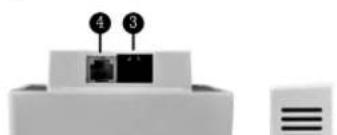
Figure 2-5 shows ports on the device.
Figure 2-5 Ports
natural_image
Diagram of a device with labeled ports (no text or symbols beyond numbers)R230D&R240D
Product Description
2 Hardware Structure
- ETH0-3: 10/100M port used to connect to the wired Ethernet.
- Phone: Phone interface: connects to a POTS phone or modem device.
- GE/PoE: 10/100/1000M port used to connect to the wired Ethernet. The port can connect to a PoE power supply to provide power for the device.
- Phone: Phone interface: connects to a traditional PSTN.
- Default: Reset button used to restore factory settings if you hold down the button more than 3 seconds.
- Power input interface: 12 V DC.
LED Indicator
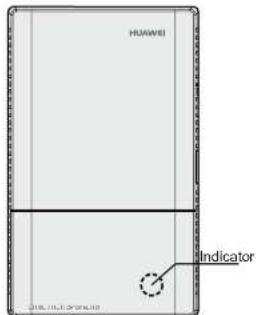
R240D provides only one indicator, as shown in Figure 2-6.
Figure 2-6 Indicator on the R240D
R230D&R240D
Product Description
2 Hardware Structure
| Type Color Status | Description | ||
| Software startup status | Green Steady on after | blinking once | After the system is reset and starts uploading the software, the indicator blinks green once. Until the software is uploaded and started, the indicator remains steady green. |
| Running status Green | Blinking once every | 2s (0.5 Hz) | The system is running properly, the Ethernet connection is normal, and STAs arc associated with the AP. |
| Blinking once every 5s (0.2 Hz) | The system is running properly, the Ethernet connection is normal, and no STA is associated with the AP. The system is in low power consumption state. | ||
| Alarm Green Blinking | once | Alarm Green every 0.25s (4 Hz) | ● The software is being upgraded. ● After the software is |
R230D&R240D
Product Description
2 Hardware Structure
| Type Color Status | Description | ||
| Fault Red Steady on A | fault that affects | services has occurred, such as a DRAM detection failure or system software loading failure. The fault cannot be automatically rectified and must be rectified manually. |
3 Product Features
3.1 WLAN Features
WLAN features supported by the AP are as follows:
● Comply with IEEE 802.11a/b/g/n/ac
● The maximum rate of 1.16Gbit/s
● Maximum ratio combining (MRC)
• Space time block code (STBC)
- Bcamforming
● Low-density parity-check (LDPC)
● Maximum-likelihood detection (MLD)
● Frame aggregation, including A-MPDU (Tx/Rx) and A-MSDU (Rx only)
● 802.11 dynamic frequency selection (DFS)
- β1 (CI = 70 MHz, 40 MHz and 90 MHz)
3.2 Network Features
Network features supported by the AP are as follows:
● Compliance with IEEE 802.3u
● Auto-negotiation of the rate and duplex mode and automatic switchover between the Media Dependent Interface (MDI) and Media Dependent Interface Crossover (MDI-X)
● Compliance with IEEE 802.1q
- SSID-based VLAN assignment
● VLAN trunk on uplink Ethernet ports
● AP control channel in tagged and untagged mode
● DHCP client, obtaining IP addresses through DHCP
● Tunnel data forwarding and direct data forwarding
● STA isolation in the same VLAN
- Access control lists (ACLs)
- Link Layer Discovery Protocol (LLDP)
● Uninterrupted service forwarding upon CAPWAP channel disconnection
● Unified authentication on the AC
- AC dual-link backup
IPv6
3.3 QoS Features
QoS features supported by the AP are as follows:
- Priority mapping and packet scheduling based on a Wi-Fi Multimedia (WMM) profile to
● WPA/WPA2-802.1x authentication and encryption (WPA/WPA2 enterprise edition)
● WPA-WPA2 hybrid authentication
● WAPI authentication and encryption
● Supports wireless intrusion detection system (WIDS) and wireless intrusion prevention system (WIPS), including rogue device detection and countermeasure, attack detection and dynamic blacklist, STA/AP blacklist and whitelist.
● 802.1x authentication, MAC address authentication, and Portal authentication
- DHCP Snooping
● DAI (Dynamic ARP Inspection)
- IPSG (IP Source Guard)
3.5 Maintenance Features
Maintenance features supported by the AP are as follows:
● Unified management and maintenance on the AC
● Automatic login and configuration loading, and plug-and-play (PnP)
- Batch upgrade
Telnet
- STelnet using SSH v2
● Real-time configuration monitoring and fast fault location using the NMS
- System status alarm
3.6 BYOD
BYOD features supported by the AP are as follows:
4 Technical Specifications
4.1 Basic Specifications
Table 4-1 Basic specifications of the R230D
| Item | Description | |
| Technical specifications Dimensions (W x D x H) 120 mm x 86 mm x 26 mm | ||
| Weight 0.1 kg | ||
| System memory | ||
| Power parameters Power input | PoE power supply in compliance with IEEE 802.3af | |
| Maximum power | 5.1 W | |
Table 4-2 Basic specifications of the R240D
| Item Description | ||
| Technical specifications Dimensions outside the wall (L × W × II) | 140mm×86mm×25mm | |
| Dimensions inside the wall (L × W × II) | ||
| Weight 0.2 kg | ||
| System memory | ||
| Power specifications Power input | ● 12 V+10%● PoE power: in compliance with IEEE 802.3af/at | |
| Maximum power consumption | ||
| Environment specifications Operating temperature and altitude | -60 m to +1800 m: 0°C to +40°C1800 m to 5000 m: Temperature decreases by 1°C every time the altitude increases 300 m. | |
| Item Description | |||
| Antenna gain | 2.4 GHz: 3 dBi5 GHz: 4 dBi | ||
| Maximum number of concurrent users | <256 | ||
| Maximum number of VAPs for each radio | 8 | ||
| Maximum transmit power | 2.4 GHz: 20 dBm (combined power)5 GHz: 18 dBm (combined power)NOTEThe actual transmit power depends on local laws and regulations.You can adjust the transmit power from the maximum transmit power to 1 dBm, with a step of 1 dB. | ||
| Maximum number of non-overlapping channels | 2.4 GHz802.11b/g20 MHz: 3802.11n20 MHz: 340 MHz: 1 | 5 GHz802.11a- 20 MHz: 13802.11n- 20 MHz: 13- 40 MHz: 6802.11m | NOTEThe table uses the number of non-overlapping channels supported by China as an example. The number of non-overlapping channels varies in different countries. For details, see the Country Code & Channels compliance status |
| Item Description | ||||
| Receiversensitivity(Typicalvalues) | 2.4 GHz802.11b (CCK)-102 dBm @ 1 Mb/s-97 dBm @ 2 Mb/s-94 dBm @ 5.5 Mb/s-91 dBm @ 11 Mb/s | 2.4 GHz802.11g (non-HIT20)-94 dBm @ 6 Mb/s-94 dBm @ 9 Mb/s-94 dBm @ 12 Mb/s-92 dBm @ 18 Mb/s-89 dBm @ 24 Mb/s-86 dBm @ 36 Mb/s-82 dBm @ 48 Mb/s-81 dBm @ 54 Mb/s | 2.4 GHz802.11n (HT20)-94 dBm @ MCS0-94 dBm @ MCS1-92 dBm @ MCS2-88 dBm @ MCS3-85 dBm @ MCS4-81 dBm @ MCS5-79 dBm @ MCS6-77 dBm @ MCS7-92 dBm @ MCS8-92 dBm @ MCS9-90 dBm @ MCS10-86 dBm @ MCS11 | 2.4 GHz802.11n(HT40)-91 dBm @ MCS0-91 dBm @ MCS1-89 dBm @ MCS2-85 dBm @ MCS3-82 dBm @ MCS4-78 dBm @ MCS5-76 dBm @ MCS6-75 dBm @ MCS7-89 dBm @ MCS8-89 dBm @ MCS9-87 dBm @ MCS10-83 dBm @ MCS11 |
| Item Description | |||
| 5 GHz802.11a (non-1IT20)-96 dBm @ 6 Mb/s-95 dBm @ 9 Mb/s-94 dBm @ 12 Mb/s-92 dBm @ 18 Mb/s-88 dBm @ 24 Mb/s-85 dBm @ 36 Mb/s-80 dBm @ 48 Mb/s-79 dBm @ 54 Mb/s | 5 GHz802.11n (HT20)-96 dBm @ MCS0-94 dBm @ MCS1-92 dBm @ MCS2-87 dBm @ MCS3-84 dBm @ MCS4-79 dBm @ MCS5-78 dBm @ MCS6-76 dBm @ MCS7-94 dBm @ MCS8-92 dBm @ MCS9-90 dBm @ MCS10-85 dBm @ MCS11 | 5 GHz802.11n (HT40)-93 dBm @ MCS0-91 dBm @ MCS1-89 dBm @ MCS2-84 dBm @ MCS3-81 dBm @ MCS4-77 dBm @ MCS5-76 dBm @ MCS6-74 dBm @ MCS7-91 dBm @ MCS8-89 dBm @ MCS9-87 dBm @ MCS10-82 dBm @ MCS11 | |
| Item Description | ||||
| 5 GHz802.11ac(VTI120)● -96 dBm @ MCS0NSS1● -94 dBm @ MCS1NSS1● -92 dBm @ MCS2NSS1● -87 dBm @ MCS3NSS1● -84 dBm @ MCS4NSS1● -79 dBm @ MCS5NSS1● -78 dBm @ MCS6NSS1● -76 dBm @ MCS7NSS1● -72 dBm @ MCS8NSS1● -94 dBm @ MCS0NSS2● -92 dBm @ MCS1NSS2● -90 dBm @ MCS2NSS2 | 5 GHz802.11ac(VTI140)● -93 dBm @ MCS0NSS1● -91 dBm @ MCS1NSS1● -89 dBm @ MCS2NSS1● -84 dBm @ MCS3NSS1● -81 dBm @ MCS4NSS1● -77 dBm @ MCS5NSS1● -75 dBm @ MCS6NSS1● -74 dBm @ MCS7NSS1● -69 dBm @ MCS8NSS1● -67 dBm @ MCS9NSS1● -91 dBm @ MCS0NSS2● -89 dBm @ MCS1NSS2 | 5 GHz802.11ac(VTI180)● -90 dBm @ MCS0NSS1● -88 dBm @ MCS1NSS1● -85 dBm @ MCS2NSS1● -81 dBm @ MCS3NSS1● -78 dBm @ MCS4NSS1● -74 dBm @ MCS5NSS1● -72 dBm @ MCS6NSS1● -70 dBm @ MCS7NSS1● -66 dBm @ MCS8NSS1● -63 dBm @ MCS9NSS1● -88 dBm @ MCS0NSS2● -86 dBm @ MCS1NSS2 | - | |
4.3 Radio Specifications (R240D)
Table 4-4 Radio specifications
| Item | Description | ||
| Antenna type | Built-in antenna | ||
| Antenna gain | 2.4 GHz: 2 dBi5 GHz: 3 dBi | ||
| Maximum number of concurrent users | ≤256 | ||
| Maximum number of VAPs for each radio | 8 | ||
| Maximum transmit power | 2.4 GHz: 21 dBm (combined power)5 GHz: 20 dBm (combined power)NOTEThe actual transmit power depends on local laws and regulations. The R240D uses a 86-type box and applies only to countries and regions that support 86-type boxes.You can adjust the transmit power from the maximum transmit power to 1 dBm, with a step of 1 dB. | ||
| Maximum | 2.4 GHz | 5 GHz | NOTE |
| Item Description | ||||
| Channel rate | 802.11b: 1, 2, 5.5, and 11 Mbit/s802.11a/g: 6, 9, 12, 18, 24, 36, 48, and 54 Mbit/s802.11n: 6.5 to 300 Mbit/s802.11ac: 6.5 to 867 Mbit/s | |||
| Receiversensitivity(Typicalvalues) | 2.4 GHz802.11b (CCK)-101 dBm @1 Mbit/s-96 dBm @ 2 Mbit/s-94 dBm @ 5.5 Mbit/s-90 dBm @ 11 Mbit/s | 2.4 GHz802.11g (non-HT20)-95 dBm @ 6 Mbit/s-95 dBm @ 9 Mbit/s-94 dBm @ 12 Mbit/s-92 dBm @ 18 Mbit/s-88 dBm @ 24 Mbit/s-85 dBm @ 36 Mbit/s-81 dBm @ 48 Mbit/s-79 dBm @ 54 Mbit/s | 2.4 GHz802.11n (HT20)-95 dBm @ MCS0-94 dBm @ MCS1-92 dBm @ MCS2-87 dBm @ MCS3-84 dBm @ MCS4-79 dBm @ MCS5-78 dBm @ MCS6-77 dBm @ MCS7-93 dBm @ MCS8-92 dBm @ MCS9 | 2.4 GHz802.11n(HT40)-93 dBm @ MCS0-91 dBm @ MCS1-89 dBm @ MCS2-84 dBm @ MCS3-81 dBm @ MCS4-77 dBm @ MCS5-75 dBm @ MCS6-74 dBm @ MCS7-91 dBm @ MCS8-89 dBm @ MCS9 |
| Item Description | |||
| 5 GHz802.11a (non-1IT20)● -94 dBm @ 6 Mbit/s● -94 dBm @ 9 Mbit/s● -93 dBm @ 12 Mbit/s● -91 dBm @ 18 Mbit/s● -87 dBm @ 24 Mbit/s● -84 dBm @ 36 Mbit/s● -79 dBm @ 48 Mbit/s● -78 dBm @ 54 Mbit/s | 5 GHz802.11n (HT20)● -94 dBm @ MCS0● -93 dBm @ MCS1● -90 dBm @ MCS2● -86 dBm @ MCS3● -83 dBm @ MCS4● -78 dBm @ MCS5● -77 dBm @ MCS6● -76 dBm @ MCS7● -92 dBm @ MCS8● -91 dBm @ MCS9● -88 dBm @ MCS10● -84 dBm @ MCS11 | 5 GHz802.11n (HT40)● -91 dBm @ MCS0● -90 dBm @ MCS1● -87 dBm @ MCS2● -83 dBm @ MCS3● -80 dBm @ MCS4● -76 dBm @ MCS5● -74 dBm @ MCS6● -73 dBm @ MCS7● -89 dBm @ MCS8● -88 dBm @ MCS9● -85 dBm @ MCS10● -81 dBm @ MCS11 | |
| Item Description | ||||
| 5 GHz802.11ac(VTI120)● -95 dBm @ MCS0NSS1● -93 dBm @ MCS1NSS1● -90 dBm @ MCS2NSS1● -86 dBm @ MCS3NSS1● -83 dBm @ MCS4NSS1● -78 dBm @ MCS5NSS1● -77 dBm @ MCS6NSS1● -75 dBm @ MCS7NSS1● -71 dBm @ MCS8NSS1● -93 dBm @ MCS0NSS2● -91 dBm @ MCS1NSS2● -88 dBm @ MCS2NSS2 | 5 GHz802.11ac(VTI140)● -91 dBm @ MCS0NSS1● -90 dBm @ MCS1NSS1● -88 dBm @ MCS2NSS1● -83 dBm @ MCS3NSS1● -80 dBm @ MCS4NSS1● -76 dBm @ MCS5NSS1● -74 dBm @ MCS6NSS1● -72 dBm @ MCS7NSS1● -68 dBm @ MCS8NSS1● -66 dBm @ MCS9NSS1● -89 dBm @ MCS0NSS2● -88 dBm @ MCS1NSS2 | 5 GHz802.11ac(VTI180)● -88 dBm @ MCS0NSS1● -87 dBm @ MCS1NSS1● -84 dBm @ MCS2NSS1● -80 dBm @ MCS3NSS1● -77 dBm @ MCS4NSS1● -73 dBm @ MCS5NSS1● -71 dBm @ MCS6NSS1● -69 dBm @ MCS7NSS1● -65 dBm @ MCS8NSS1● -63 dBm @ MCS9NSS1● -86 dBm @ MCS0NSS2● -85 dBm @ MCS1NSS2 | - | |
4.4 Standards Compliance
Safety standards
- UL 60950 - 1
IEC 60950 - 1
EN 60950 - 1
GB 4943
Radio standards
ETSI EN 300 328
ETSI EN 301 893
- RSS-210
AS/NZS 4268
EMC standards
EN 301 489 - 1
EN 301 489 - 17
ETSI EN 60601-1-2
ICES-003
● YD/T 1312.2-2004
ITU k.21
GB 9254
R230D&R240D
Product Description
4 Technical Specifications
Security standards
● 802.11i, Wi-Fi Protected Access 2 (WPA2), and WPA
802.1X
● Advanced Encryption Standards (AES) and Temporal Key Integrity Protocol (TKIP)
● EAP Type (s)
Environment standards
● Regulation 1907/2006/EC
WEEE

- Trademarks and Permissions
- Notice
- About This Document
- Intended Audience
- Symbol Conventions
- Change History
- Changes in Issue 02 (2015-10-31)
- Changes in Issue 01 (2015-08-31)
- Contents
- Product Positioning and Characteristics
- Product Positioning
- Product Overview
- Usage Scenario
- 802.11ac Gigabit Wireless Rate
- Unique, Graceful Plate Design
- Easy to Install in a Standard 86-type Box
- Flexible Installation Modes
- Hidden Indicator, Zero Impact on Sleep
- Four Downlink Ethernet Interfaces, Supporting Wired Access from Multiple Users
- Hardware Structure
- R230D
- Appearance
- LED Indicator
- NOTE
- Port
- Product Features
- WLAN Features
- Network Features
- QoS Features
- Maintenance Features
- BYOD
- Technical Specifications
- Basic Specifications
- Radio Specifications (R240D)
- Standards Compliance
- Safety standards
- Radio standards
- EMC standards
- Security standards
- Environment standards
- WEEE
Brand : HUAWEI
Model : R240D
Category : Wi-Fi repeater