
PSD1000 - Dishwasher RCA - Free user manual and instructions
Find the device manual for free PSD1000 RCA in PDF.


| Product Type | Built-in Dishwasher |
| Height | 34 inches (86.4 cm) |
| Width | 24 inches (61 cm) |
| Depth | 24 inches (61 cm) |
| Weight | Approximately 50 kg (110 lbs) |
| Power Supply | 120 V ~ 60 Hz, 15 A |
| Energy Consumption (per cycle) | 1.2 kWh (estimated) |
| Water Consumption (per cycle) | 3.5 gallons (13.2 liters) |
| Number of Place Settings | 14 |
| Cycle Types | Heavy, Normal, Light, Rinse Only |
| Noise Level | 50 dBA |
| Delay Start | Up to 24 hours |
| Child Lock | Yes |
| Soil Sensor | Automatic adjustment |
| Sanitize Option | NSF certified |
| Drying System | Heated air with fan |
| Rack Configuration | Upper and lower racks, silverware basket |
| Filter Type | Self-cleaning filter |
| Maintenance Frequency | Clean filter monthly, descale as needed |
| Safety Features | Overflow protection, auto shut-off |
| Spare Parts Availability | Racks, spray arms, filters, heating element, circulation pump |
Frequently Asked Questions - PSD1000 RCA
User questions about PSD1000 RCA
0 question about this device. Answer the ones you know or ask your own.
Ask a new question about this device
Download the instructions for your Dishwasher in PDF format for free! Find your manual PSD1000 - RCA and take your electronic device back in hand. On this page are published all the documents necessary for the use of your device. PSD1000 by RCA.
USER MANUAL PSD1000 RCA
natural_image
Illustration of a large kitchen appliance with open door, showing internal compartments and wheels (no text or symbols)PSD1000
PSD2220
PSD3220
PSD3230
PSD3420
PSD3430
RCA
Welcome to the RCA family. We're proud of our quality products and we are committed to providing dependable service. You'll see it in this easy-to-use manual and you'll hear it in the friendly voices of our customer service department.
Congratulations! You Are Now Part Of The RCA Family.
Best of all, you'll experience these values each time you use your dishwasher. That's important, because your new dishwasher will be part of your family for many years. And we hope you will be part of ours for a long time to come.
We thank you for buying RCA. We appreciate your purchase, and hope you will continue to rely on us whenever you need quality appliances for your home.

natural_image
Simple black-and-white icon of an exclamation mark with radiating lines, no text or symbols present.Important!
Fill out and return the Consumer Product Ownership Registration card that is packed with this product. If you cannot find it, please send in the duplicate card printed in the back of this manual.

natural_image
Illustration of a pencil writing on a black square surface with a curved line (no text or symbols)Write the model and serial numbers here.
##
#
You can find them on the tub wall just inside the door.
Staple sales slip or cancelled check here.
Proof of the original purchase date is needed to obtain service under the warranty.
RCA & You, A Service Partnership.
Ask any RCA appliance owner and they will tell you we stand behind our products with unmatched quality service. However, did you know that most questions result from simple problems that you can easily fix yourself in just a few minutes? This Owner's Manual can tell you how.
natural_image
Simple line drawing of a pair of eyeglasses on a black background (no text or symbols)Read this Manual
Inside you will find many helpful hints on how to use and maintain your washer properly. Just a little preventive care on your part can save you a great deal of time and money over the life of your dishwasher.

natural_image
Simple icon of a magnifying glass with a question mark inside, no text or symbols presentReview the Section on Troubleshooting Tips
You'll find many answers to common problems here. If you review our chart of Troubleshooting Tips first, you may not need to call for service at all.
natural_image
Simple line drawing of a classic telephone handset with keypad (no text or symbols)If You Need Service
If you do need service, you can relax knowing help is only a phone call away. A list of toll-free customer service numbers is included in the back section.
Safety Information .....4–7
Operating Instructions
Control Panels 8
Control Settings .....9
Dial Cycles .....10, 11
Using the Dishwasher ....12, 13
Loading the
Dishwasher Racks .....14, 15
Care and Cleaning .....16, 17
Optional Accessories .....18
Troubleshooting Tips
Before You
Call For Service .....19–24
Customer Service
Product Registration .....29
Warranty ....31
Service Telephone
Numbers ....Back Cover
IMPORTANT SAFETY INFORMATION. READ ALL INSTRUCTIONS BEFORE USING.
WARNING!
For your safety, the information in this manual must be followed to minimize the risk of fire, explosion, electric shock, or to prevent property damage, personal injury, or loss of life.

natural_image
Black and white graphic with a central exclamation mark surrounded by radiating lines (no text or symbols)WATER HEATER SAFETY
Under certain conditions hydrogen gas may be produced in a water heater that has not been used for two weeks or more. HYDROGEN GAS IS EXPLOSIVE.
If the hot water has not been used for two weeks or more, prevent the possibility of damage or injury by turning on all hot water faucets and allow them to run for several minutes. Do this before using any electrical appliance which is connected to the hot water system. This simple procedure will allow any built-up hydrogen gas to escape. Since the gas is flammable, do not smoke or use an open flame or appliance during this process.
Use your dishwasher only for its intended purpose as described in this Owner's Manual.
natural_image
Simple icon of a wrench inside a square frame (no text or symbols)PROPER INSTALLATION AND MAINTENANCE
This dishwasher must be properly installed and located in accordance with the Installation Instructions before it is used. If you did not receive an Installation Instructions sheet with your dishwasher, you can receive one by calling us toll-free at the GE Answer Center ^® , 800.626.2000.
■ Connect to a grounded metal, permanent wiring system; or run an equipment-grounding conductor with the circuit conductors and connect to the equipment-grounding terminal or lead of the appliance.
■ Improper connection of the equipment-grounding conductor can result in a risk of electric shock. Check with a qualified electrician or service representative if you are in doubt whether the appliance is properly grounded.
■ Dispose of discarded appliances and shipping or packing material properly.
■ Do not attempt to repair or replace any part of your dishwasher unless it is specifically recommended in this manual. All other servicing should be referred to a qualified technician.
■ To minimize the possibility of electric shock, disconnect this appliance from the power supply before attempting any maintenance.
NOTE: Turning the dishwasher off does not disconnect the appliance from the power supply. We recommend having a qualified technician service your appliance.
IMPORTANT SAFETY INFORMATION. READ ALL INSTRUCTIONS BEFORE USING.
WARNING!

natural_image
Abstract geometric symbol with a diagonal line inside a circle, no text or symbols present.DO NOT...
■ Do not tamper with controls.
- Do not abuse, sit on, or stand on the door or dish rack of the dishwasher.
■ Do not discard a dishwasher without first removing the door of the washing compartment.
- Do not store or use combustible materials, gasoline or other flammable vapors and liquids in the vicinity of this or any other appliance.
■ Do not allow children to play inside, on or with this appliance or any discarded appliance.
WHEN USING YOUR DISHWASHER
■ Use only powder or liquid detergents or wetting agents recommended for use in a dishwasher and keep them out of the reach of children.
- Locate sharp items so that they are not likely to damage the door seal.
- Load sharp knives with the handles up to reduce the risk of cut-type injuries.
- Do not wash plastic items unless marked dishwasher safe or the equivalent. For plastic items not so marked, check the manufacturer's recommendations.
■ Do not touch the heating element during or immediately after use.
■ Do not operate your dishwasher unless all enclosure panels are properly in place.
■ Close supervision is necessary if this appliance is used by or near children.
- Load light plastic items so they will not become dislodged and drop to the bottom of the dishwasher—they might come into contact with the heating element and be damaged.

natural_image
Simple black-and-white icon of an exclamation mark with radiating lines, no text or symbols present.Read and follow this Safety Information carefully.
SAVE THESE INSTRUCTIONS
About the dishwasher control panel.
You can locate your model number on the tub wall just inside the door. Throughout this manual, features and appearance may vary from your model.
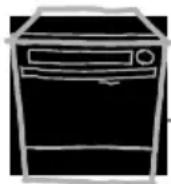
Model PSD1000
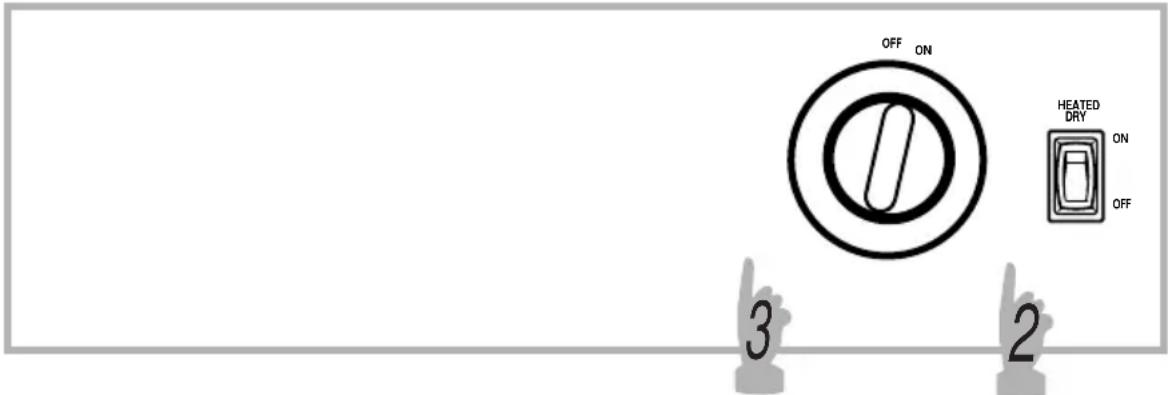
Model PSD2220
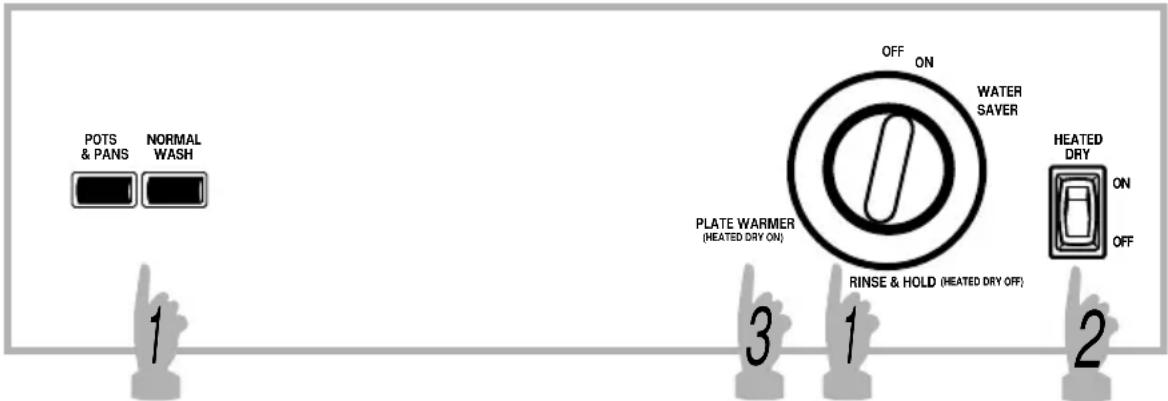
Models PSD3220 and PSD3230
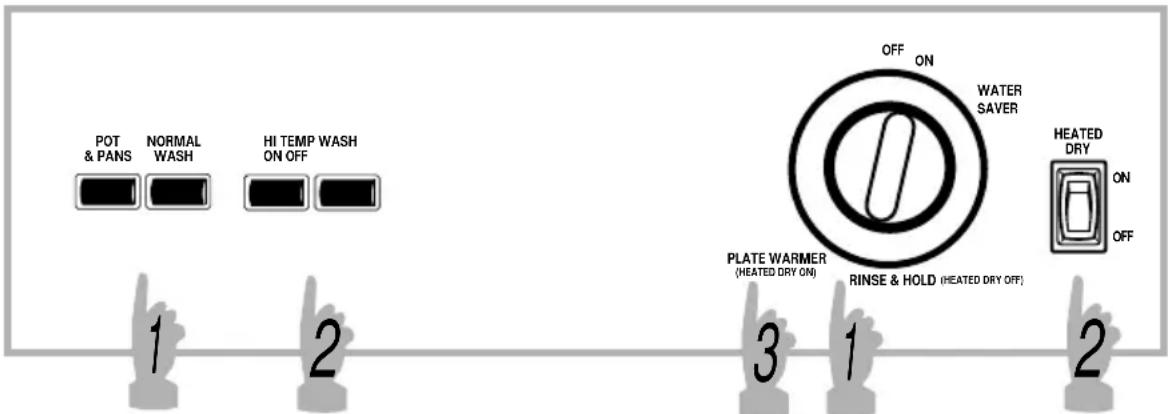
Models PSD3420 and PSD3430
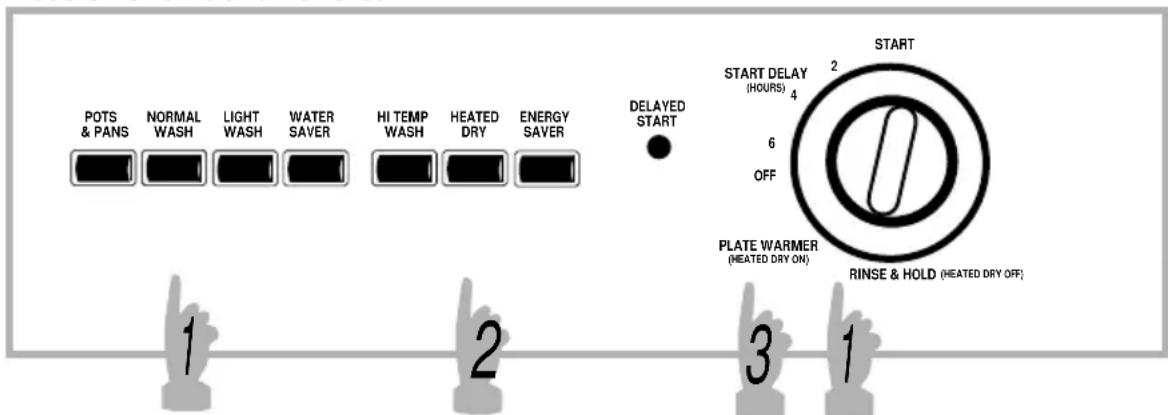

natural_image
Abstract icon of a magnifying glass over a black square, no text or symbols presentControl Settings

Cycles
POTS & PANS For heavily soiled dishes or cookware with dried-on or baked-on soils. Everyday dishes may be included. This cycle will not remove burned-on foods.
NORMAL WASH For loads of everyday dishes, glasses and cookware with medium soils. NOTE: Many dishes have lighter soil than normal. Choosing a cycle other than NORMAL WASH will save energy and water.
LIGHT WASH/ For dishes with light soils. WATER SAVER
RINSE & HOLD For rinsing partial loads that will be washed later. Do not use detergent.
PLATE WARMER For warming clean dishes and serving plates. This cycle will take approximately 32 minutes.
■ Make sure the Dial is at the OFF position.
- Latch the door.

Options
HI TEMP Provides extra heat for best performance. It is used WASH best with heavily-soiled dishes.
HEATED DRY Turns the drying heater on for fast drying. This cycle ON/HEATED will extend the time to your wash cycle. DRY
HEATED DRY Shuts off the drying heat option. Dishes air dry OFF naturally and energy is saved.
ENERGY SAVER Turns all options off.

Start
Slowly turn the Dial to the START or ON position. Don't turn it past the START or ON position, or you could accidentally miss a rinse. There is a time delay between start-up and water fill so you will not hear any wash action right away.
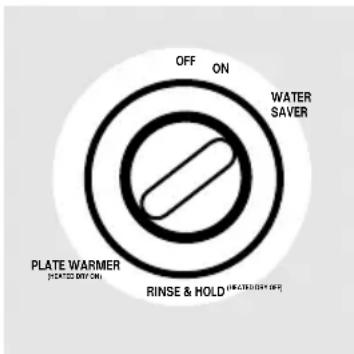
Water Saver (PSD2220, PSD3220 and PSD3230 only)
For quickly washing loads of everyday dishes with light soils that have not dried on.
1 Be sure the door is unlatched.
2 Select the NORMAL WASH cycle and any options.
3 Slowly turn the Dial to WATER SAVER
4 Latch the door to start the cycle.
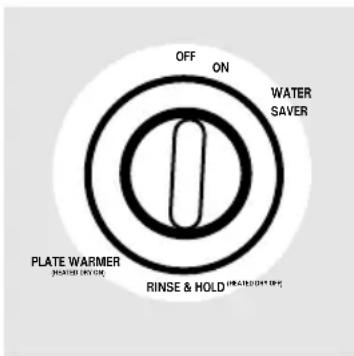
Rinse & Hold (PSD2220, PSD3220, PSD3230, PSD3420 and PSD3430 only)
For rinsing partial loads that will be washed later. Do not use detergent.
1 Make sure ENERGY SAVER or HEATED DRY OFF is selected.
2 Be sure the door is unlatched.
3 Slowly turn the Dial to RINSE & HOLD.
4 Latch the door to start the cycle.
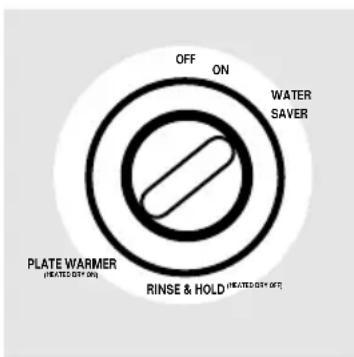
Plate Warmer (PSD2220, PSD3220, PSD3230, PSD3420 and PSD3430 only)
For warming clean dishes and serving plates. This cycle will take approximately 32 minutes.
1 Load clean dishware to be warmed.
2 Select HEATED DRY ON or HEATED DRY.
3 Be sure the door is unlatched.
4 Slowly turn the Dial to PLATE WARMER.
5 Latch the door to start the cycle.
![START 2 START DELAY [ HOURS ] 4 6 OFF PLATE WARMER [HEATED DRY ON ] RINSE & HOLD [HEATED DRY OFF ]](/content/2026/05/923749/images/2ced7771af1a3ea3a39972c38da22c6489802f8edde1d2e64251ce7398cbfca6.jpg)
Start Delay (PSD3420 and PSD3430 only)
The START DELAY will allow you to delay the start time of any cycle not on the Dial automatically for up to 6 hours.
1 Be sure the door is unlatched.
2 Select the wash cycle and option you want.
3 Slowly turn the Dial to desired time. The DELAYED START light will come on.
4 Latch the door to start the cycle.
Cycle Sequence
Water Time
Cycles (approx.) (approx.) Cycle Sequence
POTS & PANS 9.5 gal. 63 min. Rinse Rinse Rinse Main Wash Rinse Rinse Rinse
| NORMAL WASH | 8.0 gal. | 63 min. | Rinse | Rinse | Main Wash | Rinse | Rinse | Rinse |
| LIGHT WASH | 6.7 gal. | 63 min. | Rinse | Rinse | Main Wash | Rinse | Rinse | |
| WATER SAVER | 5.4 gal. | 63 min. | Rinse | Main Wash | Rinse | Rinse | ||
| RINSE & HOLD | 3.9 gal. | 12 min. | Rinse | Rinse | Rinse |
Drying Options:
HEATED DRY and HEATED DRY ON. Available on all wash cycles except RINSE & HOLD. Add approximately 32 minutes to the cycle.
ENERGY SAVER and HEATED DRY OFF. Drying heater is turned off. Dishes dry naturally.
Using the dishwasher.
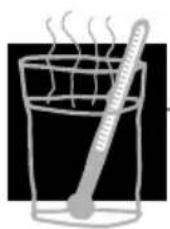
Check the Water Temperature
The entering water must be at least 120^ F. and not more than 150^ F., for effective cleaning and to prevent dish damage. Check the water temperature with a candy or meat thermometer. Turn on the hot water faucet nearest the dishwasher, place the thermometer in a glass and let the water run continuously into the glass until the temperature stops rising.

Using a Rinse Agent
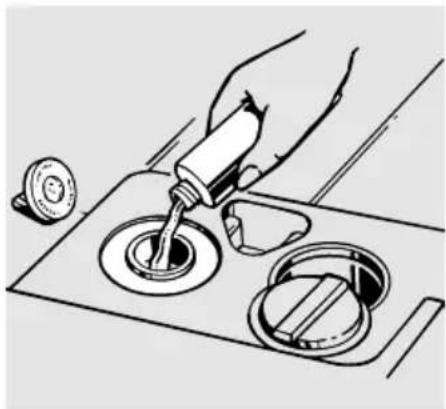
A rinse agent, such as JET-DRY, makes water flow off the dishes quickly thereby reducing water spotting.
Fill the rinse agent dispenser until it reaches the bottom of lip inside the opening. Replace cap.
To check if rinse agent is needed, remove the cap and look into the dispenser.
A full dispenser should last about one month.
If rinse agent spills, wipe it up immediately. It can keep your detergent from working.
natural_image
Illustration of a hand pouring liquid into a circular tank with a lid, no text or symbols present
natural_image
Abstract composition of white spheres on a black background, no text or symbols presentProper Use of Detergent
Use only detergent specifically made for use in dishwashers. Keep your detergent fresh and dry. Don't put powder detergent into the dispenser until you're ready to wash dishes.
The amount of detergent to use depends on whether your water is hard or soft. With hard water, you need extra detergent. With soft water, you need less detergent.
Protect your dishes and dishwasher by contacting your water department and asking how hard your water is. Twelve or more grains is extremely hard water. A water softener is recommended. Without it, lime can build up in the water valve, which could stick while open and cause flooding. Too much detergent with soft water can cause a permanent cloudiness of glassware, called etching.
You'll find two detergent dispensers on the door of your dishwasher. All wash cycles except RINSE & HOLD require detergent in the main cup. If your dishes have extra heavy soil or you have hard water you may want to add detergent to the open cup also.
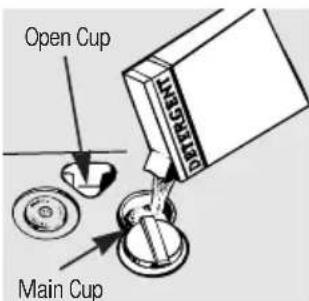
Be sure the Dial is at OFF position before adding detergent. Otherwise, the detergent cup will not close and latch properly. Add detergent then close the main cup.
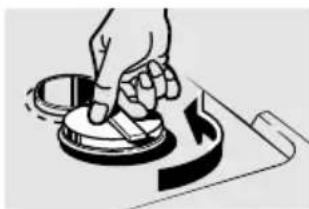
NOTE: To open detergent cup after it has been closed, simply turn the detergent cup handle counter-clockwise until it releases. A snapping sound may be heard.
natural_image
Illustration of a hand using a tool to press or mark a circular component, with no visible text or symbols.
natural_image
Simple black-and-white icon of an exclamation mark with radiating lines, no text or symbols present.Forget to Add a Dish?
A forgotten dish can be added any time before the main wash.
1 Push the door latch to the left.
2 Do not open the door until water spray action stops. Steam may rise out of the dishwasher.
3 Add forgotten dishes.
4 Close the door and push the latch to the far right.
Loading the dishwasher racks.
For best dishwashing results, follow these loading guidelines. Features and appearance of racks and silverware baskets may vary from your model.
natural_image
Black-and-white line drawing of a container filled with various circular objects, no text or symbols present.Upper Rack
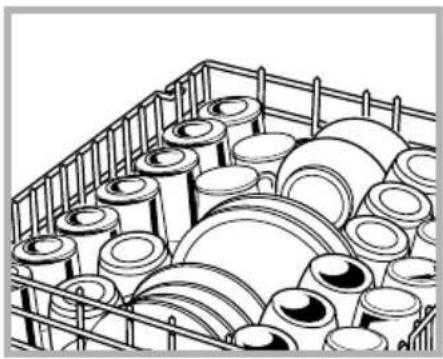
The upper rack is for glasses, cups and saucers. Cups and glasses fit best along the sides. This is also a secure place for dishwasher-safe plastics. The upper rack is good for all kinds of odd-shaped utensils. Saucepans, mixing bowls and other items should be placed face down.
Secure larger dishwasher-safe plastics over two fingers when possible.
Make sure small plastic items are secure so they can't fall onto the heating element.
natural_image
Technical line drawing of a mechanical component with concentric grooves and a central shaft (no text or symbols)The Wash Tower
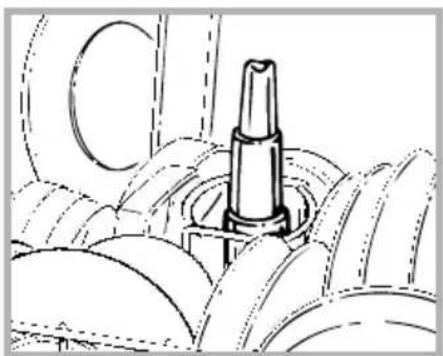
Keep the center area clear in the lower rack.
The wash tower rises through the center of the lower rack during the wash and rinse portions of the cycle.

Don't block it or load tall things next to it.
Also, be careful not to let a portion of an item such as a pot or dish handle extend through the bottom rack. This could block the wash arm and cause poor washing results.
natural_image
Line drawing of a kitchen utensil with gloves and a cup (no text or symbols)Lower Rack
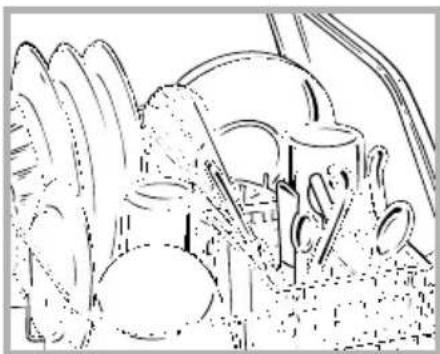
When loading the lower rack, do not load large platters or trays in the front right corner. They may prevent detergent from circulating during the wash cycle.
The lower rack is best used for plates, saucers, and cookware. Large items such as broiler pans and racks should go along the sides. Load platters, pots and bowls along the sides, in corners, or in the back. The soiled side of items should face the center of the rack.
Silverware Basket
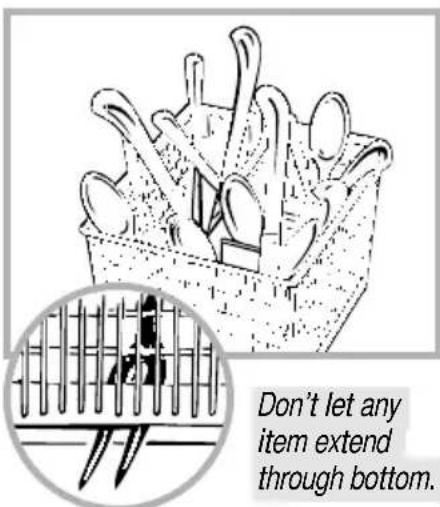
Put flatware in the removable basket with fork and knife handles up to protect your hands. Place spoons in the basket with handles down. Mix knives, forks and spoons so they don't nest together. Distribute evenly. Small plastic items, such as measuring spoons and lids from small containers, should go in the bottom of the silverware basket with silverware on top.
natural_image
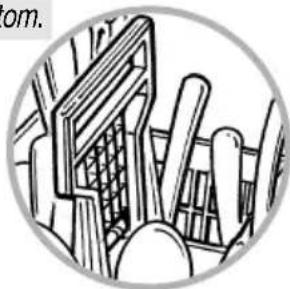
Illustration of a mechanical assembly with rods and gears, no visible text or symbolsA security cell cover (on some models) can be lowered to either side to secure lightweight items from the effects of the vigorous wash action.
Caring for the dishwasher.
To clean the control panel use a lightly dampened cloth then dry thoroughly. To clean the exterior use a good appliance polish wax.
Never use sharp objects, scouring pads or harsh cleaners on any part of the dishwasher.
Protect Against Freezing
If your dishwasher is left in an unheated place during the winter, ask a service technician to:
1 Cut off electrical power to the dishwasher. Remove fuses or trip circuit breaker.
2 Turn off the water supply and disconnect the water inlet line from the water valve.
3 Drain water from the inlet line and water valve. (Use a pan to catch the water.)
4 Reconnect the water inlet line to the water valve.
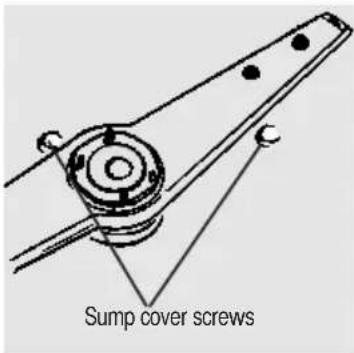
5 Remove the plastic sump cover in the tub bottom and use a sponge to soak up water in the rubber boot.
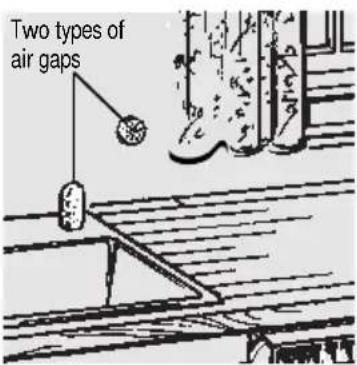
Check the air gap any time your dishwasher isn't draining well.
Does Your Dishwasher Have an Air Gap?
An air gap protects your dishwasher against water backing up into it if a drain clogs. The air gap is not a part of the dishwasher. It is not covered by your warranty. Not all plumbing codes require air gaps, so you may not have one.
The air gap is easy to clean.
1 Turn off the dishwasher and lift off the chrome cover.
2 Unscrew the plastic cap and clean with a toothpick.
About optional accessories.
You can change the door and lower access panel appearance of your dishwasher by ordering one of these optional accessories:
Color Panels
■ 1/4" Wood Panel Trim Kit
■ 3/4" Trimless Panel Kit
These accessories are available at extra cost (VISA, MasterCard, or Discover cards accepted) by calling 800-626-2002.
Specify accessory number when ordering.
Descriptions of Optional Accessories
Color panels—Replacement door panels and lower access panels are available in the following colors:
■ GPF300A (Almond)
■ GPF300B (Black)
■ GPF300W (White)
Wood panel trim kit—This accessory contains trim and instructions for you to supply and install a 1/4" thick decorative wood door and lower access panel:
■ GPF325A (Almond)
■ GPF325B (Black)
■ GPF325W (White)
NOTE: The GPF100 dishwasher door spring kit must also be ordered and installed when the door panel weighs four lbs. or more.
Trimless panel kit—This accessory contains parts and instructions for you to supply and install a 3/4" thick decorative wood door and lower access panel:
GPF375
NOTE: The GPF100 dishwasher door spring kit will be included with the trimless panel kit and must be installed with it.

Troubleshooting Tips
Review the charts on the following pages first and you may not need to call for service.
Problem Possible Causes What To Do
| Dishwasher won't run | Fuse is blown, or the circuit breaker tripped | Replace fuse or reset circuit breaker. Remove any other appliances from the circuit. |
| Noise | Some of the sounds• Soft food disposal you'll hear are normal shredding action.Drain valve opening to pump water out.Timer control as cycle progresses.Detergent cup opening.The motor stopping during the drying period. | |
| Utensils are not secure• Make sure everything is in the rack or something secured in dishwasher. small has dropped into the rack | ||
| Motor hums• Dishwasher has not been used on a regular basis. If you do not use your dishwasher often, set it to fill and pump out once every week. This will help keep the seal moist and the garbage disposer clear. | ||
Before you call for service...

Troubleshooting Tips
| Problem Possible Causes What To Do | ||
| Water standing in the bottom of the tub | This is normal | A small amount of clean water around the outlet on the tub bottom at the back of the tub keeps the water seal lubricated. |
| Water won't pump out of the tub | Drain is clogged·If you have an air gap, clean it.Check to see if your kitchen sink is draining well. If not, you may need a plumber.If the dishwasher drains into a disposer, run disposer clear. | |
| Suds in the tub | Correct detergent·Use only automatic wasn't used dishwasher detergents to avoid sudsing.To remove suds from the tub, open the dishwasher and let suds evaporate.Add 1 gallon of cold water to the tub. Close and latch the dishwasher. Pump out water by slowly turning the Dial until a drain period is reached. Repeat if necessary. | |
Rinse agent • Always wipe up rinse agent was spilled spills immediately.
| Problem Possible Causes What To Do | |
| Stained tub interior | Detergent with • Some detergents contain colorant was used colorant (pigment or dyes) that will discolor the tub interior with extended use. Check the detergent cup for signs of any discoloration. If cup is discolored, change to detergent without any colorant. |
| Dishes don't dry | Low inlet water • Make sure inlet water temperature temperature is correct. |
| Rinse agent dispenser • Check the rinse agent is empty dispenser. | |
| Dishes and flatware not clean | Inlet water temperature • Raise the water heater is below 120°F. temperature to 120°F. |
| Water pressure is temporarily low • Turn on a faucet. Is water coming out more slowly than usual? If so, wait until pressure is normal before using your dishwasher. | |
| Air gap is clogged • Clean the air gap. | |
| Improper rack loading • Make sure large dishware does not block the detergent dispenser or the wash arm. | |
Before you call for service...

Troubleshooting Tips
| Problem Possible Causes What To Do | ||
| Spots and filming on glasses and flatware | Extremely hard waterLow inlet water temperature utensils from the Overloading the dishwasherImproper loading allow to run for 18 to 22 Old or damp powder now be in the main wash. detergent5 Open the door and pour 2 cups (500 ml) of white Rinse agent dispenser empty the dishwasher.6 Close the door and allow Too little detergent to complete the cycle. If vinegar rinse doesn’t work: Repeat as above, except use 1/4 cup (60 ml) of citric acid crystals instead of vinegar. | • To remove stubborn spots from glassware:1 Remove all metal dishwasher.2 Do not add detergent.3 Select the longest cycle.4 Start the dishwasher and |
| Cloudiness on glassware | Combination of soft water and too much detergent | • This is called etching and is permanent. To prevent this from happening, use less detergent if you have soft water. Wash glassware in the shortest cycle that will get them clean. |
| Water temperature entering the dishwasher exceeds 150°F. | • Lower the water heater temperature. | |
| Yellow or brown film on tub | Tea or coffee stains Remove the stain by hand, using a solution of 1/2 cup bleach and 3 cups warm water. ▲WARNING Before cleaning interior, wait at least 20 minutes after a cycle for the heating element to cool down. Failure to do so can result in burns. | |
| An overall yellow or A special filter in the water brown film can be caused supply line is the only way by iron deposits in water to correct this problem. Contact a water softener company. | ||
| White film on inside surfaces | Hard water minerals To clean the interior, apply dishwasher detergent to a damp sponge. Wear rubber gloves. Do not use any type of cleanser other than dishwasher detergent because it may cause foaming or sudsing. | |
Before you call for service...

Troubleshooting Tips
| Problem Possible Causes What To Do | |
| Detergent cup lid won't latch | Dial is not in the OFF position and slide the door latch to the left. |
| Detergent left in dispenser cups | Dishes are blocking the Reposition the dishes. detergent cups |
| Steam | This is normal • Steam comes through the vent by the door latch during drying and when water is being pumped out. |
| Black or gray marks on dishes | Aluminum utensils have • Remove marks with a mild, rubbed against dishes abrasive cleaner. |
Notes
Notes
GE Service Protection Plus™
GE, a name recognized worldwide for quality and dependability, offers you Service Protection Plus™—comprehensive protection on all your appliances—No Matter What Brand!
Benefits Include:
- Backed by GE
- All brands covered
- Unlimited service calls
• All parts and labor costs included
• No out-of-pocket expenses
• No hidden deductibles
• One 800 number to call
We'll Cover Any Appliance. Anywhere. Anytime.*
You will be completely satisfied with our service protection or you may request your money back on the remaining value of your contract. No questions asked. It's that simple.
Protect your refrigerator, dishwasher, washer and dryer, range, TV, VCR and much more—any brand! Plus there’s no extra charge for emergency service and low monthly financing is available. Even icemaker coverage and food spoilage protection is offered. You can rest easy, knowing that all your valuable household products are protected against expensive repairs.
Place your confidence in GE and call us in the U.S. toll-free at 800-626-2224 for more information.
*All brands covered, up to 20 years old, in the continental U.S.
Cut here
Please place in envelope and mail to:
General Electric Company Warranty Registration Department P.O. Box 34070 Louisville, KY 40232-4070
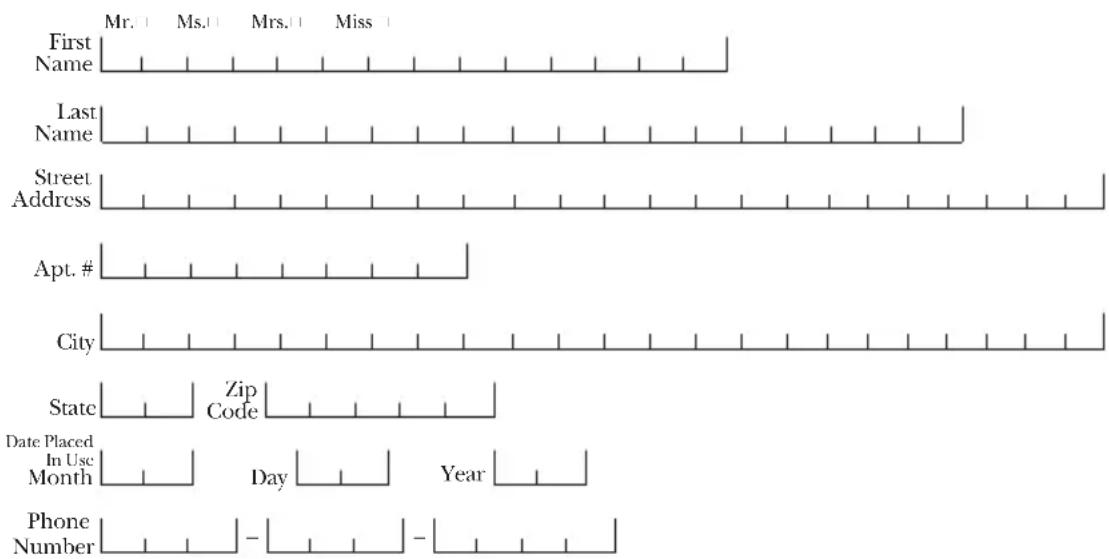
Consumer Product Ownership Registration
Dear Customer:
Thank you for purchasing our product and thank you for placing your confidence in us. We are proud to have you as a customer!
Follow these three steps to protect your new appliance investment:

Model Number Serial Number

Important: If you did not get a registration card with your product, detach and return the form below to ensure that your product is registered.

Cut here
Consumer Product Ownership Registration

Model Number Serial Number


GE Appliances
HOTPOINT
RCA
RCA Dishwasher Warranty
All warranty service provided by our Factory Service Centers, or an authorized Customer Care® technician. For service, call 800-GE-CARES.
For The Period Of: We Will Replace, At No Charge To You:
| One Year Any partFrom the date of the original purchase warranty, | of the dishwasher which fails due to a defect in materials or workmanship. During this full one-year we will also provide, free of charge, all labor and in-home service to replace the defective part. |
| Ten Years The tub or door liner,(Only for models PSD2220, PSD3220, PSD3230, PSD3420, and PSD3430) warranty,From the date of the original purchase | if it fails to contain water due to a defect in materials or workmanship such as cracking, chipping, peeling or rusting. During this full ten-year we will also provide, free of charge, all labor and in-home service to replace the defective part. |
What Is Not Covered:
■ Service trips to your home to teach you how to use the product.
■ Improper installation.
■ Replacement of house fuses or resetting of circuit breakers.
■ Failure of the product if it is abused, misused, or used for other than the intended purpose or used commercially.
■ Damage to the product caused by accident, fire, floods or acts of God.
■ Incidental or consequential damage to personal property caused by possible defects with this appliance.
■ Cleaning or servicing of the air gap device in the drain line.
This warranty is extended to the original purchaser and any succeeding owner for products purchased for home use within the USA. In Alaska, the warranty excludes the cost of shipping or service calls to your home.
Some states do not allow the exclusion or limitation of incidental or consequential damages. This warranty gives you specific legal rights, and you may also have other rights which vary from state to state. To know what your legal rights are, consult your local or state consumer affairs office or your state's Attorney General.
Warrantor: General Electric Company. Louisville, KY 40225
Service Telephone Numbers.

natural_image
Simple line drawing of a house with windows and cloud-like shapes (no text or symbols)In-Home Repair Service 800-GE-CARES (800-432-2737)
Expert GE repair service is only a phone call away.

Special Needs Service 800.626.2000
TDD 800-TDD-GEAC (800-833-4322)
Consumers with impaired hearing or speech who have access to a TDD or a conventional teletypewriter may call to request information or service.

Service Contracts 800-626-2224
Purchase a GE service contract while your warranty is still in effect and you'll receive a substantial discount. GE Consumer Service will still be there after your warranty expires.

Parts and Accessories 800-626-2002
Individuals qualified to service their own appliances can have parts or accessories sent directly to their homes (VISA, MasterCard and Discover cards are accepted).
Instructions contained in this manual cover procedures to be performed by any user. Other servicing generally should be referred to qualified service personnel. Caution must be exercised, since improper servicing may cause unsafe operation.

natural_image
Simple hand-drawn sketch of a smiling face with raised hands, enclosed in a gray rounded square (no text or symbols)Service Satisfaction
If you are not satisfied with the service you receive, follow these three steps. First, contact the people who serviced your appliance. Next, if you are still not pleased, write all the details—including your phone number—to: Manager, Consumer Relations, RCA Appliances, Appliance Park, Louisville, KY 40225. Finally, if your problem is still not resolved, write:
Major Appliance Consumer Action Program
20 North Wacker Drive, Chicago, IL 60606.
Printed in Louisville, KY
- Congratulations! You Are Now Part Of The RCA Family.
- Important!
- Write the model and serial numbers here.
- Staple sales slip or cancelled check here.
- RCA & You, A Service Partnership.
- Read this Manual
- Review the Section on Troubleshooting Tips
- If You Need Service
- Operating Instructions
- Troubleshooting Tips
- Customer Service
- IMPORTANT SAFETY INFORMATION. READ ALL INSTRUCTIONS BEFORE USING.
- WARNING!
- WATER HEATER SAFETY
- PROPER INSTALLATION AND MAINTENANCE
- DO NOT...
- WHEN USING YOUR DISHWASHER
- About the dishwasher control panel.
- Control Settings
- Cycles
- Options
- Start
- Water Saver (PSD2220, PSD3220 and PSD3230 only)
- Rinse & Hold (PSD2220, PSD3220, PSD3230, PSD3420 and PSD3430 only)
- Plate Warmer (PSD2220, PSD3220, PSD3230, PSD3420 and PSD3430 only)
- Start Delay (PSD3420 and PSD3430 only)
- Cycle Sequence
- Drying Options:
- Using the dishwasher.
- Check the Water Temperature
- Using a Rinse Agent
- Proper Use of Detergent
- Forget to Add a Dish?
- Loading the dishwasher racks.
- Upper Rack
- The Wash Tower
- Lower Rack
- Silverware Basket
- Caring for the dishwasher.
- Protect Against Freezing
- Does Your Dishwasher Have an Air Gap?
- The air gap is easy to clean.
- About optional accessories.
- Descriptions of Optional Accessories
- Before you call for service...
- Notes
- GE Service Protection Plus™
- Benefits Include:
- Consumer Product Ownership Registration
- Follow these three steps to protect your new appliance investment:
- Important: If you did not get a registration card with your product, detach and return the form below to ensure that your product is registered.
- RCA Dishwasher Warranty
- What Is Not Covered:
- Service Telephone Numbers.
Brand : RCA
Model : PSD1000
Category : Dishwasher