
14891 - Microphone MONOPRICE - Free user manual and instructions
Find the device manual for free 14891 MONOPRICE in PDF.


| Product Type | Desktop Paging Microphone |
| Brand | Monoprice |
| Model | 14891 |
| Capsule Type | Condenser |
| Polar Pattern | Cardioid |
| Frequency Response | 40Hz - 16kHz |
| Sensitivity | -40dB ±2dB |
| Output Impedance | 75 ohms |
| Power Source | 2x AAA batteries or +48V phantom power |
| Battery Life | Approximately 24 hours |
| Included Cable | 25-foot XLR cable |
| Included Adapter | Female XLR to male 1/4" TS plug |
| Pop Filter | Removable foam pop filter |
| Microphone Base | Includes ON/OFF switch and LED indicator |
| Gooseneck Design | Flexible for adjustable positioning |
| Intended Use | Indoor meetings, conferences, public address |
| Safety | Do not expose to water or moisture |
| Cleaning | Use soft dry cloth only |
| Regulatory Compliance | FCC Part 15 and ICES-003 |
Frequently Asked Questions - 14891 MONOPRICE
User questions about 14891 MONOPRICE
0 question about this device. Answer the ones you know or ask your own.
Ask a new question about this device
Download the instructions for your Microphone in PDF format for free! Find your manual 14891 - MONOPRICE and take your electronic device back in hand. On this page are published all the documents necessary for the use of your device. 14891 by MONOPRICE.
USER MANUAL 14891 MONOPRICE
Desktop Paging Microphone
User's Manual
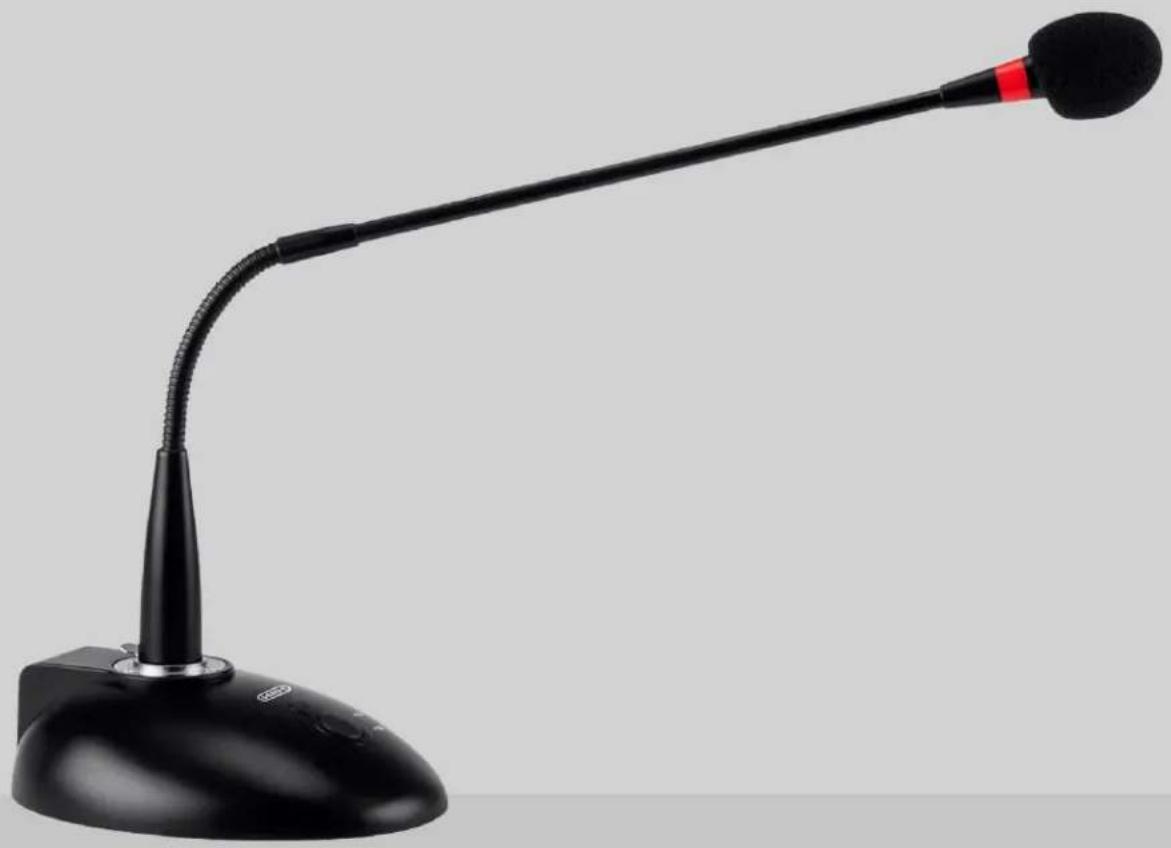
natural_image
Black desktop microphone with adjustable arm and base (no visible text or symbols)SAFETY WARNINGS AND GUIDELINES
- This device is intended for indoor use only.
- Do not expose this device to water or moisture of any kind.
- Do not mix new and old batteries or batteries of different types.
- Do not mix alkaline, standard, or rechargeable batteries with this product.
- Remove the batteries if storing this product for a long period of time.
- Clean using a soft, dry cloth only. Do not use chemical cleaners, solvents, or detergents. For stubborn deposits, moisten the cloth with warm water.
INTRODUCTION
Thank you for purchasing this Desktop Paging Microphone!
This condenser microphone is an ideal solution for meetings, conferences, and public address needs. It features a gooseneck design, which allows you to angle it to the ideal speaking position. The microphone is powered using two AAA batteries in the base or by connecting to an XLR jack with +48V Phantom Power. In addition to the base, it includes a removable foam pop filter, an XLR cable, and an XLR to 1/4" TS plug adapter.
FEATURES
- Condenser microphone with flexible gooseneck design and base with power switch
- Cardioid polar pattern
- Powered using two AAA batteries or by plugging into an XLR jack with +48V Phantom Power
- Microphone can be plugged into the included base or directly into a mixer or PA amp
- Includes a 25-foot XLR cable and female XLR to male 1/4" TS plug adapter
- Removable foam pop filter
PACKAGE CONTENTS
Please take an inventory of the package contents to ensure you have all the items listed below.
1x Condenser microphone with removable foam pop filter
1x Microphone base
1x 25-foot XLR cable
1x Female XLR to male 1/4" TS plug adapter
1x User's manual
CONNECTING THE MICROPHONE TO THE BASE
Perform the following steps to connect the microphone using two AAA batteries for power.
- Remove the battery cover from the bottom of the base.
- Install two AAA batteries (not included), taking care to match the polarity markings inside the battery compartment.
- Replace the battery cover.
- Insert the XLR plug on the microphone's stem into the XLR jack on the base.
- Plug one end of the included XLR cable into the XLR jack on the rear of the base, then plug the other end into your amplifier, mixer, PA system, or other device.
- Press the ON/OFF button on the base to power the microphone on or off. The LED indicator above the button illuminates whenever the microphone is powered on.
CONNECTING THE MICROPHONE TO PHANTOM POWER
Perform the following steps to connect the microphone using a Phantom Power source for power.
-
Insert the XLR plug on the microphone's stem into the XLR jack on the base.
-
Plug one end of the included XLR cable into the XLR jack on the rear of the base, then plug the other end into your amplifier, mixer, PA system, or other device with Phantom Power.
- Enable Phantom Power for the connected XLR input.
- Press the ON/OFF button on the base to power the microphone on or off. The LED indicator above the button illuminates whenever the microphone is powered on.
TROUBLESHOOTING
Q1. The power indicator will not illuminate.
A1. Replace the batteries with fresh ones. Alternatively, ensure that that +48V Phantom Power is activated on the connected XLR jack.
Q2. The LED indicator is on, but no sound can be heard.'
A2. Ensure the proper input channel is selected. Increase the volume level on the microphone input. Increase the amplifier's output volume level. Try swapping out the XLR cable with a known good one.
Q3. The mic is plugged into the XLR to 1/4" adapter and is plugged into the mixer, but no sound can be heard.
A3. The microphone requires power to operate. Without the base it cannot use battery power and plugged into a 1/4" jack it cannot receive Phantom Power. Use the base or plug it into an XLR jack with +48V Phantom Power.
SPECIFICATIONS
| Model | 14891 |
| Capsule Type | Condenser |
| Polar Pattern | Cardioid |
| Frequency Response | 40Hz ~ 16kHz |
| Sensitivity | -40dB ±2dB |
| Output Impedance | 75 ohms |
| Power Source | 2x AAA batteries or +48V phantom power |
| Battery Life | Approximately 24 hours |
REGULATORY COMPLIANCE
Notice for FCC

This device complies with Part 15 of the FCC rules. Operation is subject to the following two conditions: (1) this device may not cause harmful interference, and (2) this device must accept any interference received, including interference that may cause undesired operation.
Modifying the equipment without authorization may result in the equipment no longer complying with FCC requirements for Class B digital devices. In that event, your right to use the equipment may be limited by FCC regulations, and you may be required to correct any interference to radio or television communications at your own expense.
This equipment has been tested and found to comply with the limits for a Class B digital device, pursuant to Part 15 of the FCC Rules. These limits are designed to provide reasonable protection against harmful interference in a residential installation. This equipment generates, uses and can radiate radio frequency energy and, if not installed and
used in accordance with the instructions, may cause harmful interference to radio communications. However, there is no guarantee that interference will not occur in a particular installation. If this equipment does cause harmful interference to radio or television reception, which can be determined by turning the equipment off and on, the user is encouraged to try to correct the interference by one or more of the following measures:
- Reorient or relocate the receiving antenna.
- Increase the separation between the equipment and receiver.
- Connect the equipment into an outlet on a circuit different from that to which the receiver is connected.
- Consult the dealer or an experienced radio/TV technician for help.
Notice for Industry Canada
This Class B digital apparatus complies with Canadian ICES-003.
Brand : MONOPRICE
Model : 14891
Category : Microphone