
Solo Logo - Subwoofer ARCAM - Free user manual and instructions
Find the device manual for free Solo Logo ARCAM in PDF.


| Product Type | Powered subwoofer (sub-bass loudspeaker system) |
| Brand | Arcam |
| Model | Solo Logo |
| Drive Unit | 10" (254mm) long-excursion, magnetically shielded subwoofer driver |
| Amplifier Power | 200W RMS (275W max) into 1Ω |
| Frequency Range | 20 Hz - 250 Hz |
| Sensitivity | 85 dB/watt at 1m |
| Impedance | 1Ω nominal |
| Crossover Type | 4th order Linkwitz-Riley, 24dB/octave, adjustable frequency and Q |
| Inputs | RCA phono: L, R, LFE (sub) |
| Outputs | RCA phono: L, R, LFE (daisy-chain) |
| Power Supply | 100-240V AC, 50/60Hz; fuse T2.5AL 250V |
| Power Consumption | Standby: <1W (estimated); Active: up to 275W max |
| Dimensions (W x D x H) | 280 x 290 x 416 mm |
| Net Weight | 15 kg |
| Cabinet Construction | Machined MDF with internal bracing, 10 litre internal volume |
| Finish | Black paint |
| Standby Mode | Auto (15 min idle) or manual (always on) |
| Phase Control | 0° or 180° switchable |
| Volume Control | Adjustable level (0-10 recommended starting at 5) |
| Indicator LED | Blue: powered on; Red: standby; Off: disconnected from mains |
| Safety Compliance | Class II (double insulated); FCC Part 15 compliant |
| Included Accessories | IEC mains power lead, user handbook |
Frequently Asked Questions - Solo Logo ARCAM
User questions about Solo Logo ARCAM
0 question about this device. Answer the ones you know or ask your own.
Ask a new question about this device
Download the instructions for your Subwoofer in PDF format for free! Find your manual Solo Logo - ARCAM and take your electronic device back in hand. On this page are published all the documents necessary for the use of your device. Solo Logo by ARCAM.
USER MANUAL Solo Logo ARCAM
RISQUE DE CHOC ELECT NE PAS OUVRIR

CAUTION: To reduce the risk of electric shock, do not remove cover (or back). No user serviceable parts inside. Refer servicing to qualified service personnel.
WARNING: To reduce the risk of fire or electric shock, do not expose this apparatus to rain or moisture.
The lightning flash with an arrowhead symbol within an equilateral triangle, is intended to alert the user to the presence of uninsulated 'dangerous voltage' within the product's enclosure that may be of sufficient magnitude to constitute a risk of electric shock to persons.
The explanation point within an equilateral triangle is intended to alert the user to the presence of important operating and maintenance (servicing) instructions in the literature accompanying the product.
CAUTION: In Canada and the USA, to prevent electric shock, match the wide blade of the plug to the wide slot in the socket and insert the plug fully into the socket.
Important safety instructions
This product is designed and manufactured to meet vinyl quality and safety standards. However, you should be aware of the following installation and operation precautions.
1. Take heed of warnings and instructions
It is important that you:
A. read all the safety and operating instructions before operating this speaker.
B. keep this handbook for future reference.
C. follow all instructions and adhere to all warnings in the handbook or on the speaker.
2. Water and moisture
Do not use this speaker near water.
The presence of electricity near water can be dangerous – for example next to a bathtub.
washbowl, kitchen sink, in a wet basement or near a swimming pool, etc.
3. Object or liquid entry
Take care that objects do not fall and liquids are not spilled, dripped or splashed into the enclosure through any openings. Liquid-filled objects such as vases should not be placed on the equipment.
4. Ventilation
Do not block any of the ventilation openings.
Do not pace the equipment on a bed, sofa, rug or similar soft surface, or in an enclosed bookcase or cabinet, since ventilation may be impeded. We recommend a minimum distance of 50mm around the sides and top of the appliance to provide adequate ventilation.
5. Heat
Do not install the speaker near any heat producing equipment such as radiators, stoves or other appliances (including other amplifiers) that produce heat.
6. Climate
The appliance has been designed for use in moderate climates.
7. Siting the unit
The unit is not designed for placing in a rack or stand. It should be placed directly on the floor and sited where electrical and other leads do not cause a trip hazard.
8. Power sources
The speaker is supplied with a market suitable electrical plug. Do not substitute or modify the supplied plug, see your dealer if a replacement is required.
This product is a Class II or double insulated electrical appliance. It has been designed in such a way that it does not require a safety connection to electrical earth (U.S. = ground).
The primary method of isolating the Logo speaker unit from the mains supply is to use the switch on the rear of the unit. The Logo speaker unit must be installed in a manner that makes plug disconnection possible.
9. Power-cord protection
Power supply cords should be routed so that they are protected against being walked on or pinched, particularly at plugs and the point, where they exit from the speaker.
10. Protection from electrical storms
^1 Unplug the speaker during lightning storms or when unused for long periods of time.
11. Abnormal smell
If an abnormal smell or smoke is detected from the appliance, turn the power off immediately and unplug the unit from the wall outlet. Contact your dealer immediately.
12. Cleaning
Unplug the unit from the mains supply before cleaning. The case should normally only require a wipe with a soft, dry, lint-free cloth. Do not use paint thinners or other chemical solvents for cleaning.
We do not advise the use of furniture cleaning sprays or polishes as they can cause indelible white marks if the unit is subsequently wiped with a damp cloth.
13. Servicing and repair
Refer all servicing to qualified servicing personnel.
Servicing is required when: the speaker has been damaged in any way, such as
A. the power-supply cord or the plug has been damaged, or
B. liquid has been spilled, or objects have fallen into the enclosure, or
C. the appliance has been exposed to rain or moisture, or
D. the appliance does not appear to operate normally or exhibits a marked change in performance, or
E. the appliance has been dropped or the enclosure damaged.
Safety compliance
This product has been designed to meet the IEC 60065 international electrical safety standard.
This device complies with Part 15 of the FCC Rules. Operation is subject to the following two conditions:
(1) This device may not cause harmful interference,
and (2) this device must accept any interference received, including interference that may cause undesired operation.
contents
safety guidelines ......E-2
Important safety instructions....E-2
Safety compliance E-2
thank you....E-3
installation E-4
Positioning the unit ....E-4
Power F-4
Interconnect cables E-4
Connecting to a sound source .....E-4
Care of your speaker....E-1
speaker positioning E-5
Stereo system with no LFE ....E-6
connection E-6
Sub/full range+sat system ....E-6
Sub/sat system E-6
Direct mode in Arcam surround
amplifiers F-6
Crossover frequency setting ....E-7
Crossover Q setting.....E-7
Volume level setting....E-7
Phase setting E-7
calibration ....E-7
specification ......E-8
Technical specifications .....E-8
Worldwide Guarantee ....E-8
Claims under guarantee ....E-8
Problems? E-8
On-line registration....E-8
... and congratulations for buying the Arcam Logo sub-bass loudspeaker system.
Logo can extend the bandwidth of your main (satellite) speakers by accurately revealing the low frequency components of stereo and surround sound programme sources. It also offers a separate but concurrent LFE (low frequency effects) connection – this is a channel intended by the recording engineer to be exclusively reproduced by a subwoofer. Logo's own volume control permits the level to be adjusted independently to achieve a perfect balance in the listening room.
Logo features its own 200W amplifier which is close-coupled to a downward-facing long excursion driver that takes full advantage of the latest materials technology and a sophisticated braced cabinet design. The bass response is actively corrected by a Linkwitz transform crossover circuit to give a Bessel alignment: this minimizes time distortion for accurate bass transients. The result is a performance of great power and musicality.
Please take a moment to read this handbook, as the advice that it contains will help you get the maximum benefit from your purchase.
The Logo Development Team
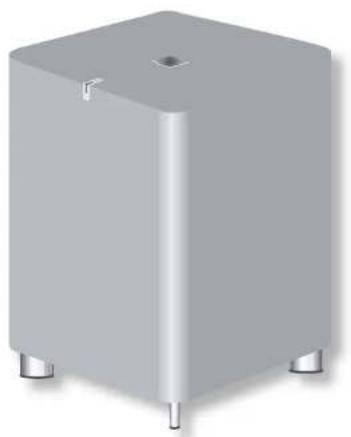
natural_image
3D rendering of a gray rectangular electronic component with three metallic pins (no text or symbols visible)What's in the box?
Arcam Logo sub-bass system
IEC mains power lead
this I handbook!
thank you...

Positioning the unit
Place the Logo speaker unit on a level, firm surface, avoiding direct sunlight and sources of heat or damp.
Do not place Logo in an enclosed space such as a bookcase or closed cabinet unless there is good provision for ventilation. The Logo speaker unit is designed to run warm during normal operation.
Do not place your record deck on top of Logo. Record decks are very sensitive to the noise generated by mains power supplies which will be heard as a background 'hum' if the record deck is too close. Vibrations from Logo may also cause the pickup stylus to jump tracks.
Power
Logo is supplied with a moulded mains plug already fitted to the lead. Check that the plug supplied fits your supply – should you require a new mains lead, please contact your Arcam dealer. Logo is fitted with a transformer designed to accept nominal mains voltages from 100V to 240V.
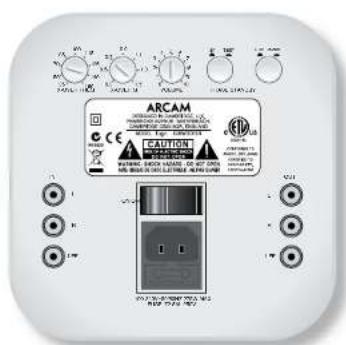
Push the IEC plug end of the power cable into the socket on the back of Logo, making sure that it is pushed in firmly. Plug the other end of the cable into your mains socket and, if necessary, switch the socket on.
Logo is fitted with a main power switch on the rear panel, above the power inlet: make sure that this is switched on to use Logo.
If your logo is not to be used for a prolonged period, switch the unit off at the main power switch.
Indicator LED

An indicator LED is positioned across the top edge of Logo's cabinet. When the indicator LED is off, it indicates that the speaker is completely disconnected from the mains. A blue
light from the indicator shows that the speaker is powered up and ready for immediate use. A red light from the indicator shows that the speaker is in standby (power-saving) mode and will power up as soon as an audio signal is received.
Standby switch

The push-in STANDBY switch provides two settings: AUTO and MANUAL.
'Auto' (bullon out) switches Logo's
amplifier to standby after a period of
idleness (about 15 minutes) when no audio signal has been received. MANUAL' (button in) means that Logo's amplifier is on whenever the unit is receiving mains power.
Interconnect cables
We recommend the use of high-quality screened audio interconnect cables. Poor quality cables will degrade the performance of your system. All cables should be kept as short as is practically possible. It is good practice when connecting your equipment to make sure that the mains power supply cabling is kept as far away as possible from your audio cables. Failure to do so may result in unwanted noise in the audio signals.
Note: When connecting Logo to signal leads, or when moving Logo to a new position, make sure that the unit is not receiving power by switching off and disconnecting the power lead.
Connecting to a sound source
Check that your sound processor/receiver is switched off before connecting logo. Failure to do this may result in both speaker and amplifier damage.
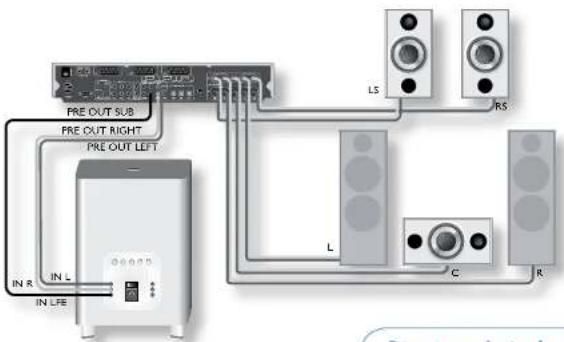
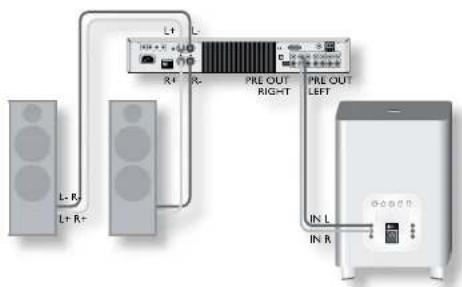
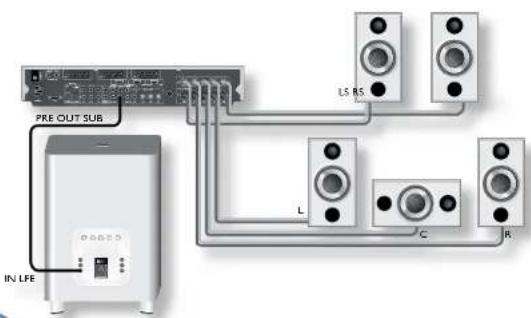
If your sound source has a PRE-OUT SUB or LFE OUT output, connect this to IN LFE on the back panel using RCA (pnono) connectors at each end. If your sound source does not have a SUB or LFE output, connect the left and right channels of the stereo pre-amp output (PRE OUT L and PRE OUT R) to IN L and IN R, respectively.
You may connect both the LFE and the L and R outputs to Logo if you wish to use both the LFE channel and to supplement the bass response of 'Large' Left and Right speakers.
out L, out R and out Ure provide line-level outputs for 'daisy-chaining' further units, in a multi-room installation, for example.
After connecting
Turn the sound source amplifier volume down to minimum before switching on. Switch the source amplifier on, select a source signal, then gradually increase the volume to the required listening level.
Care of your speaker
Running-in
In the same way as a new car requires a 'running-in' period, so do all loudspeakers. Your Logo may sound good when you first connect it, but with time it will improve dramatically. Expect about 50 hours use before the full potential of your Logo is realised.
Cleaning
To clean your speaker simply use a soft, slightly dampened cloth to wipe off any dust or dirt. Do not use solvent-based or chemical cleaning products as these may damage the finish of the speaker cabinet.
Power handling
Arcam speakers are designed to reproduce recorded music under normal domestic conditions. We do not recommend nor warrant them for commercial applications, such as discotheques, public address, etc.
speaker positioning
The advice given here is a general guideline for setting up speakers. Refer to the documentation supplied with your speakers for more precise positioning and installation information, and see www.dolby.com/consumer/home_entertainment/roomlayout.html for useful information on listening-room layouts.
Room acoustics
Your room's shape and how it is furnished will affect the sound you hear. For instance, too many bare surfaces can cause reflections that may add harshness to the sound. Carpets, wall hangings and curtains can all help.
If you have a choice of listening rooms, avoid one that is perfectly square or has one dimension exactly twice another. Such a room can aggravate resonances that colour the sound.
The closer you place a speaker to corners and the intersection of wall and floor or wall and ceiling, the stronger the bass output, which may over-emphasise the bass. Moving a speaker just a few inches can sometimes make a big difference.
Speaker setup
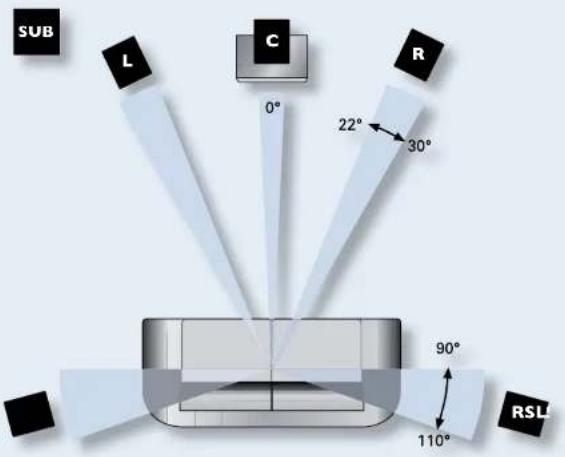
Proper speaker placement is the key to the best home theatre sound (see diagram).
As a rough guide, speakers should be placed on rigid stands at about 15cm from the rear wall and at least 60cm from any side wall. Speakers should never be placed on the floor (unless they are floor-
standing speakers), or in corners. The speaker drivers should be at, or a little above, ear level when seated. If possible, centre your seating area between the surround speakers.
The final sound will depend on the acoustics of the listening room and experimenting with speaker positioning is very worthwhile.
Subwoofer
The location of Logo will affect the overall sound quality. Placing the subwoofer next to a wall or in a corner will often boost efficiency and give a cleaner low bass sound. However, all rooms react differently and we recommend that you experiment with subwoofer positioning.
Speaker stands
The more firmly a speaker is held, the better it will sound. We recommend the use of rigid metal stands of 40–60cm height. Properly damped types that do not 'ring' when tapped with a pencil (either by virtue of construction, or because they are filled with dry silver sand) will bring out the best in a speaker. Ensure that the stands and/or speakers do not wobble.

Sub/full range+sat system
This is a surround-sound system (such as Arcam's Solo Movie S.1) where full range I and R speakers are combined with satellite (or with full range) rear speakers. The system should be connected with both the sub, subwoofer or use output connected to IN LFE and Left/Right preamplifier outputs attached to IN LIN R on Logo.
In such systems, Logo can be set up to work with two crossover frequencies. One frequency is set up for the rear speakers using the surround amplifier crossover, and one frequency for the full range Left and Right speakers, using the Logo crossover.
Direct mode in Arcam surround amplifiers
If you wish to have your system set up to use the crossover in the surround amplifier for 5.1 or 7.1 material, but use Left and Right full range speakers with Logo filling in for two-channel material, you can use Direct mode.
Connect the amplifier and Logo as in the Sub/full range+sat system diagram. In the amplifier, set up all speakers to 'Small'; this redirects bass to Logo via the LFE channel. To use the system's full range, activate 'Direct mode' for two-channel sources. This sends the full range signals to the Left and Right speakers and use the IN DIN R inputs to Logo via its own crossover.
Stereo system with no LFE
This is a typical two-channel system (such as Arcam's Solo). Logo is connected to L/R preamplifier outputs. The crossover frequency on Logo should be adjusted to the low frequency roll off of the main speakers (see the manual for your speakers for this information). The Q-control (x-over q) can be used to fine-tune the integration of Logo and your main speakers.
Sub/sat system
This is a surround-sound system (such as Arcam's Solo Movie 5.1) where all the main speakers are satellite speakers, defined as "Small". Logo is connected to output marked sub, SUBWOOFER or LIFE.
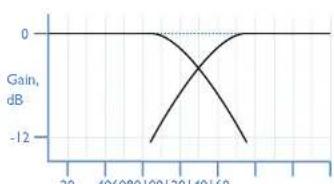
The LTE input bypasses the crossover in Logo, so the crossover frequency should be set by the surround sound amplifier. For the crossover setting, please see the response of your satellite speakers which may vary from around 70Hz for large satellites, to 150Hz for small satellites. We recommend 80Hz as a starting point if you are unsure.
The subwoofo's has two jobs: firstly to reproduce accurately and with sufficient power the sub-bass that other 'smaller' speakers cannot (the centre speaker is almost always a 'small' speaker); and secondly to reproduce the 'I' or low frequency effects (LFE) track of 5.1 or 7.1 material.
For optimum results, the subwoofer must be set up in the correct relation to the other speakers in the system. The two relevant controls are the crossover point and the subwoofer level. The crossover point establishes the frequency below which signals are redirected away from 'small' speakers toward the subwoofer. Setting the subwoofer level ensures signals that are of equal volume achieve the same sound pressure level no matter what frequency they are or which speaker they come from (i.e. subwoofer or satellite speaker).
In most surround-sound systems, two crossovers are available: one in the surround-sound decoder and one in the Logo unit.
In order to get the optimum sound in a variety of systems, Logo allows these controls to be used independently for systems with 'Large' front speakers and an LFE output from the surround-sound decoder.
Recommended settings for use with Muso speakers
Arcam's Muso satellite speakers ideally complement the sound quality and design values of Logo. The recommended settings of Logo for use with Muso speakers are:
| X-OVER FREQ | 90Hz |
| X-OVER Q | 0.5 |
| VOLUME | 8 |
| PHASE | 0^ |


Crossover frequency setting
In most systems, a crossover point for Logo of 901-lz is recommended.
If your satellite speakers are very 'Small' (and thus cannot reproduce much bass) you might like to set the crossover point higher than this figure to allow Logo to do more of the work. However, be aware that the higher the crossover point, the more directional the low frequency sounds, thus the more easily identifiable is the subwoofer's physical position
If your satellite speakers can reproduce reasonable bass, you can try a lower crossover point. Experimentation and listening will guide you to the right spot.

Crossover Q setting
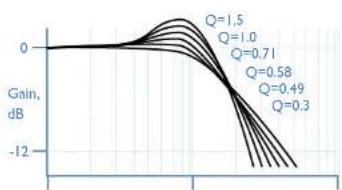
The x-over q setting controls the slope of the trace beyond the cutoff frequency, in ctBioctave. The aim is to make a 'mirror image' match with the slope of the high-pass filter—a steep cut-off of the high-pass filter from the sound processor/receiver should be matched by a steep cut-off of the low-pass filter from Logo. Similarly, if the sound processor/receiver provides a more gradual cut-off, the x-over q setting should have a lower value.

Volume level setting
Accurate volume level setting for a subwoofer ideally requires specialist measuring equipment such as a Real Time Spectrum Analyser or RTA. A regular SPL (Sound Pressure Level) meter will not work for this! For most systems though simple experimentation by ear will suffice. Start with a medium settling (5) and experiment with volume until low frequency sounds can be heard as part of the main sound and not traceable to the subwoofer directly. Most sound processors or receivers allow Sub levels to be trimmed 'on the fly' to counter excessively high or low levels from particular source material.

Phase setting
This has two settings: with the PHASE button out (0°) and with the button in (180°).
A phase delay may be used to counteract the effect of sound waves from Logo interacting with and partially cancelling out or unduly emphasising sound from the satellite speakers. This effect depends critically on the relative positioning of subwoofer and satellite speakers and can also be remedied by relocating the subwoofer a short distance. The phase selling is available if relocation is not possible or impractical.
line
| x | Gain, dB | | ---- | -------- | | 20 | 0 | | 40 | 0 | | 60 | 0 | | 80 | 0 | | 100 | -12 | | 120 | -12 | | 140 | -12 | | 160 | 0 |Crossover frequency, Hz
line
| Q | Gain, dB | |------|----------| | 1.5 | 0 | | 1.0 | 0 | | 0.71 | 0 | | 0.58 | 0 | | 0.49 | 0 | | 0.3 | 0 |Crossover frequency

Technical specifications
| System design One-way speaker, with 10 litres internal volume. The cabinet is solidly constructed from machined MDI with internal bracing. |
| Drive unit 10" (254mm) subwoofer drive unit with long excursion, magnetically shielded. |
| Frequency range 20Hz to 250Hz |
| Impedance 1Ω nominal |
| Sensitivity 85cB/wart, measured at 1m |
| Crossover Fourth order Linkwitz Riley crossover circuit, 24dB/octave (80dB/decade), adjustable for frequency and Q. |
| Connections left, right and sub inputs and outputs RCA phone sockets (gold), max 2.5V, >22kΩ. The unit may be 'easy-chained'. |
| Mairs supply 100V 240V at 50/60Hz. Fuse T2.5AL 250V |
| Amplifier 200 watts/1Ω, under normal operating conditions, 275W max. |
| Finish Black paint |
| Dimensions 280 x 290 x 416mm (WxDxH) |
| Mass Net 15kg (Note:Take care when lifting the unit) |
| Note that all specification values are typical, unless otherwise stated. |
Continual improvement policy
Arcam has a policy of continual improvement for its products. This means that designs and specifications are subject to change without notice.
Worldwide Guarantee
This entitles you to have the unit repaired free of charge, during the first two years after purchase, at any authorised Arcam distributor provided that it was originally purchased from an authorised Arcam dealer or distributor. The manufacturer can take no responsibility for defects arising from accident, misuse, abuse, wear and tear, neglect or through unauthorised adjustment and/or repair, neither can they accept responsibility for damage or loss occurring during transit to or from the person claiming under the guarantee.
The warranty covers:
Parts and labour costs for two years from the purchase date. After two years you must pay for both parts and labour costs. The warranty does not cover transportation costs at any time.
Claims under guarantee
This equipment should be packed in the original packing and returned to the dealer from whom it was purchased, or failing this, directly to the Arcam distributor in the country of residence.
It should be sent carriage prepaid by a reputable carrier – not by post. No responsibility can be accepted for the unit whilst in transit to the dealer or distributor and customers are therefore advised to insure the unit against loss or damage whilst in transit.
For further details contact Arcam at
Arcam Customer Support Department,
Pembroke Avenue, Waterbeach,
CAMBRIDGE, CB25 9QR, England
www.arcam.co.uk.
Problems?
If your Arcam dealer is unable to answer any query regarding this or any other Arcam product please contact Arcam Customer Support at the above address and we will do our best to help you.
On-line registration
You can register you product on-line at www.arcom.co.uk.
- Important safety instructions
- Take heed of warnings and instructions
- Water and moisture
- Object or liquid entry
- Ventilation
- Heat
- Climate
- Siting the unit
- Power sources
- Power-cord protection
- Protection from electrical storms
- Abnormal smell
- Cleaning
- Servicing and repair
- Safety compliance
- contents
- What's in the box?
- thank you...
- Positioning the unit
- Power
- Indicator LED
- Standby switch
- Interconnect cables
- Connecting to a sound source
- After connecting
- Care of your speaker
- Running-in
- Cleaning
- Power handling
- speaker positioning
- Room acoustics
- Speaker setup
- Subwoofer
- Speaker stands
- Sub/full range+sat system
- Direct mode in Arcam surround amplifiers
- Stereo system with no LFE
- Sub/sat system
- Recommended settings for use with Muso speakers
- Crossover frequency setting
- Crossover Q setting
- Volume level setting
- Phase setting
- Continual improvement policy
- Worldwide Guarantee
- The warranty covers:
- Claims under guarantee
- Problems?
- On-line registration
Brand : ARCAM
Model : Solo Logo
Category : Subwoofer