
Blender Pro - Blender DUALIT - Free user manual and instructions
Find the device manual for free Blender Pro DUALIT in PDF.


| Product Type | Blender |
| Brand | Dualit |
| Model | Blender Pro |
| Dimensions (H x W x D) | 400 x 200 x 200 mm |
| Weight | 3.5 kg |
| Power | 1200 W |
| Voltage | 220-240 V, 50/60 Hz |
| Capacity | 1.5 L |
| Material - Jug | BPA-free Tritan |
| Material - Blade | Stainless steel |
| Speed Settings | Variable speed with pulse function |
| Functions | Blend, crush ice, smoothie, soup, puree |
| Safety Features | Locking lid, overload protection, non-slip feet |
| Cleaning | Dishwasher-safe jug and lid |
| Warranty | 2 years |
| Included Accessories | Tamper, recipe book |
Frequently Asked Questions - Blender Pro DUALIT
User questions about Blender Pro DUALIT
0 question about this device. Answer the ones you know or ask your own.
Ask a new question about this device
Download the instructions for your Blender in PDF format for free! Find your manual Blender Pro - DUALIT and take your electronic device back in hand. On this page are published all the documents necessary for the use of your device. Blender Pro by DUALIT.
USER MANUAL Blender Pro DUALIT
natural_image
Black and white photo of a modern kitchen blender with a handle and control panel (no visible text or symbols)INSTRUCTION AND
GUARANTEE OF
THE DUALIT BLENDER
CONTENTS
IMPORTANT SAFEGUARDS.... 4
KNOWING YOUR BLENDER...... 5
USING YOUR BLENDER...... 88
SERVICING & GUARANTEE.... 110
IMPORTANT SAFEGUARDS
When using electrical appliances, basic safety precautions should always be followed including the following:
READ ALL INSTRUCTIONS
- To protect against risk of electrical shock, do not put blender powerbase in water or other liquid
- Make sure the electrical outlet is rated at the same voltage as that stated on the bottom of the power base
- Close supervision is necessary when any appliance is used by or near children
- Unplug from outlet when not in use, before putting on or taking off parts, and before cleaning
- Avoid contact with moving parts
- Do not operate the blender with a damaged cord or plug or after appliance malfunctions, or is
dropped or damaged in any manner. Return appliance to the nearest Authorized Service Centre for examination, repair or electrical or mechanical adjustment
- Do not use outdoors
- Do not let cord hang over edge of table or counter
- Keep hands and utensils out of container while blending to reduce the risk of severe injury to persons or damage to the blender. A scraper may be used but must be used only when the blender is not running
- Blades are sharp. Handle carefully
- To reduce the risk of injury never place the cutter assembly blades on base without jug properly attached
• Always operate blender with Dualit lid in place
• This is an attended appliance
- The use of attachments, not recommended or sold by the manufacturer may cause fire, electric shock or injury
- When processing warm liquids, use heat proof gloves
- Be certain the jar is firmly on the base and the lid and blade assembly is locked in place before operating appliance
- Never feed food by hand. Always use food pusher
- Do not attempt to defeat the interlock mechanisms
• Servicing should be performed by a Dualit service representative - Never turn the blender "ON" for longer than one minute - it may overheat. All foods are fully processed within one minute, especially dry food and small portions
• Never blend more than 1.4 litres
SAFEGUARDS
- Never remove the jug from the power base until motor and blades are stationary. Damage to the clutch can occur
- Do not leave the blades in water and never leave the blender jug with any liquid inside it
- Keep jug empty when not in use
- Do not add boiling liquids or foods to glass jug. Always cool liquids or food items to below 60°C before adding
- Frozen foods with the exception of small pieces of fruit or ice cubes should not be placed in the jug
- Do not insert frozen items into jug taken directly from a hot dishwasher
- Do not immerse or wash jug in boiling or very hot water
SAVE THESE INSTRUCTIONS
KNOWING YOUR BLENDER
BEFORE PLUGGING IN
- Use this product with rated voltage A.C. outlet only
- Be sure to unplug the A.C. cord when blender is not being used
- Do not plug the appliance in before checking that the voltage indicated on the rating plate is the same as the electrical supply voltage
- If the power cord is damaged it must, for safety reasons, be replaced by Dualit or an authorised Dualit repairer
- If blender fails to operate refit lid ensuring correct positioning of the plunger into the Safety Interlock System and/or unplug for 15 minutes, plug in and try again
- Ensure the blade assembly is correctly fitted
If problems persist, either contact the shop where you purchased from, or contact Dualit customer services.
SAFETY INTERLOCK SYSTEM
This appliance is provided with a safety system which disables the mechanism if the jug lid or blade assembly is not fitted even if the switch button is ON.
Note: Do not use the jug to switch the appliance on and off.
Only use with the glass jar and lid firmly in place, ensure the lid and plunger are correctly positioned into the Safety Interlock System, page 7. A small micro switch detects if the blade assembly is locked into the collar and is located in the correct position. If the jug and blade unit are not correctly assembled the motor will not start.
ALWAYS PLACE ONE HAND ON TOP OF THE LID WHEN THE MOTOR IS RUNNING. ENSURE SAFETY INTERLOCK IS FIRMLY ENGAGED
KNOWING YOUR BLENDER
PARTS AND CONTROLS
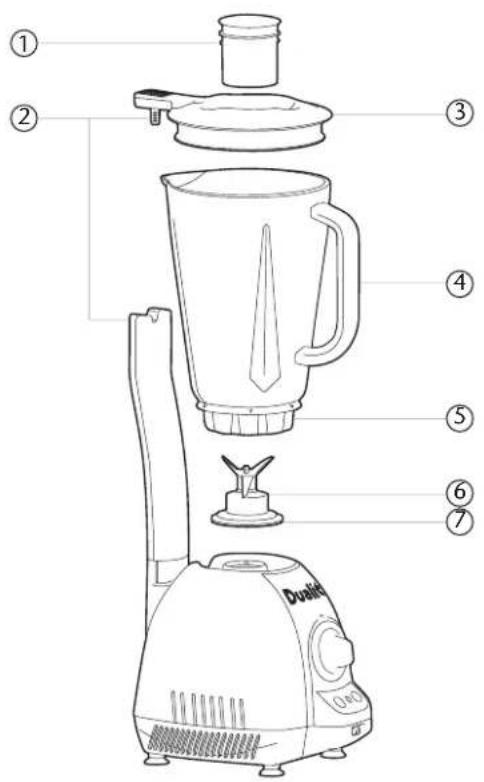
- Filler cap/Blade removal key
- Safety Interlock System
- Lid
- Glass jug with blades
- Collar
- Removable blade
-
Gasket
-
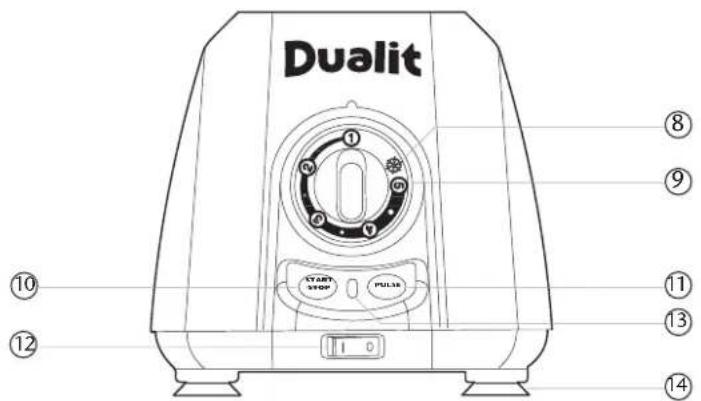
Smoothie setting
- Variable speed control
- Start/Stop button
- Pulse button
- Main On/Off
- Power light
- Sucker feet
KNOWING YOUR BLENDER
REMOVABLE BLADE
CAUTION: THE BLADES ARE VERY SHARP!
Unlocking the blade assembly for cleaning:
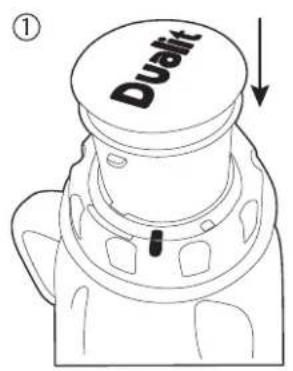
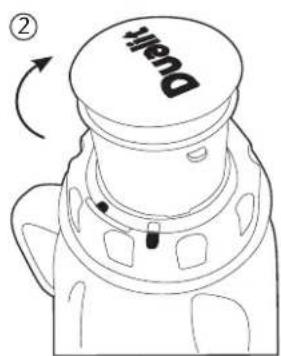
- The filler cap doubles as a key to unlock the blade from jug.
- To unlock the blade, remove the filler cap / key from the lid. Turn the jug upside down and rest on a steady surface.
- Position the key in the collar aligning the indicators on the collar as shown in Fig 1.
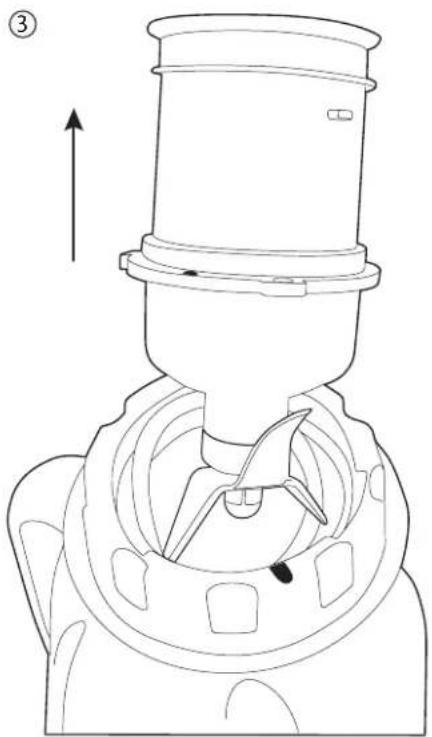
- Holding the jug steady, rotate the key clockwise Fig 2. to the unlock position indicated on the collar Fig 3. Then pull vertically to remove the blade assembly.
• To replace and lock the blade assembly, reverse the unlocking instructions.
natural_image
Technical line drawing of a mechanical component with an upward arrow indicator (no text or symbols present)ENSURE THE BLADE ASSEMBLY & RUBBER GASKET IS CORRECTLY LOCKED INTO THE JAR TO CREATE A WATER TIGHT SEAL BEFORE USING.
USING YOUR BLENDER
ASSEMBLING YOUR BLENDER
- Do not plug in until you have assembled your blender and unplug straight after use
- Prior to first use, wash lid, jug and blade unit
- Place the jug onto the power base
- Push the lid onto the jug and at the rear of the lid locate the plunger into the Safety Interlock
- The Dualit blender has a double Safety Interlock that prevents the motor running unless the lid and blade is correctly in position
FILLER CAP / BLADE KEY
- Remove cap and add ingredients only at slow speeds. When using at high speed, with a full jug or with warm contents, stop blender and then add ingredients
- The filler cap doubles up as a key for removing the blade assembly from the Jug for cleaning
BLENDING
- Plug power cord into earthed socket. Blender is now ready for use. Please Note: The Red power light indicates that there is power to the Blender. This light changes to a Green light when the blades are running
- Place fully assembled jug onto power base
- Insert foodstuffs into the jug
- Attach lid, ensuring the safety plunger is in place. Keep hand on rear of lid to ensure safety switch is engaged
- Switch unit on, the power light will slowly flash red
- Turn speed control knob to desired setting
-
Press the start/stop button, the red flashing light, will turn to solid green and the blades will rotate
-
To turn off, press the start/stop button again, the power light will return to flashing red
- To pour, using the handle, lift the jug vertically upwards off the blender base, remove the lid to pour
- The speed can be adjusted when blending by turning the speed knob in either direction
- All speeds can be used with pulse button. On the speed control knob 1 is slow 5 is fast
- When blending warmed foods, do not add 'hot' liquids to glass jug. Always allow liquid to cool below 60°C before adding to the jug and place a gloved hand over the lid and only operate on slow speed
- Do not insert frozen foods into jug taken directly from a hot dish washer
USING YOUR BLENDER
SMOOTHIE / ICE CRUSHING FEATURE
Create smoothies or crush ice in 45 seconds with the automated smoothie and ice crushing feature.

- Rotate the control knob clockwise to ice symbol, it will click into position. The power light will fast flash red
• FOR SMOOTHIES: Add you ingredients into the jug - Press the start/stop button, the power light will flash green while in use
The blade will then pulse at full speed for 1 second, then automatically reduce speed and run at the lowest setting for another 3 seconds. (This allows the mixture to drop down onto the blades to be processed.)
- The blender will continue alternating speeds for 12 cycles
-
Once complete the blender stops and reverts back to the standby
-
To switch off manually, press the Start/stop button, the power light will return to flashing red
- FOR ICE CRUSHING: Add ice cubes into the jug. Do not fill over half way and use single cubes no larger than 3 - 4cm Follow the instructions above to crush your ice in seconds
PULSE / TURBO FEATURE
- Place ingredients into the jug and firmly attach the lid
- Switch blender on ,the red standby light will flash
- Press pulse button, green light will glow and blades will rotate at full speed until button is released
- When blending at any speed the pulse button can be pressed for full speed and will hold full speed until pulse button is released the speed resumes as set on the knob
BLENDING TIPS
- Only use rubber spatula to mix foods when blender lid is removed, the speed knob is at speed 1 and the blades are stationary
• Always use the blender on a clean, dry surface. - Cut most foods into cubes approximately 3/4" (1.8cm) to 1" (2.5cm) to achieve a more uniform result
- Use a rubber or plastic spatula as needed, only when the motor is off. Never use metal utensils, as damage may occur to the jug and blades
- Place lid on firmly. The blender will only operate with the lid correctly positioned on the jug and the plunger inserted in the safety switch
• Always place one hand on top of the lid when the motor is running
USING YOUR BLENDER
BLENDING TIPS
- Cool hot foods to below 60°c before blending and with all foods, start at slow speed to combine ingredients then increase speed, if necessary. Use heat proof gloves, if blending warm foods
- For a thicker slushy consistency in frozen drinks, simply add more ice, a cube at a time, until desired consistency is reached
- When crushing ice, do not fill the jug over half way
- Use ice cubes no larger than 3 - 4cm^3 for even ice crushing
SERVICING
CLEANING
- Switch off, unplug and un-assemble before cleaning
- Do not let the power base, flex or plug get wet
- Wipe power base with damp cloth, then dry.
- Hand wash the blade assembly.
- The Jug, Lid and filler cap can be washed in dishwasher, using a low temperature cycle, then dry
- Alternatively to clean the jug, quarter fill with warm water, add a few drops of washing liquid and whizz for 30 seconds. Rinse
• To remove blade for cleaning, follow procedure on page 7 - Do not touch the blades - brush clean under a tap/faucet. Leave to dry out of children's reach
- Warning: Do not immerse or wash jug in boiling or very hot water above 60°C
GUARANTEE
If your blender fails within one year from date of purchase we will repair or replace it free of charge provided:
- You have not misused, neglected or damaged it
• It has not been modified - You supply your receipt showing When you bought your blender
The guarantee does not affect your statutory rights.
If over one year, contact Dualit for recommended repair agents.
Further advice on using your Dualit blender and other products in the Dualit Range is available from:
Dualit Customer CareLine on +44 (0) 1293 652 500 (09:00 to 17:00 Monday to Friday)
Alternatively email: info@dualit.com
Dualit does not assume any responsibility for incidental or consequential damages.
Dualit.®CE
DUALIT LIMITED COUNTY OAK WAY CRAWLEY WEST SUSSEX RH11 7ST
TELEPHONE: +44 (0) 1293 652 500 FACSIMILE: +44 (0) 1293 652 555
EMAIL: info@dualit.com WEB: www.dualit.com
- CONTENTS
- IMPORTANT SAFEGUARDS
- READ ALL INSTRUCTIONS
- SAFEGUARDS
- SAVE THESE INSTRUCTIONS
- KNOWING YOUR BLENDER
- BEFORE PLUGGING IN
- SAFETY INTERLOCK SYSTEM
- PARTS AND CONTROLS
- REMOVABLE BLADE
- CAUTION: THE BLADES ARE VERY SHARP!
- USING YOUR BLENDER
- ASSEMBLING YOUR BLENDER
- FILLER CAP / BLADE KEY
- BLENDING
- SMOOTHIE / ICE CRUSHING FEATURE
- PULSE / TURBO FEATURE
- BLENDING TIPS
- SERVICING
- CLEANING
- GUARANTEE
- Dualit.®CE
Brand : DUALIT
Model : Blender Pro
Category : Blender