MIX7 - Keyboard Tiptop Audio - Free user manual and instructions
Find the device manual for free MIX7 Tiptop Audio in PDF.


| Product Type | 7-Channel Mono Summing Mixer (Eurorack Module) |
| Brand | Tiptop Audio |
| Model | MIX7 |
| Format | Eurorack (3U, 8HP typical width) |
| Dimensions (Width x Depth) | 40.3mm x 40mm (approx) |
| Weight | ~100g |
| Power Requirements | +12V / -12V (typical 20mA) |
| Number of Input Channels | 7 |
| Signal Types Supported | Audio, CV, Triggers, Gates |
| Gain Modes | Unity Gain (OUT = IN) or Attenuated Gain (OUT = 0.4xIN) |
| Mode Selection | Jumper on rear panel |
| Output | 1 x Mixed mono output (3.5mm jack) |
| Indicator | Red LED for clipping indication |
| Applications | Drum mixing, waveform mixing, CV mixing, trigger/gate mixing, submixing |
| Expandability | Daisy-chain multiple MIX7 modules for more channels |
| Cleaning Instructions | Wipe with dry, soft cloth. Avoid liquids. |
| Safety Precautions | Use only in Eurorack cases with proper power; avoid shorts |
| Spare Parts Availability | Contact Tiptop Audio or authorized dealers |
| Repairability | Modular design; basic repairs possible by qualified technicians |
Frequently Asked Questions - MIX7 Tiptop Audio
User questions about MIX7 Tiptop Audio
0 question about this device. Answer the ones you know or ask your own.
Ask a new question about this device
Download the instructions for your Keyboard in PDF format for free! Find your manual MIX7 - Tiptop Audio and take your electronic device back in hand. On this page are published all the documents necessary for the use of your device. MIX7 by Tiptop Audio.
USER MANUAL MIX7 Tiptop Audio
MIX7 is a 7-channel mono summing mixer in Eurorack format that can be used to mix audio, CV, Triggers or Gate signals. There are two modes of operation that are set by a jumper at the back of the module.
Unity gain (JUMPER OFF: OUT = IN): The level of each input equals that of the output, what comes in comes out.
Attenuated gain (JUMPER ON: OUT = 0.4IN): The level of each input is attenuated at the output to provide more headroom for mixing hot (loud) audio signals without distortion.
The module is shipped in Unity mode, with the jumper off.
MIX7 can be used in multiple ways, so lets get started:
Drum Mixer
Sequence a drum pattern with up to 7 drum sounds, connect the audio output of each drum module to an input of MIX7. Connect the output of MIX7 to your sound system. Use individual volume controls on drum modules to set the drums balance.
Mixing Oscillators Waveform
Connect the waveforms from two Z3000's to the inputs of MIX7. Connect the mix output of MIX7 to your sound system through a Filter like the Z2040. You have just patched the audio part of a monophonic synth patch.
Mixing Control Voltage Sources
In this example we will need two Z4000 envelopes. Connect the outputs of both to the inputs of MIX7. Connect the mix output of MIX7 to your Frequency Modulation (FM) input of Z2040 filter. Now you can modulate the filter frequency with two envelopes.
Mixing Triggers And Gates
Connect the trigger outputs from your Circadian Rhythms or Trigger Riot to different inputs on the MIX7, send the MIX OUT to a Tiptop Audio ONE Sample Player, play with the Mute button on the sequencers to add and remove triggers from the mix.
Mixing More Than 7 Channels
MIX7 is a summing bus that can be expanded by using two or more MIX7 modules to add channels. Connect the output of the first MIX7 to input 1 on the second MIX7. Connect the output of the second MIX7 to your sound system. Now you have patched a 13-channel mixer.
Modes And Jumper Settings
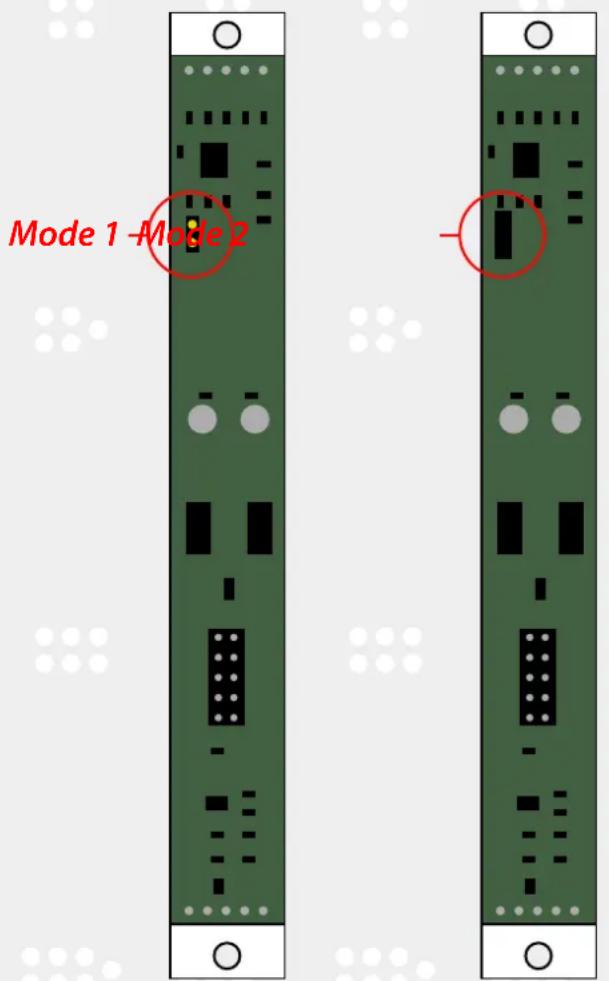
There are two modes of operation that are set by a jumper at the back of the module. With the jumper set on one pin or none of the pins the mode is set to Unity Gain, this is how your MIX7 is set by us when shipped to you. With the jumper set on two pins the mode is Attenuated Mode. On the back of the module the options appear as:
JUMPER OFF: OUT = IN
JUMPER ON: OUT = 0.4 IN
Mode 1 - Unity gain: the level of each input equals that of the output, what comes in comes out. This is the standard mode typical to modular synthesizer mixers. This mode is transparent with no added gain and can be used with all type of signals.
Mode 2 - Attenuated Gain: the level of each input is attenuated before it gets mixed to provide more headroom for mixing hot (loud) audio signals without distortion. This mode should be considered if you are planning to use MIX7 primarily for mixing hot signals like Tiptop drums and ONE Sample Player modules, giving you peace of mind knowing there is little chance of clipping the signals even when the volume levels of the sounds feeding the mixer are high. Mixing of audio signals with no distortion and clipping is essential for quality mixing, for example when mixing bass drums. In many cases bass drums are pure sine waves. If these waves are getting clipped, the bass drum gets added harmonics that change its purity. This can lead to a unintentionally distorted bass drum instead of a well-rounded one. Clipping is indicated by the RED led on the module.
Processing Drums In Groups
By using two or more MIX7 it's easy to create "subgroups". Subgroups are used to process groups of different sounds simultaneously. For example you can mix bass drums, toms and snare together using one MIX7 and Hi Hats and cymbals using another MIX7.
- Connect the output of the first MIX7 to a High Pass input on Forbidden Planet and the output of the second MIX7 to a delay.
- Connect MIX7 outputs to the inputs on a third MIX7.
- Connect the output of the third MIX7 to your sound system.
Now you have split your drum sounds into two separate processing groups: High-Pass filter on low and mid-range drums and delay on cymbals and hi hats. This is a typical workflow of signal routing and sound design inside the modular.
Mixing Oscillator Waveforms
- Tune your Z3000 oscillator to a nice bass frequency.
- Connect square wave to input 1 on MIX7.
- Connect mix output of MIX7 to the input of Z2040 filter.
-
Connect the output of Z2040 to your sound system.
-
Connect sine wave output of a second Z3000 tuned one octave lower than the first to channel 2 of MIX7.
Now you have a square wave tone reinforced by a sub bass sine wave that you can filter to taste.
A variation on the patch described above.
- Tune your Z3000 oscillator to a nice bass frequency.
- Conne.ct square wave output to the input of Z2040.
- Connect the output of Z2040 to input 1 on MIX7.
- Connect sine wave output of a second Z3000 tuned one octave lower than the first to channel 2 of MIX7.
- Connect mix output of MIX7 to your sound system.
Now you have a square wave tone that you can filter to taste reinforced by a sub bass sine wave that is filtered separately.
Mixing Control Voltages
- Connect saw wave output of Z3000 to the audio input of Z2040, connect the output of Z2040 to your sound system.
- Connect the output of Z4000 ADSR envelope to input 1 on MIX7.
- Connect the output of a second Z4000 to input 2 on MIX7.
- Connect the output of a third Z4000 to input 3 of MIX7.
- Connect the 16 step output of Z8000 to input 4 of MIX7.
- Connect the mix out of MIX7 to the frequency modulation input of Z2040.
Trigger the 3 envelopes from 3 separate tracks of Circadian Rhythms, clock Z8000 from the main Circadian Rhythms clock output. Now run the sequence. By creatively arranging your gate patterns that trigger the envelopes and mixing in modulation sequence you can create very interesting modulation patterns.
Connect The Sound Of Your Mobile Phone To Your Modular
MIX7 can even be used to amplify a weak signal. It's not the ideal way of doing that, but what happens if you don't have a dedicated amplifier module handy? Use Stackcables to send your phone audio to all 7 inputs on MIX7, (make sure MIX7 is set to UNITY MODE). MIX7 has now multiplied the gain of your phone by 7, making it usable for use in the modular.
Brand : Tiptop Audio
Model : MIX7
Category : Keyboard