
Mirage S70 - Treadmills Toorx - Free user manual and instructions
Find the device manual for free Mirage S70 Toorx in PDF.


| Product Type | Treadmill |
| Brand | Toorx |
| Model | Mirage S70 |
| Motor | DC motor |
| Speed Range | 1 - 18 km/h |
| Incline Range | 0 - 15 levels |
| Display Type | LED console with multiple windows |
| Preset Programs | 24 |
| User Programs | 4 (U1-U4) |
| Heart Rate Control (HRC) | 4 programs (HRC1-HRC4) |
| Heart Rate Monitoring | Hand grip sensors and chest strap (optional) |
| Body Fat Measurement | Yes |
| Bluetooth Music | Yes |
| Fan | 3-speed fan |
| Safety Key | Yes |
| Folding Design | Yes, with damper |
| Power Requirements | 110-240V, 50/60Hz |
| Maximum User Weight | 120 kg |
| Assembly Required | Yes |
| Included Tools | Hex wrenches (5mm, 6mm), screwdriver, lubricant |
Frequently Asked Questions - Mirage S70 Toorx
User questions about Mirage S70 Toorx
0 question about this device. Answer the ones you know or ask your own.
Ask a new question about this device
Download the instructions for your Treadmills in PDF format for free! Find your manual Mirage S70 - Toorx and take your electronic device back in hand. On this page are published all the documents necessary for the use of your device. Mirage S70 by Toorx.
USER MANUAL Mirage S70 Toorx
natural_image
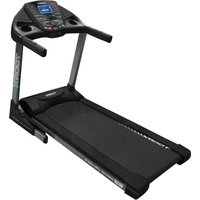
Black treadmill with visible branding and a digital display screen (no readable text or symbols on the device itself)
READY 3.0
mIRAGE S70
EXPLODED DRAWING

PARTS LIST
| PART NO | PART NAME | Q'TY |
| 1 | Front roller | 1 |
| 2 | Running belt | 1 |
| 3 | Rear roller | 1 |
| 4 | Running deck | 1 |
| 5 | Side rail | 2 |
| 6 | Fix cushion of running deck | 4 |
| 7 | Rubber cushion of running deck | 4 |
| 8 | Motor belt | 1 |
| 9 | Motor | 1 |
| 10 | Motor cover | 1 |
| 11 | Motor frame | 1 |
| 12 | Left end cap | 1 |
| 13 | Right end cap | 1 |
| 14 | Rear left level frame cover | 1 |
| 15 | Rear right level frame cover | 1 |
| 16 | Rear support cover | 1 |
| 17 | Rear adjustable foot | 2 |
| 18 | Running platform | 1 |
| 19 | Motor belly | 1 |
| 20 | Motor control board | 1 |
| 21 | Incline motor | 1 |
| 22 | Power wire | 1 |
| 23 | Motor adjustable plug | 1 |
| 24 | Power wire cushion | 1 |
| 25 | Fuse | 1 |
| 26 | Power switch | 1 |
| 27 | Incline frame | 1 |
| 28 | Incline frame shaft sleeve | 2 |
| 29 | Connect sleeve of Base frame | 2 |
| 30 | Damper | 1 |
| 31 | Base frame | 1 |
| 32 | Move wheel of base frame | 4 |
| 33 | Right inside protect cover | 1 |
| 34 | Right outside protect cover | 1 |
| 35 | Left inside protect cover | 1 |
| 36 | Left outside protect cover | 1 |
| 37 | Right upright | 1 |
| 38 | Left upright | 1 |
| 39 | Console frame | 1 |
| 40 | Handlebar down support | 2 |
| 41 | Foam | 2 |
| 42 | Right heart rate handle fix tube | 1 |
| 43 | Left heart rate handle fix tube | 1 |
| 44 | Heart rate handle | 2 |
| 45 | Aluminum top cap | 2 |
| 46 | Right cap frame | 1 |
| 47 | Right up cover of handle | 1 |
| 48 | Right up cover of main body | 1 |
| 49 | Right down cover of main body | 1 |
| 50 | Fix tube of heart rate handle | 2 |
| 51 | Right down cover of handle | 1 |
| 52 | Left cap frame | 1 |
| 53 | Left up cover of main body | 1 |
| 54 | Left down cover of main body | 1 |
| 55 | Left up cover of handle | 1 |
| 56 | Left down cover of handle | 1 |
| 57 | Press key up cover | 1 |
| 58 | Connect cover of handle | 1 |
| 59 | Press key panel | 1 |
| 60 | Press key down cover | 1 |
| 61 | Incline code switch | 1 |
| 62 | Code switch fix board | 2 |
| 63 | Safety key | 1 |
| 64 | Safety key fix board | 1 |
| 65 | Speed code switch | 1 |
| 66 | Encoder knob | 2 |
| 67 | Console down cover | 1 |
| 68 | Console frame | 1 |
| 69 | Fan adjustable board | 1 |
| 70 | Fan adjustable press board | 2 |
| 71 | Console up cover | 1 |
| 72 | Console LED panel | 1 |
| 73 | Phone frame | 1 |
| 74 | Display overlay | 1 |
| 75 | Press key overlay | 1 |
| 76 | Control board of console | 1 |
| 77 | 2 inches of the horn | 2 |
| 78 | 1.5 inches of the horn | 2 |
| 79 | Wind scooper | 1 |
| 80 | Fan | 3 |
| 81 | USB board | 1 |
| 82 | Control wire1 | 1 |
| 83 | Control wire2 | 1 |
| 84 | Control wire 3 | 1 |
| 85 | Control wire 4 | 1 |
| 86 | Magnet ring | 2 |
| 87 | Side rail cushion | 16 |
| 88 | Handle protect cover | 2 |
| 89 | Filter | 1 |
| 90 | ||
| 91 | M8*50 Allen head bolt | 1 |
| 92 | Φ8 Washer | 23 |
| 93 | M8*85 Allen head bolt | 2 |
| 94 | M8*65 Allen head bolt | 4 |
| 95 | M8*25 Allen head bolt | 4 |
| 96 | ST4.2*15 Screw | 16 |
| 97 | M8*20 Allen head bolt | 6 |
| 98 | Φ8 spring Washer | 8 |
| 99 | M8*25 bolts | 4 |
| 100 | ST4.2*10 Screw | 8 |
| 101 | ST4.2*15 Screw | 17 |
| 102 | ST4.8*16 Screw | 18 |
| 103 | ST4.8*16 Screw | 2 |
| 104 | M8*30 bolts | 2 |
| 105 | Φ16 plastic Washer | 2 |
| 106 | M8 Lock Nut | 9 |
| 107 | M10*50 Allen head bolt | 1 |
| 108 | Φ13 plastic Washer | 2 |
| 109 | M10 Lock Nut | 2 |
| 110 | M10*90 Allen head bolt | 1 |
| 111 | M8*45 Allen head bolt | 1 |
| 112 | M8*30 Allen head bolt | 2 |
| 113 | M8*40 Allen head bolt | 4 |
| 114 | M10*40 Allen head bolt | 2 |
| 115 | M8*25 Allen head bolt | 6 |
| 116 | M8*25 Allen head bolt | 8 |
| 117 | Φ8 Arc Washer | 2 |
| 118 | ST4.2*15 Screw | 65 |
| 119 | M10*30 Allen head bolt | 4 |
| 120 | Φ10 Washer | 4 |
| 121 | M8*35 Allen head bolt | 4 |
| 122 | M8*15 Allen head bolt | 2 |
| 123 | ST2.9*8 Screw | 62 |
| 124 | M4*16 bolts | 2 |
| 125 | M4 Lock Nut | 2 |
| 126 | M8*60 Allen head bolt | 1 |
| 127 | M8*35 Allen head bolt | 4 |
| 128 | ST4.2*30 Screw | 12 |
HARDWARE COMPARISON CHART
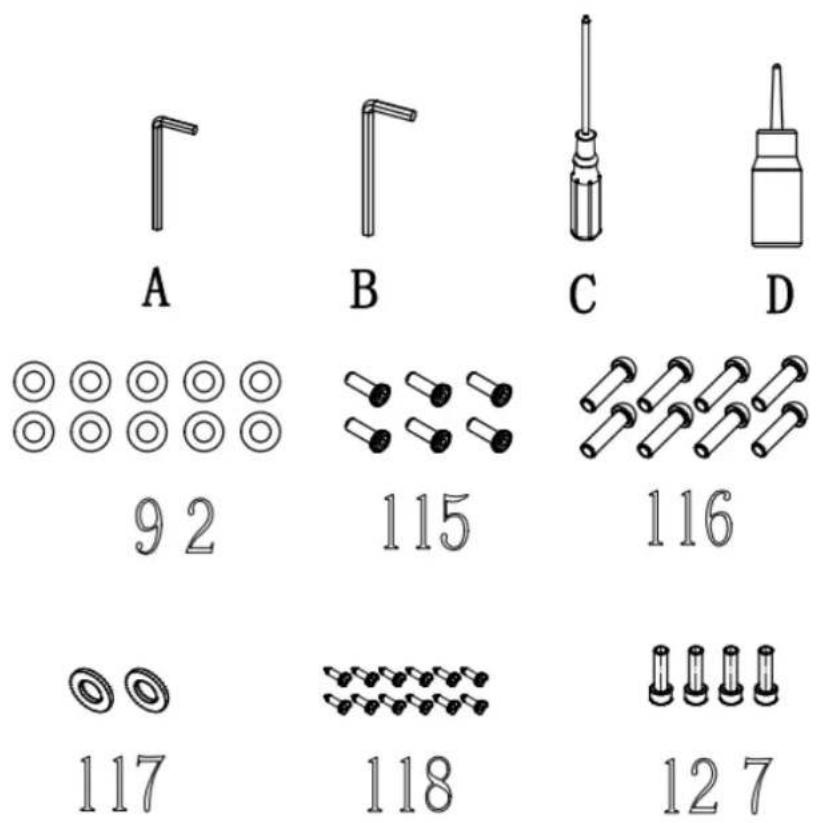
For your convenience, we have identified the hardware used in the assembly of this product. The chart below is provided to help you to identify items that may be unfamiliar to you.
| NO. | DESCRIPTION | Q'TY |
| 92 | 8 Washer | 10 |
| 115 | M8*25 Allen head bolt | 6 |
| 116 | M8*25 Allen head bolt | 8 |
| 117 | 8 Arc Washer | 2 |
| 118 | ST4.2*15 Screw | 6 |
| 127 | M8*35 Allen head bolt | 4 |
| A | 5mm SOCKET HEAD WRENCH | 1 |
| B | 6mm SOCKET HEAD WRENCH | 1 |
| C | SCREWDRIVER | 1 |
| D | LUBRICANT | 1 |
other
| Category | Value | |---|---| | A | 92 | | B | 115 | | C | 116 | | D | 127 |ASSEMBLY INSTRUCTIONS:
WARNING: Please put on all the screws, washers and bolts then tighten them.

STEP1:
Fix upright onto the base frame with M8*25 Allen head bolt115,M8*25 Allen head bolt116 and 8 Arc Washer117.

STEP2:
Fix the console onto the upright with
M8*25 Allen head bolt116 and
Φ8Washer92.

flowchart
graph TD
    A["Component A"] --> B["Component B"]
    B --> C["Component C"]
    C --> D["Component D"]
    D --> E["Component E"]
    E --> F["Component F"]
    F --> G["Component G"]
    style A fill:#f9f,stroke:#333
    style B fill:#f9f,stroke:#333
    style C fill:#f9f,stroke:#333
    style D fill:#f9f,stroke:#333
    style E fill:#f9f,stroke:#333
    style F fill:#f9f,stroke:#333
    style G fill:#f9f,stroke:#333
    subgraph SPEAK/PULSE
        A1["A"]
        B1["B"]
        C1["C"]
        D1["D"]
        E1["E"]
        F1["F"]
        G1["G"]
    end
    subgraph SPEED/INCLINE/SAFETY KEY
        A2["A"]
        B2["B"]
        C2["C"]
        D2["D"]
    end
SPEAK/PULSE
SPEED/INCLINE/SAFETY KEY
Connect all cable.
A. Main connection cable
B. Incline handlebar button cable
C. Speed handlebar button cable
D. Pulse cable
E. Pulse cable
F. Safety key cable
G. Cockpit cable


STEP3:
Fix the protect cover of upright onto the base frame with ST4.2*15
Screw118.
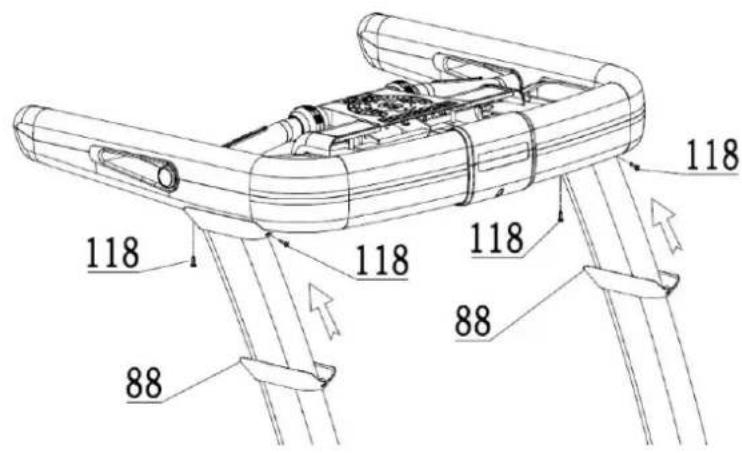
STEP4:
Fix the handle protective cover on the upright with ST4.2 * 15 Screw 50.

STEP5:
Fix console on the console frame with Φ8 Washer92 and 127.

natural_image
Line drawing of a treadmill with control panel and mechanical arms (no text or symbols)Folding illustration:
To unfold the treadmill:
Folding illustration:
To drop down treadmill:
-
Strike the damper.
-
Hold on to the top end covers and pull down the treadmill slowly on the ground.

natural_image
Line drawing of a treadmill with control panel and display screen (no text or symbols)To fold up the treadmill:
Both hands hold on the bottom end covers and lift up the treadmill.
COMPUTER OPERATION
The Operation
Run directly after pressing start
b) Target program
Press the target button to set the countdown to set the target time, distance, calories, and number of steps.
c) Fixed program (P01\~P24)
Press PROGRAM to select the program, use the up/down arrows to scroll through the list 24 programs can be used to select and set the running time (default 99 minutes), from 5 minutes to 99 minutes.
The 24 procedures are as follows:
□ 6 only change speed
□ 12 speeds and lifts all change
□ 6 only up and down changes
d) User mode
User mode U1\~U4, manual input time, speed and lift
e)HRC
There are 4 programs (HRC1, HRC2, HRC3, HRC4) HRC, you can set the time, age, weight, and display the maximum heart rate of the current program
The maximum heart rate is calculated as 220-age, and the user can adjust it with the up and down arrows
HRC1: 60% max
HRC2: 70% max
HRC3: 80% max
HRC4: 90% max
In HRC mode, the treadmill will only detect the heart rate through the chest strap.
f) Body Fat
Measure fat percentage
2 operation
Make sure the security key is inserted well, otherwise, the console will display "--"
a) Boot
After inserting the security key, turn on the power, the console displays the version number and TOTAL value. Then standby, default program: manual mode
Start 1.0km/h-0.0 lift, the user can freely change the speed/lift, the default maximum time is 99 minutes
b) start running
After standby or program setting, press <;Start>; count down with 3-2-1 (3s), and then start running.
c) Stop running
During operation, press <;stop/pause>; the motor and lifting motor stop
The first time the user presses stop/pause the treadmill, we pause and hold it for 2 minutes, then it will automatically stop and rise to 0.0
If you press stop/pause twice, the treadmill will stop, lift 0.0 and reset the data
When the safety switch is removed, the speed returns to zero. The slope is maintained. When the safety switch is put on again, the slope returns to zero.
d) Speed setting
When running, press speed +/- to increase/decrease speed by 0.1 or use smart ring to adjust 0.5/gear, speed adjustment range 1-maximum speed, speed shortcut keys <3>, <6>, <9>, <12> Set speed directly
e) Lift setting
When running, press up/down +/- to increase/decrease up/down 1, or use smart ring to adjust 1/gear, up/down adjustment range 0-15, up/down shortcut keys <3>, <6>, <9>, <12>Directly set the lift
f) Set the target program
In the standby mode, press TARGET to switch to the setting target time, distance, calories, steps usage mode
The currently set target will flash as a notification, press the up and down arrows to adjust the target value,
Long press for continuous adjustment, then press Enter to confirm
Target time: default value 30:00; range 5:00-99:00; 1st gear = 1 minute
Target calories: default value 50; range 10-990; level 1=10 calories
Target step: default 4000; range 1000-9900; 1st gear=100 steps
During the setting process, press
g) Set up a fixed program
In the standby state, press
Press Enter to confirm
Press MODE to set the time, and then use the up/down arrows to set the time (the default time is 30:00 minutes), the range is 5:00-99:00 minutes
h)HRC setting
Press HRC in standby
To select programs H1-H4, please use the up/down arrows and press Enter to confirm
• To adjust the value, press MODE
1) Set the time, the default value is 30 minutes, the range is 5\~99 minutes-then press Enter
2) Press MODE to set the age, the default value is 40, the range is 16-65-and then press Enter
3) Press MODE>; set the weight, the default value is 68 kg, the range is 40-130 kg-then press Enter
4) The suggested target will be displayed in the heart rate window, and the user can use the up/down arrows to change the value-then press Enter
Press
When the time countdown reaches zero, the treadmill stops
The HRC program is only applicable to the chest strap, and the speed and lift will be adjusted according to the current heart rate compared to the target heart rate
• Speed change relationship
A: Change frequency, HRC detects heart rate every 30 seconds (heart rate is always displayed).
B: If the user's heart rate is lower than the target heart rate by 30 beats/min, the speed will increase by 2.0 km/h.
C: If the user's heart rate is 6-29 beats/min below the target heart rate, the speed will increase by 1.0 km/h.
D: If the user's heart rate is higher than the target heart rate by 30 beats/min, the speed will decrease by 2.0 km/h.
E: If the user's heart rate is 6-29 beats/min higher than the target heart rate, the speed will decrease by 1.0 km/h.
G: The user's heart rate is higher or lower than the target heart rate 0-5 beats per minute, and the speed remains the same.
- In the following situations, decelerate to the minimum, run at the lowest speed for 15 seconds and then stop, and beep once every second.
A: The heart rate is detected every 30 seconds, if the heart rate is not detected twice in a row.
B: At a speed of 1 km/h, the exercise heart rate is greater than the target heart rate, resulting in deceleration.
C: When the heart rate exceeds (220-years old).
- At speeds above 1 km/h, the deceleration cannot be lower than 1 km/h. For example, the minimum speed of the treadmill is 1 km/h, and when running at 1.6 km/h, the heart rate will decelerate by 1.0 (2.0) km/h. Then decelerate to 1 km/h.
The slope is not controlled by the heart rate and can be adjusted manually.
The starting speed is 1 km/h, and the heart rate is not used for 1 minute before running.
Manual adjustment of speed and tilt is also available. The adjustment will be for the current 30 segments. When passed to the next step, the speed/tilt value will follow the HRC rules. Press the mode and the user can stop the HRC and run in the manual program
i) 【USER setting
In the standby mode, press USER
Press ENTER to set the time. Press ENTER again to confirm or START to directly start USER program operation.
The following is the setting method of 30-segment data of USER program
1) Press the MODE button to enter the data setting step. The data in the first column flashes to enter the editing state, press the speed +/- or use the speed shuttle switch to set the speed value. Press the slope +/- or the slope shuttle switch to set the slope value. The speed defaults to 1.0. The slope defaults to 0. Press ENTER to confirm to enter the next block.
2) The second step will flash-repeat all 30 steps
3) After setting all the 30-segment programs, press ENTER to return to the flashing state of the USER name, indicating that all the data has been recorded. At this time, you can press ENTER to set the running time. You can also directly press START to directly start running. Countdown at 0:00, the treadmill stops
j)【Body Fat】Test mode
Press BODY FAT in standby mode to enter the fat measurement mode
Energy window display: gender, default value: S-1, setting range: 1-2 1 = male 2 = female
Distance window display: age, default value: 25 years old, setting range: 10-99 years old
Steps window display: height, default value: 170cm, setting range 100-220cm
Speed window display: weight, default value: 70kg, setting range 20-150kg
1) Press MODE to enter the settings, use the up/down arrows to adjust gender, age, height and weight
2) After the parameter setting is completed, press the MODE matrix window to display 0.0
3) At this time, put your hands on the heart rate grip, the matrix window will display the measured body fat value after 8 seconds..
k) fixed program diagrams,
| TIME MODE | 1 2 | 3 4 | 5 6 7 | 8 9 | 10 11 | 12 13 | 14 | 15 16 | 17 18 | 19 | 20 21 | 22 23 | 24 | 25 26 | 27 28 | 29 30 | |||||||||||||||
| P-01 | SPD 13 | 3455 | 4433 | 2333 | 4554 | 4333 | 345 | 5443 | 31 | ||||||||||||||||||||||
| P-02 | SPD 24 | 6665 | 4443 | 346 | 6654 | 4434 | 666 | 5444 | 32 | ||||||||||||||||||||||
| P-03 | SPD 24 | 6776 | 6553 | 467 | 7665 | 5346 | 6776 | 6554 | 32 | ||||||||||||||||||||||
| P-04 | SPD 24 | 6866 | 5544 | 346 | 8665 | 5443 | 468 | 6655 | 32 | ||||||||||||||||||||||
| P-05 | SPD | 3 | 4 | 6 | 8 | 10 | 8 | 6 | 6 | 5 | 5 | 4 | 4 | 6 | 8 | 10 | 8 | 6 | 6 | 5 | 5 | 4 | 4 | 6 | 8 | 10 | 8 | 6 | 5 | 3 | 2 |
| P-06 | SPD | 3 | 4 | 6 | 8 | 10 | 12 | 10 | 8 | 6 | 5 | 4 | 6 | 8 | 10 | 12 | 10 | 8 | 6 | 5 | 4 | 6 | 8 | 10 | 12 | 10 | 8 | 6 | 5 | 3 | 2 |
| P-07 | spd 13 | 455 | 4433 | 2334 | 554 | 4333 | 345 | 5443 | 31 | ||||||||||||||||||||||
| inc 0 | 3344 | 6644 | 303 | 3446 | 6440 | 334 | 4664 | 430 | |||||||||||||||||||||||
| P-08 | spd 24 | 6665 | 4443 | 346 | 6654 | 4434 | 6665 | 5444 | 32 | ||||||||||||||||||||||
| inc 0 | 3355 | 6655 | 313 | 3446 | 6440 | 334 | 4664 | 430 | |||||||||||||||||||||||
| P-09 | spd 24 | 6665 | 4443 | 346 | 6654 | 4434 | 6665 | 5444 | 32 | ||||||||||||||||||||||
| inc 3 | 5359 | 4246 | 810 | 1055 | 5446 | 7874 | 445 | 7764 | 0 | ||||||||||||||||||||||
| P-10 | spd 24 | 6776 | 6553 | 467 | 7665 | 5346 | 7766 | 6554 | 32 | ||||||||||||||||||||||
| inc | 5 | 4 | 4 | 3 | 3 | 4 | 4 | 3 | 3 | 10 | 8 | 6 | 6 | 4 | 3 | 4 | 5 | 6 | 10 | 8 | 6 | 3 | 3 | 5 | 5 | 3 | 3 | 5 | 4 | 0 | |
| P-11 | spd 24 | 6776 | 6553 | 467 | 7665 | 5346 | 7766 | 6554 | 32 | ||||||||||||||||||||||
| inc 7 | 5434 | 5544 | 879 | 9554 | 6687 | 663 | 3466 | 440 | |||||||||||||||||||||||
| P-12 | spd 24 | 6866 | 5544 | 346 | 8665 | 5443 | 4686 | 6555 | 32 | ||||||||||||||||||||||
| inc | 6 | 4 | 4 | 3 | 4 | 4 | 5 | 6 | 7 | 7 | 10 | 8 | 6 | 5 | 6 | 7 | 9 | 7 | 8 | 10 | 10 | 8 | 6 | 5 | 7 | 7 | 10 | 8 | 5 | 0 | |
| P-13 | spd 24 | 6866 | 5544 | 346 | 8665 | 5443 | 4686 | 6555 | 32 | ||||||||||||||||||||||
| inc | 5 | 7 | 7 | 5 | 7 | 4 | 6 | 6 | 7 | 8 | 10 | 10 | 3 | 3 | 5 | 5 | 7 | 7 | 8 | 8 | 10 | 8 | 6 | 4 | 6 | 6 | 8 | 8 | 10 | 0 | |
| P-14 | spd | 3 | 4 | 6 | 8 | 10 | 8 | 6 | 6 | 5 | 5 | 4 | 4 | 6 | 8 | 10 | 8 | 6 | 6 | 5 | 5 | 4 | 4 | 6 | 8 | 10 | 8 | 6 | 5 | 3 | 2 |
| inc | 5 | 4 | 4 | 3 | 3 | 4 | 5 | 5 | 8 | 10 | 8 | 8 | 6 | 4 | 3 | 4 | 6 | 6 | 8 | 8 | 10 | 10 | 8 | 4 | 3 | 4 | 8 | 8 | 10 | 0 | |
| P-15 | spd | 3 | 4 | 6 | 8 | 10 | 8 | 6 | 6 | 5 | 5 | 4 | 4 | 6 | 8 | 10 | 8 | 6 | 6 | 5 | 5 | 4 | 4 | 6 | 8 | 10 | 8 | 6 | 5 | 3 | 2 |
| inc | 6 | 5 | 6 | 5 | 4 | 6 | 8 | 8 | 9 | 9 | 10 | 10 | 6 | 5 | 4 | 5 | 6 | 6 | 8 | 8 | 10 | 10 | 6 | 5 | 4 | 6 | 8 | 8 | 10 | 0 | |
| P-16 | spd 34 | 6781 | 8655 | 3467 | 7665 | 5346 | 6776 | 6554 | 32 | ||||||||||||||||||||||
| inc | 8 | 8 | 6 | 5 | 6 | 5 | 6 | 8 | 8 | 10 | 10 | 8 | 6 | 4 | 6 | 6 | 8 | 8 | 10 | 8 | 6 | 5 | 5 | 8 | 6 | 8 | 10 | 10 | 12 | 0 | |
| P-17 | spd | 3 | 4 | 6 | 8 | 10 | 12 | 10 | 8 | 6 | 5 | 4 | 6 | 8 | 10 | 12 | 10 | 8 | 6 | 5 | 4 | 6 | 8 | 10 | 12 | 10 | 8 | 6 | 5 | 3 | 2 |
| inc | 8 | 8 | 6 | 5 | 4 | 3 | 4 | 5 | 6 | 6 | 10 | 6 | 6 | 4 | 3 | 4 | 6 | 8 | 10 | 12 | 10 | 8 | 4 | 3 | 4 | 6 | 8 | 10 | 12 | 0 | |
| P-18 | spd | 3 | 4 | 6 | 8 | 10 | 12 | 10 | 8 | 6 | 5 | 4 | 6 | 8 | 10 | 12 | 10 | 8 | 6 | 5 | 4 | 6 | 8 | 10 | 12 | 10 | 8 | 6 | 5 | 3 | 2 |
| inc | 10 | 9 | 8 | 7 | 6 | 5 | 6 | 7 | 8 | 10 | 12 | 8 | 7 | 6 | 5 | 6 | 7 | 8 | 10 | 12 | 10 | 8 | 6 | 5 | 6 | 7 | 8 | 10 | 12 | 0 | |
| P-19 | INC 03 | 3446 | 5443 | 0334 | 4665 | 4403 | 3446 | 6443 | 30 | ||||||||||||||||||||||
| P-20 | INC 35 | 5942 | 2468 | 1010 | 5554 | 4678 | 7444 | 4577 | 640 | ||||||||||||||||||||||
| P-21 | INC | 5 | 4 | 4 | 3 | 3 | 4 | 4 | 3 | 3 | 10 | 8 | 6 | 6 | 4 | 3 | 4 | 5 | 6 | 10 | 8 | 6 | 3 | 3 | 5 | 5 | 3 | 3 | 5 | 4 | 0 |
| P-22 | INC | 6 | 5 | 6 | 5 | 4 | 6 | 8 | 8 | 9 | 9 | 10 | 10 | 6 | 5 | 4 | 5 | 6 | 6 | 8 | 8 | 10 | 10 | 6 | 5 | 4 | 6 | 8 | 8 | 10 | 0 |
| P-23 | INC | 8 | 8 | 6 | 5 | 4 | 6 | 6 | 8 | 6 | 10 | 10 | 8 | 6 | 4 | 6 | 6 | 8 | 8 | 10 | 8 | 6 | 5 | 5 | 8 | 6 | 8 | 10 | 10 | 12 | 0 |
| P-24 | INC | 10 | 9 | 8 | 7 | 6 | 5 | 6 | 7 | 8 | 10 | 12 | 8 | 7 | 6 | 5 | 6 | 7 | 8 | 10 | 12 | 10 | 8 | 6 | 5 | 6 | 7 | 8 | 10 | 12 | 0 |
I) Fan switch
- Press the FAN switch to turn the fan on or off.
- Use the button + below to increase from level 1 to level 2, and press it again to increase to level 3.
- Use the button below-to decrease from level 3 to level 2, and then press it again to decrease to level 1. m) Bluetooth music
Turn on the phone's Bluetooth to pair with the searched Bluetooth device of the machine. After the connect successful, use the mobile phone to play music.

Garlando
GARLANDO SPA
Via Regione Piemonte, 32 - Zona Industriale D1
15068 - Pozzolo Formigaro (AL) - Italy
www.toorx.it - info@toorx.it

Brand : Toorx
Model : Mirage S70
Category : Treadmills