PP 50 - Scale PCE Instruments - Free user manual and instructions
Find the device manual for free PP 50 PCE Instruments in PDF.


| Product Type | Parcel Scale |
| Brand | PCE Instruments |
| Model | PP 50 |
| Weighing Range | 0 ... 50 kg / 0 ... 110 lb |
| Resolution | 1 g / 0.03 oz |
| Accuracy | ±0.1 % of weighing range |
| Units | lb/oz, kg/g, kg, g, lb, oz |
| Overrange Indication | "O-Ld" |
| Low Battery Indicator | "LO" |
| Auto Power Off | After 5 minutes of inactivity |
| Power Supply - Battery | 3 x 1.5 V AAA battery |
| Power Supply - Mains Adaptor | Primary: 100-240 V AC / 50,60 Hz; Secondary: 6 V DC, 1 A |
| Environmental Conditions | 5 ... 35 °C, <90 % RH, non-condensing |
| Weighing Platform Dimensions (folded) | 198 x 180 x 44 mm / 7.8 x 7.0 x 1.7 in |
| Weighing Platform Dimensions (unfolded) | 120 mm height / 4.7 in |
| Display Dimensions | 92 x 68 x 30 mm / 3.6 x 2.6 x 1.1 in |
| Display Cable Length | Spiral cable, 280 mm / 43 in |
| Weight (scale unit) | 810 g / 28.5 oz |
| Functions | Tare, piece counting, hold, calibration, unit change, auto zero |
| Delivery Scope | 1 x scale, 3 x AAA batteries, 1 x mains adaptor, 1 x user manual |
| Cleaning | Use a damp cloth with pH-neutral cleaner; no abrasives or solvents |
| Safety Notes | Do not use in explosive atmospheres; avoid shocks and extreme temperatures; only qualified personnel should open the case |
Frequently Asked Questions - PP 50 PCE Instruments
User questions about PP 50 PCE Instruments
0 question about this device. Answer the ones you know or ask your own.
Ask a new question about this device
Download the instructions for your Scale in PDF format for free! Find your manual PP 50 - PCE Instruments and take your electronic device back in hand. On this page are published all the documents necessary for the use of your device. PP 50 by PCE Instruments.
USER MANUAL PP 50 PCE Instruments
User Manual
PCE-PP Series Parcel Scales

User manuals in various languages (français, italiano, español, português, nederlands, türk, polski, русский, 中文) can be found by using our product search on: www.pce-instruments.com
Last change: 28 February 2022
v1.0
Contents
1 Safety notes....1
2 Specifications.... 2
3 Delivery scope....2
4 Device description .... 3
4.1 Key assignment.... 4
5 Switching the scales on and off .... 4
6 Taring 4
7 Changing the unit....4
8 Piece counting function .... 4
9 Measured value .... 5
10 Calibration .... 5
11 Contact....6
12 Disposal 6
1 Safety notes
Please read this manual carefully and completely before you use the device for the first time. The device may only be used by qualified personnel and repaired by PCE Instruments personnel.
Damage or injuries caused by non-observance of the manual are excluded from our liability and not covered by our warranty.
- The device must only be used as described in this instruction manual. If used otherwise, this can cause dangerous situations for the user and damage to the meter.
- The instrument may only be used if the environmental conditions (temperature, relative humidity, ...) are within the ranges stated in the technical specifications. Do not expose the device to extreme temperatures, direct sunlight, extreme humidity or moisture.
- Do not expose the device to shocks or strong vibrations.
- The case should only be opened by qualified PCE Instruments personnel.
- Never use the instrument when your hands are wet.
- You must not make any technical changes to the device.
- The appliance should only be cleaned with a damp cloth. Use only pH-neutral cleaner, no abrasives or solvents.
- The device must only be used with accessories from PCE Instruments or equivalent.
- Before each use, inspect the case for visible damage. If any damage is visible, do not use the device.
- Do not use the instrument in explosive atmospheres.
- The measurement range as stated in the specifications must not be exceeded under any circumstances.
- Non-observance of the safety notes can cause damage to the device and injuries to the user.
We do not assume liability for printing errors or any other mistakes in this manual.
We expressly point to our general guarantee terms which can be found in our general terms of business.
If you have any questions please contact PCE Instruments. The contact details can be found at the end of this manual.
2 Specifications
| PCE-PP 20 | |
| Weighing range | 0 ... 20 kg / 0 ... 44 lb |
| Resolution | 1 g / 0.03 oz |
| Accuracy | ±0.1 % of weighing range |
| PCE-PP 50 | |
| Weighing range | 0 ... 50 kg / 0 ... 110 lb |
| Resolution | 1 g / 0.03 oz |
| Accuracy | ±0.1 % of weighing range |
| Further specifications | |
| Units | lb / oz, kg / g, kg, g, lb, oz |
| Overrange indication | "O-Ld" |
| Low battery voltage indicator | "LO" |
| Automatic power off | after 5 minutes of inactivity |
| Power supply battery | 3 x 1.5 V AAA battery |
| Power supply mains adaptor | primary: 100 ... 240 V AC / 50, 60 Hzsecondary: 6 V DC, 1 A |
| Environmental conditions | 5 ... 35 °C, <90 % RH, non-condensing |
| Weighing platform dimensions | 198 x 180 x 44 / (120 (unfolded)) mm /7.8 x 7.0 x 1.7 / (4.7 (unfolded)) " |
| Display dimensions | 92 x 68 x 30 mm / 3.6 x 2.6 x 1.1" |
| Display cable | spiral cable with a length of 280 mm / 43" |
| Weight | 810 g / 28.5 oz |
3 Delivery scope
1 x parcel scales PCE-PP Series
3 x 1.5 V AAA battery
1 x mains adaptor
1 x user manual
4 Device description
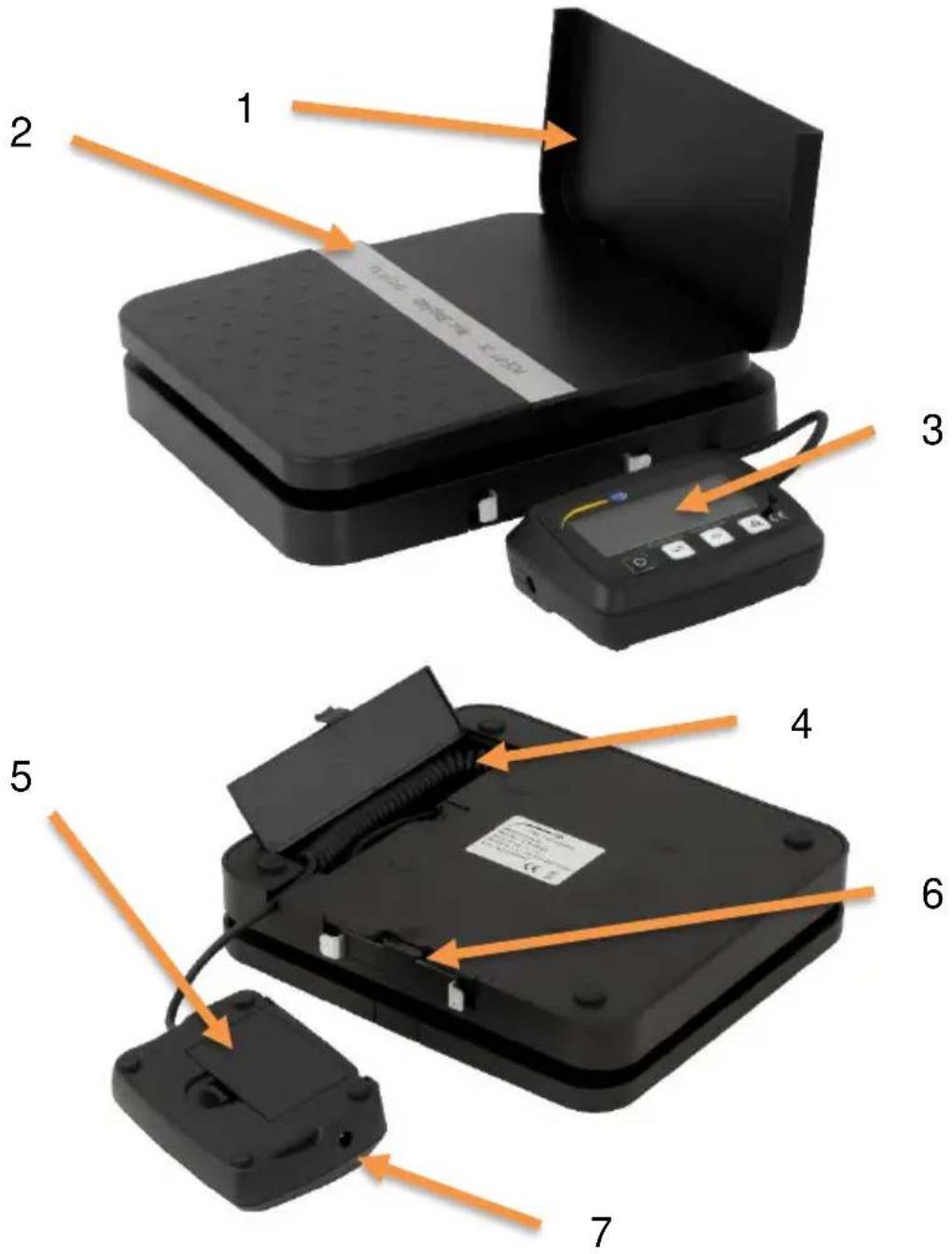
| No. | Description |
| 1 | Fold-out wall |
| 2 | Weighing surface |
| 3 | Display unit |
| 4 | Compartment for spiral cable |
| 5 | Battery compartment |
| 6 | Bracket for display unit |
| 7 | Mains connection |
4.1 Key assignment
| Key | Description |
 | On and off switch |
 | Unit key |
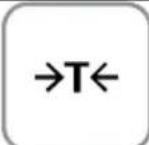 | Tare key |
 | Piece counting key |
5 Switching the scales on and off
To switch on the scales, briefly press the on/off key once. The measurement starts immediately. To switch off the scales, press the key again.
Note:
If you do not use the scales within 5 minutes, they switch off automatically. Note that the balance is zeroed when it is switched on. Zeroing does not increase the weighing range.
6 Taring
To tare the applied weight, press and release the tare key once.
Note:
Taring does not increase the weighing range.
7 Changing the unit
To select the unit, press the unit key repeatedly until you see your desired unit displayed. You can choose lb / oz, kg / g, kg, g, lb or oz.
8 Piece counting function
First place the reference weight on the weighing platform. To be able to use the piece counting function, now press and hold the piece counting key. With the unit key, you can now select how many pieces are on the scales. You can choose 25, 50, 75 or 100 pieces. Press the piece counting key again to use the piece counting function. To exit the piece counting function, press the unit key. You can repeat the piece count measurement with the same reference at any time by pressing and releasing the piece counting key once. If you want to teach in a new reference weight, start again with this paragraph and repeat the procedure.
9 Measured value
After the displayed reading has stabilised, the "hold" indicator flashes six times. As soon as "hold" stops flashing, the reading is held for another 6 seconds if the weight changes by more than 5 g.
Note:
This function cannot be disabled.
10 Calibration
To perform a calibration, press and hold the unit key while the scales are switched on until the scales' weighing range is briefly displayed once. You can then select the calibration weight. To do this, press the tare key. You can choose 5,000 g or 10,000 g. Then press the unit key. "CAL" briefly appears on the display. The set weight is then displayed flashing. Now place the set weight on the weighing cell. After a few seconds, "PASS" is shown on the display if the calibration was successful.
Note:
If you wish to cancel the calibration or if an error has occurred, you can cancel the calibration at any time by switching off the scales.
11 Contact
If you have any questions, suggestions or technical problems, please do not hesitate to contact us. You will find the relevant contact information at the end of this user manual.
12 Disposal
For the disposal of batteries in the EU, the 2006/66/EC directive of the European Parliament applies. Due to the contained pollutants, batteries must not be disposed of as household waste. They must be given to collection points designed for that purpose.
In order to comply with the EU directive 2012/19/EU we take our devices back. We either re-use them or give them to a recycling company which disposes of the devices in line with law.
For countries outside the EU, batteries and devices should be disposed of in accordance with your local waste regulations.
If you have any questions, please contact PCE Instruments.


PCE Instruments contact information
Germany France Spain
PCE Deutschland GmbH PCE Instruments France EURL PCE Ibérica S.L.
Im Langel 26 23, rue de Strasbourg Calle Mayor, 53
D-59872 Meschede 67250 Soultz-Sous-Forets 02500 Tobarra (Albacete)
Unit 11 Southpoint Business Park
Ensign Way, Southampton
Hampshire
United Kingdom, SO31 4RF
Tel: +44 (0) 2380 98703 0
Fax: +44 (0) 2380 98703 9
info@pce-instruments.co.uk
www.pce-instruments.com/english
Italy
PCE Italia s.r.l.
Via Pesciatina 878 / B-Interno 6
55010 Loc. Gragnano Pehlivan Sok. No.6/C
Capannori (Lucca)
Italia
www.pce-instruments.com/turkish
The Netherlands
PCE Brookhuis B.V.
Institutenweg 15
7521 PH Enschede
Nederland
Telefoon: +31 (0)53 737 01 92
info@pcebenelux.nl
www.pce-instruments.com/dutch Fax: +1 (561) 320-9176
info@pce-americas.com
www.pce-instruments.com/us
Brand : PCE Instruments
Model : PP 50
Category : Scale