
PC-Sub WL12 - Subwoofer Phase Technology - Free user manual and instructions
Find the device manual for free PC-Sub WL12 Phase Technology in PDF.


| Product Type | Wireless Powered Subwoofer |
| Model | PC-Sub WL12 |
| Brand | Phase Technology |
| Driver Size | 12" Long-Throw Mica-Graphite Poly Cone with NBR Surround |
| Frequency Response | 20 - 200 Hz |
| Amplifier Power | 300 W RMS, 900 W Peak |
| Low Pass Crossover | 35 - 120 Hz Variable, 24 dB/Octave, with LFE Setting |
| Phase Control | 0/180° Switchable |
| Gain Control | Adjustable Volume |
| Auto Power On/Off | Signal Sensing Auto Turn On/Off (after ~10 min silence) |
| Wireless Technology | 2.4 GHz Uncompressed Audio Streaming |
| Wireless Range | Up to 50 feet (15 m) |
| Inputs | Wireless Stereo RCA (via transmitter), Wired Mono RCA (Line In) |
| Cabinet Design | Down-firing woofer with rear slotted port |
| Grille | Black Cloth |
| Color | Gloss Black |
| Dimensions (H x W x D) | 16" x 15" x 16.375" (406 x 381 x 416 mm) |
| Weight | 41.52 lbs (18.84 kg) |
| Power Requirements | 100-240 V AC, 50/60 Hz (auto-sensing) |
| Included Accessories | Wireless Transmitter with Power Adapter, Power Cord, Vibration Isolation Pads |
| Warranty | 3 Years Electronics, 10 Years Speaker |
Frequently Asked Questions - PC-Sub WL12 Phase Technology
User questions about PC-Sub WL12 Phase Technology
0 question about this device. Answer the ones you know or ask your own.
Ask a new question about this device
Download the instructions for your Subwoofer in PDF format for free! Find your manual PC-Sub WL12 - Phase Technology and take your electronic device back in hand. On this page are published all the documents necessary for the use of your device. PC-Sub WL12 by Phase Technology.
USER MANUAL PC-Sub WL12 Phase Technology
PC SUB WL SUBWOOFERS
OWNER'S MANUAL: PC SUB WL-10 • PC SUB WL-12

natural_image
Technical line drawing of a speaker or audio component with concentric circular rings and mounting feet (no text or symbols)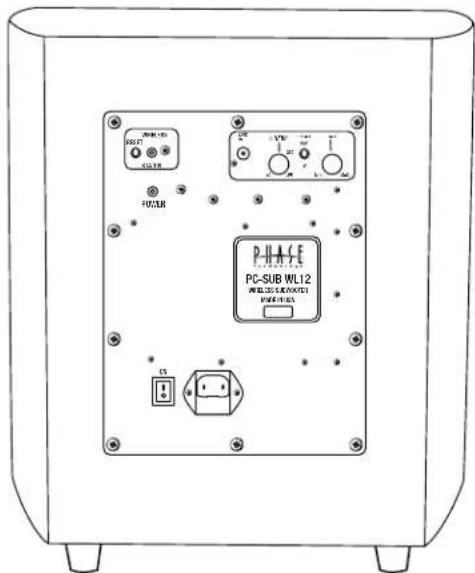

WL SUBWOOFER
REARVIEW
& TRANSMITTER
Thank you for choosing Phase Technology® speakers. We know there are a wide variety of choices available today, and we sincerely appreciate your purchase of our product. Phase Technology speakers are built to exacting standards and will provide many years of listening enjoyment.
Our speakers are the result of over five decades of designing and manufacturing. We hold many key patents in loudspeaker technology including the soft-dome tweeter. Our mission, our passion is to constantly advance the art and science of accurate audio reproduction. Our dedication insures your new speakers will accurately reproduce all the impact, detail and delicacy of today's digital technology.
Regardless of application, serious audiophile listening or home theater, we recommend that you take the time to read this manual thoroughly before connecting speakers to your amplifier or receiver. In the highly unlikely event that you should experience a problem with set-up or operation, please contact one of our authorized dealers for assistance, or contact us directly.
Phase Technology Corporation
8005 W. 110th St., Suite 208
Overland Park, KS 66210
855.663.5600 (Domestic)
+1.913.663.5600 (International)
Fax: 913.663.3200
[FEATURES]
- Down-firing woofers in a rear slotted port design
• 300 Watt RMS, 900-Watt Peak Power Internal Amplifier
• Signal Sensing Auto Turn On/Off - Gain Control
- Phase Switch
- Variable Crossover
- Line/LFE Input
•Wireless 2.4 GHz Uncompressed Audio Streaming - Servo-Control monitors and adjusts output for dynamic and undistorted response
SAFETY INSTRUCTIONS GETTING STARTED AND PRECAUTIONARY NOTES 3
SUBWOOFER PLACEMENT
SPEAKER CONNECTIONS
HOOKING UP YOUR PC SUB WL 4
AMPLIFIER SETUP AND BASS MANAGEMENT 4
SUBWOOFER AMPLIFIER PANEL
CARING FOR YOUR SPEAKERS 5
MAINTENANCE AND SERVICE
TROUBLESHOOTING 5
WARRANTY 6
SPECIFICATIONS 6
[SAFETY INSTRUCTIONS]
![Phase Technology PC-Sub WL12 - [SAFETY INSTRUCTIONS] - 1](/content/2026/05/913668/images/bc477d0b0a6dd2b66bd2ef5641127c507717fd2e3fa92aea2d7952385c4b3aaf.jpg)
CAUTION
RISK OF ELECTRIC SHOCK DO NOT OPEN

CAUTION: To reduce the risk of electric shock, do not remove cover (or back). No user-serviceable parts inside. Refer servicing to qualified service personnel.
Explanation of Graphical Symbols

The lightning flash with arrowhead symbol, within an equilateral triangle, is intended to alert you to the presence of un-insulated “dangerous voltage: within the product’s enclosure that may be off sufficient magnitude to constitute a risk of electric shock to persons.

The exclamation point within an equilateral triangle is intended to alert you to the presence of important operating and maintenance (servicing) instructions in the literature accompanying the appliance.
- Read Instructions - All the safety and operating instructions should be read before the appliance is operated.
- Retain Instructions - The safety and operating instructions should be retained for future reference.
- Heed Warnings - All warnings on the appliance and in the operating instructions should be adhered to.
- Follow Instructions - All operating and other instructions should be followed.
- Water and Moisture - The appliance should not be used near water - for example, near a bathtub, washbowl, kitchen sink, laundry tub, in a wet basement, or near a swimming pool, etc.
- Carts and Stands - The appliance should be used only with a cart or stand that is recommended by the manufacturer.
PORTABLE CART WARNING

- Wall or Ceiling Mounting - The appliance should be mounted to a wall or ceiling only as recommended by the manufacturer.
- Ventilation - The appliance should be situated so that its location or position does not interfere with its proper ventilation. For example, the appliance should not be situated on a bed, sofa, rug, or similar surface that may block the ventilation openings; or placed in a built-in installation, such as a bookcase or cabinet
that may impede the flow of air through the ventilation openings.
- Heat - The appliance should be situated away from heat sources such as radiators, stoves, or other appliances that produce heat.
- Power Source - The appliance should be connected to a power supply only of the type described in the operating instructions or as marked on the appliance.
- Power Cord Protection - Power supply cords should be routed so that they are not likely to be walked on or pinched by items placed up or against them, paying particular attention to cords at plugs, convenience receptacles, and the point where they exit from the appliance.
- Cleaning - The appliance should be cleaned only as recommended by the manufacturer.
- Nonuse Periods - The power cord of the appliance should be unplugged from the outlet when left unused for a long period of time.
- Object and Liquid Entry - Care should be taken so that neither objects fall nor liquids spill into the inside of the appliance.
- Damage Requiring Service - The application should be serviced by qualified service personnel when:
a. the power supply cord or the plug has been damaged,
b. objects have fallen onto or liquid has been spilled into the appliance,
c. the appliance has been exposed to rain,
d. the appliance does not appear to operate normally or exhibits a marked change in performance, or
e. the appliance has been dropped or the cabinet damaged.
- Servicing - The user should not attempt to service the appliance beyond those means described in the operating instructions. All other servicing should be referred to qualified service personnel.
- Grounding or Polarization - Precautions should be taken so that the grounding or polarization means of an appliance is not defeated.
APPLICABLE FOR USA, CANADA OR WHERE APPROVED FOR USAGE
CAUTION: TO PREVENT ELECTRIC SHOCK, MATCH WIDE BLADE PLUG TO WIDE SLOT, INSERT FULLY.
ATTENTION: POUR EVITER LES CHOCS ELECTRIQUES, INTRODUIRE LA LAME LA PLUS LARGE DE LA FICHE DANS LA BORNE CORRESPONDANTE DE LA PRESE ET POUSSER JUSQU AU FOND.
[PC SUB WL]subwoofers
[GETTING STARTED AND PRECAUTIONARY NOTES]
For proper connection and therefore full enjoyment of your new Phase Technology speakers, we encourage you to read this owners' manual thoroughly, even if you are very familiar with installing speakers and home entertainment equipment.
Speaker placement is very subjective. Placement follows the guidelines for the developers of multi-channel home entertainment systems, yet is also guided by personal preferences. The proper spacing, location and adjustment of front, rear and center-channel speakers as well as subwoofers are critical for complete enjoyment of your new speakers. This manual covers these topics thoroughly.
Before connecting your new speakers or other system components, turn the system power off and unplug your amplifier to avoid any possibility of damage from power surges or unbalanced loads before the system is properly connected.
Observe speaker polarity carefully! Every cable, speaker terminal and amplifier connection are clearly marked to show their positive (+) and negative (-) polarities. For ideal system performance, always connect the positive side of the cable (marked with a stripe, color and /or other indicator) to the positive terminals on your speakers and amplifier and the negative side of the cable to the negative terminals.
Amplifier selection is critical to your enjoyment of your new speakers. If you are considering upgrading your current component amplifier or multi-function receiver, we suggest purchasing as much power as your budget can afford. It will always be preferable to have an affordable high-powered model with fewer “bells and whistles” than a lower-powered model straining to operate near its power limits.
High volume settings that produce audible distortion – indicating an under-powered amplifier – could eventually damage your speakers and your amplifier.
Begin and end listening sessions at low volume levels so you will not power up your system the next time with possibly harmful high voltages. A damaging surge also could result if you change the input source (from FM tuner to CD player, for example) at high volume levels.
If you suspect that one channel of your amplifier has failed, have it repaired immediately by your dealer. Damage to your speakers could occur if you switch between the good and defective channels.
[SUBWOOFER PLACEMENT]
Subwoofer placement is less critical, because the frequencies they reproduce are omni directional. This means the human ear doesn't perceive these low frequencies as coming from a specific direction, enabling placement of a subwoofer virtually anywhere in the listening room.
It's best, however, to keep a subwoofer within the sound field of the other speakers. The closer the subwoofer is to a wall, the louder and more intense its bass output will be: this effect is even stronger when the sub is placed in or near a room's corner. If using two subwoofers, start by placing them next to the front left and right speakers, in both front corners or one in the corner and one 1/3 of the way along the front wall from the corner. Each room is different. Experiment with these options or try other locations until you get the best results. If you must choose a less-than-ideal position, the output level of Phase Technology powered subwoofers is adjustable to compensate for your listening environment.
[SPEAKER CONNECTIONS]
The following instructions apply whether you are using a separate amplifier or Home Theater receiver. For simplicity we will use the term “amplifier” throughout this manual to mean both.

Special note: Turn off and unplug your amplifier before connecting speakers.
Special Note: Observe Speaker Polarity Carefully!
Every cable, speaker and amplifier is clearly marked to show their positive (+) and negative (-) terminals. Amps and speakers may use some combination of these symbols and/or colors to indicate positive (usually red) and negative (usually black or white) connections. One strand of your cable will also be ridged and/or marked with a colored line or other indicator on the positive side. For proper polarity and, thus, ideal system performance, always connect the positive side of the cable to the positive terminals on your speakers and amplifier and the negative side of the cable to the negative terminals.
[HOOKING UP YOUR PC SUB-WL SUBWOOFER]
OPTION 1: WIRELESS SETUP The PC SUB WL wireless transmitter includes a power adapter. This power adapter is a universal adapter and is designed to operate on household power of 100-240V and 50/60Hz. Plug the power adapter into a convenient power outlet and the small coaxial power plug into the rear of the transmitter socket labeled "DC In +5V". The transmitter should power up and display a blue LED light on the front of the unit.
Next, connect the "SUB/Left IN" on the wireless transmitter to the "Subwoofer Out", "SUB OUT", or "Pre-Amp Out" connection on the rear of your receiver or processor using a dedicated RCA interconnect cable. Plug the PC SUB WL into a wall outlet and turn the power switch on. The power LED should turn red and the Wireless Status LED should be blue. The transmitter and the subwoofer now need to be synchronized (paired) so that they will recognize each other.
TRANSMITTER/RECEIVER PAIRING INSTRUCTIONS Up to two PC SUB WL Subwoofer systems can work in close proximity. When using two subwoofers each needs to be paired to its own transmitter. Pairing is done as follows:
-
Press the RESET button for the receiver unit on the back of the subwoofer once. The blue LED will start blinking quickly.
-
Press the button located on the bottom of the transmitter unit once. The Blue LED will start blinking quickly. After a few seconds both blue LEDs will stay on continuously. If pairing is not successful the blue LED on the Transmitter will start blinking slowly after 10 seconds. In this case, press the button on the transmitter again.
Note: There is no need to press the receiver button again (the button on the back of the subwoofer). The flashing Receiver LED indicates that the receiver is waiting for a transmitter to connect to it.
Two wireless PC SUB WL subwoofers can be used simultaneously, but each requires its own transmitter. If you already have one system installed, then repeat the above process but press the transmitter button on the second transmitter twice in order to avoid interference with the first system. Our wireless topology uses adaptive frequency hopping. If interference is detected the transmitter and receiver automatically switch to another channel. If for some reason the pairing is interrupted then re-pairing will resolve the problem and return the system to normal operation.
NOTE: Recommended wireless operating range is 50 feet. The range depends on usage and obstructions between the transmitter and receiver.
OPTION 2: WIRED DIRECT CONNECTION SETUP This is the recommended (wired) method of connection for those applications where the Wireless Transmitter will not be used. Never attempt to connect your PC SUB-WL using both the wired and wireless hookups.
Most A/V receivers and processors are equipped with a "Subwoofer Out" or "Pre-Amp Out" connection. Run a dedicated RCA interconnect cable from the "SUB OUT" terminal on your receiver or amplifier to the "LINE IN" terminal on the subwoofer.
![Phase Technology PC-Sub WL12 - [HOOKING UP YOUR PC SUB-WL SUBWOOFER] - 1](/content/2026/05/913668/images/3c776425361082dc89c89efbe4952a419f312c1ba19d54a5ccaabcbffdf4a0f9.jpg)
flowchart
graph LR
    A["Left Front"] --> B["Right Front"]
    B --> C["Center Channel"]
    C --> D["Left Sum"]
    D --> E["Right Sum"]
    E --> F["SUB OUT"]
    F --> G["Subwoofer"]
    G --> H["Line Input"]
Amplifier Panel
[AMPLIFIER SETUP AND BASS MANAGEMENT]
Many home theater receivers/processors have a feature that controls how the bass is processed and delivered to the subwoofer. It also adjusts the amount of bass that is sent to your satellite speakers. Look carefully in your amplifier or receiver's instruction manual for details on how to adjust for the speaker size (sometimes called "Speaker Setup") for your system.
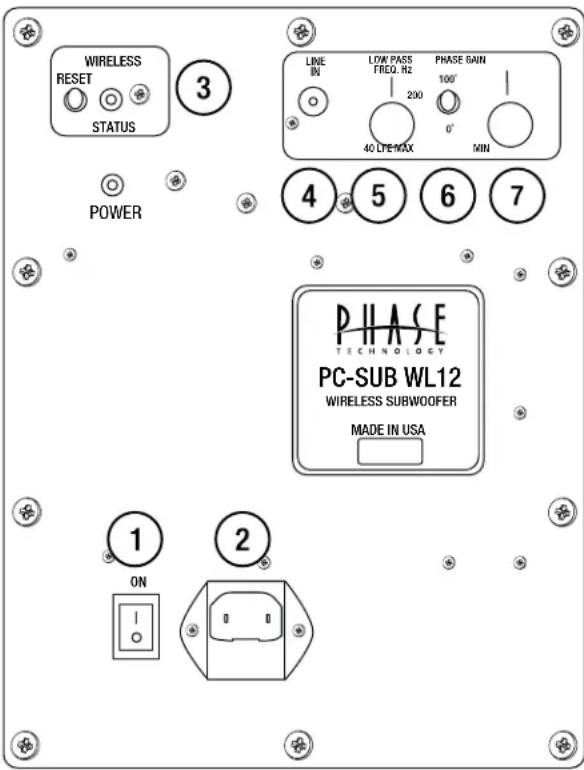
[SUBWOOFER AMPLIFIER PANEL]
-
Power/Auto ON/OFF: When this switch is left "ON", the subwoofer automatically activates upon detection of an audio signal; the subwoofer goes into "STANDBY" after approximately ten (10) minutes of silence. The LED on the amplifier will change from Red to Green when an input signal is detected and the amplifier turns on.
-
Power Input: Connects to a standard AC power outlet with the supplied power cord. The PC SUB WL is designed to adjust automatically to handle power sources of 100-240V, 50-60Hz. Please be certain that the proper fuse is installed on the amp for the input voltage used locally (see ratings on amplifier panel).
-
Wireless Signal: Blue LED light is on when wireless signal is being received. Press RESET to establish or re-establish a wireless connection. (See wireless set up instructions)
-
Line In: FOR WIRED CONNECTION ONLY: Using a high-quality RCA cable, connect the "SUB OUT" terminal on your receiver or processor to the "LINE IN" terminal on your PC SUB WL subwoofer. (See wired setup connection instructions.)
-
Low-Pass Frequency Control: If using the crossover setting in your A/V receiver or processor, set this control to "LFE" (Low-Frequency Effects). If using the sub's internal crossover, choose the setting that sounds best and matches the low-frequency cutoff of your main speakers. It may take some experimentation to find the best sound for your room and your equipment.
-
Phase Control: This adjustment matches the phase - the in and out movement of speaker cones - to that of your main speakers. Adjust this control by listening to music with bass content. The setting is correct when the bass sounds the fullest.
-
Gain Control: This adjustment increases or decreases the power, and thus volume, of the PC SUB WL. As with the Phase Control and the Low-Pass Frequency Control, it may take some experimentation to find the best sound for your system.
[VIBRATION ISOLATION PADS]
Included with your PC SUB-WL are a set of four (4) gray disks with an adhesive backing. The Vibration Isolation Pads should be used whenever your subwoofer is installed on any hard flooring surface. These pads prevent the subwoofer from moving against the floor when played at high levels. To use the pads, simply peel off the paper backing from the four disks and apply one pad to the bottom of each of the rubber feet of the subwoofer.
[CARING FOR YOUR PHASE TECHNOLOGY SPEAKER]
All Phase Technology speakers are finished with a high degree of craftsmanship in either hand polished paint or vinyl laminates. We recommend using a lint-free rag with a small amount of glass cleaner to maintain the long-lasting beauty of the finish. Avoid products containing silicones, oils, oil derivatives, or solvents. Enclosures finished in vinyl laminates may be cleaned with a damp cloth as necessary.
[MAINTENANCE AND SERVICE]
Because of Phase Technology's uncompromising quality control programs, it's unlikely that your speakers will ever need service if connected and used as outlined in this Owners' Manual. In the unlikely event that a problem does occur, please contact your Phase Technology dealer. Your dealer has the necessary factory-authorized parts and trained technicians to quickly restore your speaker to its original performance specifications.
[TROUBLESHOOTING]
NO SOUND
- Verify that all components are plugged in and turned on.
- Check all speaker wires and cables for loose connections.
- Check to see if you have selected the proper source on your amplifier.
VOICES DO NOT APPEAR TO COME FROM BETWEEN THE SPEAKERS / BASS RESPONSE IS WEAK
- Verify that all speaker connections from the amplifier to the speakers are running PLUS+ to PLUS+ and MINUS- to MINUS-.
- Check to see if there are any furnishings or plants that may be blocking the output of a speaker.
SOUND, BUT NO BASS (MOST LIKELY IN SYSTEMS WITH A SUBWOOFER)
-
Verify that the subwoofer is plugged into an AC outlet and power is turned on.
-
Check that the speaker wire / cable going from the amplifier/receiver to the subwoofer is securely fastened.
- Check the volume control of the subwoofer.
- Refer to your amplifier/receiver manual to make sure you have adjusted its bass output properly.
MUDDY OR BOOMY BASS
- Check the volume control for the subwoofer. Excess volume can cause speakers to sound distorted and unnatural.
- Try adjusting the crossover control on the subwoofer or the subwoofer setup on your receiver to a slightly lower frequency (example: reduce from 120 Hz to 80 or 60 Hz).
- If the subwoofer or full size speaker is close to a corner, side or back wall, try moving it away from the wall.
- Bookshelf speakers placed in a semi-enclosed space or cabinet can artificially emphasize bass output. Reduce the bass control on your amplifier or move the speakers to the front of the cabinet. Alternatively, reposition the speakers to a more open location.
DISTORTED SOUND FROM THE SPEAKERS
- This problem is usually caused by setting the volume control too high. Reduce the amplifier/receiver volume to a lower level.
- If noise and distortion are audible at higher volume levels, your amplifier may not be powerful enough. Consider upgrading to a unit with higher power.
NOTE: Remember, even though your Phase Technology speakers can handle considerable power levels, ANY speaker if used improperly can be damaged. Consult your Phase Technology dealer for assistance in choosing a new amplifier or receiver.
[WARRANTY]
LIMITED WARRANTY: Phase Technology warrants its loudspeakers to be free from defects in material and workmanship for a period of ten (10) years for speaker product, limited lifetime for CI speakers, and three (3) years for the electronic components to the original purchaser. Purchase must be made from an authorized Phase Technology dealer.
This warranty does not cover service or parts to repair damage caused by misuse, abuse, damage while in transit, alterations, unauthorized repairs, failure to follow instructions, fire, flood or any other cause beyond the reasonable control of Phase Technology. Defects in speaker cabinets or grilles must be brought to the attention of your dealer immediately after purchase. This warranty will be void if the products' serial number has been altered or removed.
Should your Phase Technology product require service, please call the MSE Audio customer service department for a return authorization. All merchandise returned to Phase Technology without prior authorization will be refused. For your return authorization number, please call 855.663.5600 or email sales@mseaudio.com.
[SPECIFICATIONS]
PC Sub WL-10 PC Sub WL-12
| Description: 10" Wireless Subwoofer w/ Passive Radiator | 12" Wireless Subwoofer w/ Passive Radiator |
| Frequency Response: 22 - 200 Hz | 20 - 200 Hz |
| Amplifier Power: 300 W Continuous, 900 W Peak | 300 W Continuous, 900 W Peak |
| Driver: 10" Long-Throw Mica-Graphite Poly Cone w/ NBR Surround | 12" Long-Throw Mica-Graphite Poly Cone w/ NBR Surround |
| Low Pass Crossover: 35 - 120 Hz Variable; 24 dB/Octave + LFE Setting | 35 - 120 Hz Variable; 24 dB/Octave + LFE Setting |
| Line Level Inputs: (2) Stereo RCA Wireless; Mono RCA Wired | (2) Stereo RCA Wireless; Mono RCA Wired |
| Outputs: N/A | N/A |
| Grille: Black Cloth | Black Cloth |
| Color Options: Gloss Black | Gloss Black |
| Dimensions: 13" H x 13.375" W x 14.5" D | 16" H x 15" W x 16.375" D |
| Weight: 40 lbs | 41.52 lbs |
| Included Accessories: N/A | N/A |
| Optional Accessories: N/A | N/A |
Copyright © 2016 MS Electronics, LLC. All rights reserved. MSE Audio, Phase Technology and PhaseTech are registered trademarks and
"Speakers for your Life" is a trademark of MSE Audio, Overland Park, Kansas USA. Phase Technology is part of MSE Audi®, www.phasetech.com.
MSE AUDIO® [INDUCTION DYNAMICS TECHNOLOGY PHASE Rocknastics SolidDrive SOUND TUBE ENTERTAINMENT SOUND SPHERE]
www.mseaudio.com | 8005 W. 110th Street | Suite 208 | Overland Park, KS 66210 | p:913.663.5600 | f:913.663.3200


- PC SUB WL SUBWOOFERS
- [FEATURES]
- [SAFETY INSTRUCTIONS]
- CAUTION
- Explanation of Graphical Symbols
- PORTABLE CART WARNING
- APPLICABLE FOR USA, CANADA OR WHERE APPROVED FOR USAGE
- [PC SUB WL]subwoofers
- [GETTING STARTED AND PRECAUTIONARY NOTES]
- [SUBWOOFER PLACEMENT]
- [SPEAKER CONNECTIONS]
- Special note: Turn off and unplug your amplifier before connecting speakers.
- Special Note: Observe Speaker Polarity Carefully!
- [HOOKING UP YOUR PC SUB-WL SUBWOOFER]
- [AMPLIFIER SETUP AND BASS MANAGEMENT]
- [SUBWOOFER AMPLIFIER PANEL]
- [VIBRATION ISOLATION PADS]
- [CARING FOR YOUR PHASE TECHNOLOGY SPEAKER]
- [MAINTENANCE AND SERVICE]
- [TROUBLESHOOTING]
- NO SOUND
- VOICES DO NOT APPEAR TO COME FROM BETWEEN THE SPEAKERS / BASS RESPONSE IS WEAK
- SOUND, BUT NO BASS (MOST LIKELY IN SYSTEMS WITH A SUBWOOFER)
- MUDDY OR BOOMY BASS
- DISTORTED SOUND FROM THE SPEAKERS
- [WARRANTY]
Brand : Phase Technology
Model : PC-Sub WL12
Category : Subwoofer