
LCUBE CUB-1 - Uncategorized ARRI - Free user manual and instructions
Find the device manual for free LCUBE CUB-1 ARRI in PDF.


| Product Type | LED Light Panel |
| Model | LCUBE CUB-1 |
| Brand | ARRI |
| Dimensions (H x W x D) | 15 x 15 x 15 cm (5.9 x 5.9 x 5.9 in) |
| Weight | 1.2 kg (2.65 lbs) |
| Power Supply | AC 100-240V, 50/60Hz or V-Mount battery |
| Power Consumption | 60W max |
| Light Output | 5000 lumens (tungsten and daylight balanced) |
| Color Temperature | 3200K - 6500K adjustable |
| CRI / TLCI | ≥ 95 / ≥ 95 |
| Dimming Range | 0-100% smooth dimming |
| Control Methods | On-board controls, DMX, Wireless (Bluetooth / App) |
| Mounting | Stand mount (5/8" receiver) and yoke |
| Cooling | Passive (no fan) |
| Operating Temperature | -20°C to 40°C (-4°F to 104°F) |
| Protection Rating | IP20 |
| Included Accessories | Power cord, battery adapter plate, gel frame holder |
| Warranty | 2 years |
| Repairability | Modular design; user-replaceable LED engine and power supply |
Frequently Asked Questions - LCUBE CUB-1 ARRI
User questions about LCUBE CUB-1 ARRI
0 question about this device. Answer the ones you know or ask your own.
Ask a new question about this device
Download the instructions for your Uncategorized in PDF format for free! Find your manual LCUBE CUB-1 - ARRI and take your electronic device back in hand. On this page are published all the documents necessary for the use of your device. LCUBE CUB-1 by ARRI.
USER MANUAL LCUBE CUB-1 ARRI
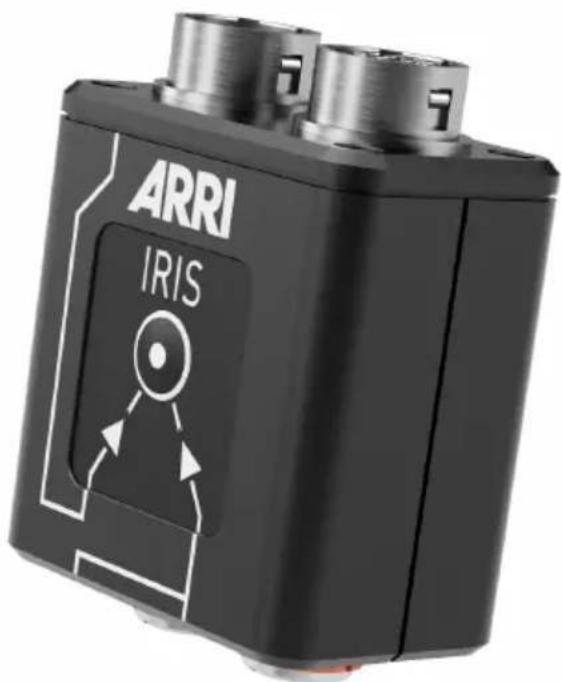
LBUS to ENG Protocol Converter
USER MANUAL
Date: 17th February 2017
Imprint
Copyright © 2016 Arnold & Richter Cine Technik GmbH & Co. Betriebs KG. All rights reserved. No parts of this document may be reproduced without prior written consent of Arnold & Richter Cine Technik GmbH & Co. Betriebs KG. Specifications are subject to change without notice. Errors, omissions, and modifications excepted.
ARRI, ALEXA, AMIRA, Master Grip, LDS and LENS DATA SYSTEM are trademarks or registered trademarks of Arnold & Richter Cine Technik GmbH & Co. Betriebs KG. All other brands or products are trademarks or registered trademarks of their respective holders and should be treated as such. Original version.
For further assistance
ARRI Cine + Video Geräte Gesellschaft m.b.H.
This User Manual applies to the following product:
KK.0013217 LCUBE CUB-2 with Software Update Packet (equals to SUP 1.0.0
K0.0012983)
Revision history
Version ID Order # Release Date
01 10001998 K5.0013264 F06071 21.02.2017
Disclaimer
Before using the products described in this manual, be sure to read and understand all the respective instructions.
The ARRI LBUS to ENG Protocol Converter LCUBE CUB-2 is/are only available to commercial customers. By utilization, the customer agrees that the LCUBE CUB-2 or other components of the system are deployed for commercial use only. Otherwise the customer must contact ARRI before utilization.
While ARRI endeavors to enhance the quality, reliability and safety of their products, customers agree and acknowledge that the possibility of defects thereof cannot be eliminated entirely. To minimize the risk of damage to property or injury (including death) to persons arising from defects in the products, customers must incorporate sufficient safety measures in their work with the system and heed the stated canonic use.
ARRI or its subsidiaries do not assume any responsibility for losses incurred due to improper handling or configuration of the LCUBE CUB-2 or other system components.
ARRI assumes no responsibility for any errors that may appear in this document. The information is subject to change without notice.
For product specification changes after this manual was published, refer to the latest published ARRI data sheets or release notes, etc., for the most up-to-date specifications. Not all products and/or types are available in every country. Please check with an ARRI sales representative for availability and additional information.
Neither ARRI nor its subsidiaries assume any liability for infringement of patents, copyrights or other intellectual property rights of third parties by or arising from the use of ARRI products or any other liability arising from the use of such products. No license, express, implied or otherwise, is granted under any patents, copyrights or other intellectual property right of ARRI or others.
ARRI or its subsidiaries expressly exclude any liability, warranty, demand or other obligation for any claim, representation, cause, action, or whatsoever, express or implied, whether in contract or not, including negligence, or incorporated in terms and conditions, whether by statute, law or otherwise. In no event shall ARRI
or its subsidiaries be liable for or have a remedy for recovery of any special, direct, indirect, incidental, or consequential damages, including, but not limited to lost profits, lost savings, lost revenues or economic loss of any kind or for any claim by a third party, downtime, good-will, damage to or replacement of equipment or property, any cost or recovery of any material or goods associated with the assembly or use of our products, or any other damages or injury of the persons and so on or under any other legal theory.
In the event that one or all of the foregoing clauses are not allowed by applicable law, the fullest extent permissible clauses by applicable law are validated.
Table of Contents
1 For your safety....6
2 Audience and intended use.... 8
3 Scope of delivery and warranty....9
4 LBUS....11
5 Introduction......12
5.1 Sample setup.... 13
6 Layout....14
6.1 Status.... 14
6.2 Setup button....15
7 Operation....16
8 Software update.... 17
9 Appendix.... 18
9.1 Part numbers.... 18
9.2 Pinouts.... 22
9.3 Compatibility....24
9.3.1 Cameras and lenses....24
9.3.2 Hand units....24
9.4 Specifications.... 25
9.4.1 Dimensions and weight.... 25
9.5 Service contacts....26
9.6 International declarations....27
1 For your safety
Before use, please ensure that all users read, understand, and follow the instructions comprehensively in this document.
Risk levels and alert symbols
Safety warnings, safety alert symbols, and signal words in these instructions indicate different risk levels:

DANGER!
DANGER indicates an imminent hazardous situation, which, if not avoided, will result in death or serious injury.

WARNING!
WARNING indicates a potentially hazardous situation, which, if not avoided, may result in death or serious injury.

CAUTION!
CAUTION indicates a potentially hazardous situation, which, if not avoided, may result in minor or moderate injury.
NOTICE
NOTICE explains practices not related to physical injury. No safety alert symbol appears with this signal word.
Note: Provides additional information to clarify or simplify a procedure.
Vital precautions

DANGER!
Risk of electric shock and fire!
Short-circuits may entail lethal damage!
Before use, read and follow all valid instructions.
Use solely and exclusively as described in the instructions.
Never open. Never insert objects.
For operation, always use a power source as indicated in the instructions.
Always unplug the cable by gripping the plug, not the cable.
Never try to repair. All repair work should be done by a qualified ARRI Service Center.
Never remove or deactivate any safety equipment (incl. warning stickers or paint marked screws).
Always protect from moisture, cold, heat, dirt, vibration, shock, or aggressive substances.

DANGER!
Risk of fire!
Short-circuits and back currents to power supplies/batteries may entail lethal damage!
Always use original ARRI/cmotion LBUS cables to external power sources (D-Tap, XLR)! ARRI/cmotion LBUS cables to external power sources provide a protection circuit to prevent back currents to power supplies/batteries.
2 Audience and intended use
NOTICE
The product is solely and exclusively available for commercial costumers and shall be used by skilled personnel only. Every user should be trained according to ARRI guidelines. Use the product only for the purpose described in this document. Always follow the valid instructions and system requirements for all equipment involved.
The LCUBE CUB-2 is solely and exclusively for use on professional camera setups.
3 Scope of delivery and warranty
NOTICE
Product and packaging contain recyclable materials. Always store, ship, and dispose of according to local regulations. ARRI is not liable for consequences from inadequate storage, shipment or disposal.
Delivery
On delivery, please check that the package and content are intact. Never accept a damaged or incomplete delivery. A complete delivery includes:
LCUBE CUB-2
LCUBE bracket
User manual
Original packaging
Warranty
For scope of warranty, please ask your local ARRI Service Partner. ARRI is not liable for consequences from inadequate shipment, improper use, or third-party products.
4 LBUS
LBUS is an ARRI/cmotion bus standard designed to allow multiple lens motors and control devices to communicate with each other.
5 Introduction
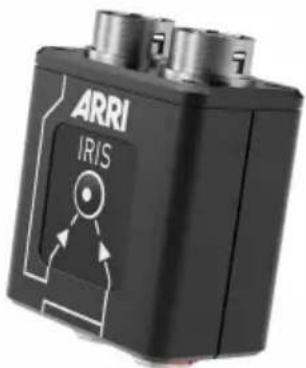
The LCUBE CUB-2 is a miniature signal converter that integrates the 12 pin Hirose ENG protocol into the LBUS ecosystem. It provides two options for iris control: Auto-iris from the camera or manual iris from a Master Grip.
Main features
Adapts servo-zoom lenses (Hirose 12 pin) to LBUS (Lemo 4 pin).
■ Enables Master Grips to directly control focus, iris and zoom of a servo-zoom lens.
■ Provides a switch to select between iris control from camera (auto-iris via camera Hirose 12 pin interface) or Master Grips (via LBUS).
5.1 Sample setup
3rd party camera with ENG lens and Master Grips
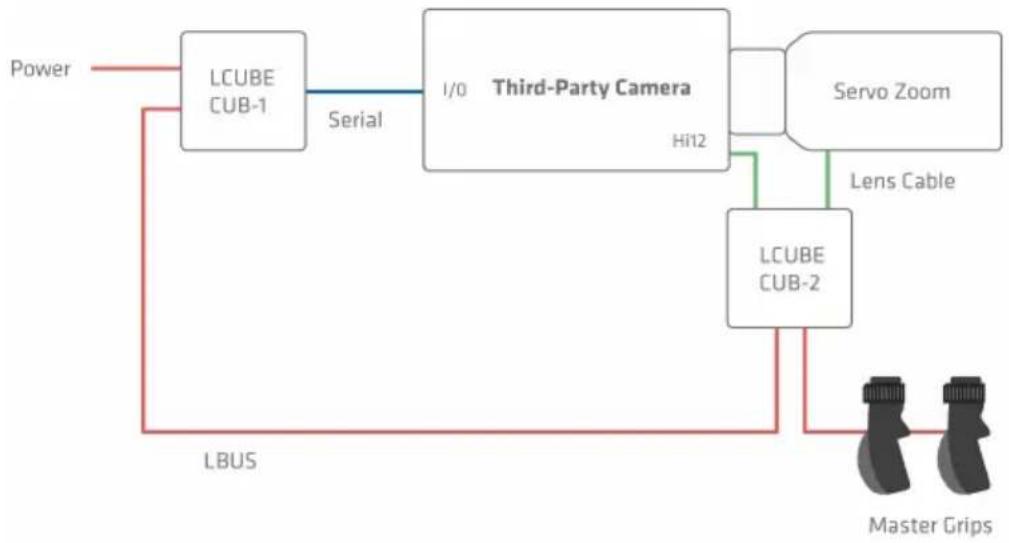
flowchart
graph TD
    A["Power"] --> B["LCUBE CUB-1"]
    B -->|Serial| C["I/O"]
    C --> D["Third-Party Camera"]
    D --> E["Servo Zoom"]
    E --> F["Lens Cable"]
    F --> G["LCUBE CUB-2"]
    G --> H["Master Grips"]
    I["LBUS"] --> B
6 Layout
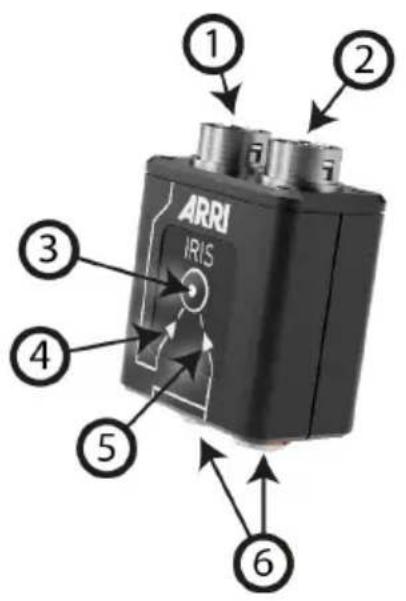
1 ENG IN - camera
2 ENG OUT - lens
3 Setup button
4 Indicator: Iris control via camera
5 Indicator: Iris control via LBUS
6 LBUS connectors
6.1 Status
The LED of the SETUP button indicates the current status.
Solid green Device is ready, no warnings
Green/red flashing No LBUS master device connected
Solid red Power supply is below 11V
Red flashing No LBUS data is available
Blue flashing Device is executing the bootloader
6.2 Setup button
IRIS source
The source of iris control can be either set to camera or LBUS. The currently active iris source is indicated by two arrows underneath the SETUP button (see "Layout", page 14, (4) and (5)).
Press the SETUP button momentarily to indicate the current iris source. Press the SETUP button momentarily again to change the assignment. Toggle through until you reach the desired setting.
7 Operation
- Connect the ENG input of CUB-2 to the camera Hirose 12 pin lens interface (optional).
- Connect the ENG output of CUB-2 with the ENG lens cable.
- Connect the control devices (e.g. Master Grips) via LBUS with the CUB-2.
- Power the LBUS.
- Select the source of the iris on the CUB-2
NOTE: The setup does not require the CUB-2 to be connected to the camera Hirose 12 pin lens interface.
8 Software update
The LCUBE CUB-2 can be updated from external devices through its LBUS interface.
The following devices provide update functionalities for LCUBE CUB-2:
ARRI Wireless Compact Unit WCU-4
ARRI Active Motor Controller AMC-1
ARRI Universal Motor Controller UMC-4
■ emotion compact hand unit
■ emotion cworld
Please refer to the respective user manuals for further information.
WARNING!
Before starting the update, make sure that there are no devices connected to the LCUBE CUB-2, except LBUS devices necessary for the update itself.
WARNING!
Do not switch off power and do not remove the storage media during the update, as this may damage the LCUBE CUB-2.
9 Appendix
9.1 Part numbers
Part numbers
| KK.0013217(equalsK0.0012983) | LCUBE CUB-2 Basic Set |
| contains | |
| K2.0010681 LCUBE CUB-2 | |
| K2.0013194 Cable LCUBE CUB-2 to camera Hi12 1.6ft | |
| K2.0009620 LCUBE BracketQuick release bracket with 3/8" screw for LCUBE converters | |
NOTICE
The LCUBE CUB-2 Basic Set does not include an LBUS cable. LBUS cables are available in various lengths and need to be ordered separately.
Mechanical accessories
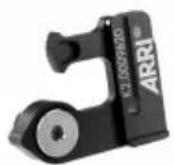
K2.0009620 LCUBE bracket (included)
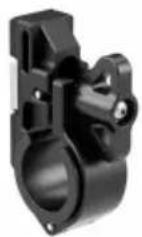
K2.0006176 CLM-5/cforce mini clamp console 19/15 mm (not included)
LBUS cables
| K2.0006749 Cable | LBUS 0,2 m/8" LCB-3 |
| K2.0006750 Cable | LBUS 0,3 m/1 ft LCB-4 |
| K2.0006751 Cable | LBUS 0,5 m/1.6 ft LCB-A |
| K2.0006752 Cable | LBUS 0,8 m/2.6 ft LCB-1 |
| K2.0006753 Cable | LBUS 1,5 m/5 ft LCB-5 |
| K2.0006754 Cable | LBUS 3 m/10 ft LCB-1-01 |
| K2.0006755 Cable | LBUS 6 m/20 ft LCB-2 |
| K2.0006756 Cable | LBUS 15 m/49 ft LCB-1-15 |
| K2.0007318 Cable | LBUS to LCS 0,8 m/2.6 ft |
| K2.0006757 Cable | LBUS to D-Tap 1,2 m/4 ft LPS-7-01 |
| K2.0006758 Cable | LBUS to D-Tap 0,8 m/2.6 ft LPS-7 |
| K2.0006759 Cable | LBUS to RS 0,8 m/2.6 ft LPS-1 |
| K2.0006760 Cable | LBUS to XLR-4 0,8 m/2.6 ft LPS-6 |
| K2.0012630 Cable | LBUS (2x angled), 0,8 m/2.6 ft |
| K2.0013042 Cable | LBUS (angled, straight), 0,35 m/1.15 ft |
| K2.0013041 Cable | LBUS (angled, straight), 1 m/3.3 ft |
| K2.0013040 Cable | LBUS (2x angled), 0,6 m/2 ft |
| K2.0013043 Cable | LBUS (angled, straight), 0,8 m/2.6 ft |
| K2.0013044 Cable | LBUS (angled) to LCS 0,8 m/2.6 ft |
| K2.0012785 Cable | LBUS (2x angled), 0,2 m/8" |
| K2.0009643 Cable | AMIRA/ALEXA MINI EXT to LBUS (straight) 0,8 m/2.6 ft |
| K2.0012628 Cable | AMIRA/ALEXA MINI EXT to LBUS (angled) 0,8 m/2.6 ft |

DANGER!
Risk of fire!
Short-circuits and back currents to power supplies/batteries may entail lethal damage!
Always use original ARRI/cmotion LBUS cables to external power sources (D-Tap, XLR)! ARRI/cmotion LBUS cables to external power sources provide a protection circuit to prevent back currents to power supplies/batteries.
9.2 Pinouts
LBUS connector
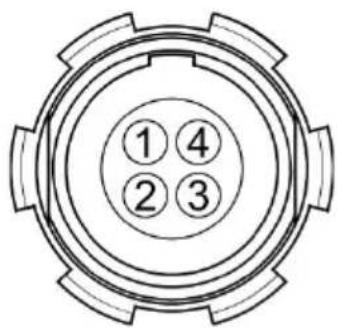
1 GND Ground
2 CAN-L CAN bus
3 V-BAT Power supply in-/output
4 CAN-H CAN bus
12 Pin LENS connector
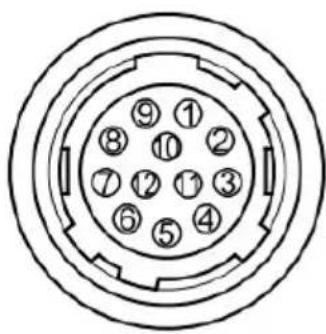
1, 2 n.c.
3 GND Ground
4, 5 n.c.
6 +12V Regulated
12V/1A lens supply
1, 2 n.c.
3 GND Ground
4, 5 n.c.
6 DC-IN 12-34 VDC IN
7, 8, 9, 10 n.c.
The CUB-2 supports most cameras and lenses with Hirose 12 pin connector.
9.3.2 Hand units
The following hand units can be connected directly to the LCUBE CUB-2 for servo motor control or REC start/stop functionality. In such a case, use the Cable LCUBE CUB-2 to camera Hi12 (K2.0013194) to connect the camera 12 pin Hirose lens interface to the CUB-2 ENG input (for camera REC start/stop functionality) and connect the hand unit to a CUB-2 LBUS connector (see page 14).
| REC Start/Stop Servo control | |
| Master Grips Yes Yes | |
| emotion pan-bar zoom Yes |
NOTE: The recording status of the camera is not indicated on the Master Grip screen when using the LCUBE CUB-2 directly connected to the camera 12 pin Hirose lens interface.
9.4 Specifications
Temperature range: -20 to +50°C (-4 to +122°F)
Supply voltage: 12 - 34 VDC
Current consumption: 50mA @ 24 V
9.4.1 Dimensions and weight
Dimensions
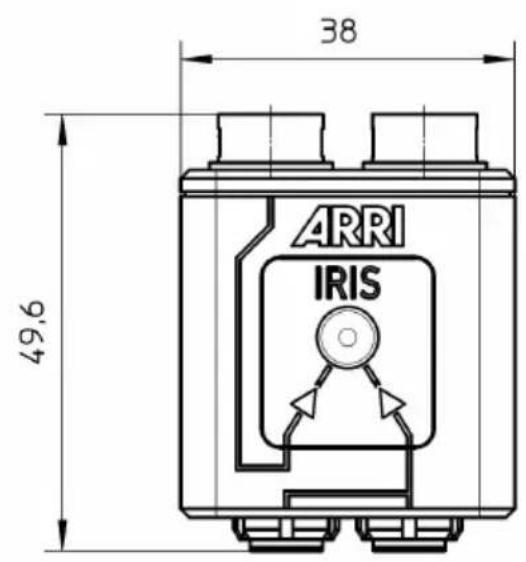
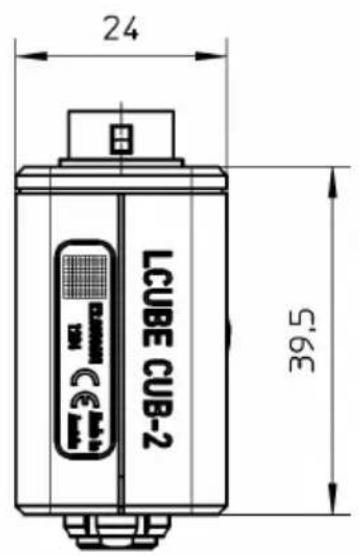
Weight
CUB-2: 60g/2.12oz
LCUBE Bracket: 13g/0.46oz
9.5 Service contacts
Munich, Germany
Arnold & Richter Cine Technik
+49 89 3809 2121
service@arri.de
Business hours:
Mo. - Fr. 9:00 - 17:00 (CET)
London, Great Britain
ARRI CT Limited
+44 1895 457 051
service@arri-ct.com
Business hours:
Mo. - Thu. 9:00 - 17:30
Fr. 9:00 - 17:00 (GMT)
Burbank, USA
ARRI Inc. West Coast
+1 877 565 2774
service@arri.com
Business hours:
Mo. - Fr. 8:15 - 17:00 (PST)
Mississauga, Canada
ARRI Canada Limited
+1 416 255 3335
service@arri.com
Business hours:
Mo. - Fr. 8:30 - 17:00 (EDT)
Beijing, China
ARRI China Co. Limited
+86 10 5900 9680
service@arrichina.com
Business hours:
Mo. - Fr. 9:00 - 18:00 (CST)
Vienna, Austria
ARRI Cine + Video Geräte
Ges.m.b.H.
+43 1 8920107 30
service@arri.at
Business hours:
Mo. - Fr. 9:00 - 17:00 (CET)
Milan, Italy
ARRI Italia S.r.l.
+39 (02) 262 271 75
info@arri.it
Business hours:
Mo. - Fr. 9:00 - 18:00 (CET)
New York, USA
ARRI Inc. East Coast
+1 877 565 2774
service@arri.com
Business hours:
Mo. - Fr. 8:00 - 17:30 (EST)
Hong Kong, China
ARRI Asia Limited
+852 2537 4266
service@arriasia.hk
Business hours:
Mo. - Fr. 10:00 - 18:30 (HKT)
Sydney, Australia
ARRI Australia Pty Ltd
+61 2 9855 4305
service@arri.com.au
Business hours:
Mo. - Fr. 8:00 - 18:00 (AEST)
9.6 International declarations
EC Declaration of Conformity
The product conforms with the specifications of the following European directives:
■ Directive 2014/30/EU of the European Parliament and the Council of 26 February 2014 on the harmonization of the laws of the Member States relating to electromagnetic compatibility
■ Directive 2011/65/EU of the European Parliament and the Council of 8 June 2011 on the restriction of the use of certain hazardous substances in electrical and electronic equipment
The compliance with the requirements of the European Directives was proved by the application of the following harmonized standards:
EN 55103-1:2009; EN 55103-2:2009
CE
FCC Class A Statement
Note: This equipment has been tested and found to comply with the limits for a Class A digital device, pursuant to Part 15 of the FCC Rules. These limits are designed to provide reasonable protection against harmful interference when the equipment is operated in a commercial environment. This equipment generates, uses, and can radiate radio frequency energy and, if not installed and used in accordance with the instruction manual, may cause harmful interference to radio communications.
Operation of this equipment in a residential area is likely to cause harmful interference in which case the user will be required to correct the interference at his own expense.
Industry Canada Compliance Statement
- LBUS to ENG Protocol Converter
- Imprint
- For further assistance
- Revision history
- Disclaimer
- Table of Contents
- For your safety
- Risk levels and alert symbols
- DANGER!
- WARNING!
- CAUTION!
- NOTICE
- Vital precautions
- Risk of electric shock and fire!
- Risk of fire!
- Audience and intended use
- Scope of delivery and warranty
- Delivery
- Warranty
- LBUS
- Introduction
- Main features
- Sample setup
- Layout
- Status
- Setup button
- IRIS source
- Operation
- Software update
- Appendix
- Part numbers
- Mechanical accessories
- Pinouts
- LBUS connector
- Pin LENS connector
- Hand units
- Specifications
- Dimensions and weight
- Weight
- Service contacts
- Munich, Germany
- London, Great Britain
- Burbank, USA
- Mississauga, Canada
- Beijing, China
- Vienna, Austria
- Milan, Italy
- New York, USA
- Hong Kong, China
- Sydney, Australia
- International declarations
- EC Declaration of Conformity
- FCC Class A Statement
- Industry Canada Compliance Statement
Brand : ARRI
Model : LCUBE CUB-1
Category : Uncategorized