KNV Line - Uncategorized GLP - Free user manual and instructions
Find the device manual for free KNV Line GLP in PDF.


| Product Type | Strobe/Color Effect Lighting Fixture |
| Brand | GLP (German Light Products GmbH) |
| Model | KNV Line |
| Category | Uncategorized |
| Power Supply | External KNV PSU (mains powered, 100-240 V AC) |
| White LED per Pixel | 1 x 30 W cool white (5000 K) |
| RGB LEDs per Pixel | 16 x 0.25 W high-quality RGB |
| Total Pixels per Fixture | 5 |
| Luminous Flux per Pixel | Up to 2,200 lumens |
| Beam Angle | 120° |
| IP Rating | IP54 (indoor and temporary outdoor use) |
| Control Protocols | DMX512, Art-Net, sACN |
| DMX Modes | 8 modes (1 to 8) |
| Maximum Pixels per PSU | 25 (mix of Dot and Line) |
| Main Functions | Strobe, dimmer, FX engine, pixel mapping, flare effect, hyperspeed, dimmer flash, color generator |
| Dimming Curves | Linear, Soft, Extra Soft (ESoft) |
| Maintenance | Clean with a soft, dry cloth. Do not use liquids. |
| Safety | Read the KNV Dot and Line Quick Start and Safety Manual before use. |
| Manufacturer | German Light Products GmbH, Industriestrasse 2, 76307 Karlsbad, Germany |
| Service & Support | EMEA: +49 7248 9271955, USA: +1 818 767 8899, support@glp.de |
Frequently Asked Questions - KNV Line GLP
User questions about KNV Line GLP
0 question about this device. Answer the ones you know or ask your own.
Ask a new question about this device
Download the instructions for your Uncategorized in PDF format for free! Find your manual KNV Line - GLP and take your electronic device back in hand. On this page are published all the documents necessary for the use of your device. KNV Line by GLP.
USER MANUAL KNV Line GLP
natural_image
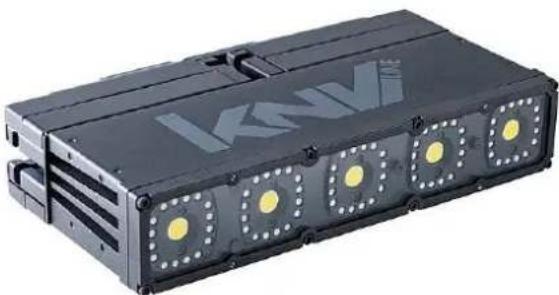
Black optical flash unit with illuminated lens and attached cable (no text or symbols visible)KNV LINE
natural_image
Exterior view of a black industrial device with illuminated circular components (no visible text or symbols)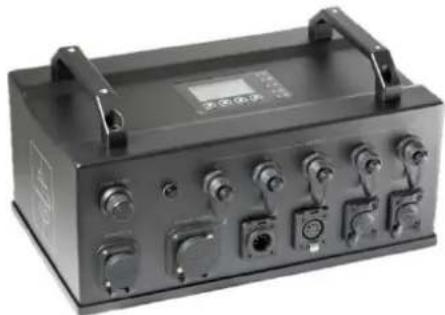
natural_image
Exterior view of a black industrial control box with multiple switches and buttons (no visible text or labels)Firmware Version v.34
-GL-P-
Document revisions
| Revision number | Notes | Released |
| A | First version available.Firmware v.23 | April 2020 |
| V34-20210824-1 | Pixel configuration options added.Main LED PWM frequency now adjustable.PSU control panel display modified.Firmware v.34 | August 2021 |
GLP® KNV Dot and Line User Manual – Revision V34-20210820-1
This manual covers fixture software version v.34
© 2018-2021 German Light Products GmbH. All rights reserved.
The marks ‘GLP’ and ‘German Light Products’ are trademarks registered as the property of German Light Products GmbH in Germany, in the United States of America and in other countries.
The information contained in this document is subject to change without notice. German Light Products GmbH and all affiliated companies disclaim liability for any injury, damage, direct or indirect loss, consequential or economic loss or any other loss occasioned by the use of, inability to use or reliance on the information contained in this document.
Manufacturer's head office:
German Light Products GmbH (GLP), Industriestrasse 2, 76307 Karlsbad, Germany
Tel (Germany): +49 7248 92719 - 0
Service & Support EMEA:
GLP, Industriestrasse 2, 76307 Karlsbad, Germany
Tel. (Germany): +49 7248 9271955
Email: support@glp.de
www.glp.de
Service & Support USA:
GLP USA, 1145 Arroyo St., Ste. A, 91340 San Fernando, California
Tel (USA): +1 818 767 8899
Support (US): info@germanlightproducts.com
www.germanlightproducts.com
Table of Contents
-
Safety......4
-
KNV Dot overview....6
-
KNV Line overview 7
-
KNV PSU overview....8
-
Features....10
Controlling fixtures and the KNV PSU....10
White LEDs....11
Color LEDs 11
Pixel mapping and pixel orientation .... 11
Extra shutter 11
Flare effect 11
Hyperspeed....12
FX 12
RGB color generator 14
Dimming curves 14
Dimmer Flash 14
Output limitation 15
Behavior when the fixture is not receiving a DMX signal 15
Display 15
Fixture information 16
Custom settings and factory defaults 16
- Control menus and LCD display 17
Default screen....17
Main control menus....18
Control buttons 18
Status LEDs 19
Shortcut menu....19
- Control protocol setup....20
Setting up fixture control 20
-
Control menu layout 22
-
KNV Dot and Line Pixel mapping....26
Test patterns 28
- DMX control modes....29
Pixel Configuration....30
Managing unused DMX channels 30
Special notes on the DMX tables....31
- Control channel layout 32
DMX Mode 1: RGBW 16-bit....32
DMX Mode 2: White strobe with FX, RGB with FX 34
DMX Mode 3: RGB strobe with FX, White individual pixels....41
DMX Mode 4: White strobe with FX, RGB 25-pixel....46
DMX Mode 5: Multi-layer RGBW with FX....50
DMX Mode 6: RGBW 25-pixel, 8-bit....58
DMX Mode 7: RGBW 25-pixel, 16-bit....60
DMX Mode 8: RGBW 25-pixel, 8-bit with RGBW FX....62
1. Safety
Key to symbols
The following symbols are used in the product's user documentation:
Warning! Safety hazard. Risk of injury or death.
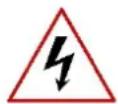
Warning! Hazardous voltage. Risk of lethal or severe electric shock.

Warning! See user documentation for important safety information.
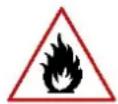
Warning! Fire hazard.
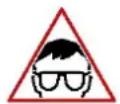
Warning! Risk of eye injury.
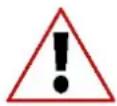
Warning! Read the KNV Dot and Line Quick Start and Safety Manual supplied with the product and available for download from www.glp.de before installing, operating or servicing the product. The Quick Start and Safety Manual contains important information for the safe use of KNV Dot and Line fixtures. If you fail to read that information you may create a safety hazard with a risk of injury, death or damage.
If you have any doubts or questions about how to use the product safely, contact your GLP supplier for assistance. Your GLP supplier will be happy to help.
The user documentation for GLP® KNV Dot and Line lighting fixtures consists of three documents:
- The KNV Dot and Line Quick Start and Safety Manual, supplied with KNV fixtures and available for download from www.glp.de. The Quick Start and Safety Manual contains important safety information and installation instructions that the installer and user must read. It also contains dimensions drawings and technical specifications for the product.
- The KNV Dot and Line User Manual, available for download from www.glp.de. The User Manual explains features and control of KNV fixtures.
- The KNV Dot and Line DMX Channel Index, available for download from www.glp.de. The Channel Index is a separate document containing the DMX control channel layout and DMX commands available in fixtures. This information is also included in the User Manual.
KNV Dot and Line fixtures are intended for use by experienced professionals with the knowledge and skills to set up, operate, and maintain high-powered, remotely
controlled lighting equipment safely and efficiently. These operations require expertise that may not be provided in this manual.
- Respect all warnings and directions given in the product's user documentation and on the product. Read the product's Quick Start and Safety Manual and familiarize yourself with the safety precautions it contains before installing, using or servicing the product. GLP and affiliated companies will take no responsibility for damage or injury resulting from disregard for the information in the user documentation.
- Check the GLP website at www.glp.de and make sure that you have the latest versions of the product's Quick Start and Safety Manual and this user manual.
- Check the fixture software version indicated on page 2 of this user manual and then use the control panel on the KNV Line or KNV Dot PSU to check the version installed in the fixture. If the versions are not the same, the user manual may still cover the fixture, because software updates do not always affect the use of the fixture. However, it is possible that this manual does not match the fixture perfectly. Software release notes can help clarify this question. You can consult software release notes and download the correct version of this user manual on the GLP website if necessary.
- Make both the Quick Start and Safety Manual and this user manual available to all persons who will install, operate or service the product. Save both documents for future reference.
- If you have any questions about the safe operation of fixtures, please contact an authorized GLP distributor (see list of distributors at www.glp.de).
GLP Service and Support
Contact information for the nearest GLP Service and Support is available online at www.glp.de/en/service, by email at info@glp.de, or by telephone at the following numbers:
• GLP Germany: +49 (7248) 927 19-55
• GLP N. America: +1 818 767-8899
• GLP UK: +44 1392 690140
• GLP Asia: +852 (3151) 7730
• GLP Nordic: +46 737 57 11 40
2. KNV Dot overview
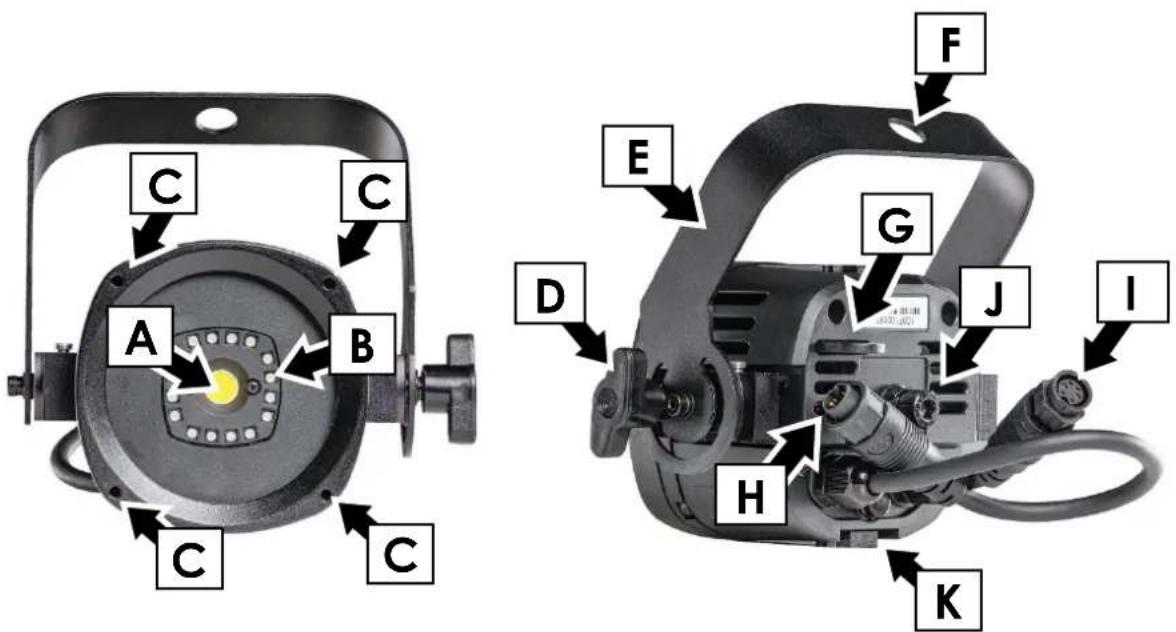
Figure 1. KNV Dot overview
A - White LED
B - 16 x RGB LEDs
C - Mounting points for optical accessories (M3 threaded holes)
D - Handscrew for tilt adjustment
E - KNV Dot Hanging Bracket
F - 13 mm hole for rigging clamp bolt or mounting bolt
G - Safety cable attachment point
H - Combined DC power and data IN connector
I - Combined DC power and data THRU connector
J - M8 Allen screw for custom mounting hardware
K - KNV Dot Slide Connector channel (4 x channels: top, bottom, left, right)
3. KNV Line overview
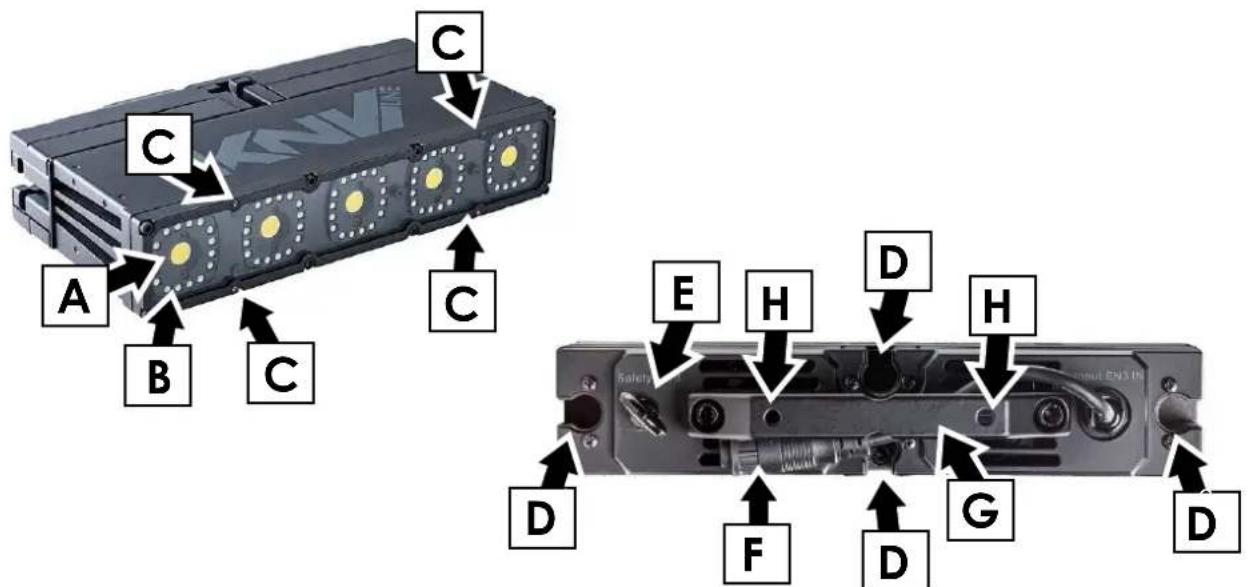
Figure 2. KNV Line overview
A - White LED
B - 16 x RGB LEDs
C - Mounting points for optical accessories (M3 threaded holes)
D - Channels for KNV Module Connectors
E - Safety cable attachment point
F - Combined DC power and data IN connector
G - Carrying handle
H - M6 threaded holes for fasteners on mounting hardware such as KNV system connector plate
4. KNV PSU overview
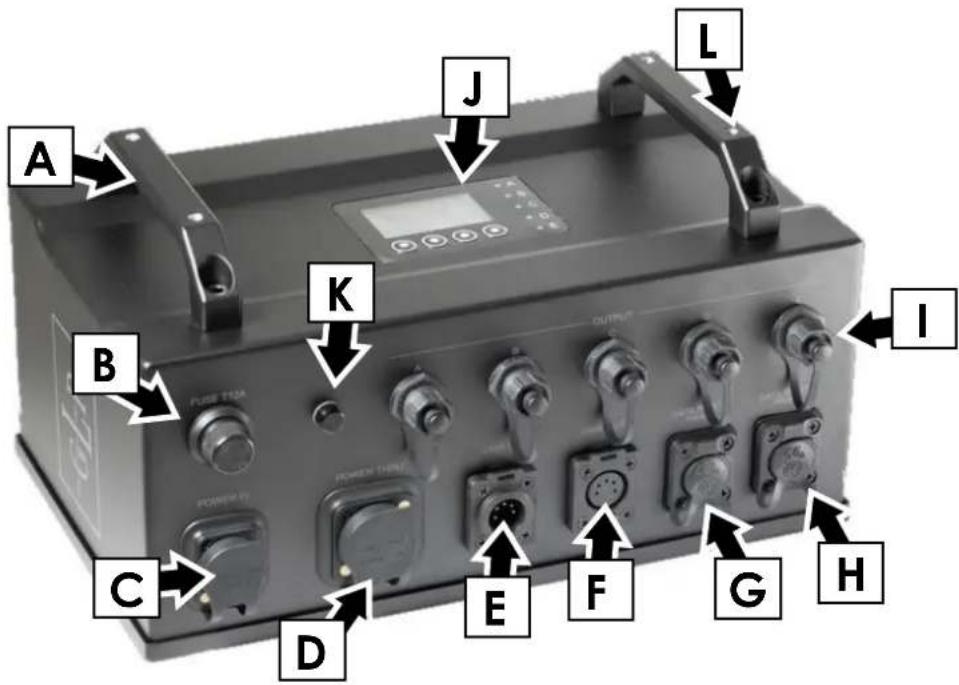
Figure 3. KNV PSU overview
A - Carrying handle
B - Primary fuse
C - Mains POWER IN connector
D - Mains POWER THRU connector
E - DMX IN connector, 5-pin XLR
F - DMX THRU connector, 5-pin XLR
G - Data port A (Art-Net/SACN), Neutrik EtherCON, failsafe
H - Data port B (Art-Net/SACN), Neutrik EtherCON, failsafe
I - Combined control data and DC power outputs A - E
J - Control panel with backlit display
K - Pressure relief valve
L - M6 threaded holes for mounting hardware (4 x holes total)
flowchart
graph TD
    O["O"] --> P["P"]
    P --> M["M"]
    M --> P["P"]
    P --> P["P"]
    P --> O["O"]
    N["N"] --> L["L"]
    L --> N["N"]
    L --> L["L"]
    L --> N["N"]
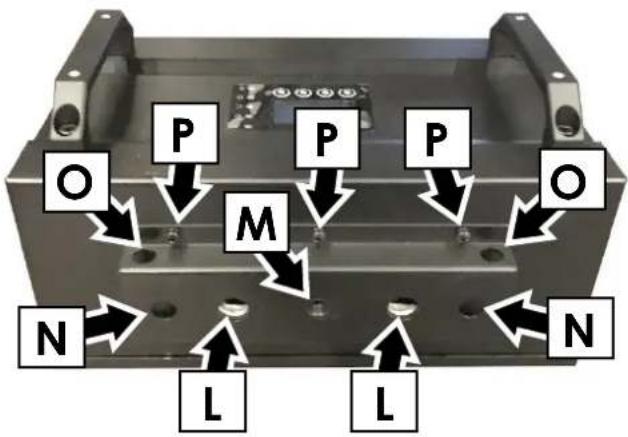
Figure 4. PSU mounting points
L - Quarter-turn fastener attachment points for 89 mm GLP Omega Bracket
M - Threaded hole for M10 mounting bolt
N - Safety cable / rigging clamp attachment point (∅13 mm)
O - Safety cable attachment point
P - Mounting plate screw (6 x Phillips head screws total)
The PSU's mounting plate (the plate with the attachment points shown in Figure 4) can be repositioned by unscrewing the six mounting plate screws P, moving the mounting plate around to the side of the PSU that is opposite the control panel and reinstalling the six screws in the corresponding holes in that side.
5. Features
The KNV Dot and Line from GLP are powerful strobe/color effect lighting fixtures that can be interlocked and combined, giving enormous creative possibilities. When KNV Dot and Line fixtures are fastened together using hardware accessories from GLP, their pixel pitch and DMX control setup coordinate easily with KNV Cube and Arc fixtures. This allows all four types of fixture to be integrated easily into creative installations.
KNV Dot and Line fixtures combine powerful white light output from one 30 W cool white LED per pixel with bright color output from sixteen 0.25 W high-quality RGB LEDs per pixel in a circle around the white LED. The arrangement gives a total luminous flux of up to 2 200 lumens per pixel.
Fixtures can be used indoors in permanent and temporary installations. Their rugged construction and IP54 rating mean that they can also be used outdoors in temporary installations if precautions are taken to prevent immersion in water and damage from direct sunlight. They can be placed upright on a level surface or suspended from a suitable structure as described in the KNV Dot and Line Quick Start and Installation Manual.
Four mounting points with M3 threaded holes are provided on the front of fixtures for mounting optical accessories from GLP.
Power and data can be daisy-chained between KNV Dots.
All fixtures can be interlocked with quick-release mechanical fasteners for ease of installation.
The KNV is not suitable for household use, for use in any location where unattended children have access to it, or for use in permanent outdoor installations.
Controlling fixtures and the KNV PSU
KNV Dot and Line fixtures can be controlled as individual pixels or as groups of pixels using any standard DMX controller. White and color output can be controlled separately or combined for stunning strobe, continuous output and wash effects. Using the powerful multilayer FX engine integrated into the KNV system, complex dynamic effects can be created quickly with no need for a separate pixel-mapping media server.
Fixtures are set up and controlled via the KNV PSU, a separate external power supply and control unit with an integrated control panel and display. Each KNV PSU can manage up to 25 pixels. These pixels can consist of 25 x KNV Dot fixtures, 5 x KNV Line fixtures, or a mixture of the two fixture types. Depending on which DMX mode you use, you can group control the pixels in groups or individually. Individual pixel control combined with the freedom to locate individual pixels almost anywhere you want in the installation gives enormous creative flexibility.
DMX control commands are similar – but not identical – to those of KNV Cube and Arc fixtures. Fixtures can be configured to behave identically or symmetrically if they are placed in the installation and pixel mapped with this in mind. For detailed guidance on setting up pixel mapping, see page 26.
White LEDs
KNV Dot and Line fixtures feature one or five cool white LEDs respectively that produce powerful white light at 5000 K. White LEDs can be controlled together or individually depending on the DMX control mode selected.
The white LEDs offer shutter and dimming effects including a powerful strobe, flashing at up to 16.67 Hz, or operate continuously to give high-output wash effects with a 120^ beam angle.
You can also select from a wide range of pre-programmed dynamic FX patterns to run on the white LEDs.
Color LEDs
The Dot and Line fixtures' RGB LEDs are arranged into circles of 16 LEDs around each white LED. RGB LEDs can be controlled together or individually depending on the DMX control mode selected.
You can run a wide range of color effects (including strobe effects and dynamic FX patterns) on the RGB LEDs, or you can operate them continuously using RGB color mixing to provide a color wash with a 120^ beam angle.
You can also use the RGB LEDs to add blue or red to the powerful white LEDs and adjust their color temperature.
Pixel mapping and pixel orientation
See the separate chapter 'KNV Dot and Line Pixel mapping' on page 26 for details of pixel mapping and co-ordination with KNV Cube and Arc fixtures. This chapter also gives details of the test pattern that you can use to check or visualize pixel mapping in arrays of multiple KNV Dot or Line fixtures.
Extra shutter
In DMX modes 1, 6 and 7 an extra shutter channel is available. You can choose whether this shutter effect should run on all LEDs (RGBW), on RGB LEDs only or on White LEDs only by making a selection via DMX on the Control / Settings channel in modes 1, 6 and 7 or using the fixture's control panel.
The default setting for the extra shutter effect is RGBW.
Flare effect
A feature which we call the Flare effect can be applied to flashes when they are activated on strobe channels. The Flare effect is an interference effect that you can superimpose onto a flash. This effect is particularly impressive when combined with increased flash length.
Random pixel sparkle
The Flare effect channels include a Random pixel setting. This setting applies the flare effect to individual pixels at random, giving an impressive sparkling effect. Again, we recommend that you try combining this effect with increased flash length.
Hyperspeed
Hyperspeed is a very fast flash rate on the Shutter effects channels that gives a very powerful effect.
FX
The KNV Dot and Line share the KNV Cube and Arc's pre-programmed dynamic FX that give you quick access to a wide range of dynamic patterns and movement options for the pixels in an array of fixtures.
When FX are active, you can control them using six DMX channels:
- Five dedicated channels let you select an FX, set a crossfading speed, set pattern orientation, adjust FX length in pixels and set offsets.
- In addition to these channels, if an FX is active the third strobe channel becomes a sixth FX control channel and lets you adjust FX speed (see details below).
Dedicated FX channels
- The first FX channel, the FX Selection channel, lets you choose and activate an FX from a list of dynamic FX patterns.
If this channel is set to zero, the third strobe channel controls strobe flash rate. If an FX is selected on this channel, the third strobe channel controls FX speed.
- The second FX channel, the FX Crossfading channel, sets the time it takes for the FX to fade out. You can set FX to crossfading and apply a crossfading time from fast to slow. You can also set FX to leave a tail behind them and apply a crossfading time for the tail from slow to fast.
- The third FX channel, the FX Orientation channel, lets you select from a long list of options for the orientation of the FX. Running the same FX but with different orientation options in multiple fixtures is a fast way to set up symmetrical and/or coordinated effects.
- The fourth FX channel, the FX Offset channel, lets you apply offsets to the FX, a feature which lets you quickly set up synchronized FX chases in multiple fixtures.
Setting an offset determines the pixel in the pattern (not the pixel on the fixture) where the FX pattern will start. For example, if you set the length of an FX pattern to 10 pixels and you apply an offset of 6 pixels, the fixture will blackout for the time it takes the FX pattern to run on pixels 1 – 5, then the FX pattern will appear on the fixture when the pattern reaches pixel 6.
- The fifth FX control channel, the FX Length channel, lets you set the total length in pixels of the FX pattern.
FX speed control
If you select an FX on the FX Selection channel, the third strobe channel is redeployed and becomes the FX Speed control channel. Instead of controlling strobe flash rate, it now becomes the sixth FX control channel and lets you adjust the speed of the FX.
Setting up FX chases
If you select the same FX with the same speed in multiple fixtures, you can use the other FX channels in combination to set up an FX chase across multiple fixtures:
- FX Crossfading / Crossfading with tail sets the rate at which one FX pattern step fades out before the next pattern step arrives.
- FX Orientation can be used to add variety to a chase or set up multiple coordinated chases in different groups of fixtures.
- FX Offset sets the pixel on which the FX pattern will start.
An FX pattern with no offset starts on pixel 1. You will obtain this if you set the FX Offset channel to zero and also if you set the FX Offset channel to 001.
- FX Length sets the number of pixels over which the FX pattern will run.
The normal FX length is 5 pixels. You will obtain this 5-pixel length if you set the FX Length channel to zero. It is not possible to set FX Length to less than 5 pixels.
When you set up FX chases, you will normally achieve the best results by increasing FX length in steps of 5 pixels (one fixture).
To obtain synchronized chases in multiple fixtures you must set up FX Length and FX Offset parameters in combination. Here is how FX Length and FX Offset work in a single fixture:
- FX Length = Off (DMX value zero on the FX Length DMX channel): The FX pattern will have the normal length of five pixels. It will start at pixel 1, run from pixel 1 to pixel 5 and then immediately start at pixel 1 again.
- FX Length = 30 (DMX value 030 on the FX Length DMX channel): The FX pattern will start at pixel 1, run from pixel 1 to pixel 5 and then black out for the time it takes to run the FX pattern on pixels 6 – 30.
- FX Offset = Off (DMX value zero on the FX Offset DMX channel): The FX pattern will start at pixel 1.
- FX Offset = 6 (DMX value 006 on the FX Offset DMX channel): The FX pattern will start at pixel 6. If you have set an FX length of 30, the pixels will black out for the time it takes to run the FX pattern on pixels 1 – 5, then run the FX pattern on pixels 6 – 10, then black out for the time it takes to run the FX pattern on pixels 11 – 30.
To create a single FX pattern chase that will run across an array of multiple fixtures, you need to:
- Set FX Length in all the fixtures to the total number of pixels that the pattern will run across, and
- Set FX Offset in each fixture in a sequence five pixels apart.
This means that, if you want an FX pattern to run across six fixtures in a horizontal row and return immediately to pixel 1 when it reaches pixel 30 at the end of the row, you must set FX Length to 30 on all six fixtures and set FX Offsets with a gap of five pixels between fixtures. To give a concrete example, here is how you must set up each fixture:
-
Fixture 1: FX Length = 30, FX Offset = 1
FX will start at Pixel 1 of the 30 pixels in FX Length and run on pixels 1 - 5 -
Fixture 2: FX Length = 30, FX Offset = 6 FX will start at Pixel 6 of the 30 pixels in FX Length and run on pixels 6 - 10
- Fixture 3: FX Length = 30, FX Offset = 11 FX will start at Pixel 11 of the 30 pixels in FX Length and run on pixels 11 – 15
- Fixture 4: FX Length = 30, FX Offset = 16 FX will start at Pixel 16 of the 30 pixels in FX Length and run on pixels 16 - 20
- Fixture 5: FX Length = 30, FX Offset = 21 FX will start at Pixel 21 of the 30 pixels in FX Length and run on pixels 21 - 25
- Fixture 6: FX Length = 30, FX Offset = 26 FX will start at Pixel 26 of the 30 pixels in FX Length and run on pixels 26 - 30
RGB color generator
The RGB color generator effect available in DMX modes 3, 5 and 8 gives instant access to automatic color effects such as random colors, ramp up/down colors and random pixel colors. These effects would be difficult to program on a DMX controller.
Dimming curves
See Figure 5. You can select from three dimming curves using the PSU's control panel or the Control / Settings DMX channel:
- Linear makes the dimming curve appear to increase and decrease evenly throughout the dimming range.
- Soft gives finer control at low light levels (where the eye is more sensitive to changes in light level) and coarser control at high levels.
- Esoft (Extra-soft) gives even finer control at low light levels even and coarser control at high levels.
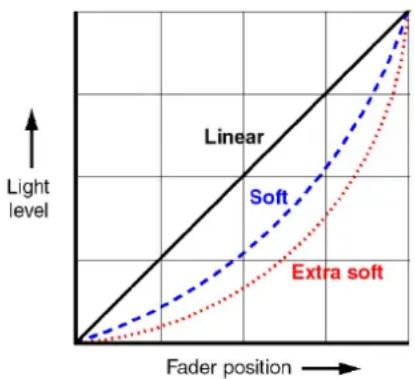
Figure 5. Dimming curves
The default setting is Soft.
Dimmer Flash
A shortcut to creating single flashes is available if you activate Dimmer Flash using the Control / Settings DMX channel or the Fixture Settings menu in the fixture's control panel.
When Dimmer Flash mode is enabled, if the Flash rate channel (the third of the Strobe channels) is set to zero, any new DMX value that you input on the Intensity channel (the first of the Strobe channels) will produce a single flash. In effect, all you need to do is 'nudge the dimmer fader' to produce a flash.
If you activate this function, you can tap flashes in sync with a music beat, easily keeping track of changes in the beat.
Output limitation
It is possible to limit LEDs to 10, 20, 40, 60 or 80 percent of their maximum output on the Control / Settings channel or using the fixture's control panel. You can set the limits separately for White and RGB LEDs.
Behavior when the fixture is not receiving a DMX signal
You can set the fixture to react in three different ways if no DMX signal is present (if the fixture is being controlled by DMX but the DMX signal stops, or if you apply power to the fixture when no DMX signal is present):
- No DMX = Hold sets the fixture to continue obeying the last DMX values it received. This is the default setting.
If no DMX signal was being received, the fixture will black out.
- No DMX = Blackout sets the fixture to black out.
- No DMX = Stand-alone sets the fixture to show the scene that has been stored using Capture scene (see below).
To program the scene that the fixture will display if it is set to Stand-alone and no DMX signal is present, use the Capture scene command:
- No DMX = Capture scene stores the scene that the fixture is currently displaying. Once stored, the scene is used as the fixture's Stand-alone scene.
All these settings are available via DMX on the Control / Settings channel and in the fixture's control panel.
To avoid any possibility of unexpected behavior from a powerful strobe light if the DMX signal fails, we recommend that you always set the fixture to Blackout.
Display
The KNV PSU's backlit graphic LCD display lets you set up control and behavior in the fixtures that you connect to the PSU. See Chapters 6 and 7 for more details.
Using the Control / Settings DMX channel or the fixture's control panel you can:
- Change the display orientation from Normal to Inverted for easier reading if the PSU is flown upside-down in a rig.
- Choose between three different display modes:
- Auto: The display will automatically switch off after a few seconds if the PSU is receiving a valid control signal and has not detected an error. If the PSU is not receiving a valid control signal the display will flash. If the PSU has detected an error, the display will remain constantly on and show the error. Auto is the default setting.
- On: The display stays on constantly. This setting can be useful when you are configuring or testing the installation.
- Off: The display will automatically switch off after a few seconds even if the PSU is not receiving a valid control signal or if it has detected an error.
Fixture information
The Information menu in the control panel gives access to information such as the PSU's serial number and currently installed software version, a list of any errors that have been logged, readouts from the PSU's counters and temperature sensors, and general device information. You can also see a readout of the quality of the DMX signal that the PSU is receiving.
Custom settings and factory defaults
You can customize settings (DMX mode, Pixel orientation, etc.) via DMX or using the PSU's control panel. Custom settings are stored after a power off/on cycle and after a reset.
Two options are available in the control panel for deleting multiple custom settings and restoring defaults:
- Load Setting Defaults reloads all the factory default settings except DMX address, DMX mode and Control protocol. This option returns the PSU and connected fixtures to baseline settings (Output limitation, Pixel orientation, Dimmer curve, etc.) without affecting their basic configuration in an installation.
- Load Factory Backup reloads all the factory default settings including DMX address, DMX mode and Control Protocol. This option reinitializes the PSU completely and returns it to its state when it left the factory.
6. Control menus and LCD display
Warning! DMX control is disabled when the control menus are active. Be prepared for connected fixtures to emit strong light as soon as you exit the control menus.
The control panel and LCD display provide access to user settings, readouts and utilities.
See Figure 6. The status LEDs A – E light to indicate the status of outputs A – E (see next page).
If the control panel display is in sleep mode, pressing any button activates the display.
You can change display orientation and display mode options on the DMX Control / Settings channel and in the Display Orientation and Display Mode menus in the control panel.
Default screen
When the PSU boots up it carries out a reset. Once the reset is completed, the panel displays the default screen. See Figure 6.
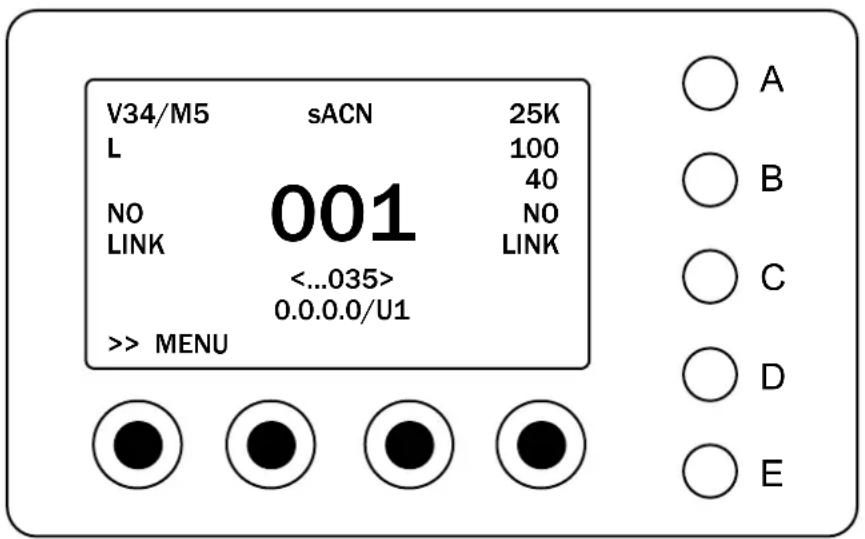
Figure 6. Default screen
The default screen as shown in Figure 6 gives the following commands and information:
Opens shortcuts menu
MENU Opens main control menus
NO LINK Status of etherCon port
V34 Currently installed software version
/M5 Currently selected control mode
sACN Currently selected signal source
001 Current DMX start address
(...035) Highest DMX channel occupied (i.e. last channel in DMX footprint)
25k Currently selected PWM
0.0.0.0/U1 Current IP Address and DMX universe (not available in battery mode)
L Dimmer curve (L = Linear, S = Soft, E >= Extra Soft)
100 White output limit (100% = No limit, 10...80% = output limit enabled)
40 RGB output limit (100% = No limit, 10...80% = output limit enabled)
Main control menus
See Figure 7. Opening the main control menus from the default screen gives access to the full menu structure. 'Control menu layout' on page 22 lists the contents of the control menus.
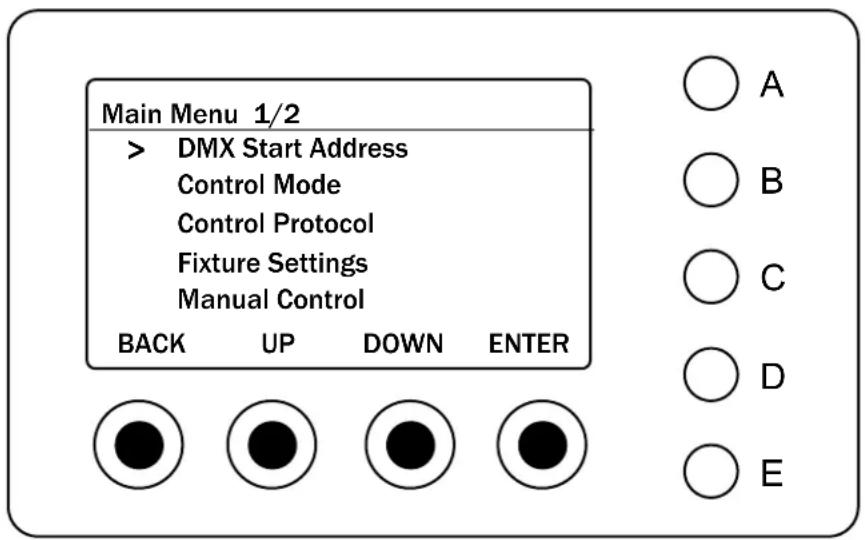
Figure 7. Control panel display
Control buttons
The functions of the four buttons below the display window are indicated in the display. The main functions are as shown in Figure 7:
- BACK – Go back one level and return to the top of the menu.
- UP – Scroll up or increase a number.
- DOWN – Scroll down or reduce a number.
- ENTER – Enter a menu, select a setting or implement a command.
Status LEDs
The five LEDs A to E indicate the status of the corresponding power/data outputs as follows:
- WHITE – Output in testing mode.
- GREEN – Output working normally, no errors detected.
- GREEN FLASHING – Output sending/receiving data, no errors detected.
- RED – Output has detected an error (overload, overcurrent, short circuit etc.). Shut down power to PSU and check all connected fixtures, cables and connections.
Shortcut menu
See Figure 8. Opening the Shortcut Menu from the default screen gives quick access to the PSU's basic functions:
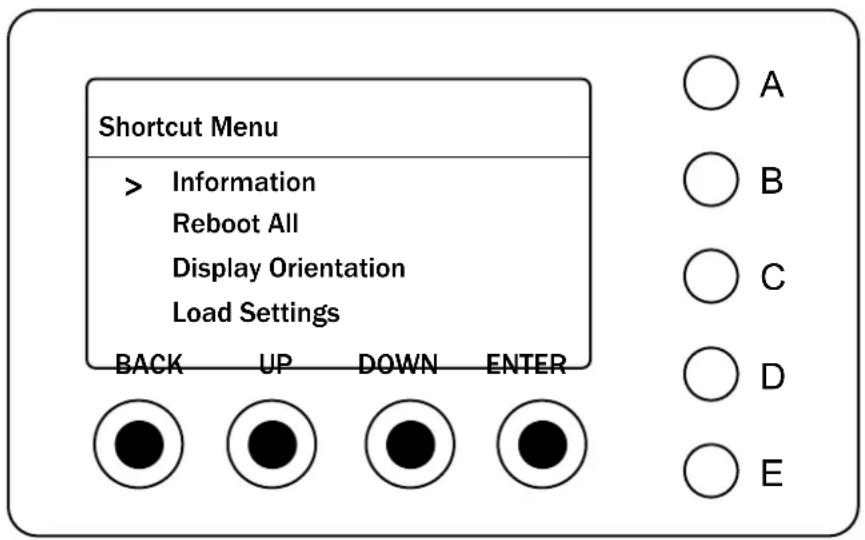
Figure 8. Shortcut menu
The Shortcut Menu contains the following submenus (see 'Control menu layout' on page 22 for full details of menu items).
| Information | Scroll through PSU information readouts |
| Reboot All | Reboot all functions |
| Display Orientation | Invert control panel display |
| Load Settings(hold for 3 seconds to confirm) | Load Preset 1, 2 or 3, or load default settings (except DMX address, DMX mode and control mode) |
| Load Factory Backup(hold for 5 seconds to confirm) | Load all factory default settings (including DMX address, DMX mode and control mode) |
7. Control protocol setup
The KNV PSU receives control data from a DMX controller and manages the control of up to 25 pixels (25 x KNV Dot fixtures, 5 x KNV Line fixtures or a mixture of the two fixture types). Setting up control of KNV Dot and Line fixtures therefore involves opening the menus in the control panel of the KNV PSU that the fixtures are connected to and configuring the PSU's DMX Address, DMX Mode and Control Protocol (DMX, Art-Net or sACN).
If you are using Art-Net or sACN you also need to make sure that the PSU will have a correct IP address and SubNet Mask.
The DMX, Art-Net and sACN fixture control settings described below will not be affected if you apply a Load Default Settings command in the fixture's control panel, but they will be returned to factory defaults if you apply a Load Factory Backup command in the fixture's control panel.
Setting up fixture control
KNV Dot and Line fixtures can be controlled via USITT512 DMX, Art-Net network or sACN network. The KNV PSU's EtherCON in and out ports are fail-safe (if power to the PSU is lost or the PSU stops working, the control data signal will still be relayed between the ports).
If you would like advice with planning and installing a suitable control link, your GLP supplier will be happy to provide assistance.
DMX
To configure fixtures for DMX control over a standard DMX cable link, open the menus in the KNV PSU's control panel and make the following adjustments:
- In the DMX Address menu, use the UP and DOWN buttons to scroll to a suitable start address, then press ENTER to confirm.
- In the Control Mode menu, scroll to and select the DMX mode you want to use to control the fixture.
- In Protocol Setup → Protocol Type, select DMX.
You can now the 25 pixels on the fixtures connected to the PSU's five outputs using standard DMX.
Art-Net
To configure fixtures connected to a KNV PSU to receive control data via Art-Net over an Ethernet network, open the menus in the PSU's control panel and make the following adjustments:
- In the DMX Address menu, use the UP and DOWN buttons to scroll to a suitable start address, then press ENTER to confirm.
- In the Control Mode menu, scroll to and select the DMX mode you want to use to control the fixture.
-
In Protocol Setup → Protocol Type, select Art-Net.
-
In the Ethernet Config menu, configure each PSU with its own unique IP address. To do this, you can either:
a) set each PSU to generate its own IP address by choosing the ranges 2.x.x.x or 10.x.x.x (Art-Net specification),
b) set each PSU to acquire an IP address automatically by DHCP, or
c) assign IP addresses manually by entering individual IP addresses and Subnet masks.
- Select an Art-Net port/universe from 00000 (Network 0 / Subnet 0 / Universe 0) to 32767 (Network 7 / Subnet 15 / Universe 255). Note that the first Art-Net universe is considered to be universe number 00000, not 00001.
You can now control the 25 pixels on the fixtures connected to the PSU's five outputs via Art-Net.
Note that it is possible to transmit DMX data as broadcast or unicast packages via Art-Net. If a large number of universes (more than 30) is broadcast, data loss can occur. If you suspect that this is happening, configure your console to unicast Art-Net DMX packages to the KNV PSUs or switch to sACN.
sACN
To configure fixtures connected to a KNV PSU to receive control data via sACN over an Ethernet network, open the menus in the PSU's control panel and make the following adjustments:
- In the DMX Address menu, use the UP and DOWN buttons to scroll to a suitable start address, then press ENTER to confirm.
- In the Control Mode menu, scroll to and select the DMX mode you want to use to control the fixture.
- In Protocol Setup → Protocol Type, select sACN.
- In the Ethernet Config menu, configure each PSU with its own unique IP address. To do this, you can either:
d) set each PSU to generate its own IP address by choosing the ranges 2.x.x.x or 10.x.x.x (Art-Net specification),
e) set each PSU to acquire an IP address automatically by DHCP, or
f) assign IP addresses manually by entering individual IP addresses and Subnet masks.
- Select an sACN universe from 00001 to 63999.
You can now control the 25 pixels on the fixtures connected to the PSU's five outputs via sACN.
8. Control menu layout
Menus
Notes
| DMX Address | |||
| 001-512 | Enter DMX address | ||
| Control Mode | |||
| Mode 1 | RGBW + Shutter | ||
| Mode 2 | W Strobe FX + RGB Strobe FX | ||
| Mode 3 | RGB Strobe FX + SPix W | ||
| Mode 4 | W Strobe FX + SPix RGB | ||
| Mode 5 | Multi-layer | ||
| Mode 6 | SPix RGBW 8-bit | ||
| Mode 7 | SPix RGBW 16-bit | ||
| Mode 8 | SPix RGBW Strobe FX | ||
| Protocol Setup | |||
| Protocol Type | DMX | Control via DMX protocol | |
| ArtNet | Control via Art-Net protocol | ||
| sACN | Control via sACN protocol | ||
| Ethernet Config | Addressing Mode | Auto 2.X.X.X | Auto addressing in the range 2.X.X.X |
| Auto 10.X.X.X | Auto addressing in the range 10.X.X.X | ||
| Custom IP | Use custom IP address | ||
| DHCP | Get IP address by DHCP | ||
| Custom IP address | XXX.XXX.XXX.XXX | Enter custom IP address | |
| Custom IP Subnet | XXX.XXX.XXX.XXX | Enter custom subnet mask | |
| ArtNet Port | 0 - 32768 | Set Art-Net port | |
| sACN Universe | 1 - 63999 | Set sACN universe | |
| Pixel Configuration | |||
| A1 ... <01..25> | Link controllable pixel positions to a physical pixel:• A1 is the first pixel of output A.• A2 is the second pixel of output A.• Etc. | ||
| A2 ... <01..02..25> | |||
| A3 ... <01..03..25> | |||
| A4 ... <01..04..25> | |||
| A5 ... <01..05..25> | |||
| B1 ... <01..06..25> | |||
| B2 ... <01..07..25> | |||
| ... Etc. ... | |||
| E4 ... <01..24..25> | |||
| E5 ... <01..25> | |||
| Auto configuration | Confirm (hold for 3 seconds to activate) | Loads the default pixel position configuration (A1= pixel 01, A2= pixel 02, A3= pixel 03 .... E5= pixel 25) | |
| Fixture Settings | |||
| Pixel Orientation | Normal | Set pixel orientation: normal or rotated clockwise | |
| 90° | |||
| 180° | |||
| 270° | |||
| Pixel Mirror | Off | Flip pixels right-to-left | |
| On | |||
| Dimmer Curve | Linear | Select dimming curve | |
| Soft | |||
| ESoft | |||
| Dimmer Flash | Off | Set fixture to flash when dimmer channel value is moved | |
| On | |||
| Extra Shutter | RGBW | Sets which LEDs are used in the extra shutter effect that is available in DMX Modes 1, 6 and 7. | |
| White | |||
| RGB | |||
| Output Limit W | Off | Set maximum output for White LEDs | |
| 80% | |||
| 60% | |||
| 40% | |||
| 20% | |||
| 10% | |||
| Output Limit RGB | Off | Set maximum output for RGB LEDs | |
| 80% | |||
| 60% | |||
| 40% | |||
| 20% | |||
| 10% | |||
| No Signal | Blackout | Fixture blacks out when no DMX signal present | |
| Hold | Fixture holds current scene when no DMX signal present | ||
| Stand Alone | Fixture goes to Stand-Alone scene when no DMX signal present | ||
| Capture DMX Values | Confirm (hold for 3 seconds to activate) | Capture current scene for use as Stand-Alone scene | |
| Display Mode | Auto | Display sleeps unless error detected or no valid control signal | |
| On | Display constantly on | ||
| Off | Display off, even if error detected or no valid control signal | ||
| Display Orientation | Normal | Invert display | |
| Upside-down | |||
| Fan Mode | Regulated | Fan speed temperature-regulated | |
| High | Fan speed constant high | ||
| Medium | Fan speed constant medium | ||
| Low | Fan speed constant low | ||
| Effect Sync | Internal | Invert display | |
| Immediately | |||
| PWM Frequency | 2400 Hz | Main LED PWM frequency = 2400 Hz | Adjust PWM frequency of main LED (RGB LED frequency remains unchanged at 18.3 kHz) |
| 3000 Hz | Main LED PWM frequency = 3000 Hz | ||
| 4800 Hz | Main LED PWM frequency = 4800 Hz | ||
| 9600 Hz | Main LED PWM frequency = 9600 Hz | ||
| 25 kHz | Main LED PWM frequency = 25 kHz | ||
| Load Settings | Preset 1 | Confirm (hold for 3 seconds to activate) | Load custom fixture setting Preset 1 - 3 |
| Preset 2 | Confirm (hold for 3 seconds to activate) | ||
| Preset 3 | Confirm (hold for 3 seconds to activate) | ||
| Default | Confirm (hold for 3 seconds to activate) | Load factory default settings apart from DMX address, DMX mode, Control protocol | |
| Information | |||
| Show Errorlist | Show list of any errors stored in memory | ||
| Show Serial Number | Show PSU's serial number | ||
| Show SW Version | Show PSU's currently installed firmware version | ||
| Show device info | Shows general information for the PSU | ||
| Show device hours | Show total number of hours powered on (resettable and non-resettable) | ||
| Device power cycles | Show total number of power cycles (resettable and non-resettable) | ||
| Show signal quality | Show quality of DMX signal being received | ||
| Show temperature | Shows current temperatures of the PSU's sensors | ||
| Manual Control | ||||
| Reset All | No | Reboot all of the PSU's functions | ||
| Yes | ||||
| Manual DMX | Red | 000 ... 255 | Manually set effects (values correspond to DMX values) | |
| Green | 000 ... 255 | |||
| Blue | 000 ... 255 | |||
| White | 000 ... 255 | |||
| Shutter | 000 ... 255 | |||
| Load No-Signal Scene | Confirm | Load stored Stand-Alone scene | ||
| Save as No-Signal Scene | Confirm | Store current manually set values as Stand-Alone scene | ||
| Capture DMX values | Confirm | Store current DMX values as Stand-Alone scene | ||
| Reset Manual values | Confirm | Reset all manually set values to zero | ||
| Service | ||||
| Test Sequence | Confirm | Run test sequence on all connected fixtures | ||
| Fixture update | Loads new software to all connected fixtures at outputs A - E | |||
| Advanced | Confirm 3 seconds | |||
| Reset Counters | Device hours | Confirm (hold for 3 s. to activate) | Reset PSU's internal counters | |
| Device power cycles | Confirm (hold for 3 s. to activate) | |||
| Max. temperatures | Confirm (hold for 3 s. to activate) | Reset PSU's internal maximum temperature log | ||
| Save Settings | Preset 1 | Confirm (hold for 3 s. to activate) | Load current PSU settings as presets that can be recalled in Fixture Settings → Load Settings | |
| Preset 2 | Confirm (hold for 3 s. to activate) | |||
| Preset 3 | Confirm (hold for 3 s. to activate) | |||
| Load Factory Backup | Confirm (hold for 5 seconds to activate) | Load factory default settings including DMX address, DMX mode and control protocol Important! May result in loss of communication with DMX controller until DMX address is reconfigured. | ||
Control Menus
Default settings are written in BOLD type.
9. KNV Dot and Line Pixel mapping
Three factors affect pixel mapping in KNV Dot and Line installations:
- the physical location of KNV Dot and Line fixtures,
- the order in which fixtures are connected to the outputs of the KNV PSU, and
- the pixel orientation and pixel mirroring settings available in the PSU control panel or remotely via DMX.
This means that the installer and lighting designer or operator need to plan the layout of the installation together using this chapter as a guide.
Standard pixel layout
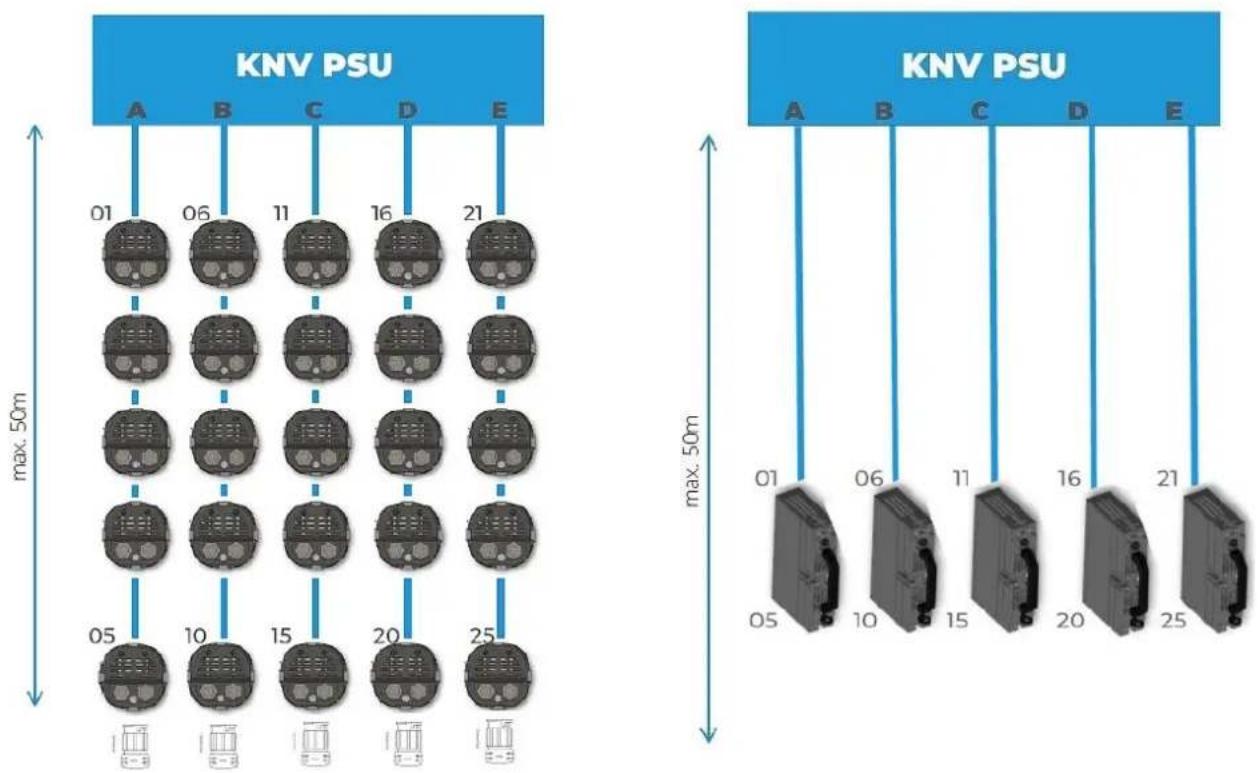
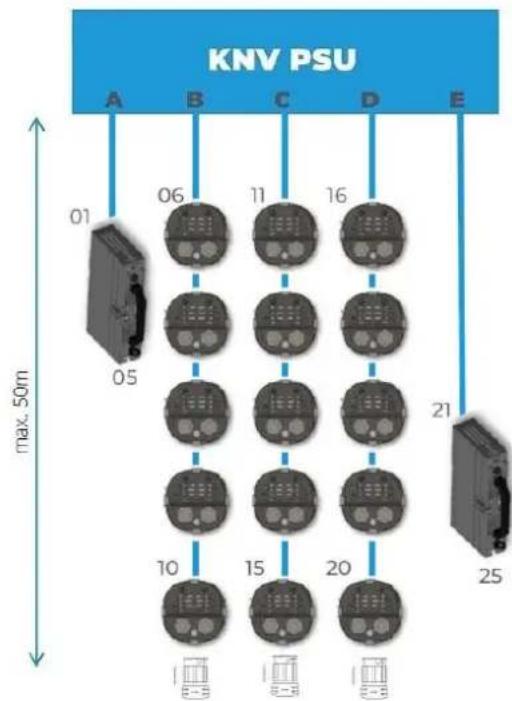
See Figure 9 and Figure 10. Pixels are automatically mapped as shown when you connect KNV Dot and / or Line fixtures to a KNV PSU.
For example:
- If you connect a chain of five KNV Dots to Output D on the PSU, the first KNV Dot in the chain will respond to commands sent to Pixel 16 and the last KNV Dot in the chain will respond to commands sent to Pixel 20.
- If you connect a KNV Line to Output B on the PSU, the first pixel of the KNV Line (the pixel at the cable entry end of the fixture) will respond to commands sent to Pixel 06. The last pixel of the KNV Line (the pixel at the safety cable attachment end of the fixture) will respond to commands sent to Pixel 10.
flowchart
graph TD
    subgraph_Left_NPV["KNV PSU"]
        A1["01"] --> D1["16"]
        A2["06"] --> D2["16"]
        A3["11"] --> D3["16"]
        A4["21"] --> D4["16"]
        A5["05"] --> D5["15"]
        A6["10"] --> D6["15"]
        A7["15"] --> D7["15"]
        A8["20"] --> D8["15"]
        A9["25"] --> D9["15"]
    end
    subgraph_Right_NPV["KNV PSU"]
        A10["01"] --> D10["16"]
        A11["06"] --> D11["16"]
        A12["11"] --> D12["16"]
        A13["20"] --> D13["16"]
        A14["25"] --> D14["16"]
    end
    style Left_NPV fill:#f9f,stroke:#333
    style Right_NPV fill:#bbf,stroke:#333
Figure 9. Pixel mapping - KNV Dot only and KNV Line only
flowchart
graph TD
    A["KNV PSU"] --> B["01"]
    A --> C["05"]
    A --> D["06"]
    A --> E["11"]
    A --> F["16"]
    A --> G["21"]
    A --> H["25"]
    style A fill:#99ccff,stroke:#333
    style B fill:#cccccc,stroke:#333
    style C fill:#cccccc,stroke:#333
    style D fill:#cccccc,stroke:#333
    style E fill:#cccccc,stroke:#333
    style F fill:#cccccc,stroke:#333
    style G fill:#cccccc,stroke:#333
    style H fill:#cccccc,stroke:#333
    note right of A "max. 50m"
    note right of H "25"
Figure 10. Pixel mapping - KNV Dot and Line mixed
KNV Dot and Line fixtures can be integrated into installations containing KNV Dot and Arc fixtures if you follow the pixel mapping guidelines below.
Matching pixel orientation in KNV Cube and Arc fixtures
To create a matrix of KNV Dot or Line fixtures that have the same 5 x 5 pixel layout as a KNV Cube or Arc fixture in its normal (unmirrored and unrotated) pixel configuration, see Configuration A below: install the KNV Dots or Lines horizontally running from left to right, connecting the top row of pixels to PSU output A, the next row down to PSU output B and so on until you connect the bottom row of pixels to PSU output E.
KNV Cube / Arc, normal pixel orientation
| 01 | 02 | 03 | 04 | 05 |
| 06 | 07 | 08 | 09 | 10 |
| 11 | 12 | 13 | 14 | 15 |
| 16 | 17 | 18 | 19 | 20 |
| 21 | 22 | 23 | 24 | 25 |
Configuration A: KNV Dots / Lines installed in horizontal rows
| A | → | 01 | 02 | 03 | 04 | 05 |
| B | → | 06 | 07 | 08 | 09 | 10 |
| C | → | 11 | 12 | 13 | 14 | 15 |
| D | → | 16 | 17 | 18 | 19 | 20 |
| E | → | 21 | 22 | 23 | 24 | 25 |
Hanging vertically downwards and adjusting KNV Cube and Arc fixture settings
If you prefer to create a matrix of KNV Dot or Line fixtures hanging vertically downwards from PSU outputs A to E (as shown in Figure 9, Figure 10 and Configuration B below) but you still want identical pixel mapping with a KNV Cube or Arc fixture, open the Fixture Settings control menu on the KNV Cube or Arc, set Pixel Mirrored to ON and set Pixel Rotation to 90° CCW. The pixels in the KNV Cube or Arc will be mapped as shown below.
KNV Cube / Arc, Pixel Mirrored = ON Pixel Rotation = 90° CCW
| 01 | 06 | 11 | 16 | 21 |
| 02 | 07 | 12 | 17 | 22 |
| 03 | 08 | 13 | 18 | 23 |
| 04 | 09 | 14 | 19 | 24 |
| 05 | 10 | 23 | 20 | 25 |
Configuration B: KNV Dots / Lines suspended in vertical columns
| A | B | C | D | E |
| ↓ | ↓ | ↓ | ↓ | ↓ |
| 01 | 06 | 11 | 16 | 21 |
| 02 | 07 | 12 | 17 | 22 |
| 03 | 08 | 13 | 18 | 23 |
| 04 | 09 | 14 | 19 | 24 |
| 05 | 10 | 23 | 20 | 25 |
Test patterns
You can check the pixel mapping setup of an array of KNV Dot and Line fixtures from the control desk by applying a Test pattern on the Control / Settings DMX channel or activating Test sequence in the Service menu.
KNV Dot and Line fixtures show a dynamic test pattern that helps you identify them when they are distributed freely in a creative installation. The dynamic pattern helps you identify the first fixture connected to each PSU output and see the pixel order of each line. The patterns of the pixels connected to each output are as follows:
| Output A | First pixel: Constant RGB at 50% intensityAll pixels: Continuous RGB chase on pixels 1-5 at 100% intensity |
| Output B | First pixel: Constant Red at 50% intensityAll pixels: Continuous Red chase on pixels 1-5 at 100% intensity |
| Output C | First pixel: Constant Green at 50% intensityAll pixels: Continuous Green chase on pixels 1-5 at 100% intensity |
| Output D | First pixel: Constant Blue at 50% intensityAll pixels: Continuous Blue chase on pixels 1-5 at 100% intensity |
| Output E | First pixel: Constant Magenta at 50% intensityAll pixels: Continuous Magenta chase on pixels 1-5 at 100% intensity |
10. DMX control modes
Eight DMX control modes are available in the KNV Dot and Line.
Note that the DMX channel layout in KNV Dot and Line fixtures is not exactly the same as the channel layout in KNV Cube and Arc fixtures.
In all DMX modes, a Control / Settings channel lets you adjust fixture settings remotely from the DMX control desk.
- DMX Mode 1 lets you control all 25 pixels together as a group with 16-bit resolution. A separate Shutter channel provides strobe, pixel and ramp-up/down effects. This extra shutter affects all white and all RGB LEDs by default, but you can change this setting via the Control/Settings DMX Channel or the fixture's control panel so that the shutter applies to white LEDs only or RGB LEDs only.
- DMX Mode 2 splits the KNV into a White Strobe and a separate RGB Strobe, each with standard strobe light control channels: Intensity, Flash Rate and Flash Duration. In addition, the Flare effect and pre-programmed dynamic FX are available for each strobe.
- DMX Mode 3 provides an RGB strobe plus 25 individually controllable white pixels. The RGB strobe has standard strobe control channels: Intensity, Flash Rate and Flash Duration. It also has the Flare effect and pre-programmed dynamic FX. The 25 individual white pixels have a separate Shutter channel with strobe, pixel and ramp-up/down effects.
- DMX Mode 4 provides a White Strobe plus 25 individually controllable RGB pixels. The White strobe has standard strobe control channels: Intensity, Flash Rate and Flash Duration. It also has the Flare effect and pre-programmed dynamic FX. The 25 individual RGB pixels have a separate Shutter channel with strobe, pixel and ramp-up/down effects.
- DMX Mode 5 provides three different layers:
- The Base Layer has lowest priority (other layers override it), so it acts as a background layer. The Base layer has RGBW intensity control.
- Layer 2 has priority over the base layer, so it acts as a middle layer.
- Layer 3 has highest priority, so it acts as a top layer.
- Layers 2 and 3 both have standard RGBW strobe control channels plus the Flare effect and pre-programmed dynamic FX. Layers 2 and 3 also have a 16-bit Layer Master Channel that controls the transparency of the layer.
FX layer priorities work in true color, which means that colors are not mixed. If you run a red snake FX on Layer 2 over the top of a blue background on the Base Layer, the snake will be red, not a mix of blue and red.
Applying transparency to a layer allows the color of the background layer or the lower priority layer to shine through.
If you want to dim a layer's colors without color from lower priority layers shining through, reduce the intensity of the colors without applying transparency to the layer. If you reduce the intensity of all the colors to zero, you can run a black effect over the top of lower priority layers.
- DMX Mode 6 provides master shutter/strobe control plus 8-bit RGBW control of 25 individual pixels.
- DMX Mode 7 provides master shutter/strobe control plus 16-bit RGBW control of 25 individual pixels.
- DMX Mode 8 provides a base Layer 1 with RGBW 8-bit control of 25 individual pixels and an additional Layer 2 with RGBW FX.
- In DMX Modes 2, 3, 4, 5 and 8 if no FX is selected (FX Selection channel is set to zero), the Flash rate channel controls the flash rate of the Strobe. If an FX is selected, the Flash rate channel is redeployed and controls the speed of the effect instead.
- DMX Modes 6 and 7 give individual control of 25 separate pixels plus a master Shutter channel. The extra shutter with strobe, pixel and ramp-up/down effects applies to all the LEDs (white and RGB), by default, but you can change this setting via the Control / Settings DMX Channel or the PSU's control panel so that the shutter applies to white LEDs only or to RGB LEDs only.
Pixel Configuration
By default, the PSU configures the first physical pixel of the Output A line as Pixel 01 and the last physical pixel of the Output A line as Pixel 05. It configures the first physical pixel of the Output B line as Pixel 06 and the last physical pixel of the Output B line as Pixel 10, and so on.
Pixel Configuration lets you adjust the control position of the different physical pixels on the output lines by mapping an individual pixel to a specific position. For example, if you want the second KNV Dot at Output B to be Pixel 25 in your pixel mapping setup, just change the value "B2=07" to "B2=25".
The default pixel mapping positions are as follows:
- Output A: A1=01 / A2=02 / A3=04 / A4=04 / A5=05
- Output B: B1=06 / B2=07 / B3=08 / B4=09 / B5=10
- Output C: C1 = 11 / C2 = 12 / C3 = 13 / C4 = 14 / C5 = 15
- Output D: D1=16 / D2=17 / D3=18 / D4=19 / D5=20
• Output E: E1=21 / E2=22 / E3=23 / E4=24 / E5=25
You can load the above default pixel mapping configuration at any time using the Auto Configuration command.
Note: As the pixel mapping configuration is a control-critical setting, it is not restored to default settings if you apply a Load Fixture Setting Defaults command. In other words, an individual pixel configuration will not be affected by a Load Fixture Setting Defaults command. To delete custom pixel mapping and restore the default pixel configuration, apply either an Auto Configuration or Load Factory Backup command.
Managing unused DMX channels
If you connect less than 25 pixels to a KNV PSU and you are operating in DMX Modes 3, 4, 6, 7 and 8, you can reduce the DMX footprint of the installation and free up DMX channels by deleting unused DMX channels in your controller patch.
To give an example:
- You are operating in DMX Mode 6 and you only need to control 10 pixels. You have set the PSU to DMX address 001
- Connect pixels 1 – 5 to PSU output A and pixels 6 – 10 to PSU output B.
- PSU outputs C, D and E will not be connected to pixels.
- The KNV PSU will only work with data sent on DMX channels 001 – 042. DMX channels 043 – 102 will be ignored. You can simply unpatch these channels in your controller and give the next fixture DMX address 043.
Note that if you send a GET device_info query via RDM, the PSU will not report a smaller DMX footprint if you leave outputs unused – it will always report the full DMX footprint.
Special notes on the DMX tables
In the following DMX channel layout tables:
- Default settings are indicated with bold type.
- 'L = xx' indicates the length of the FX expressed as the number of steps that make up the FX (like the number of frames in an animation). If a pattern is listed as 'L = 10', the FX consists of ten steps.
- FX crossfade times apply to crossfading between the steps in the FX. If you apply a long crossfade time to a moving FX pattern, it will appear to leave a tail behind it as the pixels in the pattern fade down to zero.
- Where commands are marked with an asterisk * you must send that value continuously for 3 seconds (or other duration if indicated in the table) to apply the command.
11. Control channel layout
DMX Mode 1: RGBW 16-bit
10 DMX Channels
| Channel | Command | DMX range | Percent | Default DMX | Fade | |
| RGBW | ||||||
| 1 | Red coarse | Red intensity 0-100% | 0-65535 | 0-100% | 0 | Fade |
| 2 | Red fine | |||||
| 3 | Green coarse | Green intensity 0-100% | 0-65535 | 0-100% | 0 | Fade |
| 4 | Green fine | |||||
| 5 | Blue coarse | Blue intensity 0-100% | 0-65535 | 0-100% | 0 | Fade |
| 6 | Blue fine | |||||
| 7 | White coarse | White intensity 0-100% | 0-65535 | 0-100% | 0 | Fade |
| 8 | White fine | |||||
| 9 | Shutter | Shutter closed | 0-4 | 0-1.6% | 255 | Snap |
| Sync ramp up slow > fast | 5-39 | 2.0-15.3% | Fade | |||
| Sync ramp down slow > fast | 40-74 | 15.7-29.0% | Fade | |||
| Sync ramp up-down slow > fast | 75-109 | 29.4-%42.7 | Fade | |||
| Sync double flash slow >fast | 110-144 | 43.1-56.5% | Fade | |||
| Random pixel slow > fast | 145-179 | 56.9-70.2% | Fade | |||
| Random strobe slow > fast | 180-214 | 70.6-83.9% | Fade | |||
| Sync strobe 0.289 > 16.67 Hz | 215-249 | 84.3-97.6% | Fade | |||
| Hyperspeed | 250-252 | 98.0-98.8% | Snap | |||
| Open | 253-255 | 99.2-100% | Snap | |||
| Control / Settings | ||||||
| 10 | Control / Settings | Idle | 0-11 | 0-4.3% | 0 | Snap |
| Effect sync - Immediate (1 sec.) | 12-15 | 4.7-5.9% | ||||
| Effect sync - Power line (3 sec.) | 16-29 | 6.3-11.4% | ||||
| Effect sync - Internal (3 sec.) | 30-32 | 11.8-12.5% | ||||
| No function | 33-38 | 12.9-14.9% | ||||
| Dimmer flash Off* | 39-41 | 15.3-16.1% | ||||
| Dimmer flash On* | 42-44 | 16.5-17.3% | ||||
| Dimming curve ESoft* | 45-47 | 17.6-18.4% | ||||
| Dimming curve Soft* | 48-50 | 18.8-19.6% | ||||
| Dimming curve Linear* | 51-53 | 20.0-20.8% | ||||
| No function | 54-56 | 21.2-22.0% | ||||
| Extra Shutter RGBW* (Modes 1/6/7) | 57-59 | 22.4-23.1% | ||||
| Extra Shutter RGB only* (Modes 1/6/7) | 60-62 | 23.5-24.3% | ||||
| Extra Shutter White only* (Modes 1/6/7) | 63-65 | 24.7-25.5% | ||||
| No function | 66-68 | 25.9-26.7% | ||||
| Fan mode regulated* | 69-71 | 27.1-27.8% | ||||
| Fan mode high* | 72-74 | 28.2-29.0% | ||||
| Fan mode medium* | 75-77 | 29.4-30.2% | ||||
| Fan mode low* | 78-80 | 30.6-31.4% | ||||
| No function | 81-83 | 31.8-32.5% | ||||
| Display On* | 84-86 | 32.9-33.7% | ||||
| Display Off* | 87-89 | 34.1-34.9% | ||||
| Control / Settings (continued) | Display Auto* | 90-92 | 35.3-36.1% | |||
| Display invert Off* | 93-95 | 36.5-37.3% | ||||
| Display invert On* | 96-98 | 37.6-38.4% | ||||
| No DMX = Capture scene* | 99-101 | 38.8-39.6% | ||||
| No DMX = Stand-alone* | 102-104 | 40.0-40.8% | ||||
| No DMX = Blackout* | 105-107 | 41.2-42.0% | ||||
| No DMX = Hold* | 108-110 | 42.4-43.1% | ||||
| Test pattern On* | 111-113 | 43.5-44.3% | ||||
| Test pattern Off* | 114-116 | 44.7-45.5% | ||||
| No function | 117-134 | 45.9-52.5% | ||||
| White output limitation Off* | 135-137 | 52.9-53.7% | ||||
| White output limitation 80%* | 138-140 | 54.1-54.9% | ||||
| White output limitation 60%* | 141-143 | 55.3-56.1% | ||||
| White output limitation 40%* | 144-146 | 56.5-57.3% | ||||
| White output limitation 20%* | 147-149 | 57.6-58.4% | ||||
| White output limitation 10%* | 150-152 | 55.8-59.6% | ||||
| No function | 153-158 | 60.0-62.0% | ||||
| RGB output limitation Off%* | 159-161 | 62.4-63.1% | ||||
| RGB output limitation 80%* | 162-164 | 63.5-64.3% | ||||
| RGB output limitation 60%* | 165-167 | 64.7-65.5% | ||||
| RGB output limitation 40%* | 168-170 | 65.9-66.7% | ||||
| RGB output limitation 20%* | 171-173 | 67.1-67.8% | ||||
| RGB output limitation 10%* | 174-176 | 68.2-69.0% | ||||
| No function | 177-191 | 69.4-74.9% | ||||
| Main LED PWM 2400 Hz (5 sec.) | 192-194 | 75.3-76.1% | ||||
| Main LED PWM 3000 Hz (5 sec.) | 195-197 | 76.5-77.3% | ||||
| Main LED PWM 4800 Hz (5 sec.) | 198-200 | 77.6-78.4% | ||||
| Main LED PWM 9600 Hz (5 sec.) | 201-203 | 78.8-79.6% | ||||
| No function | 204-206 | 80.0-80.8% | ||||
| Main LED PWM 25 kHz (5 sec.) | 207-209 | 81.2-82.0% | ||||
| No function | 210-251 | 82.4-98.4% | ||||
| Reboot fixture* | 252-255 | 98.8-100% | ||||
DMX Mode 2: White strobe with FX, RGB with FX
23 DMX Channels
| Channel | Command | DMX range | Percent | Default DMX | Fade | |
| Channel group A: White strobe with FX | ||||||
| 1 | White LEDs intensity | Intensity 0-100% | 0-255 | 0-100% | 0 | Fade |
| 2 | White LEDs flash duration | Flash duration 7-650 ms | 0-255 | 0-100% | 0 | Fade |
| 3 | White LEDs flash rate (if FX are not active) | No flashSingle flash if Dimmer Flash = ON and value is changed on Ch 1 | 0-1 | 0-0.4% | 0 | Snap |
| Flash rate 0.289-16.67 Hz | 2-250 | 0.8-98% | Fade | |||
| Hyperspeed | 251-252 | 98.4-98.8% | Snap | |||
| Continuously on | 253-255 | 99.2-100% | Snap | |||
| FX speed (if FX are active) | FX speed = stop | 0-1 | 0-0.4% | Snap | ||
| FX speed = slow > fast | 2-253 | 0.8-98.8% | Fade | |||
| FX speed = stop | 254-255 | 99.2-100% | Snap | |||
| 4 | White LEDs Flare effect | Off | 0-9 | 0-3.5% | 0 | Snap |
| Slow > fast | 10-49 | 3.9-19.2% | Fade | |||
| Off | 50-59 | 19.6-23.1% | Snap | |||
| Random slow > fast | 60-109 | 23.5-42.7% | Fade | |||
| Off | 110-119 | 43.1-46.7% | Snap | |||
| Random pixel slow > fast | 120-169 | 47.1-66.3% | Fade | |||
| Off | 170-255 | 66.7-100% | Snap | |||
| 5 | White LEDs FX selection | Sync strobe - all | 0-2 | 0-0.8% | 0 | Snap |
| Sync strobe - circle mask | 3-5 | 1.2-2.0% | ||||
| Sync strobe - 4 dot mask | 6-8 | 2.4-3.1% | ||||
| Sync strobe - 1 dot mask | 9-11 | 3.5-4.3% | ||||
| Random strobe - all | 12-14 | 4.7-5.5% | ||||
| Random strobe - circle mask | 15-17 | 5.9-6.7% | ||||
| Random strobe - 4 dot mask | 18-20 | 7.1-7.8% | ||||
| Random strobe - 1 dot mask | 21-23 | 8.2-9.0% | ||||
| Lite in/out - all | 24-26 | 9.4-10.2% | ||||
| Lite in/out - circle mask | 27-29 | 10.6-11.4% | ||||
| Lite in/out - 4 dot mask | 30-32 | 11.8-12.6% | ||||
| Lite in/out - 1 dot mask | 33-35 | 12.9-13.7% | ||||
| Snake | 36-38 | 14.1-14.9% | ||||
| Raindrops | 39-41 | 15.3-16.1% | ||||
| Random pixel | 42-44 | 16.5-17.3% | ||||
| Random fake x 2 (L = 13) | 45-47 | 17.6-18.4% | ||||
| Random fake x 4 (L = 7) | 48-50 | 18.8-19.6% | ||||
| Line (L = 5) | 51-53 | 20.0-20.8% | ||||
| Double line (L = 3) | 54-56 | 21.2-22.0% | ||||
| Corner to corner line (L = 9) | 57-59 | 22.4-23.1% | ||||
| Tilted double lines (L = 5) | 60-62 | 23.5-24.3% | ||||
| Tilted double lines in to out (L = 3) | 63-65 | 24.7-25.5% | ||||
| Center line running dot (L = 5) | 66-68 | 25.9-26.7% | ||||
| Middle line running dot (L = 5) | 69-71 | 27.1-27.8% | ||||
| Outer line running dot (L = 5) | 72-74 | 28.2-29.0% | ||||
| Corner to corner (L = 5) | 75-77 | 29.4-30.2% | ||||
| Arrow (L = 7) | 78-80 | 30.6-31.4% | ||||
| Wave (L = 8) | 81-83 | 31.8-32.5% | ||||
| Wheel (L = 8) | 84-86 | 32.9-33.7% | ||||
| Half wheel (L = 16) | 87-89 | 34.1-34.9% | ||||
| Circling dot (L = 8) | 90-92 | 35.3-36.1% | ||||
| Outer circle (L = 8) | 93-95 | 36.5-37.3% | ||||
| Inner circle (L = 4) | 96-98 | 37.6-38.4% | ||||
| Outer 4 dots (L = 4) | 99-101 | 38.8-39.6% | ||||
| Outer single dot (L = 16) | 102-104 | 40.0-40.8% | ||||
| Middle single dot (L = 8) | 105-107 | 41.2-42.0% | ||||
| Spinning 2x1 dots (L = 8) | 108-110 | 42.4-43.1% | ||||
| Asymmetrical 4 dots (L = 8) | 111-113 | 43.5-44.3% | ||||
| Symmetrical 4 dots (L = 8) | 114-116 | 44.7-45.5% | ||||
| Square (L = 3) | 117-119 | 45.9-46.7% | ||||
| Inside out (L = 6) | 120-122 | 47.1-48.8% | ||||
| Inside out 2 (L = 3) | 123-125 | 48.2-49.0% | ||||
| Abstract 1 (L = 3) | 126-128 | 49.4-50.2% | ||||
| Abstract 2 (L = 3) | 129-131 | 50.6-51.4% | ||||
| Abstract 3 (L = 3) | 132-134 | 51.8-52.5% | ||||
| Hash tag (L = 2) | 135-137 | 52.9-53.7% | ||||
| Flip flop (L = 2) | 138-140 | 54.1-54.9% | ||||
| Jumping slash (L = 13) | 141-143 | 55.3-56.1% | ||||
| Jumping 'L' (L = 12) | 144-146 | 56.5-57.3% | ||||
| Jumping pins (L = 12) | 147-149 | 57.6-58.4% | ||||
| Fat dot (L = 4) | 150-152 | 58.8-59.6% | ||||
| Bars (L = 2) | 153-155 | 60.0-60.8% | ||||
| 3 x lines (L = 5) | 156-158 | 61.2-62.0% | ||||
| 2 x lines (L = 5) | 159-161 | 62.4-63.1% | ||||
| Spiral (L = 28) | 162-164 | 63.5-64.3% | ||||
| Off - No Strobe or FX | 165-255 | 64.7-100% | ||||
| 6 | White LEDs FX crossfade time | Off | 0-1 | 0-0.4% | 0 | Snap |
| Crossfade fast > slow | 2-127 | 0.8-49.8% | Fade | |||
| Crossfade and tail slow > fast | 128-255 | 50.2-100% | Fade | |||
| 7 | White LEDs orientation | Off | 0-4 | 0-1.6% | 0 | Snap |
| Rotate 90° | 5-9 | 2.0-3.5% | ||||
| Rotate 180° | 10-14 | 3.9-5.5% | ||||
| Rotate 270° | 15-19 | 5.9-7.5% | ||||
| Horizontal flip | 20-24 | 7.8-9.4% | ||||
| Rotate 90° & vertical flip | 25-29 | 9.8-11.4% | ||||
| Rotate 180° & horizontal flip | 30-34 | 11.8-13.3% | ||||
| Rotate 270° & vertical flip | 35-39 | 13.7-15.3% | ||||
| Off | 40-44 | 15.7-17.3% | ||||
| Random rotate & flip | 45-49 | 17.7-19.2% | ||||
| Random position | 50-54 | 19.6-21.2% | ||||
| Rotate 90° & random position | 55-59 | 21.6-23.1% | ||||
| Rotate 180° & random position | 60-64 | 23.5-25.1% | ||||
| Rotate 270° & random position | 65-69 | 25.5-27.1% | ||||
| Off | 70-74 | 27.5-29.0% | ||||
| Bounce | 75-79 | 29.4-31.0% | ||||
| Rotate 90° & bounce | 80-84 | 31.4-32.9% | ||||
| Rotate 180° & bounce | 85-89 | 33.3-34.9% | ||||
| Rotate 270° & bounce | 90-94 | 35.3-36.9% | ||||
| Off | 95-99 | 37.3-38.8% | ||||
| Rotate CCW at end | 100-104 | 39.2-40.8% | ||||
| Rotate CW at end | 105-109 | 41.2-42.7% | ||||
| Random rotate at end | 110-114 | 43.1-44.7% | ||||
| Off | 115-134 | 45.1-52.5% | ||||
| Rotate 90° ** | 135-139 | 52.9-54.5% | ||||
| Rotate 180° ** | 140-144 | 54.9-56.5% | ||||
| Rotate 270° ** | 145-149 | 56.9-58.4% | ||||
| Horizontal flip ** | 150-154 | 58.8-60.4% | ||||
| Rotate 90° & vertical flip ** | 155-159 | 60.8-62.4% | ||||
| Rotate 180° & horizontal flip ** | 160-164 | 62.7-64.3% | ||||
| Rotate 270° & vertical flip ** | 165-169 | 64.7-66.3% | ||||
| Off | 170-174 | 66.7-68.2% | ||||
| Random rotate & flip ** | 175-179 | 68.6-70.2% | ||||
| Random position ** | 180-184 | 70.6-72.2% | ||||
| Rotate 90° & random position ** | 185-189 | 72.5-74.1% | ||||
| Rotate 180° & random position ** | 190-194 | 74.5-76.1% | ||||
| Rotate 270° & random position ** | 195-199 | 76.5-78.0% | ||||
| Off | 200-204 | 78.4-80.0% | ||||
| Bounce ** | 205-209 | 80.4-82.0% | ||||
| Rotate 90° & bounce ** | 210-214 | 82.4-83.9% | ||||
| Rotate 180° & bounce ** | 215-219 | 84.3-85.9% | ||||
| Rotate 270° & bounce ** | 220-224 | 86.3-87.8% | ||||
| Off | 225-229 | 88.2-89.8% | ||||
| Rotate CCW at end ** | 230-234 | 90.2-91.8% | ||||
| Rotate CW at end ** | 235-239 | 92.2-93.7% | ||||
| Random rotate at end ** | 240-244 | 94.1-95.7% | ||||
| Off | 245-255 | 96.1-100% | ||||
| 8 | White LEDs FX offset | 0-100% | 0-255 | 0-100% | 0 | Fade |
| 9 | White LEDs FX length | 0-100% | 0-255 | 0-100% | 0 | Fade |
| Channel group B: RGB strobe with FX | ||||||
| 10 | RGB LEDs dimmer | Intensity 0-100% | 0-255 | 0-100% | 0 | Fade |
| 11 | RGB LEDs flash duration | Flash duration 7-650 ms | 0-255 | 0-100% | 0 | Fade |
| 12 | RGB LEDs flash rate (if FX are not active) | No flash | 0-1 | 0-0.4% | 0 | Snap |
| Flash rate 0.289-16.67 Hz | 2-250 | 0.8-98% | Fade | |||
| Hyperspeed | 251-254 | 98.4-99.6% | Snap | |||
| Continuously on | 255 | 100% | Snap | |||
| FX speed (if FX are active) | FX speed = stop | 0-1 | 0-0.4% | Snap | ||
| FX speed = slow > fast | 2-253 | 0.8-98.8% | Fade | |||
| FX speed = stop | 254-255 | 99.2-100% | Snap | |||
| 13 | Red | Red intensity 0-100% | 0-255 | 0-100% | 255 | Fade |
| 14 | Green | Green intensity 0-100% | 0-255 | 0-100% | 255 | Fade |
| 15 | Blue | Blue intensity 0-100% | 0-255 | 0-100% | 255 | Fade |
| 16 | RGB LEDs Flare effect | Off | 0-9 | 0-3.5% | 0 | Snap |
| Slow > fast | 10-49 | 3.9-19.2% | Fade | |||
| Off | 50-59 | 19.6-23.1% | Snap | |||
| Random slow > fast | 60-109 | 23.5-42.7% | Fade | |||
| Off | 110-119 | 43.1-46.7% | Snap | |||
| Random pixel slow > fast | 120-169 | 47.1-66.3% | Fade | |||
| Off | 170-255 | 66.7-100% | Snap | |||
| 17 | RGB LEDs FX selection | Sync strobe - all | 0-2 | 0-0.8% | 0 | Snap |
| Sync strobe - circle mask | 3-5 | 1.2-2.0% | ||||
| Sync strobe - 4 dot mask | 6-8 | 2.4-3.1% | ||||
| Sync strobe - 1 dot mask | 9-11 | 3.5-4.3% | ||||
| Random strobe - all | 12-14 | 4.7-5.5% | ||||
| Random strobe - circle mask | 15-17 | 5.9-6.7% | ||||
| Random strobe - 4 dot mask | 18-20 | 7.1-7.8% | ||||
| Random strobe - 1 dot mask | 21-23 | 8.2-9.0% | ||||
| Lite in/out - all | 24-26 | 9.4-10.2% | ||||
| Lite in/out - circle mask | 27-29 | 10.6-11.4% | ||||
| Lite in/out - 4 dot mask | 30-32 | 11.8-12.6% | ||||
| Lite in/out - 1 dot mask | 33-35 | 12.9-13.7% | ||||
| Snake | 36-38 | 14.1-14.9% | ||||
| Raindrops | 39-41 | 15.3-16.1% | ||||
| Random pixel | 42-44 | 16.5-17.3% | ||||
| Random fake x 2 (L = 13) | 45-47 | 17.6-18.4% | ||||
| Random fake x 4 (L = 7) | 48-50 | 18.8-19.6% | ||||
| Line (L = 5) | 51-53 | 20.0-20.8% | ||||
| Double line (L = 3) | 54-56 | 21.2-22.0% | ||||
| Corner to corner line (L = 9) | 57-59 | 22.4-23.1% | ||||
| Tilted double lines (L = 5) | 60-62 | 23.5-24.3% | ||||
| Tilted double lines in to out (L = 3) | 63-65 | 24.7-25.5% | ||||
| Center line running dot (L = 5) | 66-68 | 25.9-26.7% | ||||
| Middle line running dot (L = 5) | 69-71 | 27.1-27.8% | ||||
| Outer line running dot (L = 5) | 72-74 | 28.2-29.0% | ||||
| Corner to corner (L = 5) | 75-77 | 29.4-30.2% | ||||
| Arrow (L = 7) | 78-80 | 30.6-31.4% | ||||
| Wave (L = 8) | 81-83 | 31.8-32.5% | ||||
| Wheel (L = 8) | 84-86 | 32.9-33.7% | ||||
| Half wheel (L = 16) | 87-89 | 34.1-34.9% | ||||
| Circling dot (L = 8) | 90-92 | 35.3-36.1% | ||||
| Outer circle (L = 8) | 93-95 | 36.5-37.3% | ||||
| Inner circle (L = 4) | 96-98 | 37.6-38.4% | ||||
| Outer 4 dots (L = 4) | 99-101 | 38.8-39.6% | ||||
| Outer single dot (L = 16) | 102-104 | 40.0-40.8% | ||||
| Middle single dot (L = 8) | 105-107 | 41.2-42.0% | ||||
| Spinning 2x1 dots (L = 8) | 108-110 | 42.4-43.1% | ||||
| Asymmetrical 4 dots (L = 8) | 111-113 | 43.5-44.3% | ||||
| Symmetrical 4 dots (L = 8) | 114-116 | 44.7-45.5% | ||||
| Square (L = 3) | 117-119 | 45.9-46.7% | ||||
| Inside out (L = 6) | 120-122 | 47.1-48.8% | ||||
| Inside out 2 (L = 3) | 123-125 | 48.2-49.0% | ||||
| Abstract 1 (L = 3) | 126-128 | 49.4-50.2% | ||||
| Abstract 2 (L = 3) | 129-131 | 50.6-51.4% | ||||
| Abstract 3 (L = 3) | 132-134 | 51.8-52.5% | ||||
| Hash tag (L = 2) | 135-137 | 52.9-53.7% | ||||
| Flip flop (L = 2) | 138-140 | 54.1-54.9% | ||||
| Jumping slash (L = 13) | 141-143 | 55.3-56.1% | ||||
| Jumping 'L' (L = 12) | 144-146 | 56.5-57.3% | ||||
| Jumping pins (L = 12) | 147-149 | 57.6-58.4% | ||||
| Fat dot (L = 4) | 150-152 | 58.8-59.6% | ||||
| Bars (L = 2) | 153-155 | 60.0-60.8% | ||||
| 3 x lines (L = 5) | 156-158 | 61.2-62.0% | ||||
| 2 x lines (L = 5) | 159-161 | 62.4-63.1% | ||||
| Spiral (L = 28) | 162-164 | 63.5-64.3% | ||||
| Off - No Strobe or FX | 165-255 | 64.7-100% | ||||
| 18 | RGB LEDs FX crossfade time | Off | 0-1 | 0-0.4% | 0 | Snap |
| Crossfade fast > slow | 2-127 | 0.8-49.8% | Fade | |||
| Crossfade and tail slow > fast | 128-255 | 50.2-100% | Fade | |||
| 19 | RGB LEDs orientation | Off | 0-4 | 0-1.6% | 0 | Snap |
| Rotate 90° | 5-9 | 2.0-3.5% | ||||
| Rotate 180° | 10-14 | 3.9-5.5% | ||||
| Rotate 270° | 15-19 | 5.9-7.5% | ||||
| Horizontal flip | 20-24 | 7.8-9.4% | ||||
| Rotate 90° & vertical flip | 25-29 | 9.8-11.4% | ||||
| Rotate 180° & horizontal flip | 30-34 | 11.8-13.3% | ||||
| Rotate 270° & vertical flip | 35-39 | 13.7-15.3% | ||||
| Off | 40-44 | 15.7-17.3% | ||||
| Random rotate & flip | 45-49 | 17.7-19.2% | ||||
| Random position | 50-54 | 19.6-21.2% | ||||
| Rotate 90° & random position | 55-59 | 21.6-23.1% | ||||
| Rotate 180° & random position | 60-64 | 23.5-25.1% | ||||
| Rotate 270° & random position | 65-69 | 25.5-27.1% | ||||
| Off | 70-74 | 27.5-29.0% | ||||
| Bounce | 75-79 | 29.4-31.0% | ||||
| Rotate 90° & bounce | 80-84 | 31.4-32.9% | ||||
| Rotate 180° & bounce | 85-89 | 33.3-34.9% | ||||
| Rotate 270° & bounce | 90-94 | 35.3-36.9% | ||||
| Off | 95-99 | 37.3-38.8% | ||||
| Rotate CCW at end | 100-104 | 39.2-40.8% | ||||
| Rotate CW at end | 105-109 | 41.2-42.7% | ||||
| Random rotate at end | 110-114 | 43.1-44.7% | ||||
| Off | 115-134 | 45.1-52.5% | ||||
| Rotate 90° ** | 135-139 | 52.9-54.5% | ||||
| Rotate 180° ** | 140-144 | 54.9-56.5% | ||||
| Rotate 270° ** | 145-149 | 56.9-58.4% | ||||
| Horizontal flip ** | 150-154 | 58.8-60.4% | ||||
| Rotate 90° & vertical flip ** | 155-159 | 60.8-62.4% | ||||
| Rotate 180° & horizontal flip ** | 160-164 | 62.7-64.3% | ||||
| Rotate 270° & vertical flip ** | 165-169 | 64.7-66.3% | ||||
| Off | 170-174 | 66.7-68.2% | ||||
| Random rotate & flip ** | 175-179 | 68.6-70.2% | ||||
| Random position ** | 180-184 | 70.6-72.2% | ||||
| Rotate 90° & random position ** | 185-189 | 72.5-74.1% | ||||
| Rotate 180° & random position ** | 190-194 | 74.5-76.1% | ||||
| Rotate 270° & random position ** | 195-199 | 76.5-78.0% | ||||
| Off | 200-204 | 78.4-80.0% | ||||
| Bounce ** | 205-209 | 80.4-82.0% | ||||
| Rotate 90° & bounce ** | 210-214 | 82.4-83.9% | ||||
| Rotate 180° & bounce ** | 215-219 | 84.3-85.9% | ||||
| Rotate 270° & bounce ** | 220-224 | 86.3-87.8% | ||||
| Off | 225-229 | 88.2-89.8% | ||||
| Rotate CCW at end ** | 230-234 | 90.2-91.8% | ||||
| Rotate CW at end ** | 235-239 | 92.2-93.7% | ||||
| Random rotate at end ** | 240-244 | 94.1-95.7% | ||||
| Off | 245-255 | 96.1-100% | ||||
| 20 | RGB LEDs FX offset | 0-100% | 0-255 | 0-100% | 0 | Fade |
| 21 | RGB LEDs FX length | 0-100% | 0-255 | 0-100% | 0 | Fade |
| 22 | RGB LEDs color generator | Off | 0-9 | 0-3.5% | 0 | Snap |
| Random all pixels RGBCMY | 10-19 | 3.9-7.5% | Snap | |||
| Random single pixel RGBCMY | 20-29 | 7.8-11.4% | Snap | |||
| Random all pixels bright colors | 30-39 | 11.8-15.3% | Snap | |||
| Random single pixel bright colors | 40-49 | 15.7-19.2% | Snap | |||
| Red / Blue | 50-59 | 19.6-23.1% | Snap | |||
| Red / Green | 60-69 | 23.5-27.1% | Snap | |||
| Blue / Green | 70-79 | 27.5-31.0% | Snap | |||
| Yellow / Magenta | 80-89 | 31.4-34.9% | Snap | |||
| Yellow / Cyan | 90-99 | 35.3-38.8% | Snap | |||
| Cyan / Magenta | 100-109 | 39.2-42.7% | Snap | |||
| Yellow / Blue | 110-119 | 43.1-46.7% | Snap | |||
| Green / Magenta | 120-129 | 47.1-50.6% | Snap | |||
| Red / Green / Blue | 130-139 | 51.0-54.5% | Snap | |||
| Red / Yellow / Blue | 140-149 | 54.9-58.4% | Snap | |||
| Red / Green / Blue / Yellow / Magenta / Cyan | 150-159 | 58.8%-62.4% | Snap | |||
| Red / Green / Blue - Horizontal line | 160-169 | 62.7-66.3% | Snap | |||
| Red / Green / Blue - Vertical line | 170-179 | 66.7-70.2% | Snap | |||
| No function | 180-219 | 70.6-85.9% | Snap | |||
| Color scroll, slow -> fast | 220-229 | 86.3-89.8% | Fade | |||
| Lite in | 230-239 | 90.2-93.7% | Snap | |||
| Lite out | 240-249 | 94.1-97.6% | Snap | |||
| Off | 250-255 | 98.0-100% | Snap | |||
| Control / Settings | ||||||
| 23 | Control / Settings | Idle | 0-11 | 0-4.3% | 0 | Snap |
| Effect sync - Immediate (1 sec.) | 12-15 | 4.7-5.9% | ||||
| Effect sync - Power line (3 sec.) | 16-29 | 6.3-11.4% | ||||
| Effect sync - Internal (3 sec.) | 30-32 | 11.8-12.5% | ||||
| No function | 33-38 | 12.9-14.9% | ||||
| Dimmer flash Off* | 39-41 | 15.3-16.1% | ||||
| Dimmer flash On* | 42-44 | 16.5-17.3% | ||||
| Dimming curve ESoft* | 45-47 | 17.6-18.4% | ||||
| Dimming curve Soft* | 48-50 | 18.8-19.6% | ||||
| Dimming curve Linear* | 51-53 | 20.0-20.8% | ||||
| No function | 54-68 | 21.2-26.7% | ||||
| Fan mode regulated* | 69-71 | 27.1-27.8% | ||||
| Fan mode high* | 72-74 | 28.2-29.0% | ||||
| Fan mode medium* | 75-77 | 29.4-30.2% | ||||
| Fan mode low* | 78-80 | 30.6-31.4% | ||||
| No function | 81-83 | 31.8-32.5% | ||||
| Display On* | 84-86 | 32.9-33.7% | ||||
| Display Off* | 87-89 | 34.1-34.9% | ||||
| Display Auto* | 90-92 | 35.3-36.1% | ||||
| Display invert Off* | 93-95 | 36.5-37.3% | ||||
| Display invert On* | 96-98 | 37.6-38.4% | ||||
| No DMX = Capture scene* | 99-101 | 38.8-39.6% | ||||
| No DMX = Stand-alone* | 102-104 | 40.0-40.8% | ||||
| No DMX = Blackout* | 105-107 | 41.2-42.0% | ||||
| No DMX = Hold* | 108-110 | 42.4-43.1% | ||||
| Test pattern On* | 111-113 | 43.5-44.3% | ||||
| Test pattern Off* | 114-116 | 44.7-45.5% | ||||
| Rotation Off* | 117-119 | 45.9-46.7% | ||||
| Rotate 90° * | 120-122 | 47.1-47.8% | ||||
| Rotate 180° * | 123-125 | 48.2-49.0% | ||||
| Rotate 270° * | 126-128 | 49.4-50.2% | ||||
| Pixel mirror Off* | 129-131 | 50.6-51.4% | ||||
| Pixel mirror On* | 132-134 | 51.8-52.5% | ||||
| White output limitation Off* | 135-137 | 52.9-53.7% | ||||
| White output limitation 80%* | 138-140 | 54.1-54.9% | ||||
| White output limitation 60%* | 141-143 | 55.3-56.1% | ||||
| White output limitation 40%* | 144-146 | 56.5-57.3% | ||||
| White output limitation 20%* | 147-149 | 57.6-58.4% | ||||
| White output limitation 10%* | 150-152 | 55.8-59.6% | ||||
| No function | 153-158 | 60.0-62.0% | ||||
| RGB output limitation Off%* | 159-161 | 62.4-63.1% | ||||
| RGB output limitation 80%* | 162-164 | 63.5-64.3% | ||||
| RGB output limitation 60%* | 165-167 | 64.7-65.5% | ||||
| RGB output limitation 40%* | 168-170 | 65.9-66.7% | ||||
| RGB output limitation 20%* | 171-173 | 67.1-67.8% | ||||
| RGB output limitation 10%* | 174-176 | 68.2-69.0% | ||||
| No function | 177-191 | 69.4-74.9% | ||||
| Main LED PWM 2400 Hz (5 sec.) | 192-194 | 75.3-76.1% | ||||
| Main LED PWM 3000 Hz (5 sec.) | 195-197 | 76.5-77.3% | ||||
| Main LED PWM 4800 Hz (5 sec.) | 198-200 | 77.6-78.4% | ||||
| Main LED PWM 9600 Hz (5 sec.) | 201-203 | 78.8-79.6% | ||||
| No function | 204-206 | 80.0-80.8% | ||||
| Main LED PWM 25 kHz (5 sec.) | 207-209 | 81.2-82.0% | ||||
| No function | 210-251 | 82.4-98.4% | ||||
| Reboot fixture* | 252-255 | 98.8-100% | ||||
DMX Mode 3: RGB strobe with FX, White individual pixels
40 DMX Channels
| Channel | Command | DMX range | Percent | Default DMX | Fade | |
| Channel group A: RGB strobe with FX | ||||||
| 1 | RGB LEDs dimmer | Intensity 0-100% | 0-255 | 0-100% | 0 | Fade |
| 2 | RGB LEDs flash duration | Flash duration 7-650 ms | 0-255 | 0-100% | 255 | Fade |
| 3 | RGB LEDs flash rate (if FX not active) | No flashSingle flash if Dimmer Flash = ON and value is changed on Ch 1 | 0-1 | 0-0.4% | 0 | Snap |
| Flash rate 0.289-16.67 Hz | 2-250 | 0.8-98% | Fade | |||
| Hyperspeed | 251-254 | 98.4-99.6% | Snap | |||
| Continuously on | 255 | 100% | Snap | |||
| RGB LEDs FX speed (if FX active) | FX speed = stop | 0-1 | 0-0.4% | Snap | ||
| FX speed = slow > fast | 2-253 | 0.8-98.8% | Fade | |||
| FX speed = stop | 254-255 | 99.2-100% | Snap | |||
| 4 | Red | Red intensity 0-100% | 0-255 | 0-100% | 255 | Fade |
| 5 | Green | Green intensity 0-100% | 0-255 | 0-100% | 255 | Fade |
| 6 | Blue | Blue intensity 0-100% | 0-255 | 0-100% | 255 | Fade |
| 7 | RGB LEDs Flare effect | Off | 0-9 | 0-3.5% | 0 | Snap |
| Slow > fast | 10-49 | 3.9-19.2% | Fade | |||
| Off | 50-59 | 19.6-23.1% | Snap | |||
| Random slow > fast | 60-109 | 23.5-42.7% | Fade | |||
| Off | 110-119 | 43.1-46.7% | Snap | |||
| Random pixel slow > fast | 120-169 | 47.1-66.3% | Fade | |||
| Off | 170-255 | 66.7-100% | Snap | |||
| 8 | RGB LEDs FX selection | Sync strobe - all | 0-2 | 0-0.8% | 0 | Snap |
| Sync strobe - circle mask | 3-5 | 1.2-2.0% | ||||
| Sync strobe - 4 dot mask | 6-8 | 2.4-3.1% | ||||
| Sync strobe - 1 dot mask | 9-11 | 3.5-4.3% | ||||
| Random strobe - all | 12-14 | 4.7-5.5% | ||||
| Random strobe - circle mask | 15-17 | 5.9-6.7% | ||||
| Random strobe - 4 dot mask | 18-20 | 7.1-7.8% | ||||
| Random strobe - 1 dot mask | 21-23 | 8.2-9.0% | ||||
| Lite in/out - all | 24-26 | 9.4-10.2% | ||||
| Lite in/out - circle mask | 27-29 | 10.6-11.4% | ||||
| Lite in/out - 4 dot mask | 30-32 | 11.8-12.6% | ||||
| Lite in/out - 1 dot mask | 33-35 | 12.9-13.7% | ||||
| Snake | 36-38 | 14.1-14.9% | ||||
| Raindrops | 39-41 | 15.3-16.1% | ||||
| Random pixel | 42-44 | 16.5-17.3% | ||||
| Random fake x 2 (L = 13) | 45-47 | 17.6-18.4% | ||||
| Random fake x 4 (L = 7) | 48-50 | 18.8-19.6% | ||||
| Line (L = 5) | 51-53 | 20.0-20.8% | ||||
| Double line (L = 3) | 54-56 | 21.2-22.0% | ||||
| Corner to corner line (L = 9) | 57-59 | 22.4-23.1% | ||||
| Tilted double lines (L = 5) | 60-62 | 23.5-24.3% | ||||
| Tilted double lines in to out (L = 3) | 63-65 | 24.7-25.5% | ||||
| Center line running dot (L = 5) | 66-68 | 25.9-26.7% | ||||
| Middle line running dot (L = 5) | 69-71 | 27.1-27.8% | ||||
| Outer line running dot (L = 5) | 72-74 | 28.2-29.0% | ||||
| Corner to corner (L = 5) | 75-77 | 29.4-30.2% | ||||
| Arrow (L = 7) | 78-80 | 30.6-31.4% | ||||
| Wave (L = 8) | 81-83 | 31.8-32.5% | ||||
| Wheel (L = 8) | 84-86 | 32.9-33.7% | ||||
| Half wheel (L = 16) | 87-89 | 34.1-34.9% | ||||
| Circling dot (L = 8) | 90-92 | 35.3-36.1% | ||||
| Outer circle (L = 8) | 93-95 | 36.5-37.3% | ||||
| Inner circle (L = 4) | 96-98 | 37.6-38.4% | ||||
| Outer 4 dots (L = 4) | 99-101 | 38.8-39.6% | ||||
| Outer single dot (L = 16) | 102-104 | 40.0-40.8% | ||||
| Middle single dot (L = 8) | 105-107 | 41.2-42.0% | ||||
| Spinning 2x1 dots (L = 8) | 108-110 | 42.4-43.1% | ||||
| Asymmetrical 4 dots (L = 8) | 111-113 | 43.5-44.3% | ||||
| Symmetrical 4 dots (L = 8) | 114-116 | 44.7-45.5% | ||||
| Square (L = 3) | 117-119 | 45.9-46.7% | ||||
| Inside out (L = 6) | 120-122 | 47.1-48.8% | ||||
| Inside out 2 (L = 3) | 123-125 | 48.2-49.0% | ||||
| Abstract 1 (L = 3) | 126-128 | 49.4-50.2% | ||||
| Abstract 2 (L = 3) | 129-131 | 50.6-51.4% | ||||
| Abstract 3 (L = 3) | 132-134 | 51.8-52.5% | ||||
| Hash tag (L = 2) | 135-137 | 52.9-53.7% | ||||
| Flip flop (L = 2) | 138-140 | 54.1-54.9% | ||||
| Jumping slash (L = 13) | 141-143 | 55.3-56.1% | ||||
| Jumping 'L' (L = 12) | 144-146 | 56.5-57.3% | ||||
| Jumping pins (L = 12) | 147-149 | 57.6-58.4% | ||||
| Fat dot (L = 4) | 150-152 | 58.8-59.6% | ||||
| Bars (L = 2) | 153-155 | 60.0-60.8% | ||||
| 3 x lines (L = 5) | 156-158 | 61.2-62.0% | ||||
| 2 x lines (L = 5) | 159-161 | 62.4-63.1% | ||||
| Spiral (L = 28) | 162-164 | 63.5-64.3% | ||||
| Off - No Strobe or FX | 165-255 | 64.7-100% | ||||
| 9 | RGB LEDs FX crossfade time | Off | 0-1 | 0-0.4% | 0 | Snap |
| Crossfade fast > slow | 2-127 | 0.8-49.8% | Fade | |||
| Crossfade and tail slow > fast | 128-255 | 50.2-100% | Fade | |||
| 10 | RGB LEDs orientation | Off | 0-4 | 0-1.6% | 0 | Snap |
| Rotate 90° | 5-9 | 2.0-3.5% | ||||
| Rotate 180° | 10-14 | 3.9-5.5% | ||||
| Rotate 270° | 15-19 | 5.9-7.5% | ||||
| Horizontal flip | 20-24 | 7.8-9.4% | ||||
| Rotate 90° & vertical flip | 25-29 | 9.8-11.4% | ||||
| Rotate 180° & horizontal flip | 30-34 | 11.8-13.3% | ||||
| Rotate 270° & vertical flip | 35-39 | 13.7-15.3% | ||||
| Off | 40-44 | 15.7-17.3% | ||||
| Random rotate & flip | 45-49 | 17.7-19.2% | ||||
| Random position | 50-54 | 19.6-21.2% | ||||
| Rotate 90° & random position | 55-59 | 21.6-23.1% | ||||
| Rotate 180° & random position | 60-64 | 23.5-25.1% | ||||
| Rotate 270° & random position | 65-69 | 25.5-27.1% | ||||
| Off | 70-74 | 27.5-29.0% | ||||
| Bounce | 75-79 | 29.4-31.0% | ||||
| Rotate 90° & bounce | 80-84 | 31.4-32.9% | ||||
| Rotate 180° & bounce | 85-89 | 33.3-34.9% | ||||
| Rotate 270° & bounce | 90-94 | 35.3-36.9% | ||||
| Off | 95-99 | 37.3-38.8% | ||||
| Rotate CCW at end | 100-104 | 39.2-40.8% | ||||
| Rotate CW at end | 105-109 | 41.2-42.7% | ||||
| Random rotate at end | 110-114 | 43.1-44.7% | ||||
| Off | 115-134 | 45.1-52.5% | ||||
| Rotate 90° ** | 135-139 | 52.9-54.5% | ||||
| Rotate 180° ** | 140-144 | 54.9-56.5% | ||||
| Rotate 270° ** | 145-149 | 56.9-58.4% | ||||
| Horizontal flip ** | 150-154 | 58.8-60.4% | ||||
| Rotate 90° & vertical flip ** | 155-159 | 60.8-62.4% | ||||
| Rotate 180° & horizontal flip ** | 160-164 | 62.7-64.3% | ||||
| Rotate 270° & vertical flip ** | 165-169 | 64.7-66.3% | ||||
| Off | 170-174 | 66.7-68.2% | ||||
| Random rotate & flip ** | 175-179 | 68.6-70.2% | ||||
| Random position ** | 180-184 | 70.6-72.2% | ||||
| Rotate 90° & random position ** | 185-189 | 72.5-74.1% | ||||
| Rotate 180° & random position ** | 190-194 | 74.5-76.1% | ||||
| Rotate 270° & random position ** | 195-199 | 76.5-78.0% | ||||
| Off | 200-204 | 78.4-80.0% | ||||
| Bounce ** | 205-209 | 80.4-82.0% | ||||
| Rotate 90° & bounce ** | 210-214 | 82.4-83.9% | ||||
| Rotate 180° & bounce ** | 215-219 | 84.3-85.9% | ||||
| Rotate 270° & bounce ** | 220-224 | 86.3-87.8% | ||||
| Off | 225-229 | 88.2-89.8% | ||||
| Rotate CCW at end ** | 230-234 | 90.2-91.8% | ||||
| Rotate CW at end ** | 235-239 | 92.2-93.7% | ||||
| Random rotate at end ** | 240-244 | 94.1-95.7% | ||||
| Off | 245-255 | 96.1-100% | ||||
| 11 | RGB LEDs FX offset | 0-100% | 0-255 | 0-100% | 0 | Fade |
| 12 | RGB LEDs FX length | 0-100% | 0-255 | 0-100% | 0 | Fade |
| 13 | RGB LEDs color generator | Off | 0-9 | 0-3.5% | 0 | Snap |
| Random all pixels RGBCMY | 10-19 | 3.9-7.5% | Snap | |||
| Random single pixel RGBCMY | 20-29 | 7.8-11.4% | Snap | |||
| Random all pixels bright colors | 30-39 | 11.8-15.3% | Snap | |||
| Random single pixel bright colors | 40-49 | 15.7-19.2% | Snap | |||
| Red / Blue | 50-59 | 19.6-23.1% | Snap | |||
| Red / Green | 60-69 | 23.5-27.1% | Snap | |||
| Blue / Green | 70-79 | 27.5-31.0% | Snap | |||
| Yellow / Magenta | 80-89 | 31.4-34.9% | Snap | |||
| Yellow / Cyan | 90-99 | 35.3-38.8% | Snap | |||
| Cyan / Magenta | 100-109 | 39.2-42.7% | Snap | |||
| Yellow / Blue | 110-119 | 43.1-46.7% | Snap | |||
| Green / Magenta | 120-129 | 47.1-50.6% | Snap | |||
| Red / Green / Blue | 130-139 | 51.0-54.5% | Snap | |||
| Red / Yellow / Blue | 140-149 | 54.9-58.4% | Snap | |||
| Red / Green / Blue / Yellow / Magenta / Cyan | 150-159 | 58.8%-62.4% | Snap | |||
| Red / Green / Blue - Horizontal line | 160-169 | 62.7-66.3% | Snap | |||
| Red / Green / Blue - Vertical line | 170-179 | 66.7-70.2% | Snap | |||
| No function | 180-219 | 70.6-85.9% | Snap | |||
| Color scroll, slow -> fast | 220-229 | 86.3-89.8% | Fade | |||
| Lite in | 230-239 | 90.2-93.7% | Snap | |||
| Lite out | 240-249 | 94.1-97.6% | Snap | |||
| Off | 250-255 | 98.0-100% | Snap | |||
| 14 | White LEDs shutter | Shutter closed | 0-4 | 0-1.6% | 255 | Snap |
| Sync ramp up slow > fast | 5-39 | 2.0-15.3% | Fade | |||
| Sync ramp down slow > fast | 40-74 | 15.7-29.0% | Fade | |||
| Sync ramp up-down slow > fast | 75-109 | 29.4-%42.7 | Fade | |||
| Sync double flash slow > fast | 110-144 | 43.1-56.5% | Fade | |||
| Pixel flare effect slow > fast | 145-179 | 56.9-70.2% | Fade | |||
| Random strobe slow > fast | 180-214 | 70.6-83.9% | Fade | |||
| Sync strobe 0.289 > 16.67 Hz | 215-249 | 84.3-97.6% | Fade | |||
| Hyperspeed | 250-252 | 98.0-98.8% | Snap | |||
| Open | 253-255 | 99.2-100% | Snap | |||
| Control / Settings | ||||||
| 15 | Control / Settings | Idle | 0-11 | 0-4.3% | 0 | Snap |
| Effect sync – Immediate (1 sec.) | 12-15 | 4.7-5.9% | ||||
| Effect sync – Power line (3 sec.) | 16-29 | 6.3-11.4% | ||||
| Effect sync – Internal (3 sec.) | 30-32 | 11.8-12.5% | ||||
| No function | 33-38 | 12.9-14.9% | ||||
| Dimmer flash Off* | 39-41 | 15.3-16.1% | ||||
| Dimmer flash On* | 42-44 | 16.5-17.3% | ||||
| Dimming curve ESoft* | 45-47 | 17.6-18.4% | ||||
| Dimming curve Soft* | 48-50 | 18.8-19.6% | ||||
| Dimming curve Linear* | 51-53 | 20.0-20.8% | ||||
| No function | 54-68 | 21.2-26.7% | ||||
| Fan mode regulated* | 69-71 | 27.1-27.8% | ||||
| Fan mode high* | 72-74 | 28.2-29.0% | ||||
| Fan mode medium* | 75-77 | 29.4-30.2% | ||||
| Fan mode low* | 78-80 | 30.6-31.4% | ||||
| No function | 81-83 | 31.8-32.5% | ||||
| Display On* | 84-86 | 32.9-33.7% | ||||
| Display Off* | 87-89 | 34.1-34.9% | ||||
| Display Auto* | 90-92 | 35.3-36.1% | ||||
| Display invert Off* | 93-95 | 36.5-37.3% | ||||
| Display invert On* | 96-98 | 37.6-38.4% | ||||
| No DMX = Capture scene* | 99-101 | 38.8-39.6% | ||||
| No DMX = Stand-alone* | 102-104 | 40.0-40.8% | ||||
| No DMX = Blackout* | 105-107 | 41.2-42.0% | ||||
| No DMX = Hold* | 108-110 | 42.4-43.1% | ||||
| Test pattern On* | 111-113 | 43.5-44.3% | ||||
| Test pattern Off* | 114-116 | 44.7-45.5% | ||||
| Rotation Off* | 117-119 | 45.9-46.7% | ||||
| Rotate 90° * | 120-122 | 47.1-47.8% | ||||
| Rotate 180° * | 123-125 | 48.2-49.0% | ||||
| Rotate 270° * | 126-128 | 49.4-50.2% | ||||
| Pixel mirror Off* | 129-131 | 50.6-51.4% | ||||
| Pixel mirror On* | 132-134 | 51.8-52.5% | ||||
| White output limitation Off* | 135-137 | 52.9-53.7% | ||||
| White output limitation 80%* | 138-140 | 54.1-54.9% | ||||
| White output limitation 60%* | 141-143 | 55.3-56.1% | ||||
| White output limitation 40%* | 144-146 | 56.5-57.3% | ||||
| White output limitation 20%* | 147-149 | 57.6-58.4% | ||||
| White output limitation 10%* | 150-152 | 55.8-59.6% | ||||
| No function | 153-158 | 60.0-62.0% | ||||
| RGB output limitation Off%* | 159-161 | 62.4-63.1% | ||||
| RGB output limitation 80%* | 162-164 | 63.5-64.3% | ||||
| RGB output limitation 60%* | 165-167 | 64.7-65.5% | ||||
| RGB output limitation 40%* | 168-170 | 65.9-66.7% | ||||
| RGB output limitation 20%* | 171-173 | 67.1-67.8% | ||||
| RGB output limitation 10%* | 174-176 | 68.2-69.0% | ||||
| No function | 177-191 | 69.4-74.9% | ||||
| Main LED PWM 2400 Hz (5 sec.) | 192-194 | 75.3-76.1% | ||||
| Main LED PWM 3000 Hz (5 sec.) | 195-197 | 76.5-77.3% | ||||
| Main LED PWM 4800 Hz (5 sec.) | 198-200 | 77.6-78.4% | ||||
| Main LED PWM 9600 Hz (5 sec.) | 201-203 | 78.8-79.6% | ||||
| No function | 204-206 | 80.0-80.8% | ||||
| Main LED PWM 25 kHz (5 sec.) | 207-209 | 81.2-82.0% | ||||
| No function | 210-251 | 82.4-98.4% | ||||
| Reboot fixture* | 252-255 | 98.8-100% | ||||
| Channel group B: White individual pixels | ||||||
| 16 | White pixel 1 | Intensity 0-100% | 0-255 | 0-100% | 0 | fade |
| 17 | White pixel 2 | Intensity 0-100% | 0-255 | 0-100% | 0 | fade |
| 18 | White pixel 3 | Intensity 0-100% | 0-255 | 0-100% | 0 | fade |
| 19 | White pixel 4 | Intensity 0-100% | 0-255 | 0-100% | 0 | fade |
| 20 | White pixel 5 | Intensity 0-100% | 0-255 | 0-100% | 0 | fade |
| 21 | White pixel 6 | Intensity 0-100% | 0-255 | 0-100% | 0 | fade |
| 22 | White pixel 7 | Intensity 0-100% | 0-255 | 0-100% | 0 | fade |
| 23 | White pixel 8 | Intensity 0-100% | 0-255 | 0-100% | 0 | fade |
| 24 | White pixel 9 | Intensity 0-100% | 0-255 | 0-100% | 0 | fade |
| 25 | White pixel 10 | Intensity 0-100% | 0-255 | 0-100% | 0 | fade |
| 26 | White pixel 11 | Intensity 0-100% | 0-255 | 0-100% | 0 | fade |
| 27 | White pixel 12 | Intensity 0-100% | 0-255 | 0-100% | 0 | fade |
| 28 | White pixel 13 | Intensity 0-100% | 0-255 | 0-100% | 0 | fade |
| 29 | White pixel 14 | Intensity 0-100% | 0-255 | 0-100% | 0 | fade |
| 30 | White pixel 15 | Intensity 0-100% | 0-255 | 0-100% | 0 | fade |
| 31 | White pixel 16 | Intensity 0-100% | 0-255 | 0-100% | 0 | fade |
| 32 | White pixel 17 | Intensity 0-100% | 0-255 | 0-100% | 0 | fade |
| 33 | White pixel 18 | Intensity 0-100% | 0-255 | 0-100% | 0 | fade |
| 34 | White pixel 19 | Intensity 0-100% | 0-255 | 0-100% | 0 | fade |
| 35 | White pixel 20 | Intensity 0-100% | 0-255 | 0-100% | 0 | fade |
| 36 | White pixel 21 | Intensity 0-100% | 0-255 | 0-100% | 0 | fade |
| 37 | White pixel 22 | Intensity 0-100% | 0-255 | 0-100% | 0 | fade |
| 38 | White pixel 23 | Intensity 0-100% | 0-255 | 0-100% | 0 | fade |
| 39 | White pixel 24 | Intensity 0-100% | 0-255 | 0-100% | 0 | fade |
| 40 | White pixel 25 | Intensity 0-100% | 0-255 | 0-100% | 0 | fade |
Individual white pixel control on channels 16-40 can be mapped independently at the controller depending on how many pixels are connected to the KNV PSU outputs A - E.
Unused DMX channels can be deleted from the controller patch leaving them free for use by other fixtures.
DMX Mode 4: White strobe with FX, RGB 25-pixel
86 DMX Channels
| Channel | Command | DMX range | Percent | Default DMX | Fade | |
| Channel group A: White strobe with FX | ||||||
| 1 | White LEDs dimmer | Intensity 0-100% | 0-255 | 0-100% | 0 | Fade |
| 2 | White LEDs flash duration | Flash duration 7-650 ms | 0-255 | 0-100% | 0 | Fade |
| 3 | White LEDs flash rate (if FX are not active) | No flashSingle flash if Dimmer Flash = ON and value is changed on Ch 1 | 0-1 | 0-0.4% | 0 | Snap |
| Flash rate 0.289-16.67 Hz | 2-250 | 0.8-98% | Fade | |||
| Hyperspeed | 251-252 | 98.4-98.8% | Snap | |||
| Continuously on | 253-255 | 99.2-100% | Snap | |||
| FX speed (If FX are active) | FX speed = stop | 0-1 | 0-0.4% | Snap | ||
| FX speed = slow > fast | 2-253 | 0.8-98.8% | Fade | |||
| FX speed = stop | 254-255 | 99.2-100% | Snap | |||
| 4 | White LEDs Flare effect | Off | 0-9 | 0-3.5% | 0 | Snap |
| Slow > fast | 10-49 | 3.9-19.2% | Fade | |||
| Off | 50-59 | 19.6-23.1% | Snap | |||
| Random slow > fast | 60-109 | 23.5-42.7% | Fade | |||
| Off | 110-119 | 43.1-46.7% | Snap | |||
| Random pixel slow > fast | 120-169 | 47.1-66.3% | Fade | |||
| Off | 170-255 | 66.7-100% | Snap | |||
| 5 | White LEDs FX selection | Sync strobe - all | 0-2 | 0-0.8% | 0 | Snap |
| Sync strobe - circle mask | 3-5 | 1.2-2.0% | ||||
| Sync strobe - 4 dot mask | 6-8 | 2.4-3.1% | ||||
| Sync strobe - 1 dot mask | 9-11 | 3.5-4.3% | ||||
| Random strobe - all | 12-14 | 4.7-5.5% | ||||
| Random strobe - circle mask | 15-17 | 5.9-6.7% | ||||
| Random strobe - 4 dot mask | 18-20 | 7.1-7.8% | ||||
| Random strobe - 1 dot mask | 21-23 | 8.2-9.0% | ||||
| Lite in/out - all | 24-26 | 9.4-10.2% | ||||
| Lite in/out - circle mask | 27-29 | 10.6-11.4% | ||||
| Lite in/out - 4 dot mask | 30-32 | 11.8-12.6% | ||||
| Lite in/out - 1 dot mask | 33-35 | 12.9-13.7% | ||||
| Snake | 36-38 | 14.1-14.9% | ||||
| Raindrops | 39-41 | 15.3-16.1% | ||||
| Random pixel | 42-44 | 16.5-17.3% | ||||
| Random fake x 2 (L = 13) | 45-47 | 17.6-18.4% | ||||
| Random fake x 4 (L = 7) | 48-50 | 18.8-19.6% | ||||
| Line (L = 5) | 51-53 | 20.0-20.8% | ||||
| Double line (L = 3) | 54-56 | 21.2-22.0% | ||||
| Corner to corner line (L = 9) | 57-59 | 22.4-23.1% | ||||
| Tilted double lines (L = 5) | 60-62 | 23.5-24.3% | ||||
| Tilted double lines in to out (L = 3) | 63-65 | 24.7-25.5% | ||||
| Center line running dot (L = 5) | 66-68 | 25.9-26.7% | ||||
| Middle line running dot (L = 5) | 69-71 | 27.1-27.8% | ||||
| Outer line running dot (L = 5) | 72-74 | 28.2-29.0% | ||||
| Corner to corner (L = 5) | 75-77 | 29.4-30.2% | ||||
| Arrow (L = 7) | 78-80 | 30.6-31.4% | ||||
| Wave (L = 8) | 81-83 | 31.8-32.5% | ||||
| Wheel (L = 8) | 84-86 | 32.9-33.7% | ||||
| Half wheel (L = 16) | 87-89 | 34.1-34.9% | ||||
| Circling dot (L = 8) | 90-92 | 35.3-36.1% | ||||
| Outer circle (L = 8) | 93-95 | 36.5-37.3% | ||||
| Inner circle (L = 4) | 96-98 | 37.6-38.4% | ||||
| Outer 4 dots (L = 4) | 99-101 | 38.8-39.6% | ||||
| Outer single dot (L = 16) | 102-104 | 40.0-40.8% | ||||
| Middle single dot (L = 8) | 105-107 | 41.2-42.0% | ||||
| Spinning 2x1 dots (L = 8) | 108-110 | 42.4-43.1% | ||||
| Asymmetrical 4 dots (L = 8) | 111-113 | 43.5-44.3% | ||||
| Symmetrical 4 dots (L = 8) | 114-116 | 44.7-45.5% | ||||
| Square (L = 3) | 117-119 | 45.9-46.7% | ||||
| Inside out (L = 6) | 120-122 | 47.1-48.8% | ||||
| Inside out 2 (L = 3) | 123-125 | 48.2-49.0% | ||||
| Abstract 1 (L = 3) | 126-128 | 49.4-50.2% | ||||
| Abstract 2 (L = 3) | 129-131 | 50.6-51.4% | ||||
| Abstract 3 (L = 3) | 132-134 | 51.8-52.5% | ||||
| Hash tag (L = 2) | 135-137 | 52.9-53.7% | ||||
| Flip flop (L = 2) | 138-140 | 54.1-54.9% | ||||
| Jumping slash (L = 13) | 141-143 | 55.3-56.1% | ||||
| Jumping ‘L’ (L = 12) | 144-146 | 56.5-57.3% | ||||
| Jumping pins (L = 12) | 147-149 | 57.6-58.4% | ||||
| Fat dot (L = 4) | 150-152 | 58.8-59.6% | ||||
| Bars (L = 2) | 153-155 | 60.0-60.8% | ||||
| 3 x lines (L = 5) | 156-158 | 61.2-62.0% | ||||
| 2 x lines (L = 5) | 159-161 | 62.4-63.1% | ||||
| Spiral (L = 28) | 162-164 | 63.5-64.3% | ||||
| Off - No Strobe or FX | 165-255 | 64.7-100% | ||||
| 6 | White LEDs FX crossfade time | Off | 0-1 | 0-0.4% | 0 | Snap |
| Crossfade fast > slow | 2-127 | 0.8-49.8% | Fade | |||
| Crossfade and tail slow > fast | 128-255 | 50.2-100% | Fade | |||
| 7 | White LEDs orientation | Off | 0-4 | 0-1.6% | 0 | Snap |
| Rotate 90° | 5-9 | 2.0-3.5% | ||||
| Rotate 180° | 10-14 | 3.9-5.5% | ||||
| Rotate 270° | 15-19 | 5.9-7.5% | ||||
| Horizontal flip | 20-24 | 7.8-9.4% | ||||
| Rotate 90° & vertical flip | 25-29 | 9.8-11.4% | ||||
| Rotate 180° & horizontal flip | 30-34 | 11.8-13.3% | ||||
| Rotate 270° & vertical flip | 35-39 | 13.7-15.3% | ||||
| Off | 40-44 | 15.7-17.3% | ||||
| Random rotate & flip | 45-49 | 17.7-19.2% | ||||
| Random position | 50-54 | 19.6-21.2% | ||||
| Rotate 90° & random position | 55-59 | 21.6-23.1% | ||||
| Rotate 180° & random position | 60-64 | 23.5-25.1% | ||||
| Rotate 270° & random position | 65-69 | 25.5-27.1% | ||||
| Off | 70-74 | 27.5-29.0% | ||||
| Bounce | 75-79 | 29.4-31.0% | ||||
| Rotate 90° & bounce | 80-84 | 31.4-32.9% | ||||
| Rotate 180° & bounce | 85-89 | 33.3-34.9% | ||||
| Rotate 270° & bounce | 90-94 | 35.3-36.9% | ||||
| Off | 95-99 | 37.3-38.8% | ||||
| Rotate CCW at end | 100-104 | 39.2-40.8% | ||||
| Rotate CW at end | 105-109 | 41.2-42.7% | ||||
| Random rotate at end | 110-114 | 43.1-44.7% | ||||
| Off | 115-134 | 45.1-52.5% | ||||
| Rotate 90° ** | 135-139 | 52.9-54.5% | ||||
| Rotate 180° ** | 140-144 | 54.9-56.5% | ||||
| Rotate 270° ** | 145-149 | 56.9-58.4% | ||||
| Horizontal flip ** | 150-154 | 58.8-60.4% | ||||
| Rotate 90° & vertical flip ** | 155-159 | 60.8-62.4% | ||||
| Rotate 180° & horizontal flip ** | 160-164 | 62.7-64.3% | ||||
| Rotate 270° & vertical flip ** | 165-169 | 64.7-66.3% | ||||
| Off | 170-174 | 66.7-68.2% | ||||
| Random rotate & flip ** | 175-179 | 68.6-70.2% | ||||
| Random position ** | 180-184 | 70.6-72.2% | ||||
| Rotate 90° & random position ** | 185-189 | 72.5-74.1% | ||||
| Rotate 180° & random position ** | 190-194 | 74.5-76.1% | ||||
| Rotate 270° & random position ** | 195-199 | 76.5-78.0% | ||||
| Off | 200-204 | 78.4-80.0% | ||||
| Bounce ** | 205-209 | 80.4-82.0% | ||||
| Rotate 90° & bounce ** | 210-214 | 82.4-83.9% | ||||
| Rotate 180° & bounce ** | 215-219 | 84.3-85.9% | ||||
| Rotate 270° & bounce ** | 220-224 | 86.3-87.8% | ||||
| Off | 225-229 | 88.2-89.8% | ||||
| Rotate CCW at end ** | 230-234 | 90.2-91.8% | ||||
| Rotate CW at end ** | 235-239 | 92.2-93.7% | ||||
| Random rotate at end ** | 240-244 | 94.1-95.7% | ||||
| Off | 245-255 | 96.1-100% | ||||
| 8 | White LEDs FX offset | 0-100% | 0-255 | 0-100% | 0 | Fade |
| 9 | White LEDs FX length | 0-100% | 0-255 | 0-100% | 0 | Fade |
| 10 | RGBW shutter | Shutter closed | 0-4 | 0-1.6% | 255 | Snap |
| Sync ramp up slow > fast | 5-39 | 2.0-15.3% | Fade | |||
| Sync ramp down slow > fast | 40-74 | 15.7-29.0% | Fade | |||
| Sync ramp up-down slow > fast | 75-109 | 29.4-%42.7 | Fade | |||
| Sync double flash slow > fast | 110-144 | 43.1-56.5% | Fade | |||
| Pixel flare effect slow > fast | 145-179 | 56.9-70.2% | Fade | |||
| Random strobe slow > fast | 180-214 | 70.6-83.9% | Fade | |||
| Sync strobe 0.289 > 16.67 Hz | 215-249 | 84.3-97.6% | Fade | |||
| Hyperspeed | 250-252 | 98.0-98.8% | Snap | |||
| Open | 253-255 | 99.2-100% | Snap | |||
| Control / Settings | ||||||
| 11 | Control / Settings | Idle | 0-11 | 0-4.3% | 0 | Snap |
| Effect sync - Immediate (1 sec.) | 12-15 | 4.7-5.9% | ||||
| Effect sync - Power line (3 sec.) | 16-29 | 6.3-11.4% | ||||
| Effect sync - Internal (3 sec.) | 30-32 | 11.8-12.5% | ||||
| No function | 33-38 | 12.9-14.9% | ||||
| Dimmer flash Off* | 39-41 | 15.3-16.1% | ||||
| Dimmer flash On* | 42-44 | 16.5-17.3% | ||||
| Dimming curve ESoft* | 45-47 | 17.6-18.4% | ||||
| Dimming curve Soft* | 48-50 | 18.8-19.6% | ||||
| Dimming curve Linear* | 51-53 | 20.0-20.8% | ||||
| No function | 54-68 | 21.2-26.7% | ||||
| Fan mode regulated* | 69-71 | 27.1-27.8% | ||||
| Fan mode high* | 72-74 | 28.2-29.0% | ||||
| Fan mode medium* | 75-77 | 29.4-30.2% | ||||
| Fan mode low* | 78-80 | 30.6-31.4% | ||||
| No function | 81-83 | 31.8-32.5% | ||||
| Display On* | 84-86 | 32.9-33.7% | ||||
| Display Off* | 87-89 | 34.1-34.9% | ||||
| Display Auto* | 90-92 | 35.3-36.1% | ||||
| Display invert Off* | 93-95 | 36.5-37.3% | ||||
| Display invert On* | 96-98 | 37.6-38.4% | ||||
| No DMX = Capture scene* | 99-101 | 38.8-39.6% | ||||
| No DMX = Stand-alone* | 102-104 | 40.0-40.8% | ||||
| No DMX = Blackout* | 105-107 | 41.2-42.0% | ||||
| No DMX = Hold* | 108-110 | 42.4-43.1% | ||||
| Test pattern On* | 111-113 | 43.5-44.3% | ||||
| Test pattern Off* | 114-116 | 44.7-45.5% | ||||
| Rotation Off* | 117-119 | 45.9-46.7% | ||||
| Rotate 90° * | 120-122 | 47.1-47.8% | ||||
| Rotate 180° * | 123-125 | 48.2-49.0% | ||||
| Rotate 270° * | 126-128 | 49.4-50.2% | ||||
| Pixel mirror Off* | 129-131 | 50.6-51.4% | ||||
| Pixel mirror On* | 132-134 | 51.8-52.5% | ||||
| White output limitation Off* | 135-137 | 52.9-53.7% | ||||
| White output limitation 80%* | 138-140 | 54.1-54.9% | ||||
| White output limitation 60%* | 141-143 | 55.3-56.1% | ||||
| White output limitation 40%* | 144-146 | 56.5-57.3% | ||||
| White output limitation 20%* | 147-149 | 57.6-58.4% | ||||
| White output limitation 10%* | 150-152 | 55.8-59.6% | ||||
| No function | 153-158 | 60.0-62.0% | ||||
| RGB output limitation Off%* | 159-161 | 62.4-63.1% | ||||
| RGB output limitation 80%* | 162-164 | 63.5-64.3% | ||||
| RGB output limitation 60%* | 165-167 | 64.7-65.5% | ||||
| RGB output limitation 40%* | 168-170 | 65.9-66.7% | ||||
| RGB output limitation 20%* | 171-173 | 67.1-67.8% | ||||
| RGB output limitation 10%* | 174-176 | 68.2-69.0% | ||||
| No function | 177-191 | 69.4-74.9% | ||||
| Main LED PWM 2400 Hz (5 sec.) | 192-194 | 75.3-76.1% | ||||
| Main LED PWM 3000 Hz (5 sec.) | 195-197 | 76.5-77.3% | ||||
| Main LED PWM 4800 Hz (5 sec.) | 198-200 | 77.6-78.4% | ||||
| Main LED PWM 9600 Hz (5 sec.) | 201-203 | 78.8-79.6% | ||||
| No function | 204-206 | 80.0-80.8% | ||||
| Main LED PWM 25 kHz (5 sec.) | 207-209 | 81.2-82.0% | ||||
| No function | 210-251 | 82.4-98.4% | ||||
| Reboot fixture* | 252-255 | 98.8-100% | ||||
| Channel group B: RGB 25-pixel | ||||||
| 12 | RGB Pixel 1 | Red | 0-100% | 0-255 | 255 | Fade |
| 13 | Green | 0-100% | 0-255 | 255 | Fade | |
| 14 | Blue | 0-100% | 0-255 | 255 | Fade | |
| ... | RGB Pixels 2 ... 24 | Red | 0-100% | 0-255 | 255 | Fade |
| ... | Green | 0-100% | 0-255 | 255 | Fade | |
| ... | Blue | 0-100% | 0-255 | 255 | Fade | |
| 84 | RGB Pixel 25 | Red | 0-100% | 0-255 | 255 | Fade |
| 85 | Green | 0-100% | 0-255 | 255 | Fade | |
| 86 | Blue | 0-100% | 0-255 | 255 | Fade | |
Individual RGB pixel control on channels 12-86 be mapped independently at the controller depending on how many pixels are connected to the KNV PSU outputs A – E. Unused DMX channels can be deleted from the controller patch leaving them free for use by other fixtures.
DMX Mode 5: Multi-layer RGBW with FX
35 DMX Channels
| Channel | Command | DMX range | Percent | Default DMX | Fade | |
| Channel group A: Base layer RGBW (low priority) | ||||||
| 1 | Red | Intensity 0-100% | 0-255 | 0-100% | 0 | Fade |
| 2 | Green | Intensity 0-100% | 0-255 | 0-100% | 0 | Fade |
| 3 | Blue | Intensity 0-100% | 0-255 | 0-100% | 0 | Fade |
| 4 | White | Intensity 0-100% | 0-255 | 0-100% | 0 | Fade |
| Channel group B: Layer 2 RGBW strobe with FX (medium priority, true color) | ||||||
| 5 | Layer 2 master(16-bit) | Layer 2 = transparentLayer 2 intensity 0-100% | 0-12-65535 | 0-0.4%0.8-100% | 0 | SnapFade |
| 6 | ||||||
| 7 | Layer 2 flashduration | 7-650 ms | 0-255 | 0-100% | 0 | Fade |
| 8 | Layer 2 flash rate (ifFX not active) | No flashSingle flash if Dimmer Flash = ONand value is changed on Ch 5 | 0-1 | 0-0.4% | 0 | Snap |
| Flash rate 0.289-16.67 Hz | 2-250 | 0.8-98% | Fade | |||
| Hyperspeed | 251-252 | 98.4-98.8% | Snap | |||
| Continuously on | 253-255 | 99.2-100% | Snap | |||
| Layer 2 FX speed(If FX active) | FX speed = stop | 0-1 | 0-0.4% | Snap | ||
| FX speed = slow > fast | 2-253 | 0.8-98.8% | Fade | |||
| FX speed = stop | 254-255 | 99.2-100% | Snap | |||
| 9 | Layer 2 Flare effect | Off | 0-9 | 0-3.5% | 0 | Snap |
| Slow > fast | 10-49 | 3.9-19.2% | Fade | |||
| Off | 50-59 | 19.6-23.1% | Snap | |||
| Random slow > fast | 60-109 | 23.5-42.7% | Fade | |||
| Off | 110-119 | 43.1-46.7% | Snap | |||
| Random pixel slow > fast | 120-169 | 47.1-66.3% | Fade | |||
| Off | 170-255 | 66.7-100% | Snap | |||
| 10 | Layer 2 Red | Intensity 0-100% | 0-255 | 0-100% | 0 | Fade |
| 11 | Layer 2 Green | Intensity 0-100% | 0-255 | 0-100% | 0 | Fade |
| 12 | Layer 2 Blue | Intensity 0-100% | 0-255 | 0-100% | 0 | Fade |
| 13 | Layer 2 White | Intensity 0-100% | 0-255 | 0-100% | 0 | Fade |
| 14 | Layer 2 FXselection | Sync strobe - all | 0-2 | 0-0.8% | 0 | Snap |
| Sync strobe - circle mask | 3-5 | 1.2-2.0% | ||||
| Sync strobe - 4 dot mask | 6-8 | 2.4-3.1% | ||||
| Sync strobe - 1 dot mask | 9-11 | 3.5-4.3% | ||||
| Random strobe - all | 12-14 | 4.7-5.5% | ||||
| Random strobe - circle mask | 15-17 | 5.9-6.7% | ||||
| Random strobe - 4 dot mask | 18-20 | 7.1-7.8% | ||||
| Random strobe - 1 dot mask | 21-23 | 8.2-9.0% | ||||
| Lite in/out - all | 24-26 | 9.4-10.2% | ||||
| Lite in/out - circle mask | 27-29 | 10.6-11.4% | ||||
| Lite in/out - 4 dot mask | 30-32 | 11.8-12.6% | ||||
| Lite in/out - 1 dot mask | 33-35 | 12.9-13.7% | ||||
| Snake | 36-38 | 14.1-14.9% | ||||
| Raindrops | 39-41 | 15.3-16.1% | ||||
| Random pixel | 42-44 | 16.5-17.3% | ||||
| Random fake x 2 (L = 13) | 45-47 | 17.6-18.4% | ||||
| Random fake x 4 (L = 7) | 48-50 | 18.8-19.6% | ||||
| Line (L = 5) | 51-53 | 20.0-20.8% | ||||
| Double line (L = 3) | 54-56 | 21.2-22.0% | ||||
| Corner to corner line (L = 9) | 57-59 | 22.4-23.1% | ||||
| Tilted double lines (L = 5) | 60-62 | 23.5-24.3% | ||||
| Tilted double lines in to out (L = 3) | 63-65 | 24.7-25.5% | ||||
| Center line running dot (L = 5) | 66-68 | 25.9-26.7% | ||||
| Middle line running dot (L = 5) | 69-71 | 27.1-27.8% | ||||
| Outer line running dot (L = 5) | 72-74 | 28.2-29.0% | ||||
| Corner to corner (L = 5) | 75-77 | 29.4-30.2% | ||||
| Arrow (L = 7) | 78-80 | 30.6-31.4% | ||||
| Wave (L = 8) | 81-83 | 31.8-32.5% | ||||
| Wheel (L = 8) | 84-86 | 32.9-33.7% | ||||
| Half wheel (L = 16) | 87-89 | 34.1-34.9% | ||||
| Circling dot (L = 8) | 90-92 | 35.3-36.1% | ||||
| Outer circle (L = 8) | 93-95 | 36.5-37.3% | ||||
| Inner circle (L = 4) | 96-98 | 37.6-38.4% | ||||
| Outer 4 dots (L = 4) | 99-101 | 38.8-39.6% | ||||
| Outer single dot (L = 16) | 102-104 | 40.0-40.8% | ||||
| Middle single dot (L = 8) | 105-107 | 41.2-42.0% | ||||
| Spinning 2x1 dots (L = 8) | 108-110 | 42.4-43.1% | ||||
| Asymmetrical 4 dots (L = 8) | 111-113 | 43.5-44.3% | ||||
| Symmetrical 4 dots (L = 8) | 114-116 | 44.7-45.5% | ||||
| Square (L = 3) | 117-119 | 45.9-46.7% | ||||
| Inside out (L = 6) | 120-122 | 47.1-48.8% | ||||
| Inside out 2 (L = 3) | 123-125 | 48.2-49.0% | ||||
| Abstract 1 (L = 3) | 126-128 | 49.4-50.2% | ||||
| Abstract 2 (L = 3) | 129-131 | 50.6-51.4% | ||||
| Abstract 3 (L = 3) | 132-134 | 51.8-52.5% | ||||
| Hash tag (L = 2) | 135-137 | 52.9-53.7% | ||||
| Flip flop (L = 2) | 138-140 | 54.1-54.9% | ||||
| Jumping slash (L = 13) | 141-143 | 55.3-56.1% | ||||
| Jumping ‘L’ (L = 12) | 144-146 | 56.5-57.3% | ||||
| Jumping pins (L = 12) | 147-149 | 57.6-58.4% | ||||
| Fat dot (L = 4) | 150-152 | 58.8-59.6% | ||||
| Bars (L = 2) | 153-155 | 60.0-60.8% | ||||
| 3 x lines (L = 5) | 156-158 | 61.2-62.0% | ||||
| 2 x lines (L = 5) | 159-161 | 62.4-63.1% | ||||
| Spiral (L = 28) | 162-164 | 63.5-64.3% | ||||
| Off - No Strobe or FX | 165-255 | 64.7-100% | ||||
| 15 | Layer 2 FX crossfade time | Off | 0-1 | 0-0.4% | 0 | Snap |
| Crossfade fast > slow | 2-127 | 0.8-49.8% | Fade | |||
| Crossfade and tail slow > fast | 128-255 | 50.2-100% | Fade | |||
| 16 | Layer 2 orientation | Off | 0-4 | 0-1.6% | 0 | Snap |
| Rotate 90° | 5-9 | 2.0-3.5% | ||||
| Rotate 180° | 10-14 | 3.9-5.5% | ||||
| Rotate 270° | 15-19 | 5.9-7.5% | ||||
| Horizontal flip | 20-24 | 7.8-9.4% | ||||
| Rotate 90° & vertical flip | 25-29 | 9.8-11.4% | ||||
| Rotate 180° & horizontal flip | 30-34 | 11.8-13.3% | ||||
| Rotate 270° & vertical flip | 35-39 | 13.7-15.3% | ||||
| Off | 40-44 | 15.7-17.3% | ||||
| Random rotate & flip | 45-49 | 17.7-19.2% | ||||
| Random position | 50-54 | 19.6-21.2% | ||||
| Rotate 90° & random position | 55-59 | 21.6-23.1% | ||||
| Rotate 180° & random position | 60-64 | 23.5-25.1% | ||||
| Rotate 270° & random position | 65-69 | 25.5-27.1% | ||||
| Off | 70-74 | 27.5-29.0% | ||||
| Bounce | 75-79 | 29.4-31.0% | ||||
| Rotate 90° & bounce | 80-84 | 31.4-32.9% | ||||
| Rotate 180° & bounce | 85-89 | 33.3-34.9% | ||||
| Rotate 270° & bounce | 90-94 | 35.3-36.9% | ||||
| Off | 95-99 | 37.3-38.8% | ||||
| Rotate CCW at end | 100-104 | 39.2-40.8% | ||||
| Rotate CW at end | 105-109 | 41.2-42.7% | ||||
| Random rotate at end | 110-114 | 43.1-44.7% | ||||
| Off | 115-134 | 45.1-52.5% | ||||
| Rotate 90° ** | 135-139 | 52.9-54.5% | ||||
| Rotate 180° ** | 140-144 | 54.9-56.5% | ||||
| Rotate 270° ** | 145-149 | 56.9-58.4% | ||||
| Horizontal flip ** | 150-154 | 58.8-60.4% | ||||
| Rotate 90° & vertical flip ** | 155-159 | 60.8-62.4% | ||||
| Rotate 180° & horizontal flip ** | 160-164 | 62.7-64.3% | ||||
| Rotate 270° & vertical flip ** | 165-169 | 64.7-66.3% | ||||
| Off | 170-174 | 66.7-68.2% | ||||
| Random rotate & flip ** | 175-179 | 68.6-70.2% | ||||
| Random position ** | 180-184 | 70.6-72.2% | ||||
| Rotate 90° & random position ** | 185-189 | 72.5-74.1% | ||||
| Rotate 180° & random position ** | 190-194 | 74.5-76.1% | ||||
| Rotate 270° & random position ** | 195-199 | 76.5-78.0% | ||||
| Off | 200-204 | 78.4-80.0% | ||||
| Bounce ** | 205-209 | 80.4-82.0% | ||||
| Rotate 90° & bounce ** | 210-214 | 82.4-83.9% | ||||
| Rotate 180° & bounce ** | 215-219 | 84.3-85.9% | ||||
| Rotate 270° & bounce ** | 220-224 | 86.3-87.8% | ||||
| Off | 225-229 | 88.2-89.8% | ||||
| Rotate CCW at end ** | 230-234 | 90.2-91.8% | ||||
| Rotate CW at end ** | 235-239 | 92.2-93.7% | ||||
| Random rotate at end ** | 240-244 | 94.1-95.7% | ||||
| Off | 245-255 | 96.1-100% | ||||
| 17 | Layer 2 FX offset | 0-100% | 0-255 | 0-100% | 0 | Fade |
| 18 | Layer 2 FX length | 0-100% | 0-255 | 0-100% | 0 | Fade |
| 19 | Layer 2 FX color generator | Off | 0-9 | 0-3.5% | 0 | Snap |
| Random all pixels RGBCMY | 10-19 | 3.9-7.5% | Snap | |||
| Random single pixel RGBCMY | 20-29 | 7.8-11.4% | Snap | |||
| Random all pixels bright colors | 30-39 | 11.8-15.3% | Snap | |||
| Random single pixel bright colors | 40-49 | 15.7-19.2% | Snap | |||
| Red / Blue | 50-59 | 19.6-23.1% | Snap | |||
| Red / Green | 60-69 | 23.5-27.1% | Snap | |||
| Blue / Green | 70-79 | 27.5-31.0% | Snap | |||
| Yellow / Magenta | 80-89 | 31.4-34.9% | Snap | |||
| Yellow / Cyan | 90-99 | 35.3-38.8% | Snap | |||
| Cyan / Magenta | 100-109 | 39.2-42.7% | Snap | |||
| Yellow / Blue | 110-119 | 43.1-46.7% | Snap | |||
| Green / Magenta | 120-129 | 47.1-50.6% | Snap | |||
| Red / Green / Blue | 130-139 | 51.0-54.5% | Snap | |||
| Red / Yellow / Blue | 140-149 | 54.9-58.4% | Snap | |||
| Red / Green / Blue / Yellow / Magenta / Cyan | 150-159 | 58.8%-62.4% | Snap | |||
| Red / Green / Blue - Horizontal line | 160-169 | 62.7-66.3% | Snap | |||
| Red / Green / Blue - Vertical line | 170-179 | 66.7-70.2% | Snap | |||
| No function | 180-219 | 70.6-85.9% | Snap | |||
| Color scroll, slow -> fast | 220-229 | 86.3-89.8% | Fade | |||
| Lite in | 230-239 | 90.2-93.7% | Snap | |||
| Lite out | 240-249 | 94.1-97.6% | Snap | |||
| Off | 250-255 | 98.0-100% | Snap | |||
| Channel group C: Layer 3 RGBW strobe with FX (high priority, true color) | ||||||
| 20 | Layer 3 master | Layer 3 = transparent | 0-1 | 0-0.4% | 0 | Snap |
| 21 | Layer 3 intensity 0-100% | 2-65535 | 0.8-100% | Fade | ||
| 22 | Layer 3 flash duration | 7-650 ms | 0-255 | 0-100% | 0 | Fade |
| 23 | Layer 3 flash rate (if FX are not active) | No flashSingle flash if Dimmer Flash = ON and value is changed on Ch 20 | 0-1 | 0-0.4% | 0 | Snap |
| Flash rate 0.289-16.67 Hz | 2-250 | 0.8-98% | Fade | |||
| Hyperspeed | 251-252 | 98.4-98.8% | Snap | |||
| Continuously on | 253-255 | 99.2-100% | Snap | |||
| Layer 3 FX speed (If FX are active) | FX speed = stop | 0-1 | 0-0.4% | Snap | ||
| FX speed = slow > fast | 2-253 | 0.8-98.8% | Fade | |||
| FX speed = stop | 254-255 | 99.2-100% | Snap | |||
| 24 | Layer 3 Flare effect | Off | 0-9 | 0-3.5% | 0 | Snap |
| Slow > fast | 10-49 | 3.9-19.2% | Fade | |||
| Off | 50-59 | 19.6-23.1% | Snap | |||
| Random slow > fast | 60-109 | 23.5-42.7% | Fade | |||
| Off | 110-119 | 43.1-46.7% | Snap | |||
| Random pixel slow > fast | 120-169 | 47.1-66.3% | Fade | |||
| Off | 170-255 | 66.7-100% | Snap | |||
| 25 | Layer 3 Red | Intensity 0-100% | 0-255 | 0-100% | 0 | Fade |
| 26 | Layer 3 Green | Intensity 0-100% | 0-255 | 0-100% | 0 | Fade |
| 27 | Layer 3 Blue | Intensity 0-100% | 0-255 | 0-100% | 0 | Fade |
| 28 | Layer 3 White | Intensity 0-100% | 0-255 | 0-100% | 0 | Fade |
| 29 | Layer 3 FX selection | Sync strobe - all | 0-2 | 0-0.8% | 0 | Snap |
| Sync strobe - circle mask | 3-5 | 1.2-2.0% | ||||
| Sync strobe - 4 dot mask | 6-8 | 2.4-3.1% | ||||
| Sync strobe - 1 dot mask | 9-11 | 3.5-4.3% | ||||
| Random strobe - all | 12-14 | 4.7-5.5% | ||||
| Random strobe - circle mask | 15-17 | 5.9-6.7% | ||||
| Random strobe - 4 dot mask | 18-20 | 7.1-7.8% | ||||
| Random strobe - 1 dot mask | 21-23 | 8.2-9.0% | ||||
| Lite in/out - all | 24-26 | 9.4-10.2% | ||||
| Lite in/out - circle mask | 27-29 | 10.6-11.4% | ||||
| Lite in/out - 4 dot mask | 30-32 | 11.8-12.6% | ||||
| Lite in/out - 1 dot mask | 33-35 | 12.9-13.7% | ||||
| Snake | 36-38 | 14.1-14.9% | ||||
| Raindrops | 39-41 | 15.3-16.1% | ||||
| Random pixel | 42-44 | 16.5-17.3% | ||||
| Random fake x 2 (L = 13) | 45-47 | 17.6-18.4% | ||||
| Random fake x 4 (L = 7) | 48-50 | 18.8-19.6% | ||||
| Line (L = 5) | 51-53 | 20.0-20.8% | ||||
| Double line (L = 3) | 54-56 | 21.2-22.0% | ||||
| Corner to corner line (L = 9) | 57-59 | 22.4-23.1% | ||||
| Tilted double lines (L = 5) | 60-62 | 23.5-24.3% | ||||
| Tilted double lines in to out (L = 3) | 63-65 | 24.7-25.5% | ||||
| Center line running dot (L = 5) | 66-68 | 25.9-26.7% | ||||
| Middle line running dot (L = 5) | 69-71 | 27.1-27.8% | ||||
| Outer line running dot (L = 5) | 72-74 | 28.2-29.0% | ||||
| Corner to corner (L = 5) | 75-77 | 29.4-30.2% | ||||
| Arrow (L = 7) | 78-80 | 30.6-31.4% | ||||
| Wave (L = 8) | 81-83 | 31.8-32.5% | ||||
| Wheel (L = 8) | 84-86 | 32.9-33.7% | ||||
| Half wheel (L = 16) | 87-89 | 34.1-34.9% | ||||
| Circling dot (L = 8) | 90-92 | 35.3-36.1% | ||||
| Outer circle (L = 8) | 93-95 | 36.5-37.3% | ||||
| Inner circle (L = 4) | 96-98 | 37.6-38.4% | ||||
| Outer 4 dots (L = 4) | 99-101 | 38.8-39.6% | ||||
| Outer single dot (L = 16) | 102-104 | 40.0-40.8% | ||||
| Middle single dot (L = 8) | 105-107 | 41.2-42.0% | ||||
| Spinning 2x1 dots (L = 8) | 108-110 | 42.4-43.1% | ||||
| Asymmetrical 4 dots (L = 8) | 111-113 | 43.5-44.3% | ||||
| Symmetrical 4 dots (L = 8) | 114-116 | 44.7-45.5% | ||||
| Square (L = 3) | 117-119 | 45.9-46.7% | ||||
| Inside out (L = 6) | 120-122 | 47.1-48.8% | ||||
| Inside out 2 (L = 3) | 123-125 | 48.2-49.0% | ||||
| Abstract 1 (L = 3) | 126-128 | 49.4-50.2% | ||||
| Abstract 2 (L = 3) | 129-131 | 50.6-51.4% | ||||
| Abstract 3 (L = 3) | 132-134 | 51.8-52.5% | ||||
| Hash tag (L = 2) | 135-137 | 52.9-53.7% | ||||
| Flip flop (L = 2) | 138-140 | 54.1-54.9% | ||||
| Jumping slash (L = 13) | 141-143 | 55.3-56.1% | ||||
| Jumping ‘L’ (L = 12) | 144-146 | 56.5-57.3% | ||||
| Jumping pins (L = 12) | 147-149 | 57.6-58.4% | ||||
| Fat dot (L = 4) | 150-152 | 58.8-59.6% | ||||
| Bars (L = 2) | 153-155 | 60.0-60.8% | ||||
| 3 x lines (L = 5) | 156-158 | 61.2-62.0% | ||||
| 2 x lines (L = 5) | 159-161 | 62.4-63.1% | ||||
| Spiral (L = 28) | 162-164 | 63.5-64.3% | ||||
| Off - No Strobe or FX | 165-255 | 64.7-100% | ||||
| 30 | Layer 3 FX crossfade time | Off | 0-1 | 0-0.4% | 0 | Snap |
| Crossfade fast > slow | 2-127 | 0.8-49.8% | Fade | |||
| Crossfade and tail slow > fast | 128-255 | 50.2-100% | Fade | |||
| 31 | Layer 3 orientation | Off | 0-4 | 0-1.6% | 0 | Snap |
| Rotate 90° | 5-9 | 2.0-3.5% | ||||
| Rotate 180° | 10-14 | 3.9-5.5% | ||||
| Rotate 270° | 15-19 | 5.9-7.5% | ||||
| Horizontal flip | 20-24 | 7.8-9.4% | ||||
| Rotate 90° & vertical flip | 25-29 | 9.8-11.4% | ||||
| Rotate 180° & horizontal flip | 30-34 | 11.8-13.3% | ||||
| Rotate 270° & vertical flip | 35-39 | 13.7-15.3% | ||||
| Off | 40-44 | 15.7-17.3% | ||||
| Random rotate & flip | 45-49 | 17.7-19.2% | ||||
| Random position | 50-54 | 19.6-21.2% | ||||
| Rotate 90° & random position | 55-59 | 21.6-23.1% | ||||
| Rotate 180° & random position | 60-64 | 23.5-25.1% | ||||
| Rotate 270° & random position | 65-69 | 25.5-27.1% | ||||
| Off | 70-74 | 27.5-29.0% | ||||
| Bounce | 75-79 | 29.4-31.0% | ||||
| Rotate 90° & bounce | 80-84 | 31.4-32.9% | ||||
| Rotate 180° & bounce | 85-89 | 33.3-34.9% | ||||
| Rotate 270° & bounce | 90-94 | 35.3-36.9% | ||||
| Off | 95-99 | 37.3-38.8% | ||||
| Rotate CCW at end | 100-104 | 39.2-40.8% | ||||
| Rotate CW at end | 105-109 | 41.2-42.7% | ||||
| Random rotate at end | 110-114 | 43.1-44.7% | ||||
| Off | 115-134 | 45.1-52.5% | ||||
| Rotate 90° ** | 135-139 | 52.9-54.5% | ||||
| Rotate 180° ** | 140-144 | 54.9-56.5% | ||||
| Rotate 270° ** | 145-149 | 56.9-58.4% | ||||
| Horizontal flip ** | 150-154 | 58.8-60.4% | ||||
| Rotate 90° & vertical flip ** | 155-159 | 60.8-62.4% | ||||
| Rotate 180° & horizontal flip ** | 160-164 | 62.7-64.3% | ||||
| Rotate 270° & vertical flip ** | 165-169 | 64.7-66.3% | ||||
| Off | 170-174 | 66.7-68.2% | ||||
| Random rotate & flip ** | 175-179 | 68.6-70.2% | ||||
| Random position ** | 180-184 | 70.6-72.2% | ||||
| Rotate 90° & random position ** | 185-189 | 72.5-74.1% | ||||
| Rotate 180° & random position ** | 190-194 | 74.5-76.1% | ||||
| Rotate 270° & random position ** | 195-199 | 76.5-78.0% | ||||
| Off | 200-204 | 78.4-80.0% | ||||
| Bounce ** | 205-209 | 80.4-82.0% | ||||
| Rotate 90° & bounce ** | 210-214 | 82.4-83.9% | ||||
| Rotate 180° & bounce ** | 215-219 | 84.3-85.9% | ||||
| Rotate 270° & bounce ** | 220-224 | 86.3-87.8% | ||||
| Off | 225-229 | 88.2-89.8% | ||||
| Rotate CCW at end ** | 230-234 | 90.2-91.8% | ||||
| Rotate CW at end ** | 235-239 | 92.2-93.7% | ||||
| Random rotate at end ** | 240-244 | 94.1-95.7% | ||||
| Off | 245-255 | 96.1-100% | ||||
| 32 | Layer 3 FX offset | 0-100% | 0-255 | 0-100% | 0 | Fade |
| 33 | Layer 3 FX length | 0-100% | 0-255 | 0-100% | 0 | Fade |
| 34 | Layer 3 FX color generator | Off | 0-9 | 0-3.5% | 0 | Snap |
| Random all pixels RGBCMY | 10-19 | 3.9-7.5% | Snap | |||
| Random single pixel RGBCMY | 20-29 | 7.8-11.4% | Snap | |||
| Random all pixels bright colors | 30-39 | 11.8-15.3% | Snap | |||
| Random single pixel bright colors | 40-49 | 15.7-19.2% | Snap | |||
| Red / Blue | 50-59 | 19.6-23.1% | Snap | |||
| Red / Green | 60-69 | 23.5-27.1% | Snap | |||
| Blue / Green | 70-79 | 27.5-31.0% | Snap | |||
| Yellow / Magenta | 80-89 | 31.4-34.9% | Snap | |||
| Yellow / Cyan | 90-99 | 35.3-38.8% | Snap | |||
| Cyan / Magenta | 100-109 | 39.2-42.7% | Snap | |||
| Yellow / Blue | 110-119 | 43.1-46.7% | Snap | |||
| Green / Magenta | 120-129 | 47.1-50.6% | Snap | |||
| Red / Green / Blue | 130-139 | 51.0-54.5% | Snap | |||
| Red / Yellow / Blue | 140-149 | 54.9-58.4% | Snap | |||
| Red / Green / Blue / Yellow / Magenta / Cyan | 150-159 | 58.8%-62.4% | Snap | |||
| Red / Green / Blue - Horizontal line | 160-169 | 62.7-66.3% | Snap | |||
| Red / Green / Blue - Vertical line | 170-179 | 66.7-70.2% | Snap | |||
| No function | 180-219 | 70.6-85.9% | Snap | |||
| Color scroll, slow -> fast | 220-229 | 86.3-89.8% | Fade | |||
| Lite in | 230-239 | 90.2-93.7% | Snap | |||
| Lite out | 240-249 | 94.1-97.6% | Snap | |||
| Off | 250-255 | 98.0-100% | Snap | |||
| Control / Settings | ||||||
| 35 | Control / Settings | Idle | 0-11 | 0-4.3% | 0 | Snap |
| Effect sync – Immediate (1 sec.) | 12-15 | 4.7-5.9% | ||||
| Effect sync – Power line (3 sec.) | 16-29 | 6.3-11.4% | ||||
| Effect sync – Internal (3 sec.) | 30-32 | 11.8-12.5% | ||||
| No function | 33-38 | 12.9-14.9% | ||||
| Dimmer flash Off* | 39-41 | 15.3-16.1% | ||||
| Dimmer flash On* | 42-44 | 16.5-17.3% | ||||
| Dimming curve ESoft* | 45-47 | 17.6-18.4% | ||||
| Dimming curve Soft* | 48-50 | 18.8-19.6% | ||||
| Dimming curve Linear* | 51-53 | 20.0-20.8% | ||||
| No function | 54-68 | 21.2-26.7% | ||||
| Fan mode regulated* | 69-71 | 27.1-27.8% | ||||
| Fan mode high* | 72-74 | 28.2-29.0% | ||||
| Fan mode medium* | 75-77 | 29.4-30.2% | ||||
| Fan mode low* | 78-80 | 30.6-31.4% | ||||
| No function | 81-83 | 31.8-32.5% | ||||
| Display On* | 84-86 | 32.9-33.7% | ||||
| Display Off* | 87-89 | 34.1-34.9% | ||||
| Display Auto* | 90-92 | 35.3-36.1% | ||||
| Display invert Off* | 93-95 | 36.5-37.3% | ||||
| Display invert On* | 96-98 | 37.6-38.4% | ||||
| No DMX = Capture scene* | 99-101 | 38.8-39.6% | ||||
| No DMX = Stand-alone* | 102-104 | 40.0-40.8% | ||||
| No DMX = Blackout* | 105-107 | 41.2-42.0% | ||||
| No DMX = Hold* | 108-110 | 42.4-43.1% | ||||
| Test pattern On* | 111-113 | 43.5-44.3% | ||||
| Test pattern Off* | 114-116 | 44.7-45.5% | ||||
| Rotation Off* | 117-119 | 45.9-46.7% | ||||
| Rotate 90° * | 120-122 | 47.1-47.8% | ||||
| Rotate 180° * | 123-125 | 48.2-49.0% | ||||
| Rotate 270° * | 126-128 | 49.4-50.2% | ||||
| Pixel mirror Off* | 129-131 | 50.6-51.4% | ||||
| Pixel mirror On* | 132-134 | 51.8-52.5% | ||||
| White output limitation Off* | 135-137 | 52.9-53.7% | ||||
| White output limitation 80%* | 138-140 | 54.1-54.9% | ||||
| White output limitation 60%* | 141-143 | 55.3-56.1% | ||||
| White output limitation 40%* | 144-146 | 56.5-57.3% | ||||
| White output limitation 20%* | 147-149 | 57.6-58.4% | ||||
| White output limitation 10%* | 150-152 | 55.8-59.6% | ||||
| No function | 153-158 | 60.0-62.0% | ||||
| RGB output limitation Off%* | 159-161 | 62.4-63.1% | ||||
| RGB output limitation 80%* | 162-164 | 63.5-64.3% | ||||
| RGB output limitation 60%* | 165-167 | 64.7-65.5% | ||||
| RGB output limitation 40%* | 168-170 | 65.9-66.7% | ||||
| RGB output limitation 20%* | 171-173 | 67.1-67.8% | ||||
| RGB output limitation 10%* | 174-176 | 68.2-69.0% | ||||
| No function | 177-191 | 69.4-74.9% | ||||
| Main LED PWM 2400 Hz (5 sec.) | 192-194 | 75.3-76.1% | ||||
| Main LED PWM 3000 Hz (5 sec.) | 195-197 | 76.5-77.3% | ||||
| Main LED PWM 4800 Hz (5 sec.) | 198-200 | 77.6-78.4% | ||||
| Main LED PWM 9600 Hz (5 sec.) | 201-203 | 78.8-79.6% | ||||
| No function | 204-206 | 80.0-80.8% | ||||
| Main LED PWM 25 kHz (5 sec.) | 207-209 | 81.2-82.0% | ||||
| No function | 210-251 | 82.4-98.4% | ||||
| Reboot fixture* | 252-255 | 98.8-100% | ||||
DMX Mode 6: RGBW 25-pixel, 8-bit
102 DMX Channels
| Channel | Command | DMX range | Percent | Default DMX | Fade | |
| RGBW Shutter / Strobe | ||||||
| 1 | Shutter, all pixels | Shutter closed | 0-4 | 0-1.6% | 255 | Snap |
| Sync ramp up slow > fast | 5-39 | 2.0-15.3% | Fade | |||
| Sync ramp down slow > fast | 40-74 | 15.7-29.0% | Fade | |||
| Sync ramp up-down slow > fast | 75-109 | 29.4-%42.7 | Fade | |||
| Sync double flash slow > fast | 110-144 | 43.1-56.5% | Fade | |||
| Pixel flare effect slow > fast | 145-179 | 56.9-70.2% | Fade | |||
| Random strobe slow > fast | 180-214 | 70.6-83.9% | Fade | |||
| Sync strobe 0.289 > 16.67 Hz | 215-249 | 84.3-97.6% | Fade | |||
| Hyperspeed | 250-252 | 98.0-98.8% | Snap | |||
| Open | 253-255 | 99.2-100% | Snap | |||
| Control / Settings | ||||||
| 2 | Control / Settings | Idle | 0-11 | 0-4.3% | 0 | Snap |
| Effect sync - Immediate (1 sec.) | 12-15 | 4.7-5.9% | ||||
| Effect sync - Power line (3 sec.) | 16-29 | 6.3-11.4% | ||||
| Effect sync - Internal (3 sec.) | 30-32 | 11.8-12.5% | ||||
| No function | 33-38 | 12.9-14.9% | ||||
| Dimmer flash Off* | 39-41 | 15.3-16.1% | ||||
| Dimmer flash On* | 42-44 | 16.5-17.3% | ||||
| Dimming curve ESoft* | 45-47 | 17.6-18.4% | ||||
| Dimming curve Soft* | 48-50 | 18.8-19.6% | ||||
| Dimming curve Linear* | 51-53 | 20.0-20.8% | ||||
| No function | 54-56 | 21.2-22.0% | ||||
| Extra Shutter RGBW*(Modes 1/6/7) | 57-59 | 22.4-23.1% | ||||
| Extra Shutter RGB only*(Modes 1/6/7) | 60-62 | 23.5-24.3% | ||||
| Extra Shutter White only*(Modes 1/6/7) | 63-65 | 24.7-25.5% | ||||
| No function | 66-68 | 25.9-26.7% | ||||
| Fan mode regulated* | 69-71 | 27.1-27.8% | ||||
| Fan mode high* | 72-74 | 28.2-29.0% | ||||
| Fan mode medium* | 75-77 | 29.4-30.2% | ||||
| Fan mode low* | 78-80 | 30.6-31.4% | ||||
| No function | 81-83 | 31.8-32.5% | ||||
| Display On* | 84-86 | 32.9-33.7% | ||||
| Display Off* | 87-89 | 34.1-34.9% | ||||
| Display Auto* | 90-92 | 35.3-36.1% | ||||
| Display invert Off* | 93-95 | 36.5-37.3% | ||||
| Display invert On* | 96-98 | 37.6-38.4% | ||||
| No DMX = Capture scene* | 99-101 | 38.8-39.6% | ||||
| No DMX = Stand-alone* | 102-104 | 40.0-40.8% | ||||
| No DMX = Blackout* | 105-107 | 41.2-42.0% | ||||
| No DMX = Hold* | 108-110 | 42.4-43.1% | ||||
| Test pattern On* | 111-113 | 43.5-44.3% | ||||
| Test pattern Off* | 114-116 | 44.7-45.5% | ||||
| No function | 117-134 | 45.9-52.5% | ||||
| White output limitation Off* | 135-137 | 52.9-53.7% | ||||
| White output limitation 80%* | 138-140 | 54.1-54.9% | ||||
| White output limitation 60%* | 141-143 | 55.3-56.1% | ||||
| White output limitation 40%* | 144-146 | 56.5-57.3% | ||||
| White output limitation 20%* | 147-149 | 57.6-58.4% | ||||
| White output limitation 10%* | 150-152 | 55.8-59.6% | ||||
| No function | 153-158 | 60.0-62.0% | ||||
| RGB output limitation Off%* | 159-161 | 62.4-63.1% | ||||
| RGB output limitation 80%* | 162-164 | 63.5-64.3% | ||||
| RGB output limitation 60%* | 165-167 | 64.7-65.5% | ||||
| RGB output limitation 40%* | 168-170 | 65.9-66.7% | ||||
| RGB output limitation 20%* | 171-173 | 67.1-67.8% | ||||
| RGB output limitation 10%* | 174-176 | 68.2-69.0% | ||||
| No function | 177-191 | 69.4-74.9% | ||||
| Main LED PWM 2400 Hz (5 sec.) | 192-194 | 75.3-76.1% | ||||
| Main LED PWM 3000 Hz (5 sec.) | 195-197 | 76.5-77.3% | ||||
| Main LED PWM 4800 Hz (5 sec.) | 198-200 | 77.6-78.4% | ||||
| Main LED PWM 9600 Hz (5 sec.) | 201-203 | 78.8-79.6% | ||||
| No function | 204-206 | 80.0-80.8% | ||||
| Main LED PWM 25 kHz (5 sec.) | 207-209 | 81.2-82.0% | ||||
| No function | 210-251 | 82.4-98.4% | ||||
| Reboot fixture* | 252-255 | 98.8-100% | ||||
| RGBW 25-pixel 8-bit | ||||||
| 3 | Pixel 1 RGBW | Red intensity 0-100% | 0-255 | 0-100% | 0 | Fade |
| 4 | Green intensity 0-100% | 0-255 | 0-100% | 0 | Fade | |
| 5 | Blue intensity 0-100% | 0-255 | 0-100% | 0 | Fade | |
| 6 | White intensity 0-100% | 0-255 | 0-100% | 0 | Fade | |
| ... | Pixel 2 ... 24 RGBW | Red intensity 0-100% | 0-255 | 0-100% | 0 | Fade |
| ... | Green intensity 0-100% | 0-255 | 0-100% | 0 | Fade | |
| ... | Blue intensity 0-100% | 0-255 | 0-100% | 0 | Fade | |
| ... | White intensity 0-100% | 0-255 | 0-100% | 0 | Fade | |
| 99 | Pixel 25 RGBW | Red intensity 0-100% | 0-255 | 0-100% | 0 | Fade |
| 100 | Green intensity 0-100% | 0-255 | 0-100% | 0 | Fade | |
| 101 | Blue intensity 0-100% | 0-255 | 0-100% | 0 | Fade | |
| 102 | White intensity 0-100% | 0-255 | 0-100% | 0 | Fade | |
Individual RGBW pixel control on channels 03-102 be mapped independently at the controller depending on how many pixels are connected to the KNV PSU outputs A - E.
Unused DMX channels can be deleted from the controller patch leaving them free for use by other fixtures.
DMX Mode 7: RGBW 25-pixel, 16-bit
202 DMX Channels
| Channel | Command | DMX range | Percent | Default DMX | Fade | |
| RGBW Shutter / Strobe | ||||||
| 1 | Shutter, all pixels | Shutter closed | 0-4 | 0-1.6% | 255 | Snap |
| Sync ramp up slow > fast | 5-39 | 2.0-15.3% | Fade | |||
| Sync ramp down slow > fast | 40-74 | 15.7-29.0% | Fade | |||
| Sync ramp up-down slow > fast | 75-109 | 29.4-%42.7 | Fade | |||
| Sync double flash slow > fast | 110-144 | 43.1-56.5% | Fade | |||
| Pixel flare effect slow > fast | 145-179 | 56.9-70.2% | Fade | |||
| Random strobe slow > fast | 180-214 | 70.6-83.9% | Fade | |||
| Sync strobe 0.289 > 16.67 Hz | 215-249 | 84.3-97.6% | Fade | |||
| Hyperspeed | 250-252 | 98.0-98.8% | Snap | |||
| Open | 253-255 | 99.2-100% | Snap | |||
| Control / Settings | ||||||
| 2 | Control / Settings | Idle | 0-11 | 0-4.3% | 0 | Snap |
| Effect sync - Immediate (1 sec.) | 12-15 | 4.7-5.9% | ||||
| Effect sync - Power line (3 sec.) | 16-29 | 6.3-11.4% | ||||
| Effect sync - Internal (3 sec.) | 30-32 | 11.8-12.5% | ||||
| No function | 33-38 | 12.9-14.9% | ||||
| Dimmer flash Off* | 39-41 | 15.3-16.1% | ||||
| Dimmer flash On* | 42-44 | 16.5-17.3% | ||||
| Dimming curve ESoft* | 45-47 | 17.6-18.4% | ||||
| Dimming curve Soft* | 48-50 | 18.8-19.6% | ||||
| Dimming curve Linear* | 51-53 | 20.0-20.8% | ||||
| No function | 54-56 | 21.2-22.0% | ||||
| Extra Shutter RGBW* (Modes 1/6/7) | 57-59 | 22.4-23.1% | ||||
| Extra Shutter RGB only* (Modes 1/6/7) | 60-62 | 23.5-24.3% | ||||
| Extra Shutter White only* (Modes 1/6/7) | 63-65 | 24.7-25.5% | ||||
| No function | 66-68 | 25.9-26.7% | ||||
| Fan mode regulated* | 69-71 | 27.1-27.8% | ||||
| Fan mode high* | 72-74 | 28.2-29.0% | ||||
| Fan mode medium* | 75-77 | 29.4-30.2% | ||||
| Fan mode low* | 78-80 | 30.6-31.4% | ||||
| No function | 81-83 | 31.8-32.5% | ||||
| Display On* | 84-86 | 32.9-33.7% | ||||
| Display Off* | 87-89 | 34.1-34.9% | ||||
| Display Auto* | 90-92 | 35.3-36.1% | ||||
| Display invert Off* | 93-95 | 36.5-37.3% | ||||
| Display invert On* | 96-98 | 37.6-38.4% | ||||
| No DMX = Capture scene* | 99-101 | 38.8-39.6% | ||||
| No DMX = Stand-alone* | 102-104 | 40.0-40.8% | ||||
| No DMX = Blackout* | 105-107 | 41.2-42.0% | ||||
| No DMX = Hold* | 108-110 | 42.4-43.1% | ||||
| Test pattern On* | 111-113 | 43.5-44.3% | ||||
| Test pattern Off* | 114-116 | 44.7-45.5% | ||||
| No function | 117-134 | 45.9-52.5% | ||||
| White output limitation Off* | 135-137 | 52.9-53.7% | ||||
| White output limitation 80%* | 138-140 | 54.1-54.9% | ||||
| White output limitation 60%* | 141-143 | 55.3-56.1% | ||||
| White output limitation 40%* | 144-146 | 56.5-57.3% | ||||
| White output limitation 20%* | 147-149 | 57.6-58.4% | ||||
| White output limitation 10%* | 150-152 | 55.8-59.6% | ||||
| No function | 153-158 | 60.0-62.0% | ||||
| RGB output limitation Off%* | 159-161 | 62.4-63.1% | ||||
| RGB output limitation 80%* | 162-164 | 63.5-64.3% | ||||
| RGB output limitation 60%* | 165-167 | 64.7-65.5% | ||||
| RGB output limitation 40%* | 168-170 | 65.9-66.7% | ||||
| RGB output limitation 20%* | 171-173 | 67.1-67.8% | ||||
| RGB output limitation 10%* | 174-176 | 68.2-69.0% | ||||
| No function | 177-191 | 69.4-74.9% | ||||
| Main LED PWM 2400 Hz (5 sec.) | 192-194 | 75.3-76.1% | ||||
| Main LED PWM 3000 Hz (5 sec.) | 195-197 | 76.5-77.3% | ||||
| Main LED PWM 4800 Hz (5 sec.) | 198-200 | 77.6-78.4% | ||||
| Main LED PWM 9600 Hz (5 sec.) | 201-203 | 78.8-79.6% | ||||
| No function | 204-206 | 80.0-80.8% | ||||
| Main LED PWM 25 kHz (5 sec.) | 207-209 | 81.2-82.0% | ||||
| No function | 210-251 | 82.4-98.4% | ||||
| Reboot fixture* | 252-255 | 98.8-100% | ||||
| RGBW 25-pixel 16-bit | ||||||
| 3 | Pixel 1 RGBW(16 bit) | Red intensity coarse | 0-65535 | 0-100% | 0 | Fade |
| 4 | Red intensity fine | |||||
| 5 | Green intensity coarse | 0-65535 | 0-100% | 0 | Fade | |
| 6 | Green intensity fine | |||||
| 7 | Blue intensity coarse | 0-65535 | 0-100% | 0 | Fade | |
| 8 | Blue intensity fine | |||||
| 9 | White intensity coarse | 0-65535 | 0-100% | 0 | Fade | |
| 10 | White intensity fine | |||||
| ... | Pixel 2 ... 24 RGBW(16-bit) | Red intensity coarse | 0-65535 | 0-100% | 0 | Fade |
| ... | Red intensity fine | |||||
| ... | Green intensity coarse | 0-65535 | 0-100% | 0 | Fade | |
| ... | Green intensity fine | |||||
| ... | Blue intensity coarse | 0-65535 | 0-100% | 0 | Fade | |
| ... | Blue intensity fine | |||||
| ... | White intensity coarse | 0-65535 | 0-100% | 0 | Fade | |
| ... | White intensity fine | |||||
| 195 | Pixel 25 RGBW(16-bit) | Red intensity coarse | 0-65535 | 0-100% | 0 | Fade |
| 196 | Red intensity fine | |||||
| 197 | Green intensity coarse | 0-65535 | 0-100% | 0 | Fade | |
| 198 | Green intensity fine | |||||
| 199 | Blue intensity coarse | 0-65535 | 0-100% | 0 | Fade | |
| 200 | Blue intensity fine | |||||
| 201 | White intensity coarse | 0-65535 | 0-100% | 0 | Fade | |
| 202 | White intensity fine | |||||
Individual RGBW pixel control on channels 03-202 be mapped independently at the controller depending on how many pixels are connected to the KNV PSU outputs A - E.
Unused DMX channels can be deleted from the controller patch leaving them free for use by other fixtures.
DMX Mode 8: RGBW 25-pixel, 8-bit with RGBW FX
116 DMX Channels
| Channel | Command | DMX range | Percent | Default DMX | Fade | |
| Channel group A: RGBW strobe with FX | ||||||
| 1 | Layer 1 master (16-bit) | Layer 1 = transparentLayer 1 intensity 0-100% | 0-12-65535 | 0-0.4%0.8-100% | 0 | Snap Fade |
| 2 | ||||||
| 3 | Layer 1 flash duration | Flash duration 7-650 ms | 0-255 | 0-100% | 255 | Fade |
| 4 | Layer 1 flash rate (if FX not active) | No flashSingle flash if Dimmer Flash = ON and value is changed on Ch 1 | 0-1 | 0-0.4% | 0 | Snap |
| Flash rate 0.289-16.67 Hz | 2-250 | 0.8-98% | Fade | |||
| Hyperspeed | 251-254 | 98.4-99.6% | Snap | |||
| Continuously on | 255 | 100% | Snap | |||
| Layer 1 FX speed (if FX active) | FX speed = stop | 0-1 | 0-0.4% | Snap | ||
| FX speed = slow > fast | 2-253 | 0.8-98.8% | Fade | |||
| FX speed = stop | 254-255 | 99.2-100% | Snap | |||
| 5 | Layer 1 Flare effect | Off | 0-9 | 0-3.5% | 0 | Snap |
| Slow > fast | 10-49 | 3.9-19.2% | Fade | |||
| Off | 50-59 | 19.6-23.1% | Snap | |||
| Random slow > fast | 60-109 | 23.5-42.7% | Fade | |||
| Off | 110-119 | 43.1-46.7% | Snap | |||
| Random pixel slow > fast | 120-169 | 47.1-66.3% | Fade | |||
| Off | 170-255 | 66.7-100% | Snap | |||
| 6 | Red | Layer 1 red intensity 0-100% | 0-255 | 0-100% | 0 | Fade |
| 7 | Green | Layer 1 green intensity 0-100% | 0-255 | 0-100% | 0 | Fade |
| 8 | Blue | Layer 1 blue intensity 0-100% | 0-255 | 0-100% | 0 | Fade |
| 9 | White | Layer 1 white intensity 0-100% | 0-255 | 0-100% | 0 | Fade |
| 10 | Layer 1 FX selection | Sync strobe - all | 0-2 | 0-0.8% | 0 | Snap |
| Sync strobe - circle mask | 3-5 | 1.2-2.0% | ||||
| Sync strobe - 4 dot mask | 6-8 | 2.4-3.1% | ||||
| Sync strobe - 1 dot mask | 9-11 | 3.5-4.3% | ||||
| Random strobe - all | 12-14 | 4.7-5.5% | ||||
| Random strobe - circle mask | 15-17 | 5.9-6.7% | ||||
| Random strobe - 4 dot mask | 18-20 | 7.1-7.8% | ||||
| Random strobe - 1 dot mask | 21-23 | 8.2-9.0% | ||||
| Lite in/out - all | 24-26 | 9.4-10.2% | ||||
| Lite in/out - circle mask | 27-29 | 10.6-11.4% | ||||
| Lite in/out - 4 dot mask | 30-32 | 11.8-12.6% | ||||
| Lite in/out - 1 dot mask | 33-35 | 12.9-13.7% | ||||
| Snake | 36-38 | 14.1-14.9% | ||||
| Raindrops | 39-41 | 15.3-16.1% | ||||
| Random pixel | 42-44 | 16.5-17.3% | ||||
| Random fake x 2 (L = 13) | 45-47 | 17.6-18.4% | ||||
| Random fake x 4 (L = 7) | 48-50 | 18.8-19.6% | ||||
| Line (L = 5) | 51-53 | 20.0-20.8% | ||||
| Double line (L = 3) | 54-56 | 21.2-22.0% | ||||
| Corner to corner line (L = 9) | 57-59 | 22.4-23.1% | ||||
| Tilted double lines (L = 5) | 60-62 | 23.5-24.3% | ||||
| Tilted double lines in to out (L = 3) | 63-65 | 24.7-25.5% | ||||
| Center line running dot (L = 5) | 66-68 | 25.9-26.7% | ||||
| Middle line running dot (L = 5) | 69-71 | 27.1-27.8% | ||||
| Outer line running dot (L = 5) | 72-74 | 28.2-29.0% | ||||
| Corner to corner (L = 5) | 75-77 | 29.4-30.2% | ||||
| Arrow (L = 7) | 78-80 | 30.6-31.4% | ||||
| Wave (L = 8) | 81-83 | 31.8-32.5% | ||||
| Wheel (L = 8) | 84-86 | 32.9-33.7% | ||||
| Half wheel (L = 16) | 87-89 | 34.1-34.9% | ||||
| Circling dot (L = 8) | 90-92 | 35.3-36.1% | ||||
| Outer circle (L = 8) | 93-95 | 36.5-37.3% | ||||
| Inner circle (L = 4) | 96-98 | 37.6-38.4% | ||||
| Outer 4 dots (L = 4) | 99-101 | 38.8-39.6% | ||||
| Outer single dot (L = 16) | 102-104 | 40.0-40.8% | ||||
| Middle single dot (L = 8) | 105-107 | 41.2-42.0% | ||||
| Spinning 2x1 dots (L = 8) | 108-110 | 42.4-43.1% | ||||
| Asymmetrical 4 dots (L = 8) | 111-113 | 43.5-44.3% | ||||
| Symmetrical 4 dots (L = 8) | 114-116 | 44.7-45.5% | ||||
| Square (L = 3) | 117-119 | 45.9-46.7% | ||||
| Inside out (L = 6) | 120-122 | 47.1-48.8% | ||||
| Inside out 2 (L = 3) | 123-125 | 48.2-49.0% | ||||
| Abstract 1 (L = 3) | 126-128 | 49.4-50.2% | ||||
| Abstract 2 (L = 3) | 129-131 | 50.6-51.4% | ||||
| Abstract 3 (L = 3) | 132-134 | 51.8-52.5% | ||||
| Hash tag (L = 2) | 135-137 | 52.9-53.7% | ||||
| Flip flop (L = 2) | 138-140 | 54.1-54.9% | ||||
| Jumping slash (L = 13) | 141-143 | 55.3-56.1% | ||||
| Jumping 'L' (L = 12) | 144-146 | 56.5-57.3% | ||||
| Jumping pins (L = 12) | 147-149 | 57.6-58.4% | ||||
| Fat dot (L = 4) | 150-152 | 58.8-59.6% | ||||
| Bars (L = 2) | 153-155 | 60.0-60.8% | ||||
| 3 x lines (L = 5) | 156-158 | 61.2-62.0% | ||||
| 2 x lines (L = 5) | 159-161 | 62.4-63.1% | ||||
| Spiral (L = 28) | 162-164 | 63.5-64.3% | ||||
| Off - No Strobe or FX | 165-255 | 64.7-100% | ||||
| 11 | Layer 1 FX crossfade time | Off | 0-1 | 0-0.4% | 0 | Snap |
| Crossfade fast > slow | 2-127 | 0.8-49.8% | Fade | |||
| Crossfade and tail slow > fast | 128-255 | 50.2-100% | Fade | |||
| 12 | Layer 1 FX orientation | Off | 0-4 | 0-1.6% | 0 | Snap |
| Rotate 90° | 5-9 | 2.0-3.5% | ||||
| Rotate 180° | 10-14 | 3.9-5.5% | ||||
| Rotate 270° | 15-19 | 5.9-7.5% | ||||
| Horizontal flip | 20-24 | 7.8-9.4% | ||||
| Rotate 90° & vertical flip | 25-29 | 9.8-11.4% | ||||
| Rotate 180° & horizontal flip | 30-34 | 11.8-13.3% | ||||
| Rotate 270° & vertical flip | 35-39 | 13.7-15.3% | ||||
| Off | 40-44 | 15.7-17.3% | ||||
| Random rotate & flip | 45-49 | 17.7-19.2% | ||||
| Random position | 50-54 | 19.6-21.2% | ||||
| Rotate 90° & random position | 55-59 | 21.6-23.1% | ||||
| Rotate 180° & random position | 60-64 | 23.5-25.1% | ||||
| Rotate 270° & random position | 65-69 | 25.5-27.1% | ||||
| Off | 70-74 | 27.5-29.0% | ||||
| Bounce | 75-79 | 29.4-31.0% | ||||
| Rotate 90° & bounce | 80-84 | 31.4-32.9% | ||||
| Rotate 180° & bounce | 85-89 | 33.3-34.9% | ||||
| Rotate 270° & bounce | 90-94 | 35.3-36.9% | ||||
| Off | 95-99 | 37.3-38.8% | ||||
| Rotate CCW at end | 100-104 | 39.2-40.8% | ||||
| Rotate CW at end | 105-109 | 41.2-42.7% | ||||
| Random rotate at end | 110-114 | 43.1-44.7% | ||||
| Off | 115-134 | 45.1-52.5% | ||||
| Rotate 90° ** | 135-139 | 52.9-54.5% | ||||
| Rotate 180° ** | 140-144 | 54.9-56.5% | ||||
| Rotate 270° ** | 145-149 | 56.9-58.4% | ||||
| Horizontal flip ** | 150-154 | 58.8-60.4% | ||||
| Rotate 90° & vertical flip ** | 155-159 | 60.8-62.4% | ||||
| Rotate 180° & horizontal flip ** | 160-164 | 62.7-64.3% | ||||
| Rotate 270° & vertical flip ** | 165-169 | 64.7-66.3% | ||||
| Off | 170-174 | 66.7-68.2% | ||||
| Random rotate & flip ** | 175-179 | 68.6-70.2% | ||||
| Random position ** | 180-184 | 70.6-72.2% | ||||
| Rotate 90° & random position ** | 185-189 | 72.5-74.1% | ||||
| Rotate 180° & random position ** | 190-194 | 74.5-76.1% | ||||
| Rotate 270° & random position ** | 195-199 | 76.5-78.0% | ||||
| Off | 200-204 | 78.4-80.0% | ||||
| Bounce ** | 205-209 | 80.4-82.0% | ||||
| Rotate 90° & bounce ** | 210-214 | 82.4-83.9% | ||||
| Rotate 180° & bounce ** | 215-219 | 84.3-85.9% | ||||
| Rotate 270° & bounce ** | 220-224 | 86.3-87.8% | ||||
| Off | 225-229 | 88.2-89.8% | ||||
| Rotate CCW at end ** | 230-234 | 90.2-91.8% | ||||
| Rotate CW at end ** | 235-239 | 92.2-93.7% | ||||
| Random rotate at end ** | 240-244 | 94.1-95.7% | ||||
| Off | 245-255 | 96.1-100% | ||||
| 13 | Layer 2 FX offset | 0-100% | 0-255 | 0-100% | 0 | Fade |
| 14 | Layer 2 FX length | 0-100% | 0-255 | 0-100% | 0 | Fade |
| 15 | Layer 1 FX color generator | Off | 0-9 | 0-3.5% | 0 | Snap |
| Random all pixels RGBCMY | 10-19 | 3.9-7.5% | Snap | |||
| Random single pixel RGBCMY | 20-29 | 7.8-11.4% | Snap | |||
| Random all pixels bright colors | 30-39 | 11.8-15.3% | Snap | |||
| Random single pixel bright colors | 40-49 | 15.7-19.2% | Snap | |||
| Red / Blue | 50-59 | 19.6-23.1% | Snap | |||
| Red / Green | 60-69 | 23.5-27.1% | Snap | |||
| Blue / Green | 70-79 | 27.5-31.0% | Snap | |||
| Yellow / Magenta | 80-89 | 31.4-34.9% | Snap | |||
| Yellow / Cyan | 90-99 | 35.3-38.8% | Snap | |||
| Cyan / Magenta | 100-109 | 39.2-42.7% | Snap | |||
| Yellow / Blue | 110-119 | 43.1-46.7% | Snap | |||
| Green / Magenta | 120-129 | 47.1-50.6% | Snap | |||
| Red / Green / Blue | 130-139 | 51.0-54.5% | Snap | |||
| Red / Yellow / Blue | 140-149 | 54.9-58.4% | Snap | |||
| Red / Green / Blue / Yellow / Magenta / Cyan | 150-159 | 58.8%-62.4% | Snap | |||
| Red / Green / Blue - Horizontal line | 160-169 | 62.7-66.3% | Snap | |||
| Red / Green / Blue - Vertical line | 170-179 | 66.7-70.2% | Snap | |||
| No function | 180-219 | 70.6-85.9% | Snap | |||
| Color scroll, slow -> fast | 220-229 | 86.3-89.8% | Fade | |||
| Lite in | 230-239 | 90.2-93.7% | Snap | |||
| Lite out | 240-249 | 94.1-97.6% | Snap | |||
| Off | 250-255 | 98.0-100% | Snap | |||
| Control / Settings | ||||||
| 16 | Control / Settings | Idle | 0-11 | 0-4.3% | 0 | Snap |
| Effect sync - Immediate (1 sec.) | 12-15 | 4.7-5.9% | ||||
| Effect sync - Power line (3 sec.) | 16-29 | 6.3-11.4% | ||||
| Effect sync - Internal (3 sec.) | 30-32 | 11.8-12.5% | ||||
| No function | 33-38 | 12.9-14.9% | ||||
| Dimmer flash Off* | 39-41 | 15.3-16.1% | ||||
| Dimmer flash On* | 42-44 | 16.5-17.3% | ||||
| Dimming curve ESoft* | 45-47 | 17.6-18.4% | ||||
| Dimming curve Soft* | 48-50 | 18.8-19.6% | ||||
| Dimming curve Linear* | 51-53 | 20.0-20.8% | ||||
| No function | 54-68 | 21.2-26.7% | ||||
| Fan mode regulated* | 69-71 | 27.1-27.8% | ||||
| Fan mode high* | 72-74 | 28.2-29.0% | ||||
| Fan mode medium* | 75-77 | 29.4-30.2% | ||||
| Fan mode low* | 78-80 | 30.6-31.4% | ||||
| No function | 81-83 | 31.8-32.5% | ||||
| Display On* | 84-86 | 32.9-33.7% | ||||
| Display Off* | 87-89 | 34.1-34.9% | ||||
| Display Auto* | 90-92 | 35.3-36.1% | ||||
| Display invert Off* | 93-95 | 36.5-37.3% | ||||
| Display invert On* | 96-98 | 37.6-38.4% | ||||
| No DMX = Capture scene* | 99-101 | 38.8-39.6% | ||||
| No DMX = Stand-alone* | 102-104 | 40.0-40.8% | ||||
| No DMX = Blackout* | 105-107 | 41.2-42.0% | ||||
| No DMX = Hold* | 108-110 | 42.4-43.1% | ||||
| Test pattern On* | 111-113 | 43.5-44.3% | ||||
| Test pattern Off* | 114-116 | 44.7-45.5% | ||||
| Rotation Off* | 117-119 | 45.9-46.7% | ||||
| Rotate 90° * | 120-122 | 47.1-47.8% | ||||
| Rotate 180° * | 123-125 | 48.2-49.0% | ||||
| Rotate 270° * | 126-128 | 49.4-50.2% | ||||
| Pixel mirror Off* | 129-131 | 50.6-51.4% | ||||
| Pixel mirror On* | 132-134 | 51.8-52.5% | ||||
| White output limitation Off* | 135-137 | 52.9-53.7% | ||||
| White output limitation 80%* | 138-140 | 54.1-54.9% | ||||
| White output limitation 60%* | 141-143 | 55.3-56.1% | ||||
| White output limitation 40%* | 144-146 | 56.5-57.3% | ||||
| White output limitation 20%* | 147-149 | 57.6-58.4% | ||||
| White output limitation 10%* | 150-152 | 55.8-59.6% | ||||
| No function | 153-158 | 60.0-62.0% | ||||
| RGB output limitation Off%* | 159-161 | 62.4-63.1% | ||||
| RGB output limitation 80%* | 162-164 | 63.5-64.3% | ||||
| RGB output limitation 60%* | 165-167 | 64.7-65.5% | ||||
| RGB output limitation 40%* | 168-170 | 65.9-66.7% | ||||
| RGB output limitation 20%* | 171-173 | 67.1-67.8% | ||||
| RGB output limitation 10%* | 174-176 | 68.2-69.0% | ||||
| No function | 177-191 | 69.4-74.9% | ||||
| Main LED PWM 2400 Hz (5 sec.) | 192-194 | 75.3-76.1% | ||||
| Main LED PWM 3000 Hz (5 sec.) | 195-197 | 76.5-77.3% | ||||
| Main LED PWM 4800 Hz (5 sec.) | 198-200 | 77.6-78.4% | ||||
| Main LED PWM 9600 Hz (5 sec.) | 201-203 | 78.8-79.6% | ||||
| No function | 204-206 | 80.0-80.8% | ||||
| Main LED PWM 25 kHz (5 sec.) | 207-209 | 81.2-82.0% | ||||
| No function | 210-251 | 82.4-98.4% | ||||
| Reboot fixture* | 252-255 | 98.8-100% | ||||
| Layer 2 RGBW 25-pixel 8-bit | ||||||
| 17 | Pixel 1 RGBW | Red intensity 0-100% | 0-255 | 0-100% | 0 | Fade |
| 18 | Green intensity 0-100% | 0-255 | 0-100% | 0 | Fade | |
| 19 | Blue intensity 0-100% | 0-255 | 0-100% | 0 | Fade | |
| 20 | White intensity 0-100% | 0-255 | 0-100% | 0 | Fade | |
| ... | Pixel 2 ... 24 RGBW | Red intensity 0-100% | 0-255 | 0-100% | 0 | Fade |
| ... | Green intensity 0-100% | 0-255 | 0-100% | 0 | Fade | |
| ... | Blue intensity 0-100% | 0-255 | 0-100% | 0 | Fade | |
| ... | White intensity 0-100% | 0-255 | 0-100% | 0 | Fade | |
| 113 | Pixel 25 RGBW | Red intensity 0-100% | 0-255 | 0-100% | 0 | Fade |
| 114 | Green intensity 0-100% | 0-255 | 0-100% | 0 | Fade | |
| 115 | Blue intensity 0-100% | 0-255 | 0-100% | 0 | Fade | |
| 116 | White intensity 0-100% | 0-255 | 0-100% | 0 | Fade | |
Individual RGBW pixel control on channels 17-116 be mapped independently at the controller depending on how many pixels are connected to the KNV PSU outputs A - E.
Unused DMX channels can be deleted from the controller patch leaving them free for use by other fixtures.

natural_image
Abstract logo with blue and green curved arrows forming a stylized human figure (no text or symbols)- Document revisions
- Table of Contents
- Safety
- Key to symbols
- GLP Service and Support
- KNV Dot overview
- KNV Line overview
- KNV PSU overview
- Features
- Controlling fixtures and the KNV PSU
- White LEDs
- Color LEDs
- Pixel mapping and pixel orientation
- Extra shutter
- Flare effect
- Random pixel sparkle
- Hyperspeed
- FX
- Dedicated FX channels
- FX speed control
- Setting up FX chases
- RGB color generator
- Dimming curves
- Dimmer Flash
- Output limitation
- Behavior when the fixture is not receiving a DMX signal
- Display
- Fixture information
- Custom settings and factory defaults
- Control menus and LCD display
- Default screen
- Main control menus
- Control buttons
- Status LEDs
- Shortcut menu
- Control protocol setup
- Setting up fixture control
- DMX
- Art-Net
- sACN
- Control menu layout
- Control Menus
- KNV Dot and Line Pixel mapping
- Standard pixel layout
- Matching pixel orientation in KNV Cube and Arc fixtures
- Hanging vertically downwards and adjusting KNV Cube and Arc fixture settings
- Test patterns
- DMX control modes
- Pixel Configuration
- Managing unused DMX channels
- Special notes on the DMX tables
- Control channel layout
- DMX Mode 1: RGBW 16-bit
- DMX Mode 2: White strobe with FX, RGB with FX
- DMX Mode 3: RGB strobe with FX, White individual pixels
- DMX Mode 4: White strobe with FX, RGB 25-pixel
- DMX Mode 5: Multi-layer RGBW with FX
- DMX Mode 6: RGBW 25-pixel, 8-bit
- DMX Mode 7: RGBW 25-pixel, 16-bit
- DMX Mode 8: RGBW 25-pixel, 8-bit with RGBW FX
Brand : GLP
Model : KNV Line
Category : Uncategorized