X4 atom PSU12 - Lighting GLP - Free user manual and instructions
Find the device manual for free X4 atom PSU12 GLP in PDF.


| Product Type | LED Power Supply Unit for X4 Atom Heads |
| Brand | GLP (German Light Products) |
| Model | X4 Atom PSU12 |
| Dimensions (L x W x H) | 314 x 197 x 108 mm / 12.38 x 7.75 x 4.25 inches |
| Net Weight | 4.1 kg / 9 lbs |
| Power Input | Auto-sensing 90-240 V AC, 50-60 Hz, max 350 VA |
| Power Output per Head | 25 VA per X4 Atom head, max 12 heads |
| Connectors | 1x blue powerCON (input, max 20A), 1x white powerCON (output, max 16A), 12x 4-pin XLR (output to heads) |
| DMX Control | USITT DMX-512, 5-pin XLR in/out, 110 DMX channels in Normal mode |
| Display | Backlit graphic LCD with 4-button menu navigation |
| Fuse Protection | Micro-fuse 5x20mm, T5A @ 250V |
| Maximum Ambient Temperature | 5°C - 45°C (40°F - 113°F) |
| IP Rating | IP20 |
| Mounting Options | Floor, table, rack, hanging (via omega bracket or coupler), sideways |
| Rigging Points | 2x camlock, 1x M10 thread bolt (max 11mm), 2x safety wire attachment points |
| Main Functions | Power and DMX distribution to 12 X4 Atom heads; individual head control (intensity, shutter, color, zoom, CTO); master intensity and special functions |
| Special Functions | Silent mode, PWM frequency adjustment, self-test, DMX hold, save/load image, color calibration |
| Cleaning | Monthly cleaning of fans and air channels with vacuum or airbrush |
| Safety | Class 2M LED, avoid direct eye exposure; use safety cable; wait 15 min after power off before handling |
| Warranty | Void if housing opened or modifications made |
Frequently Asked Questions - X4 atom PSU12 GLP
User questions about X4 atom PSU12 GLP
0 question about this device. Answer the ones you know or ask your own.
Ask a new question about this device
Download the instructions for your Lighting in PDF format for free! Find your manual X4 atom PSU12 - GLP and take your electronic device back in hand. On this page are published all the documents necessary for the use of your device. X4 atom PSU12 by GLP.
USER MANUAL X4 atom PSU12 GLP
from software version: v1.21

since 1994 support@glp.de www.glp.de
Contents
1 Description of Device....3
2 Safety Instructions .... 4
3 Mounting....5
3.1 Operating on the floor, on a table or in a Rack....5
3.2 Mounting in a hanging or sideways position 5
3.3 Securing the Fixture....6
4 Connections....7
4.1 Power Supply 7
4.2 DMX....8
4.3 Output to X4 ATOM Head 8
5 The Menu Field 8
6 DMX Channel Selection (DMX Protocol) 11
6.1 Normal Mode (norm) 110 DMX Channels:....11
7 Maintaining and Cleaning 20
7.1 Safety regulations....20
7.2 Maintenance and Interval (rule-of-thumb) 20
8 Technical Specifications: 21
9 Dimensions....22
1 Description of Device
- LCD-Display / Menu (data entry)
- Safety wire attachment point (2x)
- Fan in/outlet (2x)
- Connector panel (see below)
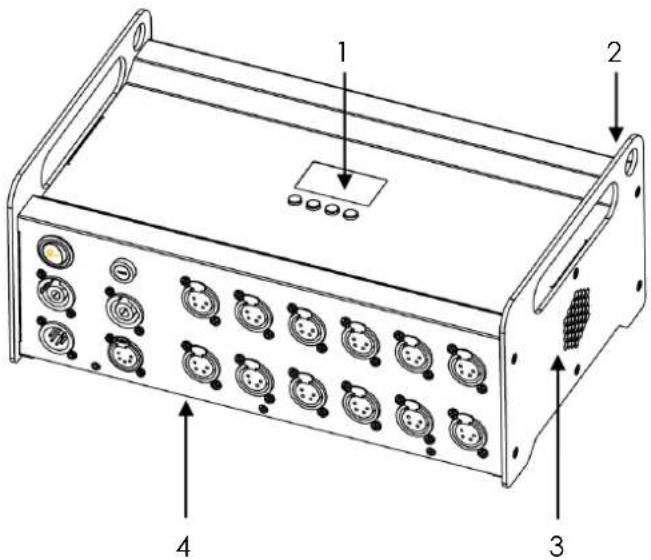
Connector Panel
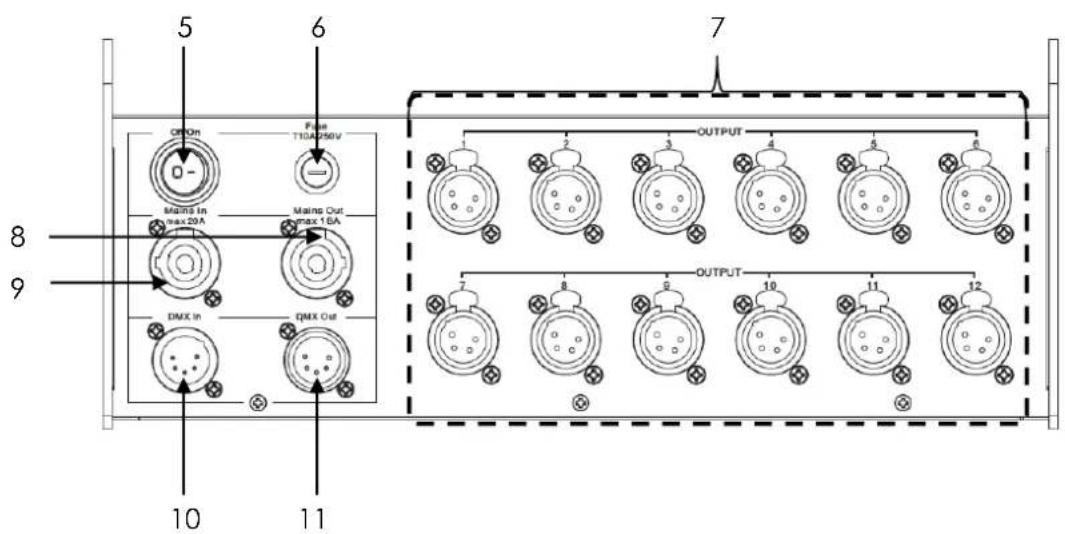
- Mains switch (on / off)
- Micro-fuse 5 x 20mm, T5A @ 250V
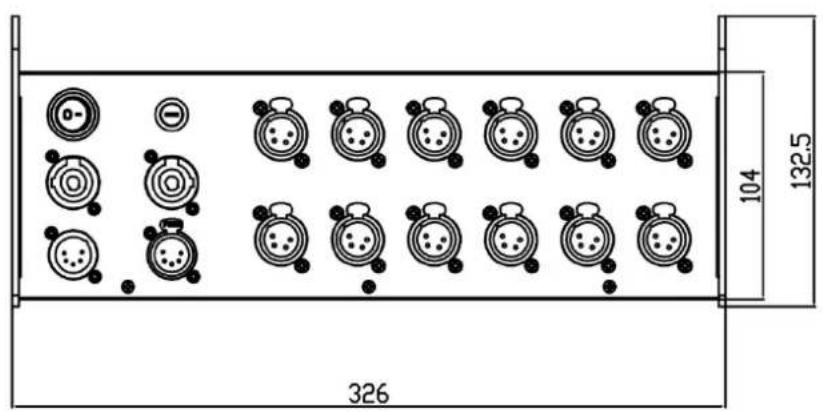
- 12 x Output to Atom head (XLR 4pin)
-
Mains Output (white powerCON)
-
Mains Input (blue powerCON)
-
DMX Input (XLR 5pin)
- DMX Output (XLR 5pin)
2 Safety Instructions

The X4 ATOM PSU 12 is a High-Tech Product.
To guarantee a smooth operation, it is necessary to respect the following rules. The manufacturer of this device will not take responsibility for damages through any disregard of the information provided in this manual. Warranty claims also will be voided in the case that the fixture housing is opened.
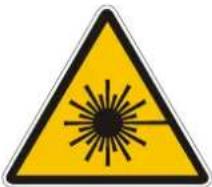
Never look directly into the beam of light or into the LE
Attention: LED Class 2M can cause injuries of your eyes even without optical instruments in front of them or within a distance of less than 0.5m and short exposure time.
Hence: Avoid direct radiation into your eyes!
-
Before powering on the fixture, make sure that the fixtures fans and air inlets are clean and not blocked.
-
The fixture doesn't contain any user serviceable parts. Opening the fixture will void all warranties.
-
It is necessary to wait at least 15 minutes after disconnecting the mains power before handling the fixture. Pay attention to possible hot parts of the fixture.
-
To ensure safe operation, follow also the Installation guide described in the chapter below. Operating the X4 ATOM PSU 12 without suitable safety aids like Safety cables or clamps/hooks can increase the risk of an accident and must be avoided.
-
Repair, maintenance, and installation work shall be done by qualified or GLP certified staff only. You need to pay attention to the common rules of technology that are not explicitly mentioned in this manual.
-
Use only original GLP spare parts. Any structural modification of the system will terminate all warranty claims.
-
Please keep this instruction manual for future reference.
-
Should you have any questions about the operation of your fixture then please contact your local GLP office, or their authorized distributor, a list of which can be found at www.glp.de.
3 Mounting
The X4 ATOM PSU 12 is fully operational whether it hangs or is mounted to the wall. It can also be operated in a rack or standing on the floor or table. Keep a safety distance of min. 0.5 m towards any easily inflammable materials (decoration etc.).

Pay attention to the regulations of: BGV C1 (former VBG 70) and DIN VDE 0711-217.
The installation shall be done by qualified staff only.
For the various mounting positions of the X4 ATOM PSU 12 (sideways or hanging) different accessories kits are available. Through this a safe and firm installation is assured. You'll find dedicated connectors on the top side of the fixture which should be used.
3.1 Operating on the floor, on a table or in a Rack
The X4 ATOM PSU 12 can directly placed on the floor, a table or inside a rack. An additional securing is usually not required. Please pay attention to an even and gripping surface and keep at least 10cm space to each side for ventilation.
Attention: Make sure not to not block any of the two fan in/outlets on either side of the fixture.
3.2 Mounting in a hanging or sideways position
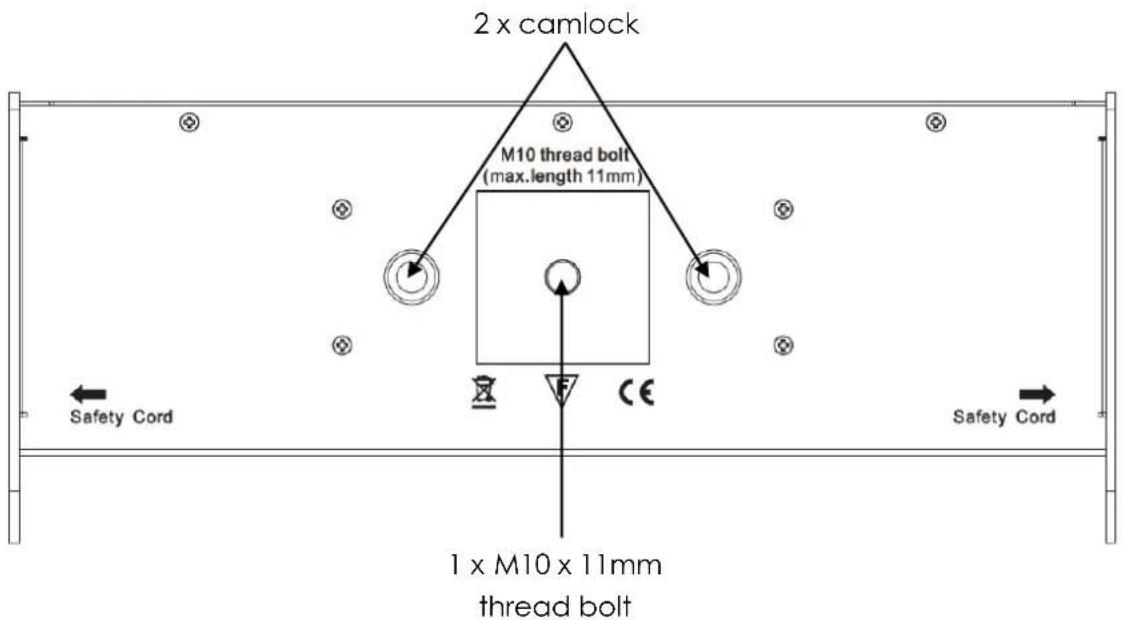
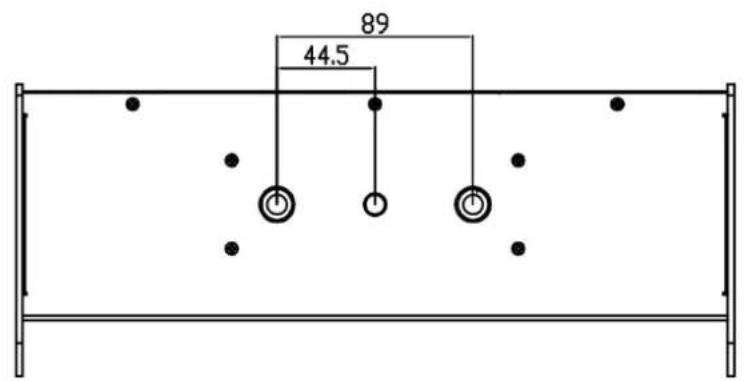
To operate the X4 ATOM PSU 12 in a hanging position an omega bracket can be mounted directly to the top side of the PSU using the two Camlock connectors.
It is fixed to the fixture with fasteners called Camlock quick-release connectors. Insert the two fasteners and turn each 90° to lock them. Do the opposite to release them again.
Alternatively a half-coupler (clamp or hook) can be mounted directly to the top side of the PSU using the M10 x 11mm thread bolt.
Attention: Never use a longer bolt than 11mm as this may damage the interior of the fixture.
Top side view of the fixture:
3.3 Securing the Fixture
Regardless of the mounting method of the X4 ATOM PSU 12 you'll have to use a stipulated safety wire.
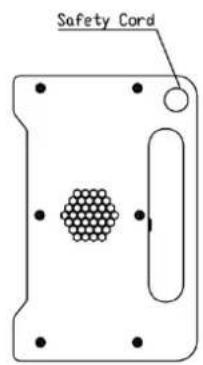
Attach the safety wire through the attachment point shown below and connect it to the primary support structure.
Pay attention to a safe and proper fastening. The safety cable must comply with BGI 810-3 (EN 60598-2-17 Section 17.6.6) and be capable of bearing a static suspended load that is ten times the weight of the fixture and all installed accessories.
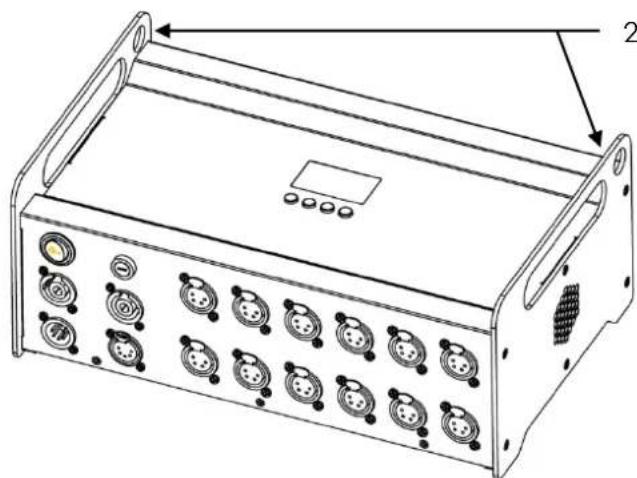
natural_image
Technical line drawing of a device chassis with multiple ports and mounting brackets (no text or symbols)2 x safety attachment point
4 Connections
4.1 Power Supply
\~90-240 Volt AC, 50-60 Hz, powerCON AC connector
Connected load max. 350 VA (Watt) / 25VA (Watt) per Atom head <=> T5A (micro-fuse 5x20mm)
Please see printing on the case for the right electronic supply!
Always disconnect from the mains supply for changing the fuse and use only the above described micro-fuse type.
NEUTRIK® powerCON
The X4 ATOM PSU 12 is fitted with NEUTRIK® powerCON locking 3 conductor AC connectors.
The grey connector must be used to draw AC mains power from the fixtures` throughput sockets and the blue connectors must be used to supply power at the fixtures` power input socket.
The total number of fixtures in one interconnected chain depends on your local AC mains voltage but you must never connect more than a total load of 20A to stay within the limits of the connector. The total load includes all connected fixtures including the first one in the chain.
Note: The maximum allowed total - load is 20A including the first fixture in one interconnected daisy chain.
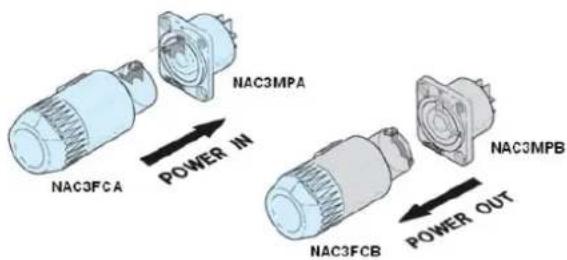
4.2 DMX
USITT DMX-512 Standard input/output in XLR 5-pin connectors.
Pin 1 = [Ground] / Pin 2 = [-] / Pin 3 = [+] / Pin 4 & 5 N.C.
The DMX- Addressing starts at the DMX- Address [001].
4.3 Output to X4 ATOM Head
12 x 4-pin XLR connectors for signal and power to Atom Head only.
Pin 1 = [Ground] / Pin 2 = [Data +] / Pin 3 = [Data -] / Pin 4 = [V + 24V]
Do not exceed 60m / 200ft. cable length for any output to the X4 ATOM head.
Attention: Do only connect one (1) GLP X4 ATOM head per output. Never connect any other equipment to this output as this may damage the PSU and/or the connected fixture(s).
5 The Menu Field
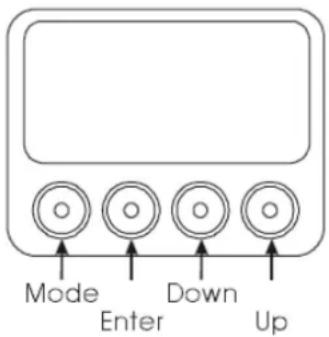
You'll find the control board on the front side of the X4 ATOM PSU 12.
It allows you to make all necessary adjustments of the fixture. With the Mode-key you get into the main menu. Afterwards you can navigate through the menu with the Up/Down-keys. Push the Enter-key to get in the next menu level or to confirm your settings. Make them and set functions ON/OFF with the Up/Down-keys. Confirm and save it with the Enter-key (the display shows OK). Push the Mode-key to cancel the entry and go back to the main menu.
| Level1 | Level 2 | Level 3 | Level 4 | Remark |
| DMX Start Address 001 | Set the DMX start address | |||
| Special | Manual DMX | Master Intensity | Manual control of all fixture functions | |
| Manual control for Master Intensity | ||||
← DOWN - UP →
| Fixture | Select fixture/output | ||
| Zoom | Manual control for zoom | ||
| Speed Movements | N/A | ||
| Special | Manual control for Special functions | ||
| White Temperature | Manual control for Color temperature | ||
| Dimmer | Manual control for Dimmer | ||
| Shutter | Manual control for Shutter | ||
| White | Manual control for White | ||
| Blue | Manual control for blue | ||
| Green | Manual control for green | ||
| Red | Manual control for red | ||
| Color Wheel | Manual control for the color wheel | ||
| Adjust | |||
| Key code xxxx | Use the code for entering the calibration menu (for authorized persons only) | ||
| Display Contrast | Adjustment for the Display contrast | ||
| PWM - Freqy. Adj. | Changes PMW frequency | ||
| Max Zoom adjust | Calibration of Zoom-offset | ||
| LED adjust | |||
| Clear EPROM | Adjust intensity for red channel | ||
| White adjust blue | Adjust intensity for blue channel | ||
| White adjust green | Adjust intensity for green channel | ||
| Reset all settings to factory defaults | |||
| Display Black out | Diagnose of Boot-loader | ||
| Diagnose | Diagnose fixture functions | ||
| DMX hold | Holds last DMX signal in case of signal loss | ||
| DMX Image | |||
| Set image if DMX off | Activates a stored scene if DMX is off | ||
| Save image in memory | Stores the scene currently sent to the unit | ||
| Set dimming mode | Linear Dimming / Extr. soft dimming / Soft dimming | ||
| DMX input Monitor | Indicates the presently received DMX signal per DMX channel | ||
| Master Intensity | Instantaneous value for Master Intensity | |
| Fixture | Instantaneous value for Fixture Sel. | |
| Zoom | Instantaneous value for Zoom | |
| Speed Movements | N/A | |
| Special | Instantaneous value for Special | |
| White Temperature | Adjustment of the color temperature | |
| Dimmer | Instantaneous value for Dimmer | |
| Shutter | Instantaneous value for Shutter | |
| White | Instantaneous value for White | |
| Blue | Instantaneous value for Blue | |
| Green | Instantaneous value for Green | |
| Red | Instantaneous value for Red | |
| Color Wheel | Instantaneous value for color wheel | |
| Self test program | Initiates a self-test program | |
| Live time | On-time of fixture | |
| Silent Mode | Switch Silent Mode ON/OFF | |
| Reset | RESET and new calibration for all functions |
| Self test program |
| Live time |
| Silent Mode |
| Reset |
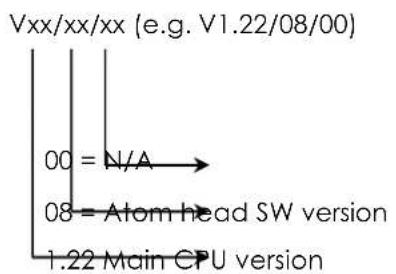
Additional Display Indications
As a default you'll find the following additional information in the first row of the LCD display:
6 DMX Channel Selection (DMX Protocol)
6.1 Normal Mode (norm) 110 DMX Channels:
Note: We suggest to patch the Atom PSU as one 2 channel fixture and each connected Atom head as one 9 channel fixture.
| Channel | Function | Time and Value | % | DMX |
| PSU / Master Control | ||||
| 1 Master Intensity | Intensity of all connected Atom heads | 0 - 100% | 0..100 | 0..255 |
| 2 Special for all fixtures | No function | 0..19 | 0..50 | |
| Activate silent mode | >1 sec | 20..25 | 51..64 | |
| No function | 26..39 | 65..99 | ||
| Change PWM Frequency (582hz - 618hz) | >1 sec | 40..78 | 100..200 | |
| Control all (copy output 1 to all outputs) | >0.5 sec | 79..97 | 201..247 | |
| Reset all fixtures | >0.5 sec | 98..100 | 248..254 | |
| Output 1 | ||||
| 3 Intensity | Intensity | 0 - 100% | 0..100 | 0..255 |
| 4 Shutter | Shutter closed | 0..5 | 0..15 | |
| Random strobe | random / slow - fast | 6..18 | 16..47 | |
| Ramp up | random / slow - fast | 19..31 | 48..79 | |
| Ramp down | random / slow - fast | 32..43 | 80..111 | |
| Pulse | random / slow - fast | 44..62 | 112..143 | |
| Strobe with b/o pause | random / slow - fast | 63..77 | 144..199 | |
| Strobe - Slow to Fast | random / slow - fast | 78..98 | 200..239 | |
| Shutter Open | 95..100 | 239..255 | ||
| 5 Color (fixed) | Colors adjustable via RGB | 0..2 | 0..7 | |
| Color 01 - Red ^1) | 3..5 | 8..15 | ||
| Color 02 - Amber ^1) | 6..8 | 16..23 | ||
| Color 03 - Warm Yellow ^1) | 9..12 | 24..31 | ||
| Color 04 - Yellow ^1) | 13..15 | 32..39 | ||
| Color 05 - Green ^1) | 16..18 | 40..47 | ||
| Color 06 - Turquoise ^1) | 19..21 | 48..55 | ||
| Color 07 - Cyan ^1) | 22..24 | 56..63 | ||
| Color 08 - Blue ^1) | 25..27 | 64..71 | ||
| Color 09 - Lavender ^1) | 28..30 | 72..79 | ||
| Color 10 - Malve ^1) | 31..34 | 80..87 | ||
| Color 11 - Magenta ^1) | 35..37 | 88..95 | ||
| Color 12 - Pink ^1) | 38..40 | 96..103 | ||
| White - CTO | 3200K | 41..43 | 104..111 | |
| White | 5600K | 44..46 | 112..119 | |
| White - CTB | 7200K | 47..49 | 120..127 | |
| Rainbow Effect Stop 2) | 50 | 128 | ||
| Rainbow Effect 3) | slow - fast | 51..88 | 129..223 | |
| Random colors | slow - fast | 89..100 | 224..255 | |
| 6 Red | Color mixing system - Red | 0 - 100% | 0..100 | 0..255 |
| 7 Green | Color mixing system - Green | 0 - 100% | 0..100 | 0..255 |
| 8 Blue | Color mixing system - Blue | 0 - 100% | 0..100 | 0..255 |
| 9 White | Color mixing system - White | 0 - 100% | 0..100 | 0..255 |
| 10 Zoom | Wide (flood) - narrow (spot) | 34° - 3.5° | 0..100 | 0..255 |
| 11 CTO | No function | Applicable for | 0..3 | 0..7 |
| Variable CTO (10,000K - 2,700K) | all colors | 4..100 | 8..255 | |
| Output 2 | ||||
| 12 Intensity | Intensity | 0 - 100% | 0..100 | 0..255 |
| 13 Shutter | Shutter closed | 0..5 | 0..15 | |
| Random strobe | random / slow - fast | 6..18 | 16..47 | |
| Ramp up | random / slow - fast | 19..31 | 48..79 | |
| Ramp down | random / slow - fast | 32..43 | 80..111 | |
| Pulse | random / slow - fast | 44..62 | 112..143 | |
| Strobe with b/o pause | random / slow - fast | 63..77 | 144..199 | |
| Strobe - Slow to Fast | random / slow - fast | 78..98 | 200..239 | |
| Shutter Open | 95..100 | 239..255 | ||
| 14 Color (fixed) | Colors adjustable via RGB | 0..2 | 0..7 | |
| Color 01 - Red 1) | 3..5 | 8..15 | ||
| Color 02 - Amber 1) | 6..8 | 16..23 | ||
| Color 03 - Warm Yellow 1) | 9..12 | 24..31 | ||
| Color 04 - Yellow 1) | 13..15 | 32..39 | ||
| Color 05 - Green 1) | 16..18 | 40..47 | ||
| Color 06 - Turquoise 1) | 19..21 | 48..55 | ||
| Color 07 - Cyan 1) | 22..24 | 56..63 | ||
| Color 08 - Blue 1) | 25..27 | 64..71 | ||
| Color 09 - Lavender 1) | 28..30 | 72..79 | ||
| Color 10 - Malve 1) | 31..34 | 80..87 | ||
| Color 11 - Magenta 1) | 35..37 | 88..95 | ||
| Color 12 - Pink 1) | 38..40 | 96..103 | ||
| White - CTO | 3200K | 41..43 | 104..111 | |
| White | 5600K | 44..46 | 112..119 | |
| White - CTB | 7200K | 47..49 | 120..127 | |
| Rainbow Effect Stop 2) | 50 | 128 | ||
| Rainbow Effect 3) | slow - fast | 51..88 | 129..223 | |
| Random colors | slow - fast | 89..100 | 224..255 | |
| 15 Red | Color mixing system - Red | 0 - 100% | 0..100 | 0..255 |
| 16 Green | Color mixing system - Green | 0 - 100% | 0..100 | 0..255 |
| 17 Blue | Color mixing system - Blue | 0 - 100% | 0..100 | 0..255 |
| 18 White | Color mixing system - White | 0 - 100% | 0..100 | 0..255 |
| 19 Zoom | Wide (flood) - narrow (spot) | 34° - 3.5° | 0..100 | 0..255 |
| 20 CTO | No function | Applicable for | 0..3 | 0..7 |
| Variable CTO (10,000K - 2,700K) | all colors | 4..100 | 8..255 | |
| Output 3 | ||||
| 21 Intensity | Intensity | 0 - 100% | 0..100 | 0..255 |
| 22 Shutter | Shutter closed | 0..5 | 0..15 | |
| Random strobe | random / slow - fast | 6..18 | 16..47 | |
| Ramp up | random / slow - fast | 19..31 | 48..79 | |
| Ramp down | random / slow - fast | 32..43 | 80..111 | |
| Pulse | random / slow - fast | 44..62 | 112..143 | |
| Strobe with b/o pause | random / slow - fast | 63..77 | 144..199 | |
| Strobe - Slow to Fast | random / slow - fast | 78..98 | 200..239 | |
| Shutter Open | 95..100 | 239..255 | ||
| 23 Color (fixed) | Colors adjustable via RGB | 0..2 | 0..7 | |
| Color 01 - Red 1 | 3..5 | 8..15 | ||
| Color 02 - Amber 1 | 6..8 | 16..23 | ||
| Color 03 - Warm Yellow 1 | 9..12 | 24..31 | ||
| Color 04 - Yellow 1 | 13..15 | 32..39 | ||
| Color 05 - Green 1 | 16..18 | 40..47 | ||
| Color 06 - Turquoise 1 | 19..21 | 48..55 | ||
| Color 07 - Cyan 1 | 22..24 | 56..63 | ||
| Color 08 - Blue 1 | 25..27 | 64..71 | ||
| Color 09 - Lavender 1 | 28..30 | 72..79 | ||
| Color 10 - Malve 1 | 31..34 | 80..87 | ||
| Color 11 - Magenta 1 | 35..37 | 88..95 | ||
| Color 12 - Pink 1 | 38..40 | 96..103 | ||
| White - CTO | 3200K | 41..43 | 104..111 | |
| White | 5600K | 44..46 | 112..119 | |
| White - CTB | 7200K | 47..49 | 120..127 | |
| Rainbow Effect Stop 2 | 50 | 128 | ||
| Rainbow Effect 3) | slow - fast | 51..88 | 129..223 | |
| Random colors | slow - fast | 89..100 | 224..255 | |
| 24 Red | Color mixing system - Red | 0 - 100% | 0..100 | 0..255 |
| 25 Green | Color mixing system - Green | 0 - 100% | 0..100 | 0..255 |
| 26 Blue | Color mixing system - Blue | 0 - 100% | 0..100 | 0..255 |
| 27 White | Color mixing system - White | 0 - 100% | 0..100 | 0..255 |
| 28 Zoom | Wide (flood) - narrow (spot) | 34° - 3.5° | 0..100 | 0..255 |
| 29 CTO | No function | Applicable for | 0..3 | 0..7 |
| Variable CTO (10,000K - 2,700K) | all colors | 4..100 | 8..255 | |
| Output 4 | ||||
| 30 Intensity | Intensity | 0 - 100% | 0..100 | 0..255 |
| 31 Shutter | Shutter closed | 0..5 | 0..15 | |
| Random strobe | random / slow - fast | 6..18 | 16..47 | |
| Ramp up | random / slow - fast | 19..31 | 48..79 | |
| Ramp down | random / slow - fast | 32..43 | 80..111 | |
| Pulse | random/ slow - fast | 44..62 | 112..143 | |
| Strobe with b/o pause | random / slow - fast | 63..77 | 144..199 | |
| Strobe - Slow to Fast | random / slow - fast | 78..98 | 200..239 | |
| Shutter Open | 95..100 | 239..25 | ||
| 32 Color (fixed) | Colors adjustable via RGB | 0..2 | 0..7 | |
| Color 01 - Red 1 | 3..5 | 8..15 | ||
| Color 02 - Amber 1 | 6..8 | 16..23 | ||
| Color 03 - Warm Yellow 1 | 9..12 | 24..31 | ||
| Color 04 - Yellow 2 | 13..15 | 32..39 | ||
| Color 05 - Green 2 | 16..18 | 40..47 | ||
| Color 06 - Turquoise 2 | 19..21 | 48..55 | ||
| Color 07 - Cyan 2 | 22..24 | 56..63 | ||
| Color 08 - Blue 2 | 25..27 | 64..71 | ||
| Color 09 - Lavender 2 | 28..30 | 72..79 | ||
| Color 10 - Malve 1) | 31..34 | 80..87 | ||
| Color 11 - Magenta 1) | 35..37 | 88..95 | ||
| Color 12 - Pink 1) | 38..40 | 96..103 | ||
| White - CTO | 3200K | 41..43 | 104..111 | |
| White | 5600K | 44..46 | 112..119 | |
| White - CTB | 7200K | 47..49 | 120..127 | |
| Rainbow Effect Stop 2) | 50 | 128 | ||
| Rainbow Effect 3) | slow - fast | 51..88 | 129..223 | |
| Random colors | slow - fast | 89..100 | 224..255 | |
| 33 Red | Color mixing system - Red | 0 - 100% | 0..100 | 0..255 |
| 34 Green | Color mixing system - Green | 0 - 100% | 0..100 | 0..255 |
| 35 Blue | Color mixing system - Blue | 0 - 100% | 0..100 | 0..255 |
| 36 White | Color mixing system - White | 0 - 100% | 0..100 | 0..255 |
| 37 Zoom | Wide (flood) - narrow (spot) | 34° - 3.5° | 0..100 | 0..255 |
| 38 CTO | No function | Applicable for all colors | 0..3 | 0..7 |
| Variable CTO (10,000K - 2,700K) | 4..100 | 8..255 | ||
| Output 5 | ||||
| 39 Intensity | Intensity | 0 - 100% | 0..100 | 0..255 |
| 40 Shutter | Shutter closed | 0..5 | 0..15 | |
| Random strobe | random / slow - fast | 6..18 | 16..47 | |
| Ramp up | random / slow - fast | 19..31 | 48..79 | |
| Ramp down | random / slow - fast | 32..43 | 80..111 | |
| Pulse | random / slow - fast | 44..62 | 112..143 | |
| Strobe with b/o pause | random / slow - fast | 63..77 | 144..199 | |
| Strobe - Slow to Fast | random / slow - fast | 78..98 | 200..239 | |
| Shutter Open | 95..100 | 239..255 | ||
| 41 Color (fixed) | Colors adjustable via RGB | 0..2 | 0..7 | |
| Color 01 - Red 1) | 3..5 | 8..15 | ||
| Color 02 - Amber 1) | 6..8 | 16..23 | ||
| Color 03 - Warm Yellow 1) | 9..12 | 24..31 | ||
| Color 04 - Yellow 1) | 13..15 | 32..39 | ||
| Color 05 - Green 1) | 16..18 | 40..47 | ||
| Color 06 - Turquoise 1) | 19..21 | 48..55 | ||
| Color 07 - Cyan 1) | 22..24 | 56..63 | ||
| Color 08 - Blue 1) | 25..27 | 64..71 | ||
| Color 09 - Lavender 1) | 28..30 | 72..79 | ||
| Color 10 - Malve 1) | 31..34 | 80..87 | ||
| Color 11 - Magenta 1) | 35..37 | 88..95 | ||
| Color 12 - Pink 1) | 38..40 | 96..103 | ||
| White - CTO | 3200K | 41..43 | -111 | |
| White | 5600K | 44..46 | 112..119 | |
| White - CTB | 7200K | 47..49 | 120..127 | |
| Rainbow Effect Stop 2) | 50 | 128 | ||
| Rainbow Effect 3) | slow - fast | 51..88 | 129.223 | |
| Random colors | slow - fast | 89..100 | 224..255 | |
| 41 Red | Color mixing system - Red | 0 - 100% | 0..100 | 0..255 |
| 43 Green | Color mixing system - Green | 0 - 100% | 0..100 | 0..255 |
| 44 Blue | Color mixing system - Blue | 0 - 100% | 0..100 | 0..255 |
| 45 White | Color mixing system - White | 0 - 100% | 0..100 | 0..255 |
| 46 Zoom | Wide (flood) - narrow (spot) | 34° - 3.5° | 0..100 | 0..255 |
| 47 CTO | No function | Applicable for all colors | 0..3 | 0..7 |
| Variable CTO (10,000K - 2,700K) | 4..100 | 8..255 | ||
| Output 6 | ||||
| 48 Intensity | Intensity | 0 - 100% | 0..100 | 0..255 |
| 49 Shutter | Shutter closed | 0..5 | 0..15 | |
| Random strobe | random / slow - fast | 6..18 | 16..47 | |
| Ramp up | random / slow - fast | 19..31 | 48..79 | |
| Ramp down | random / slow - fast | 32..43 | 80..111 | |
| Pulse | random / slow - fast | 44..62 | 112..143 | |
| Strobe with b/o pause | random / slow - fast | 63..77 | 144..199 | |
| Strobe - Slow to Fast | random / slow - fast | 78..98 | 200..239 | |
| Shutter Open | 95..100 | 239..255 | ||
| 50 Color (fixed) | Colors adjustable via RGB | 0..2 | 0..7 | |
| Color 01 - Red 1) | 3..5 | 8..15 | ||
| Color 02 - Amber 1) | 6..8 | 16..23 | ||
| Color 03 - Warm Yellow 1) | 9..12 | 24..31 | ||
| Color 04 - Yellow 1) | 13..15 | 32..39 | ||
| Color 05 - Green 1) | 16..18 | 40..47 | ||
| Color 06 - Turquoise 1) | 19..21 | 48..55 | ||
| Color 07 - Cyan 1) | 22..24 | 56..63 | ||
| Color 08 - Blue 1) | 25..27 | 64..71 | ||
| Color 09 - Lavender 1) | 28..30 | 72..79 | ||
| Color 10 - Malve 1) | 31..34 | 80..87 | ||
| Color 11 - Magenta 1) | 35..37 | 88..95 | ||
| Color 12 - Pink 1) | 38..40 | 96..103 | ||
| White - CTO | 3200K | 41..43 | 104..111 | |
| White | 5600K | 44..46 | 112..119 | |
| White - CTB | 7200K | 47..49 | 120..127 | |
| Rainbow Effect Stop 2) | 50 | 128 | ||
| Rainbow Effect 3) | slow - fast | 51..88 | 129..223 | |
| Random colors | slow - fast | 89..100 | 224..255 | |
| 51 Red | Color mixing system - Red | 0 - 100% | 0..100 | 0..255 |
| 52 Green | Color mixing system - Green | 0 - 100% | 0..100 | 0..255 |
| 53 Blue | Color mixing system - Blue | 0 - 100% | 0..100 | 0..255 |
| 54 White | Color mixing system - White | 0 - 100% | 0..100 | 0..255 |
| 55 Zoom | Wide (flood) - narrow (spot) | 34° - 3.5° | 0..100 | 0..255 |
| 56 CTO | No function | Applicable for | 0..3 | 0..7 |
| Variable CTO (10,000K - 2,700K) | all colors | 4..100 | 8..255 | |
| Output 7 | ||||
| 57 Intensity | Intensity | 0 - 100% | 0..100 | 0..255 |
| 58 Shutter | Shutter closed | 0..5 | 0..15 | |
| Random strobe | random / slow - fast | 6..18 | 16..47 | |
| Ramp up | random / slow - fast | 19..31 | 48..79 | |
| Ramp down | random / slow - fast | 32..43 | 80..111 | |
| Pulse | random / slow - fast | 44..62 | 112..143 | |
| White - CTO | 3200K | 41..43 | 104..111 | |
| White | 5600K | 44..46 | 112..119 | |
| White - CTB | 7200K | 47..49 | 120..127 | |
| Rainbow Effect Stop^2) | 50 | 128 | ||
| Rainbow Effect^3) | slow - fast | 51..88 | 129..223 | |
| Random colors | slow - fast | 89..100 | 224..255 | |
| 60 Red | Color mixing system - Red | 0 - 100% | 0..100 | 0..255 |
| 61 Green | Color mixing system - Green | 0 - 100% | 0..100 | 0..255 |
| 62 Blue | Color mixing system - Blue | 0 - 100% | 0..100 | 0..255 |
| 63 White | Color mixing system - White | 0 - 100% | 0..100 | 0..255 |
| 64 Zoom | Wide (flood) - narrow (spot) | 34^ - 3.5^ | 0..100 | 0..255 |
| 65 CTO | No functionVariable CTO (10,000K - 2,700K) | Applicable forall colors | 0..34..100 | 0..78..255 |
| Output 8 | ||||
| 66 Intensity | Intensity | 0 - 100% | 0..100 | 0..255 |
| 67 Shutter | Shutter closedRandom strobeRamp upRamp downPulseStrobe with b/o pauseStrobe - Slow to FastShutter Open | random / slow - fastrandom / slow - fastrandom / slow - fastrandom / slow - fastrandom / slow - fast | 0..56..1819..3132..4344..6263..7778..9895..100 | 0..1516..4748..7980..111112..143144..199200..239239..255 |
| 68 Color (fixed) | Colors adjustable via RGBColor 01 - Red1)Color 02 - Amber1)Color 03 - Warm Yellow1)Color 04 - Yellow1)Color 05 - Green1)Color 06 - Turquoise1)Color 07 - Cyan1)Color 08 - Blue1)Color 09 - Lavender1)Color 10 - Malve1)Color 11 - Magenta1)Color 12 - Pink1)White - CTOWhiteWhite - CTBRainbow Effect Stop^2) Rainbow Effect^3) Random colors | 3200K5600K7200Kslow - fastslow - fast | 0..23..56..89..1213..1516..1819..2122..2425..2728..3031..3435..3738..4041..4344..4647..495051..8889..100 | 0..78..1516..2324..3132..3940..4748..5556..6364..7172..7980..8788..9596..103104..111112..119120..127128129..223224..255 |
| 69 Red | Color mixing system - Red | 0 - 100% | 0..100 | 0..255 |
| 70 Green | Color mixing system - Green | 0 - 100% | 0..100 | 0..255 |
| 71 Blue | Color mixing system - Blue | 0 - 100% | 0..100 | 0..255 |
| 72 White | Color mixing system - White | 0 - 100% | 0..100 | 0..255 |
| 73 Zoom | Wide (flood) - narrow (spot) | 34^ - 3.5^ | 0..100 | 0..255 |
| 74 CTO | No functionVariable CTO (10,000K - 2,700K) | Applicable forall colors | 0..34..100 | 0..78..255 |
| Output 9 | ||||
| 75 Intensity | Intensity | 0 - 100% | 0..100 | 0..255 |
| 76 Shutter | Shutter closedRandom strobeRamp upRamp down | random / slow - fastrandom / slow - fastrandom / slow - fast | 0..56..1819..3132..43 | 0..1516..4748..7980..111 |
| PulseStrobe with b/o pauseStrobe - Slow to FastShutter Open | random / slow - fastrandom / slow - fastrandom / slow - fast | 44..6263..7778..9895..100 | 112..143144..199200..239239..255 | |
| 77 Color (fixed) | Colors adjustable via RGBColor 01 - Red11Color 02 - Amber11Color 03 - Warm Yellow11Color 04 - Yellow11Color 05 - Green11Color 06 - Turquoise11Color 07 - Cyan11Color 08 - Blue11Color 09 - Lavender11Color 10 - Malve11Color 11 - Magenta11Color 12 - Pink11White - CTOWhiteWhite - CTBRainbow Effect Stop21Rainbow Effect31Random colors | 3200K5600K7200Kslow - fastslow - fast | 0..23..56..89..1213..1516..1819..2122..2425..2728..3031..3435..3738..4041..4344..4647..495051..8889..100 | 0..78..1516..2324..3132..3940..4748..5556..6364..7172..7980..8788..9596..103104..111112..119120..127128129..223224..255 |
| 78 Red | Color mixing system - Red | 0 - 100% | 0..100 | 0..255 |
| 79 Green | Color mixing system - Green | 0 - 100% | 0..100 | 0..255 |
| 80 Blue | Color mixing system - Blue | 0 - 100% | 0..100 | 0..255 |
| 81 White | Color mixing system - White | 0 - 100% | 0..100 | 0..255 |
| 82 Zoom | Wide (flood) - narrow (spot) | 34° - 3.5° | 0..100 | 0..255 |
| 83 CTO | No functionVariable CTO (10,000K - 2,700K) | Applicable forall colors | 0..34..100 | 0..78..255 |
| Output 10 | ||||
| 84 Intensity | Intensity | 0 - 100% | 0..100 | 0..255 |
| 85 Shutter | Shutter closedRandom strobeRamp upRamp downPulseStrobe with b/o pauseStrobe - Slow to FastShutter Open | random / slow - fastrandom / slow - fastrandom / slow - fastrandom / slow - fastrandom / slow - fastrandom / slow - fast | 0..56..1819..3132..4344..6263..7778..9895..100 | 0..1516..4748..7980..111112..143144..199200..239239..255 |
| 86 Color (fixed) | Colors adjustable via RGBColor 01 - Red11Color 02 - Amber11Color 03 - Warm Yellow11Color 04 - Yellow11Color 05 - Green11Color 06 - Turquoise11Color 07 - Cyan11Color 08 - Blue11Color 09 - Lavender11Color 10 - Malve11Color 11 - Magena11Color 12 - Pink11White - CTOWhiteWhite - CTBRainbow Effect Stop 2) Rainbow Effect 3) Random colors | 3200K5600K7200Kslow - fast slow - fast | 0..23..56..89..1213..1516..1819..2122..2425..2728..3031..3435..3738..4041..4344..4647..4950 51..88 89..100 | 0..78..1516..2324..3132..3940..4748..5556..6364..7172..7980..8788..9596..103104..111112..119120..127128 129..223 224..255 |
| 87 Red | Color mixing system - Red | 0 - 100% | 0..100 | 0..255 |
| 88 Green | Color mixing system - Green | 0 - 100% | 0..100 | 0..255 |
| 89 Blue | Color mixing system - Blue | 0 - 100% | 0..100 | 0..255 |
| 90 White | Color mixing system - White | 0 - 100% | 0..100 | 0..255 |
| 91 Zoom | Wide (flood) - narrow (spot) | 34° - 3.5° | 0..100 | 0..255 |
| 92 CTO | No function Variable CTO (10,000K - 2,700K) | Applicable for all colors | 0..3 4..100 | 0..7 8..255 |
| Output 11 | ||||
| 93 Intensity | Intensity | 0 - 100% | 0..100 | 0..255 |
| 94 Shutter | Shutter closedRandom strobeRamp upRamp downPulseStrobe with blackout pauseStrobe - Slow to FastShutter Open | random / slow - fast random / slow - fast random / slow - fast random / slow - fast random / slow - fast random / slow - fast | 0..5 6..18 19..31 32..43 44..62 63..77 78..98 95..100 | 0..15 16..47 48..79 80..111 112..143 144..199 200..239 239..255 |
| 95 Color (fixed) | Colors adjustable via RGBColor 01 - Red 1)Color 02 - Amber 1)Color 03 - Warm Yellow 1)Color 04 - Yellow 1)Color 05 - Green 1)Color 06 - Turquoise 1)Color 07 - Cyan 1)Color 08 - Blue 1)Color 09 - Lavender 1)Color 10 - Malve 1)Color 11 - Magenta 1)Color 12 - Pink 1)White - CTOWhiteWhite - CTBRainbow Effect Stop 2)Rainbow Effect 3)Random colors | 3200K 5600K 7200K slow - fast slow - fast | 0..2 3..5 6..8 9..12 13..15 16..18 19..21 22..24 25..27 28..30 31..34 35..37 38..40 41..43 44..46 47..49 50 51..88 89..100 | 0..7 8..15 16..23 24..31 32..39 40..47 48..55 56..63 64..71 72..79 80..87 88..95 96..103 104..111 112..119 120..127 128 129..223 224..255 |
| 96 Red | Color mixing system - Red | 0 - 100% | 0..100 | 0..255 |
| 97 Green | Color mixing system - Green | 0 - 100% | 0..100 | 0..255 |
| 98 Blue | Color mixing system - Blue | 0 - 100% | 0..100 | 0..255 |
| 99 White | Color mixing system - White | 0 - 100% | 0..100 | 0..255 |
| 100 Zoom | Wide (flood) - narrow (spot) | 34° - 3.5° | 0..100 | 0..255 |
| 101 CTO | No functionVariable CTO (10,000K - 2,700K) | Applicable for all colors | 0..3 4..100 | 0..7 8..255 |
| Output 12 | ||||
| 102 Intensity | Intensity | 0 - 100% | 0..100 | 0..255 |
| 103 Shutter | Shutter closedRandom strobeRamp upRamp downPulseStrobe with b/o pauseStrobe - Slow to FastShutter Open | random / slow - fast random / slow - fast random / slow - fast random / slow - fast random / slow - fast random / slow - fast random / slow - fast random / slow - fast random / slow - fast random / slow - fast random / slow - fast random / slow - fast random / slow - fast random / slow - fast random / slow - fast random / slow - fast random / slow - fast random / slow - fast random / slow - fast random / slow - fast random / slow - fast randomly | 0..5 6..18 19..31 32..43 44..62 63..77 78..9895..100 | 0..15 16..47 48..79 80..111 112..143 144..199 200..239239..255 |
| 104 Color (fixed) | Colors adjustable via RGB | 0..2 | 0..7 | |
| Color 01 - Red 1) | 3..5 | 8..15 | ||
| Color 02 - Amber 1) | 6..8 | 16..23 | ||
| Color 03 - Warm Yellow 1) | 9..12 | 24..31 | ||
| Color 04 - Yellow 1) | 13..15 | 32..39 | ||
| Color 05 - Green 1) | 16..18 | 40..47 | ||
| Color 06 - Turquoise 1) | 19..21 | 48..55 | ||
| Color 07 - Cyan 1) | 22..24 | 56..63 | ||
| Color 08 - Blue 1) | 25..27 | 64..71 | ||
| Color 09 - Lavender 1) | 28..30 | 72..79 | ||
| Color 10 - Malve 1) | 31..34 | 80..87 | ||
| Color 11 - Magenta 1) | 35..37 | 88..95 | ||
| Color 12 - Pink 1) | 38..40 | 96..103 | ||
| White - CTO | 3200K | 41..43 | 104..111 | |
| White | 5600K | 44..46 | 112..119 | |
| White - CTB | 7200K | 47..49 | 120..127 | |
| Rainbow Effect Stop 2) | 50 | 128 | ||
| Rainbow Effect 3) | slow - fast | 51..88 | 129..223 | |
| Random colors | slow - fast | 89..100 | 224..255 | |
| 105 Red | Color mixing system - Red | 0 - 100% | 0..100 | 0..255 |
| 106 Green | Color mixing system - Green | 0 - 100% | 0..100 | 0..255 |
| 107 Blue | Color mixing system - Blue | 0 - 100% | 0..100 | 0..255 |
| 108 White | Color mixing system - White | 0 - 100% | 0..100 | 0..255 |
| 109 Zoom | Wide (flood) - narrow (spot) | 34° - 3.5° | 0..100 | 0..255 |
| 110 CTO | No function | Applicable for all colors | 0..3 | 0..7 |
| Variable CTO (10,000K - 2,700K) | 4..100 | 8..255 | ||
1) The predefined colors can be used as start-colors for the Rainbow effect. Please select first a desired start-color before you activate the rainbow effect. All X4 Atom will then start from that color and will execute the rainbow effect synchronously. Different X4 Atom can have different start-colors but will still execute the rainbow effect synchronously. If you choose a color different from the ones marked with 1) in the tables above the rainbow start-color will be red.
2) Rainbow-effect Stop will pause this function. After resuming the rainbow-effect will be continued from the current color.
3) The Rainbow-effect will run synchronously only if started from one of the predefined colors (see also 1) before).
7 Maintaining and Cleaning
The X4 ATOM PSU 12 is a fixture of very low maintenance. It is only necessary to clean the air inlets and outlets from time to time. For safe operation it is absolutely essential that the fixture is kept clean and that dust, dirt and smoke-fluid residues must not build up on, or within the fixture. Otherwise the fixture's cooling will be significantly reduced or damages can occur. Regular cleaning will not only ensure the maximum performance, but will also allow the fixture to operate reliably throughout its life.
7.1 Safety regulations
• Pull out the mains power plug!
- Wait min. 15 minutes after disconnecting power to allow the fixture to cool down.
7.2 Maintenance and Interval (rule-of-thumb)
The contamination of the fixture depends on the environment details. Hence no general guidelines can be given. The intervals given below are only suggestions from our experience.
| Position | Interval | In this way |
| Fan and air channel | monthly | vacuum cleaner, airbrush, etc. |
8 Technical Specifications:
| Power supply | |
| Power consumption | Max. 350 VA (Watt) / 25VA (Watt) per X4 Atom head |
| Power input | Auto sensing 90-240 V AC, 50-60 Hz |
| Mains in connector | PowerCON (blue) max 20A |
| Mains out connector | PowerCON (white) max 18A |
| Output to Atom head | 12 x 4-pin XLRPower (24V) & Signal (RS-485) to X4 Atom head:Pin 1 = [Ground]Pin 2 = [Data +]Pin 3 = [Data -]Pin 4 = [V+ 24V] |
| Max. cable length to Atom head | 60m per output200ft per output |
| Fuse protection | Micro-fuse 5x20 mm, T10A |
| Operational Parameters | |
| Max. Ambient Temperature | 5° - 45°C (integrated overheating switch)40°-113°F |
| Protection | IP20 rated |
| Mounting Position | Any (see relevant chapter in the manual) |
| Rigging Options | |
| 1 x M10 socket | For direct coupler |
| 2 x Camlock | For omega bracket |
| 2 x Attachment point | For safety wire |
| Data Entry | |
| Backlit Graphic LCD Display with 4 button control for addressing and other settings | |
| DMX Control | |
| Standard USITT DMX-512, 5-pin XLR:Pin 3 = [+]Pin 2 = [-]Pin 1 = [Ground]Pin 4 & 5 not connectedThe DMX- Addressing starts at the DMX channel [001] | |
| Weights and Measures | |
| Length | 314 mm / 12.38'' |
| Width | 197 mm / 7.75'' |
| Height | 108 mm / 4.25'' |
| Weight (net) | 4.1 kg / 9 lbs. |
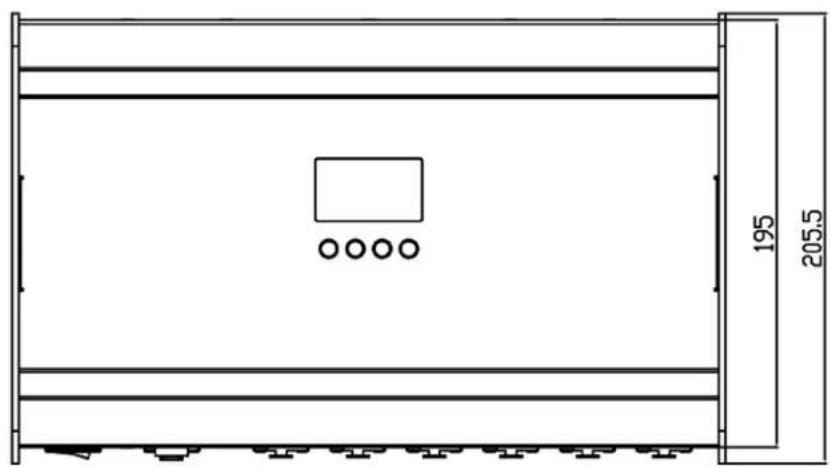
9 Dimensions

natural_image
Abstract black-and-white graphic with intertwined curved lines and a central circular shape (no text or symbols)- Contents
- Description of Device
- Safety Instructions
- Mounting
- Operating on the floor, on a table or in a Rack
- Mounting in a hanging or sideways position
- Top side view of the fixture:
- Securing the Fixture
- Connections
- Power Supply
- Always disconnect from the mains supply for changing the fuse and use only the above described micro-fuse type.
- DMX
- Output to X4 ATOM Head
- The Menu Field
- Additional Display Indications
- DMX Channel Selection (DMX Protocol)
- Normal Mode (norm) 110 DMX Channels:
- Maintaining and Cleaning
- Safety regulations
- Maintenance and Interval (rule-of-thumb)
- Technical Specifications:
Brand : GLP
Model : X4 atom PSU12
Category : Lighting