LB510 - Food storage container N'oveen - Free user manual and instructions
Find the device manual for free LB510 N'oveen in PDF.


| Product Type | Electric Food Storage Container / Lunch Box |
| Model | LB510 |
| Brand | N'oveen |
| Power Supply | 230V AC (mains) and 12V DC (car adapter included) |
| Power Consumption | 40W |
| Heating Time | 20–30 minutes to reach approx. 60°C |
| Main Container Material | Stainless steel (inox), removable, 3 chambers, total capacity 1L |
| Cutlery Included | Metal spoon and fork |
| Handle | Foldable, hides in lid for easy carrying |
| Lid Closure | 2 latches |
| Sealing | Silicone gasket to prevent leaks |
| Power Indicator | Yes, lights up when connected to power |
| Heating Element | Flat heating element on bottom for even heat distribution |
| Power Cord | Detachable, includes 12V car adapter |
| Thermal Bag | Included for easy transport |
| Safety Features | BPA-free material; do not immerse body in water; PTC thermostat for overheat protection |
| Care Instructions | Wash removable containers in dishwasher; wipe body with damp cloth; do not use abrasive cleaners |
| Color Options | Grey (LB510), Blue (LB520) |
Frequently Asked Questions - LB510 N'oveen
User questions about LB510 N'oveen
0 question about this device. Answer the ones you know or ask your own.
Ask a new question about this device
Download the instructions for your Food storage container in PDF format for free! Find your manual LB510 - N'oveen and take your electronic device back in hand. On this page are published all the documents necessary for the use of your device. LB510 by N'oveen.
USER MANUAL LB510 N'oveen
natural_image
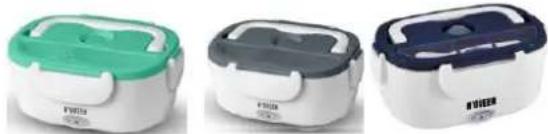
Three identical electric food containers with green and pink handles, displayed side by side (no visible text or symbols)• LUNCH BOX NOVEEN 12/230 Volt LB410 GREY, LB420 MINT, LB430 DARK BLUE
natural_image
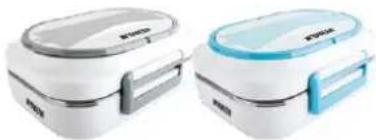
Three types of electric food containers with green, gray, and blue coloring (no visible text or symbols)LUNCH BOX NOVEEN 12/230 Volt LB510 GREY, LB520 BLUE
natural_image
Two white and blue electric food containers (no visible text or symbols)POLSKI....s.7
ENGLISH....p. 12
ENGLISH: 1.Spoon cover, 2.Handle, 3.Lunch Box Cover, 4.Silicone sealing ring, 5.Fastener, 6.Stainless steel food plate, 7.Power indicator
Thank you for purchasing our product.
Thank you for purchasing our product. Before use, read the instruction manual provided with it. Keep this manual in case you need to use it again. We believe that the Lunch Box will bring comfort and convenience to you and your family thanks to its excellent functionality. If necessary, we encourage you to contact us or our service outlets, we will be happy to help you!
You can find more Noveen brand products at www.noveen.pl
Read all safety information before use and keep this user manual for later reference
- Never disassemble the device housing without consulting qualified personnel.
- If the power cord or other component is damaged, it must be replaced by the manufacturer, service representative or qualified person to avoid any danger. A self-repair attempt will result in warranty loss.
- Check if the rated voltage is the same as the voltage you are using.
- Do not use near flammable materials.
- Do not touch the power plug with wet hands - risk of electric shock.
- Only professional service personnel can repair the device.
- Do not heat the food for longer than the period indicated by the producer.
- Do not place the device in a microwave oven or refrigerator, only the containers can be heated or cooled separately.
- In the event of an unusual odor during normal operation, turn off the device, disconnect the power supply and contact the service center.
- Never turn the device on when there is no food in the container
- Unplug the appliance before cleaning and maintaining it.
- This device is meant to be operated by adults, or under their supervision.
- In case of any doubts as to the full efficiency of the device, contact the service center.
Note: The ventilation opening must be open when connected to electricity.
Note: During the operation of the device, and after heating, the food in the container may be hot - be careful, avoid burns.
FIRST USE
Remove the lunch box from the packaging, clean the containers, covers and gasket. Dry and wipe the device before use. Never immerse device body in water.
DEVICE DESCRIPTION - detailed description
COVER
HANDLE - used in transport of the Lunch Box, handle can be hidden in the lid's body, making the container easier to store.
LATCH - the device has 4 latches (LB5 2 latches) by which the container can be closed and moved safely, without worrying that the content of the Lunch Box will get out.
SPOON CONTAINER AND SPOON (LB3, LB4 series) CUTLERY STORE (LB5 series) - there is a lockable place for a spoon and a spoon in the lid's body. You do not have to worry about cutlery wherever you are.
VENTILATION OPEN (LB3, LB4 series) - the excess of warm air escapes during operation.
VENTING VALVE (LB3, LB4 series) - opened (during heating) and closed (during transport).
WARNING (LB3, LB4 series) - Indicates that the vent must be open and the user should add some water to the box before heating the food so that the device can run smoothly.
SILICONE GASKET - prevents liquid food from leaking outside
BODY AND EQUIPMENT
REMOVABLE CONTAINER - Plastic container (LB3 series), inox (LB4 series) with a capacity of 1.1l, 3 chamber 1l INOX container (LB5 series) can be removed from the body so you can wash it in the dishwasher, or consume food from it, without having a plate or bowl. The container (LB3 series) has two chambers, so you can carry two different food types, without the possibility of mixing.
REMOVABLE CONTAINER 0.5l and COVER (LB3, LB4 series) - A plastic, removable container with a capacity of 0.5l with lid, perfectly matching one of the parts of a large container. The container does not move around the Lunch Box and its closing guarantees no penetration of odors from the large chamber. Intended for sauces, salads etc.
CONTAINER - It is an integral part of the device, you can not carry food in it. It is used to heat the remaining containers by a flat heating element on its bottom for equal heat distribution.
POWER SOCKET, CABLE - The cable in the device is detachable for easier transport, the cable itself can be transported in another convenient way, or stored in the bag (included).
POWER SOCKET 12V, CABLE (LB4, LB5 series)- The cable in the device is detachable for easier transport, the cable itself can be transported in another convenient way, or
stored in the bag (included).
The set includes a personalized thermal bag, which helps in easy device transport.
POWER SUPPLY COVER - When transporting or storing the device, you can close the socket with a lid to protect the socket.
POWER INDICATOR - After connecting the device to mains socket, the indicator on the device will turn on.
DESCRIPTION:
- 230 volt mains power supply
- 12 volt power supply (LB4, LB5 series) - adapter included
- High power of 40 watts
- Comfortable meals heating in short time: 60 degrees in 20-30 minutes!
- Removable containers, easy to wash in the dishwasher: - main container plastic (LB3 series), inox (LB4, LB5 series) - an additional 0.5 liter container with a cap; e.g. for soup, sauce (LB3, LB4 series)
- Additional storage for a spoon (spoon provided LB3, LB4 series), cutlery (metal spoon and fork included LB5 series)
- Foldable handle for easy carrying
- Lid with clips for easy closing
- Power indicator
- Unique heating structure, homogeneous distribution of temperature.
- Thermostat with PTC element, better safety
- Container made of a special BPA-free material
- Unbreakable and resistant to high temperatures material
Note: The heating time depends on the amount of food, food temperature and ambient temperature.
- Food can be consumed 20-30 minutes after turning the power on at an ambient temperature of 25^ C. (depends on the type of heated meal)
- The heating time should be increased if the ambient temperature is low or the food has been removed from the refrigerator.
- Separate the containers before eating food.
OPERATING THE DEVICE:
Remember to use the device in accordance with the manufacturer's recommendations. Make sure that the device is properly cleaned before use and has no signs of damage. If you have any doubts about the technical condition - contact the service.
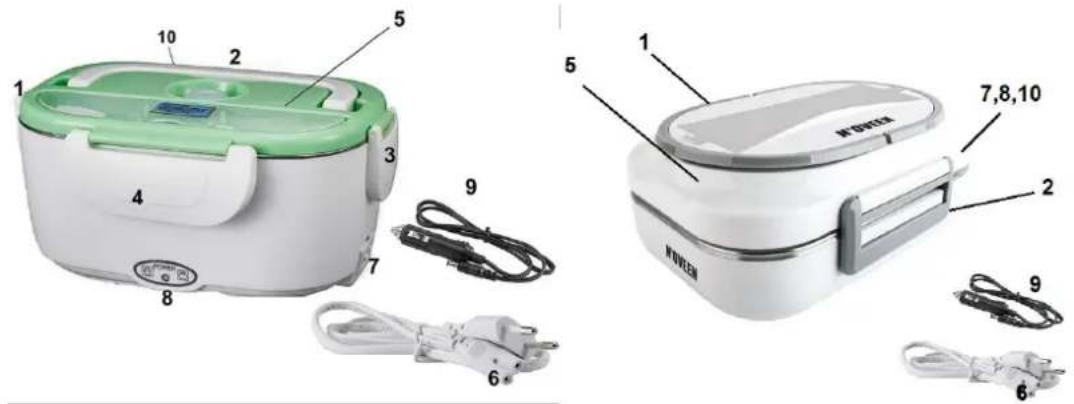
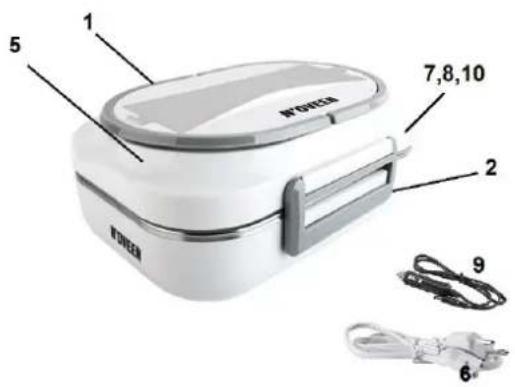
- Place the device on a flat surface,
- To remove the cover (5), release the four latches (1,2,3,4 - LB3, LB4 series) / (1,2 - LB5 series).
- Fill the containers with food, place the containers in the body of the device.
- Close the lid (5) with latches (1,2,3,4 - LB3, LB4 series) / (1,2 - LB5 series), make sure that the food does not come out.
- Device should be transported so that the lid is always on top.
- To start the device and heat the contents, press the rubber venting element on the cover so that its edges rise (LB3, LB4 series).
- Connect the power cable 220-240 V (6) to power socket (7) and the plug to electric socket. In case of 12V power supply (LB4 series) - insert 12V power cable (9) into socket (10) and the adapter to the cigarette lighter socket in the car.
- After connecting to the power supply, the indicator (8) will light up.
- After obtaining the desired temperature and pulling out the heated content, disconnect the power cord from the power supply.
Cleaning and maintenance
- Wash the device immediately after use to avoid unpleasant odors.
- Do not use scouring powders, hard or wire cleaning brushes
- Put some warm water after use in a container or use a soft cleaning cloth.
- Clean the Lunch Box and put it in the packaging if won't use it for a long time; place in a cool and dry place to avoid problems caused by moisture.
- If there is any problem with the device, please contact our technical service department - do not try to repair the device by yourself.
TROUBLESHOOTING
| Symptom | Cause | Remedy |
| Heater does not heat Heating lights is off | 1. Power supply is not connected2. Power cord is damaged | Check the plug and socket, power cord is fine and connected |
| Heater does not heat Heating light is on | 1. The heater is damaged | Maintenance department to repair |
| The food is still cold after heating | 1. Heating time too short2. Low ambient temperature and low temperature of food | Extend the heating time |
KARTA GWARANCYJNA POLSKA
IMPORTER / GWARANT :
- Thank you for purchasing our product.
- Read all safety information before use and keep this user manual for later reference
- FIRST USE
- DEVICE DESCRIPTION - detailed description
- COVER
- BODY AND EQUIPMENT
- The set includes a personalized thermal bag, which helps in easy device transport.
- DESCRIPTION:
- OPERATING THE DEVICE:
- Cleaning and maintenance
- KARTA GWARANCYJNA POLSKA
- IMPORTER / GWARANT :
Brand : N'oveen
Model : LB510
Category : Food storage container