
XT-815A - Power inverter Planet - Free user manual and instructions
Find the device manual for free XT-815A Planet in PDF.


| Product Type | Network Switch |
| Brand | Planet |
| Model | XT-815A |
| Number of Ports | 8 |
| Port Type | 10/100/1000Base-T |
| Data Rate | 10/100/1000 Mbps |
| MAC Address Table | 2K entries |
| Switching Capacity | 16 Gbps |
| Packet Forwarding Rate | 11.9 Mpps |
| Jumbo Frame Support | 9K bytes |
| Dimensions (W x D x H) | 200 x 120 x 44 mm |
| Weight | 0.5 kg |
| Power Supply | 5V DC, 1A |
| Power Consumption | 5W |
| Operating Temperature | 0°C to 40°C |
| Storage Temperature | -10°C to 70°C |
| Humidity | 10% to 90% (non-condensing) |
| LED Indicators | Power, Link/Act per port |
| Mounting | Desktop or wall-mountable |
| Fanless Design | Yes |
| Standards Compliance | IEEE 802.3, 802.3u, 802.3ab |
| EMI Certification | FCC Class B, CE |
| Safety Certification | UL, CE, RoHS |
| Package Contents | Switch, power adapter, user manual |
| Cleaning Instructions | Use a dry, soft cloth. Do not use liquids or solvents. |
| Safety Warnings | Do not expose to water or moisture. Do not open the device. Use only provided power adapter. |
Frequently Asked Questions - XT-815A Planet
User questions about XT-815A Planet
0 question about this device. Answer the ones you know or ask your own.
Ask a new question about this device
Download the instructions for your Power inverter in PDF format for free! Find your manual XT-815A - Planet and take your electronic device back in hand. On this page are published all the documents necessary for the use of your device. XT-815A by Planet.
USER MANUAL XT-815A Planet
2-Port 10G/2.5G/1G/100BASE-X SFP+ Media Converter
XT-815A
User's Manual
Trademark
Copyright © PLANET Technology Corp. 2024
Contents are subject to revision without prior notice.
PLANET is a registered trademark of PLANET Technology Corp.
All other trademarks belong to their respective owners.
Disclaimer
PLANET Technology does not warrant that the hardware will work properly in all environments and applications, and makes no warranty and representation, either implied or expressed, with respect to the quality, performance, merchantability, or fitness for a particular purpose.
PLANET has made every effort to ensure that this User's Manual is accurate; PLANET disclaims liability for any inaccuracies or omissions that may have occurred.
Information in this User's Manual is subject to change without notice and does not represent a commitment on the part of PLANET. PLANET assumes no responsibility for any inaccuracies that may be contained in this User's Manual. PLANET makes no commitment to update or keep current the information in this User's Manual, and reserves the right to make improvements to this User's Manual and/or to the products described in this User's Manual, at any time without notice.
If you find information in this manual incorrect, misleading, or incomplete, we would appreciate your comments and suggestions.
FCC Warning
This equipment has been tested and found to comply with the limits for a Class A digital device, pursuant to Part 15 of the FCC Rules. These limits are designed to provide reasonable protection against harmful interference when the equipment is operated in a commercial environment. This equipment generates, uses, and can radiate radio frequency energy and, if not installed and used in accordance with the Instruction manual, may cause harmful interference to radio communications. Operation of this equipment in a residential area is likely to cause harmful interference in which case the user will be required to correct the interference at his own expense.
CE Mark Warning
This device is compliant with Class A of CISPR 32. In a residential environment this equipment may cause radio interference.
WEEE Warning

To avoid the potential effects on the environment and human health as a result of the presence of hazardous substances in electrical and electronic equipment, end users of electrical and electronic equipment should understand the meaning of the crossed-out wheeled bin symbol. Do not dispose of WEEE as unsorted municipal waste and have to collect such WEEE separately.
Revision
PLANET 2-Port 10G/2.5G/1G/100BASE-X SFP+ Media Converter User's Manual
MODEL: XT-815A
REVISION: 1.0 (DECEMBER, 2024)
Part No: EM-XT-815A_v1.0 (2350-AA5520-000)
Table of Contents
- Package Contents .... 3
- Product Specifications .... 4
- Hardware Introduction ......6
3.1 Three-View Diagram....6
3.2 Front View 8
3.3 LED Definition: 8
3.4 Top View....9
3.5 Wiring the Power Inputs....9
3.6 Wiring the Fault Alarm Contact 12
3.7 Grounding the Device....12
- Installation....13
4.1 DIN-rail Mounting Installation.... 13
4.2 Wall-mount Plate Mounting 14
4.3 Side Wall-mount Plate Mounting....14
- Customer Support .... 15
1. Package Contents
Thank you for purchasing PLANET XT-815A 2-Port 10G/2.5G/1G/100BASE-X SFP+ Media Converter. In the following sections, unless specified, the term "Media Converter" mentioned in this manual refers to the XT-815A.
Open the box of the Media Converter and carefully unpack it. The box should contain the following items:
XT-815A Media Converter x 1 QR Code Sheet x 1


Power Adapter (5V,2A) x 1
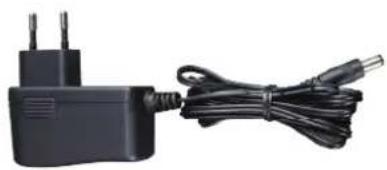
If any of these are missing or damaged, please contact your dealer immediately; if possible, retain the carton including the original packing material, and use them again to repack the product in case there is a need to return it to us for repair.

Note
The XT-815A comes with two vacant SFP module slots. The mini GBIC SFP module is not included in the package.
1.2 Product Features
- Physical Port
Media conversion between 10GBASE-X SFP+, 2.5GBASE-X, 1000BASE-X, and 100BASE-FX fiber optic
Dual 10GBASE-X SFP+ fiber optic ports supporting
- Multi-mode fiber with LC connector
- Single-mode fiber with LC connector
➢ SFP transceivers support auto-detection for 10G/2.5G/1G/100Mbps
- Layer 2 Features
➢ Fully compliant with IEEE 802.3z Gigabit SX/LX, IEEE 802.3ae 10 Gigabit Ethernet, IEEE 802.3x Flow Control, IEEE 802.3az Energy Efficient Ethernet, and IEEE 802.1p Class of Service standards.
➢ Non-blocking full wire-speed forwarding performance
➢ 12K jumbo frame support for handling large data transmissions
➢ Transparent IEEE 802.1Q VLAN tagging and multicast pass-through
- IEEE 802.3x full-duplex flow control and back-pressure for packet loss prevention
- Mechanical
Durable metal casing for enhanced reliability
➢ LED indicators to facilitate network diagnostics
▶ Compact size and Plug-and-Play installation
External 5V DC, 2A power input socket
➢ Wall mounting or DIN-rail installation (optional)
➢ 0 to 50 degrees C operating temperature
Compatible with PLANET 10"/19" Media Converter Chassis (MC-700/MC-1500/MC-1500R/MC-1500R48).
1.3 Product Specifications
| Model XT-815A | |
| Hardware Specifications | |
| SFP+ Port | Dual 10GBASE-X SFP+ interfacesBackward compatible with 100BASE-FX, 1000BASE-X and 2500BASE-X SFP transceivers |
| Fiber Mode May vary on SFP+/SFP Module | |
| Fiber Port Type (connector) | SFP, LC type |
| Fiber Maximum Distance May vary on SFP Module | |
| Network Cables May vary on SFP+ and SFP modules | |
| Enclosure Metal case | |
| Dimensions (W x D x H) 94 x 70.3 x 26.2 mm | |
| Weight 195g | |
| Power Supply DC 5V, 2A power socket, external AC-to-DC adapter | |
| Installation Wall-mount or DIN-rail installation (optional) | |
| LED | System: PWR (Green)SFP+ Port:2.5Gbps/1Gbps LNK/ACT(Green)10Gbps /100Mbps LNK/ACT(Amber) |
| Layer 2 Features | |
| Switch Architecture Store-and-Forward | |
| Fabric | 40Gbps backbone to ensure high-speed data transmission |
| Forwarding Rate Non-blocking, full wire-speed forwarding rate | |
| Flow Control | Half duplex: Back pressure eliminates packet lossFull duplex: IEEE 802.3x pause frame support for efficient flow control |
| Maximum Frame Size | Supports jumbo frames up to 12K. |
| VLAN Support | Transparent 802.1Q VLAN pass-through for seamless integration in tagged network environments |
| Priority Switching | 8-level QoS priority switching for traffic optimizationSupports 802.1p priority for efficient traffic management. |
| Standards Conformance | |
| Regulatory Compliance FCC Part 15 Class A, CE | |
| Protocols and Standards Compliance | IEEE 802.3z Gigabit SX/LXIEEE 802.3ae 10 Gigabit EthernetIEEE 802.3x Flow ControlIEEE 802.3az Energy Efficient EthernetIEEE 802.1p Class of Service |
| Environment | |
| Temperature | Operating: 0 ~ 50 degrees CStorage: -10 ~ 70 degrees C |
| Humidity 5% ~ 95% non-condensing | |
2. Hardware Description
2.1 Dimensions
■ XT-815A dimensions (W x D x H): 94 x 70.3 x 26.2 mm

Dimensions (W x D x H): 94 x 70.3 x 26.2 mm
Figure 2-1: XT-815A Dimensions
2.2 Converter Front Panel and LED Indicators
Figure 2-2 shows the front panel of the Media Converter.

Figure 2-2: XT-815A Front Panel
■ System
| LED Color Function | |||
| PWR Green | Lights Power ON | ||
| Off Power | OFF | ||
■ 10GBASE-X SFP+ Interface
| LED Color Function | |||
| 1G/2.5GLNK/ACT | Green | Lights | To indicate the port is running at 1000Mbps or 2500Mbps. |
| Blink | To indicate that the Switch is actively sending or receiving data over that port. | ||
| 10G/100LNK/ACT | Amber Lights | To indicate the port is running at 10Gbps or 100Mbps and successfully established. | |
2.3 Rear Panel
The rear panel of the XT-815A consists of one DC jack, which accepts input power with 5V DC, 2A.

Figure 2-3: One DC jack for DC power input
2.4 Power Information:
The central pole of the Media Converter's power jacks measures 2.5mm wide that requires +5VDC power input. It conforms to the bundled AC-DC adapter and PLANET's media chassis. Should you have the issue of power connection, please contact your local sales representative.
Please keep the AC-DC adapter as a spare part when the XT-815A is installed in a media chassis.

Note
Before installing the media converter into the converter slot of PLANET media converter chassis, please remove the earth grounding screw first.

2.5mm
Width of DC Receptacle: 2.5mm
+5V for each slot

DC receptacle is 2.5mm wide that matches the central pole; the width of the Media Converter DC jack also measures 2.5mm.
Warning: Do not install any improper unit.
The device is a power-required device, meaning it will not work till it is powered. If your networks should be active all the time, please consider using UPS (Uninterrupted Power Supply) for your device. It will prevent you from network data loss or network downtime.
In some areas, installing a surge suppression device may also help to protect your Media Converter from being damaged by unregulated surge or current to the converter or the power adapter.
3. Installation
This section describes the functionalities of the Media Converter's components and guides you to how to install it on the desktop. Basic knowledge of networking is assumed. Please read this chapter completely before continuing.
3.1 Stand-alone Installation
Step 1: Unpack the Media Converter.
Step 2: Connect the 5V DC power adapter to the XT-815A and verify that the Power LED lights up.
(Please refer to the 2.4 Power Information section for power input.)
Step 3: Prepare a fiber cable for connection to the 10GBASE-X SFP+ slot, and make sure both sides of the SFP transceiver are with the same media type.
(Please refer to the 3.5 Cable Connection section for the type of connection.)
Step 4: Connect the fiber cable. Attach the duplex LC connector on the network cable to the SFP+ transceiver. Attach the fiber cable from the XT-815A to the fiber network. TX, RX must be paired at both ends.
Step 5: When all the connections are all set and the LED lights all show normal, the installation is completed.

Note
After inserting the 10G SFP+ transceiver into the media converter's 10G SFP+ slot, the LNK/ACT LED will light up (Chipset restriction).
3.2 Wall-mount Installation
Step 1: Please find the wall that can mount the Media Converter.
Step 2: Screw two screws on the wall.

Step 3: Hang the Media Converter on the screws from the wall.
Step 4: Refer to Chapter 2.4 Power Information on the power supply to the Media Converter.


Note
Before mounting the device to the wall, please check the location of the electrical outlet and the length of the Ethernet cable.
3.3 Media Chassis Installation
To install the Media Converter in a 10-inch or 19-inch standard rack, follow the instructions described below.
Step 1: Place your Media Converter on a hard flat surface, with the front panel positioned towards your front side.
Step 2: Carefully slide in the module until it is fully and firmly fitted into the slot of the chassis; the Power LED of the Media Converter will turn ON.

Figure 3-1: Insert Gigabit Media Converter into an available slot

Caution
- Never push the converter into the slot with force; it could damage the chassis.
- The Media Converter Chassis supports hot-swap; there is no need to turn off the whole chassis before sliding in the new converter.
3.4 Optional DIN-rail Installation
There are two DIN-rail holes on the left side of the XT-815A that allows to be easily installed by DIN-rail mounting. PLANET optional DIN-rail mounting kit – RKE-DIN -- can be ordered separately. Refer to the following steps for the DIN-rail mounting of the XT-815A:
Step 1: Screw the DIN rail on the XT-815A.

Step 2: Now slide the DIN rail into the track.

Step 3: Check whether the DIN rail is tightly on the track.


You must use the screws supplied with the mounting brackets. Damage caused to the parts by using incorrect screws would invalidate your warranty.
3.5 Cable Connection
■ Installing the SFP+ Transceiver
The sections describe how to insert an SFP+ transceiver into an SFP+ slot.
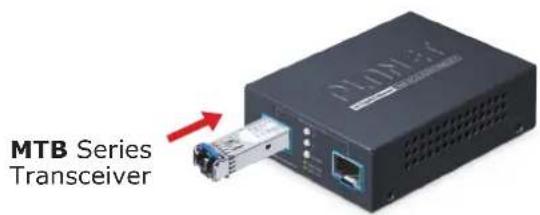
Figure 3-2: Plug in the SFP+ Transceiver
The SFP+ transceivers are hot-pluggable and hot-swappable. You can plug in and out the transceiver to/from any SFP+ port without having to power down the Media Converter

Note
It is recommended to use PLANET SFP+ transceiver on the Media Converter. If you insert an SFP+ transceiver that is not supported, the Media Converter will not recognize it.
10GBASE-X SR/LR:
Before connecting the other switches, workstation or Media Converter, please do the following:
- Make sure both sides of the SFP+ transceiver are with the same media type; for example, 10GBASE-SR to 10GBASE-SR, 10GBASE-LR to 10GBASE-LR.
- Check whether the fiber-optic cable type matches the SFP+ transceiver model.
To connect to 10GBASE-SR SFP+ transceiver, use the multi-mode fiber cable with one side being the male duplex LC connector type.
To connect to 10GBASE-LR SFP+ transceiver, use the single-mode fiber cable with one side being the male duplex LC connector type.
Connecting the fiber cable
- Attach the duplex LC connector of the network cable to the SFP+ transceiver.
- Connect the other end of the cable to a device like a switch with SFP+ installed, fiber NIC on a workstation or a Media Converter.
■ Removing the Transceiver Module
- Make sure there is no network activity by consulting or checking with the network administrator. Or through the management interface of the switch/converter (if available), disable the port in advance.
- Remove the fiber optic cable gently.
- Turn the lever of the MTB module to a horizontal position.
- Pull out the module gently through the lever.
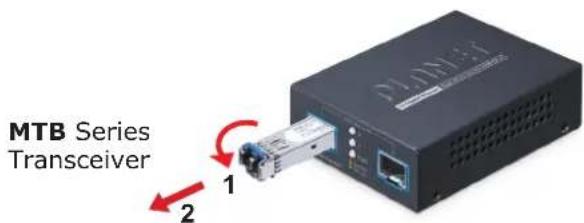
Figure 3-3: Pulling Out from the SFP+ Transceiver

Note
Never pull out the module without pulling the lever or the push bolts on the module. Directly pulling out the module with effort could damage the module and SFP+ module slot of the Media Converter.
■ 100/1G/2.5G/10GBASE-X
The 100/1G/2.5G/10GBASE-X port comes with auto-negotiation capability. It automatically supports 100BASE-FX, 1000BASE-X, 2500BASE-X and 10GBASE-X networks. Users only need to plug a working network device into the 100/1G/2.5G/10GBASE-X port, and then turn on the Media Converter. The port will automatically run at 1000Mbps, 2500Mbps and 10000Mbps after the negotiation with the connected device.
APPENDIX : APPROVED PLANET SFP+ TRANSCEIVERS
PLANET Media Converter supports 10GBASE-X with both multi-mode and single mode SFP+ transceivers. The following list of approved PLANET SFP+ transceivers are correct at the time of publication:
Available 10Gbps SFP+ Transceivers
PLANET Media Converter supports 10GBASE-X with both multi-mode and single mode SFP+ transceivers. The following list of approved PLANET SFP+ transceivers are correct at the time of publication:
Available 2.5Gbps SFP Modules
| MTB-LB40 | 1-Port 10GBASE-BX SFP+ Fiber Optic Module - 40km (TX:1330nm RX:1270nm) |
| MTB-LA40 | 1-Port 10GBASE-BX SFP+ Fiber Optic Module - 40km (TX:1270nm RX:1330nm) |
| MTB-LB20 | 1-Port 10GBASE-BX SFP+ Fiber Optic Module - 20km (TX:1330nm RX:1270nm) |
| MTB-LA20 | 1-Port 10GBASE-BX SFP+ Fiber Optic Module - 20km (TX:1270nm RX:1330nm) |
| MTB-TSR | 1-Port 10GBASE-SR SFP+ Fiber Optic Module - 300m (-40~85 degrees C) |
| MTB-TLR | 1-Port 10GBASE-LR SFP+ Fiber Optic Module - 10km (-40~85 degrees C) |
| MTB-SR 1-Port | 10GBASE-SR SFP+ Fiber Optic Module - 300m |
| MTB-LR 1-Port | 10GBASE-LR SFP+ Fiber Optic Module - 10km |
| MTB-LA60 | 1-Port 10GBASE-BX SFP+ Fiber Optic Module - 60km (TX:1270nm RX:1330nm) |
| MTB-LB60 | 1-Port 10GBASE-BX SFP+ Fiber Optic Module - 60km (TX:1330nm RX:1270nm) |
| MTB-RJ 1-Port | 10GBASE-T SFP+ Copper Fiber Optic Module - 30m |
| MTB-LR40 1-Port | 10GBASE-LR SFP+ Fiber Optic Module - 40km |
| MTB-TLR40 | 1-Port 10GBASE-LR SFP+ Fiber Optic Module - 40km (-40~85 degrees C) |
| MTB-SR2 1-Port | 10GBASE-LR SFP+ Fiber Optic Module - 2km |
| MTB-LR20 1-Port | 10GBASE-LR SFP+ Fiber Optic Module - 20km |
| MTB-LR60 1-Port 10GBASE-LR SFP+ Fiber Optic Module - 60km | |
| MTB-LR80 1-Port 10GBASE-LR SFP+ Fiber Optic Module - 80km | |
| MTB-TSR2 | 1-Port 10GBASE-LR SFP+ Fiber Optic Module - 2km (-40~85 degrees C) |
| MTB-TLR20 | 1-Port 10GBASE-LR SFP+ Fiber Optic Module - 20km (-40~85 degrees C) |
| MTB-TLR60 | 1-Port 10GBASE-LR SFP+ Fiber Optic Module - 60km (-40~85 degrees C) |
| MTB-TLA20 | 1-Port 10GBASE-BX SFP+ Fiber Optic Module - 20km (TX:1270nm RX:1330nm) (-40~85 degrees C) |
| MTB-TLB20 | 1-Port 10GBASE-BX SFP+ Fiber Optic Module - 20km (TX:1330nm RX:1270nm) (-40~85 degrees C) |
| MTB-TLA40 | 1-Port 10GBASE-BX SFP+ Fiber Optic Module - 40km (TX:1270nm RX:1330nm) (-40~85 degrees C) |
| MTB-TLB40 | 1-Port 10GBASE-BX SFP+ Fiber Optic Module - 40km (TX:1330nm RX:1270nm) (-40~85 degrees C) |
| MTB-TLA60 | 1-Port 10GBASE-BX SFP+ Fiber Optic Module - 60km (TX:1270nm RX:1330nm) (-40~85 degrees C) |
| MTB-TLB60 | 1-Port 10GBASE-BX SFP+ Fiber Optic Module - 60km (TX:1330nm RX:1270nm) (-40~85 degrees C) |
| MTB-LA10 | 1-Port 10GBASE-BX SFP+ Fiber Optic Module - 10km (TX:1270nm RX:1330nm) |
| MTB-LB10 | 1-Port 10GBASE-BX SFP+ Fiber Optic Module - 10km (TX:1330nm RX:1270nm) |
Available 2.5Gbps SFP Modules
| MGB-2GTSR | 2.5G SFP Transceiver (Multi-mode, 850nm, DDM, -40~85 degrees C) - 300m |
| MGB-2GTLA20 | 2.5G SFP Transceiver (Single mode WDM, TX:1310nm RX:1550nm, DDM, -40~85 degrees C) - 20km |
| MGB-2GTLB20 | 2.5G SFP Transceiver (Single mode WDM, TX:1550nm RX:1310nm, DDM, -40~85 degrees C) - 20km |
| MGB-2GSR | 2.5G SFP Transceiver (Multi-mode, 850nm, DDM, 0~70 degrees C) - 300m |
| MGB-2GLA20 | 2.5G SFP Transceiver (Single mode WDM, TX:1310nm RX:1550nm, DDM, 0~70 degrees C) - 20km |
| MGB-2GLB20 | 2.5G SFP Transceiver (Single mode WDM, TX:1550nm RX:1310nm, DDM, 0~70 degrees C) - 20km |
| MGB-2GLR20 2.5G SFP Transceiver (Single mode, 1310nm, DDM) - 20km | |
| MGB-2GLR2 2.5G SFP Transceiver (Single mode, 1310nm, DDM) - 2km | |
| MGB-2GTLR20 | 2.5G SFP Transceiver (Single mode, 1310nm, DDM, -40~85 degrees C) - 20km |
| MGB-2GTLR2 | 2.5G SFP Transceiver (Single mode, 1310nm, DDM, -40~85 degrees C) - 2km |
Available 1Gbps SFP Modules
| MGB-GT SFP-Port 1000BASE-T Module | |
| MGB-LX SFP-Port 1000BASE-LX mini-GBIC module - 20km | |
| MGB-SX SFP-Port 1000BASE-SX mini-GBIC module - 550m | |
| MGB-SX2 SFP-Port 1000BASE-SX mini-GBIC module - 2km | |
| MGB-L40 SFP-Port 1000BASE-LX mini-GBIC module - 40km | |
| MGB-L80 SFP-Port 1000BASE-LX mini-GBIC module - 80km | |
| MGB-L120 SFP-Port 1000BASE-LX mini-GBIC module - 120km | |
| MGB-LA10 | SFP-Port 1000BASE-BX (WDM, TX:1310nm) mini-GBIC module - 10km |
| MGB-LB10 | SFP-Port 1000BASE-BX (WDM, TX:1550nm) mini-GBIC module - 10km |
| MGB-LA20 | SFP-Port 1000BASE-BX (WDM, TX:1310nm) mini-GBIC module - 20km |
| MGB-LB20 | SFP-Port 1000BASE-BX (WDM, TX:1550nm) mini-GBIC module - 20km |
| MGB-LA40 | SFP-Port 1000BASE-BX (WDM, TX:1310nm) mini-GBIC module - 40km |
| MGB-LB40 | SFP-Port 1000BASE-BX (WDM, TX:1550nm) mini-GBIC module - 40km |
| MGB-LA80 | SFP-Port 1000BASE-BX (WDM, TX:1490nm) mini-GBIC module - 80km |
| MGB-LB80 | SFP-Port 1000BASE-BX (WDM, TX:1550nm) mini-GBIC module - 80km |
| MGB-TSX | SFP-Port 1000BASE-SX mini-GBIC module - 550m (-40~85 degrees C) |
| MGB-TSX2 | SFP-Port 1000BASE-SX mini-GBIC module - 2km (-40~85 degrees C) |
| MGB-TLX | SFP-Port 1000BASE-LX mini-GBIC module - 20km (-40~85 degrees C) |
| MGB-TL40 | SFP-Port 1000BASE-LX mini-GBIC module - 40km (-40~85 degrees C) |
| MGB-TL80 | SFP-Port 1000BASE-LX mini-GBIC module - 80km (-40~85 degrees C) |
| MGB-TLA10 | SFP-Port 1000BASE-BX (WDM, TX:1310nm) mini-GBIC module - 10km (-40~85 degrees C) |
| MGB-TLB10 | SFP-Port 1000BASE-BX (WDM, TX:1550nm) mini-GBIC module - 10km (-40~85 degrees C) |
| MGB-TLA20 | SFP-Port 1000BASE-BX (WDM, TX:1310nm) mini-GBIC module - 20km (-40~85 degrees C) |
| MGB-TLB20 | SFP-Port 1000BASE-BX (WDM, TX:1550nm) mini-GBIC module - 20km (-40~85 degrees C) |
| MGB-TLA40 | SFP-Port 1000BASE-BX (WDM, TX:1310nm) mini-GBIC module - 40km (-40~85 degrees C) |
| MGB-TLB40 | SFP-Port 1000BASE-BX (WDM, TX:1550nm) mini-GBIC module - 40km (-40~85 degrees C) |
| MGB-TLA80 | SFP-Port 1000BASE-BX (WDM, TX:1490nm) mini-GBIC module - 80km (-40~85 degrees C) |
| MGB-TLB80 | SFP-Port 1000BASE-BX (WDM, TX:1550nm) mini-GBIC module - 80km (-40~85 degrees C) |
| MGB-TSA | SFP-Port 1000BASE-BX (WDM, TX:1310nm) mini-GBIC module - 2km (-40~85 degrees C) |
| MGB-TSB | SFP-Port 1000BASE-BX (WDM, TX:1550nm) mini-GBIC module - 2km (-40~85 degrees C) |
| MGB-TGT SFP-Port 1000BASE-T Module - 100m (-40~85 degrees C) | |
| MGB-TLA120 | SFP-Port 1000BASE-BX (WDM, TX:1490nm) mini-GBIC module - 120km (-40~85 degrees C) |
| MGB-TLB120 | SFP-Port 1000BASE-BX (WDM, TX:1550nm) mini-GBIC module - 120km (-40~85 degrees C) |
Available 100Mbps SFP Modules
| MFB-FX SFP-Port 100BASE-FX Transceiver (1310nm) -2km | |
| MFB-F20 SFP-Port 100BASE-FX Transceiver (1310nm) - 20km | |
| MFB-FA20 | SFP-Port 100BASE-BX Transceiver (WDM, TX:1310nm) -20km |
| MFB-FB20 | SFP-Port 100BASE-BX Transceiver (WDM, TX:1550nm) -20km |
| MFB-F40 SFP-Port 100BASE-FX Transceiver (1310nm) - 40KM | |
| MFB-F60 SFP-Port 100BASE-FX Transceiver (1310nm) - 60KM | |
| MFB-TFX | SFP-Port 100BASE-FX Transceiver (1310nm) -2km(-40~85 degrees C) |
| MFB-TF20 | SFP-Port 100BASE-FX Transceiver (1310nm) - 20km(-40~85 degrees C) |
| MFB-TFA20 | SFP-Port 100BASE-BX (WDM, TX:1310nm) mini-GBIC module-20km(-40~85 degrees C) |
| MFB-TFB20 | SFP-Port 100BASE-BX (WDM, TX:1550nm) mini-GBIC module-20km(-40~85 degrees C) |
| MFB-TFA40 | SFP-Port 100BASE-BX (WDM, TX:1310nm) mini-GBIC module-40km(-40~85 degrees C) |
| MFB-TFB40 | SFP-Port 100BASE-BX (WDM, TX:1550nm) mini-GBIC module-40km(-40~85 degrees C) |
| MFB-TSB | SFP-Port 100BASE-BX Transceiver (Multi-mode/WDM, TX:1550nm RX:1310nm/DDM) - 2km (-40~85 degrees C) |
| MFB-TF120 | SFP-Port 100BASE -FX Transceiver (1550nm) - 120km(-40~85 degrees C) |
| MFB-TSA | SFP-Port 100BASE-BX (Multi-mode/WDM, TX:1310nm) mini-GBIC module-2km (-40~85 degrees C) |
| MFB-TFB60 | MFB-TFB60 SFP-Port 100BASE-BX (WDM, TX:1550nm) mini-GBIC module-60km (-40~85 degrees C) |
| MFB-F120 SFP-Port 100BASE -FX Transceiver (1550nm) - 120km | |
| MFB-TFA60 | SFP-Port 100BASE-BX (WDM, TX:1310nm) mini-GBIC module-60km (-40~85 degrees C) |
5. Customer Support
Thank you for purchasing PLANET products. You can browse our online FAQ resource on PLANET web site first to check if it could solve your issue. If you need more support information, please contact PLANET switch support team.
PLANET online FAQs:
https://www.planet.com.tw/en/support/faq.php
Support team mail address:
support @planet.com.tw
Copyright © PLANET Technology Corp. 2024.
Contents are subject to revision without prior notice.
PLANET is a registered trademark of PLANET Technology Corp.
All other trademarks belong to their respective owners.


- 2-PORT 10G/2.5G/1G/100BASE-X SFP+ MEDIA CONVERTER
- TRADEMARK
- DISCLAIMER
- FCC WARNING
- CE MARK WARNING
- WEEE WARNING
- REVISION
- TABLE OF CONTENTS
- PACKAGE CONTENTS
- 1.2 PRODUCT FEATURES
- 1.3 PRODUCT SPECIFICATIONS
- HARDWARE DESCRIPTION
- 2.1 DIMENSIONS
- 2.2 CONVERTER FRONT PANEL AND LED INDICATORS
- 2.3 REAR PANEL
- 2.4 POWER INFORMATION
- INSTALLATION
- 3.1 STAND-ALONE INSTALLATION
- 3.2 WALL-MOUNT INSTALLATION
- 3.3 MEDIA CHASSIS INSTALLATION
- 3.4 OPTIONAL DIN-RAIL INSTALLATION
- 3.5 CABLE CONNECTION
- INSTALLING THE SFP+ TRANSCEIVER
- 10GBASE-X SR/LR
- CONNECTING THE FIBER CABLE
- REMOVING THE TRANSCEIVER MODULE
- 100/1G/2.5G/10GBASE-X
- APPENDIX : APPROVED PLANET SFP+ TRANSCEIVERS
- AVAILABLE 10GBPS SFP+ TRANSCEIVERS
- CUSTOMER SUPPORT
Brand : Planet
Model : XT-815A
Category : Power inverter