UNITE Touchscreen Console - Uncategorized True - Free user manual and instructions
Find the device manual for free UNITE Touchscreen Console True in PDF.


| Product Type | Touchscreen Console for Cardio Equipment |
| Display Size | 10" or 16" (not specified which; typical) |
| Resolution | High-definition |
| Operating System | Android OS |
| Connectivity | Bluetooth, Wi-Fi (implied), HDMI, USB, 3.5mm headphone jack |
| Wireless Charging | Yes, for compatible mobile devices (reading rack area) |
| Smartwatch Integration | Apple Watch and Samsung Galaxy Watch compatible (GymKit) |
| Heart Rate Monitoring | Polar 5kHz chest strap, Bluetooth HR transmitter, Contact Heart Rate (CHR) grips |
| Built-in Workout Programs | Quick Start, Manual, Calorie Goal, Distance Goal, Time Goal, Hill Intervals, HIIT Boost, HRC Cruise Control, Cardio360, Monuments, and more (over 20 programs) |
| Entertainment | Live TV (coaxial, HDMI, IPTV), streaming apps (Netflix, YouTube, Disney+, etc.), web browser |
| Display Views | Track View, Graph View, HIIT View, Virtual Views (scenic videos) |
| Language Options | 12 languages |
| Screen Lock for Cleaning | Hold lock icon 3 seconds for 20-second lock |
| Reading Rack | Yes, with wireless charging area |
| Compatibility | True Apex, Gravity, Launch, Vapor cardio equipment (treadmills, bikes, ellipticals, etc.) |
| Power | AC power (specific voltage not listed) |
| Dimensions | Not specified |
| Weight | Not specified |
| Warranty | Contact True Fitness support |
Frequently Asked Questions - UNITE Touchscreen Console True
User questions about UNITE Touchscreen Console True
0 question about this device. Answer the ones you know or ask your own.
Ask a new question about this device
Download the instructions for your Uncategorized in PDF format for free! Find your manual UNITE Touchscreen Console - True and take your electronic device back in hand. On this page are published all the documents necessary for the use of your device. UNITE Touchscreen Console by True.
USER MANUAL UNITE Touchscreen Console True
WIRELESS CHARGING....35
ABOUT THE UNITE TOUCHSCREEN CONSOLES
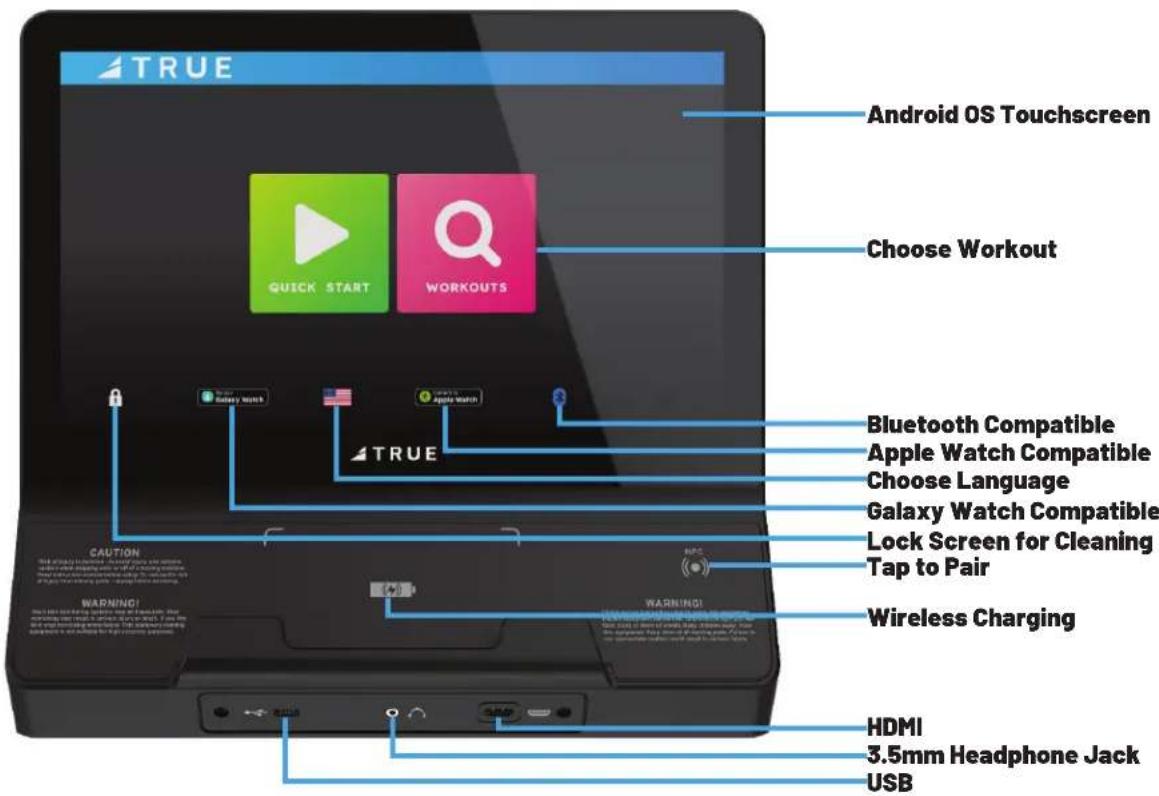
The vibrant, high-definition UNITE Touchscreen consoles seamlessly combines performance, connectivity, and entertainment to exceed the expectations of your users. Offering a library of engaging workouts, wireless charging, and a variety of apps and entertainment streaming options, users can stay connected while staying focused on their fitness goals. Compatible with all Apex, Gravity, Launch, and Vapor cardio equipment.
FEATURES
• Vibrant Screen with State-of-the-Art UI
• User-Friendly Interface
- Entertainment
• Apple and Samsung Watch Connectivity
• Built-In Workout Programs
- Wireless Charging
- Bluetooth Compatible
- Reading Rack
ASSEMBLY AND SETUP
HOW TO ATTACH THE CONSOLE TO THE CONSOLE MAST
See the base assembly instructions for how to attach the console to the console mast for each cardio base.
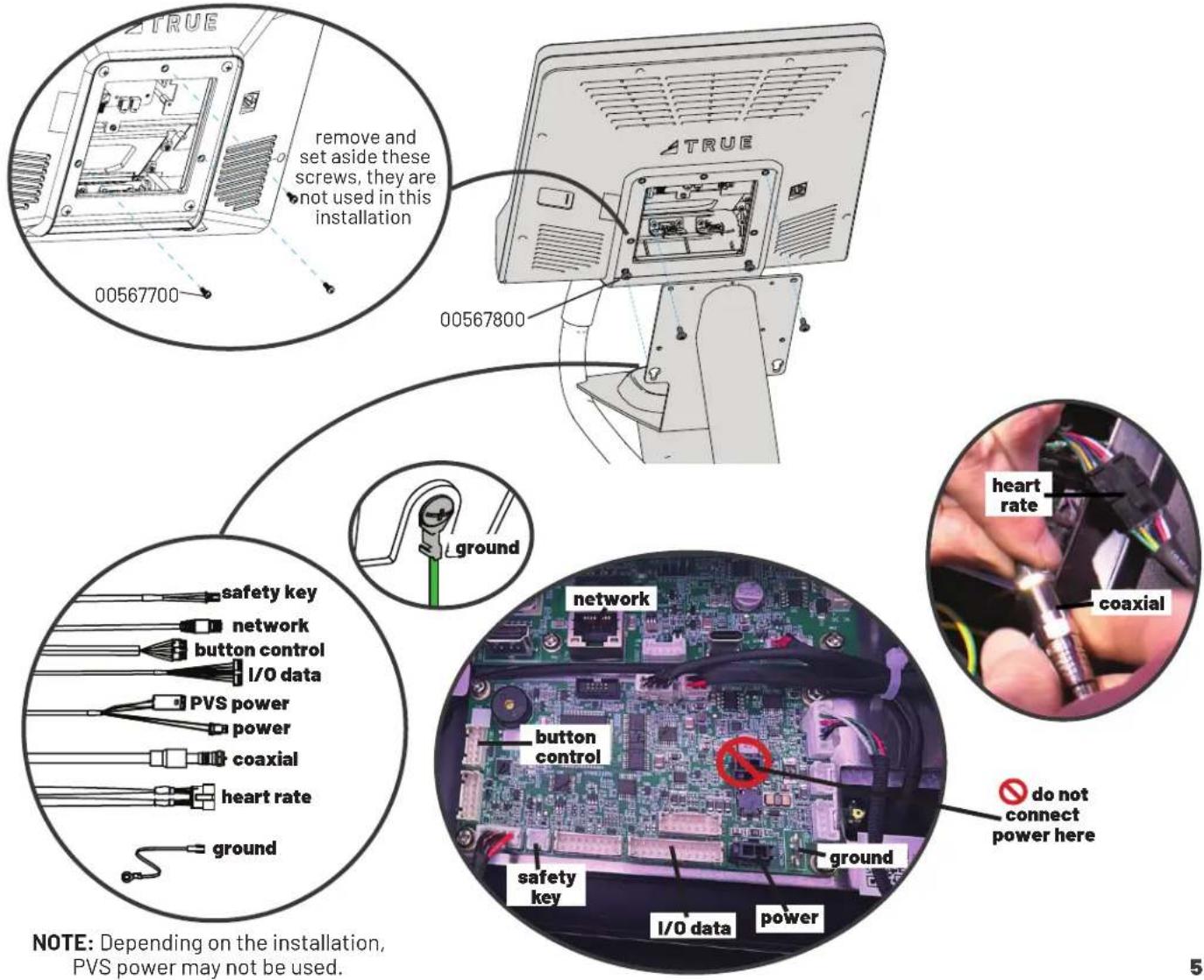
Example of potential cable connections and instructions shown below.
EXAMPLE: ATTACH THE CONSOLE TO THE CONSOLE MAST
A. If the console has three screws (00567700 // SCREW, M4-.7 X 12 PPHMS SEMS) preassembled, remove and set aside these screws. They are not used in this installation. Remove and set aside the top two screws (00567800 // SCREW, M5-.8X12 COMBO PHILLIPS/COMMON TRUSS HEAD - ACG BLACK) preassembled to the console. Slightly loosen the bottom two screws but leave them installed. All four screws will be used to secure the console to the mast in step C.
B. Connect the cables: network, coaxial, heart rate, safety key, I/O data, power, and ground (use the screw on the console mast to attach the ground cable from the console).
NOTE: The LED console does not use the coaxial or network cables. Those cables can be tucked back down the console mast.
Ensure all cables are routed inside the console mast to avoid pinching the cables
C. Using a #2 Phillips screwdriver, secure the console to the console mast using the four screws (00567800).
HOW TO CONFIGURE THE CONSOLE WITH THE BASE AND RUN CALIBRATION\*
*NOTE: All new products require configuration. However, not all new products require calibration. Refer to the table below. If calibration is required, you must calibrate the machine. Configuration and Diagnostic options are only available by accessing the console Manager and Technician modes. See the UNITE Touchscreen Setup Guide for more information.
| PRODUCT CALIBRATION REQUIREMENTS | ||
| REQUIRES CALIBRATION DOES NOT | REQUIRE CALIBRATION | |
| APEX TREADMILL APEX ELLIPTICAL | GRAVITY CROSSTRAINER | |
| GRAVITY TREADMILL PLUS APEX CR | OSSTRAINER GRAVITY RECUMBENT | ELLIPTICAL |
| GRAVITY TREADMILL APEX RECUMBENT BIKE LAUNCH ELLIPTICAL | ||
| LAUNCH TREADMILL DC APEX UPRIGHT BIKE LAUNCH RECUMBENT BIKE | ||
| VAPOR STRYKER APEX RECUMBENT | ELLIPTICAL LAUNCH UPRIGHT BIKE | |
| VAPOR ALPINE RUNNER | GRAVITY ELLIPTICAL | VAPOR PALISADE |
| VAPOR SPECTRUM | GRAVITY RECUMBENT BIKE | VAPOR XT-ONE |
| GRAVITY UPRIGHT BIKE | VAPOR LATERAL X | |
Contact product support right away if you run into issues setting up the machine:
800.883.8783 | service@truefitness.com | Monday–Friday 8:30am–5:00pm (CST)
CONSOLE NAVIGATION
HOME SCREEN
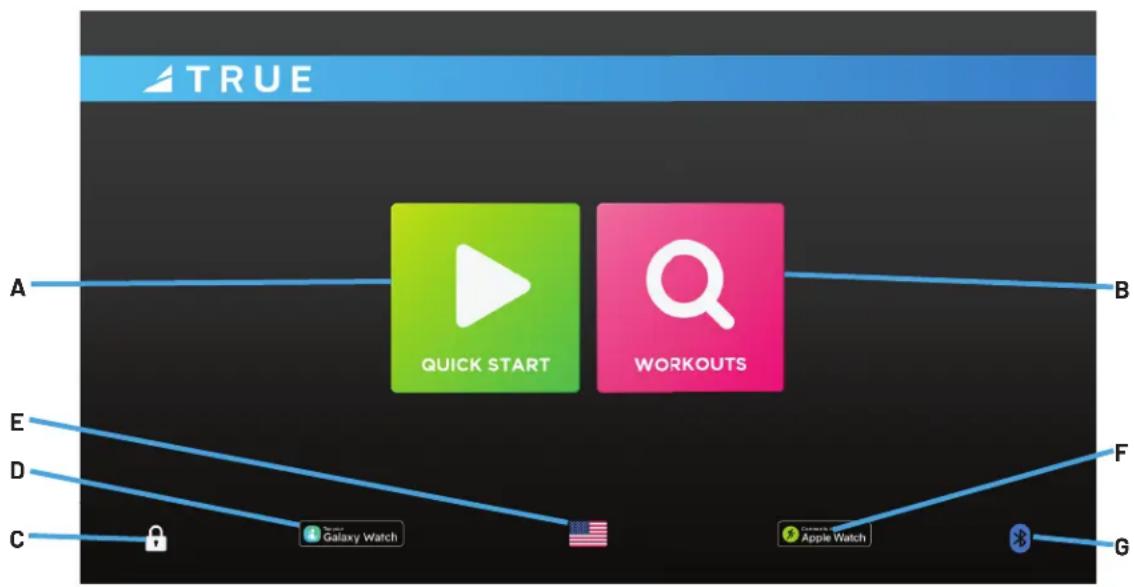
The Home Screen is displayed on the console when there is no workout in progress. From this screen the user is able to select from various options to begin a workout.
flowchart
graph TD
    A["QUICK START"] --> B["WORKOUTS"]
    C["Lock Icon"] --> D["Galaxy Watch"]
    E["Lock Icon"] --> F["Apple Watch"]
    G["Lock Icon"] --> H["Apple Watch"]
    I["A"] --> J["B"]
    K["E"] --> L["F"]
    M["D"] --> N["G"]
A. Quick Start
Starts a Quick Start workout in which the user controls all settings until the workout is ended by the user.
B. Workouts
Displays a list of the preprogrammed workouts that are available on this machine.
C. Screen Lock
When the screen lock is held for three seconds, the touch screen display will lock for 20 seconds to enable cleaning.
D. Galaxy Watch Connectivity
Tap to pair a Galaxy Watch with a TRUE cardio machine to accurately and efficiently track your cardio workouts.
E. Language Options
Enables users to choose between 12 language options.
F. Apple Watch Connectivity
Pair an Apple Watch with an Apple GymKit-enabled TRUE cardio machine to accurately and efficiently track your cardio workouts.
G. Bluetooth
Allows users to pair their Bluetooth devices prior to beginning a workout.
SELECTING A PRESET WORKOUT
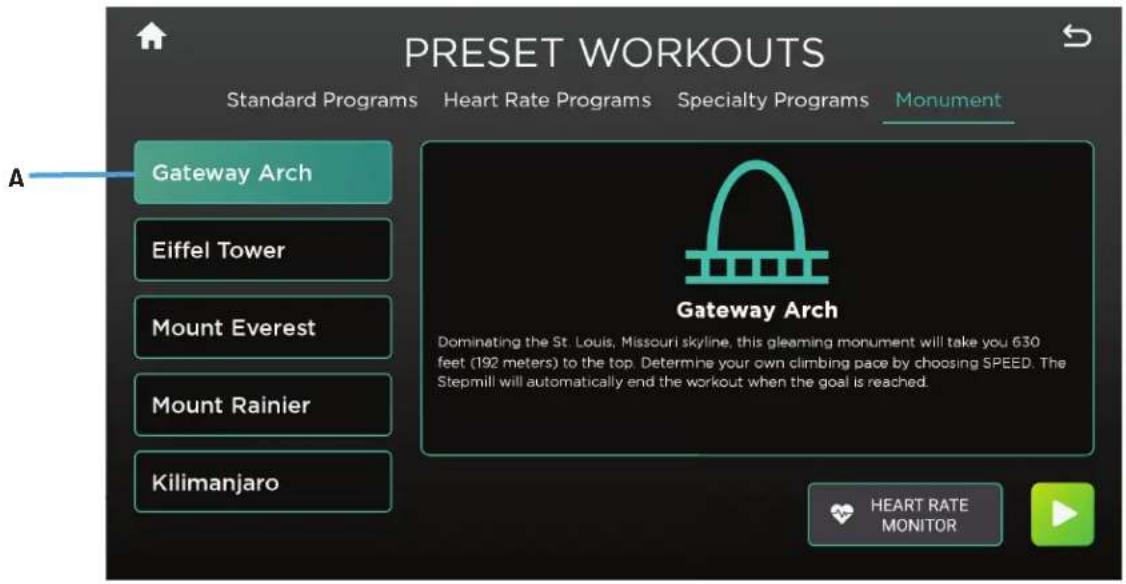
Preset workouts are accessed by selecting WORKOUTS from the Home Screen. The user may select from specific workout categories listed on the top of the screen to view a subset of all available workouts such as heart rate programs. To begin a workout, swipe through the workout list (A) and press anywhere within the workout bounding box to select it. Press the next arrow to continue.
NOTE: The image below may differ slightly based on the base unit used.
WORKOUT DATA ENTRY SCREENS
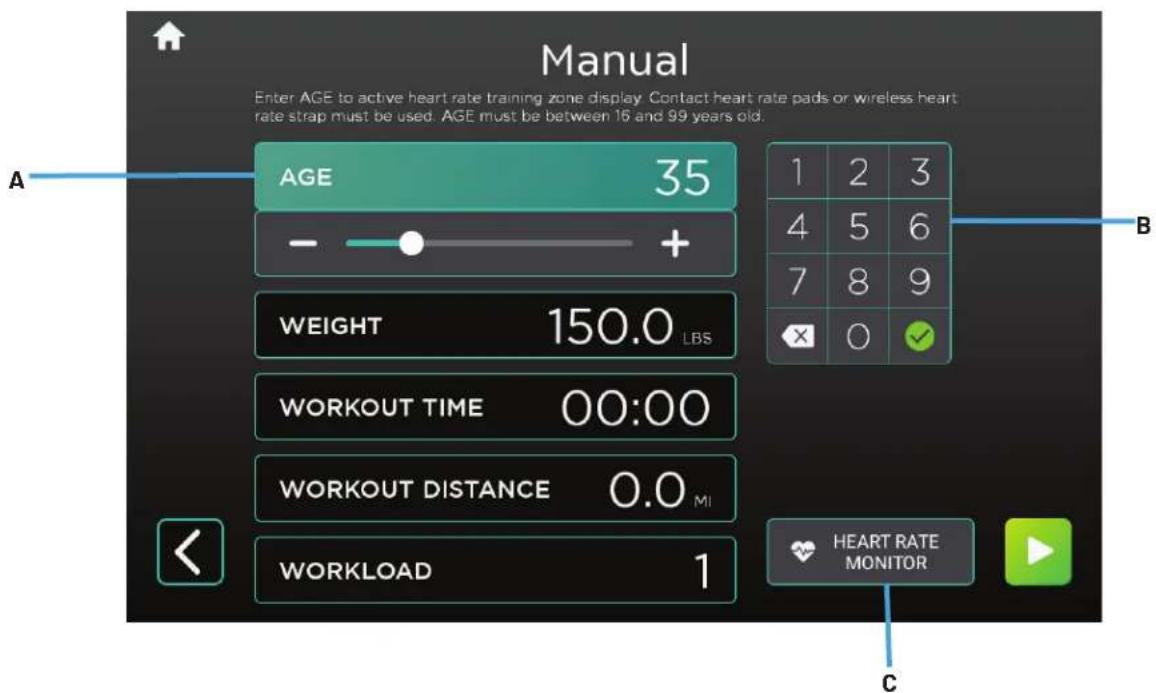
These screens allow users to input their personal information or workout goals prior to beginning a workout. To set a value, select the heading (A) of the value and manually enter a value using the keypad (B). Select Heart Rate Monitor (C) to pair a Bluetooth-enabled heart rate device with the console to wirelessly monitor heart rate data. Pressing Save (not shown) enables the user to save on-screen workout parameters for future workouts selectable from the Workout Finder main menu by selecting Saved Workouts. Select the next arrow to begin the workout.
NOTE: Selecting the checkmark on the keypad after entering a value will save the value in that item and then automatically select the next item in the list.
NOTE: Workout Data Entry Screens vary by base unit and program selection.
MONUMENTS
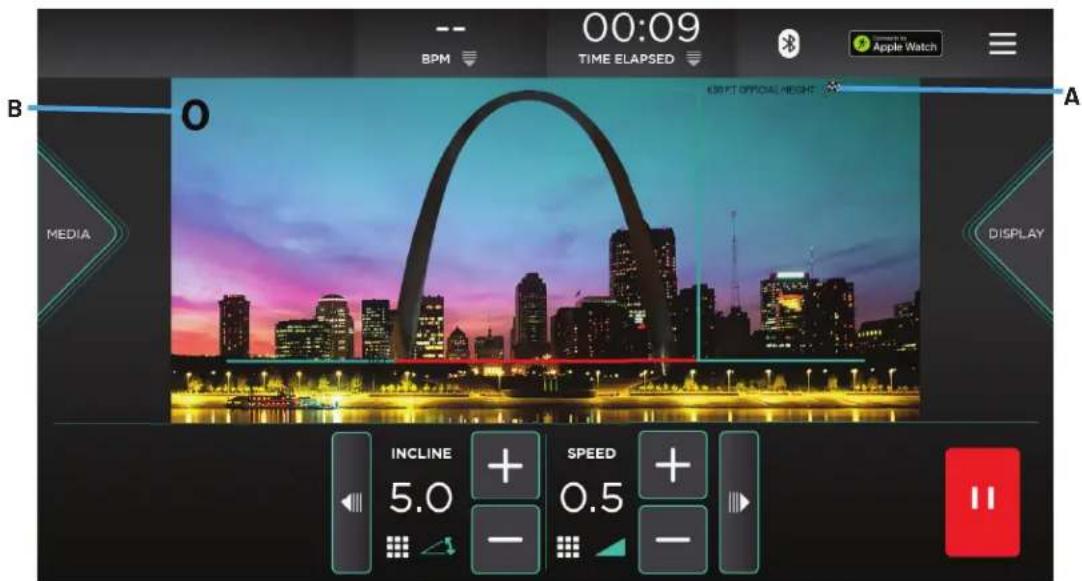
For the Vapor Alpine Runner and Vapor Stryker only, the user can select from custom workouts based on international monuments such as the Gateway Arch, Eiffel Tower, Mount Everest, Mount Rainier, and Kilimanjaro. These custom workouts are based on the height of each monument displaying the current height traveled in real time and total height (A) with the workout automatically ending once the user has reached the top of the monument. The user determines their individual climbing pace by manually entering the incline and speed levels, which determines their projected finish time (B).
CARDIO360 WORKOUT SCREEN
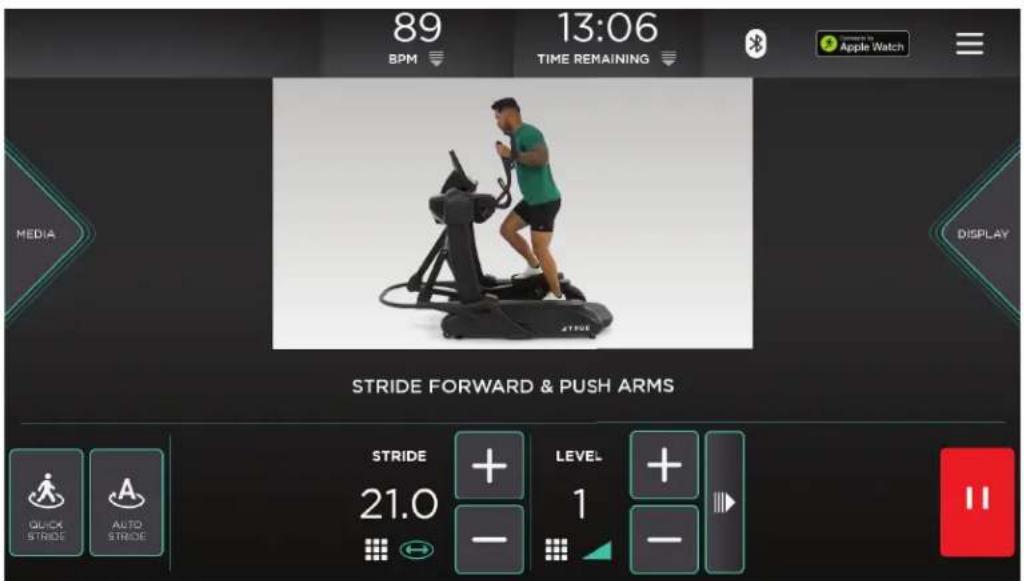
Available only on the Vapor Spectrum and Apex, Gravity, and Launch ellipticals, the Cardio360 workout screen provides the user with prerecorded video clips and corresponding instructional text prompts cycling through the various segments of a Cardio360 workout.
NOTE: The selected Cardio360 workout (Cardio360, Cardio360 Video, or Cardio360 Custom) determines the order, frequency and length of time for each Cardio360 workout segment
WORKOUT DATA SCREENS
During any workout a Workout Data Screen will be displayed to give the user a comprehensive visual overview of their current workout data.
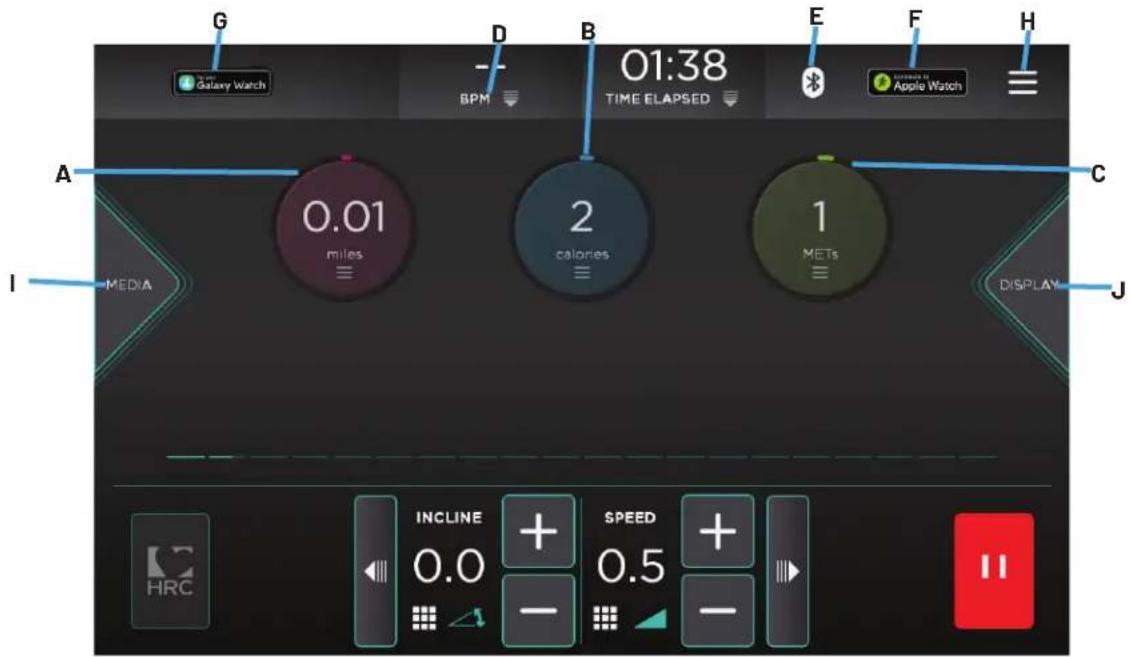
A. Distance\*
Displays the current distance traveled in miles, feet, or kilometers. The user can tap the circle for additional selections.
B. Calories\*
Displays the estimated total amount of calories burned since the start of the workout. The user can tap the circle for additional selections.
C. METs\*
Displays the estimated total amount of METs burned since the start of the workout. The user can tap the circle for additional selections.
NOTE: Users must tap the circle to change to RPMs while using a bike.
D. Heart Rate Information
When the user is wearing a heart rate chest strap or utilizing the Contact Heart Rate system, their heart rate will be displayed in bpm (beats per minute).
NOTE: If heart rate is not selected to display in the Workout Data menu, it will automatically display while heart rate data is available in addition to deselecting the last non-heart rate data value to display heart rate if six data values have already been selected. If heart rate is selected to display in the Workout Data menu, it will continuously display the selected heart rate data value.
E. Bluetooth Connectivity
Allows users to pair their Bluetooth devices prior to beginning a workout.
F. Apple Watch Connectivity
Allows the user to pair an Apple Watch with an Apple Gymkit-enabled TRUE cardio machine to accurately and efficiently track their cardio workouts.
G. Galaxy Watch Connectivity
Allows the user to pair a Galaxy Watch with a TRUE cardio machine to accurately and efficiently track their cardio workouts.
H. Options
This menu allows the user to change their personal info, access the user manual, change units from metric to imperial, adjust the volume and brightness, and connect to Bluetooth.
I. Media
Allows the user to access the console's apps and television.
J. Display
Allows the user to change the workout view to track view, graph view, HIIT view, or virtual.
*NOTE: Additional selections differ based on the base unit used.*
WORKOUT DATA SCREENS
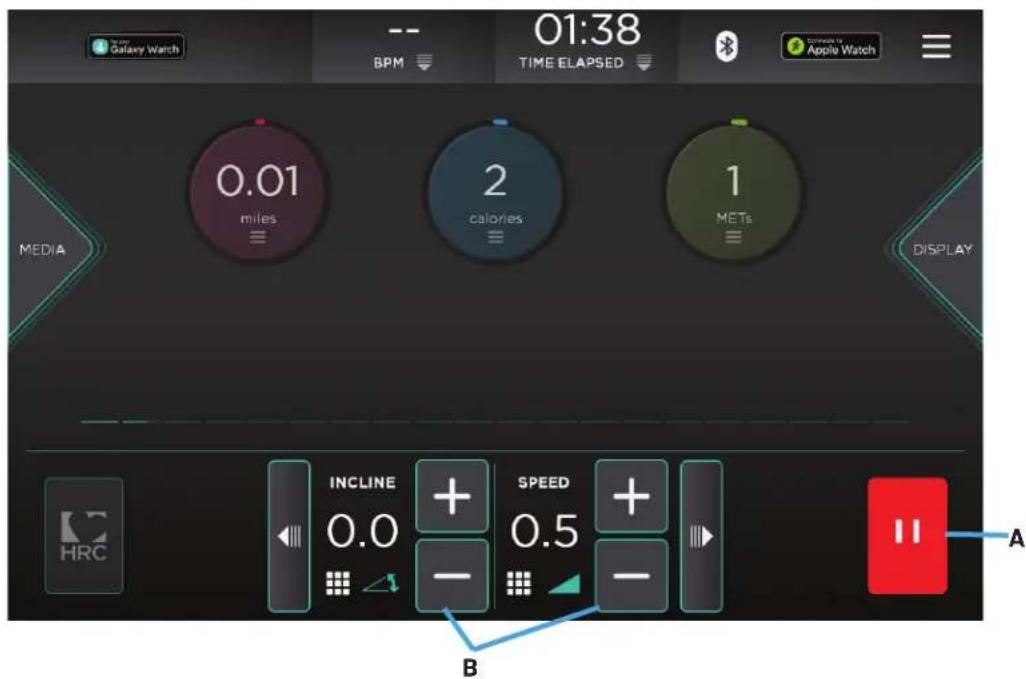
A. Stop
Stops or pauses the current workout.
B. Quick Touch Speed/Incline Keys
These keys allow the user to quickly adjust the incline levels in increments of 0.5% and speed in increments of 0.5 mph. To manually enter a speed or incline increment, press the corresponding numerical readout and a numeric keypad will appear to enter your selection.
NOTE: For non-treadmill base units, the incline data field will display WORKLOAD measured in levels of resistance from 1-30 and the SPEED data field will display PACE measured in revolutions-per-minute (rpm). For the UC400, UC900, RC400, and RC900 models engaged in a Pace workout, the Pacesetter option will display next to the PACE data field providing a target pace for the user based on the type of Pace workout selected.
OPTIONS MENU
The Options menu contains controls that allow users to adjust settings during their workout.
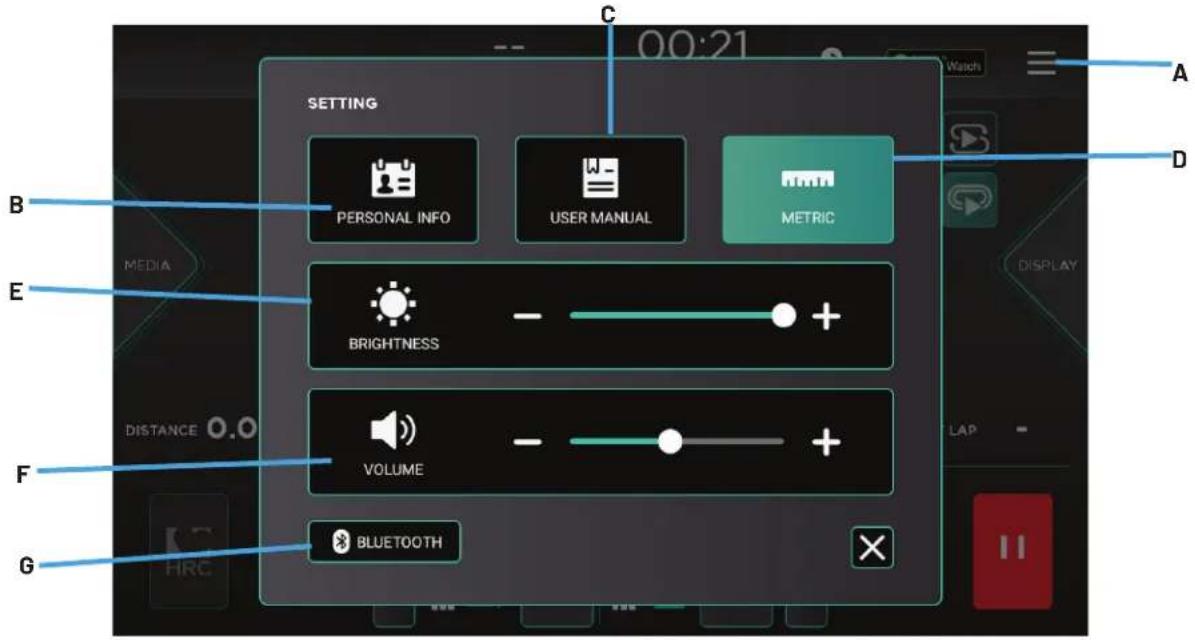
A. Options Menu
The Options menu enables users to customize their workout experience such as updating their personal info, and pairing Bluetooth wireless technology enabled devices with the console.
B. Personal Info
Enables the user to update their personal.
NOTE: If the user is logged into their User Profile on a UNITE touchscreen console, then the user weight autofi IIs based on the weight data entered by the user in their User Profi le.
C. User Manual
Enables the user to access the online version of the UNITE touchscreen console manual.
D. Units
Enables the user to switch between metric and imperial (US) units of measurement displayed on the screen.
E. Brightness
Enables the user to adjust the brightness on the console.
F. Volume
Enables the user to adjust the console volume.
G. Bluetooth Connectivity
Allows the user to pair Bluetooth wireless technology enabled devices with the Envision touchscreen console such as audio devices, heart rate monitors, and headphone devices.
BLUETOOTH CONNECTIVITY
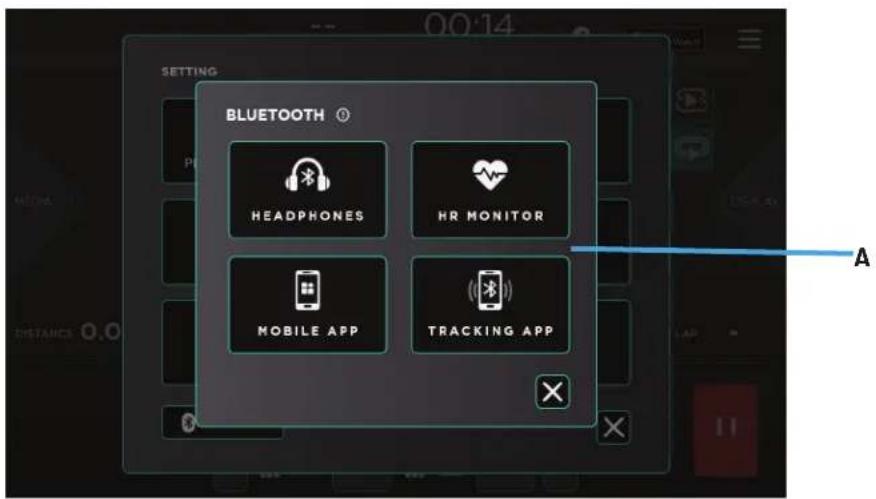
The Bluetooth connectivity screen (A) displays the Bluetooth wireless technology enabled devices available for pairing with the UNITE 10" and 16" consoles. Follow the on-screen prompts on the console and the Bluetooth device to complete the pairing process. Once the pairing process is complete, the audio screen will appear where the user can navigate playable audio menus, mute and adjust volume, pause, advance, or replay tracks, and unpair the UNITE 10" or 16" console and Bluetooth device.
NOTE: The Bluetooth connectivity screen can also be accessed from the console home screen to pair your Bluetooth wireless technology enabled devices with the console before starting a workout.
APPLE WATCH CONNECTIVITY
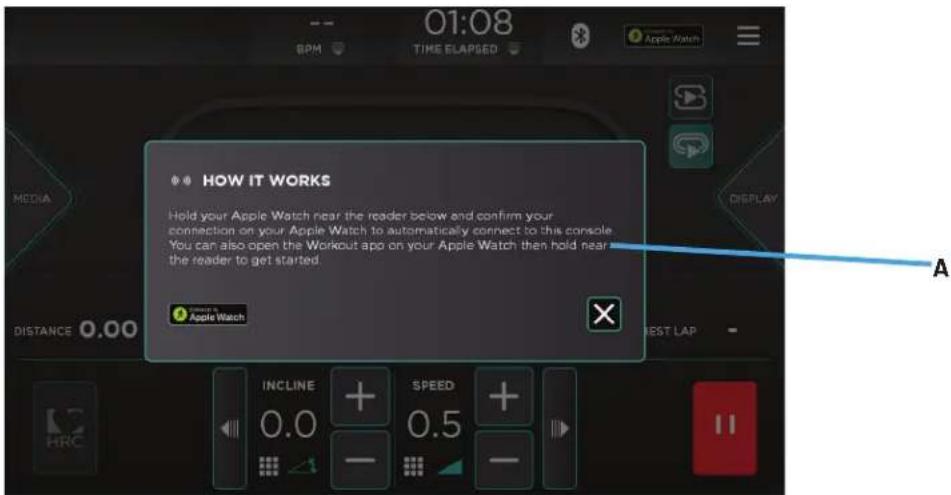
The Apple Watch connectivity screen (A) displays instructions for connecting an Apple Watch device to the console during a workout. Follow the on-screen prompts on the console and the Apple Watch device to complete the pairing process.
NOTE: The Apple Watch connectivity screen can also be accessed from the console home screen to pair your Apple Watch device with the console before starting a workout.
GALAXY WATCH CONNECTIVITY
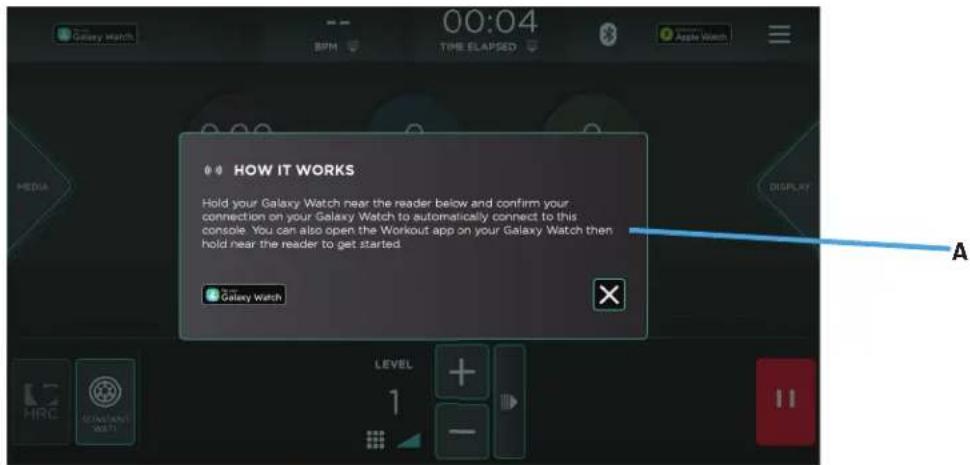
The Galaxy Watch connectivity screen (A) displays instructions for connecting an Galaxy Watch device to the console during a workout. Follow the on-screen prompts on the console and the Apple Watch device to complete the pairing process.
NOTE: The Galaxy Watch connectivity screen can also be accessed from the console home screen to pair your Galaxy Watch device with the console before starting a workout.
TRACK VIEW
The Track view displays a virtual track with a progress dot representing the user walking and/or running around the track.
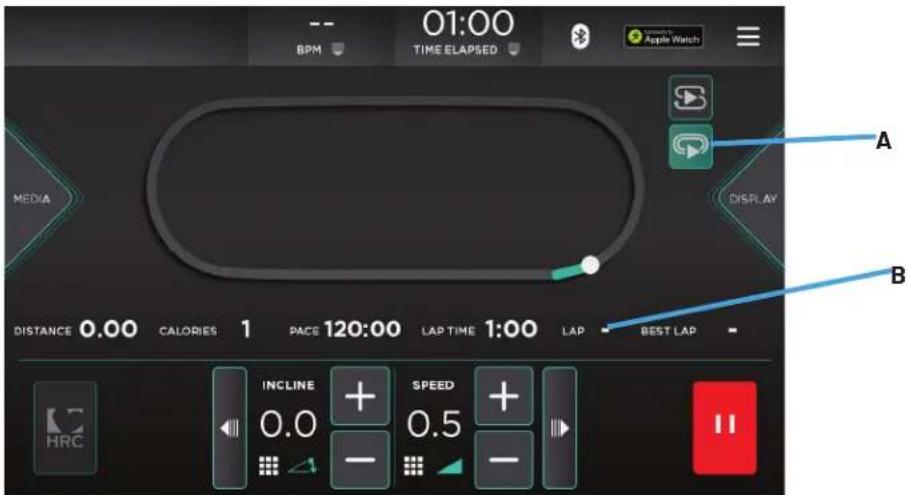
A. Walk/Run Track
Displays a virtual track with a progress dot representing the user walking and/or running around the track.
B. Lap Count
Displays a counter for the number of laps the user has completed around the virtual track.
GRAPH VIEW
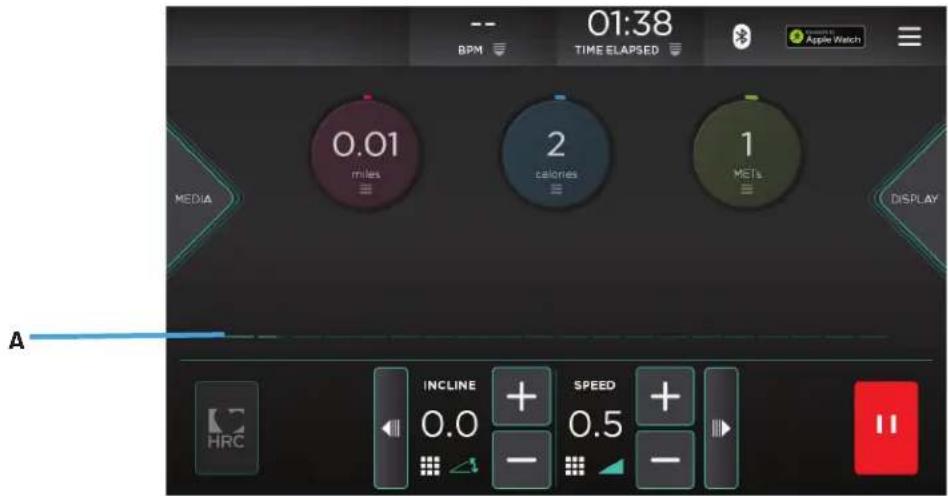
The Graph View screen (A) provides a real-time graphical display of the user's current workout incline or speed data based on the type of workout selected. A horizontal progress bar driven by preset time increments tracks the progress through the current graph bar. Select the Graph View icon in the Display menu to navigate to the screen shown below.
HIIT VIEW
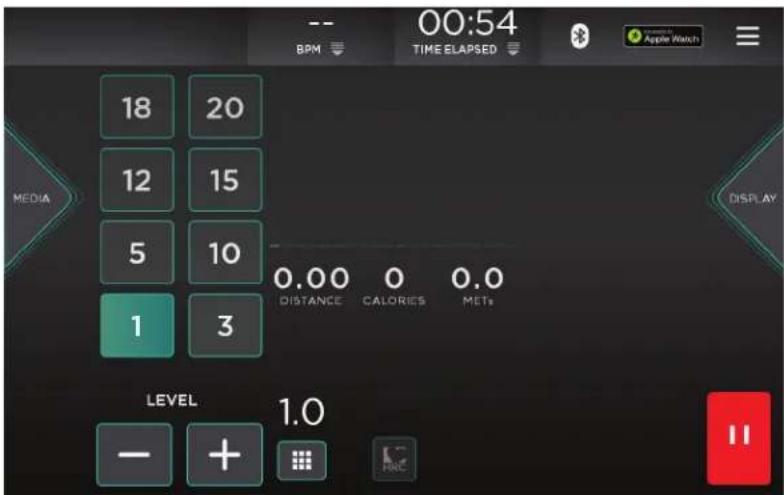
The HIIT view allows the user to customize their interval training by defining their workout and recovery periods before adjusting the incline, speed, level, or stride to maximize their woprkout.
TV CONTROLS
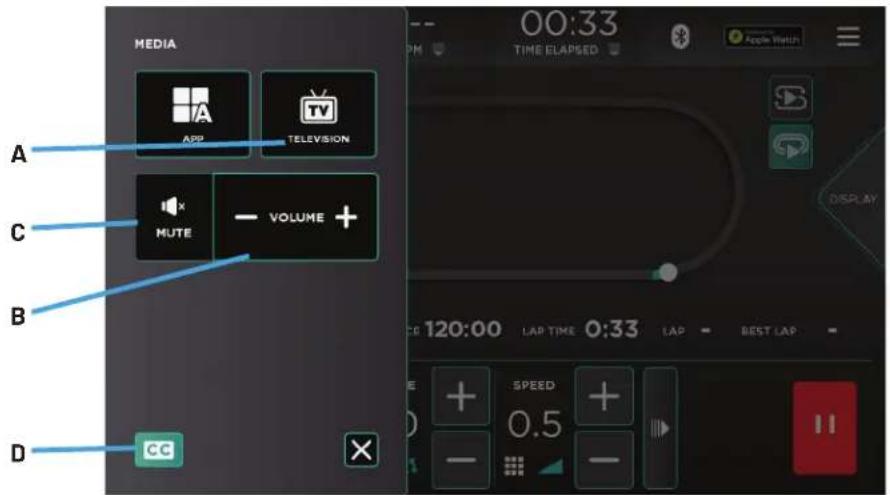
This console enables the user to watch live TV programming in crisp, clear high definition. The TV controls are built in to a workout view screen to allow the user to monitor their workout while enjoying their favorite shows. Select TELEVISION (A) in the Media menu to access TV programming. The user can control the audio volume of the TV program (B), mute the audio volume of the TV program (C), and toggle on or off closed captioning (D) in the Media menu.
TV CONTROLS
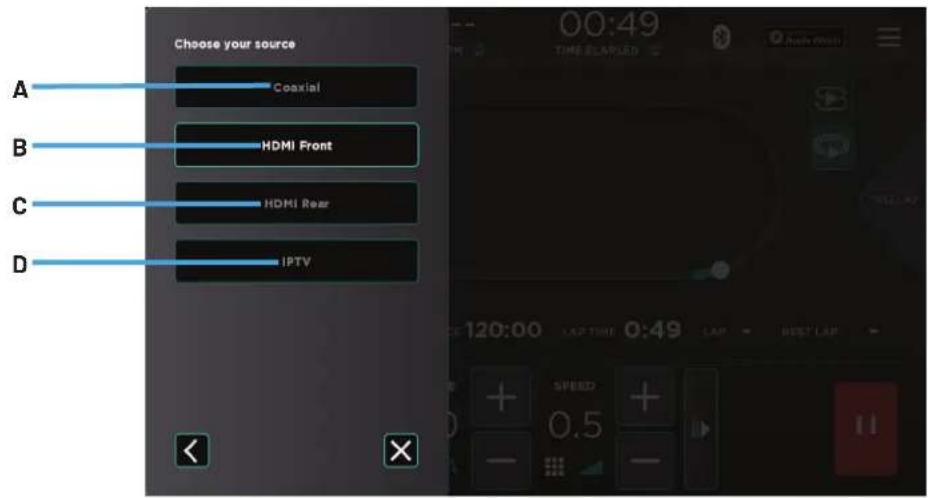
To begin watching TV, users must select Coaxial (A), HDMI Front (B), HDMI Rear (C), or IPTV (D) as their source.
TV CONTROLS
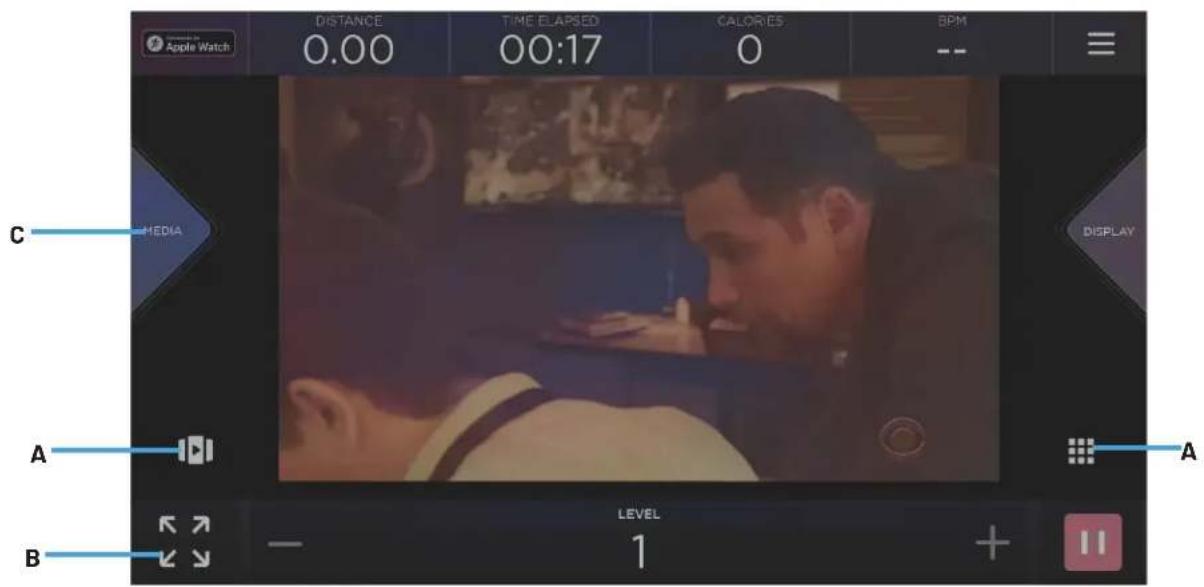
A. Channel List
Scroll through the list of available channels.
B. Screen Toggle
Allows the user to switch back and forth between full screen and regular mode.
C. Media Menu
Select this menu to navigate to the TV home screen.
APPS
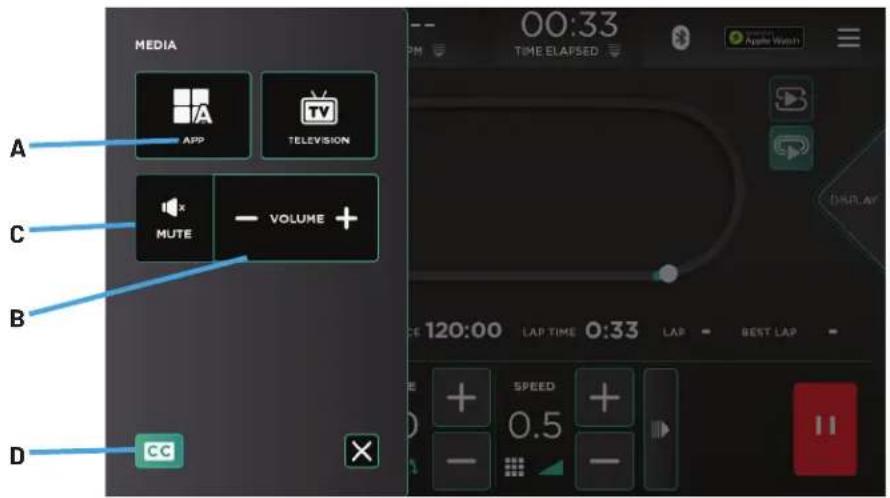
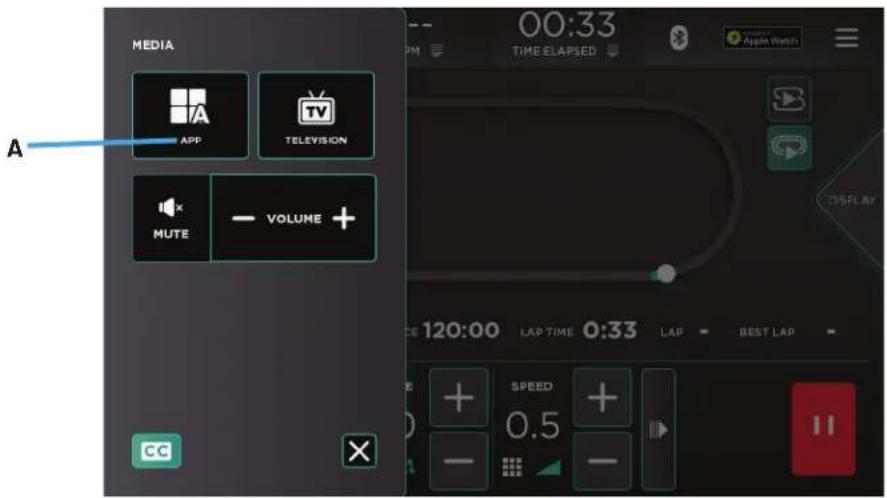
This console enables the user to access a web browser or watch their favorite online streaming apps in crisp, clear high definition. Select APP (A) in the Media menu to access the console's installed apps. The user can control the audio volume of the video (B), mute the audio volume of the video (C), and toggle on or off closed captioning (D) in the Media menu.
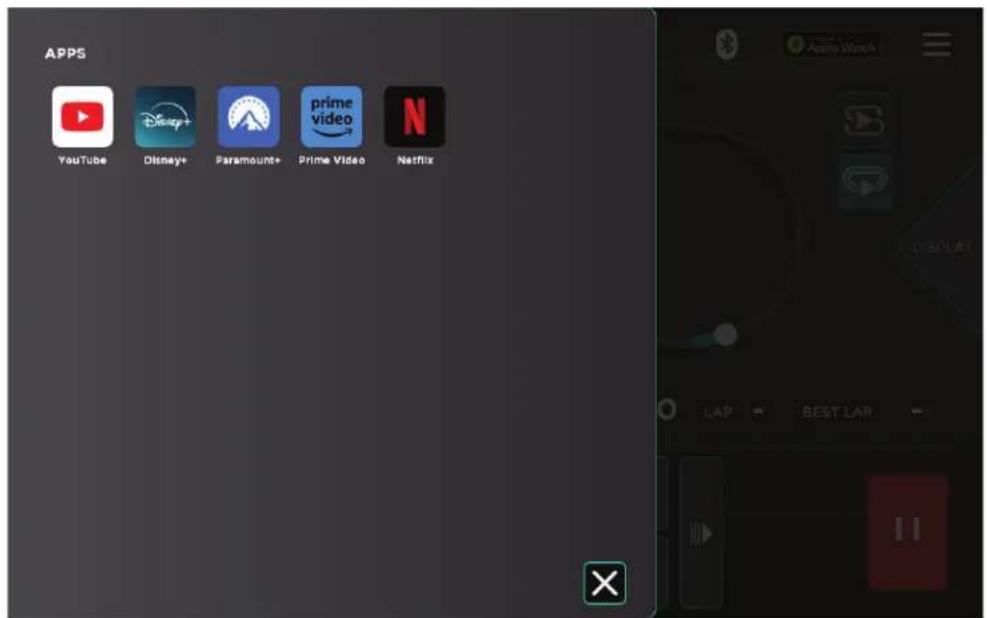
APPS
In the Apps menu, the user can select their desired app to proceed. The console will then start streaming video during the user's workout.
WEB BROWSER
In the Apps menu (A), the user can select the Chrome app to access the internet if it's installed. After following the on-screen prompts, select Continue to finish the web browser setup.
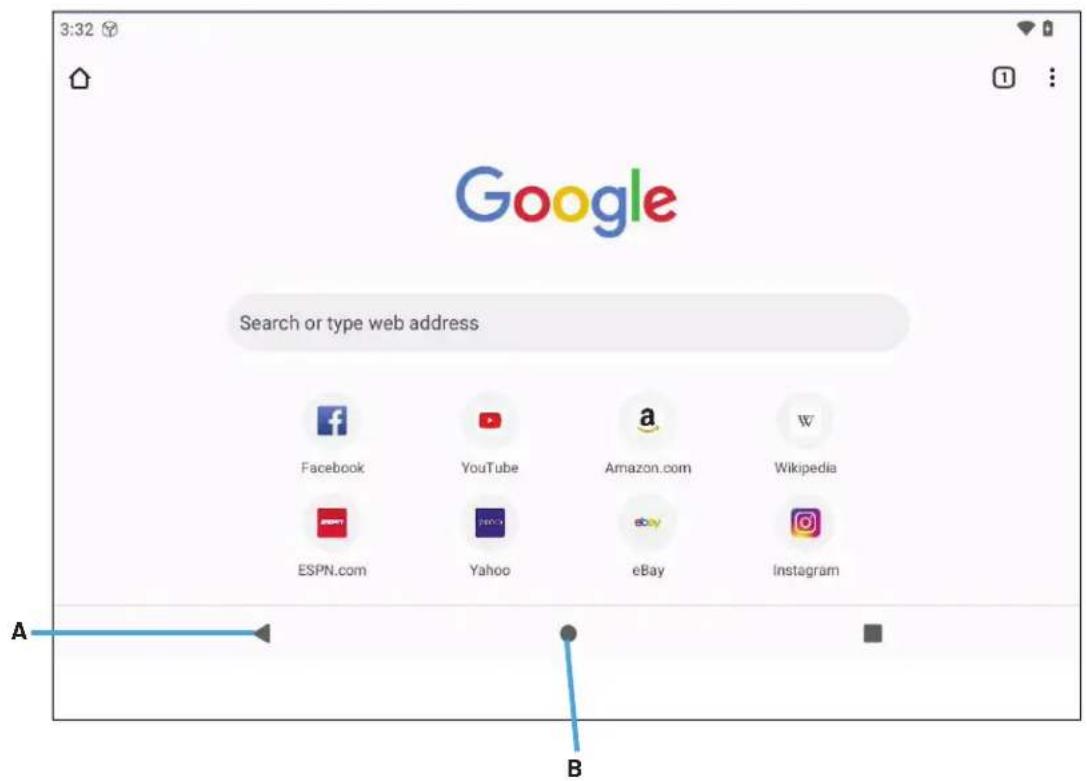
WEB BROWSER
In the Chrome web browser, the user can navigate to their desired websites. The user can select the Back button (A) to return to the Apps menu or the Home button (B) to access the home screen.
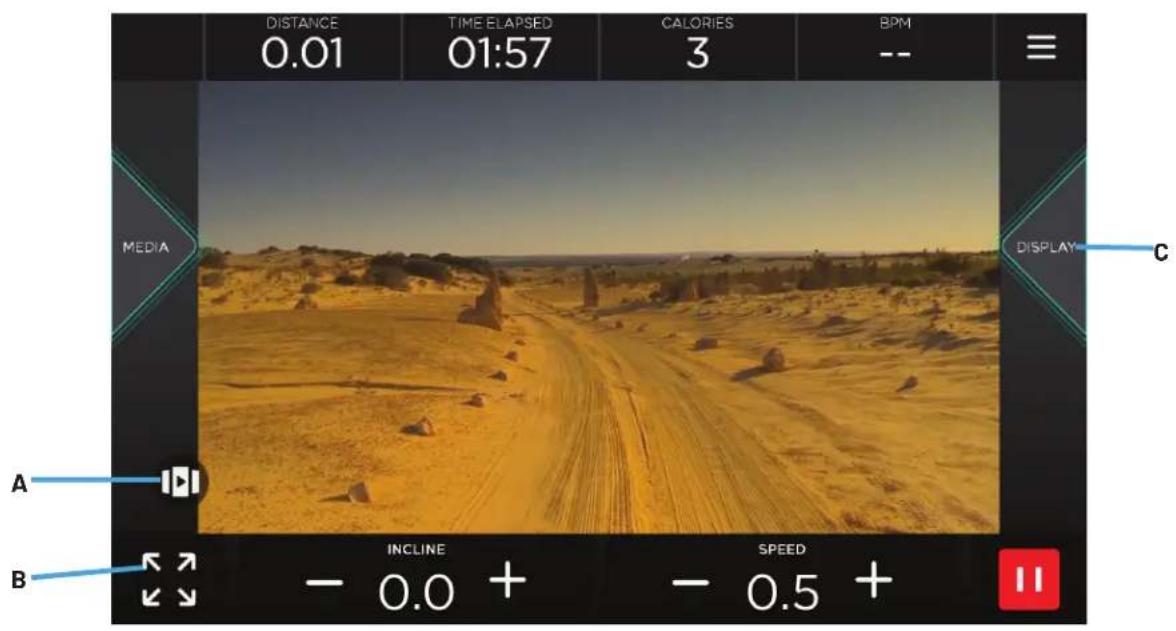
VIRTUAL VIEWS
Virtual Views provides users with a scenic, first-person video to enhance their workout. Select the playlist icon to scroll through the list of available videos (A) and make your selection. To display the video in full screen mode, select the full screen icon (B). Current incline and speed workout selections will appear in full screen mode. Select the Display menu (C) to navigate to the Virtual Views screen.
IDLE SCREEN
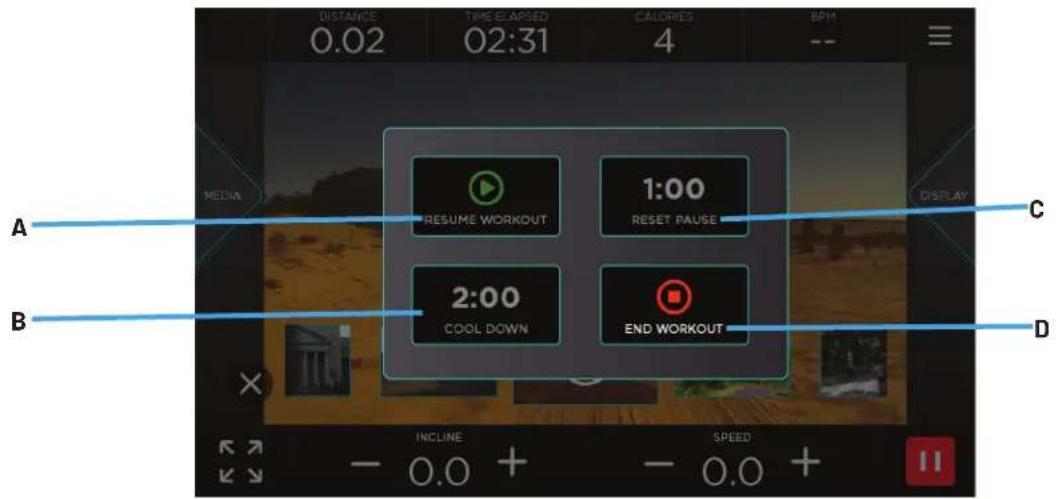
During a workout when the user becomes idle or presses Stop on the bottom toolbar, the Idle screen shown below will appear prompting the user to resume their workout (A), start a two minute, low intensity cooldown (B) with the workout ending after that time, reset the Idle Screen Timer (C) to 30 seconds while the user makes their selection, or end the current workout (D) and proceed to the Workout Summary screen.
NOTE: During the cooldown sequence, the unit is in manual mode where the user directly controls all settings such as speed, incline, and resistance.
NOTE: The Idle Screen will disable the Resume Workout, Cool Down, and Reset Pause until the belt and incline motors cease movement.
WORKOUT SUMMARY
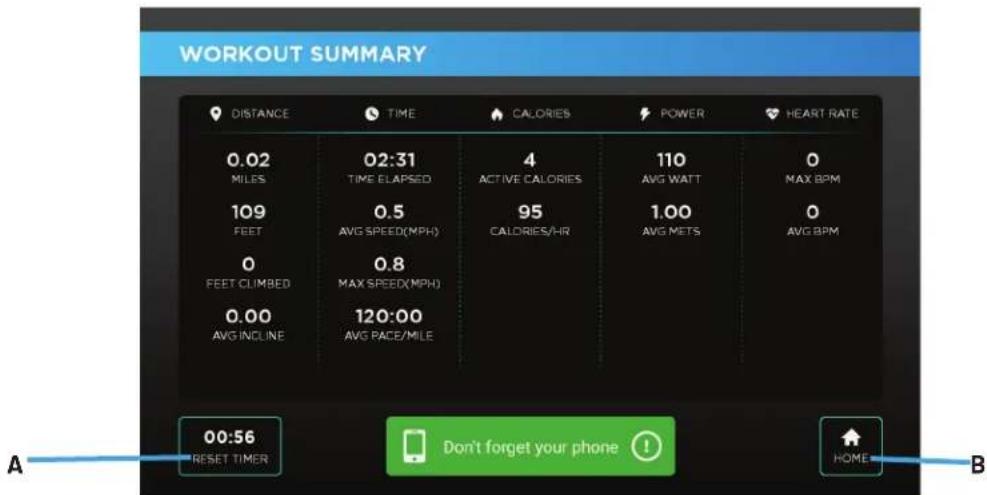
At the end of a workout the Workout Summary screen will display an overview of the workout data. If the user requires more time to view the workout summary, they can press RESET TIMER (A) to reset the timer back to one minute. Press HOME (B) to return to the home screen before the reset timer reaches zero seconds.
NOTE: For fitness test workouts, the Workout Summary screen will display additional data such as a fitness test score.
BASE MODEL AND EQUIPMENT TYPE INFORMATION
| BASE MODEL EQUIPMENT TYPE | |
| APEX CROSSTRAINER ADJUSTABLE | CROSS TRAINER |
| APEX ELLIPTICAL ELLIPTICAL | |
| APEX RECUMBENT BIKE BIKE | |
| APEX RECUMBENT ELLIPTICAL ELLIPTICAL | OPTICAL |
| APEX TREADMILL TREADMILL | |
| APEX UPRIGHT BIKE BIKE | |
| GRAVITY CROSSTRAINER CROSS TRAINER | |
| GRAVITY ELLIPTICAL ELLIPTICAL | |
| GRAVITY RECUMBENT BIKE BIKE | |
| GRAVITY RECUMBENT ELLIPTICAL ELLIPTICAL | ILLIPTICAL |
| GRAVITY TREADMILL TREADMILL | |
| GRAVITY TREADMILL PLUS TREADMILL | LL |
| GRAVITY UPRIGHT BIKE | BIKE |
| LAUNCH ELLIPTICAL ELLIPTICAL | |
| LAUNCH RECUMBENT BIKE BIKE | |
| LAUNCH TREADMILL DC TREADMILL | |
| LAUNCH UPRIGHT BIKE | BIKE |
| VAPOR ALPINE RUNNER | TREADMILL |
| VAPOR LATERAL X | ADJUSTABLE CROSS TRAINER |
| VAPOR PALISADE | CLIMBER |
| VAPOR SPECTRUM | ADJUSTABLE ELLIPTICAL |
| VAPOR STRYKER | TREADMILL |
| VAPOR XT-ONE | ADJUSTABLE CROSS TRAINER |
| CONFIGURATION AND DIAGNOSTIC OPTIONS PER EQUIPMENT TYPE* | ||||||||
| EQUIPMENT TYPE | CALIBRATION | MAX SPEED/MAX GRADE | SPEED/INCLINE | RPM/SPM | WATTS | BATTERY | STATIC BRAKE | MOTOR |
| ADJUSTABLE CROSS TRAINER — | — | — | ● | ● | ● | — | ● | |
| ADJUSTABLE ELLIPTICAL | ● | — | — | ● | ● | ● | — | ● |
| BIKE / CROSS TRAINER / ELLIPTICAL | — | — | — | ● | ● | ● | — | — |
| CLIMBER | — | — | — | — | ● | — | ● | ● |
| TREADMILL | ● | ● | ● | — | ● | — | ● | ● |
*Configuration and Diagnostic options are only available by accessing the console Manager and Technician modes. See the UNITE Touchscreen Setup Guide for more information.
TOUCHSCREEN ICON DESCRIPTIONS
| ICON* DESCRIPTION | |
 | Start |
 | Pause/Stop |
 | Back |
 | Enter |
 | Up |
 | Down |
 | Home |
 | Options |
 | Back |
 | Full Screen |
 | Screen Toggle |
| ICON* DESCRIPTION | |
 | Playlist |
 | Bluetooth |
 | Apple Watch Connectivity |
 atch atch | Galaxy Watch Connectivity |
 | Screen Lock |
 | Language Options |
| Digital Keypad |  |
| Expand |  |
*Icons vary by model.
WORKOUT PROGRAMS BY MODEL
| WORKOUT PROGRAMS | APEX, GRAVITY, LAUNCH, AND VAPOR TREADMILL | APEX, GRAVITY, AND LAUNCH BIKE | APEX, GRAVITY, AND LAUNCH ELLIPTICAL | VAPOR ADJUSTABLE STRIDE ELLIPTICAL | VAPOR CLIMBER | VAPOR LATERALX | APEX AND GRAVITY RECUMBENT ELLIPTICAL / GRAVITY CROSS TRAINER | APEX CROSS TRAINER | VAPOR XT-ONE |
| 30:30 - - - - | ● | ● | |||||||
| AIR FORCE | ● | - | - | - | - | - | - | ||
| ARMY | ● | - | - | - | - | - | - | ||
| CALORIE GOAL | ● | ● | ● | ● | ● | ● | ● | ||
| CARDIO 360 - - | ● | ● | - | - | - | - | - | ||
| CARDIO CHALLENGE | ● | ● | ● | ● | ● | ● | ● | ||
| DISTANCE GOAL | ● | ● | ● | ● | ● | ● | ● | ||
| DISTANCE WORKOUTS | ● | ● | ● | ▲ | ● | ● | |||
| DRAW YOUR OWN WORKOUT | ● | ● | ● | ● | ● | ● | ● | ||
| FAT BURN | - - - - | ● | - | - | - | ||||
| FIREFIGHTER | - - - - | ● | - | - | - | ||||
| FLOORS | - - - - | ● | - | - | - | ||||
| GERKIN | ● | - | - | - | - | - | - | ||
| HILL INTERVALS | ● | ● | ● | ▲ | ● | ● | |||
| HIIT BOOST*† | - | - | - | - | ▲ | ● | |||
| HRC CRUISE CONTROL* | ● | ● | ● | ● | ● | ● | ● | ||
| LEG SHAPER | ● | ● | ● | ▲ | ● | ● | |||
| MANUAL | ● | ● | ● | ● | ● | ● | ● | ||
| MARINES | ● | - | - | - | - | - | - | ||
| MMA | - - - - | ● | ● | ||||||
| MONUMENT WORKOUT** | ● | - | - | - | ● | - | - | - | |
| NAVY | ● | - | - | - | - | - | - | ||
| PACER WORKOUT | ● | ● | ● | ● | ● | ● | ● | ||
| PEB | ● | - | - | - | - | - | - | ||
| QUICK START | ● | ● | ● | ● | ● | ● | ● | ||
| ROLLING HILLS | ● | ● | ● | ● | ● | ● | ● | ||
| SINGLE HILL | ● | ● | ● | ▲ | ● | ● | |||
| SPEED INTERVALS | ● | - | - | - | ● | - | - | - | |
| TARGET HRC*** | ● | ● | ● | ● | ● | ● | ● | ||
| TIME GOAL | ● | ● | ● | ● | ● | ● | ● | ||
| VIRTUAL VIEWS | ● | ● | ● | ● | ● | ● | ● | ||
| WATTS MODE* – | ● | – | – | – | – | – | |||
| WEIGHT LOSS HILL | ● | – | – | – | – | – | – |
*Modes within a workout.
HIIT boosters vary by model.
**Monument Workout is only applicable for the Vapor Alpine Runner and Vapor Stryker.
*** The TRUE Heart Rate Control (HRC) workouts are unique because users must enter the key parameters of the workout; target heart rate, maximum speed, maximum incline, maximum resistance, and time, prior to beginning the HRC workout. As users approach their target heart rate, the console automatically takes over and changes the workload automatically to keep users near their target heart rate. This allows for a completely "hands free" workout.
NOTE: A Bluetooth or Polar® compatible heart rate monitoring chest strap should be worn during HRC workouts. For increased safety and accuracy, contact heart rate monitoring is not recommended for HRC workouts.
| HIIT BOOST VAPOR LATERALX | APEX AND GRAVITY RECUMBENT ELLIPTICAL | GRAVITY CROSS TRAINER | APEX CROSS TRAINER VAPOR XT-ONE |
| ARM BLASTER — — | ● | ● | |
| CHEST PRESS — | — | — | |
| GLUTE KICKER — — | ● | — | |
| GLUTE POWER — | — | — | |
| LEG PRESS — | — | — | |
| QUAD POWER | ● | — | — |
| SMART STRIDE — — | ● | ||
| THIGH TONER | ● | — | — |
| X MODE* | ● | ● | ● |
*X MODE challenges vary by model.
| X MODE VAPOR LATERALX | APEX AND GRAVITY RECUMBENT ELLIPTICAL | GRAVITY CROSS TRAINER | APEX CROSS TRAINER VAPOR XT-ONE | |
| FAST | ● | ● | ● | ● |
| REVERSE | ● | ● | ● | ● |
| LEGS ONLY | ● | ● | ● | ● |
| PUSH ARMS | ● | ● | ● | ● |
| PULL ARMS | ● | ● | ● | ● |
| SOUAT | ● | — | — | — |
| LEAN BACK — — — | ● | |||
| SLOW | — | — | ● | ● |
| NARROW GRIP | — | ● | — | — |
| WIDE GRIP | — | ● | — | — |
| SHIFT BODY | ● | — | — | — |
| CENTER BODY | ● | — | — | — |
WORKOUT PROGRAM DESCRIPTIONS
| WORKOUT PROGRAMS | WORKOUT PROGRAM DESCRIPTION |
| 30:30 | This challenging program provides a simple test of fitness level of 5 sets of 30-second sprint and recovery intervals. For each set, the program monitors heart rate and calculates the average minimum and average maximum heart rates and the average number of beats the heart rate recovers between sprint intervals. Heart rate recovery is a relative indicator of fitness level; a higher number indicates a more rapid heart rate recovery and therefore represents a relatively better level of fitness. |
| AIR FORCE A 1.5 mile running | Testing measured against age and gender calculations. |
| ARMY A 2-mile running | Testing measured against age and gender calculations. |
| CALORIE GOAL This work out allows you to choose the settings that will achieve your calorie goal. | |
| CARDIO 360 Cardio 360 | Coaches you through a dynamic total-body workout. |
| CARDIO CHALLENGE | Resistance increases to a maximum at the mid-point of the workout, then decrease to the finish. Setting changes affect the current segment only. |
| DISTANCE GOAL Set up | your own workout to a distance goal. |
| DISTANCE WORKOUTS | Choose a set distance of 5K, 10K, or Half Marathon. |
| DRAW YOUR OWN WORKOUT | Use this custom tool to design your own incline or workload segments or select a preset profile to customize. |
| FAT BURN | A changing step rate profile focuses on intense glute muscle use. The fat burn program guides your workout to maximize the percentage of calories burned from fat versus carbohydrates. |
| FIREFIGHTER | Get to the top! Simulate a high rise climb at 60 steps per minute, while wearing an additional 25 pounds of weight. You have a 20 second warm-up at 50 steps per minute followed by a 3 minute fitness test. |
| FLOORS | Choose the number of floors you want to climb: 25, 50, or 100 floors |
| GERKIN | A fitness test used to estimate your VO2 max. The test increases speed and incline gradually every minute and ends at the point where your heart rate reaches 85% of the maximum for your age. |
| HILL INTERVALS Hill intervals are in 2-minute segments with increased workload to simulate hills. | |
| HIIT BOOST*1 | You must be in a workout to activate a HIIT booster. HIIT boosters allow you to customize your interval training to maximize your workout. HIIT boosters are product dependent. |
| HRC CRUISE CONTROL* | You must be in a workout to activate HRC Cruise Control. While in any program, cruise control enables you to set the current heart rate as the target heart rate by pressing a single button. The cruise control program takes control of the settings to maintain your target heart rate. If Beets Per Minute (BPM) exceeds the target heart rate by more than 12 BPM, then the workout will end and cool down will begin. |
| LEG SHAPER A workout | with setting changes to work the leg muscles with added intensity. |
| MANUAL | Set up your own workout to a time or distance limit. |
| MARINES | A 3-mile running test measured against age and gender calculations. |
| MMA | Mixed Martial Arts (MMA)—Take on your toughest opponent yet! Battle it out in 5-minute rounds that include five alternating 'fight' and 'recover' intervals of various lengths. The harder you punch with your arms, the harder the machine 'fights back' with increased resistance. This great workout gets your heart and your fists pumping. |
| MONUMENT WORKOUT | Intensify your workout by traveling the world and climbing some famous monuments. You will be able to track your progress as you climb to the top of the St. Louis Arch, Eiffel Tower, Mt. Everest, Mt. Rainier, or Mt. Kilimanjaro. Your output from the machine will display your percentage of completion of stairs to the top of the monument, or percentage of completion of elevation to the top of the mountain, whichever is applicable. |
| NAVY | A 1.5 mile running test measured against age and gender calculations. |
| PACER WORKOUT | This is a workout where the user sets a distance and a desired time to complete that distance. An average pace to achieve that time and distance is computed and an additional pacer dot is displayed on the track/course view based on the desired pace. |
| PEB A 1.5 mile running test measured against age and gender calculations. | |
| QUICK START A workout in which you control all settings. The workout continues until you end it. | |
| ROLLING HILLS | A series of increasing and decreasing workload changes that simulate rolling hills. Adjust your settings at any time during the workout to increase or decrease intensity of the hills. |
| SINGLE HILL | Workload increases to a maximum at the midpoint of the workout, then decreases to the finish to simulate one big hill. |
| SPEED INTERVALS | Zero-incline walking or running intervals are in 1-minute segments. Incline changes are permanent; speed changes affect the current 1-minute segment only. |
| TARGET HRC*** | Choose your target heart rate. The workout begins in manual control, gradually increase workload until heart rate is within 10 BPM at your target. At this point, the machine takes control of workload to maintain your heart rate within a few beats of the target. |
| TIME GOAL Set up your own workout to a time goal. | |
| VIRTUAL VIEWS Shows a virtual video on the workout display. | |
| WATTS MODE* | You must be in a workout to activate torque control. Power output is measured in watts, representing the amount of power required by the machine to maintain the workload (resistance and speed) that you want to experience. The higher the watts, the more difficult the workout. |
| WEIGHT LOSS HILL | 2-minute walking interval segments with incline alternating between hills and a nearly flat landscape. Speed changes are permanent; incline change affects the current 2-minute segment only. |
*Modes within a workout.
^ HIIT boosters vary by model.
**Monument Workout is only applicable for the Vapor Alpine Runner and Vapor Stryker.
*** The TRUE Heart Rate Control (HRC) workouts are unique because users must enter the key parameters of the workout; target heart rate, maximum speed, maximum incline, maximum resistance, and time, prior to beginning the HRC workout. As users approach their target heart rate, the console automatically takes over and changes the workload automatically to keep users near their target heart rate. This allows for a completely "hands free" workout.
NOTE: A Bluetooth or Polar® compatible heart rate monitoring chest strap should be worn during HRC workouts. For increased safety and accuracy, contact heart rate monitoring is not recommended for HRC workouts.
WORKOUT PROGRAM DESCRIPTIONS
| HIIT BOOST DESCRIPTION | |
| ARM BLASTER | Arm blaster integrates cardio sessions with strength sessions. The cardio session follows the program profile that you have selected. Every other minute, resistance increases 10 levels from your then-current level (or to the maximum resistance of 30) for a muscle-building, 10-repetition set as you transfer the workload from your lower body to your upper body. During the arm blaster rep countdown, the level of resistance can be changed by pressing the level (▲/▼) buttons. |
| CHEST PRESS | A unique workout booster designed to build endurance, strength and muscle tone in your upper body. Chest press integrates cardio sessions with strength sessions focused on the chest, arms, and back. The cardio session follows the selected program profile. For each chest press interval, the resistance level increases 10 levels (or to the maximum resistance of 30) for a muscle-building, 10-repetition set as you place your feet on the stationary foot pegs and transfer the workload from lower body to upper body. During the chest press set, the level of resistance can be changed by pressing the level (▲/▼) buttons. |
| GLUTE KICKER | Glute kicker is focused on your glutes, hips, and thighs. It uses four modes: Reverse, Squat, Fast, and Lean Back. Glute kickersessions last for one minute, with a one-minute recovery period. During the glute kicker session, the level of resistance can be changed by pressing the level (▲/▼) buttons. |
| GLUTE POWER | Challenge your glutes with this workout booster that pushes back. The faster you go, the greater the resistance (level) and the steeper the incline. Slow down again and the resistance decreases and the incline lessens. Race up and down those 'hills' and feel the burn. |
| LEG PRESS | An aggressive routine to help you build strength and power in your leg muscles. Leg press integrates cardio sessions with strength sessions focused on the legs. The cardio session follows the selected program profile. For each leg press interval, resistance increases 10 levels (or to the maximum resistance of 30) for a muscle-building, 15-repetition set as you place your hands on the stationary handlebars and transfer the workload to the lower body. During the leg press set, the level of resistance can be changed by pressing the level (▲/▼) buttons. |
| QUAD POWER | Challenge your quads and glutes with this workout booster that pushes back. The faster you go, the greater the resistance (level) and the wider the lateral motion (lateral width). Slow down again and the resistance decreases and the lateral width narrows. You are in control as the laterals responds to really work those legs. |
| SMART STRIDE | Smart stride automatically replicates natural movement by analyzing and measuring your pace and direction and intuitively adjusting stride length in 1-inch (2-centimeter) increments from 20 inches (51 cm) to 28 inches (671 cm). Press and the machine will analyze your speed and make the appropriate adjustments as your pace or direction changes. |
| THIGH TONER | Thigh toner uses varying lateral widths to firm and tone your thighs. Press during any program, then increase your speed. The faster you go, the greater the wider the lateral motion. Slow down again and the lateral width narrows. |
| X MODE* | The x mode feature works in any program; simply push the button to activate. When x mode is active, one to four x mode LED combinations will instruct you what to do. The sequence is randomly generated so you never know what is coming next. To activate x mode, simply push the x mode button while in any program. To turn x mode off, push the button again. In its original (out-of-the-box) configuration, each x mode session lasts for one minute. The countdown timer displays how much time until your next x mode interval or how much time is left in your x mode interval. Once you complete the instruction, you have a one-minute period where you do your normal routine (according to the program you are using). After this one-minute period, you will automatically get your next x mode routine. |
*X MODE challenges vary by model.
| X MODE VAPOR LATERALX | |
| FAST Pick up the pace-we | recommend 50-60 Revolutions Per Minute (RPM), but you should find your own comfort level. |
| REVERSE Pedal backwards | to change the muscle focus on your entire lower body. |
| LEGS ONLY Either hold the | stationary handlebars or naturally swing your arms. |
| PUSH ARMS Focus on pushing with your arms to work your chest and triceps. | |
| PULL ARMS Focus on pulling with your arms to work your biceps and lats. | |
| SQUAT Bend slightly at the | knees as you pedal. You'll feel this one in your quadriceps and glutes in no time. |
| LEAN BACK | Grab the stationary handlebars and lean slightly backwards. This changes the muscle focus to your lower body. You will feel this in your quadriceps. |
| SLOW Slow down to 30-40 | RPM to allow yourself to recover. |
| NARROW GRIP | Grasp the multigrip handlebars on the low inside edge to give your triceps and chest muscles a workout. |
| WIDE GRIP | Grasp the multigrip handlebars high on the outside and feel it in your shoulders, chest, and back. |
| SHIFT BODY Shift your whole body side to side with the lateral motion. | |
| CENTER BODY Keep your core centered and steady as your lower body shifts with the lateral motion. | |
| WORKOUT SETTINGS-VALUES-RANGES | |||
| Setting Standard Values* | Minimum Value Maximum Value | ||
| Workout Time | 30:00 | 1:00 | 99:00 |
| Level | 1 | 1 | 30 |
| Speed** | 3 | 0.5 mph (0.8 kph) | 12 mph (19.3 kph) |
| Incline** | 0% | 0% | 30% |
| Age | 40 | 15 | 99 |
| Weight** | 150 lbs (68 kg) | 70 lbs (32 kg) | 400 lbs (181 kg) or 500 lbs (226.7 kg) |
| Calories | 150 | 1 | 1000 |
| Interval Time | 00:30 | 00:15 | 99:45 |
| Interval Level | 1 | 1 | 30 |
| How Many Intervals | 3 | 2 | 6 |
| Target Heart Rate | (220 - Age)* %; varies by program | 80 | (220 - Age) |
| Watts (Work) | 125 | 20 | 900 |
| *Standard program values are used if no values are entered within 4 seconds of prompts. **Values vary by model. | |||
HEART RATE INFORMATION
HEART RATE MONITORING
TRUE cardio equipment can monitor a user's heart rate using a Polar* 5kHz compatible chest strap, a Bluetooth heart rate transmitter or the metal grips on the hand rails (called contact heart rate or CHR pads). Bluetooth transmitters and chest straps transmit the user's heart rate to the machine via radio, and the CHR pads connect to a special computer circuit to extract the user's heart rate.
Chest Strap and Bluetooth Heart Rate Monitoring
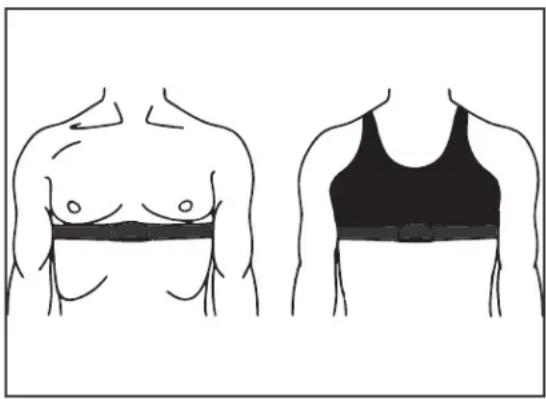
Although TRUE cardio equipment functions fi ne without using the heart rate monitoring feature, this kind of monitoring gives valuable feedback on the user's effort level. Using chest strap or Bluetooth monitoring also allows users to use Heart Rate Control, the most advanced exercise control system available. When users wear a Polar® compatible transmitter strap or a Bluetooth transmitter, the machine will display the user's heart rate as a digital beats-per-minute (bpm) readout. A chest strap should be worn directly against the user's skin, about 1-2 inches below the pectoral muscles/breast line. Women should be careful to place the transmitter below their bra line. *Bluetooth transmitters should be worn in accordance with the manufacturer's documentation. Initially the transmission signal for heart rate may be erratic or non-existent. Some moisture is necessary between the strap and the user's skin for proper transmission. Sweat from exercise works best, but ordinary tap water may be used prior to the workout if desired.
NOTE: The chest strap produces a radio signal that the console reads and registers as the user's heart rate. The accuracy of a reading may be affected when outside interference is present.
Contact Heart Rate (CHR)
The CHR system will let the user monitor their heart rate without wearing a chest strap. When using the CHR system users should gently grasp the CHR pads with both hands. Within 30 seconds, the user's heart rate should be displayed as a digital bpm readout (during the first 30 seconds the system is analyzing and locking in the user's heart rate). Users should exercise with smooth body motions and breathe regularly. It is best to avoid talking while using the CHR system, as talking will cause unrepresentative heart rate spikes of 5 to 10 bpm. To ensure an accurate reading, the user's hands should be clean, free of both dirt and hand lotions.
NOTE: For increased safety and accuracy the CHR system should only be used at speeds of 4 mph or lower (CHR readings are less accurate due to large muscle movements above this speed).
NOTE: CHR monitoring may be less accurate than chest strap monitoring since the heart rate signals are much stronger at the chest. When using a HRC workout, it is best to use a chest strap because of the stronger and more accurate readings. Do not use the contact heart rate grips as a handlebar during a workout.
⚠️CAUTION: Do not use the contact heart rate grips as a handlebar during a workout.
natural_image
Illustration of a person's torso and chest with a belt, shown from different angles (no text or symbols)TRUE FITNESS
HEART RATE CONTROL (HRC)
You are now the owner of the most sophisticated Heart Rate Control (HRC) cardio equipment available. TRUE HRC is unique and patented. It accommodates users from rehabilitation to world class athletes, and all those in between. TRUE HRC allows users to do a completely hands-free heart rate controlled workout using speed, incline or both. By training at a specific target heart rate, users can exercise at a more efficient cardiovascular level.
The TRUE HRC system is unique because users must enter the key parameters of the workout; target heart rate, maximum speed, maximum incline, and time, prior to beginning the HRC workout. As users approach their target heart rate, the console automatically takes over and changes the speed and/or incline automatically to keep users near their target heart rate. This allows for a completely "hands-free" workout.
NOTE: A Bluetooth or Polar® compatible heart rate monitoring chest strap should be worn during HRC workouts. For increased safety and accuracy, contact heart rate monitoring is not recommended for HRC workouts.
Target Heart Rate
TRUE's Heart Rate Control (HRC) workouts let the machine monitor relative exercise intensity by way of the user's heart rate, then automatically adjust the speed, incline, and resistance to keep the user at their target heart rate and thus their desired exercise intensity. Heart rate is a good measure of the body's exercise stress level. It reflects differences in physical condition, fatigue, the comfort of the workout environment, even diet and emotional state. Users should compare their heart rate with how they feel to ensure safety and comfort.
Consult a Physician to Determine Heart Rate
Using heart rate to control a workout takes the guesswork out of the workout settings. Consult a physician before using heart rate controlled workouts for advice on selecting a target heart rate range. Also, it is important to use the machine for several workouts in the manual mode while monitoring heart rate. Users should compare their heart rate with how they feel to ensure safety and comfort. After users have spent some time learning how their heart responds to different levels of speed, incline, and resistance, they will have a better understanding of how to select the maximum speed and maximum incline required for reaching their target heart rate.
Warm Up
At the beginning of an HRC workout, the machine is in full Manual Control mode. Users should gradually increase the workout intensity to slowly raise their heart rate to within 10 beats per minute (bpm) of their target heart rate. The machine will operate as if in manual mode during the warm up stage. Users control speed, incline, and resistance. The user may only increase speed, incline, and resistance to the present maximum values entered. It is important that the user starts at a low level of perceived exertion and gradually increase the workout intensity over several minutes until they approach their target heart rate. This allows the body to adapt to the workout. Increasing the workout intensity gradually will allow the user to enter the Heart Rate Control stage without overshooting their target, keeping their heart rate within a few bpm of their target.
NOTE: Warming up too fast may cause the user to overshoot their target. If this occurs it may take several minutes before the computer software can control their heart rate. Users may overshoot and undershoot for several minutes until control is achieved.
Heart Rate Control Stage
The machine takes control of speed, incline, and resistance, keeping the user's heart rate within a few bpm of their target. When using the Interval HRC Workout, the machine alternates between work and rest intervals.
Cooldown
At the end of the workout time or distance, the machine reduces the workout intensity by half and goes back into Manual Control mode, where users directly control their cooldown.
WIRELESS CHARGING
For mobile devices capable of wireless charging, the UNITE Touchscreen consoles can wirelessly charge those devices.
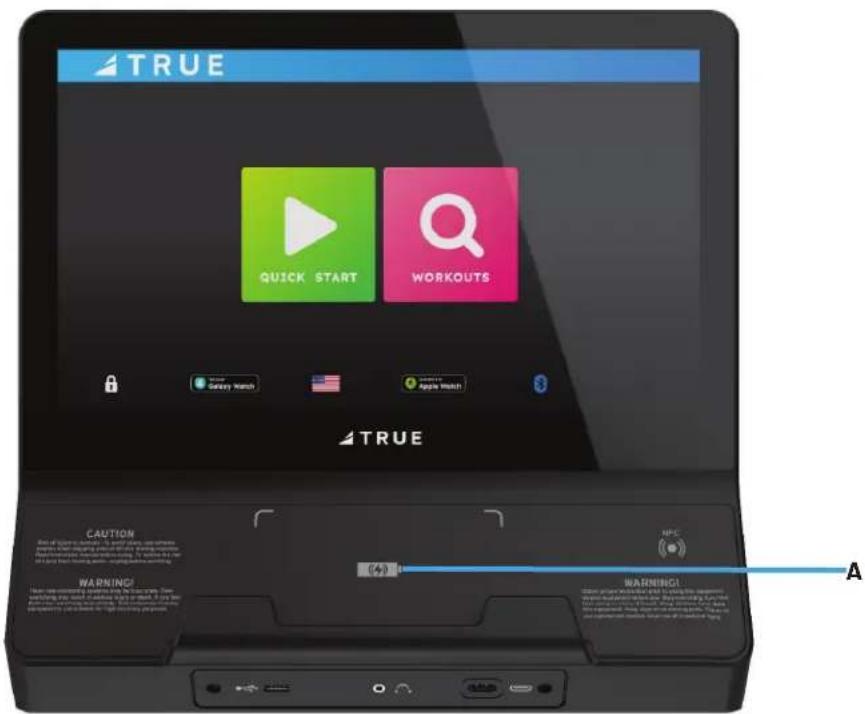
Simply place the mobile device within the wireless charging boundary box (A) on the reading rack and the console will automatically charge the mobile device.
Contact the mobile device manufacturer for details regarding wireless charging capability on a particular mobile device.
NOTE: Wirelessly charging a mobile device will not interrupt Bluetooth connectivity or Wi-Fi connectivity. For example, the console will wirelessly charge an iPhone© positioned within the wireless charging boundary box on the reading rack while maintaining the ability to connect to the iPhone via Bluetooth.
TRUE FITNESS
CONTACT US
service@truefi tness.com
800.883.8783
865 Hoff Road
St. Louis, MO 63366
TRUEFITNESS.COM

UNITE TOUCHSCREEN CONSOLE MANUAL PROGRAM GUIDE
© 2024 TRUE Fitness All Rights Reserved.
- ABOUT THE UNITE TOUCHSCREEN CONSOLES
- FEATURES
- ASSEMBLY AND SETUP
- HOW TO ATTACH THE CONSOLE TO THE CONSOLE MAST
- EXAMPLE: ATTACH THE CONSOLE TO THE CONSOLE MAST
- HOW TO CONFIGURE THE CONSOLE WITH THE BASE AND RUN CALIBRATION\*
- CONSOLE NAVIGATION
- HOME SCREEN
- Quick Start
- Workouts
- Screen Lock
- Galaxy Watch Connectivity
- Language Options
- Apple Watch Connectivity
- Bluetooth
- SELECTING A PRESET WORKOUT
- WORKOUT DATA ENTRY SCREENS
- MONUMENTS
- CARDIO360 WORKOUT SCREEN
- WORKOUT DATA SCREENS
- Distance\*
- Calories\*
- METs\*
- Heart Rate Information
- Bluetooth Connectivity
- Galaxy Watch Connectivity
- Options
- Media
- Display
- Stop
- Quick Touch Speed/Incline Keys
- OPTIONS MENU
- Options Menu
- Personal Info
- User Manual
- Units
- Brightness
- Volume
- Bluetooth Connectivity
- BLUETOOTH CONNECTIVITY
- APPLE WATCH CONNECTIVITY
- GALAXY WATCH CONNECTIVITY
- TRACK VIEW
- Walk/Run Track
- Lap Count
- GRAPH VIEW
- HIIT VIEW
- TV CONTROLS
- Channel List
- Screen Toggle
- Media Menu
- APPS
- WEB BROWSER
- VIRTUAL VIEWS
- IDLE SCREEN
- WORKOUT SUMMARY
- HIIT boosters vary by model.
- HEART RATE INFORMATION
- HEART RATE MONITORING
- Chest Strap and Bluetooth Heart Rate Monitoring
- Contact Heart Rate (CHR)
- TRUE FITNESS
- HEART RATE CONTROL (HRC)
- Target Heart Rate
- Consult a Physician to Determine Heart Rate
- Warm Up
- Heart Rate Control Stage
- Cooldown
- WIRELESS CHARGING
Brand : True
Model : UNITE Touchscreen Console
Category : Uncategorized