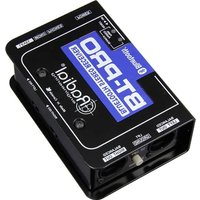
BT-Pro - Audio case Radial Engineering - Free user manual and instructions
Find the device manual for free BT-Pro Radial Engineering in PDF.


| Product Type | Bluetooth Direct Box (Stereo Receiver) |
| Dimensions (W x H x D) | 3.3" x 5" x 2" (84 x 127 x 51 mm) |
| Weight | 1.5 lbs (0.68 kg) |
| Power Supply | USB Mini-B (power only, 5V DC) |
| Bluetooth Compliance | Bluetooth 2.0 + EDR, Class 2, A2DP |
| Bluetooth Range | Up to 12 m (40 ft) line of sight |
| Audio Outputs | 2 x Balanced XLR-M (AES standard), 1 x 3.5mm TRS headphone |
| Frequency Response | 20 Hz – 20 kHz |
| Dynamic Range | 90 dB |
| Signal-to-Noise Ratio | 90 dB |
| Total Harmonic Distortion | < 0.01% |
| Maximum Output Level | +8 dBu (source dependent) |
| Output Impedance | 300 Ω |
| Level Control | Variable (affects XLR and headphone) |
| Mono Sum Switch | Sums L+R to mono, LED indicator |
| Ground Lift | Switch lifts pin-1 on both XLR outputs |
| Transformer Isolation | Independent per channel (LEFT-ISO / RIGHT-ISO) |
| Construction | 14-gauge steel chassis, powder coat finish |
| Warranty | 3-year transferable limited warranty |
| Maintenance & Care | Clean with dry cloth; do not use liquids or solvents |
| Safety Warnings | Headphone output can cause hearing damage; avoid phantom power without transformer isolation |
| Spare Parts & Repairability | Contact Radial Engineering for service; warranty covers defects |
| General Information | Designed and made in Canada; www.radialeng.com |
Frequently Asked Questions - BT-Pro Radial Engineering
User questions about BT-Pro Radial Engineering
0 question about this device. Answer the ones you know or ask your own.
Ask a new question about this device
Download the instructions for your Audio case in PDF format for free! Find your manual BT-Pro - Radial Engineering and take your electronic device back in hand. On this page are published all the documents necessary for the use of your device. BT-Pro by Radial Engineering.
USER MANUAL BT-Pro Radial Engineering
BT-PRO™ Bluetooth® Direct Box
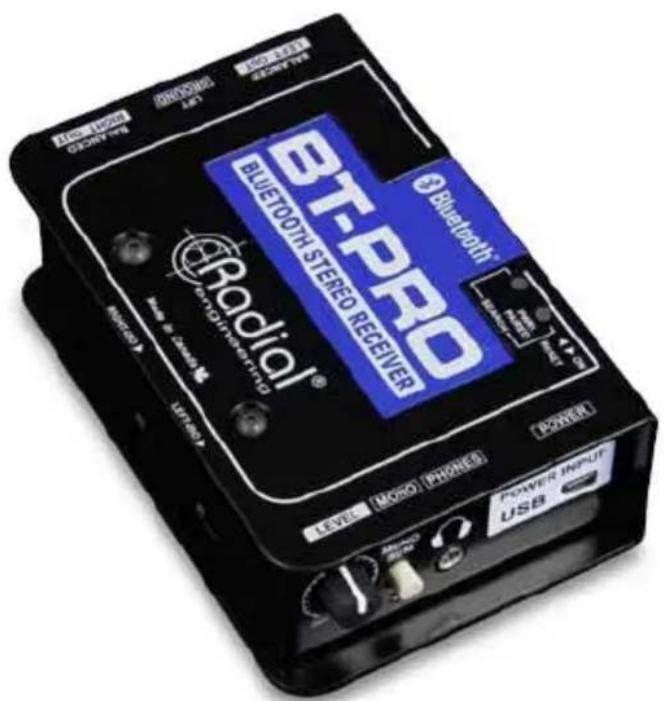
User Guide
Radial Engineering Ltd.
1588 Kebet Way, Port Coquitlam
British Columbia, Canada, V3C 5M5
Tel: 604-942-1001 • Fax: 604-942-1010
Email: info@radialeng.com

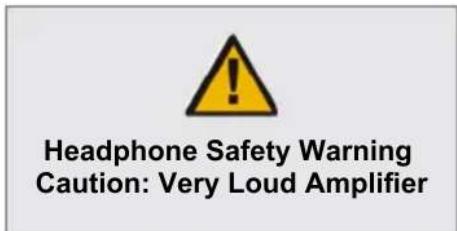
Headphone Safety Warning
Caution: Very Loud Amplifier
As with all products capable of producing high Sound Pressure Levels (SPL) users must be very careful to avoid the hearing damage that may occur from prolonged exposure. This is particularly important as it applies to headphones. Prolonged listening at high SPLs will eventually cause tinnitus and can lead to partial or complete loss of hearing. Please be aware of the recommended exposure limits within your legal jurisdiction and follow them very closely. The user agrees that Radial Engineering Ltd. remains harmless from any health effects resulting from the use of this product and the user clearly understands that he or she is entirely responsible for the safe and proper use of this product. Please consult the Radial Limited Warranty for further details.

FCC IDENTIFIER: 2AJYKTS-BT35A01
This device complies with Part 15 of the FCC Rules. Operation is subject to the following two conditions: (1) this device may not cause harmful interference, and (2) this device must accept any interference received, including interference that may cause undesired operation

The BT-Pro contains Digital devices that are susceptible to Electrostatic Discharge (ESD), precautions should be observed for optimal system performance.
Radial® BT-Pro™ User Guide
Table of Contents Page
Features ....1
Overview....2
Making Connections....3-4
Bluetooth Pairing ....5
Testing and Using....6
Block Diagram....7
Specifications 8
Warranty ....Back cover
Congratulations on your purchase of the Radial BT-Pro™! The BT-Pro is a high-resolution stereo direct box designed to wirelessly pair with Bluetooth® enabled devices and seamlessly transfer the streaming audio to a pair of balanced audio outputs. This makes it ideal for connecting a laptop, cell phone or tablet to a mixing console, powered speakers or PA system.
This manual covers the setup and operation of the BT-Pro in various applications. Please take a few minutes to read it through in order to familiarize yourself with the BT-Pro features so you can get the most out of them. If you have any questions that are not covered in this manual, please consult the FAQ section on our website. This is also where we post the latest updates. If you still do not find what you are looking for, feel free to send us an email at info@radialeng.com and we will do our very best to reply in short order.
FEATURES

-
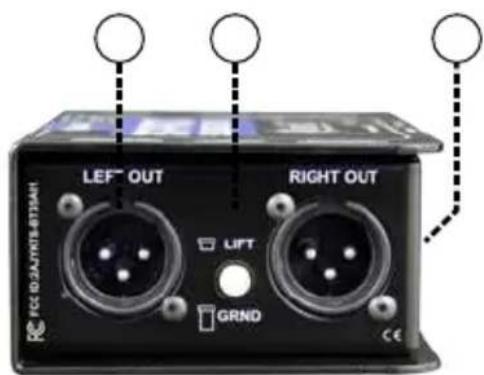
LEVEL: Used to set the overall output level.
-
MONO: Sums the stereo signal to mono. When active, the LED indicator illuminates. Mono mode reduces the channel count on the PA or lets you send the signal to two separate audio systems simultaneously.
-
HEADPHONE: Mini 3.5mm stereo (1/8") TRS headphone output is used to check the output from the source for trouble shooting. Works with ear buds and standard headphones.
-
POWER INPUT/USB: Used to power the BT-Pro. Connect the included USB Mini-B cable to a computer or wall power supply. This is a power input only that will not pass audio or other data.
-
XLR OUT: Standard XLR male outputs follow AES format with pin-1 (ground), pin-2 (+) and pin-3 (-).
-
GROUND LIFT: Used to help eliminate hum and buzz caused by ground loops. Lifts pin-1 on both XLR outputs.
-
RIGHT-ISO/LEFT-ISO: Switches on side panel let you insert transformer isolation when needed on each channel. Used to eliminate hum and buzz caused by ground loops.
-
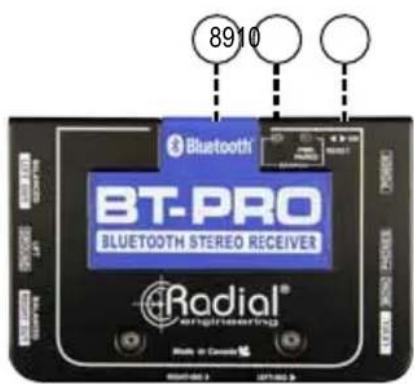
COVER: Blue Sintra ^ cover protects the internal antenna while allowing the wireless signal to pass through without interference.
-
LED PAIRING INDICATORS: Red and blue LED's toggle back and forth during pairing to provide visual feedback of the wireless Bluetooth connection status.
-
RESET/ON: Recessed switch on side panel used to reset the BT-Pro for pairing with another device.
OVERVIEW
A typical direct box is a device that lets you interface an unbalanced (hi-Z) audio output with a professional balanced (low-Z) input as found on a PA or recording system. The Radial BT-Pro is similar in that it pairs with a Bluetooth enabled device and converts the streamed digital signal to analog balanced stereo output.
The BT-Pro's antenna first picks up the streaming audio and converts it to analog audio. A level control allows you to adjust the output level and a mono sum switch can be activated to send the mono signal to two separate audio systems or used to check for phase issues. The 3.5mm mini-headphone output can be used to monitor the stereo signal and test for audio prior to connecting to the PA. Before the XLR output, isolation transformers may be switched into the circuit to eliminate noise caused by ground loops. The signal is then balanced to drive long cables without noise.
A front-panel level control is used to adjust the output volume along with the volume setting for the headphones. This is variable from a mic level output to feed a traditional mixing channel preamp input to a line level to feed the line input on a mixing console, recording system or powered speaker. The BT-Pro ensures the digital signal is delivered to the PA as faithfully as possible.
The BT-Pro is easy to setup and use. Once it is powered up and the ON switch is engaged, it will automatically appear as an available device on your Bluetooth enabled computer, tablet or smart phone.
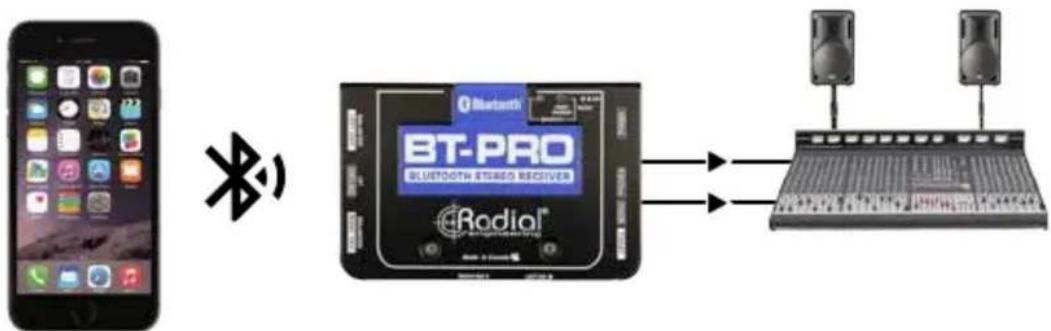
flowchart
graph LR
    A["Smartphone"] -->|Bluetooth| B["Bluetooth STUDIO RECEIVER"]
    B --> C["Audio System"]
    C --> D["Output Device"]
MAKING CONNECTIONS
Before making any connections, always ensure your audio system is either turned down or turned off in order to protect more sensitive components from damage caused by loud turn-on or plug-in transients. The BT-Pro uses a USB Mini-B connector and cable for its power requirements. Use the included 'Mini-B to TYPE A' USB cable and connect to a computer, USB hub or the included USB wall charger. You may also use any standard USB wall charger that is included with most phones and tablets, as the BT-Pro will only draw a small amount of current.
TYPE A USB
Fits most laptops and computers

natural_image
Close-up of a black USB cable with a separate connector (no text or symbols visible)TYPE Mini-B USB
Used to connect to the BT-Pro
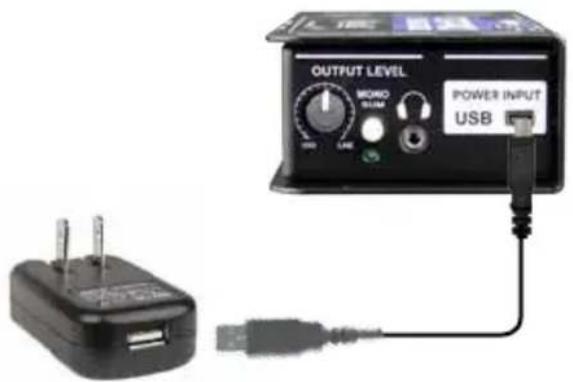
BE SURE THAT THE BT-PRO IS TURNED OFF BEFORE CONNECTING THE POWER CABLE to avoid initial intermittent power spikes to the electronics.
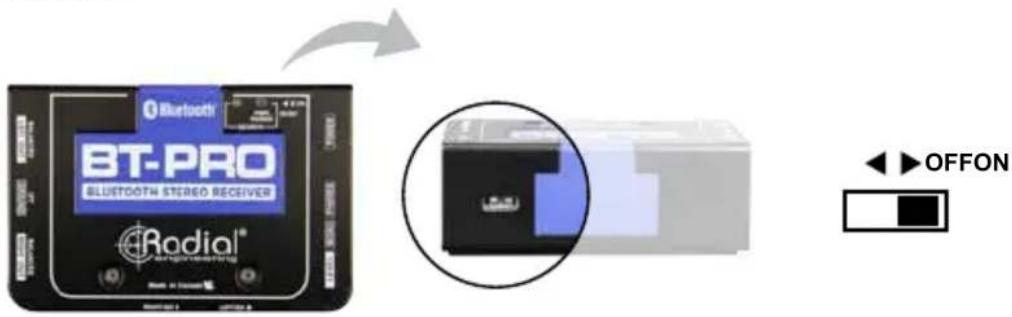
IMPORTANT NOTE: Feeding 48V phantom power to the BT-Pro can damage the unit if the protective transformers are not inserted into the signal path. Ensure that you turn off phantom power for the channels connected to the BT-Pro. If only a global phantom power switch is present, then make sure the transformers are inserted!

natural_image
Close-up of a device with a circular inset highlighting a dark interior detail (no visible text or symbols)
To block DC current, activate the transformer isolation by switching the LEFT-ISO and RIGHT-ISO to the 'right' position.
Connecting the BT-Pro to your audio system is done using two XLR cables. This follows the AES standard with pin-1 (ground), pin-2 (+) and pin-3 (-). These XLRs can be connected to mic or line level inputs.

Audio connections for PA system and recording systems use balanced XLR cables up to 100 meters (300').
Once you make the connections, turn up the audio system. It is good practice to always test at a low volume. Due to the analog circuitry in the BT-Pro, it is susceptible to interference in environments that may have high levels of ambient RF energy. To remedy this situation both of the ISO switches may be set to ON (right) and the Ground Lift switch set to LIFT (in). This will reduce the level of interference, but in some cases may not totally eliminate the issue.
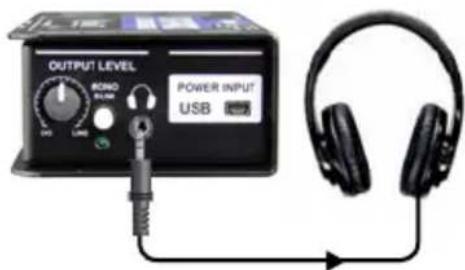
Headphone output
It is important to note that there is a very loud headphone output built into the BT-Pro that enables professional grade, low sensitivity headphones to be used. Make sure you always set the level completely off (fully counter-clockwise) before using. Adjusting the level control on the BT-Pro will affect both the XLR and headphone output. The headphone amp is not actually intended for listening – it is for testing to ensure the signal is being processed by the BT-Pro and being properly sent to the output by the DAC (digital to analog converter). If you do not hear sound in the PA, this lets you know that the problem is likely not the BT-Pro but maybe another connection or that a piece of equipment needs to be checked.
BLUETOOTH PAIRING
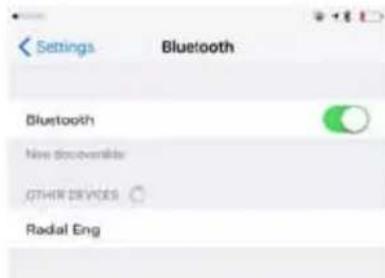
Once the BT-Pro is connected to a power supply, a blue LED on the top of the unit will illuminate. At this point you can turn the RESET/ON switch to the ON position and the BT-Pro will be available to pair with Bluetooth devices. Check the available devices on your Bluetooth enabled playback source; the BT-Pro should appear in the list as 'Radial Eng'. Once you select the BT-Pro, your plackback device should prompt you for a password. The password is 1246. Once initially paired, the BT-Pro automatically converts the streaming audio to analog for connection to a variety of systems. Your device should automatically reconnect on future sessions, as your smartphone does in your car.
-
Make sure the BT-Pro volume control is turned fully counter clockwise.
-
Enable Bluetooth pairing on your Bluetooth enabled device.
-
Connect your BT-Pro to power; a blue LED on the top of the unit will indicate that it is receiving power.
-
Turn on the BT-Pro to enable Bluetooth pairing.
-
Blue and red LED's will alternate showing the BT-Pro is in search mode for pairing.
-
Your Bluetooth device will identify the BT-Pro as 'Radial Eng' in the Bluetooth devices menu.
-
Select the BT-Pro in your Bluetooth devices menu.
-
Your Bluetooth device will then ask for a first time password for the BT-Pro. Type in: 1246.
-
Once your Bluetooth device has paired with the BT-Pro, the blue LED will flash once every three seconds. When audio is playing, the blue LED will flash three times quickly every three seconds.


Once your Bluetooth device has been paired to the BT-Pro, the BT-Pro will automatically pair to the same Bluetooth device when the BT-Pro is turned back on in range.
Going out of range
If your Bluetooth device goes out of the range of your BT-Pro (greater than 12 meters), the device playback will pause and the blue LED on the BT-Pro will slowly blink to show the unit is in 'Stand-by' mode. Once the device is back in range, the BT-Pro will automatically reconnect to continue playing back audio from your Bluetooth device. Stand-by mode will not allow another Bluetooth device to pair with the BT-Pro. If your Bluetooth device goes out of range from the BT-Pro for more than two minutes, or if you want to connect a different Bluetooth device for playback, you will need to reset the BT-Pro. This is done by turning the RESET/ON switch off and back to on.
The BT-Pro allows for reception distances of up to 12 meters (40'), which can be significantly extended under ideal conditions. Should you experience interference or signal dropouts, ensure that there is a clear line of sight between the BT-Pro and your Bluetooth device. You can also adjust the angle and placement of the BT-Pro, as this may also affect the reception.
NOTE: If you're using a computer with a USB Bluetooth dongle, some pairing features may not be automatically available. Please refer to your dongle's software manual for instructions on how to activate these features.
TESTING AND USING
First, set the BT-Pro's LEVEL control to the 7 o'clock (off) position. This will allow you to adjust the output level on the fly. Next, check the status of the MONO SUM switch and LED indicator. For stereo, set the switch to the outward position (LED off). For dual mono operation, set the switch to the inward position (LED on).
It's a good idea to start testing the Bluetooth audio with a sound file you are familiar with. Set your source's output level and the level of the media playback software (if applicable) at 80% or higher for optimal signal to noise. A higher volume from the source will allow the BT-Pro to operate at the lowest noise floor. Keep in mind that various media files will play back at different volume levels depending on your software and how the sound file was recorded.
Slowly raise the output level of the BT-Pro. It is good practice to always test at a low volume to ensure proper connections have been made and all devices in the signal chain are set up correctly and working. This way, should a device not be turned on or a connection not fully made, it will not create a loud transient ‘pop’ in the PA that could damage a tweeter or annoy your audience. When satisfied, slowly increase the input gain on your mixing console until you reach an appropriate level.
BLOCK DIAGRAM*

flowchart
graph LR
    A["BLUE TOOTH RECEIVER"] -->|L_OUT| B["FILTER"]
    A -->|R_OUT| C["FILTER"]
    B --> D["PHASE SPLITTER / BUFFER"]
    C --> E["PHASE SPLITTER / BUFFER"]
    D --> F["TRANSFORMER FULL BYPASS SWITCHES"]
    E --> F
    F --> G["OUTPUT LEFT"]
    F --> H["OUTPUT RIGHT"]
    G --> I["GROUND LIFT"]
    H --> J["HEADPHONE OUTPUT"]
    K["H/P AMPLIFIER"] --> L["HEADPHONE OUTPUT"]
    M["MONO"] --> N["FILTER"]
    N --> O["FILTER"]
    P["CHASSIS_GND"] --> Q["OUTPUT"]
* Subject to change without notice.
SPECIFICATIONS\*
Audio Circuit Type: Bluetooth A2DP transceiver with audio line drive
Bluetooth Compliance: Bluetooth 2.0 W/EDR
Data Compression: SBC Codec
Compatibility: All Bluetooth A2DP compliant devices
Device Range: 12m (40') (line of sight)
Frequency Response: 20Hz to 20KHz
Dynamic Range: 90dB
Signal to Noise: 90dB
Maximum Gain: ....+8dBu (source file dependant)
Total Harmonic Distortion: 0.01%
Output Impedance: 300Ω
Features
Audio Output: 2x Balanced AES Standard XLR-M
Headphone Output: 3.5mm TRS
Level Control: ......Variable, works on headphone and XLR
Transformer Isolation:....Independent for each channel
Mono Switch: Sums Left and Right Channels
Ground Lift: ....Lifts pin 1 on both XLR Outputs
General
Construction: 14 gauge steel chassis & outer shell
Finish: Durable powder coat
Size: (W x H x D)....3.3" X 5" X 2" (84 x 127 x 51mm)
Weight: 1.5lbs (6.8Kg)
Power: USB Mini connector (Power Only)
Warranty: Radial 3-year, transferable
THREE YEAR TRANSFERABLE LIMITED WARRANTY
RADIAL ENGINEERING LTD. ("Radial") warrants this product to be free from defects in material and workmanship and will remedy any such defects free of charge according to the terms of this warranty. Radial will repair or replace (at its option) any defective component(s) of this product (excluding finish and wear and tear on components under normal use) for a period of three (3) years from the original date of purchase. In the event that a particular product is no longer available, Radial reserves the right to replace the product with a similar product of equal or greater value. In the unlikely event that a defect is uncovered, please call 604-942-1001 or email service@radialeng.com to obtain an RA number (Return Authorization number) before the 3 year warranty period expires. The product must be returned prepaid in the original shipping container (or equivalent) to Radial or to an authorized Radial repair centre and you must assume the risk of loss or damage. A copy of the original invoice showing date of purchase and the dealer name must accompany any request for work to be performed under this limited and transferable warranty. This warranty shall not apply if the product has been damaged due to abuse, misuse, misapplication, accident or as a result of service or modification by any other than an authorized Radial repair center.
THERE ARE NO EXPRESSED WARRANTIES OTHER THAN THOSE ON THE FACE HEREOF AND DESCRIBED ABOVE. NO WARRANTIES WHETHER EXPRESSED OR IMPLIED, INCLUDING BUT NOT LIMITED TO, ANY IMPLIED WARRANTIES OF MERCHANTABILITY OR FITNESS FOR A PARTICULAR PURPOSE SHALL EXTEND BEYOND THE RESPECTIVE WARRANTY PERIOD DESCRIBED ABOVE OF THREE YEARS. RADIAL SHALL NOT BE RESPONSIBLE OR LIABLE FOR ANY SPECIAL, INCIDENTAL OR CONSEQUENTIAL DAMAGES OR LOSS ARISING FROM THE USE OF THIS PRODUCT. THIS WARRANTY GIVES YOU SPECIFIC LEGAL RIGHTS, AND YOU MAY ALSO HAVE OTHER RIGHTS, WHICH MAY VARY DEPENDING ON WHERE YOU LIVE AND WHERE THE PRODUCT WAS PURCHASED.
To meet the requirements of California Proposition 65, it is our responsibility to inform you of the following:
WARNING: This product contains chemicals known to the State of California to cause cancer, birth defects or other reproductive harm.
Please take proper care when handling and consult local government regulations before discarding.

Made in Canada

www.radialeng.com
Radial Engineering Ltd.
1588 Kebet Way, Port Coquitlam, British Columbia, V3C 5M5
Tel: 604-942-1001 • Fax: 604-942-1010 • Email: info@radialeng.com
- BT-PRO™ Bluetooth® Direct Box
- User Guide
- Headphone Safety Warning
- Caution: Very Loud Amplifier
- FCC IDENTIFIER: 2AJYKTS-BT35A01
- Radial® BT-Pro™ User Guide
- Table of Contents Page
- FEATURES
- OVERVIEW
- MAKING CONNECTIONS
- TYPE A USB
- Headphone output
- BLUETOOTH PAIRING
- Going out of range
- TESTING AND USING
- SPECIFICATIONS\*
- General
- THREE YEAR TRANSFERABLE LIMITED WARRANTY
Brand : Radial Engineering
Model : BT-Pro
Category : Audio case