
ET-C1S600 - Zoom lens PANASONIC - Free user manual and instructions
Find the device manual for free ET-C1S600 PANASONIC in PDF.


| Product Type | Zoom Lens |
| Brand | Panasonic |
| Model | ET-C1S600 |
| Mount Compatibility | Micro Four Thirds (MFT) |
| Focal Length Range | Approx. 14-42mm (kit lens standard) |
| Maximum Aperture | f/3.5-5.6 |
| Lens Construction | Multi-element glass with aspherical elements |
| Image Stabilization | Optical Image Stabilizer (O.I.S.) |
| Autofocus | Yes, internal stepping motor |
| Manual Focus | Yes, with focus ring |
| Filter Thread Diameter | 52mm |
| Dimensions (Diameter x Length) | Approx. 67mm x 84mm |
| Weight | Approx. 230g |
| Minimum Focus Distance | 0.2m (0.66ft) |
| Power Supply | Powered by camera body via electronic contacts |
| Main Functions | Zoom, autofocus, manual focus, optical stabilization, aperture control |
| Maintenance & Cleaning | Use a soft, dry cloth to clean lens surfaces; avoid solvents |
| Safety Precautions | Do not expose to extreme moisture or shock; store with caps on |
| Spare Parts & Repairability | Contact Panasonic service centers for repairs; spare parts available through authorized dealers |
| General Information | Designed for Panasonic Lumix G-series cameras and compatible MFT bodies |
Frequently Asked Questions - ET-C1S600 PANASONIC
User questions about ET-C1S600 PANASONIC
0 question about this device. Answer the ones you know or ask your own.
Ask a new question about this device
Download the instructions for your Zoom lens in PDF format for free! Find your manual ET-C1S600 - PANASONIC and take your electronic device back in hand. On this page are published all the documents necessary for the use of your device. ET-C1S600 by PANASONIC.
USER MANUAL ET-C1S600 PANASONIC
Operating Instructions
Zoom Lens
Commercial Use
Model No.
ET-C1W300
ET-C1W400
ET-C1W500
ET-C1S600
ET-C1T700
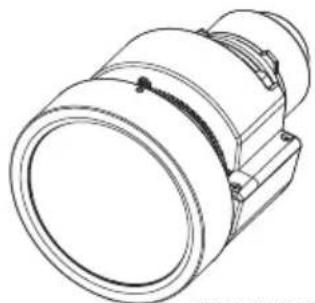
natural_image
Technical line drawing of a mechanical component with no visible text or symbols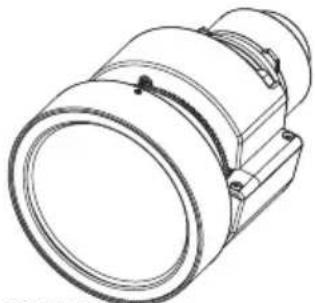
natural_image
Technical line drawing of a mechanical component with cylindrical body and mounting flanges (no text or symbols)ET-C1W300ET-C1W400
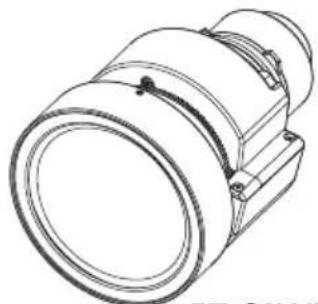
natural_image
Technical line drawing of a mechanical component with no visible text or symbolsET-C1W500
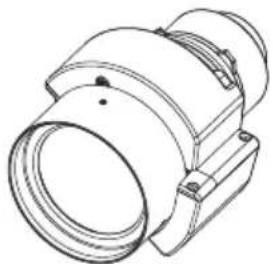
natural_image
Technical line drawing of a mechanical component with no visible text or symbolsET-C1S600
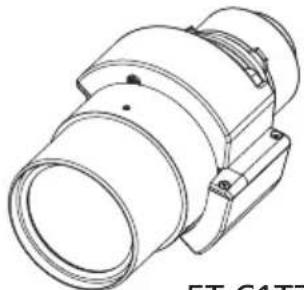
natural_image
Technical line drawing of a mechanical component (no text or symbols)ET-C1T700
Thank you for purchasing this Panasonic product.
To ensure correct use of this lens, please read the operating instructions supplied with the lens and the projector carefully.
Before using this product, be sure to read "Read this first!" (→ Page 3 to 5).
■ Please save this manual for future use.


Contents
Read this first! ....3
Before Use....6
Preparation....7
Before replacing the projection lens....7
Attaching the Lens / Detaching the Lens....7
Peripheral focus adjustment function....7
Projection relationships....8
Lens shift ranges....9
Specifications ....10
Dimensions 11
Projected image size and Projection distance.....Appendix / Annexe / 付録 1
The "Appendix" can be found after the Japanese language section (日本語).
WARNING:
Do not look at or place your skin into the light emitted from the lens while the projector is being used.
Doing so can cause burns or loss of sight.
- Strong light is emitted from the projector's lens. Do not look at or place your hands directly into this light.
● Turn off the power when moving away from the projection lens or projector.
Do not project an image with the lens cover attached.
● Doing so can cause fire.
CAUTION:
Before replacing the projection lens, be sure to turn off the power and disconnect the power plug from the wall outlet.
● Unexpected projection of light may cause injury to eyes.
● Replacing the projection lens without removing the power plug may result in electric shock.
Do not stand in front of the lens while the projector is being used.
Doing so can cause damage and burns to clothing.
- Strong light is emitted from the projector's lens.
Do not place objects in front of the lens while the projector is being used.
Doing so can cause fire, damage to the object, or malfunction of the lens and projector.
- Strong light is emitted from the projector's lens.
Do not open the desiccant bag. Do not eat the contents.
Inadvertently ingesting desiccant could be harmful.
- If the desiccant gets into your eyes or mouth, immediately rinse with plenty of water and seek medical attention.
- Keep desiccant out of the reach of children.
Read this fi rst! (continued)
■ Hazard distance (IEC/EN 62471-5:2015)
The distance from the projection lens surface, at which the emission reaches the Accessible Emission Limit (AEL) of risk group 2, is known as the hazard distance (HD) or safety distance. The area where the emission exceeds the Accessible Emission Limit of risk group 2 is called the hazard zone (HZ).
Within the hazard zone, never look into the light projected from the projector. The eyes may be damaged by direct irradiation even if you look at the light just for a moment. If you are outside the hazard zone, it is considered to be safe in all circumstances except deliberately staring into the light projected from the projector.
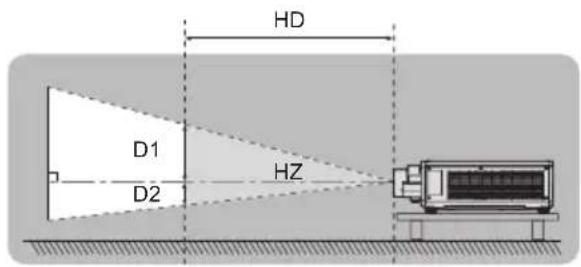
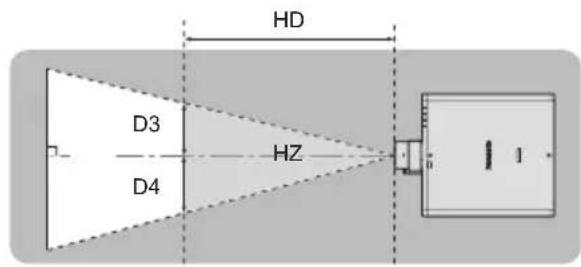
Risk group
The combination of the projector and the projection lens is categorized as risk group 2 when the hazard distance is 1 m (39-3/8") or less. It is categorized as risk group 3 when the hazard distance exceeds 1 m (39-3/8"), and it will be for professional use instead of consumer use.
In the case of risk group 3, there is a possibility of damaging the eyes by direct irradiation when looking into the projection light from inside the hazard zone even for a moment.
In the case of risk group 2, safe use without damaging the eyes is possible in all circumstances except deliberately staring into the light projected from the projector.
The combination of projector and projection lens classified as risk group 3 with a hazard distance greater than 1 m (39-3/8") is as follows.
| Projector model Projector lens model Risk group | |
| PT-REQ12 / PT-REQ10 / PT-REQ80 ET-C1T700 Risk group 3 |
Read this first! (continued)
Furthermore, each dimension to indicate the hazard area (Hz) for a combination with a projection lens that has a hazard distance exceeding 1 m (39-3/8") is as follows.
(Unit: m)
| Projector model | Projector lens model | HD*1 | D1*2 | D2*2 | D3*2 | D4*2 |
| PT-REQ12 ET-C1T700 | 2.4 0.481 0.481 0.5 | 53 0.553 | ||||
| PT-REQ10 / PT-REQ80 | ET-C1T700 1.7 0.3 | 47 0.347 0.39 | 9 0.399 |
*1 HD: Hazard distance
*2 The values of D1 to D4 will change in accordance with the lens shift amount. Each value in the table is the maximum value.
Note
● The values in the table are based on IEC/EN 62471-5:2015.
- The projectors compatible with each projection lens may be added or changed without notice. For the latest information, refer to the following website.
https://panasonic.net/cns/projector/
Attention
- If the light projected from the projector directly enters the eyes while you are inside the hazard zone, the retinas may be damaged. Do not enter the hazard zone during use. Alternatively, install the projector in a location where the projected light will not directly enter the eyes.
Before Use
■ Supported projectors
PT-REQ12 / PT-REQ10 / PT-REQ80
Note
● This manual omits the alphabets at the end of projector model numbers.
- Models other than the above may also be supported. Refer to the operating instructions for your projector or the following website.
https://panasonic.net/cns/projector/
■ Supplied Accessories
Make sure that the following has been provided.
| Part name Appearance (quantity) | |||
| Lens cover | 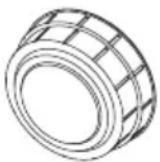 |  | ● The product is delivered with lens covers attached.● The shape and size of the lens covers are different for each pro-duct.1 each for front and rear |
Preparation
Before replacing the projection lens
Return the projection lens to the home position before replacing or removing it. For details on how to return the lens to the home position, refer to the operating instructions of the projector.
Attention
● Make sure that the projector power supply is switched off before attaching or detaching the projection lens.
● After removing the projection lens, store it safely away from vibration or impacts.
- Do not touch the electric contact points of the projection lens with your fingers. Dust and dirt on the contacts may cause contact malfunctions, while static electricity may damage the unit.
- Do not turn the gear (ring) part of the projection lens barrel by hand. Doing so may damage the motor.
- Do not touch the surface of the lens with bare hands. Finger prints and dirt on the surface of the lens will be magnified by the lens and lower the quality of the projected image. Place the supplied lens cover on the zoom lens when the projector is not in use.
- The lens may become damaged by hitting with a hard object or by wiping the front surface of the lens with excessive force. Handle with care.
- Use a clean, soft and dry cloth to wipe away dust and dirt from the projection lens. Do not use fl uffy cloths containing oil, water or dust for cleaning. The lens is easily damaged, so do not apply excessive pressure when wiping it.
Attaching the Lens / Detaching the Lens
For details on attaching or removing the projection lens, refer to the operating instructions for the projector.
Peripheral focus adjustment function
When you change the size of the projected image, the focal balance between the center and peripheral areas of the screen may shift.
The ET-C1W300 / ET-C1W400 / ET-C1W500 is equipped with a peripheral focus adjustment function to correct the shift in focal balance between the center and peripheral areas of the screen.
For instructions on adjusting the peripheral focus, refer to “Projecting” in the operating instructions for the projector.
Projection relationships
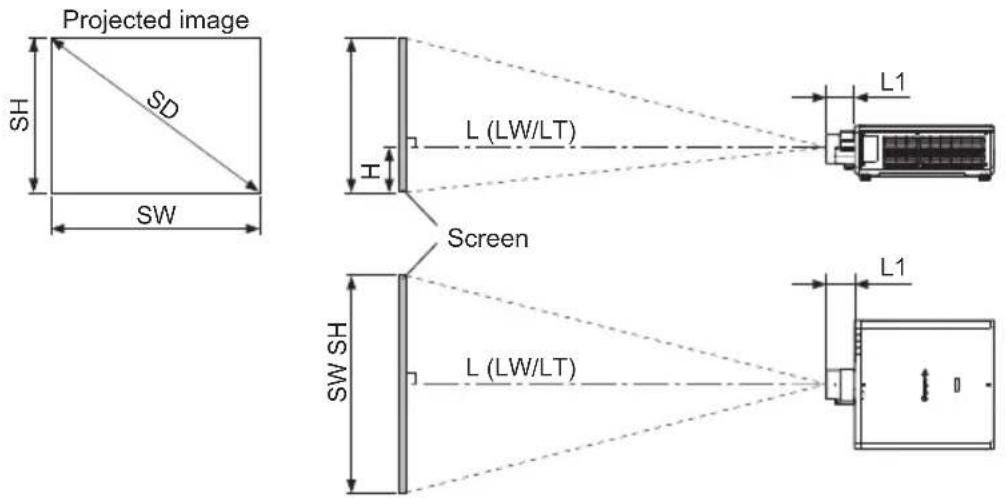
The dimensional relationship between the screen and the projector is shown below.
■ Dimensional relationship diagram
Note
- This diagram assumes that the size and position of the projected image will be adjusted so that the image fills the entire screen.
● This illustration is not drawn to scale.
| L Projection distance H | Distance from the lens center to the lower edge of the projected image | ||
| LW Minimum distance SH Projected image height | |||
| LT Maximum distance SW Projected image width | |||
| L1 Lens protrusion dimension SD Projected image size | |||
● Dimension for L1 (approximate values) (Unit: m)
| Projector model ET-C1 | W300 ET-C1 | W400 ET-C1W | W500 ET-C1$ | 600 ET-C1T | 700 |
| PT-REQ12 / PT-REQ10 / PT-REQ80 | 0.155 | 0.149 | 0.144 | 0.110 | 0.160 |
Note
- The illustrations of projectors in this manual are for informational purposes only and do not represent a specific projector model. Configurations may vary with the model.
Attention
● To prevent obstruction of the intake and exhaust vents, install the projector with a clearance from walls and objects. For details about the required distance from surrounding walls and objects, refer to the operating instructions for your projector.
If you are installing the projector in a sealed space, be sure to provide additional air conditioning equipment and ventilation equipment. Insufficient ventilation will result in an accumulation of heat and may activate the projector's protection circuit.
- Avoid setting up in places which are subject to sudden temperature changes, such as near an air conditioner or lighting equipment (studio lamps, etc.).
8-ENGLISH
Projection relationships (continued)
■ Dimensional relationship
For details on the projection distance (L), refer to “Projected image size and Projection distance” and “Projection distance formulas” in the Appendix.
Note
- For details on "Projected image size and Projection distance" for projector models other than PT-REQ12 / PT-REQ10 / PT-REQ80, refer to "Setting up" in the operating instructions of the projector.
Lens shift ranges
Perform the lens position shift within the adjustment range.
Perform lens shift adjustment within the ranges shown in the following illustrations.
The focus may change when the lens position is shifted out of the adjustment range.
This is because the movement of the lens is restricted to protect the optical parts.
Projection position can be adjusted with the optical axis shift based on the home position in the respective range.
| ET-C1W400 / ET-C1W500 /ET-C1S600 / ET-C1T700 | Optical axis center Standard projection position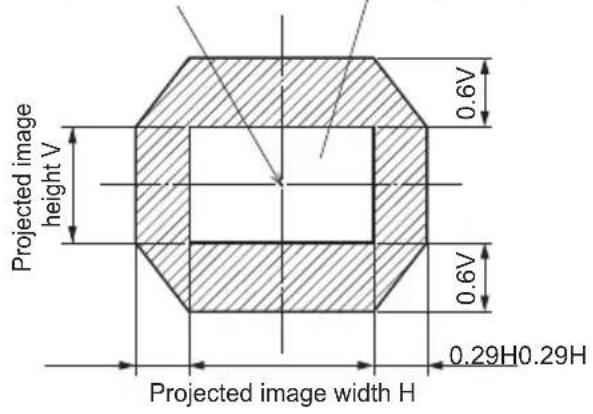 |
| ET-C1W300 | Optical axis center Standard projection position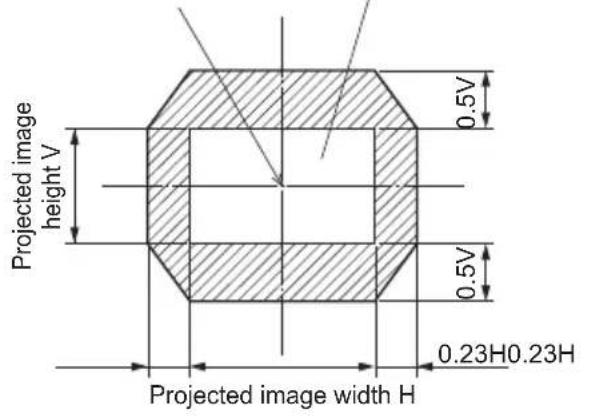 |
Note
● The home position of the projector is a point of origin position for the lens shift (i.e., vertical and horizontal positions of the lens) based on the results of lens calibration. It is not the optical center position of the screen.
Specifications
Check the specifications of each projection lens, and use the appropriate lens for your intended use.
| Model No. ET-C | 1W300 ET-C1W400 ET-C | 1W500 | ||
| F value 1.94 - | 2.28 1.94 - 2.39 1.84 - 2.34 | |||
| Focal Length (f) | 9.9 mm (3/6") - 12.3 mm (15/32") | 12.1 mm (15/32") - 16.9 mm (21/32") | 16.7 mm (21/32") - 24.6 mm (31/32") | |
| Dimensions | Width | 154 mm (6-1/16") 154 mm | (6-1/16") 154 mm (6-1/16") | |
| Height | 155 mm (6-3/32") 155 mm | (6-3/32") 155 mm (6-3/32") | ||
| Depth | 245 mm (9-21/32") 239 mm | (9-13/32") 234 mm (9-7/32") | ||
| Net Weight | 2.6 kg (5.73 lb) 2.4 k | g (5.29 lb) 2.4 k | g (5.29 lb) | |
| Model No. ET-C | 1S600 ET-C1T700 | ||
| F value 1.84 - | 2.31 1.94 - 2.38 | ||
| Focal Length (f) | 23.9 mm (30/32") - 37.2 mm (1-15/32") | 36.1 mm (1-13/32") - 59.6 mm (2-11/32") | |
| Dimensions | Width | 135 mm (5-5/16") 135 mm | (5-5/16") |
| Height | 148 mm (5-13/16") 148 mm | (5-13/16") | |
| Depth | 205 mm (8-1/16") 253 | mm (9-31/32") | |
| Net Weight | 1.7 kg (3.75 lb) 2.4 k | g (5.29 lb) | |
Dimensions
(Unit: mm)
| Model number Dimensions | |
| ET-C1W300 | 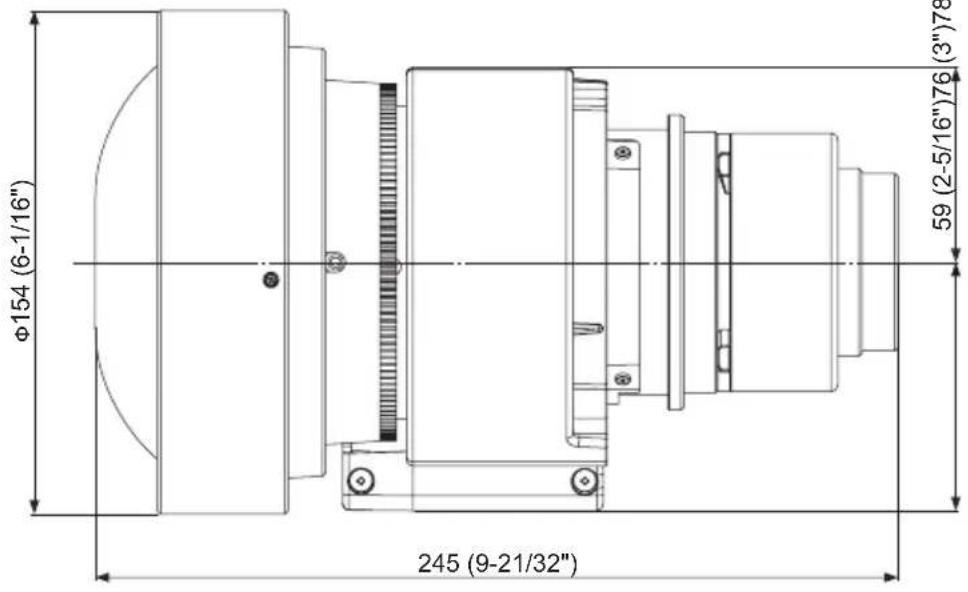 |
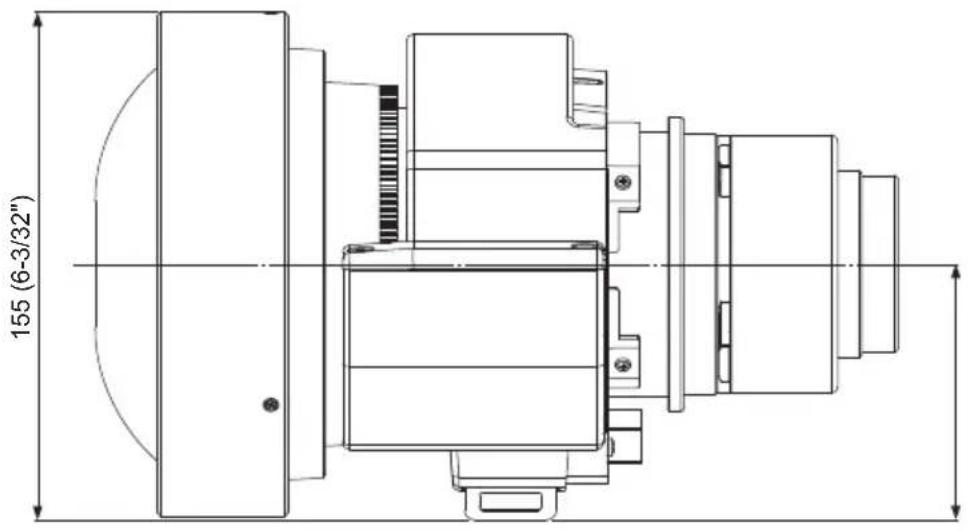 | |
Dimensions (continued)
(Uni mm)
| Model number Dimensions | |
| ET-C1W400 | 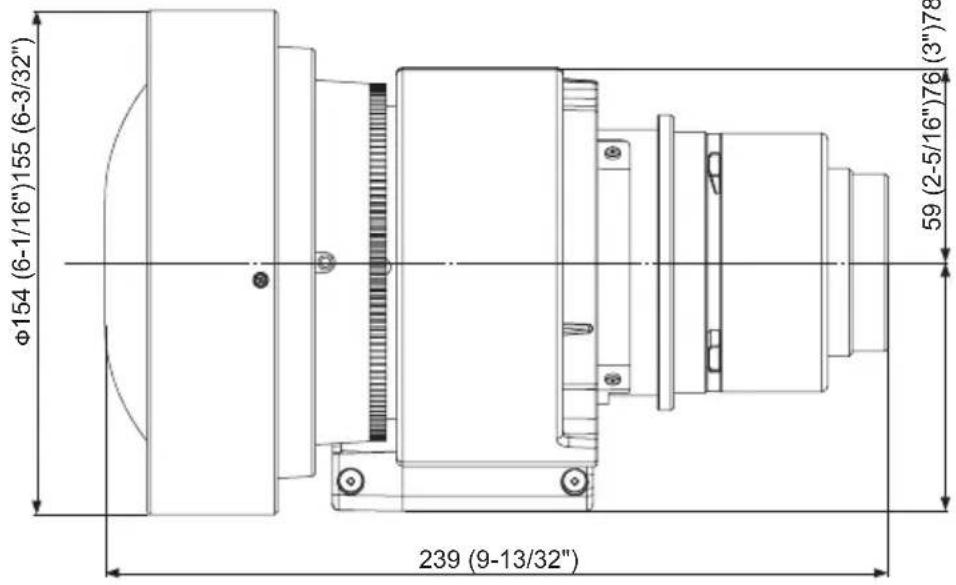 |
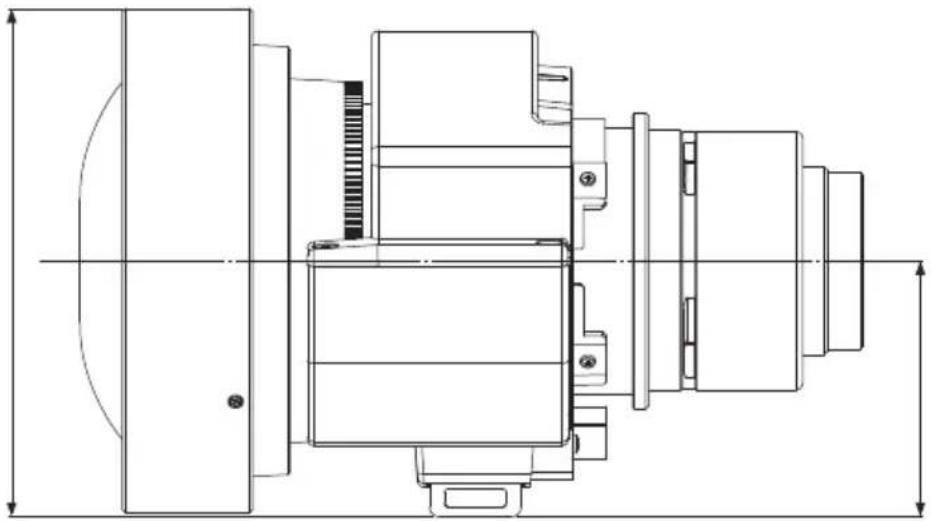 | |
Dimensions (continued)
(Uñjt: mm)
| Model number Dimensions | |
| ET-C1W500 | 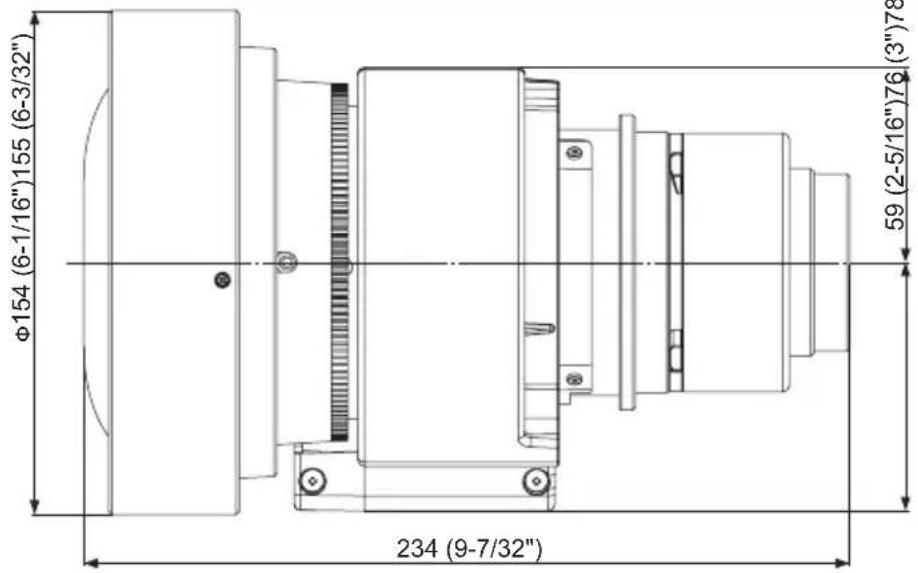 |
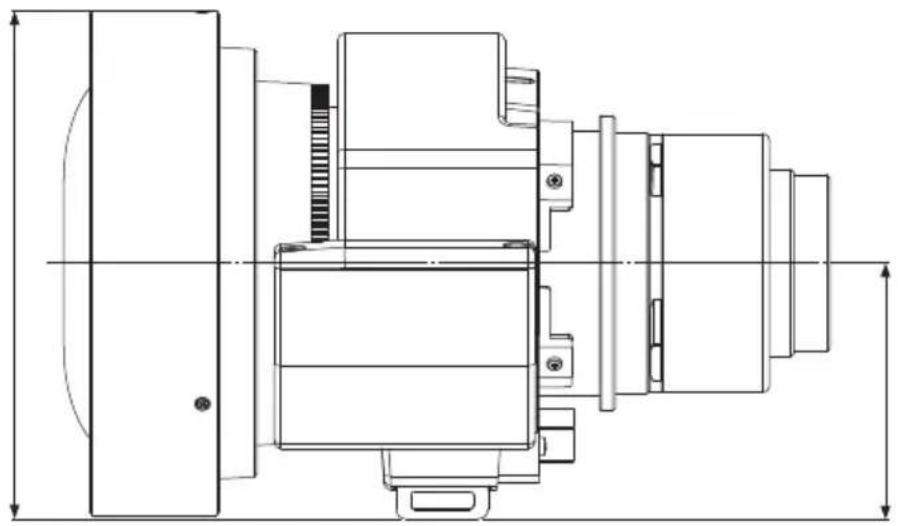 | |
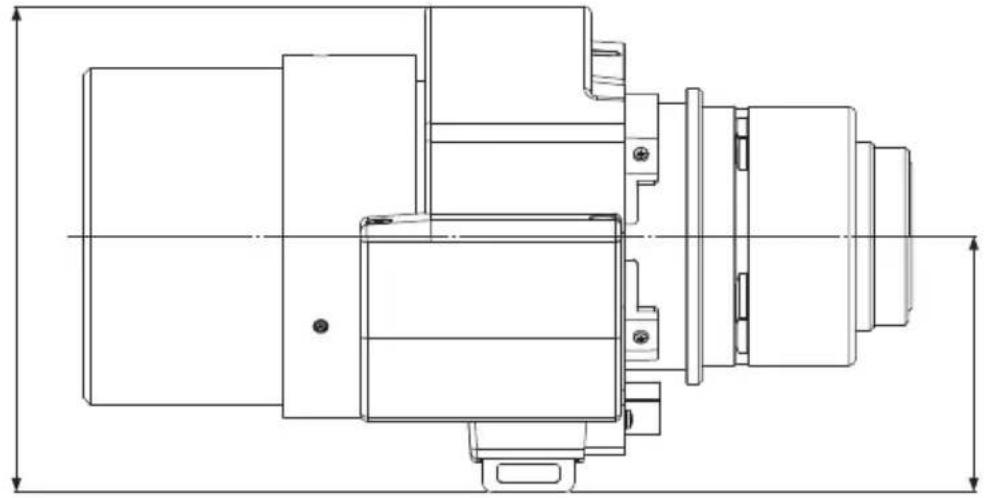
Dimensions (continued)
| Model number Dimensions | 3"78 (3-2/32") | |
| ET-C1S600 | 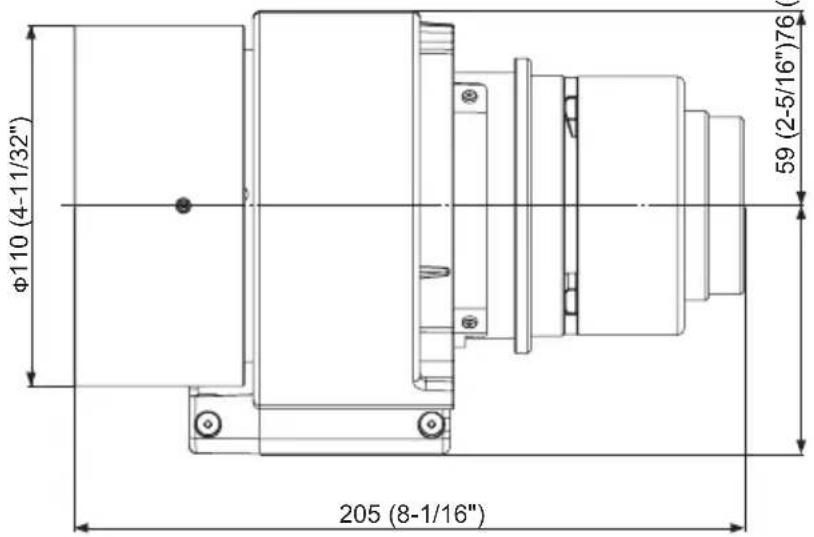 | |
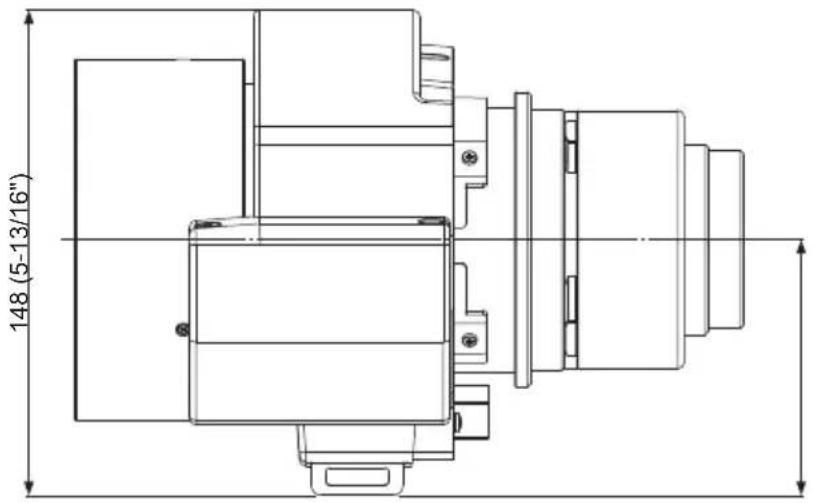 | ||
Dimensions (continued)
(Unit: 3-2/32")
| Model number Dimensions | |
| ET-C1T700 | 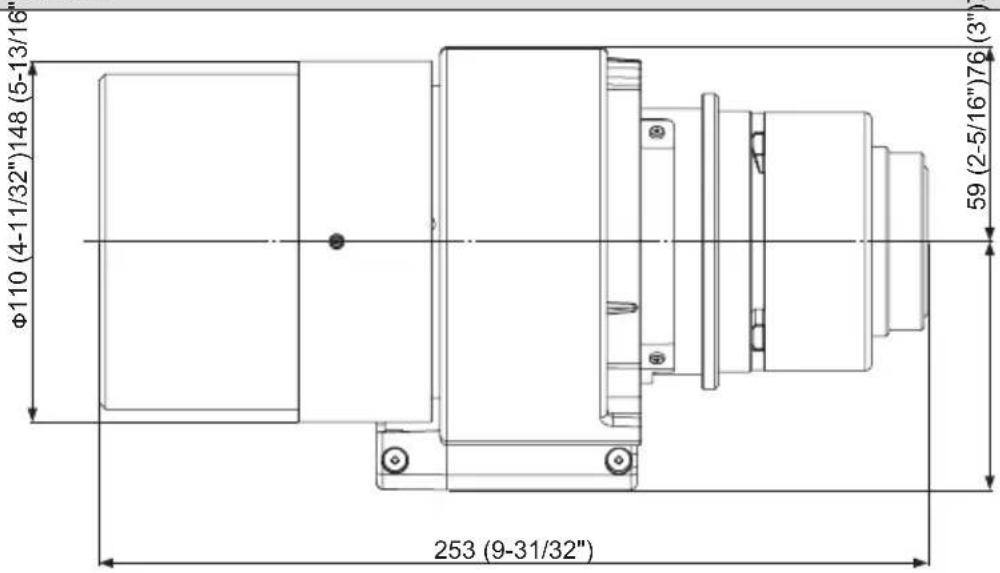 |
 | |
English
Manufactured by:
Panasonic Connect Co., Ltd.
4-1-62 Minoshima, Hakata-ku, Fukuoka 812-8531, Japan
Importer:
Panasonic Connect Europe GmbH
Hagenauer Strasse 43, 65203 Wiesbaden, Germany
Authorized Representative in EU:
Panasonic Connect Europe GmbH
Panasonic Testing Centre
Winsbergring 15, 22525 Hamburg, Germany
Importer for UK;
Panasonic Connect UK,
a branch of Panasonic Connect
Europe GmbH,
Maxis 2, Western Road, Bracknell,
Berkshire, RG12 1RT

Français
Fabriqué par:
Panasonic Connect Co., Ltd.
4-1-62 Minoshima, Hakata-ku, Fukuoka 812-8531, Japon
Importateur :
Panasonic Connect Europe GmbH
Panasonic Testing Centre
Panasonic Testing Centre
4-1-62 Minoshima, Hakata-ku, Fukuoka 812-8531, Japan
Importeur:
Panasonic Connect Europe GmbH
Panasonic Testing Centre
Panasonic Testing Centre
Winsbergring 15, 22525 Amburgo, Germania
Български
Производител:
Panasonic Connect Co., Ltd.
4-1-62 Minoshima, Hakata-ku, Fukuoka 812-8531, Япония
Вносител:
Panasonic Connect Europe GmbH
Hagenauer Strasse 43, 65203 Wiesbaden, Германия
Panasonic Testing Centre
Winsbergring 15, 22525 Hamburg, Германия
Čeština
Vyrobil:
Panasonic Connect Co., Ltd.
4-1-62 Minoshima, Hakata-ku, Fukuoka 812-8531, Japonsko
Dovozce:
Panasonic Connect Europe GmbH
Panasonic Testing Centre
4-1-62 Minoshima, Hakata-ku, Fukuoka 812-8531, Japan
Importør:
Panasonic Connect Europe GmbH
Hagenauer Strasse 43, 65203 Wiesbaden, Tyskland
Panasonic Testing Centre
Winsbergring 15, 22525 Hamburg, Tyskland
Eesti
Tootja:
Panasonic Connect Co., Ltd.
4-1-62 Minoshima, Hakata-ku, Fukuoka 812-8531, Jaapan
Maaletooja:
Panasonic Connect Europe GmbH
Hagenauer Strasse 43, 65203 Wiesbaden, Saksamaa
Panasonic Testing Centre
Winsbergring 15, 22525 Hamburg, Saksamaa
Ελληνικά
Κατασκευάστηκε από:
Panasonic Connect Co., Ltd.
4-1-62 Minoshima, Hakata-ku, Fukuoka 812-8531, latωνία
Εισαγωγέας:
Panasonic Connect Europe GmbH
Panasonic Testing Centre
4-1-62 Minoshima, Hakata-ku, Fukuoka 812-8531, Japan
Uvoznik:
Panasonic Connect Europe GmbH
Hagenauer Strasse 43, 65203 Wiesbaden, Njemačka
Ovlašteni zastupnik u EU-u:
Panasonic Connect Europe GmbH
Panasonic Testing Centre
Winsbergring 15, 22525 Hamburg, Njemačka
Latviešu
Ražotājs:
Panasonic Connect Co., Ltd.
4-1-62 Minoshima, Hakata-ku, Fukuoka 812-8531, Japāna
Importētājs:
Panasonic Connect Europe GmbH
Hagenauer Strasse 43, 65203 Wiesbaden, Vācija
Panasonic Testing Centre
Panasonic Testing Centre
Winsbergring 15, 22525 Hamburgas, Vokietija
Magyar
Gyártotta:
Panasonic Connect Co., Ltd.
4-1-62 Minoshima, Hakata-ku, Fukuoka 812-8531, Japán
Importör:
Panasonic Connect Europe GmbH
Panasonic Testing Centre
4-1-62 Minoshima, Hakata-ku, Fukuoka 812-8531, Japan
Importeur:
Panasonic Connect Europe GmbH
Panasonic Testing Centre
4-1-62 Minoshima, Hakata-ku, Fukuoka 812-8531, Japan
Importør:
Panasonic Connect Europe GmbH
Hagenauer Strasse 43, 65203 Wiesbaden, Tyskland
Autorisert representant i EU:
Panasonic Connect Europe GmbH
Panasonic Testing Centre
Winsbergring 15, 22525 Hamburg, Tyskland
Polski
Panasonic Testing Centre
Panasonic Testing Centre
Panasonic Testing Centre
Winsbergring 15, 22525 Hamburg, Germania
Slovenčina
Výrobca:
Panasonic Connect Co., Ltd.
4-1-62 Minoshima, Hakata-ku, Fukuoka 812-8531, Japonsko
Dovozca:
Panasonic Connect Europe GmbH
Hagenauer Strasse 43, 65203 Wiesbaden, Nemecko
Panasonic Testing Centre
Winsbergring 15, 22525 Hamburg, Nemecko
Slovenščina
Proizvaja:
Panasonic Connect Co., Ltd.
4-1-62 Minoshima, Hakata-ku, Fukuoka 812-8531, Japonska
Uvoznik:
Panasonic Connect Europe GmbH
Panasonic Testing Centre
Panasonic Testing Centre
Winsbergring 15, 22525 Hamburg, Almanya
Suomi
Valmistaja:
Panasonic Connect Co., Ltd.
4-1-62 Minoshima, Hakata-ku, Fukuoka 812-8531, Japani
Maahantuoja:
Panasonic Connect Europe GmbH
Hagenauer Strasse 43, 65203 Wiesbaden, Saksa
Panasonic Testing Centre
Winsbergring 15, 22525 Hampuri, Saksa
Svenska
Tillverkad av:
Panasonic Connect Co., Ltd.
4-1-62 Minoshima, Hakata-ku, Fukuoka 812-8531, Japan
Importör:
Panasonic Connect Europe GmbH
Hagenauer Strasse 43, 65203 Wiesbaden, Tyskland
Auktoriserad representant i EU:
Panasonic Connect Europe GmbH
Panasonic Testing Centre
Winsbergring 15, 22525 Hamburg, Tyskland
Disposal of Old Equipment
Only for European Union and countries with recycling systems

This symbol on the products, packaging, and/or accompanying documents means that used electrical and electronic products must not be mixed with general household waste.
For proper treatment, recovery and recycling of old products, please take them to applicable collection points in accordance with your national legislation.
By disposing of them correctly, you will help to save valuable resources and prevent any potential negative effects on human health and the environment.
For more information about collection and recycling, please contact your local authority.
Penalties may be applicable for incorrect disposal of this waste, in accordance with national legislation.
Product Information (for Turkey only)
Environment care information for users in China

This symbol is only valid in China.
Panasonic Connect Co., Ltd.
Web Site : https://panasonic.net/cns/projector/
© Panasonic Connect Co., Ltd. 2023
Panasonic Connect North America
Two Riverfront Plaza, Newark, NJ 07102
TEL: (877) 803 - 8492
Panasonic Canada Inc.
5770 Ambler Drive, Mississauga, Ontario L4W 2T3
TEL: (905) 624 - 5010
Appendix / Annexe / 付録
■ Dimensional relationship
■ Relations dimensionnelles
■ 投写関係寸法
The dimensional relationship between the screen and the projector is shown below. Les relations dimensionnelles entre l'écran et le projecteur sont indiquées ci-dessous. スクリーンとプロジェクター間の投写関係寸法は下記のとおりです。
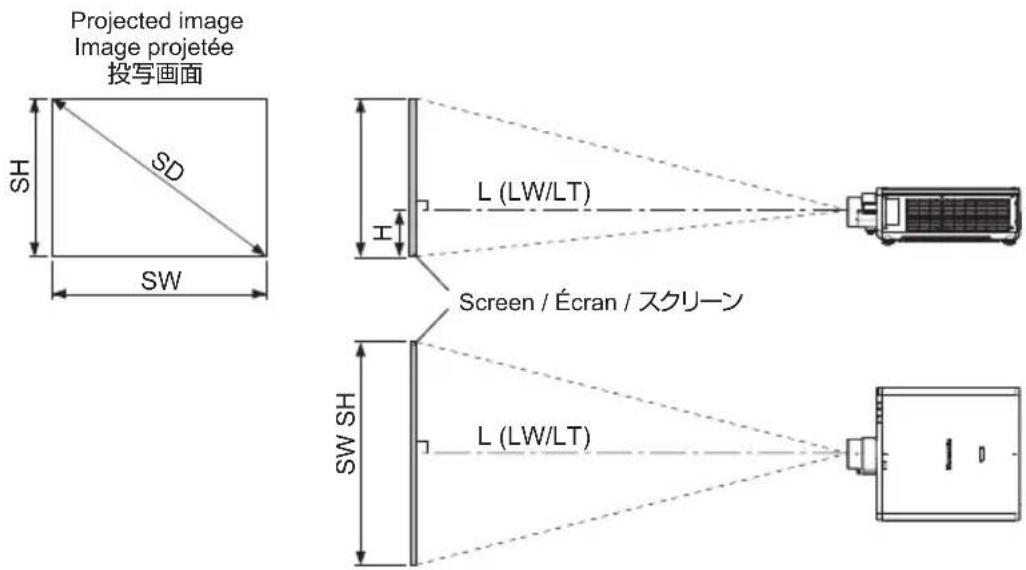
- When using projector models other than the following, refer to "Setting up" in the operating instructions of the projector. In addition, be sure to check the diagonal screen size SD (m), and use the "Projection distance formulas" (Appendix page 10) to determine the projection distance (L).
PT-REQ12 / PT-REQ10 / PT-REQ80
Remarque
The dimensions of the following table contain a slight error.
Periods are used to represent decimal points in the calculation formulas in the following table.
● A ±5 % error in listed projection distances may occur.
In addition, when [KEYSTONE] is used, distance is corrected to become smaller than the specified screen size.
● The throw ratio is based on the value during projection with the projected image size of 2.54 m (100").
Remarque
Setting-up dimensions which are not given in the above table can be calculated using the formulas below. Check the projected image size SD (m) and use the following formula to determine projection distance (L).
The dimensions of the following table contain a slight error.
Periods are used to represent decimal points in the calculation formulas in the following table.
Web Site : https://panasonic.net/cns/projector/
Panasonic Connect North America
Two Riverfront Plaza, Newark, NJ 07102
TEL: (877) 803 - 8492
Panasonic Canada Inc.
5770 Ambler Drive, Mississauga, Ontario L4W 2T3
TEL: (905) 624 - 5010
パナソニック コネクト株式会社
- Operating Instructions
- Contents
- WARNING:
- CAUTION:
- Read this fi rst! (continued)
- ■ Hazard distance (IEC/EN 62471-5:2015)
- Risk group
- Read this first! (continued)
- Note
- Attention
- Before Use
- ■ Supported projectors
- ■ Supplied Accessories
- Preparation
- Before replacing the projection lens
- Attaching the Lens / Detaching the Lens
- Peripheral focus adjustment function
- Projection relationships
- ■ Dimensional relationship diagram
- 8-ENGLISH
- Projection relationships (continued)
- ■ Dimensional relationship
- Lens shift ranges
- Specifications
- Dimensions
- Dimensions (continued)
- English
- Manufactured by:
- Importer:
- Authorized Representative in EU:
- Importer for UK;
- Français
- Fabriqué par:
- Importateur :
- Importeur:
- Български
- Производител:
- Вносител:
- Čeština
- Vyrobil:
- Dovozce:
- Importør:
- Eesti
- Tootja:
- Maaletooja:
- Ελληνικά
- Κατασκευάστηκε από:
- Εισαγωγέας:
- Uvoznik:
- Ovlašteni zastupnik u EU-u:
- Latviešu
- Ražotājs:
- Importētājs:
- Magyar
- Gyártotta:
- Importör:
- Autorisert representant i EU:
- Polski
- Slovenčina
- Výrobca:
- Dovozca:
- Slovenščina
- Proizvaja:
- Suomi
- Valmistaja:
- Maahantuoja:
- Svenska
- Tillverkad av:
- Auktoriserad representant i EU:
- Disposal of Old Equipment
- Only for European Union and countries with recycling systems
- Product Information (for Turkey only)
- Environment care information for users in China
- Panasonic Connect Co., Ltd.
- Panasonic Connect North America
- Panasonic Canada Inc.
- Appendix / Annexe / 付録
- ■ 投写関係寸法
- Remarque
Brand : PANASONIC
Model : ET-C1S600
Category : Zoom lens