ALF-IPK1HE - Uncategorized Alfatron - Free user manual and instructions
Find the device manual for free ALF-IPK1HE Alfatron in PDF.


| Product Type | 4K HDMI over IP Encoder/Decoder (H.265) |
| Model | ALF-IPK1HE (Encoder) / ALF-IPK1HD (Decoder) |
| Video Compression | H.265 |
| Maximum Video Resolution | 4K@30Hz (3840x2160) |
| Input Ports (Encoder) | 1 x HDMI |
| Output Ports (Encoder) | 1 x LAN, 1 x Line Out (Audio) |
| Input Ports (Decoder) | 1 x LAN |
| Output Ports (Decoder) | 1 x HDMI, 1 x Line Out (Audio) |
| Audio Format | MPEG4-AAC Stereo |
| Control Method | VDirector App (iOS/Android/Windows) |
| Power Supply | DC 12V 1A or PoE |
| Power Consumption | Encoder: 5W max; Decoder: 6W max |
| Operating Temperature | 0°C to 45°C (32°F to 113°F) |
| Storage Temperature | -20°C to 70°C (-4°F to 140°F) |
| Humidity | 10% to 90% non-condensing |
| ESD Protection | ±8kV air-gap discharge, ±4kV contact discharge |
| Dimensions (W x H x D) | 175mm x 25mm x 100.2mm (6.9" x 0.98" x 3.9") |
| Net Weight | 0.60kg (1.32lbs) each |
| Mounting | Included mounting ears |
| Maintenance | Clean with dry cloth only |
| Safety Precautions | Do not expose to rain/moisture; unplug during storms; do not obstruct ventilation |
| Spare Parts / Repairability | No user-serviceable parts; refer to qualified service personnel |
| Warranty | 7-year limited warranty (conditions apply) |
Frequently Asked Questions - ALF-IPK1HE Alfatron
User questions about ALF-IPK1HE Alfatron
0 question about this device. Answer the ones you know or ask your own.
Ask a new question about this device
Download the instructions for your Uncategorized in PDF format for free! Find your manual ALF-IPK1HE - Alfatron and take your electronic device back in hand. On this page are published all the documents necessary for the use of your device. ALF-IPK1HE by Alfatron.
USER MANUAL ALF-IPK1HE Alfatron
4K HDMI over IP Encoder and Decoder
Statement
Thank you for choosing this product, please read this user manual carefully before using this product. The functions described in this version are updated. In the constant effort to improve our product, we reserve the right to make functions or parameters changes without notice or obligation.
FCC Statement
This equipment generates, uses and can radiate radio frequency energy and, if not installed and used in accordance with the instructions, may cause harmful interference to radio communications. It has been tested and found to comply with the limits for a Class B digital device, pursuant to part 15 of the FCC Rules. These limits are designed to provide reasonable protection against harmful interference in a commercial installation.
Operation of this equipment in a residential area is likely to cause interference, in which case the user at their own expense will be required to take whatever measures may be necessary to correct the interference.
Any changes or modifications not expressly approved by the manufacture would void the user's authority to operate the equipment.

Do not dispose of this product with the normal household waste at the end of its life cycle. Return it to a collection point for the recycling of electrical and electronic devices. This is indicated by the symbol on the product, user manual or packaging. The materials are reusable according to their markings. By reusing, recycling or other forms of utilisation of old devices you make an important contribution to the protection of our environment. Please contact your local authorities for details about collection points.
Safety Precaution
- Do not expose this device to rain, moisture, dripping or splashing. No objects filled with liquids, such as vases, shall be placed on the device.
- Do not install or place this unit in a bookcase, built-in cabinet, or in another confined space. Ensure the unit is well ventilated.
- To prevent risk of electric shock or fire hazard due to overheating, do not obstruct the unit's ventilation openings with newspapers, tablecloths, curtains, or similar items.
- Do not install near any heat sources such as radiators, heat registers, stoves, or other device (including amplifiers) that produce heat.
• Do not place sources of naked flames, such as lighted candles, on the unit.
• Clean this device only with dry cloth. - Unplug this device during lightning storms or when unused for long periods of time.
- Protect the power cord from being walked on or pinched, particularly at plugs.
• Only use attachments / accessories specified by the manufacturer.
• Refer all servicing to qualified service personnel
Table of Contents
Introduction 2
Overview 2
Package Contents 2
Panel....3
Encoder 3
Decoder 3
Application....4
Specification....6
Trouble Shooting 7
Warranty 8
Introduction
Overview
ALF-IPK1 / ALF-IPK1HD is a networked AV encoder/decoder adopting the latestH.265 compression technology. The encoder/decoder supports resolution up to 4K@30Hz and supports using the VDirector App (IOS version) to control, users can easily build an IP matrix or a video wall on iPad. Fast and seamless switching, easy-to-use and plug-n-play features, the encoder and decoder can be widely used in sports bars, conference rooms, digital signages, etc.
Package Contents
Before you start the installation of the product, please check the package contents:
Encoder: ALF-IPK1HE
• ALF-IPK1HE Encoder x 1
• Power Adapter (DC 12V 1A) x 1
• Exchangeable US Plug x 1
• Exchangeable EU Plug x 1
• Phoenix Male Connectors (3.5 mm, 3 Pins) x 2
• Mounting Ears (with Screws) x 2
• User Manual x 1
Decoder: ALF-IPK1HD
• ALF-IPK1HD Decoder x 1
• Power Adapter (DC 12V 1A) x 1
• Exchangeable US Plug x 1
• Exchangeable EU Plug x 1
• Phoenix Male Connectors (3.5 mm, 3 Pins) x 2
• Mounting Ears (with Screws) x 2
- User Manual x 1
Panel
Encoder
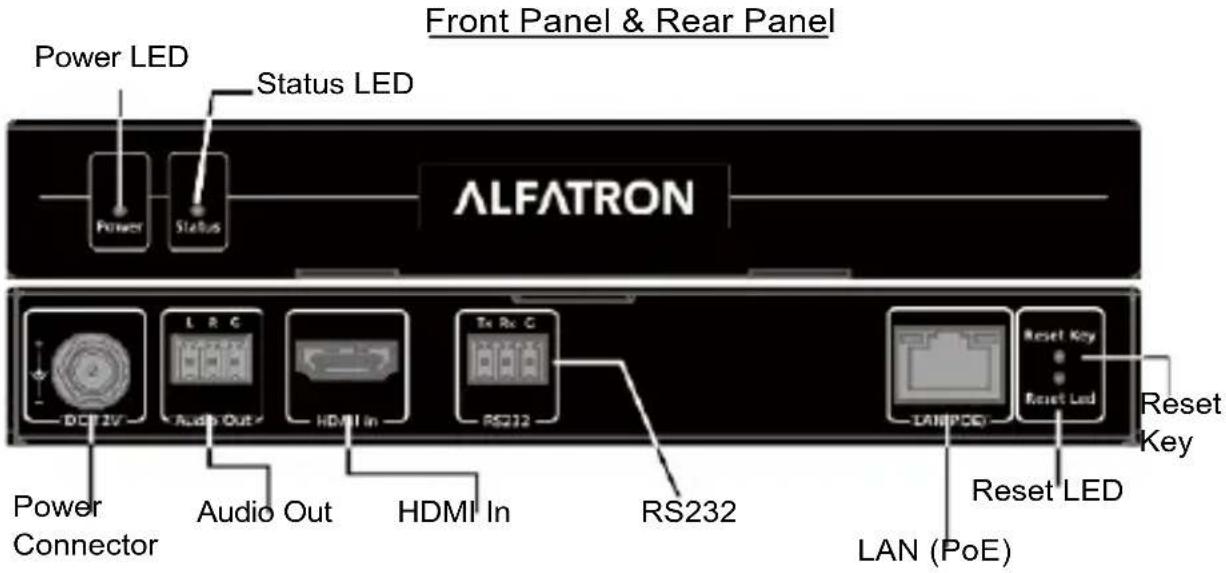
Decoder
Front Panel & Rear Panel
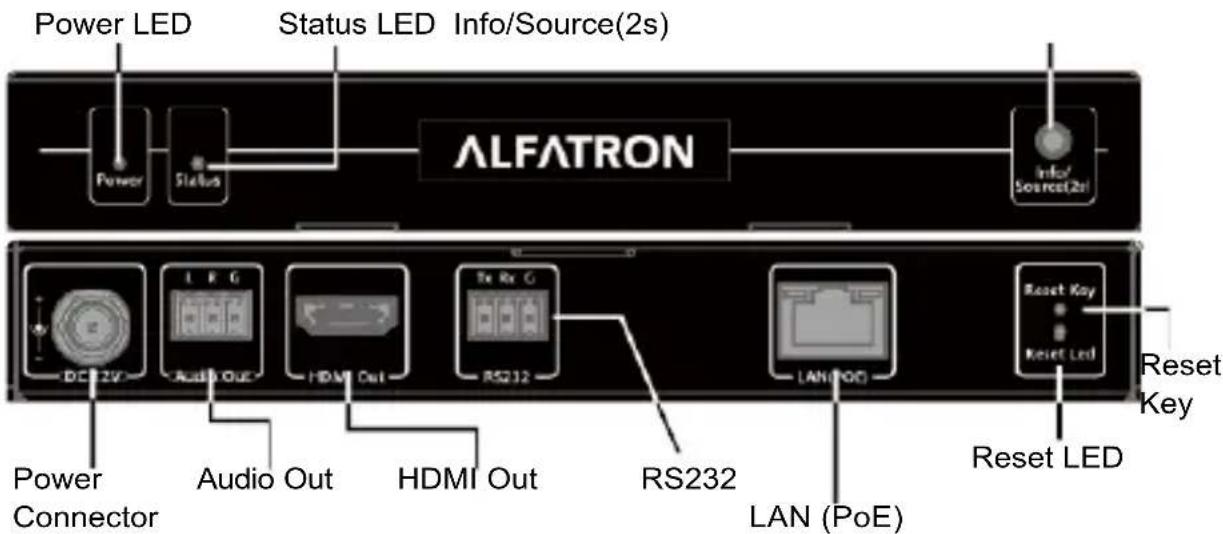
Info/Source (2s) Key: Short press to display/remove on screen information display of decoder; Press and hold for 2 seconds to change the current paired encoder.
Application
a. 1 - 1 : Extender
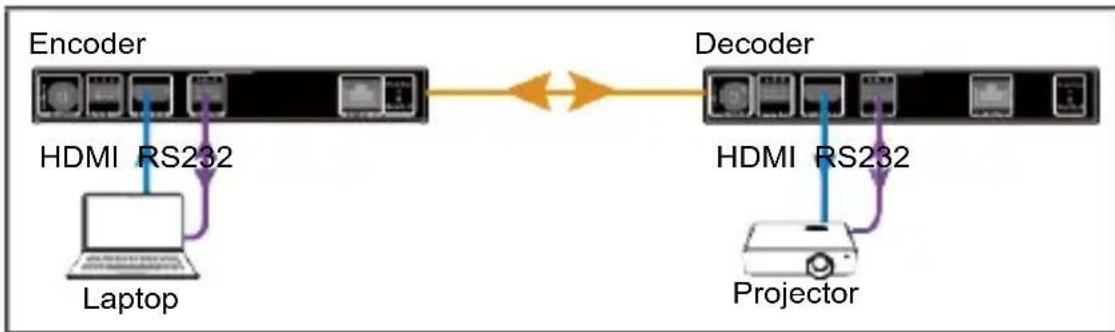
To configure matrix and video wall, perform the following:

1) Scan the QR code or search "VDirector" in Apple App Store with your iPad to install the VDirector.
2) Connect all encoders, decoders and the wireless router to the network switch according to the following diagram shown:
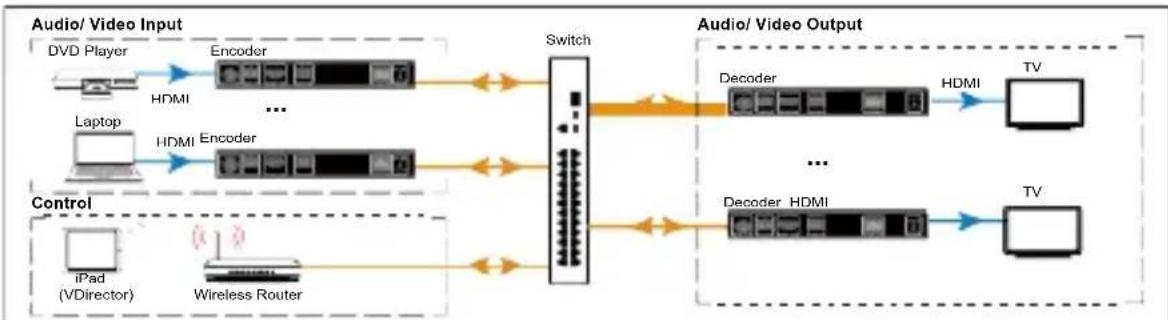
flowchart
graph LR
    subgraph Audio/Video Input
        A["DVD Player"] --> B["Encoder"]
        C["Laptop"] --> D["Encoder"]
        E["iPad (VDirector)"] --> F["Wireless Router"]
    end

    subgraph Audio/Video Output
        G["Decoder"] --> H["HDMI"] --> I["TV"]
        J["Decoder HDMI"] --> K["TV"]
    end

    B <--> G
    D <--> J
    F <--> J
    H <--> I
    K <--> J
    style Audio/Video Input fill:#f9f,stroke:#333
    style Audio/Video Output fill:#ccf,stroke:#333
3) Configure the wireless router accordingly, and then connect your iPad to the Wi-Fi network. Launch the VDirector on iPad,
4) the VDirector will start searching for online devices, and the following main screen will appear:
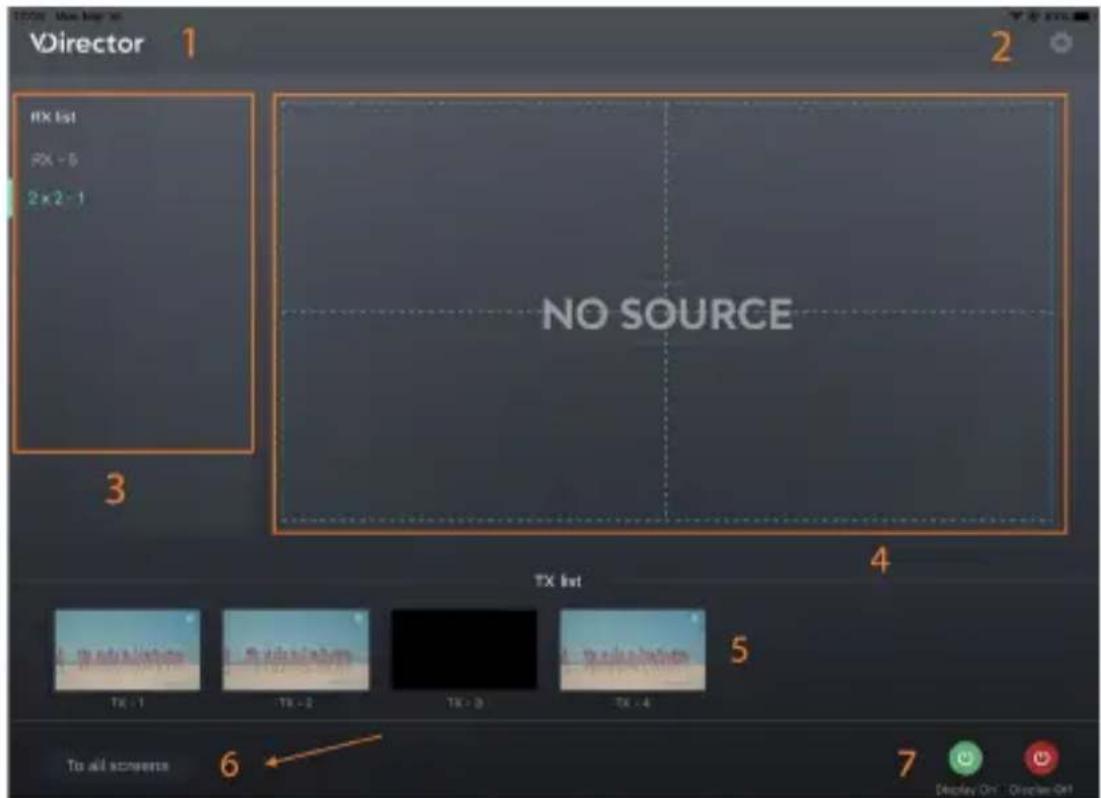
| No. | Name | Description |
| 1 | Logo | This logo can be changed to a new one. |
| 2 | System Configuration Button | Click this button to enter system configuration page for the functions:1) Naming and Sequencing;2) Video Wall Settings;3) Advanced Settings;4) System Information; |
| 3 | RX List | Shows the list of online RX devices, including single devices and devices for video walls. |
| 4 | RX Preview | Shows the live preview of current RX assignments. |
| 5 | TX List | Shows the IP stream's live preview from TX device. |
| 6 | To All Screens | Drag a TX from TX list over this button means the switching of this TX to all RX devices in RX list, including video walls. |
| 7 | Display On/Off | Display On: Turn on all RXs' displays.Display Off: Set all RXs' displays to standby state. |
Specification
| Video | Encoder | Decoder |
| Input Port | 1 x HDMI | 1 x LAN |
| Input Resolutions | up to 4K@30Hz | up to 4K@30Hz |
| Output Port | 1 x LAN | 1 x HDMI |
| Output Resolutions | up to 4K@30Hz | up to 4K@30Hz |
| Video Protocol | H.265 Video Compression | |
| Audio | Encoder | Decoder |
| Input Port | 1 x HDMI | 1 x LAN |
| Output Port | 1 x LAN, 1 x Line Out | 1 x HDMI, 1 x Line Out |
| Audio Format | MPEG4-AAC Stereo | |
Control
| Control Method | VDirector App(IOS/Android/Windows Version) |
General
| Operating Temperature | +32°F ~ +113°F (0°C ~ +45°C)10% ~ 90%, non-condensing |
| Storage Temperature | - 4°F ~ 140°F (-20°C ~ +70°C)10% ~ 90%, non -condensing |
| Power Supply | DC12V 1A /PoE |
| Power Consumption | Encoder: 5W (Max) Decoder: 6W (Max) |
| ESD Protection | Human body model:±8kV (air-gap discharge)±4kV (contact discharge) |
| Product Dimension (W x H x D) | 175mm x 25mm x 100.2mm/ 6.9" x 0.98" x 3.9" each for encoder and decoder |
| Net Weight | 0.60kg/1.32lbs each for TX and RX |
Trouble Shooting
-
Do the network switch and the wireless router require specific settings? The network switch does not require specific settings. If the wireless router enables DHCP function, ensure the DHCP IP address assignments does not start with "169.254".
-
Why can't the VDirector find online devices?
Ensure the network switch's broadcasting function is not disabled intentionally.
- Do the encoder and decoder support RS232 routing?
Yes. RS232 and audio routing will always follow video routing.
- Is it also possible to configure the video wall to the 1-n application?
Yes.
- What is the limitation of Video over IP devices on a network?
Limitless except that one encoder cannot be assigned to more than 50 decoders simultaneously. Note: As the number of the assigned decoders increases, the end-to-end latency increases accordingly.
- May I change the matched encoder for a decoder without using VDirector app?
Yes. The matched encoder will change by simply holding on the ID key (labelled 'Info/Source (2s)') in the front panel of a decoder for 2 seconds.
Warranty Limited warranty in respect of Alfatron Products Only
1.1 This limited warranty covers defects in materials and workmanship on this product.
1.2 Should warranty service be required, proof of purchase must be presented to the Company. The serial number on the product must be clearly visible and not have been tampered with in any way whatsoever.
1.3 This limited warranty does not cover any damage, deterioration or malfunction resulting from any alteration, modification, improper or unreasonable use or maintenance, misuse, abuse, accident, neglect, exposure to excess moisture, fire, improper packing and shipping (such claims must be presented to the courier), lightning, power surges, or other acts of nature. This limited warranty does not cover any damage, deterioration or malfunction resulting from the installation or removal of this product from any installation, any unauthorized tampering with this product, any repairs attempted by anyone unauthorized by the Company to make such repairs, or any other cause which does not relate directly to a defect in materials and/or workmanship of this product. This limited warranty does not cover equipment enclosures, cables or accessories used in conjunction with this product.
This limited warranty does not cover the cost of normal maintenance. Failure of the product due to insufficient or improper maintenance is not covered.
1.4 The Company does not warrant that the product covered hereby, including, without limitation, the technology and/or integrated circuit(s) included in the product, will not become obsolete or that such items are or will remain compatible with any other product or technology with which the product may be used.
1.5 Only the original purchaser of this product is covered under this limited warranty. This limited warranty is not transferable to subsequent purchasers or owners of this product.
1.6 Unless otherwise specified, the goods are warranted in accordance with the manufacturer's product specific warranties against any defect attributable to faulty workmanship or materials, fair wear and tear being excluded.
1.7 This limited warranty only covers the cost of faulty goods and does not include the cost of labor and travel to return the goods to the Company's premises.
1.8 In the event of any improper maintenance, repair or service being carried out by any third persons during the warranty period without the Company's written authorization, the limited warranty shall be void.
1.9 A 7 (seven) year limited warranty is given on the aforesaid product where used correctly according to the Company's instructions, and only with the use of the Company's components.
1.10 The Company will, at its sole option, provide one of the following three remedies to whatever extent it shall deem necessary to satisfy a proper claim under this limited warranty:
1.10.1 Elect to repair or facilitate the repair of any defective parts within a reasonable period of time, free of any charge for the necessary parts and labor to complete the repair and restore this product to its proper operating condition.; or
1.10.2 Replace this product with a direct replacement or with a similar product deemed by the Company to perform substantially the same function as the original product; or
1.10.3 Issue a refund of the original purchase price less depreciation to be determined based on the age of the product at the time remedy is sought under this limited warranty.
1.11 The Company is not obligated to provide the Customer with a substitute unit during the limited warranty period or at any time thereafter.
1.12 If this product is returned to the Company this product must be insured during shipment, with the insurance and shipping charges prepaid by the Customer. If this product is returned uninsured, the Customer assumes all risks of loss or damage during shipment. The Company will not be responsible for any costs related to the removal or reinstallation of this product from or into any installation. The Company will not be responsible for any costs related to any setting up this product, any adjustment of user controls or any programming required for a specific installation of this product.
1.13 Please be aware that the Company's products and components have not been tested with competitor's products and therefore the Company cannot warrant products and/or components used in conjunction with competitor's products.
1.14 The appropriateness of the goods for the purpose intended is only warranted to the extent that the goods are used in accordance with the Company's installation, classification and usage instructions.
1.15 Any claim by the Customer which is based on any defect in the quality or condition of the goods or their failure to correspond with specification shall be notified in writing to the Company within 7 days of delivery or (where the defect or failure was not apparent on reasonable inspection by the Customer) within a reasonable time after discovery of the defect or failure, but, in any event, within 6 months of delivery.
1.16 If delivery is not refused, and the Customer does not notify the Company accordingly, the Customer may not reject the goods and the Company shall have no liability and the Customer shall pay the price as if the goods had been delivered in accordance with the Agreement.
1.17 THE MAXIMUM LIABILITY OF THE COMPANY UNDER THIS LIMITED WARRANTY SHALL NOT EXCEED THE ACTUAL PURCHASE PRICE PAID FOR THE PRODUCT.
- Statement
- FCC Statement
- Safety Precaution
- Table of Contents
- Introduction 2
- Application....4
- Specification....6
- Trouble Shooting 7
- Warranty 8
- Introduction
- Overview
- Package Contents
- Encoder: ALF-IPK1HE
- Decoder: ALF-IPK1HD
- Panel
- Encoder
- Decoder
- Application
- Trouble Shooting
- Warranty Limited warranty in respect of Alfatron Products Only
Brand : Alfatron
Model : ALF-IPK1HE
Category : Uncategorized