
OAC 4000 - Heating Equator - Free user manual and instructions
Find the device manual for free OAC 4000 Equator in PDF.


| Product Type | Indoor/Outdoor Air Conditioner (Cooling, Heating, Fan) |
| Model | OAC 4000 |
| Brand | Equator |
| Cooling Capacity | 10000 BTU |
| Heating Capacity | 6200 BTU |
| Air Volume | 280 m³/h |
| Power Supply | 110V / 60Hz |
| Cooling Current | 9.1 A |
| Heating Current | 13.6 A |
| Cooling Power | 1000 W |
| Heating Power | 1500 W |
| Refrigerant | R32 / 380g |
| Temperature Range | 23°F to 131°F |
| Net Weight | 62 lbs |
| Dimensions (HxWxD) | 22.4 x 18.9 x 11 inches |
| IP Rating | IP24 (suitable for outdoor use) |
| Functions | Cool, Heat, Fan |
| Hoses | Dual 360° rotating flexible hoses |
| Remote Control | Yes, with sensor cord |
| Casters | 4 locking wheels |
| Water Tank | Internal tank (empty every 2-3 days) |
| Drainage | Drainage hose included for continuous drain |
| Air Filter | Washable (pull out, wash, dry) |
| Safety Features | Overheat protection (12h auto shut-off), compressor delay (3 min), power-off memory |
Frequently Asked Questions - OAC 4000 Equator
User questions about OAC 4000 Equator
0 question about this device. Answer the ones you know or ask your own.
Ask a new question about this device
Download the instructions for your Heating in PDF format for free! Find your manual OAC 4000 - Equator and take your electronic device back in hand. On this page are published all the documents necessary for the use of your device. OAC 4000 by Equator.
USER MANUAL OAC 4000 Equator
OUTDOOR / INDOOR AIR CONDITIONER
Cooling / Heating
Model - OAC 4000
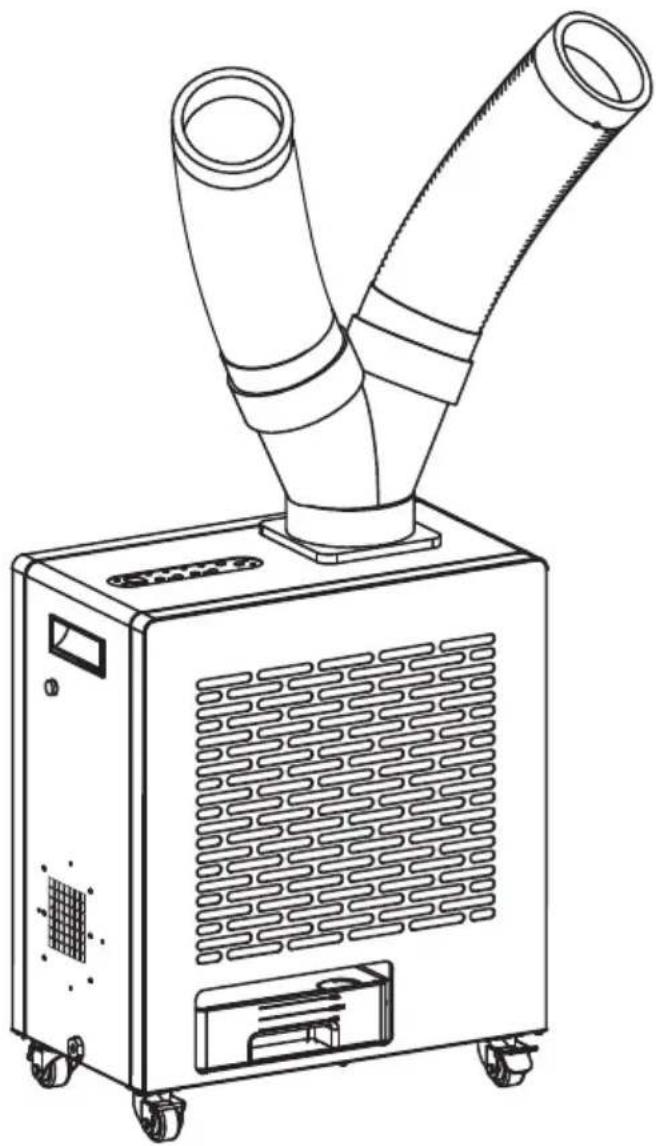
natural_image
Line drawing of a dual-lane industrial air purifier unit with two conical ducts mounted on wheels (no text or symbols)OWNER'S MANUAL
Please read the instructions carefully and keep for future reference. Information may be updated from time to time so please refer to the website for the latest version of the manual.
Warranty
Equator Appliances undertakes to the consumer-owner to repair or, at our option, to replace any part of this product which proves to be defective in workmanship or material under normal personal, family or household use, in USA and Canada, for a period of one year from the date of original purchase. For commercial use, the product is warranted for a period of 90 Days. During this period, we will provide all labor and parts necessary to correct such defect, free of charge, if the appliance has been Installed and operated in accordance with the written instructions with the appliance. Ready access to the appliance, for service, is the responsibility of the consumer-owner. Services would be provided from Monday to Friday between normal business hours.
Exclusions
In no event shall Equator Appliances be liable for incidental or consequential damages or for damages resulting from external causes such as abuse, misuse, incorrect voltage or acts of God. This warranty does not cover service calls which do not involve defective workmanship or materials covered by this warranty. Accordingly, diagnosis and repair costs for a service call which does not involve defective workmanship or materials will be the responsibility of the consumer-owner.
Specifically, the following work is not covered under warranty and does not constitute warranty work:
Installation - e.g. Installing as built-in Maintenance - e.g. Cleaning the appliance using solvents Mishandling - e.g. Breakage of hoses
Most work is covered. The defining factor is, has the machine malfunctioned (Equator Appliances is responsible) or has the customer omitted or done something to cause the machine to malfunction (customer is responsible). Some states do not allow the exclusion or limitation of incidental or consequential damages, so the above limitation of exclusion may not apply to you.
WARRANTY SERVICE
This warranty is given by:
Equator Appliances
10222 Georgibelle Drive, Suite 200,
Houston, Texas 77043-5249
For Customer Service:
Appliance Desk
Business hours: 9:00 am to 5:00 pm weekdays
You can register your Warranty by either of the following methods:
- Scan Chat-AI
- Open Smart Phone
- Open Camera
- Click the Link

- Register online at ApplianceDesk.com/Warranty
- Chat-AI is also used to obtain Product Information, Manuals and Updates
GENERAL
Since it is the responsibility of the consumer-owner to establish the warranty period by verifying the original purchase date, Equator Appliances recommends that a receipt, delivery slip or some other appropriate payment record be kept for that purpose.
This warranty gives you specific legal rights, and you may also have other rights which vary from State to State.
All rights reserved. Manual subject to change without notice
Congratulations on your new Indoor / Outdoor Air Conditioner!
In addition to its contemporary design, this is a highly sophisticated engineered product that will give you many years of satisfaction.
Here are some of the best reasons for buying your appliance:
• Air Conditioner + Heater + Fan
- Portable with casters for outdoor or indoor use
• Dual 360 degree rotating hoses
- Remote control and sensor
- All metal, waterproof construction
| USES | ||
| Unit Location | Cooling | Hot Air Exhaust |
| Outdoors Eg: Garden | Outdoors | Outdoors |
| Indoors Eg: Shop | Indoors | Outdoors |
| Outdoors Eg: Cabin | Indoors | Outdoors |
The unit can be used in following ways:
• In Outdoors. Eg: Garden.
- Kept indoors and Hot Air Exhaust Outdoor. Eg: Shops, Garages, etc.
- Kept Outdoors and cold air hoses inside the room. Hot air is exhausted outdoors. Eg: Cabin.
If the Unit is Outdoors, you can operate it with remote with the sensor cord located inside the room. It will detect the temperature of room and can be operated by remote.
Safety
Keep the appliance away from volatile and flammable substances.
Keep ventilation openings clear of obstructions.
When positioning the appliance, ensure the electrical cord is not trapped or damaged.
Do not place multiple portable socket-outlets at the rear of the appliance.
Never unplug the appliance by pulling on the power cord. Grip the plug firmly and pull straight out to remove from wall socket.
Do not use an extension cord and a damaged power cord .
Do not operate the unit with wet hands, to prevent electric shock.
Children should be supervised to ensure that they do not climb on or play with the appliance.
This appliance is not intended for use by persons (including children) with reduced physical, sensory or mental capabilities, or lack of experience and knowledge, unless they have been given supervision or instruction.
Please dispose of this appliance in accordance with local regulations.
California Proposition 65
WARNING: This product contains chemical known to the State of California to cause cancer and birth defects or other reproductive harm.
Description
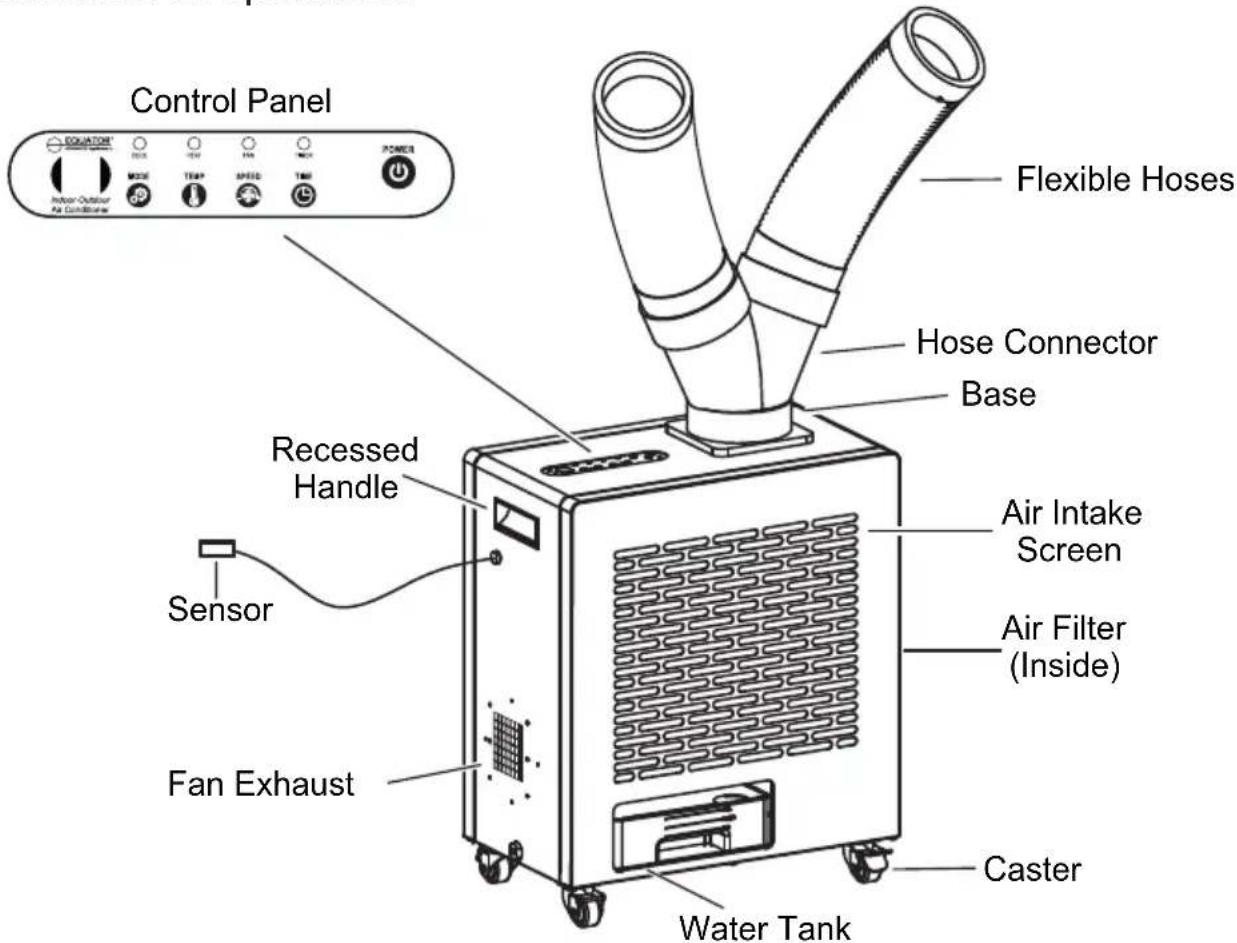
The OAC 4000 is a 3-in-1 appliance that can be used as an Air Conditioner, a Heater and a Fan, and can be used outdoors or indoors. It is rated IP24 which is suitable for outdoor use. The OAC 4000 has anti-rust and anti-corrosion coating, and electrical parts are waterproof. The appliance is conveniently portable, with a recessed handle and four 360^ rotating wheels which enables easy movement, and the wheels can lock for safety.
The OAC 4000 pulls ambient air through the Air Intake Screen and blows out air through two Flexible Hoses which can be rotated 360^ and positioned to blow air to desired areas. For cooling, the ambient air circulates through a compressor to blow cool air. For heating, the ambient air circulates through a heating element to blow hot air.
The functions can be set from the Control Panel or by using a remote control. The Mode can be selected for Cool, Heat or Fan. The temperature can be selected, and the timer can be set for duration of operation.
Assembly
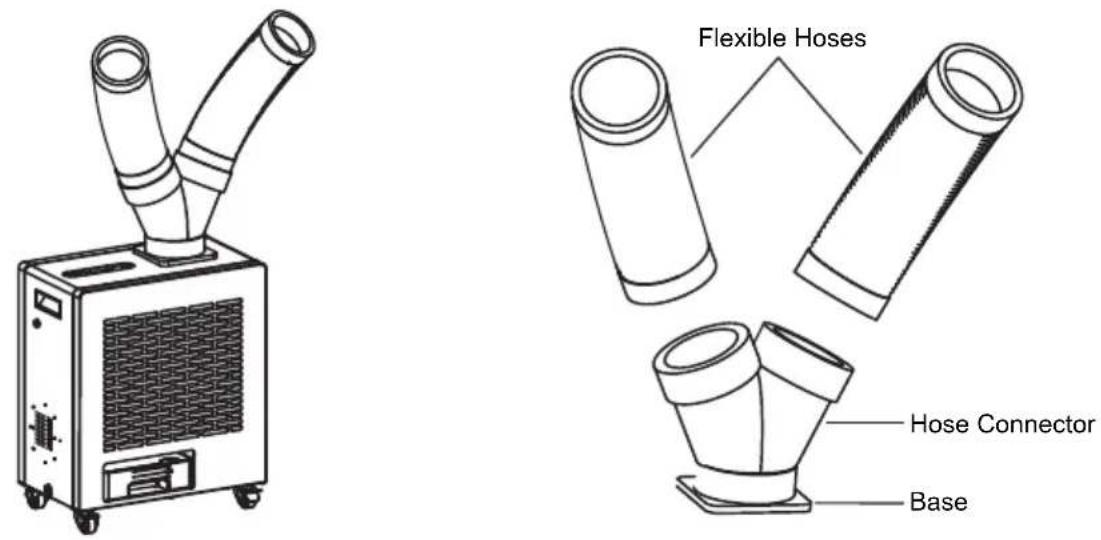
The OAC 4000 is easy to use and requires only a few quick steps to assemble the parts. Most of the appliance is already assembled and only requires the Flexible Air Hoses to be attached to the main unit.
Attach the Hose Connector to the Base by turning counterclockwise. When firmly installed there will be a click. Attach the Flexible Air Hoses to the other end of the Hose Connector by turning counterclockwise.
Hot Air Exhaust Hose (optional)
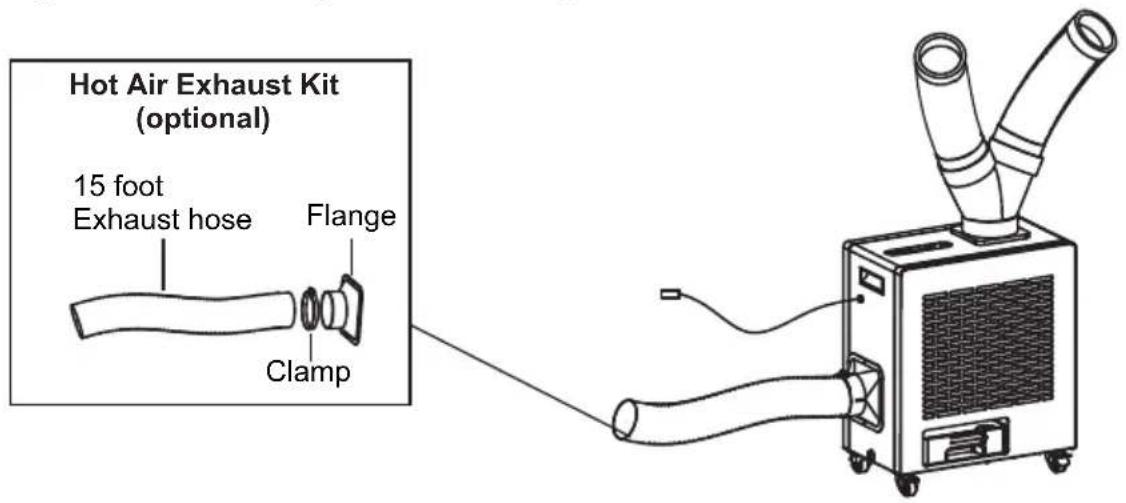
Use the Flange and Clamp in the Hot Air Exhaust Kit, to attach the 15-foot Hot Air Exhaust Hose over the Fan Exhaust. The purpose of attaching the exhaust hose is to blow hot air away from the area being used, thereby maintaining the comfort level.
Placement
The OAC 4000 is designed for outdoor or indoor use and is portable. The compact size and casters enable it to be moved easily.
When moving the appliance do not tilt it more than 45 degrees.
Place the appliance away from sources of heat and high humidity.
Place the appliance in a covered area to protect from direct sunlight and heavy rainfall for greater longevity.
Ensure there is adequate ventilation around the appliance. The Air Intake Screen and Flexible Hoses should be more than 1 foot (30 cm) away from walls or other obstructions. The vent exhausting the hot air should be 3 feet (90 cm) from any object or structure.
Place the appliance on a flat level surface and lock the casters.
Check the plug and cable before connecting the power and ensure it is 110 voltage.
When using indoors, place the OAC near a door or window. Please attach the 15 foot Hot Air Exhaust Hose and ensure that the hose exhaust is pointing out of the room.
Operation
Operate the OAC by using either the Control Panel or the Remote.
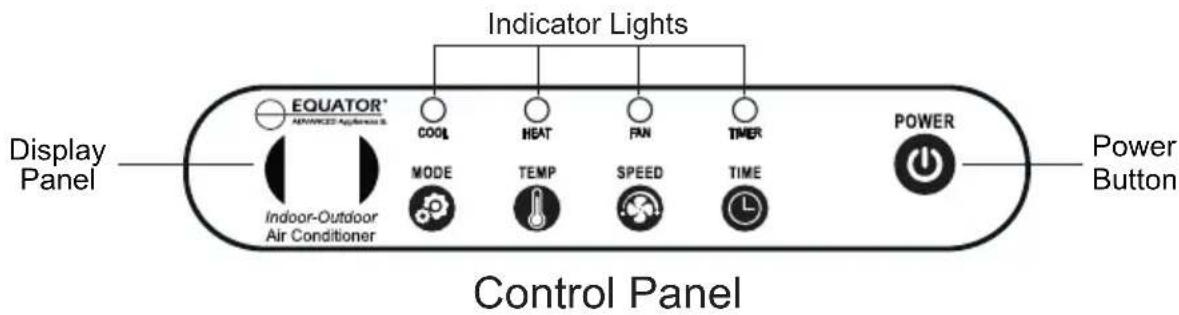
Press the Power icon ⏻ to turn On the appliance.
The OAC 4000 has 3 functions or Modes: Cool, Heat and Fan. Press and hold the MODE icon Ⓤ to select cool, warm or ambient air to blow from the 2 Flexible Hoses. The Indicator Light above the selected mode will illuminate and also show it on the Display Panel.
Control Panel Display and Indicator Lights:
Cool mode – CO and blue light Heat mode – HE and red light Fan mode – Fn and white light
Press the TEMP icon ⏻ to select the temperature of air blowing from the hoses. The indoor temperature range for operating the appliance is 50-99°F. Each time you press the icon, the temperature on the Display will increase in one-degree increments. The temperature ranges from 23-131°F.
Press the SPEED icon ⚙ to select high or low speed of the air blowing through the hoses. L or H will show on the Display. Low speed is the default.
Press the TIMER icon ⏻ if you want to set a duration of time for the appliance to operate. If no time is set, the Display will show the default “00”. Each time the icon is pressed the time increases in one-hour increments up to 12 hours, and the Display will show 01, 02, etc.
Sensor
A Sensor wire can be plugged into the OAC 4000, which allows the appliance to operate using a Remote. This is useful when using the appliance indoors. The functions on the Remote are the same as those on the Control Panel.
Exhaust Air and Condensate
A fan motor blows hot air exhaust out through the back of the unit. There is an optional Hot Air Exhaust Kit, that can be used to attach a 15-foot Hot Air Exhaust Hose over the exhaust outlet. This allows the exhaust air to be discharged at a distance away from where the appliance is being used. Especially if the appliance is being used indoors, the Hot Air Exhaust Hose can be positioned to expel the exhaust air outdoors.
Condensate is collected in a Water Tank at the base of the appliance or can be discharged directly to a designated area.
Additional Features
Power-o ffMemory
The OAC 4000 has a memory feature which remembers the settings when a power failure occurs. When power is restored, OAC will automatically start and operate based on the settings that have previously been selected.
Safety shutdown
To prevent overheating, the appliance shuts down automatically after continuously working for 12 hours.
Compressor protection
After turning off the appliance, wait 5 minutes to turn it on again. It cannot be turned on immediately. If operating the Cool mode, the compressor needs 3 minutes to restart and blow cool air.
Water Tank and Drainage Hose
In the course of operating the OAC, condensate water is produced. The water can either be collected in the Water Tank or can be discharged directly outdoors through a Drainage Hose included with the unit.
Water Tank
The Water Tank is located at the bottom of the OAC. It is important to empty the tank in a timely manner. Check the water level every 2-3 days.
Turn the power off before emptying the Water Tank.
Remove the Water Tank, discard the water and then replace it again before turning the OAC on. Do not move the OAC when it is full of water.
Drainage Hose
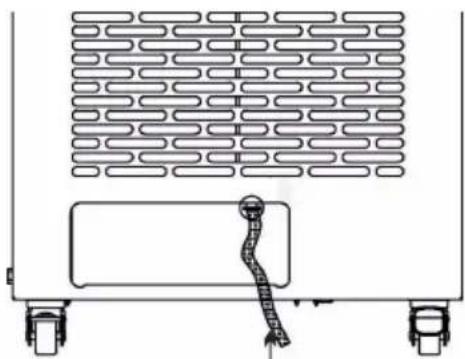
Remove the Water Tank.
Attach the Drainage Hose directly onto the outlet where it enters the Water Tank cavity. The Hose can be held in place with the Hose Clip provided.
Use a Phillips screwdriver to screw on the Hose Clip. This will keep the Drainage Hose secured.
natural_image
Diagram of a vehicle front view showing wheels, a car, and a textured panel (no text or symbols)Drainage Hose
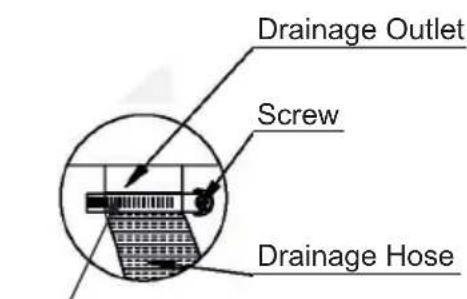
Hose Clip
Maintenance
Make sure the power cord is unplugged before moving or cleaning the OAC.
Clean the outside and inside of the appliance regularly, using water and mild detergent.
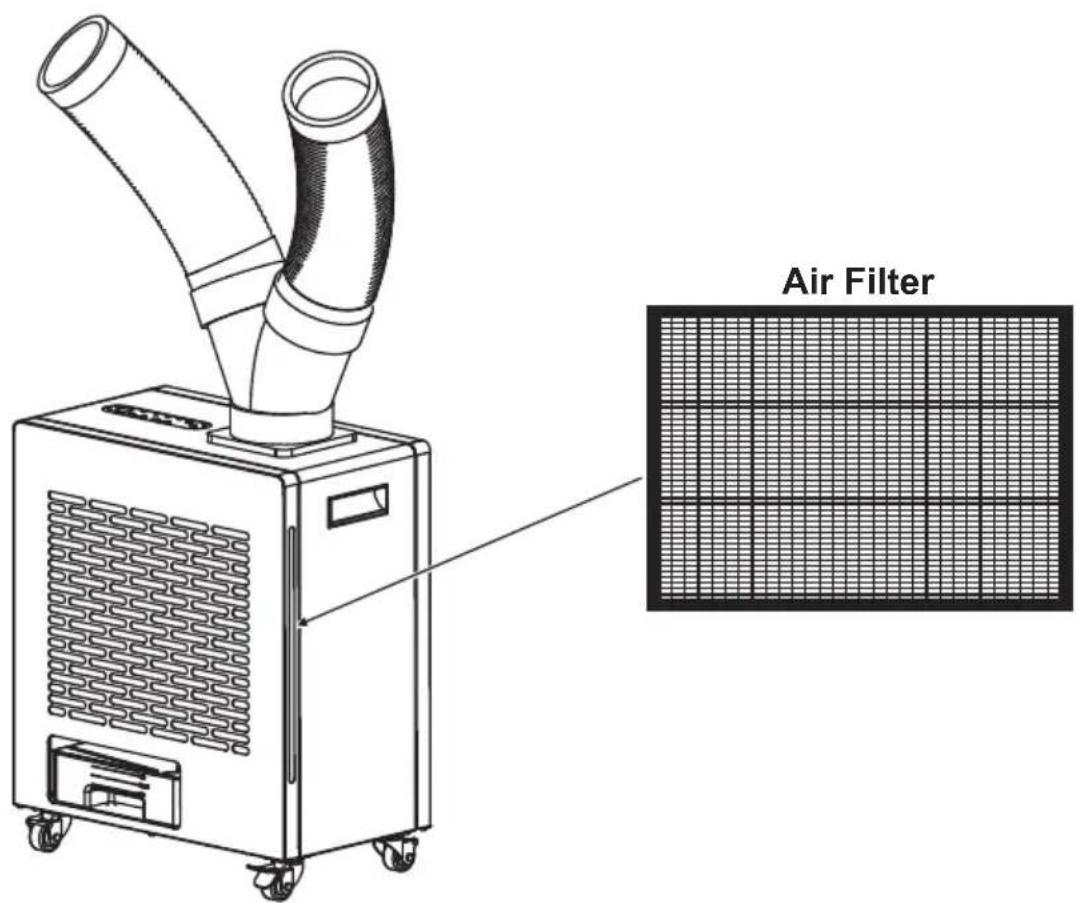
Remove the filter by pulling straight out from the slot. Clean and wash the filter. Before reinstalling, it should be completely dry.
Before storing for an extended time:
• Empty the Water Tank and let it dry completely.
- Once dry, cover the OAC and store in an upright position.
Troubleshooting
| Possible Cause and SolutionProt | |
| Not Working | Check the fuse.Check if it is plugged in correctly to the power source. |
| Not Cooling | Air Intake Screen surface is blocked.Clean and remove blockage.Filter needs cleaning.Ambient temperature is very high (above 113°F/45°C).Move away from heat source or direct sunlight.Check for proper ventilation and that air inlet or outlet is not blocked.Voltage is not correct.Compressor overheating.Shut down and restart after some time. |
| Water Leak | Drain is blocked.Needs to be cleared.Water Tank is not placed correctly.Water Tank is full and needs to be emptied. |
Technical Specifications for OAC 4000
| Model | OAC 4000 |
| Cooling / Heating Capacity | 10000 BTU / 6200 BTU |
| Air Volume 280 m3/h | |
| Voltage | 110V / 60Hz |
| Cooling / Heating Current | 9.1 A / 13.6 A |
| Cooling / Heating Power | 1000 W/1500 W |
| Refrigerant | R 32 / 380g |
| Temperature Range (Cooling / Heating) | 23°F - 131°F |
| Net Weight | 62 lbs |
| Product Dimensions (HxWxD) | 22.4 x 18.9 x 11 (inch) |
Circuit Diagram
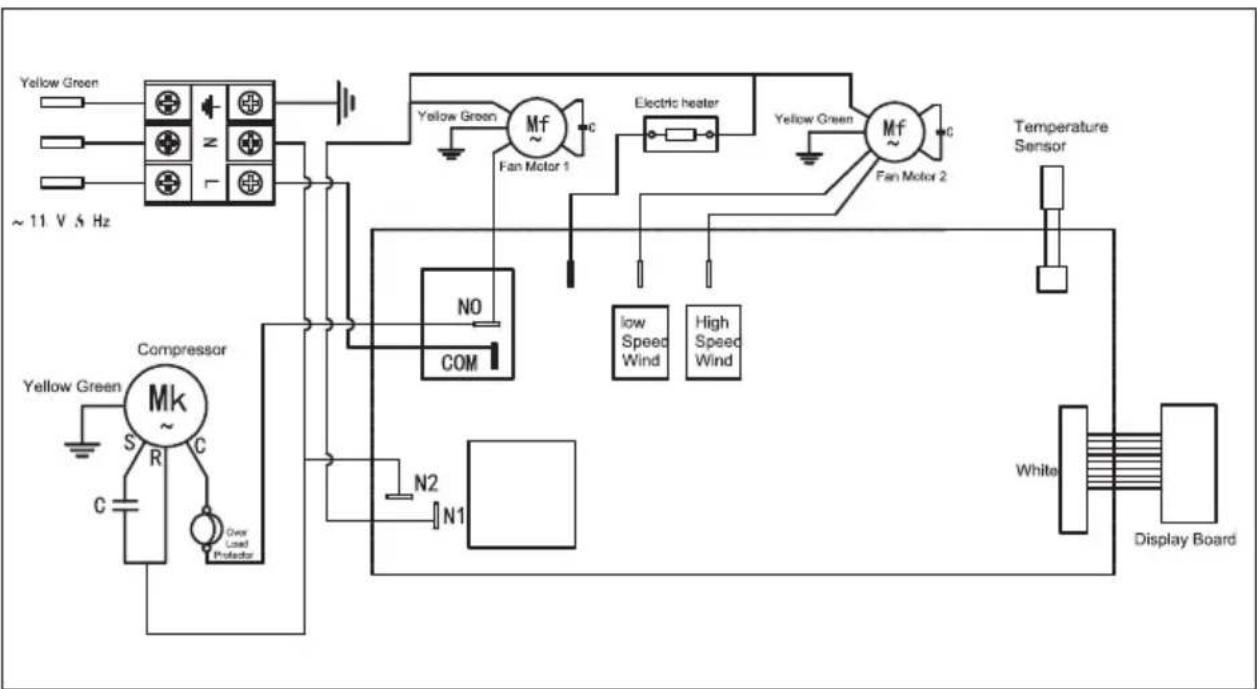
flowchart
graph TD
    A["Yellow Green"] --> B["Compressor"]
    C["Yellow Green"] --> B
    D["Yellow Green"] --> B
    E["Yellow Green"] --> B
    F["~11 V 5 Hz"] --> B
    B --> G["Mk ~"]
    G --> H["Over Load Protector"]
    H --> I["S R C"]
    I --> J["N2 N1"]
    J --> K["COM"]
    L["Yellow Green Fan Motor 1"] --> M["Mf ~"]
    N["Electric heater"] --> O["Mf ~"]
    P["Low Speed Wind"] --> Q["COM"]
    R["High Speed Wind"] --> Q
    S["Temperature Sensor"] --> T["Display Board"]
    U["White"] --> T
    V["White"] --> T
natural_image
Simple geometric diagram of a circle with a horizontal line crossing through it (no text or symbols)EQUATOR®
ADVANCED Appliances ≡
Equator Advanced Appliances USA, founded in 1991, offers Efficient, High-Quality, and Innovative household appliances.
Our Mission is to simplify domestic chores and save Time, Space, and Energy.
Our Vision is to enhance our Customer's Quality of Life!
- OUTDOOR / INDOOR AIR CONDITIONER
- Warranty
- Exclusions
- Specifically, the following work is not covered under warranty and does not constitute warranty work:
- WARRANTY SERVICE
- Equator Appliances
- For Customer Service:
- Appliance Desk
- GENERAL
- Congratulations on your new Indoor / Outdoor Air Conditioner!
- Safety
- California Proposition 65
- Description
- Assembly
- Hot Air Exhaust Hose (optional)
- Placement
- Operation
- Control Panel Display and Indicator Lights:
- Sensor
- Exhaust Air and Condensate
- Additional Features
- Power-o ffMemory
- Safety shutdown
- Compressor protection
- Water Tank and Drainage Hose
- Water Tank
- Drainage Hose
- Maintenance
- Troubleshooting
- Technical Specifications for OAC 4000
- Circuit Diagram
- EQUATOR®
- ADVANCED Appliances ≡
Brand : Equator
Model : OAC 4000
Category : Heating