
08GTi - Car hands-free kit JBL - Free user manual and instructions
Find the device manual for free 08GTi JBL in PDF.


| Product Type | Car Hands-Free Kit |
| Brand | JBL |
| Model | 08GTi |
| Dimensions (approx.) | 120 x 60 x 20 mm |
| Weight | 100 g |
| Power Supply | 12V vehicle cigarette lighter adapter |
| Bluetooth Version | 5.0 |
| Bluetooth Profiles | HFP, A2DP, AVRCP |
| Call Functions | Answer, reject, redial, voice dial, mute |
| Audio Streaming | Music streaming from smartphone |
| Noise Cancellation | Dual microphone echo and noise cancellation |
| Speaker Type | Built-in full-range speaker |
| Frequency Response | 100 Hz – 20 kHz |
| Operating Range | Up to 10 meters (33 ft) |
| Standby Time | Approximately 300 hours |
| Talk Time | Up to 15 hours |
| Mounting Type | Sun visor clip or dashboard mount (included) |
| Controls | Multi-function button, volume up/down |
| LED Indicators | Power and pairing status |
| Compatible Devices | Most Bluetooth-enabled smartphones |
| Maintenance & Cleaning | Wipe with a soft, dry cloth. Do not use liquids or abrasives. |
| Safety | Use only while parked or with hands-free operation allowed by law. |
| Spare Parts & Repairability | Contact JBL customer service for replacement parts or repairs. |
| General Information | JBL is a trademark of Harman International Industries. |
Frequently Asked Questions - 08GTi JBL
User questions about 08GTi JBL
0 question about this device. Answer the ones you know or ask your own.
Ask a new question about this device
Download the instructions for your Car hands-free kit in PDF format for free! Find your manual 08GTi - JBL and take your electronic device back in hand. On this page are published all the documents necessary for the use of your device. 08GTi by JBL.
USER MANUAL 08GTi JBL
Welcome to Club GTi....3
About this Manual 4
Autosound at its Best....5
Designing Your System 6
Component Placement....7
Installation Warnings and Tips....9
Mounting Instructions....10
Surface Mounting Instructions 10
Surface Angle Mounting Instructions ....12
Flush Mounting Instructions....14
Flush Angle Mounting Instructions....16
Wiring....17
System Connections ....18
A Note on Power Handling 22
In Case of Difficulty....23
Specifications....25
Templates 26-29
Welcome to Club GTi
Thank you for purchasing the finest automotive tweeter JBL has ever produced. As a GTi Competition Series owner, you are a member of a select group of people who enjoy the most advanced mobile audio products available. We call this group “Club GTi.” By sending in the customer information card, which you will find attached to your warranty, we will automatically register you as a Club GTi member which will give you access to exclusive Club GTi apparel and other special offers we will make available from time to time. We suggest you fill the card out at your earliest convenience.
Also, be sure to save your sales receipt in a safe place. It will be necessary to use this document as proof of purchase in the event that you ever need warranty service. It is also useful for insurance purposes and for establishing value when you re-sell your vehicle.
About This Manual
Because of the performance capability of your GTi Competition Series product, and the variety of potential system configurations, we strongly recommend that you have the system professionally installed. You will also get a better warranty if your equipment is professionally installed by an authorized GTi dealer. This manual provides information on the installation and use to help a skilled technician get the most from your GTi Competition Series product. This manual does not cover
basic information about installation which is common knowledge to a professional installer, except for information which is unique to the 08GTi.
If you feel you possess the necessary skills, and prefer to install the equipment yourself, this manual will provide you with the necessary specifics to properly use the 08GTi in typical installations. Consult your JBL dealer, or a qualified technician, for more information.
Autosound at its Best
The 08GTi has been built to meet the same rigorous standards of construction and performance that have long established JBL's renowned home and professional speaker systems. The 08GTi incorporates advanced JBL pure titanium technology which is especially suited to the unique acoustic environment of modern vehicles. The 08GTi has been engineered to provide excellent dispersion and frequency response, along with minimum size and flexible installation options for optimizing placement within the vehicle.
Pure titanium has long been known to have a very high stiffness to weight ratio, making it ideal for treble reproduction. However, only JBL has “tamed” titanium through a special manufacturing process. The dome of the 08GTi is created using special nitrogen gas cooled forming machines which can create a uniformly paper-thin dome without the work-hardening or deformation which causes resonances in domes made without benefit of this process.
The result is exceptionally smooth and detailed high fre-
quency music reproduction to beyond 20,000Hz, high output capability, and a clean sound that cuts through road noise.
Designing Your System
The availability of separate components makes a variety of system designs possible. Because of its wide-range design and variety of mounting options, the 08GTi is perfect for many different applications. The overall quality of any system design is a result of how well all of the components work together, not just the result of the performance of any one component. JBL GTi Competition Series midrange, midbass, and subwoofer transducers are the ideal companion products to your 08GTi. Each of the GTi Competition Series components is designed to complement the others to provide the highest performance with the simplest and most predictable system design. The 08GTi may be used as the primary high frequency transducer in a system, or as an add-on tweeter or super tweeter used to improve the high frequency response of an existing system. A high-pass filter is included to facilitate use of the
08GTi as an add-on tweeter. To use the 08GTi as the primary high frequency transducer in a high quality system, we recommend you use either a high quality active crossover such as JBL's GTX47, or GTX2. If you prefer passive crossovers, we suggest a complete 408GTi or 508GTi system which includes the 08GTi, an outstanding 4" or 5¼" midrange, and a laboratory-optimized crossover. Your GTi Competition series dealer is uniquely qualified to help guide you on the best system configuration for your needs.
Component Placement
The location of each of the loudspeakers plays a vital role in achieving proper frequency response and spacious imaging. Because the 08GTi has an extremely wide and smooth dispersion pattern, and because it is supplied with extremely versatile mounting hardware, excellent performance may be achieved in any vehicle. Due to the wide variety of vehicles, there is not one “right” way to locate the 08GTi, however knowledge of the following considerations will help you get the most from your system:
- The most spacious stereo image is achieved when the 08GTi's are placed as wide apart as possible.
- The best center image will be achieved when the distance from the left speaker to your left ear is as equal as possible to the distance from the right speaker to your right ear. This is most easily achieved by placing the 08GTi as far forward as you can.
- Treble is directional in nature. High frequencies fall off as you move off of the tweeter's axis. Because of this, you
can improve imaging by using the angle-mount capabilities of the 08GTi to point each tweeter's axis across the car to the listener on the opposite side. This will make each listener slightly off-axis of the tweeter they are closest to, which helps to compensate for the fact that they are always closer to one tweeter than to the other.

natural_image
Top-down schematic of a mechanical or electrical component with no visible text, numbers, or symbols- The best system integration is achieved when the tweeter is mounted close to the midrange speaker. Installing the tweeter close to the midrange helps smooth the transition from the midrange to the tweeter at the crossover point.
- You will get the best frequency response when the path from the tweeter to your ear is unobstructed.
Installation Warnings and Tips
Be careful not to cut or drill into fuel tanks, fuel lines, brake or hydraulic lines, vacuum lines or electrical wiring when working on your vehicle. Inspect behind panels before you cut or drill.
Do not use the 08GTi unmounted. Failure to securely mount this product could result in damage or injury, particularly in the event of an accident.
Do not mount the 08GTi where it will get wet.
Always disconnect the ground wire from the battery before doing any work on the vehicle.
Mounting Instructions:
The 08GTi tweeter includes accessories for four different mounting configurations. Take a look at all the possibilities described in the following paragraphs, pick one, follow the steps and you'll soon be done!
Surface Mounting Instructions
a) Using the Mounting Plate Template at the back of this manual. Pick a mounting location for the tweeter making sure that speaker wire can be run to this location. Flat surfaces
work best. Drill the holes as shown on the template in the desired mounting location. Use three 34 " mounting screws to secure the mounting plate in place as shown in Figure A.
b) Run the included speaker wire with the 08GTi crossover to the wire feed-through hole and connect the wire to the tweeter making sure to connect + to + and - to -.
c) Push the tweeter down onto the mounting plate making sure to line up the bayonet tabs with the slots in the tweeter housing.
d) Twist the tweeter clockwise
about 14 " to lock it into position.
D


Figure A
B
SURFACE MOUNT INSTALLATION
Surface Angle Mounting Instructions
a) Using the Surface Angle Mount template at the back of the manual, drill two screw holes at the desired mounting location. Secure the Surface angle mount adapter with two 34 " sheet metal screws as shown in figure B.
b) Secure the mounting plate to surface angle mount adapter using two 516 " screws.
c) Run the included speaker wire with the 08GTi crossover to the wire through hole and connect
the wire to the tweeter making sure to connect + to + and - to -.
d) Push the tweeter down onto the mounting plate making sure to line up the bayonet tabs with the slots in the tweeter housing.
e) Twist the tweeter clockwise about 14 " to lock it into position.

SURFACE ANGLE INSTALLATION
Flush Mounting Instructions
a) Use a hole saw or other tool and the Flush Mount Template at the back of this manual to make a hole for the flush mount cup in the desired location. Secure the metal spring to the flush mount cup using one metal spring screw as shown in figure C. Tighten the screw only enough to keep the metal spring from falling off.
b) Push the flush mount cup with the metal spring into the hole that was cut in step a.
c) Tighten the larger 34 " spring mounting screw to lock the flush mounting cup into the mounting hole.

d) Secure the mounting plate to the flush mount cup using three 5 / 16" screws. Connect the speaker wire to the tweeter. (See Figure D)
e) Push the tweeter down onto the mounting plate making sure to line up the bayonet tabs with the slots in the tweeter housing.
f) Twist the tweeter clockwise about 14 " to lock it into position.
FLUSH MOUNT INSTALLATION
Figure D
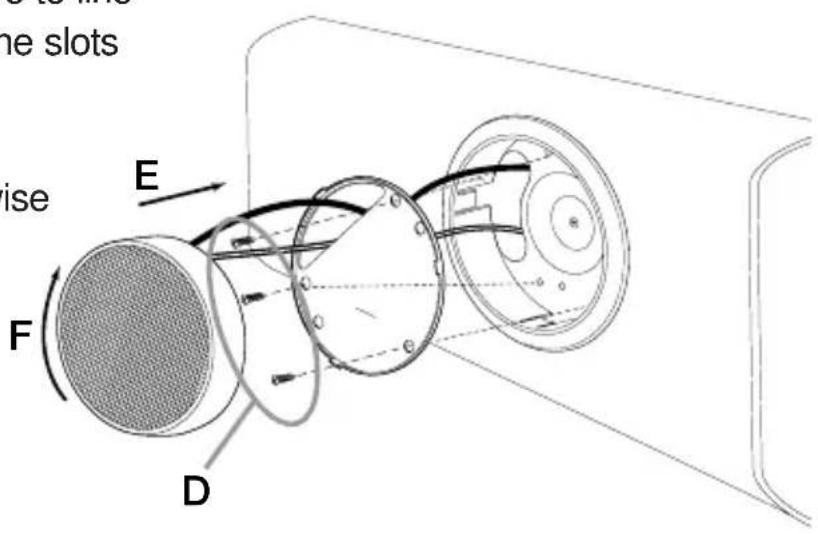
Flush Angle Mounting Instructions
a) Follow steps a through c in the Flush Mounting Instructions.
b) Secure the flush angle mount adapter to the flush mount cup using two 516 " screws as shown in Figure E.
c) Connect the 08GTi speaker wires (with crossover) to the tweeter.
d) Press the tweeter down onto the flush angle mount adapter lower portion making sure to line up the snaps with the slots in the tweeter housing.
e) Snap the other portion of the tweeter down onto the angle adapter.

Wiring
Use 2-conductor stranded type, insulated wire to connect the 08GTi to its crossover, and the crossover to the amplifier. A minimum wire gauge of 18AWG is recommended, with larger size suggested for wire runs longer than 10 feet.
The polarity — the positive/negative orientation of the connections for every speaker to amplifier connection must be consistent from left to right channel to assure proper imaging and optimum frequency response. This does not mean that the
08GTi should always be connected in the same polarity as the midrange however. It is possible, that due to the difference in the distance the sound travels from the midrange to your ears compared to the distance from the tweeters in a typical system, and the short wavelengths of sound at the crossover frequency, that a connection where the tweeters are connected in reverse polarity from the other drivers in the system may actually result in better sound. Because there is no way to accurately predict this before installation, we recommend that you try the connection both ways, and leave it in the polarity that gives the smoothest audible transition between the midrange and tweeter. The JBL standard for polarity marking uses the solid red wire as positive (+) and the black striped wire as negative (−).
System Connections:
There are a variety of sys-tem options available with the 08GTi. The simplest configura-tion is to use the 08GTi
connected in parallel to a full range speaker system. Because the 08GTi is specifically designed for high frequency operation, it must have low frequencies blocked by electrical means to prevent damage to the speaker. To facilitate this, the 08GTi is supplied with an in-line 12dB per octave 5kHz high-pass filter. We call this a “protection network”. This allows you to use the 08GTi as an add-on to an existing system by attaching the supplied protection network in parallel to the existing speakers, and connecting the tweeters to the output of the network as in fig. A, B and E. For this application, no other network is necessary. A disadvantage of this type of system is that the high frequencies are not blocked from the midrange drivers, making the performance of this type of system typically less accurate than one where a full crossover is used.
A better approach is a complete low-pass or band pass filter for the midrange driver, combined with a high pass filter for the tweeter. When a matched GTi Competition Series system is
used, the best crossover choice is the laboratory-optimized, system-matched crossover which is included with the 408GTi or 508GTi system. If you have not yet installed your components, we suggest that you consult your dealer for this system package. When a crossover such as this one is used, you do not use the protection network as it will interact with the main crossover in a detrimental way. It is also redundant, the main crossover will perform all of the functions of the protection network. If the packaged GTi system crossover is not used, the protection network should be used as the high-pass element, and a 5kHz low-pass filter may be built or purchased to connect in line with the midrange driver.
The most advanced system designs use active electronic crossovers such as the JBL GTX2 or GTX47. When an active crossover is used, the protection network is not used, you should however install an in-line fuse holder containing a 1.5A fast acting fuse between the power amplifier and the tweeter. Set the crossover frequency at or
above 5kHz if a 12dB per octave crossover is used and at or above 3.5kHz if you are using an 18 or 24dB per octave crossover. For safety, the maximum recommended amplifier power routed directly to the 08GTi tweeter is 125 Watts RMS. In fact, due to the nature of music, and the reduced energy present at high frequencies, there is little reason to use an amplifier larger than 50 Watts per channel on the tweeter, regardless of the power of other speakers in the system.
A Note on Power Handling
As a result of their high efficiency, all JBL loudspeakers will produce reasonable volume levels in the automotive environment using very little amplifier power. However, the use of a small amplifier to attain very high volume levels could lead to over-driving the amplifier. This will generate high distortion levels which can easily damage loudspeakers, even if the rated power of the amplifier is below the rated maximum power handling of the loud-speaker!
As a general rule, do not turn up the volume control past the point where you hear distortion in the form of either signal distortion from an overdriven amplifier or mechanical noise from an overstressed speaker. For the best performance and system reliability, you should select an amplifier with an output rating greater than the maximum power likely to be used to generate the desired volume levels. If you want your system “Loud + Clear,” we suggest that you step up to a JBL power amplifier which has an RMS power rating equal to, but not exceeding, the
Maximum Recommended Amplifier Power listed in the specifications of your specific JBL speaker. This margin of reserve power will ensure that the amplifier will not attempt to deliver more power than its design allows. Your dealer will be happy to point out which high power JBL amplifiers are optimum for your application and listening habits.
Following these guidelines will provide virtually distortion free sound reproduction and long loudspeaker life.
In Case of Difficulty
The most common difficulties are noise, distortion, and intermittent connections.
System noise is usually not the fault of the 08GTi. Hiss or “alternator whine” is most often the result of faulty grounding of the system electronics or improper setting of amplifier level controls. An exception to this is if the protection network or passive crossover is mounted near a source of radiated noise, the network may pick-up this noise with sufficient power to drive the 08GTi tweeters. For this reason,
be careful not to mount any passive crossover components near wires carrying high currents such as battery cables or wires leading to ammeters or tachometers.
Distortion is usually the result of overdriving one or more components in the system. The problem is most likely insufficient amplifier power, or improper setting of gain controls. Refer to the instructions which came with the electronics for assistance. The 08GTi will sound distorted if it is used without a crossover or protection network. It will also not last very long. Never use the 08GTi without one of the
recommended crossover options.
If you want to talk to us about any problems, call JBL Customer Service at 1-800-336-4JBL(4525) between 9AM and 5PM eastern time.
Specifications:
Frequency response without crossover: 3.5kHz - 22kHz
Frequency response with supplied protection network: 5Khz - 22kHz
I.E.C. power handling with included 5kHz Protection network: 60 Watts RMS
Power handling with 3.5kHz 18dB/octave active crossover: 60 Watts RMS
Recommended system amplifier power range: 20 Watts–125 Watts RMS per channel
Sensitivity: 92dB @ 2.83V / 1Meter
Dimensions:
Overall Diameter: 50mm / 1.95 inches
Height: 18mm / 0.69 inches
Height with angle adapter: 38mm / 1.5 inches
Flush mount cutout diameter: 54mm / 2 ^1/8 inches
Flush mount depth: 23mm / 0.9 inches
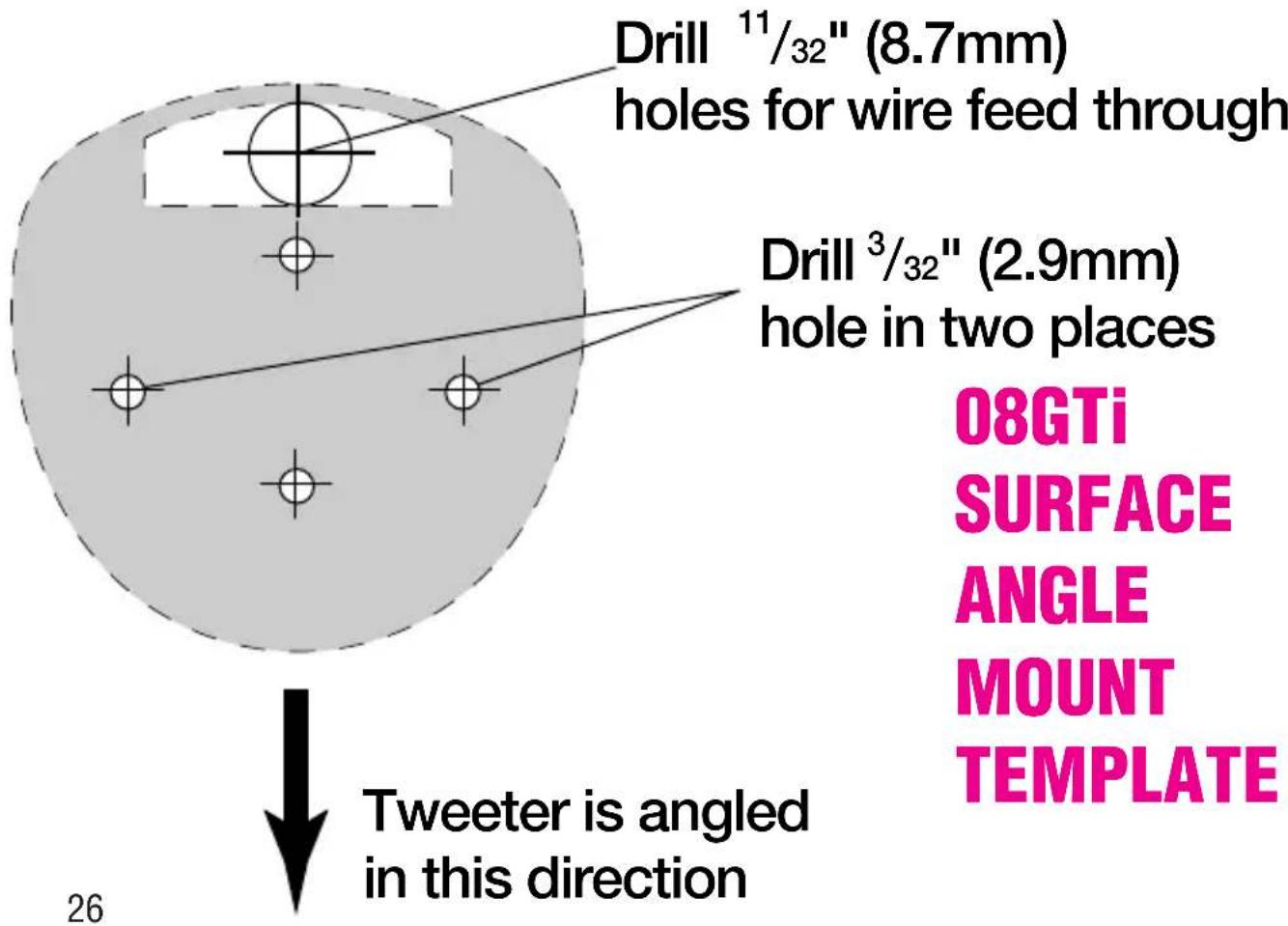

Drill ^11/_32 " (8.7mm) holes for wire feed through
08GTi MOUNTING PLATE TEMPLATE
Drill ^3/_32 " (2.4mm) holes for mounting screw
[EMPTY]

natural_image
Simple gray circle with dashed border, no text or symbols presentCut Hole Using
2^1/8-2^1/4 (54mm)
hole saw
08GTi FLUSH
MOUNT TEMPLATE
[EMPTY]
JBL continually engages in research related to products improvement. New materials, production methods and design refinements are introduced into existing products without notice as a routine expression of this philosophy. For this reason, any current JBL GTi loudspeaker may differ in some respect from its published description but will always equal or exceed the original design specifications unless otherwise stated.
©1994, All rights reserved
JBL Consumer Products, Incorporated
80 Crossways Park West, Woodbury, NY 11797
8500 Balboa Blvd., Northridge, CA 91329
1-800-336-4JBL in the USA
JBL Consumer Products, Inc.
80 Crossways Park West
Woodbury, NY 11797
8500 Balboa Blvd.
Northridge, CA 91329
1-800-336-4JBL in the USA

A Harman International Company
Made in USA
NMGP/N: 302695-001 5/94


- Welcome to Club GTi
- About This Manual
- Autosound at its Best
- Designing Your System
- Component Placement
- Installation Warnings and Tips
- Mounting Instructions:
- Surface Mounting Instructions
- SURFACE MOUNT INSTALLATION
- Surface Angle Mounting Instructions
- Flush Mounting Instructions
- FLUSH MOUNT INSTALLATION
- Flush Angle Mounting Instructions
- Wiring
- System Connections:
- A Note on Power Handling
- In Case of Difficulty
- recommended crossover options.
- Specifications:
- JBL Consumer Products, Incorporated
Brand : JBL
Model : 08GTi
Category : Car hands-free kit