
RA75 - Wi-Fi repeater Xiaomi - Free user manual and instructions
Find the device manual for free RA75 Xiaomi in PDF.


| Product Type | Wi-Fi Repeater |
| Brand | Xiaomi |
| Model | RA75 |
| Dimensions (W x D x H) | 110 x 110 x 100 mm |
| Weight | 200 g |
| Power Supply | DC 5V/1A via micro USB |
| Wireless Standard | IEEE 802.11ac (Wi-Fi 5) |
| Frequency Band | 2.4 GHz and 5 GHz |
| Maximum Data Rate | 1200 Mbps (300+867 Mbps) |
| Antenna | Internal dual-band 2x2 MIMO |
| Encryption | WPA/WPA2-PSK |
| LED Indicators | Power, Signal Strength, WPS |
| Buttons | WPS/Reset button |
| Operating Temperature | 0°C to 40°C |
| Storage Temperature | -20°C to 60°C |
| Humidity | 10% to 85% non-condensing |
| Compatibility | Any 2.4/5 GHz Wi-Fi router |
| Installation | Plug and play, optional Xiaomi Home app |
| Key Features | Signal amplification, coverage extension, seamless roaming |
| Maintenance & Cleaning | Wipe with a dry cloth |
| Safety Certifications | CE, FCC, RoHS |
| Spare Parts & Repairability | No user-serviceable parts; repair by authorized service only |
Frequently Asked Questions - RA75 Xiaomi
User questions about RA75 Xiaomi
0 question about this device. Answer the ones you know or ask your own.
Ask a new question about this device
Download the instructions for your Wi-Fi repeater in PDF format for free! Find your manual RA75 - Xiaomi and take your electronic device back in hand. On this page are published all the documents necessary for the use of your device. RA75 by Xiaomi.
USER MANUAL RA75 Xiaomi
All images are for illustration purposes only and may differ from the actual product by model and region.
English
About this product
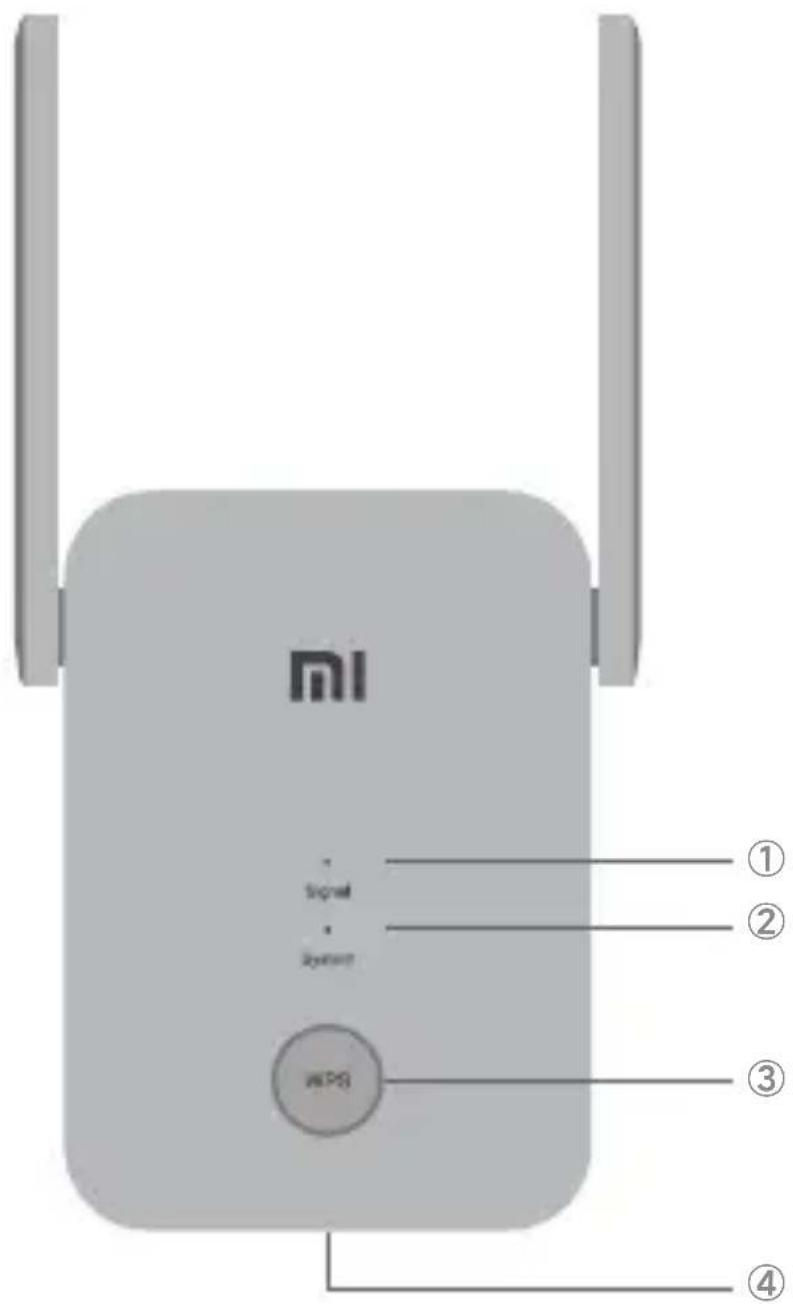
The Mi WiFi Range Extender AC1200 is designed to extend the range of your home WiFi network.
English
① Signal Indicator
Solid blue: The range extender is connected to your existing network and receiving a strong signal.
Solid orange: The range extender is receiving a weak signal. Relocating the extender closer to the router is recommended.
Solid red: The range extender is disconnected from the network. Trying to relocate it within the range of your router.
Flashing red: The range extender is ready for initialization.
Off: The range extender is unready for connection.
② System Indicator
Solid blue: The system runs normally.
Flashing blue: WPS is processing.
Solid orange: The system is booting.
Flashing orange: The system is upgrading.
Off: No power.
③ WPS Button
Press to launch the WPS Wizard.
④ Reset Button Press and hold for at least 5 seconds to restore factory settings.
English
Installation
Step1: Power On
Plug the range extender into a power outlet close to your router. Wait until the 'Signal' indicator turns flashing red.
② Step2: Set Up
Method 1: APP Setup (Recommended)
Download the Mi Home APP/Xiaomi Home App and follow the in-app instructions to complete the setup.

Method 2: WPS Button Setup
① Press the WPS button on your router if it has one.
② Within 2 minutes, press the WPS button on the range extender. The 'Signal' indicator should turn solid blue once the connection is successful.
English
Default Extended WiFi Name and Password after setup

① 2.4G WiFi: Router's WiFi name with 'Plus' at the end
② 5G WiFi: Router's WiFi name with 'Plus_5G' at the end
③ Password: Same as the router
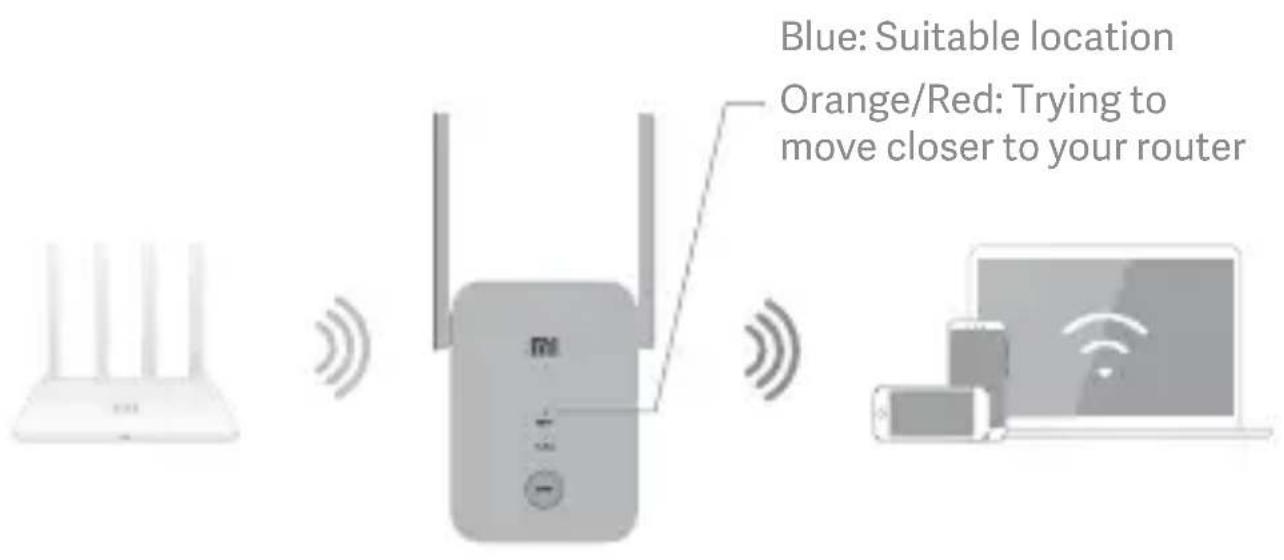
Step3: Reposition your range extender
Plug your range extender in a place between your router and the WiFi dead zone. To achieve better signal quality, try to find a location where the 'Signal' indicator is solid blue. If it doesn't, relocate the range extender closer to the router.
English
FAQs (frequently asked questions)
Q1. What should I do if the Mi Home APP/Xiaomi Home App doesn't find my device during setup?
You can manually find Mi WiFi Range Extender AC1200 in the in-app device list and add it following the instructions.
Q2. What should I do if the Mi WiFi Range Extender AC1200 stops working?
1 If the signal is poor, move the range extender to another location where there are no large obstacles between the range extender and the router.
2 If the range extender is offline, check that the router is emitting a WiFi signal. If the router is working normally, restart the range extender and try again.
3 Check whether the range extender was blacklisted by your router.
4 If the issue persists, hold down the reset button for at least 5 seconds until the indicator is constant orange. Reconfigure the settings and try again.
Q3.How do I configure the settings if I want to connect the range extender to a new Wi-Fi network?
Reset the range extender to factory settings and reconfigure the settings.
English
Specifications:
Name: Mi WiFi Range Extender AC1200
Model: RA75
Operating Temperature: 0-40°C
Input: 100\~240VAC, 50/60Hz, 0.3A
Operating Frequency: 2400MHz\~2483.5MHz, 5150MHz\~5350MHz, 5470MHz\~5725MHz, 5725MHz\~5850MHz

Certifications:
This equipment has been tested and found to comply with the limits for a Class B digital device, pursuant to part 15 of the FCC Rules. These limits are designed to provide reasonable protection against harmful interference in a residential installation. This equipment generates, uses and can radiate radio frequency energy and, if not installed and used in accordance with the instructions, may cause harmful interference to radio communications. However, there is no guarantee that interference will not occur in a particular installation. If this equipment does cause harmful interference to radio or television reception, which can be determined by turning the equipment off and on, the user is encouraged to try to correct the interference by one or more of the following measures:
—Reorient or relocate the receiving antenna.
—Increase the separation between the equipment and receiver.
English
—Connect the equipment into an outlet on a circuit different from that to which the receiver is connected.
—Consult the dealer or an experienced radio/TV technician for help.
This device complies with Part 15 of the FCC Rules. Operation is subject to the following two conditions: (1) this device may not cause harmful interference, and (2) this device must accept any interference received, including interference that may cause undesired operation.
Caution:
Any changes or modifications not expressly approved by the party responsible for compliance could void the user's authority to operate the equipment.
Radiation Exposure Statement:
This equipment complies with FCC radiation exposure limits set forth for an uncontrolled environment. This equipment should be installed and operated with minimum distance of 20 cm between the radiator and your body. This transmitter must not be co-located or operating in conjunction with any other antenna or transmitter.
Manufactured by: Xiaomi Communications Co., Ltd
019, Floor 9, Building 6, Yard 33, Middle Xi'erqi Road, Haidian District, Beijing, China
小米生态链产品包装图纸
图纸提供单位
小米生态链
项目名称
M75US 彩盒
版本号
V1.0
设计时间
20210623
设计师
李丽萍
材质工艺要求
材质要求:E楞面纸300g晨鸣白卡+
楞纸 110q玖龙牛皮+
里纸 140g 玖龙牛皮
- English
- About this product
- ① Signal Indicator
- ② System Indicator
- ③ WPS Button
- Installation
- Step1: Power On
- ② Step2: Set Up
- Method 2: WPS Button Setup
- Default Extended WiFi Name and Password after setup
- Step3: Reposition your range extender
- FAQs (frequently asked questions)
- Q1. What should I do if the Mi Home APP/Xiaomi Home App doesn't find my device during setup?
- Q2. What should I do if the Mi WiFi Range Extender AC1200 stops working?
- Q3.How do I configure the settings if I want to connect the range extender to a new Wi-Fi network?
- Specifications:
- Certifications:
- Caution:
- Radiation Exposure Statement:
- 019, Floor 9, Building 6, Yard 33, Middle Xi'erqi Road, Haidian District, Beijing, China
- 小米生态链产品包装图纸
Brand : Xiaomi
Model : RA75
Category : Wi-Fi repeater