HF150 - Lighting Ikan - Free user manual and instructions
Find the device manual for free HF150 Ikan in PDF.


| Product Type | Bi-Color LED Fresnel Studio Light |
| Model | HF150 (Helia 150W) |
| Light Source | 1 x 150W Bi-Color LED |
| Color Temperature Range | 3200K – 5600K (continuously adjustable) |
| Beam Angle | 20° – 70° (adjustable via focusing knob) |
| Dimming Range | 10% – 100% (flicker-free) |
| Control Methods | Onboard knobs (color & brightness) + DMX512 In/Out |
| Lens | 4-inch (10.16 cm) Acrylic Fresnel |
| Cooling System | Active cooling fan with separate ducts |
| Construction Material | Aluminum alloy housing |
| Yoke | Cast aluminum with 1 1/8" pin |
| Mounting | 5/8" receiver for stands or grid mounts |
| Power Input | AC 110-220V, 50-60Hz (power consumption 40W) |
| Fixture Dimensions | 19 x 6 x 12 inches (48.3 x 15.2 x 30.5 cm) |
| Fixture Weight | 10 lbs (4.54 kg) |
| Shipping Weight | 14 lbs (6.35 kg) |
| Included Accessories | Barn doors, gel frame, yoke, AC power cord |
| Warranty | 1 year free service for manufacturing defects |
| Safety Features | Overheat auto shut-off, flame-retardant materials |
| Certifications | CE, RoHS (implied) |
Frequently Asked Questions - HF150 Ikan
User questions about HF150 Ikan
0 question about this device. Answer the ones you know or ask your own.
Ask a new question about this device
Download the instructions for your Lighting in PDF format for free! Find your manual HF150 - Ikan and take your electronic device back in hand. On this page are published all the documents necessary for the use of your device. HF150 by Ikan.
USER MANUAL HF150 Ikan
Helia 150 Watt 4 in. Fresnel Bi-Color LED Studio Light w/ DMX
natural_image
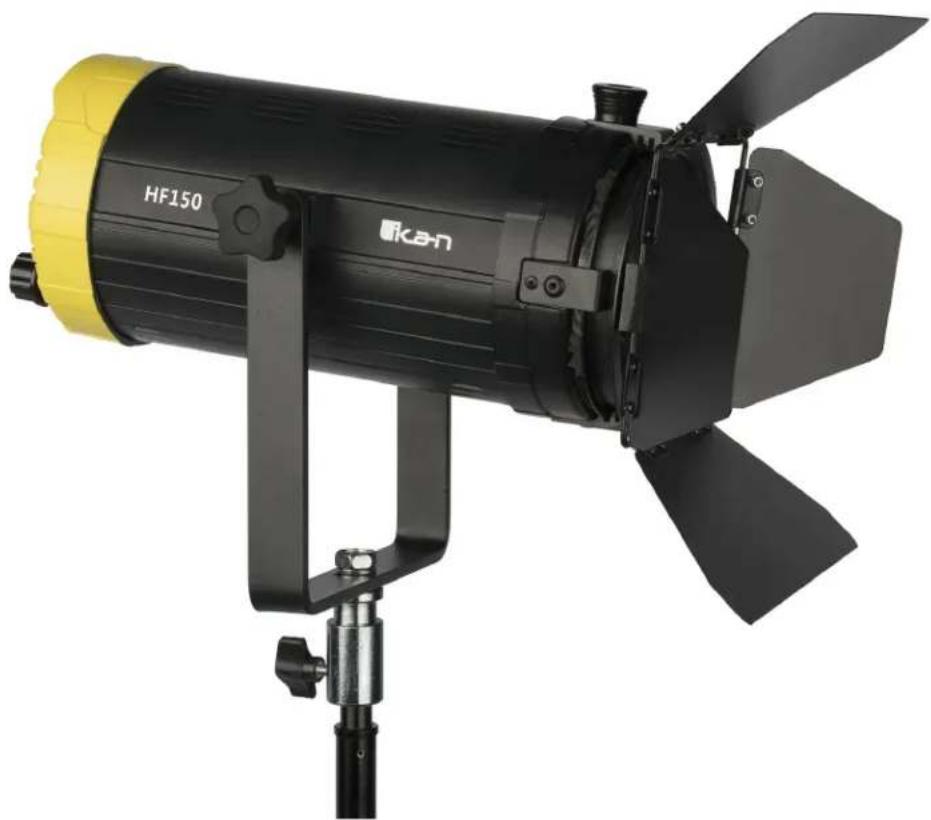
Exterior view of a black HF150 projector with yellow and black blades mounted on a stand (no text or symbols visible)What's Included
□ 1x Helia 150 Watt Fresnel
□ 1x Barn Doors
□ 1x Gel Frame
□ 1x Yoke
□ 1x AC Power Cord
Getting Started
Thank you for buying the HF150 Fresnel Light from ikan. Please carefully read the instructions and guide before operating the products. The guide includes product usage and maintenance. When you operate the product, please make sure that you have read the instructions carefully.
All the content of the manual is based on up-to-date information; technical data subject to change without notice.
Safety Instructions
- Connect the AC power cable to the HF150 light before plugging into the power source. You risk electrocution by not following this instruction.
- Don't drag cables with excessive force. Any repairs on the products should be performed by ikan technicians. Users should not remove the power supply, or else the damage will not be covered under warranty.
- Be sure that the power is off before connecting and changing the fixture head or disconnecting your cable from the power source. We recommend using Ikan connecting cables and connectors to avoid electrical shock.
- The voltage shouldn't exceed the value in the technical specifications. If the voltage is greater than, or less than the regulated values, it could damage the product.
Overview
Benchmark color temperatures for today's film and TV production are 5600K (daylight) and 3200K (tungsten). Ikan developed the HF150 Fresnel Light to handle both these temperatures. With patented technologies, the HF150 offers a professional and customizable LED light source. In addition, the light features separately-cooling ducts for optimizing heat dissipation. Specifically, the HF150 Fresnel Light offers the following features:
- The 10-100% brightness incremental adjustment of the 3200K-5600K temperature enable fine-tuning your color range.
- A four-inch diameter Fresnel lens provides even, well-distributed light
- Ultra-low noise and active cooling technology contribute to excellent thermal stability.
- The power supply will automatically cut off when the fixture overheats.
- The bright LCD readout is easy to view, enabling smooth adjustment of functions.
- Digitally adjustable knob allows you to adjust menu settings quickly and accurately.
- DMX Channel assignments can be adjusted as needed.
- AC/DC power supply, AC110VAC-270VAC
Instructions
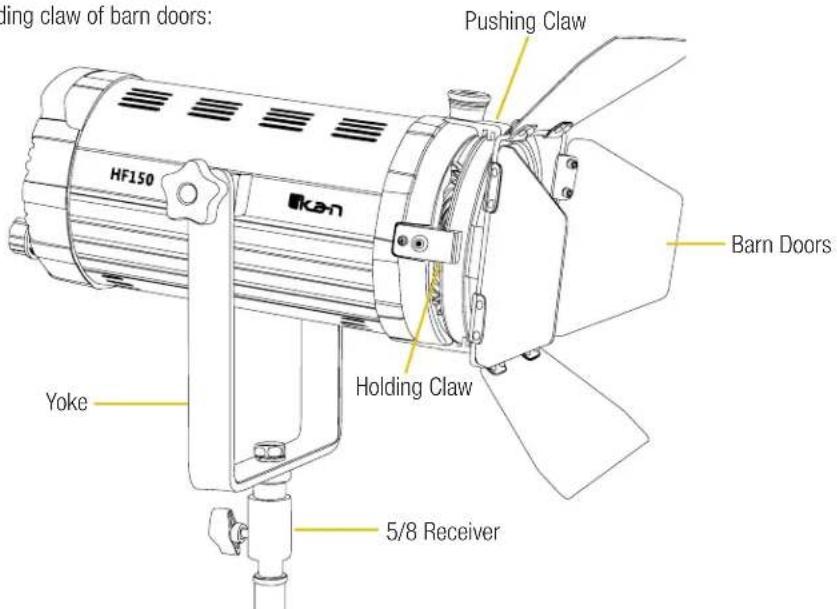
LED Fresnel housing is made aluminum alloy, which is heavy-duty, lightweight, and easy to transport. The HF150 structure is illustrated on the following page.
Appearance & Structure - Front
5/8 Receiver: Connecting the lamp with stands or grid mounts
Yoke: Adjustable lighting direction
The pushing claw of barn doors; the holding claw of barn doors:
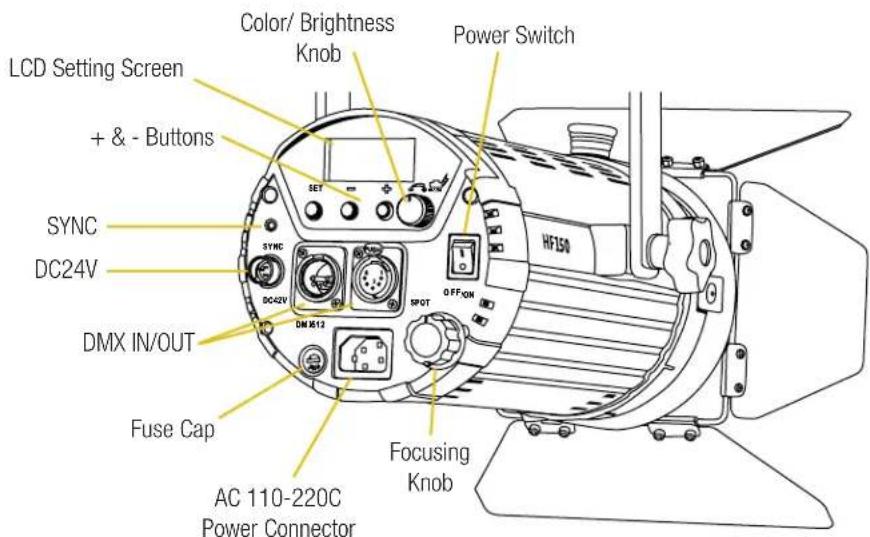
Appearance & Structure - Back
Power switch: Turn on/turn off power
Color Knob: Adjust the color from 3200K-5600K (Press in to set DMX channel)
Brightness Knob: Adjusts brightness from 10%-100% (Press in to Toggle off the LED)
LCD Setting Screen: Displays brightness and color temperature
+&- Buttons: Adjusts the DMX channels
SYNC: Not in use.
DC24V: Not in use.
Fuse Cap: Fuse Holder with T6.3A 250V fuse
AC 110-220V Power Connector: Connecting with 110-220V power cable
Focusing Knob: Changing the Beam angle of the light from flood to spot
Installation & Power Supply
- Ensure power is off before installation.
- Place the light on the Ikan customized stands, release the tension knob on the 5/8" receiver, adjust the light in the desired direction, and then tighten the tension knob on the 5/8" receiver.
- When connecting the power cords, plug the AC power cords into the AC120 socket on the rear panel (as shown in the drawing).
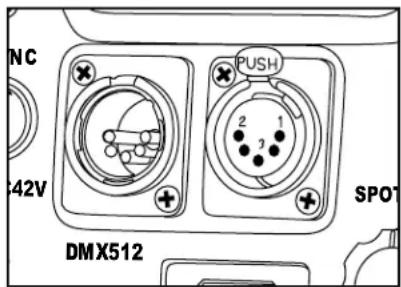
DMX 512 Controls
The DMX IN/OUT on the HF150 allows for remote fixture control over the color and brightness.
The 8Bit DMX allows for use with controllers that use just dimmer controls.
Depending on channel assigned the brightness is controlled on the first fader.
The next fader controls the color temperature from 3200K at 0% to 5600K at 100%.
What's in the box?
Please carry and place the packing box carefully. Check the lighting equipment and accessories upon opening the box. Please contact us if anything is damaged or missing. Please save the packing materials for replacing and repairing the products in the future.
Notice & Maintenance
- The HF150 Spotlight working temperature range must be regulated. Overheating and Under-cooling will reduce the LED working life.
- Products must be placed on a stable, dry, flat surface. Avoid exposure to sunlight and operating in an environment with high humidity or explosive gas.
- Don't cover the fan vent. It will shorten the working life of the fixture.
- Don't beat, knock or shake the lighting equipment during the operation.
- If the HF150 isn't working normally, please contact the Ikan repair department. Please don't disassemble/re-assemble by yourself.
- Please place the HF150 in a cool and dry place when you don't use it for an extended period of time.
Specifications
| Beam Angle 20 - 70 degrees | |
| Build Material Aluminum | |
| Control Local Knob Control and DMX In/Out | |
| Cooling System Active Cooling Fan | |
| Diagonal 17" | |
| Dimming Flicker Free Dimming, Onboard dimming Knob 100%-10% (minimal color shift) | |
| Fixture Size 19 x 6 x 12 in. | |
| Fixture Weight 10 lbs | |
| Focusing Rotating Rear Knob | |
| Head Type 3200K - 5600K | |
| Lens 4" Acrylic Fresnel | |
| Light Source 1 x 150 watt LED Bi-Color | |
| Power Supply 6 ft power cable | |
| Rating AC volts 120volts AC,50-60Hz, 40 watts | |
| Shipping Dimensions | 20 x 10 x 10 in. |
| Shipping Dimensions (Metric) | 50.8 x 25.4 x 25.4 cm |
| Shipping Weight | 14 lb |
| Shipping Weight (Metric) | 6.35 kg |
| Yoke: | Cast Aluminum with 1 1/8" pin |
Optional Accessories
Some other products that work well with the Helia HF150 available from Ikan include:
HD-STND-V2 Heavy Duty Light Stand
KCP-703 Stage Clamp w/ 16mm Stud
SW-04 Safety Wire
Learn More
More dynamic information at official website: www.ikancorp.com
Support
Contact email: support@ikancorp.com
CONDITIONS OF WARRANTY SERVICE
- Free service for one year from the day of purchase if the problem is caused by manufacturing errors.
- The components and maintenance service fee will be charged if the warranty period is expired.
Free Service will not be Provided in the Following Situations:(*Even if the product is still within the warranty period.)
- Damage caused by abuse or misuse, dismantling, or changes to the product not made by the company.
- Damage caused by natural disaster, abnormal voltage, and environmental factors, etc.
©2018 ikan Corporation. All rights reserved
- What's Included
- Getting Started
- Safety Instructions
- Overview
- Instructions
- Appearance & Structure - Front
- Appearance & Structure - Back
- Installation & Power Supply
- DMX 512 Controls
- What's in the box?
- Notice & Maintenance
- Specifications
- Optional Accessories
- Learn More
- Support
- CONDITIONS OF WARRANTY SERVICE
Brand : Ikan
Model : HF150
Category : Lighting