TL2831 - Fan MISTRAL - Free user manual and instructions
Find the device manual for free TL2831 MISTRAL in PDF.


| Product Type | Air Purifier with fan function |
| Brand | Mistral |
| Model | TL2831 |
| Power Supply | Adapter: Input 100-240V~50/60Hz, 0.35A; Output 12.0V, 1.0A |
| Power Consumption | Approx. 10W |
| CADR | 100 m³/h |
| Noise Level | 33-60 dB (1m away) |
| Fan Speeds | 3 speeds: Low, Medium, High |
| Timer Settings | 2, 4, or 8 hours |
| Sleep Mode | Yes, dims all indicator lights |
| Filter Type | Replaceable filter (rated for 3000 hours) |
| Filter Replacement Indicator | Yes, resettable by holding button for 5 seconds |
| Control Panel | Touch buttons: Power, Fan Speed, Sleep Mode, Timer |
| Safety Features | Auto shut-off when base plate removed; do not immerse in water; keep away from heat sources |
| Maintenance | Clean body with dry/soft cloth; vacuum/brush filter regularly; do not wash filter with water |
| Placement | At least 60 cm from walls; on a level, stable surface |
| Usage | Indoor use only; do not cover |
| Spare Parts | Replacement filter (Cat. No. TL2831-Filter) |
| Warranty | Refer to manufacturer; GSM Retail Australia Pty Ltd |
Frequently Asked Questions - TL2831 MISTRAL
User questions about TL2831 MISTRAL
0 question about this device. Answer the ones you know or ask your own.
Ask a new question about this device
Download the instructions for your Fan in PDF format for free! Find your manual TL2831 - MISTRAL and take your electronic device back in hand. On this page are published all the documents necessary for the use of your device. TL2831 by MISTRAL.
USER MANUAL TL2831 MISTRAL
natural_image
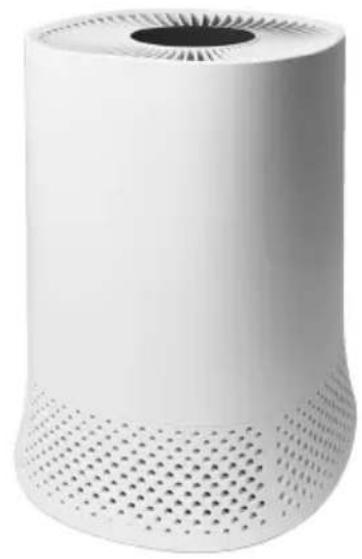
White cylindrical electronic device with perforated base and circular vent, no visible text or symbolsInstruction Manual
Model: TL2831
Important Safeguards
When using electrical appliances, in order to reduce the risk of fire, electric shock and/or injury, these basic safety precautions should always be followed:
For Your Safety
Read all instructions carefully, even if you are familiar with the appliance.
- To protect against the risk of electric shock, DO NOT IMMERSE power cord or plug in water or any other liquid.
- Do not throw the adaptor into fire and do not expose it to extreme heat. The charger could explode or burst.
- A damaged adaptor can lead to a deadly electric shock. Do not use this product if it appears to be damaged.
- This appliance is not intended for use by persons (including children) with reduced physical, sensory and mental capabilities, or lack of experience and knowledge, unless they have been given supervision or instruction concerning use of the appliance by a person responsible for their safety.
- Children should be supervised to ensure that they do not play with the appliance.
• Always unplug the unit when not in use. - Do not operate unit with a damaged power cord or plug, or after a malfunction, has been dropped or is damaged in any manner. Return the unit to an authorised service facility for examination.
- This unit is not intended for use in bathrooms, laundry areas or similar moist indoor locations. Never locate the unit where it may fall into a bathtub or other water container.
- Do not run the adaptor under carpeting or cover the adaptor with throw rugs, runners or the like. Arrange the adaptor away from traffic areas and where it will not be tripped over.
- Do not place the adaptor over any part of the unit.
- Do not plug this unit into an extension lead, double adapter or power board.
- To disconnect the unit set main switch to OFF then remove the plug from the outlet.
- This unit has hot electrical parts inside. DO NOT use it in areas where gasoline, paint or flammable liquids are used or stored.
- Do not insert or allow foreign objects to enter any ventilation or exhaust opening as this may cause an electric shock, fire or could damage the unit.
- Use the unit only as described in this booklet Any other use not recommended by the manufacturer may cause fire, electric shock or injury to persons.
- Fully remove the adaptor from the adaptor tidy before use. Always uncoil the adaptor before applying power.
- This product must always be used AND STORED in the upright position.
- Do not use this unit with a programmer, timer or any other device that switches the unit on automatically, since a fire risk exists if the unit is covered or positioned incorrectly.
- Do not touch the power supply or adaptor with wet hands.
- Unplug appliance when cleaning, removing/ replacing fiter, or moving the device.
- Use indoor only.
- Do not move the machine when it is in use.
- Do not block air circulation
- Place the machine on a level surface.
- Unplug the appliance during filling and cleaning
- Clean regularly as per Maintenance instructions to avoid malfunction.
• Always unplug from power supply before maintenance.
- Keep away from directing sunshine heat sources and air conditioners or fans.
• Always keep on stable plat surface do not place on carpet, duvet or unstable area.
- CAUTION: DO NOT COVER the appliance in any way in order to avoid overheating and fire.
Warning
If the adaptor is damaged, the adaptor must be replaced by the manufacturer, its service agent or similarly qualified persons in order to avoid a hazard.
This product has not been designed for any uses other than those specified in this booklet.
Save These Instructions
Features of Your Air Purifier
natural_image
White cylindrical electronic device with perforated base and circular vent, no visible text or symbols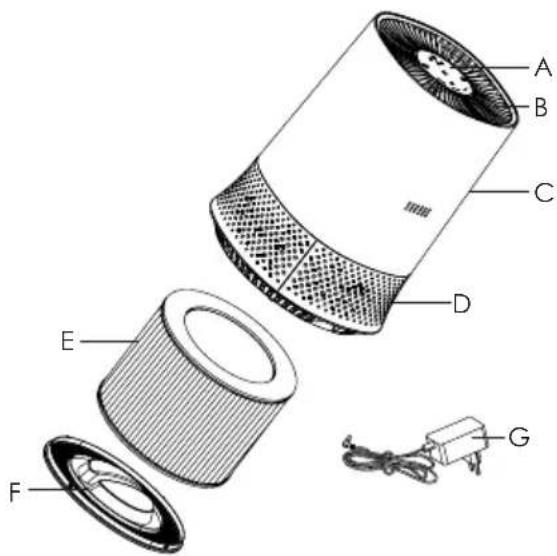
Construction of appliance
A. Control Panel
B. Air Outlet
C. Main Body
D. Air Intake
E. Filter
F. Base Plate
G. Adapter
REMARK: To minimize packaging size, we have enclosed/wrapped filter inside the filter compartment. Before use, please remove filter from compartment, unwrap from plastic bag and reposition filter back into compartment ready for use.
Features of Your Air Purifier
Congratulations on the purchase of your new Air Purifier.
Before first using your Air Purifier, it is most important that you read and follow the instructions in this use and care booklet, even if you feel you are quite familiar with this type of appliance.
Your attention is drawn particularly to the section dealing with IMPORTANT SAFEGUARDS. Find a place and keep this booklet handy for future reference.
Your Air Purifier is safe and easy to use. It has been designed to function quietly and safely under normal circumstances.
Operation
Before use, remove all packaging and inspect the appliance for any damage.
Never use a damaged product.
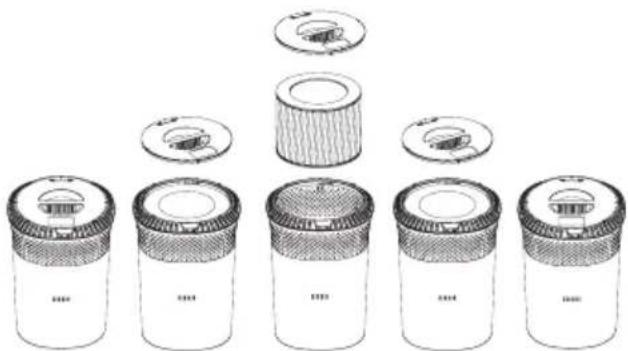
- Unscrew the appliance base plate anti-clockwise and remove.
- Remove the filter from filter compartment and separate filter from the plastic bag.
-
Reposition the filter back into filter compartment.
-
Secure filter compartment by screwing base plate back into position. Connect the adapter DC Jack to the corresponding DC socket on the appliance. Plug adapter 240V end directly into domestic power outlet nearby.
-
The appliance is now ready for use, switch power On at the power outlet and activate the appliance via Power On button on the control panel on top of the appliance. Dispose of all packaging materials in a environmentally friendly manner.
natural_image
Illustration of six cylindrical containers with different internal components, arranged in a triangular layout (no text or symbols)Note: In order to achieve optimum purification performance ensure that appliance is positioned away and clear of obstructions or walls at a radius of minimum 60cm.
Control Panel Lay-out
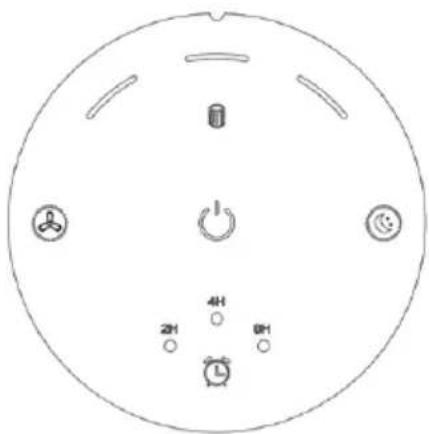
Switch button
Press this Button lightly to turn the appliance ON. This button and fan speed button illuminate to indicate it is powered ON.
Shut down
Press this button again to turn appliance OFF. All touch button indicator lights will stop illuminating to indicate that appliance is turned OFF.
Air movement speed control button
:
Press this button repeatedly to scroll and select Low, Medium or High fan speed.
Release button on the desired fan speed setting. One, Two or Three lights will illuminate to indicate the selected fan speed setting.
Sleep Mode Button

Press this button to activate the appliance sleep mode feature. In this mode all other indicator lights will turn off. Press this button again to exit Sleep Mode.
Timer Select Button

Press this button during normal appliance operation to select a dedicated time period you desire for the appliance to operate.
Repeatedly press button to scroll and select one of the three option available and release button on the selected time.
You can select 2 Hours, 4 Hours or 8 Hours, with the corresponding indicator light illuminating when selected.
Filter replace Indicator Light
The filter is rated to function efficiently for 3000 hours. This largely depends on the density of particles in the air of the space you are operating the appliance in. The filter Indicator light will illuminate when it is time to replace filter.
It is recommended that you regularly clean the filter within the 3000 hours to remove excess dust built up on the filter surface to ensure it continues to function efficiently. Remove the filter and vacuum/brush excessive dust particles from filter surface.
After Filter replacement indicator light /alarm activates, press and hold the button for 5 seconds to clear the indicator light display and then replace the filter.
Maintenance and Cleaning
- Before cleaning the product, be sure to turn off the purifier and remove the adaptor plug from the power socket.
- Do not immerse this product in water or any other liquid.
- Do not use volatile liquids such as benzene, paint thinner or detergent as they may damage the surface of the product. Please keep this product dry.
Clean air purifier body:
Clean the product with a dry, soft cloth as required; if stubborn stains are present, use a soft wet cloth for cleaning.
Technical Specification
Adaptor:
Input: 100-240V\~50/60Hz, 0.35A
Output: 12.0V, 1.0A
Air Purifier:
Input Power: Approx 10W
CADR: 100m^3/h
Noise Level: 33\~60dB (1m away)
NOTE: As a result of continual improvements, the design and specifications of the product within may differ slightly to the unit illustrated on the packaging.
Disposal
Do not dispose of packaging or the product through your household waste! The product and packaging are made from recyclable materials (plastics, metals, paper).
If the product is no longer suitable for use dispose of it in an environmentally friendly manner in accordance with your local council.
Trouble Shooting
| Problem/Trouble Possible | Reasons/Solutions |
| Can the filter be cleaned with water? | No, only vacuum /brush of dust deposits, once filter has become wet it will no longer filter efficiently. |
| Mechanical smell emitting from appliance on first use. | The machine is sealed in a corrugated box or plastic sealed box. "New" odors may be emitted as a result of internal motors and air extraction. According to the specific sensitivity level, the odor should disappear in a few days or a week, depending on the usage time of the product. |
| Can the machine be used to purify areas exceeding the rated capacity of the machine? | CADR (clean air volume) rating is measured in a specific test environment, and its performance will be affected if the environment changes. But if you use it in a room slightly larger than our rated Cadr rating, it will still help improve air quality, but it will take more time. |
| Where should I place this machine? | To ensure air circulation, it should be placed at least 0.6m away from the wall. If there are multiple doors or narrow aisles in the area, the air flow of the air purifier may be reduced, but an effective circulation will eventually be formed around the product. |
| Some airborne dust particles can still be seen in reflected light. | Although the appliance will absorb airborne dust particles in spaces, dust deposits moved as a result of opening doors/windows, switching on fans, ducted heating or Air conditioners will be inevitable. |
| The filter screen has no fixing device | The filter screen itself can be automatically fixed inside the product. When the machine is started, the air flowing through the machine will form pressure, which will create the sealing effect of the filter screen. |
| The fan motor can be heard. | This is normal and not a fault with the appliance, especially when the surrounding environment is very quiet at night, you may also hear the motor rotate rhythmically and repeatedly. When the sleep mode is turned on, it almost reaches the same sound as the external environment. |
| Appliance won't switch On. Ensure base plate is properly fixed in place, DC jack into appliance is fully inserted and 240v adapter body is fully inserted into domestic power outlet. | |
| Product does not effectively remove smoke or odors | Check to ensure that the air quality sensor is not obstructed or dirty, clean with cotton bud or soft brush.Ensure filter is regularly cleaned to remove excess dust deposits. |
| Position appliance closer to the source of the odor. | |
| The Filter is obstructed with excess dust, clean with vacuum or soft brush.Filter has reached its 3000 hours use limit, replace the filter. | |

Gerard Sourcing & Manufacturing
GSM RETAIL AUSTRALIA PTY LTD
GSM Retail Australia Pty Ltd has a policy of continual improvement throughout the product range. As such the unit contained within may differ slightly from the unit illustrated on the pack.
MADE IN CHINA for GSM Retail Australia Pty Ltd.

Cat. No. TL2831 August 2020
- Instruction Manual
- Important Safeguards
- For Your Safety
- Warning
- Save These Instructions
- Features of Your Air Purifier
- Construction of appliance
- Operation
- Control Panel Lay-out
- Switch button
- Shut down
- Air movement speed control button
- :
- Sleep Mode Button
- Timer Select Button
- Filter replace Indicator Light
- Maintenance and Cleaning
- Clean air purifier body:
- Technical Specification
- Disposal
- GSM RETAIL AUSTRALIA PTY LTD
Brand : MISTRAL
Model : TL2831
Category : Fan