
Z6 G5 A - Inverter HP - Free user manual and instructions
Find the device manual for free Z6 G5 A HP in PDF.


| Product Name | HP Z6 G5 A |
| Product Type | Inverter |
| Brand | HP |
| Model | Z6 G5 A |
| Power Supply Options | 1125W (80 PLUS Gold) and 775W (80 PLUS Gold) |
| Number of Power Supplies | 2 |
| Input Voltage Range | 100-127V / 200-240V |
| Maximum Power Output (1125W PSU) | Up to 1450W (at >180V input) |
| Maximum Power Output (775W PSU) | 775W |
| Power Cord Connector | C14 |
| Cooling Clearance | Minimum 6 inches (15.24 cm) on all sides except floor |
| Recommended UPS Type | Online continuous (double-conversion) |
| Minimum UPS Rating (for 1125W PSU) | 2kVA |
| Safety Beep Code | 3 red/4 white (side panel not fully seated) |
| Maintenance | Dust removal from front vent area and rear fans |
| Operating Environment | Avoid voltages below 90V to prevent shutdown |
| Efficiency Rating | 80 PLUS Gold (87%/90%/87% at 115V, 90%/92%/89% at 230V) |
| Processor Support | Latest processor (details in QuickSpecs) |
| Graphics Card Support | Up to 3 high-end GPUs (up to 300W each) |
| Memory Support | Up to 8 Registered DIMMs |
Frequently Asked Questions - Z6 G5 A HP
User questions about Z6 G5 A HP
0 question about this device. Answer the ones you know or ask your own.
Ask a new question about this device
Download the instructions for your Inverter in PDF format for free! Find your manual Z6 G5 A - HP and take your electronic device back in hand. On this page are published all the documents necessary for the use of your device. Z6 G5 A by HP.
USER MANUAL Z6 G5 A HP
Table of contents
Introduction....2
Power consumption and cooling considerations....2
Power consumption limitations....2
Uninterruptible power supply (UPS) 2
Power consumption....4
Power cord 4
Cooling considerations ....5
Introduction
The Z6 G5 A has been redesigned to deliver support for the latest processor, memory, graphics, and storage technologies. There are two 90% efficiency-rated power supplies that qualify for 80 PLUS GOLD status*.
In order for the system to turn on with these new power supplies, the system side panels must be fully seated. The system will error and provide a 3 Red/4 White beep code.
* The 80 PLUS specification states that all GOLD power supplies achieve at least 87%/90%/87% efficiency at 115V and 90%/92%/89% efficiency at 230V for 20%/50%/100% of rated output, respectively.
Power consumption and cooling considerations
An HP workstation might require more power than the typical office environment can supply.
An 1125W fully loaded configuration might draw up to the system's maximum current rating of 12A at 100V-127V, leaving no power for other accessories.
- An office air conditioning system must accommodate the extra heat generated by fully loaded workstation configurations.
- Some environments might have power quality problems that prevent the reliable use of high-end workstation configurations. Possible problems include power failure, voltage sag, voltage surge, voltage spike, brownout, line noise, frequency variation, and switching transient and harmonic distortion.
- If your workstation is powered from a >200V source and you meet the HP configuration guidelines, you will not need an uninterruptible power supply (UPS) to achieve maximum power output.
Power consumption limitations
- The Z6 G5 A 1125W power supplies are capable of multiple output power wattages depending on the input voltage. It is not recommended to operate in an environment that drops below 90V for any reason (for example, brownout or line sag) as the AC brown out voltage detection circuit for the power supply may be triggered and shut the PSU down unexpectedly. A UPS is highly recommended to achieve maximum output power when used at 100V.
Input Voltage and Maximum Output Power Summary
| Z6 G5 A maximum power output | ||||
| Input voltage | <90V | >90V | >104V | >180V |
| 1125W PSU | Not recommended | 1125W | 1275W | 1450W |
| 775W PSU | Not recommended | 775W | 775W | 775W |
Uninterruptible power supply (UPS)
• What is a power interruption?
A power interruption can take the form of a power failure (blackout), voltage sag, voltage surge, voltage spike, brownout (drop), line noise, frequency variation, and switching transient and harmonic distortion.
• What is an uninterruptible power supply (UPS)?
A UPS provides power when the primary source is unavailable or insufficient. It keeps the computer powered on and operational in the event of a power interruption.
There are three types of UPS – standby/offline, line Interactive, and online continuous. A standby/offline UPS enables the computer to draw power from the main AC power source until there is a power interruption. It protects against power surges, brownouts, and power failures.
A line interactive UPS protects against power problems, power failure, sags, surges, brownouts, and line noise. The supply offers voltage regulation by bumping the mains voltage up or down. This feature improves the quality of AC power to the supported load, reduces the number of transfers to and from battery mode, reduces the number of brief power interruptions to the load when switching to and from battery mode, and improves battery life.
An online continuous UPS is the most dependable solution. It is also referred to as a double-conversion UPS. It provides protection against power failures, sags, surges, brownouts, line noise, spikes, frequency variations, switching transients, and harmonic distortion. The inverter is always on and supplies the supported load with clean, regulated power, and the incoming power is always fully conditioned. Constant voltage and frequency regulation significantly reduce switching to and from the battery, increasing the life and reliability of the UPS.
• How do you select a UPS?
Use a UPS for a fully loaded workstation configuration that operates in a poor power grid area. The UPS must be rated at least 2kVA for the 1125W PSU. A UPS is necessary because without line conditioning to guarantee the minimum input voltage the maximum output power is limited. See Power consumption on page 4 for configurations and maximum power estimates.
HP recommends an online continuous UPS that provides a layer of insulation from quality problems. The type of supply also allows control of output voltage and frequency regardless of input voltage and frequency. To reach the 1275W (1125W PSU) of output power, you must maintain 115V, ideally.
CAUTION! Check with your power provider to see if your facility can reliably maintain greater than 90V power. If 90V cannot be guaranteed to your workstation, the input voltage source might blow the fuse in the power supply or trip the breaker. For reliable workstation operation under heavy loading, use a UPS because it provides reliable voltage levels.
• To reduce risk of a power interruption:
- Do not exceed the rated load of any single power supply (PSU). For maximum voltage/current ratings, refer to the product's ratings label.
- Only use the power cord included with the product.
- In general, verify that each power source circuit can safely provide the current needed for equipment that draws power from it.
Power consumption
The following table contains typical system configurations 1 for an HP Z6 G5 A Workstation.
| 1 CPU 2 2 Midrange | Graphics cards50W-75W each 3 | 2 High-End Graphics cards75W-150W each 3 | 2 High-End Graphics cards150W-300W each 3 | 3 High-End Graphics cards150W-300W each 3 |
| 300W-350W | 755W-860W | 805W-1010W | 955W-1310W | 1105W-1450W 4 |
| 210W-240W | 645W-730W | 695W-880W | 845W-1180W | 995W-1450W 4 |
1 All configurations have one CPU, 8 Registered DIMMs, 4 storage devices, and typical additional expansion cards. Configuring fewer hard drives or expansion cards has some impact on power. Power consumption is highly dependent on software utilization. The table values represent examples of maximum power consumption per configuration and may not represent actual usage. 2 For maximum power consumed per CPU, go to http://www.hp.com/go/quickspecs/ and search for your specific workstation to find the model-specific QuickSpecs. 3 For maximum power consumed per graphics card, go to http://www.hp.com/go/quickspecs/ and search for your specific workstation to find the model-specific QuickSpecs. 4 May not be able to support 3x300W depending on the configuration.
Power cord
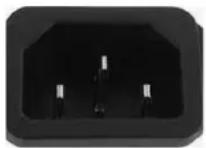
All PSUs have a C14 PSU appliance connector
Cooling considerations
To ensure proper ventilation and cooling for your workstation, observe the following guidelines:
- Keep your workstation in an area where the airflow is not obstructed.
- Keep the workstation off surfaces where dust can gather.
- Remove dust on the bottom of the front panel (vent area) and the rear fans with a small vacuum, compressed air, or dust rag.
- In all supported configurations except rack mounted, provide at least 15.24 cm (6 in) of clearance to every side of the computer except the surface placed on the floor.
- When the system is rack mounted, keep the front of the unit, the back of the unit, and the space between the unit and the upper tray free of obstructions.
The information contained herein is subject to change without notice. The only warranties for HP products and services are set forth in the express warranty statements accompanying such products and services. Nothing herein should be construed as constituting an additional warranty. HP shall not be liable for technical or editorial errors or omissions contained herein.
Second Edition: April 2018
First Edition: November 2017
Document Part Number: L14249-002


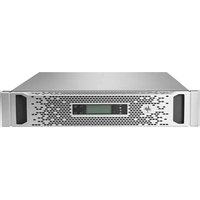
Brand : HP
Model : Z6 G5 A
Category : Inverter