MLB911 - Thermal Bottle N'oveen - Free user manual and instructions
Find the device manual for free MLB911 N'oveen in PDF.


| Product Type | Thermal Flask (Thermoflasche) |
| Brand | N'oveen |
| Model | MLB911 |
| Capacity | 500 ml |
| Material | Double-wall stainless steel |
| Insulation (Hot) | Up to 12 hours |
| Insulation (Cold) | Up to 24 hours |
| Dimensions (Height) | 25 cm |
| Dimensions (Diameter) | 7 cm |
| Weight | 350 g |
| Lid Type | Screw-on with integrated cup |
| Color Options | Stainless steel, Black |
| Care Instructions | Hand wash with mild detergent; do not microwave |
| Safety Features | BPA-free, leak-proof design |
| Spare Parts Available | Replacement lid and seal |
| Repairability | Replaceable sealing ring |
| Usage Limitations | Not for carbonated beverages or microwave |
| Additional Features | Wide mouth for easy cleaning and ice cubes |
Frequently Asked Questions - MLB911 N'oveen
User questions about MLB911 N'oveen
0 question about this device. Answer the ones you know or ask your own.
Ask a new question about this device
Download the instructions for your Thermal Bottle in PDF format for free! Find your manual MLB911 - N'oveen and take your electronic device back in hand. On this page are published all the documents necessary for the use of your device. MLB911 by N'oveen.
USER MANUAL MLB911 N'oveen
MANUAL DE INSTRUÇÕES
ΟΔΗΓΙΕΣ ΧΡΗΣΗΣ
MANUAL DE UTILIZARE
NÁVOD K OBSLUZE
POUŽÍVATELŠKÁ PRÍRUČKA
natural_image
Two 3D-printed food containers with orange straps and control buttons, one gray and one green, shown without any visible text or symbols.Multi Lunch Box Noveen MLB910 Xline
Multi Lunch Box Noveen MLB911 Xline
MLB910/911
POLSKI....s. 6
ENGLISH....p. 10
DEUTSCH....s. 14
ESPAÑOL....p. 18
PORTUGUÊS....p. 22
ΕΛΛΗΝΙΚΑ....Σ. 26
ROMÂNĂ....p. 30
ČEŠTINA....s. 34
SLOVENSKÝ....S. 38
УКРАЇНСЬКА....C. 42
flowchart
graph TD
    A["Step 1: Washing Toward Food"] --> B["Step 2: Drying with Hot Dish"]
    B --> C["Step 3: Cooling Cook Kit"]
flowchart
graph TD
    A["Prepared food item"] --> B["Heating food item"]
    B --> C["Cooking device"]
    C --> D["Menu activation"]
    D --> E["Preset 2H Cook Heat"]
    E --> F["Reaction to menu activation"]
POLSKI PL
Model: MLB910/MLB911
Thank you for purchasing our product.
Before use, please read the user manual enclosed with the product. Keep this manual in case you need to use it again. We believe that the Lunch Box will bring comfort and convenience to you and your family thanks to its excellent functionality. If you have any questions, please do not hesitate to contact us or our service center, we will be happy to help! For more N'oveen brand products, please visit www.noveen.pl
Read all safety information before use and keep these operating instructions for future reference.
- Never disassemble the unit without consulting qualified personnel.
- If the power cord or other component is damaged, it must be replaced by the manufacturer, service representative or qualified personnel to avoid danger. If you attempt to repair the unit yourself, your warranty will be void.
- Check that the rated voltage is the same as the voltage you are using.
- Do not use flammable materials close by.
- Do not touch the power plug with wet hands - risk of electric shock.
- Only professional service personnel may repair the unit.
- Do not heat food longer than the time specified by the manufacturer.
- Do not place the device in a microwave or refrigerator, only containers can be heated or cooled separately.
- If there is an abnormal odor during normal operation, turn OF the unit, disconnect the power supply and contact the service department.
- Never turn on the unit when the container is empty.
- Before cleaning and maintenance, disconnect the appliance from the power supply.
- The appliance should be used by or under the supervision of adults.
- If you are unsure whether the appliance is in full working order, contact the service department.
- The device heats up to 100 degrees, be careful!
- Water is used for heating and cooking, be careful!
- Use a kitchen glove or towel to handle ceramic containers after cooking.
- The device is operating under voltage, be careful!
Note: There is a hole on the cover of the unit through which hot steam escapes during operation. This applies to both the cooking and heating function, Careful: possibility of burns!!!!
Opening on the lid of the appliance must be exposed during use!
Do not carry the appliance during operation, you could be burned by hot water from inside the device.
During operation (cooking or heating) ceramic containers placed inside are hot!!!! Be careful.
When using the product, most parts can become hot, handle with care.
Do not open the cover while the unit is running, the unit during operation heats up the water to boiling point so it can escape after opening the lid.
TECHNICAL DATA
Model: MLB910/MLB911
Rated Voltage: 220-240V \~
Rated Frequency: 50/60 Hz
Rated Power: 300 W
Capacity: 1L
Dimensions: 225 x 130 x 91 mm
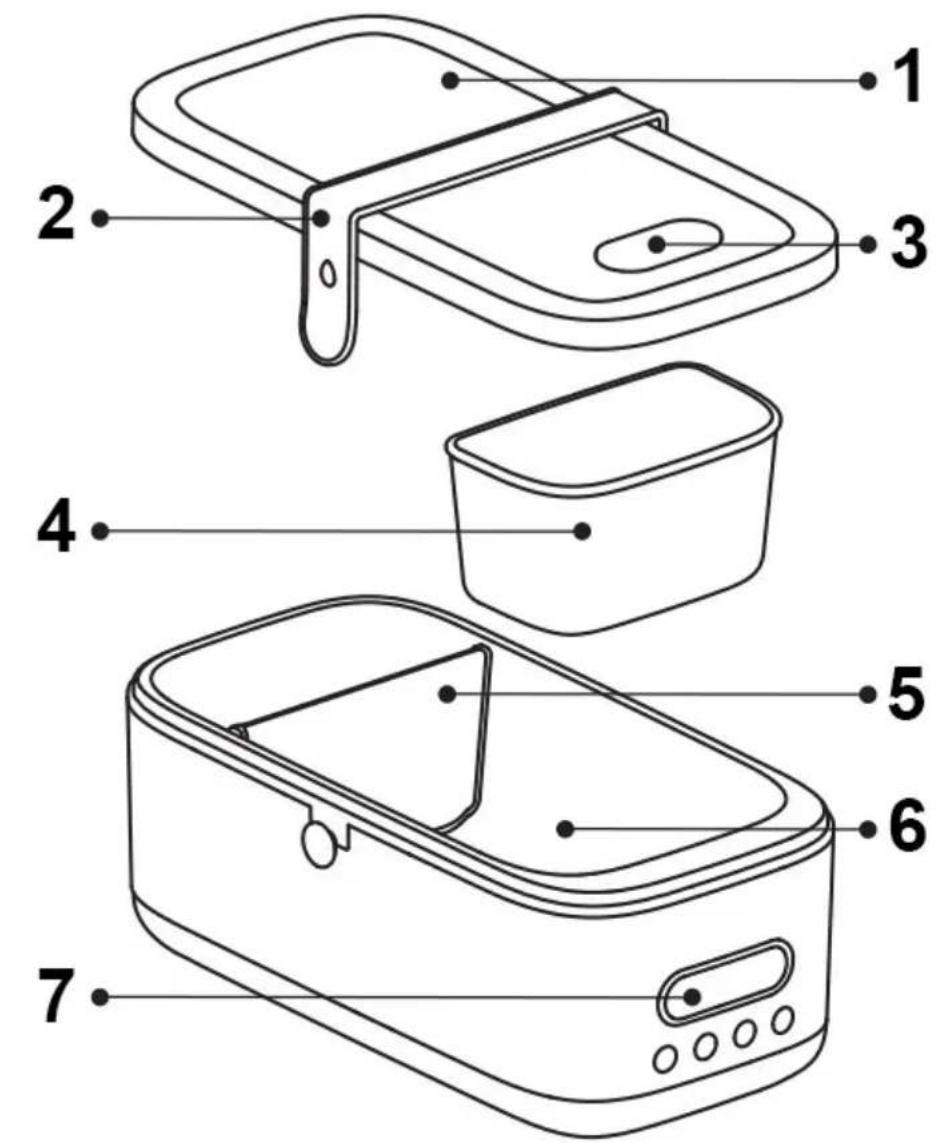
DEVICE DESCRIPTION
- Top cover
- Silicone closing band
- Steam outlet
- Additional container
- Removable divider
- Fixed inner container
- Display with control panel
USING GUIDE
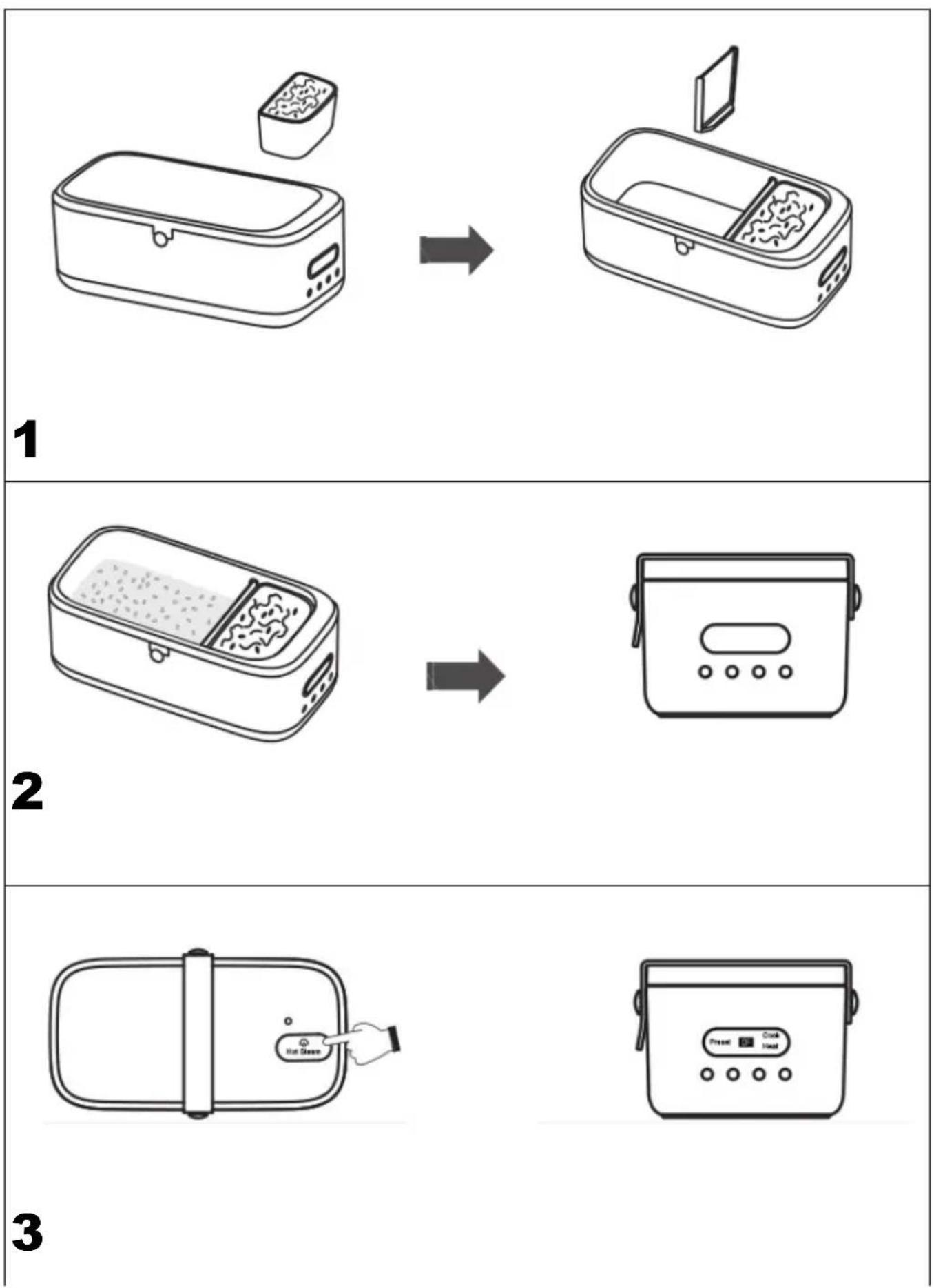
1. Heating
→See picture 1
| Place the food container in the inner container (optional) | Use the removable divider to separate the food (optional) |
→See picture 2
Place the rest of the food you want to heat on the other side of the inner container, put on the top cover and close with a silicone band
→See picture 3
| Open the steam outlet by pulling out one of its sides from the cover | Connect the power cord, the Lunch Box will enter the standby mode, and the control panel will display "OF". Press the bottom menu and select the Heat function using menu button |
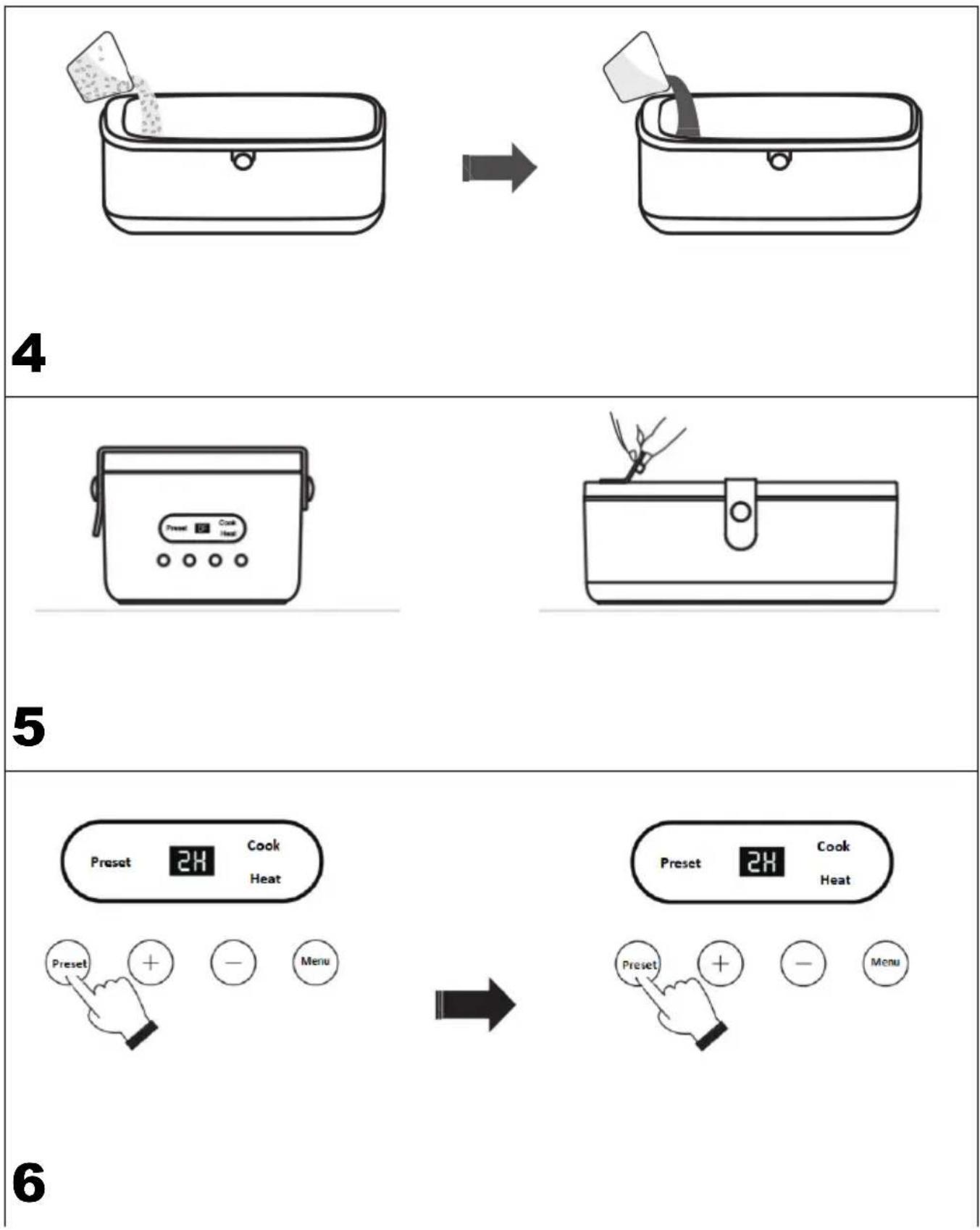
2. Cooking (rice as an example)
→See picture 4
| Use a measuring cup (not included) to add 80g of rice into the inside pot | Use a measuring cup (not included) to add 150ml of water into the inside pot. |
→See picture 5
| Connect the power cable. The Lunch Box will enter the standby mode and the control panel will display "OF". Press the menu button and select the cooking function (Cook). | When the unit is finished, lift the steam outlet and then open the top cover. |
Note: When the product is working, do not touch the top cover and the steam outlet. Beware of hot steam.
| Function Food weight Volume of water added into the lunch box (ml) | Default operationg time | Range of operating time | ||
| Cook 80g rice 150 30 min 10 min – 5 h | ||||
| Heat Proper amount Proper amount 20 min 5 min – 1 h | ||||
| Preset 2 h 1 min – 9 h | ||||
3. Preset function
→See picture 6
| Display on operation panel during schedule setting | Display on operation panel during function selection after completed |
After pressing Preset button, the indicator will flicker and the default time ("2H") will be displayed. The time can be quickly increased or decreased by long pressing +/- buttons. After setting, press Menu bottom then the indicator is on, which shows the presetsetting is completed. The unit enters the function selection status.
Note: If preset setting is not necessary, press Menu bottom directly to enter the function selection mode.
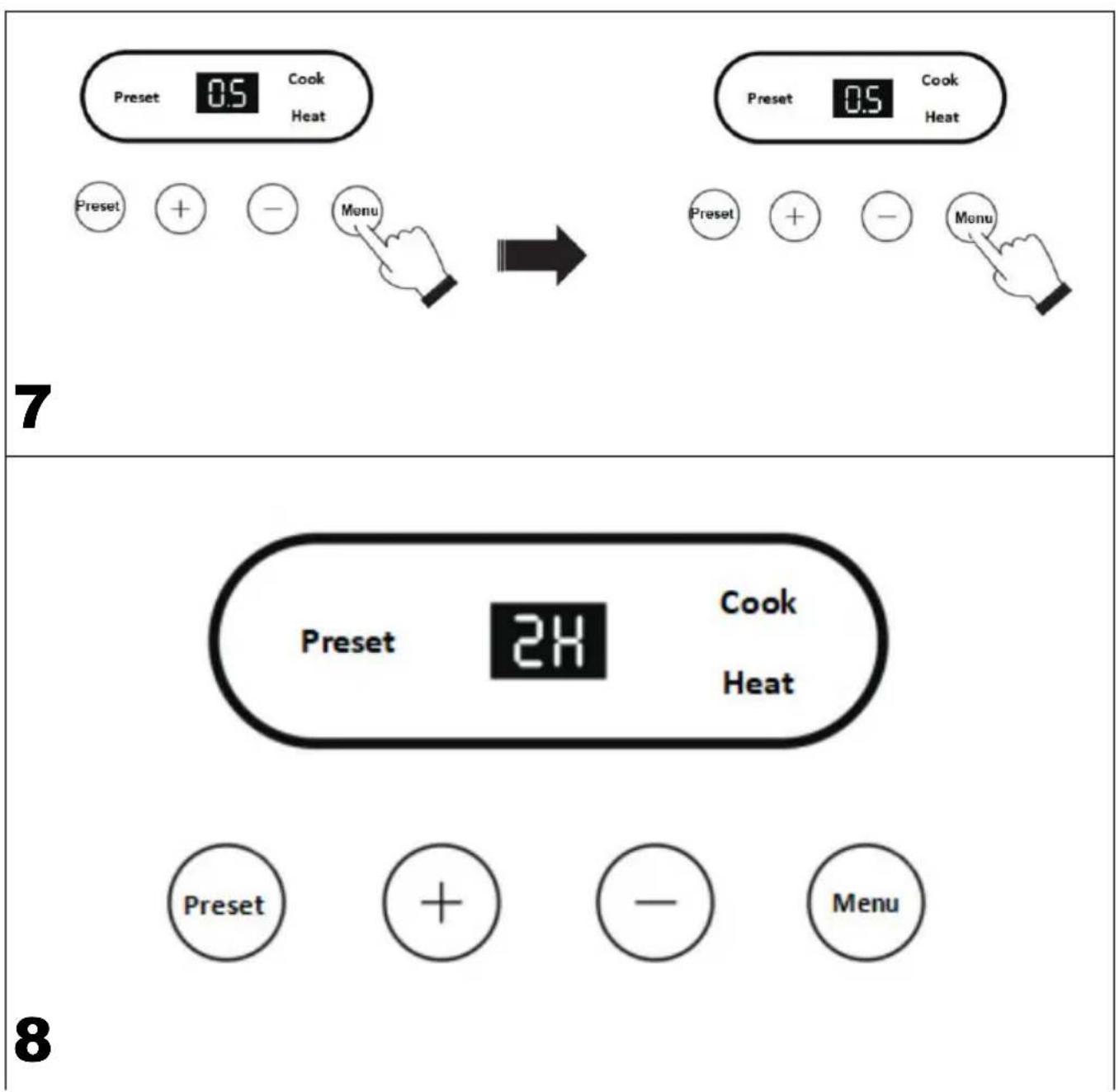
4. Function selection
→See picture 7
| Display on operation panel during function selection | 10s after function selection, the item will begin to work automatically |
If Menu buttom is pressed in the standby mode or after schedule setting, the product will enter the function selection mode. Each time this button is pressed, the product will switch to the corresponding function and indicator will flicker. The operating time can be adjusted through the +/- buttons. The product will begin to work 10s later. If Menu buttom is pressed during work, the unit will stop preset or working and become standby.
Tips:
-
Function switching follows the sequence below: standby, cook, heat and standby.
-
The preset function cannot work during function selection. If want to use preset function, press Menu to make "OF" (standby mode) display on the operation panel.
5. Keep warm function
Display on operation panel during keep warm See picture 8
Upon end of the set operating time, the item will enter the keep warm mode automatically and last for 2h by default. User can wait till the item enters standby after the default keep warm time is completed, or press Menu to stop work, then power it OF (the indicators will go out) and unplug the power cable.
Note: If want to open the top cover during cooking/heating, pay attention to the steam and the boiling water from the lunch box.
Cleaning and maintenance
•After use, unplug the power cable.
- Do not use hard steel wire but dishwashing liquid and sponge to wash the bowl and the top cover to avoid damage to their surfaces.
- When the item is dirty, do not wash it in water but wipe with with a wet towel to prevent electric leakage and accidents.
- If the item is not to be used for a long time, clean it, put it into its package and place it in a dry and well-ventilated place.
Troubleshooting
| Problem Possible cause | |
| The power indicator is out. a. P | Power failure;b. Power cable is not inserted into the power socket;c. Power socket is OF;d. Product's power cable plug is not securely inserted into the power connector of the lunchbox; ore. The product is protecting itself from working without water. |
| The food is not well steamed or cooked. | a. Added too much or little water.b. The operating time is wrongly set. |
Note: If the fault still persists after the examination above, contact service center or dealer.
- POLSKI PL
- Thank you for purchasing our product.
- Read all safety information before use and keep these operating instructions for future reference.
- TECHNICAL DATA
- DEVICE DESCRIPTION
- USING GUIDE
- Heating
- Cooking (rice as an example)
- Preset function
- Function selection
- Tips:
- Keep warm function
- Cleaning and maintenance
Brand : N'oveen
Model : MLB911
Category : Thermal Bottle