
SK105GD - Laser pointer MAKITA - Free user manual and instructions
Find the device manual for free SK105GD MAKITA in PDF.


| Product Type | Self-levelling cross-line laser pointer |
| Model | SK105GD |
| Brand | Makita |
| Laser Type | Green, Class 2 (525 ± 5 nm) |
| Range (without receiver) | 35 m (115 ft) |
| Range (with receiver) | 80 m (262 ft) |
| Levelling Accuracy | ±0.3 mm/m (±0.004 in/ft) |
| Self-levelling Range | ±4° |
| Self-levelling Time | < 3 s |
| Compatible Battery Cartridges | BL1015, BL1016, BL1020B, BL1021B, BL1040B, BL1041B |
| Operating Time (2 beams) | 7 h (BL1015/BL1016), 10 h (BL1020B/BL1021B), 20 h (BL1040B/BL1041B) |
| Power Supply | Makita battery cartridge or USB adapter (5 V DC) |
| Dimensions (L x W x H) | 112 x 61 x 102 mm (4.41 x 2.40 x 4.01 in) |
| Net Weight (without battery) | 0.46 kg |
| Weight with Battery | 0.67 - 0.84 kg |
| Tripod Thread | 1/4" (with 5/8" adapter) |
| Operating Temperature | -10°C to +50°C (14°F to 122°F) |
| Laser Line Width at 5 m | < 2 mm (< 0.08 in) |
| Functions | Self-levelling, cross-line (horizontal and vertical), brightness reduction, pulse mode |
| Levelling Lock | Yes, for transport and tilt mode |
| Out-of-Level Warning | Blinking every 5 seconds |
| Laser Safety Class | Class 2 per IEC 60825-1:2014 |
| Maintenance | Clean optics with damp soft cloth and pure alcohol; avoid immersion |
| Optional Accessories | L-adapter, PRO L-adapter, wall mount, laser receiver LDX1, tripod, storage case, target plate, hand strap, aluminum rod |
Frequently Asked Questions - SK105GD MAKITA
User questions about SK105GD MAKITA
0 question about this device. Answer the ones you know or ask your own.
Ask a new question about this device
Download the instructions for your Laser pointer in PDF format for free! Find your manual SK105GD - MAKITA and take your electronic device back in hand. On this page are published all the documents necessary for the use of your device. SK105GD by MAKITA.
USER MANUAL SK105GD MAKITA
Overview 2.
Technical data 3
Instrument Set-up 5
Operations 8
How to use the adapters and wall mount 11.
Message Codes 13
Accuracy Check 14
Care 16
Safety instructions 17
Optional accessories 22
Overview
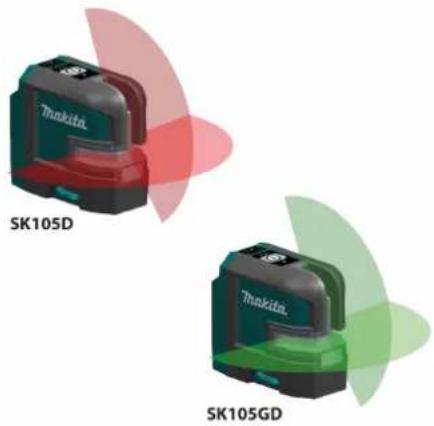
The Makita SK105D/SK105GD is a self-levelling cross-line laser. It is a reliable precision laser for any kind of tasks like levelling, plumbing, transferring and setting out right angles. It supports you on job side with two crossing vertical and horizontal lines.
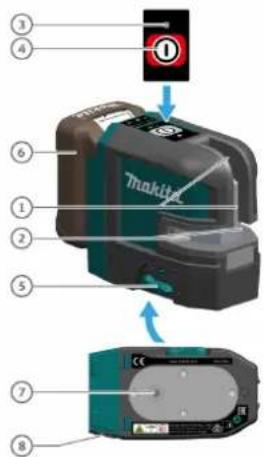
1 Window of vertical line
2 Window of horizontal line
3 Status LED
4 ON / Set key
5 Levelling lock / Transportation lock
6 Battery (optional)
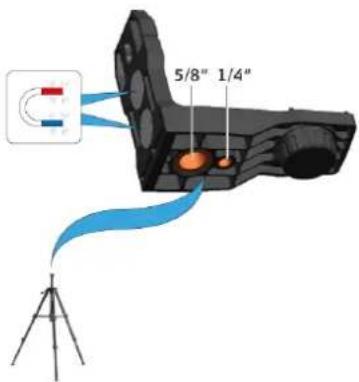
7 Tripod thread 1/4"
8 DC jack
There are 2 different types available:
• SK105D (red laser)
• SK105GD (green laser)
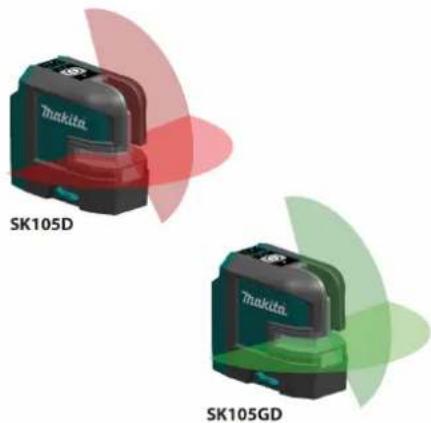
On all images in this document only the SK105D is shown.
Technical data
| Description SK105D SK105GD | ||
| Beam direction/fan angle Vertical / >160°, Horizontal / >180° | ||
| Range* 25 m (82 ft) 35 m (115 ft) | ||
| Range* with receiver 80 m (262 ft) | ||
| Levelling accuracy ±0.3 mm/m = ±3.0 mm @ 10m (±0.004 in/ft = ±0.12 in @ 33ft) | ||
| Horizontal/Vertical line accuracy ±0.3 mm/m (±0.004 in/ft) | ||
| Self-levelling range ± 4 ° | ||
| Self-levelling time | < 3 s | |
| Out-of-level warning | Yes - blink lines every 5 s | |
| Levelling system | Automatic pendulum lockable | |
| Laser type | 635 ± 5 nm, Class 2 (acc. IEC 60825-1) | 525 ± 5 nm, Class 2 (acc. IEC 60825-1) |
| Battery cartridge | BL1015 / BL1016 / BL1020B / BL1021B / BL1040B / BL1041B | |
| Operating time with Li-Ion battery (2 beam) | 15 h (BL1015/BL1016) | 7 h (BL1015/BL1016) |
| 20 h (BL1020B/BL1021B) | 10 h (BL1020B/BL1021B) | |
| 40 h (BL1040B/BL1041B) | 20 h (BL1040B/BL1041B) | |
| Net weight | 0.46 kg | |
| Weight with Li-Ion battery | 0.67 kg - 0.84 kg | |
| Power supply | Makita battery cartridge / USB adapter | |
| Rated voltage | D.C. 10.8 V - 12 Vmax, D.C. in 5 V | |
| Dimensions (L x W x H) | 112 x 61 x 102 mm (4.41 x 2.40 x 4.01 in) | |
| Operating temperature (instrument) | -10...+50 °C (+14...+122 °F) | |
| Storage temperature (instrument) | -25...+70 °C (-13...+158 °F) | |
| Laser line width at 5m distance | < 2 mm (<0.08 in) | |
| Tripod thread | 1/4" (+ 5/8" with adapter) | |
| Pulse power for receiver | Yes, auto | |
* depending on lighting conditions
Technical data
Please note the following:
- Due to our continuing program of research and development, the specifications herein are subject to change without notice.
- Specifications may differ from country to country.
- The weight may differ depending on the attachment(s), including the battery cartridge. The lightest and heaviest combination, according to EPTA-Procedure 01/2014, are shown in the table.
- Some of the battery cartridges listed above may not be available depending on your region of residence.

WARNING
Only use the battery cartridges listed above. Use of any other battery cartridges may cause injury and/or fire.
Instrument Set-up
Introduction

The safety instructions (see Safety Instructions) and the user manual should be read through carefully before the product is used for the first time.
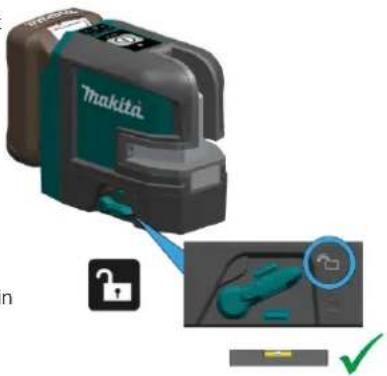
Levelling lock
Levelling unlocked
In the unlocked position the instrument automatically levels itself within the specified inclination range. (See Technical data)
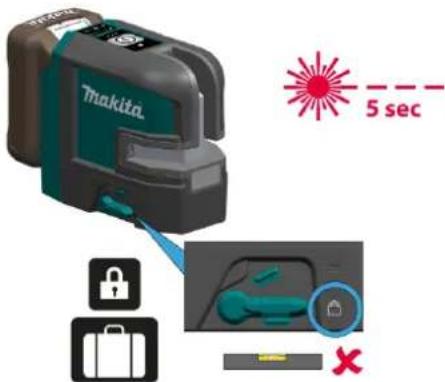
Levelling locked
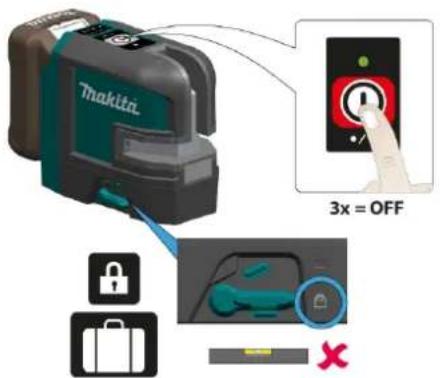
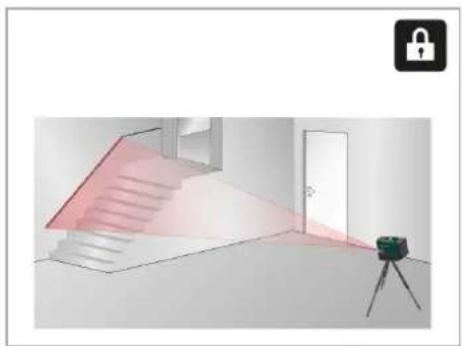
Turn the levelling lock in order to transport or tilt the instrument beyond the self-levelling range. When locked, the pendulum is fixed and the self-levelling function is deactivated. In this case the laser blinks every 5sec.

The person responsible for the product must ensure that all users understand these directions and adhere to them.
The symbols used have the following meanings:

WARNING
Indicates a potentially hazardous situation or an unintended use which, if not avoided, will result in death or serious injury.

CAUTION
Indicates a potentially hazardous situation or an unintended use which, if not avoided, may result in minor injury and/or appreciable material, financial and environmental damage.

Important paragraphs which must be adhered to in practice as they enable the product to be used in a technically correct and efficient manner.
Instrument Set-up
Laser receiver
To be able to detect the laser lines over long tances or in unfavourable lighting conditions, a laser receiver can be used.

We recommend the Makita LDX1 laser receiver.
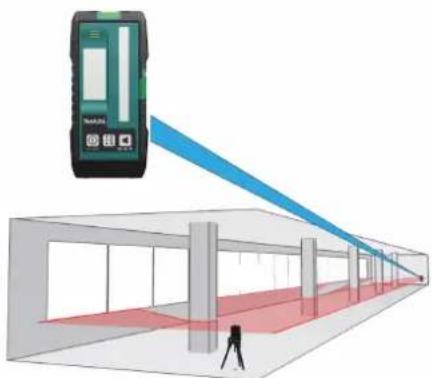
natural_image
Illustration of a person using a handheld device to observe a red LED screen in a white corridor (no text or symbols visible)Li-Ion battery
dis-installing or removing battery cartridge

CAUTION
Always switch off the tool before installing or removing of the battery cartridge.

CAUTION
Hold the tool and the battery cartridge firmly when installing or removing battery cartridge. Failure to hold the tool and the battery cartridge firmly may cause them to slip off your hands and result in damage to the tool and battery cartridge and a personal injury. Always install the battery cartridge fully until the red indicator cannot be seen. If not, it may acci-fully fall out of the tool, causing injury to you someone around you.
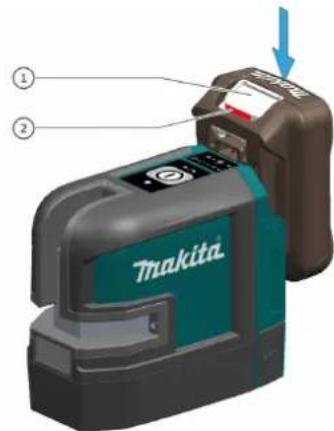
To remove the battery cartridge, slide it from the tool while sliding the button (1) on the front of the cartridge.
To install the battery cartridge, align the tongue of the battery cartridge with the groove in the housing and slip it into place. Insert it all the way unlocks in place with a little click. If you can see the red indicator (2) on the upper side of the button, is not locked completely.

CAUTION
Always install the battery cartridge fully until the red indicator cannot be seen. If not, it may accidentally fall out of the tool, causing injury to you someone around you.

CAUTION
Do not install the battery cartridge forcibly. If the cartridge does not slide in easily, it is not being inserted correctly.

CAUTION
Connecting the wrong adapter may cause serious damage to the instrument. Any damage caused by misuse is not covered by warranty. Use only Makita approved batteries USB adapters and cables. Unapproved can damage the instrument.
Instrument Set-up
Using the USB adapter (optional)
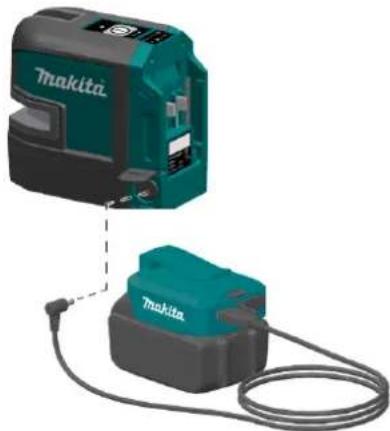
natural_image
Two teal-colored Makita industrial sensors with attached cable, shown from different angles (no text or symbols visible)Makita CXT batteries
Indicating the remaining battery capacity
Only for battery cartridges with the indicator
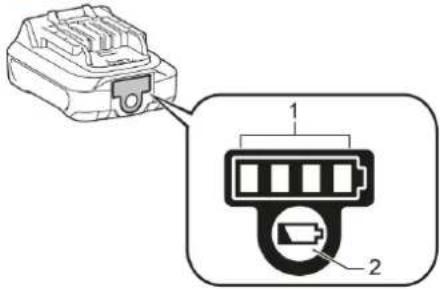
Press the check button (2) on the battery cartridge to indicate the remaining battery capacity. The indicator lamps (1) light up for a few seconds and show the remaining capacity:
| 75% - 100% | |
| 50% - 75% | |
| 25% - 50% | |
| 0% - 25% |
Depending on the conditions of use and the ambient temperature, the indication may differ slightly from the actual capacity.
Operations
Switching ON/Set key
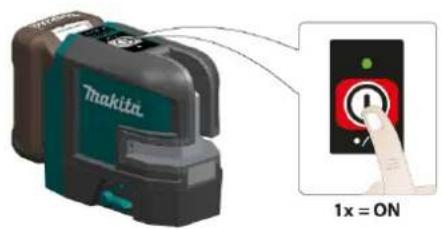
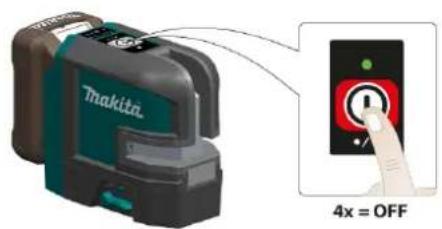
If the instrument is locked press laser key 3 times to switch off:
Brightness reduction

Operations
Functions with unlocked levelling
Vertical lines and horizontal lines
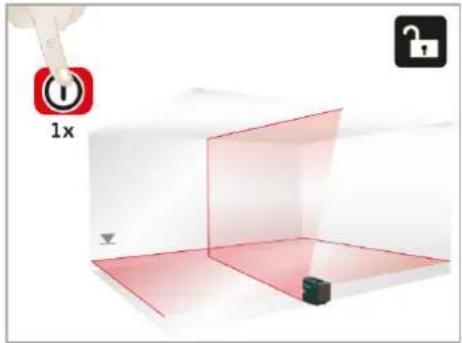
Horizontal line Vertical line
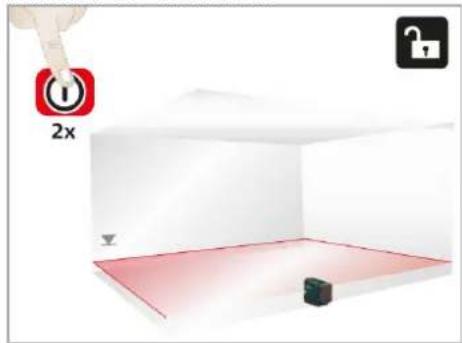
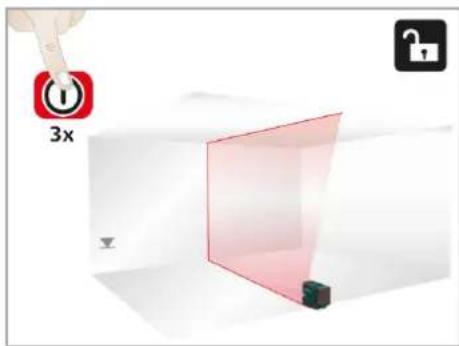
Operations
Functions with locked levelling
Horizontal line
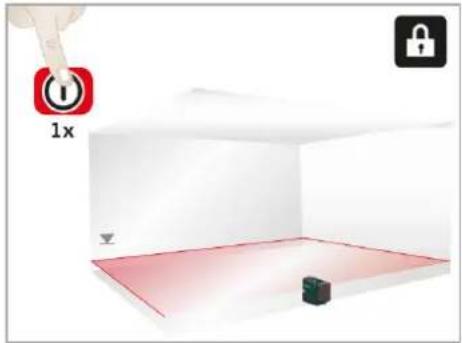
Vertical line Horizontal line tilted
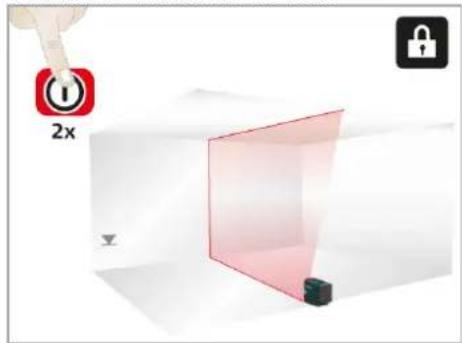
natural_image
Interior view of a room with stairs, a door, and a camera on a tripod (no text or symbols)How to use the adapters and wall mount
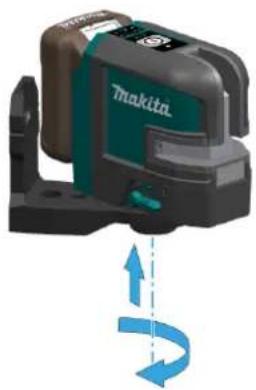
L-adapter
natural_image
Exterior view of a Makita GPS scanner device with blue circular arrow indicating rotation (no text or symbols on device body)Alignment of vertical laser lines

natural_image
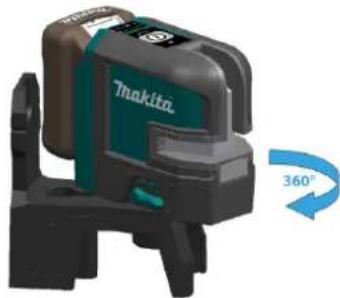
Product image of a Makita camera with 360° rotation indicator (no text or symbols on device)Turn the instrument 360° to adjust the vertical line.
PRO L-adapter
(optional accessory)
natural_image
Exterior view of a Tokita printer with 360° angle indicator (no text or symbols on device body)Put the instrument on L-adapter and fix it by thread.

L-adapter can not be used when battery cartridge BL1040B or BL1041B is inserted.
Put the instrument on PRO L-adapter and fix it b thread.
Turn the instrument 360° to adjust the vertical line

PRO L-Adapter can not be used when battery cartridge BL1040B or BL1041B is inserted.
How to use the adapters and wall mount
Wall mount
(optional accessory)
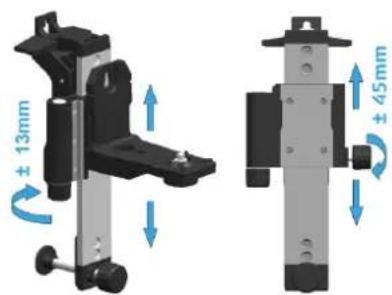
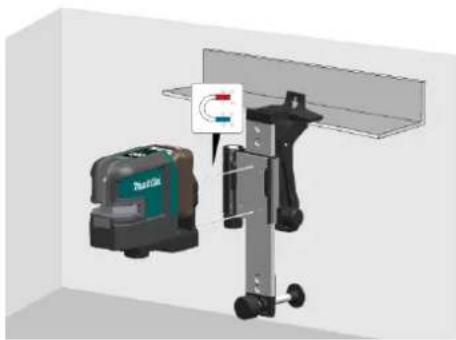
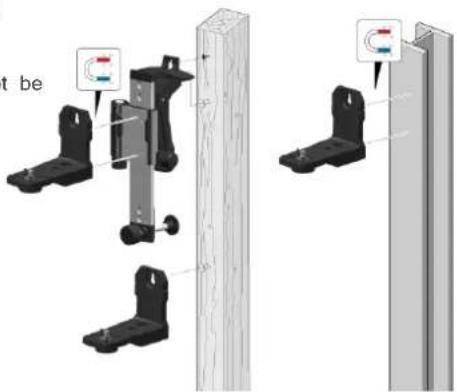
Different fixing applications
natural_image
3D rendering of a mechanical device with a mounted sensor and a small component, no visible text or symbolsTurn the adjustment knob of the wall mount to loose and fix the slide for fine adjustment of the horizontal line to the desired reference level.
The wall mount is a single item and will not be delivered with the L-adapter as shown above.
Message Codes
| ON Lights green Normal - | |||
| ON Blinks green Normal, laser set at reduced brightness | OK - or press ON / Set key for 2 seconds to get strong laser beam | ||
| ON Lights red Instrument is at low power Change power supply | |||
| OFF | Lights red 5 seconds then OFF | Battery empty | Change power supply |
| OFF | Blinks red | Temperature alert | Cool down - or heat up instrument |
| Blinks Lights red Instrument is out of self-levelling and instrument is at low power | Change power supply | ||
| Blinks | Blinks red | Instrument is out of self-levelling | Position the instrument almost horizontal |
| Blinks every 5 seconds | Lights red Levelling lock is activated and instrument is at low power | Change power supply | |
| Blinks every 5 seconds | Lights green | Normal, levelling lock is activated | - |
| Blinks every 5 seconds | Blinks green Levelling lock is activated and laser set at reduced brightness | - | |
Accuracy Check

Check the accuracy of your instrument regularly and particularly before important measuring tasks. Check Levelling lock before checking the accuracy.
Checking the accuracy of the levelling
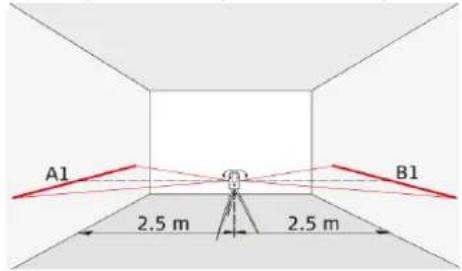
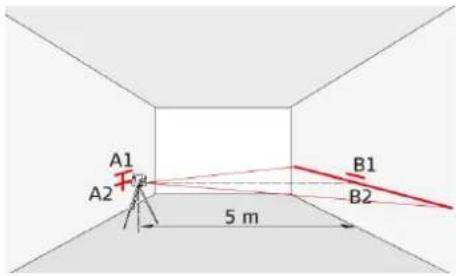
Set the instrument on a tripod half-way between Then place the instrument at the same elevation two walls (A+B) that are approx. 5 m apart. Places close as possible to wall A and again mark the lock switch in the "Unlocked" position (see L horizontal laser line or the laser point on wall A elling lock). Direct the instrument at wall A and (A2). Rotate the instrument by 180° again and switch on the instrument. Activate the horizontal mark the laser on wall B (B2). Measure the dis-laser line or laser point and mark the position of tances of the marked points A1-A2 and B1-B2. the line or the point on wall (A1). Rotate the insCalculate the difference of the two meas-ment by 180° and mark the horizontal laser line uements. the laser point in exactly the same way on wall (B1). |(A1 - A2) - (B1 - B2)| <=2 mm
If the difference does not exceed 2 mm, then the instrument is within tolerance.

Should your instrument be outside of the specified tolerance, please contact a local dealer or an authorised Makita distributor.
Accuracy Check
Vertical and horizontal line
Checking the accuracy of the horizontal line
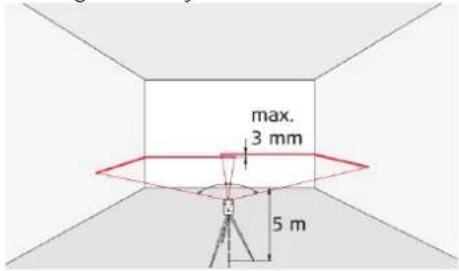
Place the lock switch in the "Unlocked" position (see Levelling lock). Position the instrument approx. 5 m away from the wall. Direct the instrument at the wall and switch on. Activate the laser line and mark the intersection point of laser crosshairs on the wall. Swivel the instrument to the right and then to the left. Observe the vertical deviation of the horizontal line from the marking. If the difference does not exceed 3 mm, then the instrument is within tolerance.
Checking the accuracy of the vertical line
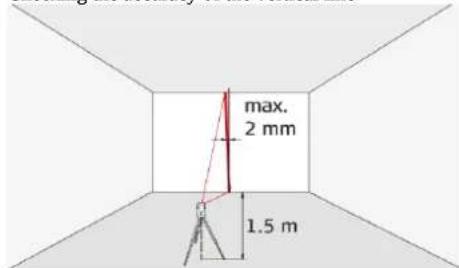
Place the lock switch in the "Unlocked" position (see Levelling lock). As a reference, use a plumb-bob and attach it as close as possible to an approx. 3 m high wall. Position the instrument at a distance of approx. 1.5 m from the wall at an elevation of approx. 1.5 m. Direct the instrument at the wall and switch on. Rotate the instrument and align it with the bottom of the plumb line. Now read off the maximum deviation of the laser line from the top of the plumb line. If the difference does not exceed 2 mm, then the instrument is within tolerance.
Should your instrument be outside of the specified tolerance, please contact a local dealer or an authorised Makita distributor.
Care
Never immerse the instrument in water. Wipe off dirt with a damp soft cloth. Never use aggressive cleaning agents or solvents. Treat the instrument with the same care that you would apply to binoculars or a camera. Dropping or violent shaking of the instrument may damage it. Check the instrument for any damage before using it. Check the levelling accuracy of the instrument regularly.
To warranty the best precision and visibility please clean the optics of your instrument regularly. Therefore blow off the dust from the glasses without touching the optics with your fingers. If necessary use a damp soft cloth and a little bit of pure alcohol.
To avoid wrong measurements also clean your adapters regularly. This could be done also by the proposed recommendation. Especially the interface between the adapter and instrument should always be clean to enable easy rotation. To clean the magnetic surface you could use compressed air or modelling clay.
If the equipment get wet always dry it (max. 70^ C/158°F) before repacking it into the case.
Safety instructions

The person responsible for the instrument must ensure that all users understand these directions and adhere to them.
Areas of responsibility
Responsibilities of the manufacturer of the original equipment:
Makita Corporation Anjo, 3-11-8, Sumiyoshi-cho, Aichi 446-8502, Japan Makita, Jan-Baptist Vinkstraat 2, 3070, Belgium Internet: www.makita.com
The company above is responsible for supplying the product, including the User Manual in a completely safe condition.
The company above is not responsible for third party accessories.
Responsibilities of the person in charge of the instrument:
- To understand the safety instructions on the product and the instructions in the User Manual.
- To be familiar with local safety regulations relating to accident prevention.
- Always prevent access to the product by unauthorised personnel.
Permitted use
- Projection of horizontal and vertical laser lines
Prohibited use
- Using the product without instruction
- Using outside the stated limits
- Deactivation of safety systems and removal of explanatory and hazard labels
- Opening of the equipment by using tools (screwdrivers, etc.)
- Carrying out modification or conversion of the product
- Deliberate dazzling of third parties; also in the dark
- Inadequate safeguards at the surveying site (e.g. when measuring on roads, construction sites, etc.)
Hazards in use

WARNING
Watch out for erroneous measurements if the instrument is defective or if it has been dropped has been misused or modified. Carry out periodic test measurements. Particularly after the instrument has been subject to abnormal use, and before, during and after important measurements.

CAUTION
Never attempt to repair the product yourself. In case of damage, contact a local dealer.

WARNING
Changes or modifications not expressively approved by Makita/manufacturer for compliance could void the user's authority to operate the equipment.

CAUTION
Laser light is bright and blinding. Do not shine at aircraft or vehicles at any distances.

WARNING
Makita Line Laser and L-adapter / PRO L-adapter should not be used in the vicinity of pacemaker because of integrated magnets which can affect the function of the pacemaker.
Safety instructions
Battery tool use and care
- Recharge only with the charger specified by the manufacturer. A charger that is suitable for one type of battery pack may create a risk of fire when used with another battery pack.
- Use power tools only with specifically designated battery packs. Use of any other battery packs may create a risk of injury and fire.
- When battery pack is not in use, keep it away from other metal objects, like paper clips, coins, keys, nails, screws or other small metal objects, that can make a connection from one terminal to another. Shorting the battery terminals together may cause burns or a fire.
- Under abusive conditions, liquid may be ejected from the battery; avoid contact. If contact accidentally occurs, flush with water. If liquid contacts eyes, additionally seek medical help. Liquid ejected from the battery may cause irritation or burns.
- Do not use a battery pack or tool that is damaged or modified. Damaged or modified batteries may exhibit unpredictable behaviour resulting in fire, explosion or risk of injury.
- Do not expose a battery pack or tool to fire or excessive temperature. Exposure to fire or temperature above 130 °C may cause explosion.
- Follow all charging instructions and do not charge the battery pack or tool
outside the temperature range specified in the instructions. Charging improperly or at temperatures outside the specified range may damage the battery and increase the risk of fire.
Important safety instructions for battery cartridge
- Before using battery cartridge, read all instructions and cautionary markings on (1) battery charger, (2) battery, and (3) product using battery.
- Do not disassemble battery cartridge.
- If operating time has become excessively shorter, stop operating immediately. It may result in a risk of overheating, possible burns and even an explosion.
- If electrolyte gets into your eyes, rinse them out with clear water and seek medical attention right away. It may result in loss of your eyesight.
- Do not short the battery cartridge:
(1) Do not touch the terminals with any conductive material.
(2) Avoid storing battery cartridge in a container with other metal objects such as nails, coins, etc.
(3) Do not expose battery cartridge to water or rain. A battery short can cause large current flow, overheating, possible burns and even a breakdown. -
Do not store the battery cartridge in locations where the temperature may reach or exceed 50 °C (122 °F).
-
Do not incinerate the battery cartridge even if it is severely damaged or is completely worn out. The battery cartridge can explode in a fire.
- Be careful not to drop or strike battery.
- Do not use a damaged battery.
- The contained lithium-ion batteries are subject to the Dangerous Goods Legislation requirements. For commercial transports e.g. by third parties, forwarding agents, special requirement on packaging and labeling must be observed. For preparation of the item being shipped, consulting an expert for hazardous material is required. Please also observe possibly more detailed national regulations. Tape or mask off open contacts and pack up the battery in such a manner that it can not move around in the packaging.
- Follow your local regulations relating to disposal of battery.
- Use the batteries only with the products specified by Makita. Installing the batteries to non-compliant products may result in a fire, excessive heat, explosion, or leak of electrolyte.
SAVE THESE INSTRUCTIONS.
Safety instructions

CAUTION
Only use genuine Makita batteries. Use of non-genuine Makita batteries, or batteries that have been altered, may result in the battery bursting causing fires, personal injury and damage. It will also void the Makita warranty for the Makita too and charger.
Disposal

CAUTION
Flat batteries must not be disposed of with hous hold waste. Care for the environment and take them to the collection points provided in accordance with national or local regulations.
Transport
Transport of instrument
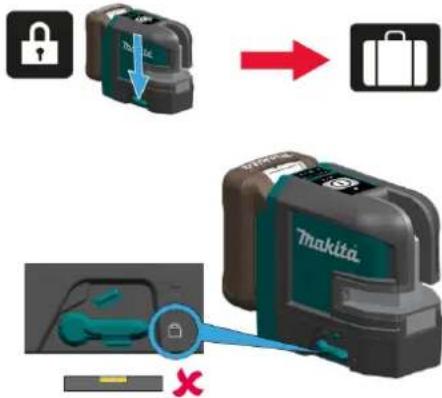
Always set the instrument in "Locked" position by turning the lock switch when transporting the instrument (see Levelling lock). Please use the or ginal case or an equivalent packaging for transporting and shipping your measuring instrument.
Tips for maintaining maximum battery life:
- Charge the battery cartridge before completely discharged. Always stop tool operation and charge the battery cartridge when you notice less tool power.
- Never recharge a fully charged battery cartridge. Overcharging shortens the battery service life.
- Charge the battery cartridge with room temperature at 10 °C - 40 °C (50 °F - 104 °F). Let a hot battery cartridge cool down before charging it.

The product must not be disposed with household waste. Dispose of the product appropriately in accordance with the national regulations in force in your country. Adhere to the national and country specific regulations.
Limits of use

Refer to section Technical data. The instrument is designed for use in areas permanently habitable for humans. Do not use the product in explosion hazardous areas or in aggressive environments.
Safety instructions
Electromagnetic Compatibility (EMC)

WARNING
The instrument conforms to the most stringent requirements of the relevant standards and regulations. However, the possibility of causing interference in other instruments cannot be totally excluded.
FCC statement (applicable in U.S.)
This equipment has been tested and found to comply with the limits for a Class B digital instrument pursuant to part 15 of the FCC rules. These limits
are designed to provide reasonable protection. This instrument complies with Industry Canada against harmful interference in a residential installlicense-exempt RSS standard(s). Operation is ation. This equipment generates, uses and can subjected to the following two conditions:
radiate radio frequency energy and, if not installed and used in accordance with the instructions, may cause harmful interference to radio communications.
However, there is no guarantee that interference will not occur in a particular installation. If this equipment does cause harmful interference to radio or television reception, which can be determined by turning the equipment off and on, the user is encouraged to try to correct the interference by one or more of the following measures:
- Reorient or relocate the receiving antenna
-
Increase the separation between the equipment and the receiver
-
Connect the equipment into an outlet on a circuit different from that to which the receiver is connected
- Consult the dealer or an experienced radio/TV technician for help
This instrument complies with part 15 of the FCC rules. Operation is subjected to the following two conditions:
- This instrument may not cause harmful interference, and
- this instrument must accept any interference received, including interference that may cause undesired operation.
fSED statement (applicable in Canada)
This instrument complies with Industry Canada license-exempt RSS standard(s). Operation is subjected to the following two conditions:
- This instrument may not cause harmful interference, and
- this instrument must accept any interference received, including interference that may cause undesired operation.
Safety instructions
Laser classification
natural_image
Two Thakita SK105D and SK105GD camera modules shown with colored sensor or sensor overlays (no text or symbols on devices)WARNING
Looking directly into the beam with optical aids (e.g. binoculars, telescopes) can be hazardous.
CAUTION
Looking into the laser beam may be hazardous to the eyes.
Wavelength
SK105D: 635 +/- 5 nm (red) / SK105GD: 525 +/- 5 nm (green)
Maximum radiant output power for classification
<1 mW
Pulse duration
45 - 70 μs
The instrument produces visible laser beams, which are emitted from the instrument. It is a Class 2 laser product in accordance with:
- IEC60825-1 : 2014 „Radiation safety of laser products“
Laser Class 2 products
Do not stare into the laser beam or direct it towards other people unnecessarily. Eye protection is normally afforded by aversion responses including the blink reflex.
Labelling
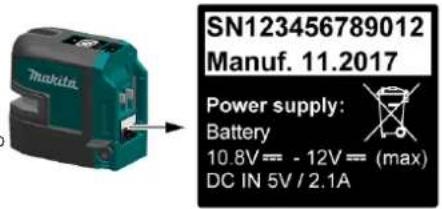
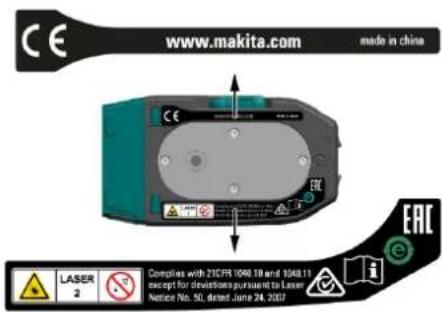
Subject to change (drawings, descriptions and technical data) without prior notice.
Optional accessories

CAUTION
These accessories or attachments are recommended for use with your Makita tool specified in this manual. The use of any other accessories or attachments might present a risk of injury to persons. Only use accessory or attachment for its stated purpose.
- USB adapter
• Power supply cable - Laser receiver LDX1
- Wall mount
- Tripod
- Laser viewing glass
- Storage case
- Target plate
- Hand strap
- Aluminium rod
- PRO L-adapter

If you need any assistance for more details regarding these accessories, ask your local Makita Service Center.
- Overview
- Technical data
- WARNING
- Instrument Set-up
- Introduction
- Levelling lock
- Levelling unlocked
- Levelling locked
- CAUTION
- Laser receiver
- Li-Ion battery
- Makita CXT batteries
- Operations
- How to use the adapters and wall mount
- L-adapter
- PRO L-adapter
- Accuracy Check
- Care
- Safety instructions
- Areas of responsibility
- Responsibilities of the manufacturer of the original equipment:
- Responsibilities of the person in charge of the instrument:
- Permitted use
- Prohibited use
- Hazards in use
- Battery tool use and care
- Important safety instructions for battery cartridge
- Disposal
- Transport
- Tips for maintaining maximum battery life:
- Limits of use
- Electromagnetic Compatibility (EMC)
- FCC statement (applicable in U.S.)
- fSED statement (applicable in Canada)
- Laser Class 2 products
- Optional accessories
Brand : MAKITA
Model : SK105GD
Category : Laser pointer