
X-787 - Loudspeaker Real-El - Free user manual and instructions
Find the device manual for free X-787 Real-El in PDF.


| Product Type | Portable Speaker System with Bluetooth and FM |
| Model | X-787 |
| Brand | Real-El |
| Output Power (RMS) | 80 W (2 × 40 W) |
| Frequency Range | 45–22000 Hz |
| Speaker Drivers | 2 × ∅ 32 mm + 2 × ∅ 145 mm |
| Bluetooth Version (Profiles) | L2CAP/A2DP |
| Bluetooth Range | Up to 10 m |
| Connection Types | USB, Micro SD (TF), AUX (3.5 mm), Bluetooth |
| Microphone Inputs | 2 × 6.3 mm jack with Echo adjustment |
| FM Radio | 87.5–108 MHz with auto scan and memory |
| Power Supply | USB/DC 5 V, 2 A (charger not included) |
| Battery | Lithium-ion 2 × 4400 mAh, DC 3.7 V |
| Charging Time | Approx. 4–6 hours (with 2A charger) |
| Playback Time | Extended (exact duration not specified) |
| Supported File Systems (micro SD) | FAT32, max 32 GB (not Ultra Speed) |
| Remote Control | Included (IR) |
| Features | TWS, EQ, RGB backlight, Karaoke, MIC PRI, USB playback |
| Dimensions (W × H × D) | 230 × 640 × 260 mm |
| Weight | 5.2 kg |
| Case Material | ABS plastic |
| Safety Precautions | Do not open; protect from humidity, heat, dust; clean with dry cloth; keep away from heat sources >1 m |
| Maintenance | Use only dry soft cloth; avoid chemical agents |
| Repairability | Service only by authorized centers; list at www.real-el.com |
| Package Contents | Speaker, FM antenna/3.5 mm cable, USB to Micro USB cable, remote control, 2 microphone holders, user manual, warranty card |
Frequently Asked Questions - X-787 Real-El
User questions about X-787 Real-El
0 question about this device. Answer the ones you know or ask your own.
Ask a new question about this device
Download the instructions for your Loudspeaker in PDF format for free! Find your manual X-787 - Real-El and take your electronic device back in hand. On this page are published all the documents necessary for the use of your device. X-787 by Real-El.
USER MANUAL X-787 Real-El
natural_image
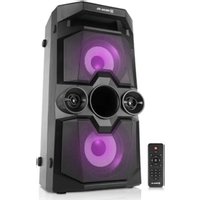
Black REAL EL audio amplifier with two speakers and a remote control (no visible text or symbols)PORTABLE SPEAKER SYSTEM
WITH BLUETOOTH AND FM
X-787
Congratulations on your purchase of the REAL-EL speaker system!
COPYRIGHT
© 2021. ENEL GROUP OU.
This Manual and information contained in are copyrighted. All rights reserved.
TRADEMARKS
All trademarks are the property of their legal holders.
CONTENTS
- BUYER RECOMMENDATIONS .... 1
- PACKAGE CONTENTS .... 1
- SAFETY PRECAUTIONS ...... 2
- TECHNICAL DESCRIPTION ...... 2
- CONNECTION AND OPERATION .... 5
- TECHNICAL SPECIFICATIONS ...... 7
1. BUYER RECOMMENDATIONS
- Unpack the device carefully. Make sure there are no accessories left in the box. Check up the device for damage; if the product was damaged during transportation, address the firm, which carried out the delivery; if the product functions incorrectly, address the dealer at once.
- Check up the package contents and availability of the warranty card.
- Do not switch on the speaker system immediately after you bring it into a room from environment with negative temperature! After unpacking, the speaker system should be kept in conditions of room temperature for at least 4 hours.
- Before installing and using the speaker system, read this Manual carefully and keep it for future reference.
2. PACKAGE CONTENTS
- Portable speaker system — 1 pc
- FM Antenna / 3.5 mm mini-jack to 3.5 mm mini-jack signal cable — 1 pc
- USB to Micro USB power cable — 1 pc
- Remote control (RC) — 1 pc
- Microphone holder — 2 pcs
- User manual — 1 pc
- Warranty card — 1 pc
Operation Manual
X-787
3. SAFETY PRECAUTIONS
- Do not open the portable speaker system (PSS) and do not perform repairs by yourself.
Service and repairs should be performed only by qualified specialists at authorized centers. The list of authorized service centers is on www.real-el.com - Make sure that foreign objects do not get inside the holes of the PSS.
- Protect the PSS from high humidity, water and dust.
- Protect the PSS from heating: do not place it closer than 1 m from a heat source. Do not expose it to direct sunlight.
- Do not use any chemical agents for cleaning. Clean it with dry soft cloth only.
- In case of PSS does not work properly. Please contact place of purchase or service center.
Special features
- FM radio
- Remote control
- TWS - simultaneous connection of two systems to one audio source
- Bluetooth audio transmission
- USB, Micro SD (TF)
- Two microphone inputs for Karaoke with Echo adjustment
- AUX connection for use with PC, TV and other sources
- EQ function
- Extended running time
- RGB backlight
4. TECHNICAL DESCRIPTION
Control panel
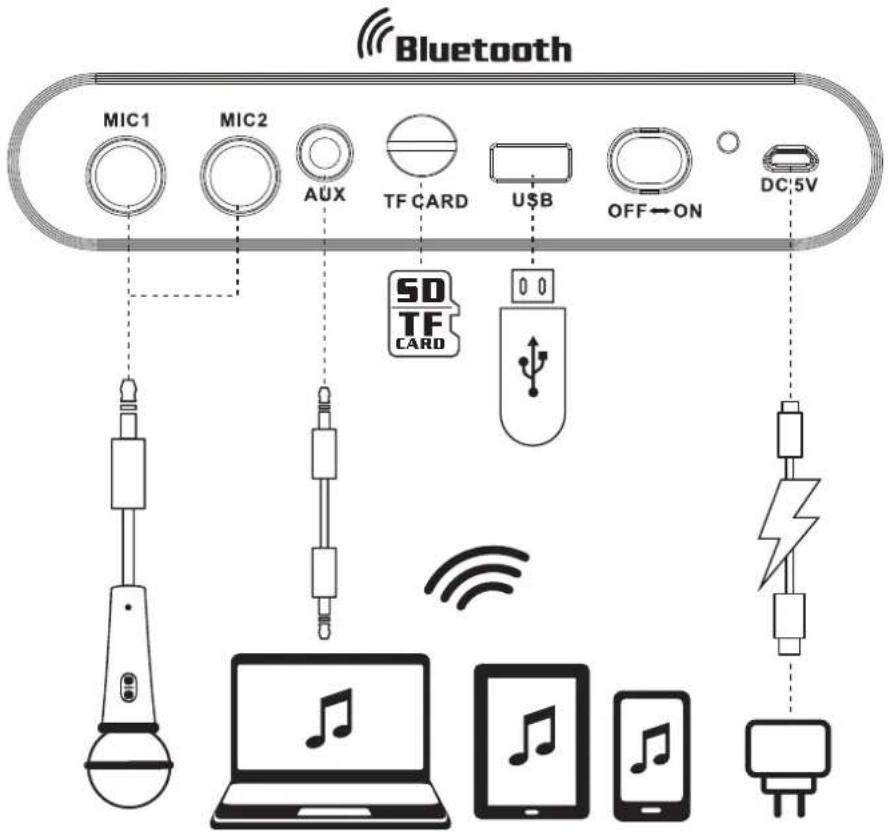
① MIC: 6.3 mm jack microphone jack
② AUX: 3.5 mm mini-jack for audio signal connecting (phone, MP3 player, etc.)
③ TF CARD: Micro SD card slot
④ USB port
⑤ Power ON/OFF
⑥ Indicator
⑦ Charging DC 5V
⑧ ECHO +/-: Microphone echo adjustment
⑨ DEL/TWS: FM station delete (long press in Radio mode);
Connect an additional speaker (Bluetooth mode only)
⑩ FM+/▶: Next track (short press in Player and Bluetooth mode);
Navigation on the track (long press in Player mode);
Next track/station (in Radio mode)
⑪ FM-/◀: Previous track (in Player and Bluetooth mode);
Navigation on the track (long press in Player mode);
Previous station (in Radio mode)
⑫ IR receiver
⑬ Display
⑭ EQ: Sound Effect mode (short press); Reset (long press)
⑮ MIC PRI: mute with a connected microphone
⑯ LIGHT: switching backlight modes (short pressing);
Turning on/off the backlight (long pressing)
Operation Manual
X-787

⑰ CH/○: Button for switching between stations or frequency (in Radio mode);
Switch playback mode (ALL, ONE, RANDOM):
ONE – Repeats the current track;
RAND – Play tracks in the random order;
ALL – Plays all tracks in the sequential order
Disconnect from device (long pressing in Bluetooth mode);
Save the selected frequency of the radio station in memory (long pressing in Radio mode)
⑱ AUTO SCAN/▶I: Play/Pause button (in Player and Bluetooth mode);
Start/Stop auto scan (long press in Radio mode);
Mute (short pressing in Radio and AUX mode);
There is a possibility of manual tuning of the receiving frequency in the range (without storing stations) from 87.5 MHz to 108 MHz with a step of 0.1 MHz. To do this, switch the receiver to the frequency display mode with the "CH/☐" button, and use the "FM +" and "FM -" buttons to make settings
⑲ MODE: Bluetooth/FM/USB/Micro SD/AUX (short press);
Turn ON/OFF prompt system tone (long press)
⑳ VOLUME+/-: Volume control
②1 MIC VOL +/-: Microphone volume control
Operation Manual
X-787

Remote control
① MODE: Switching modes button: Bluetooth/FM/USB/Micro SD/AUX (short press);
Long press: turn ON/OFF prompt system tone.
② LIGHT: Switching backlight modes (short press); Light OFF (long press).
③ REP: Disconnect from the device (long press Bluetooth mode);
Switch playback mode (ALL, ONE, RANDOM)
④ EQ: Select EQ mode
⑤ VOL-/+: Volume up/down
⑥ CH-◀: Previous track (in Player and Bluetooth mode);
Previous station (in Radio mode).
⑦ CH+▶: Next track (in Player and Bluetooth mode);
Next station (in Radio mode).
⑧ AUTO SCAN ▶: Play/Pause button (in Player and Bluetooth mode);
Start auto scan (long press in Radio mode);
⑨ FM-/+: Frequency change (in Radio mode).
⑩ 0-9: Numeric pad for entering track number (in Player mode) or number track/station in Radio mode)
5. CONNECTION AND OPERATION
Charging the battery
- The speaker must be fully charged before use. Before charging, turn the switch to the OFF position. Charge the speaker with a universal DC 5V USB charger rated for at least 2A. The charger is not included.
- Insert the charging cable into the charger connector, connect the other end to the charger, the charging indicator will be activated. The red charging indicators will light up until in full charge.
Note: It is not recommended to leave the device for a long time connected to the charger after it is fully charged.
Do not charge the speaker at low ambient temperatures. The minimum charge temperature is at least 10^ C.
Bluetooth mode
- Turn the unit into Bluetooth mode with the «Mode» button repeatedly until «bt» appears on the display. After 2-3 seconds the device will go into search mode.
- Select a Bluetooth device search mode on the audio source (mobile phone, tablet, etc.). The display will show the name "REAL-EL X-787" which need to establish a connection. After a successful connection, the loudspeaker will sound a signal.
Note: To disconnect the speaker from the audio source that was connected in Bluetooth mode, hold down the "CH/○" button on the speaker panel.
TWS mode (connecting two systems in stereo at the same time)
Connection is possible only in Bluetooth mode
- Turn on both speakers in Bluetooth mode.
- Connect the signal source to one of the speakers, the other speaker must be in Bluetooth signal search mode.
- On the other speaker (which need to connect), press and hold the DEL (TWS) button.
- If the two speakers are successfully connected to each other, TWS will be activated.
KARAOKE mode
To start using, connect the microphone to the connector①, adjust the volume level. The karaoke mode is activated automatically with any audio sources except FM mode.
Use a dynamic microphone with a 6.3 mm (1/4") TS plug as the karaoke microphone.
FM mode
• FM mode requires external antenna. Use AUX cable 3.5 mm mini-jack as antenna for radio mode.
- Turn the FM mode with the Mode button repeatedly until the frequency of the radio station appears on the display.
- In the playback mode, long press the "AUTO SCAN/▶" button to automatically search FM stations and save them automatically. Press the "◀◀" or "▶◀◀" buttons to switch between stations.
- Press DEL button to delete saved radio station. Radio works its external antenna only!
Playback mode
- Insert a SD card or USB flash drive into the corresponding slot, the audio track will be played automatically. In the playback mode, briefly press the "◀◀" or "▶◀" button to select the desired tracks.
- Press the "▶" button to play or pause.
Note: During Bluetooth playback mode, if you insert a SD card or USB, Bluetooth will be turned off and USB or SD card will play. Press the "Mode" button to return to Bluetooth mode again.
The USB port is designed for connecting USB storage media only. Do not use this connector for charging purposes, as this may cause damage of the speaker.
File system of micro SD - FAT32. The maximum capacity is 32 GB. It is not recommended to use micro SD Ultra Speed.
AUX mode
- For compatible music devices, use an audio cable with the 3.5 mm mini jack supplied in the box. Connect the cable to the audio input of the AUX and to any audio source with a 3.5 mm mini jack. Then press the "Mode" button to switch to AUX mode.
Note: The volume of the system is regulated by two controls - the VOLUME knob located on the speaker cabinet and the VOL + / VOL- buttons on the remote control. The volume of the system will be determined by the smallest value of the settings set by these controls. Therefore, if the volume is low or no sound at all, check the settings made on these two controls. If the remote control has been lost or damaged, to reset the settings set by it, press and hold the "EQ" button on the speaker, then press the "▶I" button. The volume level set by the remote control will be maximum.
You must turn off the power button "OFF/ON." If the system is not used for a long time.
- SPECIFICATION
| Parameter | Value |
| Output power (RMS) | 80 (2 × 40) W |
| Frequency range | 45-22000 Hz |
| Dimension of the speaker drivers | 2 × ∅ 32 mm + 2 × ∅ 145 mm |
| Supported Bluetooth Profiles | L2CAP/A2DP |
| Connection types | USB/micro SD/Aux/Bluetooth |
| Power supply | USB/5 V DC, 2 A |
| Battery | lithium-ion 2 × 4400 mAh, DC 3.7 V |
| Bluetooth operation distance | up to 10 m |
| Case material | ABS plastic |
| Dimensions of the product | 230 × 640 × 260 mm |
| Weight | 5.2 kg |
Notes:
- Technical specifications given in this table are supplemental information and cannot give occasion to claims.
- Technical specifications and package contents are subject to change without notice due to the improvement of REAL-EL production.

natural_image
Abstract geometric pattern with nested rectangular shapes (no text or symbols)Manufacturer: ENEL GROUP OU, Harju maakond, Rae vald, Jüri alevik, Aruküla tee 55a, 75301, Estonia. ® Registered Trademark of ENEL GROUP OU. Estonia.
- Congratulations on your purchase of the REAL-EL speaker system!
- COPYRIGHT
- TRADEMARKS
- CONTENTS
- BUYER RECOMMENDATIONS
- PACKAGE CONTENTS
- Operation Manual
- X-787
- SAFETY PRECAUTIONS
- Special features
- TECHNICAL DESCRIPTION
- Control panel
- Remote control
- CONNECTION AND OPERATION
- Charging the battery
- Bluetooth mode
- TWS mode (connecting two systems in stereo at the same time)
- KARAOKE mode
- FM mode
- Playback mode
- AUX mode
Brand : Real-El
Model : X-787
Category : Loudspeaker