
PowerTEC 818 HD - Shredder Dahle - Free user manual and instructions
Find the device manual for free PowerTEC 818 HD Dahle in PDF.


| Product Type | Paper Shredder |
| Brand | Dahle |
| Model | PowerTEC 818 HD |
| Cut Type | Cross-Cut (P-4) |
| Sheet Capacity | 18 sheets (70 gsm) |
| Bin Capacity | 130 liters (34 gallons) |
| Security Level | DIN 66399 P-4 / T-4 / E-4 |
| Continuous Run Time | 60 minutes |
| Motor Power | 1200 W (peak) |
| Voltage / Frequency | 220-240 V / 50 Hz |
| Dimensions (W x D x H) | 600 x 500 x 980 mm (23.6 x 19.7 x 38.6 in) |
| Weight | 42 kg (92.6 lbs) |
| Shred Width | 400 mm (15.7 in) |
| Cut Size | 4 x 35 mm (particles) |
| Noise Level | 58 dB (A) |
| Safety Features | Automatischer Stopp bei Überlastung, Papierstau-Erkennung, Sicherheitsschalter, Überhitzungsschutz |
| Maintenance | Regelmäßiges Ölen der Schneidwalzen mit Dahle Shredder Oil |
| Spare Parts | Ersatzklingen, Öl, Abfallbeutel |
| Included Accessories | Bedienungsanleitung, Ölflasche |
Frequently Asked Questions - PowerTEC 818 HD Dahle
User questions about PowerTEC 818 HD Dahle
0 question about this device. Answer the ones you know or ask your own.
Ask a new question about this device
Download the instructions for your Shredder in PDF format for free! Find your manual PowerTEC 818 HD - Dahle and take your electronic device back in hand. On this page are published all the documents necessary for the use of your device. PowerTEC 818 HD by Dahle.
USER MANUAL PowerTEC 818 HD Dahle
natural_image
Line drawing of a simple kitchen appliance with a top panel and side vent (no text or symbols)Operating Instructions
Dahle 818HD
TABLE OF CONTENTS
CONTENTS
PAGE
Safety Precautions....3-4
Installation....4
Operation 5
Maintenance 6
Warranty 6
Troubleshooting....7
READ CAREFULLY BEFORE USING
Proper care of your new hard drive punch will ensure many years of trouble free operation, with minimum of maintenance or repair.
IMPORTANT:
Please note that all packaging should be retained by the customer for (30) days from the time of receipt. In the event that this unit needs to be sent back for replacement or repair this packaging will be required to do so. Should the packaging have been discarded before the (30) day requested period, packaging costs may be incurred by the customer.
SPECIFICATIONS
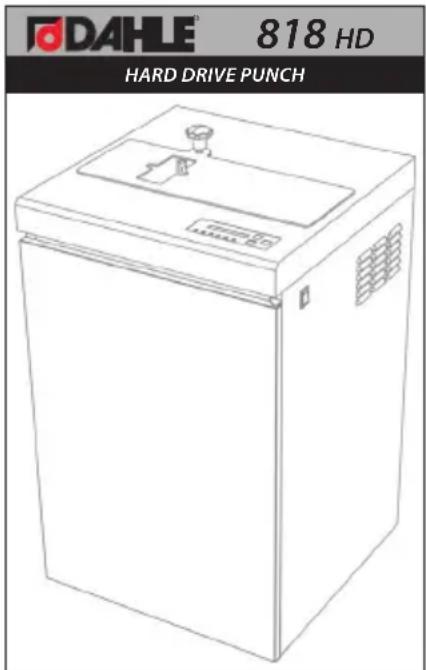
Security Level: H - 3
Hole Size: 10mm
Feed Width: 4.65"
Warranty: 1 year
Dimensions: 19.75" X 20" X 34.5"
Weight: 154 lbs.
Power Supply: 115v 50/60 Hz 15 Amp
Warranty includes labor but excludes wearable parts.
IMPORTANT SAFETY PRECAUTIONS
Your new shredder features powerful cutting mechanisms that may cause serious injury. Please follow all safety precautions.
- Only store, transport, and operate the shredder in an upright position!
- All liquids and gases used on the shredder must comply with Dahle guidelines!
- The shredder must only be operated in enclosed spaces at temperatures of 15 °C to 32 °C(59 °F–90 °F) and non-condensed humidity of 15% to 95%!
- Do not place the shredder near a heat source!
- Ensure the shredder is firmly on the floor at a distance of 4" from the wall; activate caster locks!
- Avoid any accumulation of heat!
- The mains socket must be grounded and easily accessible at all times!
- Use only the power cord supplied with the device by Dahle and ensure that it is not damaged!
- Ensure that the building installation has short-circuit protection: max. 16 A (US max. 20 A)!
- Do not use near flammable liquids and gases!
- Do not use near caustic substances!
- Do not subject to moisture!
- Do not open up the machine!
• Automatic start-up! - Switch off the shredder at the main switch when not in use!
- Only use the shredder provided that it is in perfect working order, while observing the operating instructions and the usual regulations, guidelines and applicable safety and accident prevention requirements. Take the shredder out of service immediately if faults occur!
- The device is not intended for use by persons (including children) with restricted physical, sensory or mental capabilities or a lack of experience and knowledge, unless they are working under supervision or receive detailed instruction about how to use the device from a person who is responsible for safety.
This device complies with part 15 of the FCC Rules. Operation is subject to the following conditions:
(1) This device may not cause harmful interference, and
(2) This device must accept any interference received, including interference that may cause undesired operation.
16100-13100|1121
IMPORTANT SAFETY PRECAUTIONS
- It is obligatory to follow the safety instructions!
- Read the operating instructions carefully before using the shredder!
- This shredder is not intended to be used by children (the product is not a toy)!
- Do not touch the feed opening with your hands!
- Do not allow items of clothing to touch the feed opening!
- Do not allow your hair to touch the feed opening!
- Prior to maintenance work, disconnect the shredder from the power supply!


INSTALLATION

natural_image
Line drawing of a waste sorting machine with a separate empty bin and a plastic container (no text or symbols)- Insert supplied waste bin into the machine.
- Plug machine directly into a wall outlet. Do not use a power strip or extension cord.
OPERATION
- Turn on both power switches. One is located inside the door and the other is on the right side of the shredder.Slide open the clear safety shield feed opening door located at the top of the machine.
- Insert 2.5" or 3.5" Hard Drive into the feed opening.
- Slide the safety shield feed opening door closed.
- Press the START button on the keypad. The punching area will illuminate and the punching die will drive through the hard drive. After a short delay, the die will reverse direction automatically and the LED light will go out, indicating the process is complete.
- Press down the Discharge Handle located on the top of the machine to release the punched hard drive into the waste container.
REVERSE
- In case of a jam, the machine is designed to automatically operate in reverse.
DOOR OPEN
- The DOOR OPEN will illuminate if the safety shield feed opening door located on the top of the machine or the cabinet door is open. Both must be closed for the machine to operate.
FULL
- The FULL LED light will illuminate if the waste container is full. Open the cabinet door, empty the waste container, replace the waste container, and close the cabinet door.

flowchart
graph TD
    A["HARD DRIVE PUNCH"] --> B["INDICATOR"]
    B --> C["OVER LOAD"]
    C --> D["START"]
    C --> E["REVERSE"]
    C --> F["STOP"]
    C --> G["DOOR OPEN"]
    C --> H["FULL"]
    C --> I["FAULT"]
    A --> J["REVERSE"]
    A --> K["STOP"]
    A --> L["START"]
MAINTENANCE
- Switch off the machine and disconnect power by removing power cord from wall outlet.
- Clean the exterior of the machine with a soft cloth. Do not use harsh detergents or chemicals.
WARRANTY
Dahle guarantees this hard drive punch to be free from manufacturing defects (materials / workmanship) for a period of one year.
This warranty shall not apply to wearable items or defects caused by ordinary wear and tear, insufficient maintenance or improper operation. This warranty applies to the original purchaser only and is not transferable. There are no other warranties expressed or implied beyond the face of this agreement.
TROUBLESHOOTING
Easy check points before you report malfunction.
| Symptoms | Check Point | |
| 1. The paper shredder is not working.2. Auto LED light is off | - Check the power plug- Check the voltage of the outlet (AC 120V or 220V it depends on your country's voltage rate)- Check the fuse which is located just below the main switch. |  Confirmation Confirmation |
| 3. The paper shredder does not reverse and just stops when it's fed too much paper. | - Press the reverse button and clear the jammed paper then re-operate the paper shredder. |  |
| 4. When the waste basket is full, the shredder is not working. | - Clear the waste basket then check that the Full LED light is off | Clear  |
| 5. Cabinet door is closed but the Door LED & Stop LED lights are still on | - Check the main switch which is located on the right top side. | 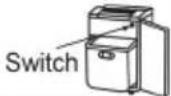 |


- Operating Instructions
- TABLE OF CONTENTS
- CONTENTS
- PAGE
- READ CAREFULLY BEFORE USING
- IMPORTANT:
- SPECIFICATIONS
- IMPORTANT SAFETY PRECAUTIONS
- Your new shredder features powerful cutting mechanisms that may cause serious injury. Please follow all safety precautions.
- This device complies with part 15 of the FCC Rules. Operation is subject to the following conditions:
- INSTALLATION
- OPERATION
- REVERSE
- DOOR OPEN
- FULL
- MAINTENANCE
- WARRANTY
- TROUBLESHOOTING
Brand : Dahle
Model : PowerTEC 818 HD
Category : Shredder