ICI905TB - Cooker InAlto - Free user manual and instructions
Find the device manual for free ICI905TB InAlto in PDF.


| Product Type | 90cm Induction Cooktop |
| Model | ICI905TB |
| Product Dimensions (W x D x H) | 900 x 520 x 60 mm |
| Built-in Dimensions (A x B) | 874 x 494 mm |
| Installed Electric Power | 9400 W |
| Rated Voltage / Frequency | 220-240 V ~ 50-60 Hz |
| Number of Cooking Zones | 5 (including flexible zone) |
| Boost Function | Yes, power boost for rapid heating |
| Flexible Cooking Area | Zone can be used as one large zone or two independent zones |
| Timer | Up to 99 minutes, minute minder or auto-off per zone |
| Child Lock | Yes, locks all controls except ON/OFF |
| Residual Heat Indicator | Displays "H" when zone is hot |
| Automatic Shut-off | Safety feature after prolonged inactivity |
| Over-temperature Protection | Sensor stops operation if excess temperature detected |
| Control Type | Touch controls |
| Cooktop Surface Material | Ceramic glass |
| Pan Detection | Automatic detection of suitable cookware |
| Cleaning Instructions | Use warm water and mild detergent; avoid abrasives and steam cleaners |
| Installation Requirements | Qualified electrician; minimum 50mm clearance; adequate ventilation |
| Warranty | 24 months (Australia/NZ), parts and labour; 36 months with extended registration |
Frequently Asked Questions - ICI905TB InAlto
User questions about ICI905TB InAlto
0 question about this device. Answer the ones you know or ask your own.
Ask a new question about this device
Download the instructions for your Cooker in PDF format for free! Find your manual ICI905TB - InAlto and take your electronic device back in hand. On this page are published all the documents necessary for the use of your device. ICI905TB by InAlto.
USER MANUAL ICI905TB InAlto
USER MANUAL INALTO.HOUSE INALTO
90cm Induction Cooktop
MODEL CODE/S
IC1905TB

FOR ALL AUSTRALIAN HOMES
V1.0 | 1021
Welcome
Congratulations on purchasing your new Induction Cooktop!
The InAlto brand is proudly distributed within Australia by Residentia Group Pty Ltd and within New Zealand by Applico Ltd.
Residentia Group Pty Ltd
ACN. 600 546 656
165 Barkly Avenue
Burnley, Victoria 3121
Australia
Applico Ltd
635 Great South Road
Penrose, Auckland 1061
New Zealand
InAlto
www.inalto.house

/inalto.house

/ inalto.house
Please refer to the warranty card at the rear of this manual for information regarding your product's parts and labour warranty, or visit online at:
→ www.residentia.group
→ www.applico.co.nz
→ www.inalto.house
Both Residentia Group & Applico are customer obsessed and our Support Teams are there to ensure you get the most out of your appliance. Should you want to learn more about recommended usage, the various features of your appliance, and importantly taking care of the unit when cleaning, our Support Teams are here to help.
Telephone Contacts:
→ AU: 1300 11 4357
→ NZ: 0800 763 448
It is important that you read through the following use and care manual thoroughly to familiarise yourself with the installation and operation requirements of your appliance to ensure optimum performance.
Again, thank you for choosing an InAlto appliance and we look forward to being of service to you.
Contents
2 Welcome
4 Safety Instructions
8 Your InAlto Cooktop
9 Before First Use
10 Using Your Cooktop
11 Operation Instructions
14 Installation Instructions
19 Cleaning & Maintenance
20 Troubleshooting
22 Technical Specifications
23 Purchase Details
23 Your Receipt
24 Warranty Information
Customer Care
InAlto recommends the use of original spare parts. When contacting our customer service team on 1300 11 4357, please ensure that you have the following information at hand (which can be found on your appliances' rating plate).
- Model Number
- Serial Number
Safety Instructions
IMPORTANT INFORMATION
The following statements you will see in this booklet have these meanings:
WARNING!
Indicating information concerning your personal safety.
CAUTION
Indicating information on how to avoid damaging the appliance or cabinetry.
IMPORTANT
Indicating tips and information about use of the cooktop.
CONDITIONS OF USE
This appliance is intended to be used in domestic environments (i.e. households) and similar applications such as:
- Staff kitchen areas in shops, offices and other working environments
- By clients in hotels, motels and other residential type environments
- Farm houses
- Bed and breakfast type environments
- Catering and similar non-retail applications
BEFORE USING YOUR APPLIANCE
Before you use the appliance, we recommend that you read through the relevant sections of this manual, which provides the description of your appliance and its functions.
To avoid the risks that are always present when you use an appliance, it is important that the appliance is installed correctly and that you read the safety instructions carefully to avoid misuse and hazards.
We recommend that you keep this instruction booklet for future reference and pass it on to any future owners.
This appliance complies with requirements of Australian Standard AS/NZS 60335.2.6
INSTALLATION
Electrical Shock Hazard
- Disconnect the appliance from the mains electricity supply before carrying out any work or maintenance on it.
- Connection to a good earth wiring system is essential and mandatory.
- Alterations to the domestic wiring system must only be made by a qualified electrician.
- Failure to follow this advice may result in electrical shock or death.
Cut Hazard
• Take care - panel edges are sharp.
- Failure to use caution could result in injury or cuts.
Important safety instructions
- Read these instructions carefully before installing or using this appliance.
- No combustible material or products should be placed on this appliance at any time.
- Please make this information available to the person responsible for installing the appliance as it could reduce your installation costs.
- In order to avoid a hazard, this appliance must be installed according to these instructions for installation.
- This appliance is to be properly installed and earthed only by a suitably qualified person.
- This appliance should be connected to a circuit which incorporates an isolating switch providing full disconnection from the power supply.
- Failure to install the appliance correctly could invalidate any warranty or liability claims.
- This appliance can be used by children aged from 8 years and above and persons with reduced physical, sensory or mental capabilities or lack of experience and knowledge if they have been given supervision or instruction concerning use of the appliance in a safe way and understand the hazards involved.
- Children shall not play with the appliance. Cleaning and user maintenance shall not be made by children without supervision.
- If the supply cord is damaged, it must be replaced by the manufacturer, its service agent or similarly qualified persons in order to avoid a hazard.
- Warning: If the surface is cracked, switch off the appliance to avoid the possibility of electric shock, for cooktopsurfaces of glass-ceramic or similar material which protect live parts
- Metallic objects such as knives, forks, spoons and lids should not be placed on the cooktop surface since they can get hot
- A steam cleaner is not to be used.
- Do not use a steam cleaner to clean your cooktop.
- The appliance is not intended to be operated by means of an external timer or separate remote-control system.
- WARNING Danger of fire: do not store items on the cooking surfaces.
- The cooking process has to be supervised. A short term cooking process has to be supervised continuously.
- WARNING Unattended cooking on a cooktop with fat or oil can be dangerous and may result in fire. NEVER try to extinguish a fire with water, but switch off the appliance and then cover flame e.g. with a lid or a fire blanket.
Electrical Shock Hazard
- Do not cook on a broken or cracked cooktop. If the cooktop surface should break or crack, switch the appliance off immediately at the mains power supply (wall switch) and contact a qualified technician.
- Switch the cooktop off at the wall before cleaning or maintenance.
- Failure to follow this advice may result in electrical shock or death.
Health Hazard
- This appliance complies with electromagnetic safety standards.
- However, persons with cardiac pacemakers or other electrical implants (such as insulin pumps) must consult with their doctor or implant manufacturer before using this appliance to make sure that their implants will not be affected by the electromagnetic field.
- Failure to follow this advice may result in death.
Cut Hazard
- The razor-sharp blade of a cooktop scraper is exposed when the safety cover is retracted. Use with extreme care and always store safely and out of reach of children.
- Failure to use caution could result in injury or cuts.
Hot Surface Hazard
- During use, accessible parts of this appliance will become hot enough to cause burns.
- Do not let your body, clothing or any item other than suitable cookware contact the ceramic glass until the surface is cool.
- Keep children away.
- Handles of saucepans may be hot to touch. Check saucepan handles do not overhang other cooking zones that are on. Keep handles out of reach of children.
- Failure to follow this advice could result in burns and scalds.
Important safety instructions
- Never leave the appliance unattended when in use. Boilover causes smoking and greasy spillovers that may ignite.
- Never use your appliance as a work or storage surface.
- Never leave any objects or utensils on the appliance.
- Do not place or leave any magnetic objects (e.g. credit cards, memory cards) or electronic devices (e.g. computers, MP3 players) near the appliance, as they may be affected by its electromagnetic field.
- Never use your appliance for warming or heating the room.
- After use, always turn off the cooking zones and the cooktop as described in this manual (i.e. by using the touch controls). Do not rely on the pan detection feature to turn off the cooking zones when you remove the pans.
- Do not allow children to play with the appliance or sit, stand, or climb on it.
- Do not store items of interest to children in cabinets above the appliance. Children climbing on the cooktop could be seriously injured.
- Do not leave children alone or unattended in the area where the appliance is in use.
- Children or persons with a disability which limits their ability to use the appliance should have a responsible and competent person to instruct them in its use. The instructor should be satisfied that they can use the appliance without danger to themselves or their surroundings.
- Do not repair or replace any part of the appliance unless specifically recommended in the manual. All other servicing should be done by a qualified technician.
- Do not place or drop heavy objects on your cooktop.
- Do not stand on your cooktop.
Safety Instructions (Continued)
Important safety instructions (cont.)
- Do not use pans with jagged edges or drag pans across the induction glass surface as this can scratch the glass.
- Do not use scourers or any other harsh abrasive cleaning agents to clean your cooktop, as these can scratch the glass.
- WARNING The appliance and its accessible parts become hot during use.
- Care should be taken to avoid touching heating elements.
- Children less than 8 years of age shall be kept away unless continuously supervised
IMPORTANT Check for any damage or marks. If you find the appliance is damaged or marked, you must report it within 7 days if you wish to claim for damage/ marks under the manufacturer's warranty. This does not affect your statutory rights. A damaged cooktop should never be installed.
INFORMATION ON DISPOSAL FOR USERS
- Most of the packaging materials are recyclable. Please dispose of these materials through your local recycling depot or by placing them in appropriate collection containers.
- If you wish to discard this product, please contact your local authorities and ask for the correct method of disposal.
WARNING! Read the following carefully to avoid damage or injury.
- Do not allow pots to boil dry, as damage to both pan and cooktop may result.
- Do not operate the cooktop for an extended period without a pot or pan on the burner.
- Do not allow large cookware to overhang the cooktop onto adjacent benchtop. This will cause scorching to the benchtop surface.
- Do not allow cooking pots or pans to intrude into the area which is close to the controls.
- In the event of faults with the appliance or damage to the glass ceramic (cracks, scratches or splits), the appliance must be switched off and disconnected from the electrical supply, to prevent the possibility of an electric shock.
- Repairs to the appliance must only be carried out by trained registered service engineers.
CAUTION: Read the following carefully to avoid an electric shock or fire.
It is important to use your cooktop safely. Check these safety points before using your cooktop.
- This appliance is not intended for use by persons (including children) with reduced physical, sensory or mental capabilities, or lack of experience and knowledge, unless they have been given supervision or instruction concerning use of the appliance by a person responsible for their safety.
- Children should be supervised to ensure they do not play with this appliance.
- During use, this appliance becomes hot. Care should be taken to avoid touching hot surfaces. To avoid burns, young children should be kept away.
- Do not leave the appliance unattended during operation.
- This appliance should be used only for normal domestic cooking and frying of food.
- The appliance must not be used as a work surface or as a storage surface.
- Additions or modifications to the appliance are not permitted.
- Do not place or store flammable liquids, highly inflammable materials or fusible objects (e.g. plastic film, plastic, aluminium) on or near the appliance.
- Keep vents clear of obstructions.
- In order to avoid a fire, this appliance must be kept clean.
- Do not spray aerosols in the vicinity of this appliance while it is in operation.
- Do not place anything, e.g. asbestos mat between pan and trivet as serious damage to the cooktop may occur.
- Handles should be turned away from the front of the bench to avoid accidents.
- Do not modify this appliance.
- Other than the connection point in the terminal block, do not let the electrical supply cord touch the appliance or hot cookware. Ensure electrical supply cord is not tangled.
THIS PAGE IS INTENTIONALLY LEFT BLANK
Your InAlto Cooktop
PRODUCT
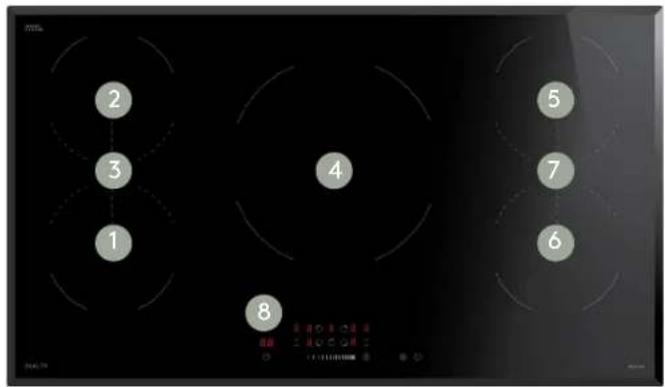
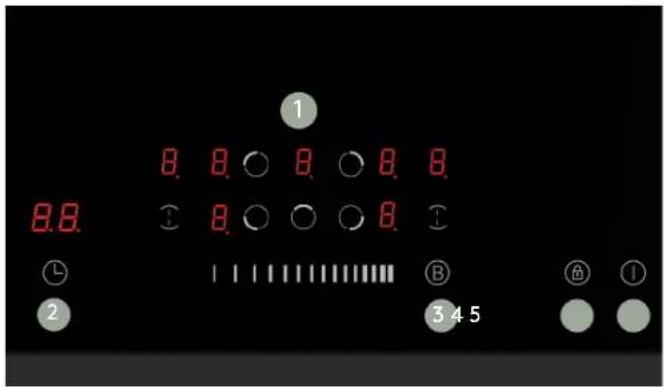
CONTROL PANEL
LEGEND
- Max. 18000/2300 W zone
- Max. 1800/2300 W zone
- Max. 3000/3600 W zone
- Max. 2200/3000 W zone
- Max. 1800/2300 W zone
- Max. 1800/2300 W zone
- Max. 3000/3600 W zone
- Control panel
LEGEND
- Heating zone selection controls
- Timer control
- Boost control
- Lock control
- ON/OFF control
Please note, the image above is indicative only. Your control panel may appear differently.
Before First Use
BEFORE FIRST USE
- Before using this appliance read this manual, taking special note of the "Safety Instructions" section.
IMPORTANT! You should clean the induction cooktop surface (refer to the "Cleaning and Maintenance" section).
- Before using the appliance, ensure that all packing materials are removed from the appliance.
INSTALLATION
- In order to avoid any potential hazard, the installation instructions in this booklet, and any labels on the appliance must be followed.
- Installation may only be carried out by a qualified electrician. The minimum distances to other appliances and units are to be observed.
- The laws, ordinances, directives and standards in force in the country of use are to be followed (safety regulations, proper recycling in accordance with the regulations, etc.)
- Ensure that all specified vents, openings and air spaces are not blocked.
- Anti-shock protection must be provided by the installation, for example drawers may only be installed with a protective floor directly underneath the appliance.
- The cut surfaces of the worktop are to be protected against moisture using a suitable sealant. The sealant seals the appliance to the work top with no gap. Do not use silicon sealant between the appliance and the work top.
- Avoid installing the appliance next to doors and under windows. Otherwise hot cookware may be knocked off the cooktop when doors and windows are opened.
- Where the appliance is built into a benchtop, the benchtop material must be capable of withstanding 85°C.
SERVICING
- Servicing MUST only be carried out by authorised personnel.
- To maintain safe operation, it is recommended that the product be inspected every five years by an authorised service person.
- If the supply cord is damaged, it must be replaced by the manufacturer, its service agent or similarly qualified persons in order to avoid a hazard.
WARNING! Never install a cooktop that has been damaged. Please contact our Customer Care team for further assistance.
CLEANING
- Always ensure the appliance is turned off before cleaning and allowed to cool.
- Do not use steam cleaners as this may cause moisture build up on electrical components.
- Always clean the appliance immediately after any food spillage.
- Refer to the Cleaning and Maintenance section of this user manual for instructions on cleaning and maintaining your induction glass cooktop.
Using Your Cooktop
INDUCTION COOKING
Induction cooking is a safe, advanced, efficient, and economical cooking technology. It works by electromagnetic vibrations generating heat directly in the pan, rather than indirectly through heating the glass surface. The glass becomes hot only because the pan eventually warms it up.
CHOSING THE RIGHT COOKWARE
- Only use cookware with a base suitable for induction cooking. Look for the induction symbol on the packaging or on the bottom of the pan.
-
You can check whether your cookware is suitable by carrying out a magnet test. Move a magnet towards the base of the pan. If it is attracted, the pan is suitable for induction.
• If you do not have a magnet: -
Put some water in the pan you want to check.
- Follow the steps under 'To start cooking'.
- If does not flash in the display and the water is heating, the pan is suitable.
- Cookware made from the following materials is not suitable: pure stainless steel, aluminium or copper without a magnetic base, glass, wood, porcelain, ceramic, and earthenware.
- Do not use cookware with jagged edges or a curved base.
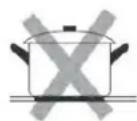
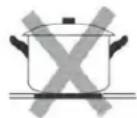
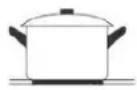
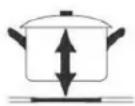
- Make sure that the base of your pan is smooth, sits flat against the glass, and is the same size as the cooking zone. Use pans whose diameter is as large as the graphic of the zone selected. Using a pot that is slightly wider will cause energy to be used at its maximum efficiency. If you use a smaller pot the efficiency could be less than expected. Pots less than 140 mm diameter could be undetected by the cooktop. Always ce ntre your pan on the cooking zone.
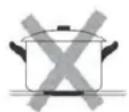

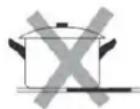
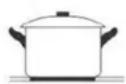
- Always lift pans off the induction cooktop – do not slide, or they may scratch the glass.

Operation Instructions
TOUCH CONTROLS
- All operations are performed by means of the touch controls that can be found on the control panel at the front of your cooktop.
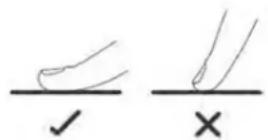
- The controls respond to touch, so you don't need to apply any pressure.
- Use the ball of your finger, not its tip.
- You will hear a beep each time a touch is registered. Make sure the controls are always clean, dry, and that there is no object (e.g. a utensil or a cloth) covering them. Even a thin film of water may make the controls difficult to operate.
TO START COOKING
IMPORTANT! Do not use cookware with jagged edges or a curved base.
- After powering on, the buzzer beeps once, all the indicators light up for 1 second then go out, indicating that the induction cooktop has entered the state of standby mode.
- Touch the ON/OFF control for a while. After power on, the buzzer beeps once, all displays show “-” or “--”, indicating that the induction cooktop has entered the state of standby mode.
- Place a suitable pan on the cooking zone that you wish to use. Make sure the bottom of the pan and the surface of the cooking zone are clean and dry.
- Touch the heating zone selection control of your desired zone, an indicator next to the key will flash
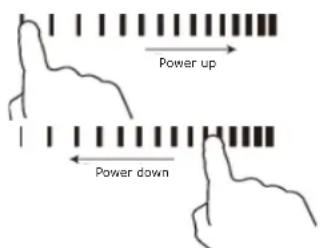
- Adjust heat setting by touching the slider control.
- If you don't choose a heat setting within 1 minute, the induction cooktop will automatically switch off. You will need to start again at step 1
- You can modify the heat setting at any time during cooking.
- You can modify the power level from 0 to 9 by the slide control.
If the display flashes ≥slant U ≤slant alternately with the heat setting
- You have not placed a pan on the correct cooking zone or,
- The pan you're using is not suitable for induction cooking or,
- The pan is too small or not properly centered on the cooking zone.
No heating takes place unless there is a suitable pan on the cooking zone.
The display will automatically turn off after 2 minutes if no suitable pan is placed on it.
WHEN YOU HAVE FINISHED COOKING
- Touching the heating zone selection control that you wish to switch off.
- Turn the cooking zone off by touching the slider to "I". Make sure the display shows "0"
- Turn the whole cooktop off by touching the ON/OFF control.
- After a zone is switched off, the corresponding cooking zone will show an "H" in the control panel. This means that the temperature of the zone still high enough to cause injury.
- The residual heat indicator will go out when the surface has cooled down to a safe temperature.
- The residual heat also can be used as an energy saving function if you want to heat further pans, use the hotplate that is still hot.
IMPORTANT! The residual heat indicator will disappear if the mains supply to the product is cut.
WARNING! It is still possible to burn yourself on a cooktop zone, even when the residual heat indicator has gone off. Always use caution when using the cooktop.
Operation Instructions (Continued)
USING THE BOOST FUNCTION
Activate the boost function
- Touch the heating zone selection control.
- Touching the boost control button, the zone indicator show "B" and the power reach Max.
Cancel the Boost function
- Touching the heating zone selection control that you wish to cancel the boost function
-
Touching the boost control to cancel the Boost function, then the cooking zone will revert to its original setting.
-
The function can work in any cooking zone
- The cooking zone returns to its original setting after 5 minutes.
- If the original heat setting equals 0, it will return to 9 after 5 minutes.
FLEXIBLE AREA
- This area can be used as a single zone or as two different zones, accordingly to the cooking needs anytime.
As one large zone
- To activate the free area as a single big zone, simply press the dedicated key.
- Adjust heat setting by touching the slider control.
- As a big zone, we suggest you use the following: Cookware: 250mm or 280mm diameter cookware (Square or Oval cookware are acceptable)
As two independent zones
You can chose to use the upper zone, the lower zone or both zones independently at the same time.
Note: Make sure the pan is bigger than 12cm.
LOCKING THE CONTROLS
- You can lock the controls to prevent unintended use (for example children accidentally turning the cooking zones on).
- When the controls are locked, all the controls except the ON/OFF control are disabled.
To lock the controls
- Touch the lock symbol. The timer indicator will show "Lo".
To unlock the controls
- Make sure the induction cooktop is turned on.
- Touch and hold the lock symbol for a few seconds.
- The cooktop will unlock and you can now start using your induction cooktop.
WARNING! When the cooktop is in the lock mode, all the controls are disable except the ON/OFF, you can always turn the induction cooktop off with the ON/OFF control in an emergency, but you shall unlock the cooktop first in the next operation.
OVER-TEMPERATURE PROTECTION
The temperature sensor equipped can monitor the temperature inside the Induction cooktop. When an excessive temperature is monitored, the Induction cooktop will stop operation automatically.
AUTOMATIC SHUT-OFF
Your induction cooktop features a safety feature for automatic power-off occurring whenever you forget to switch off a cooking zone.
The default shutdown times are shown in the table below:
| Power level | 1 | 2 | 3 | 4 | 5 | 6 | 7 | 8 | 9 |
| Default working timer (hour) | 8 | 8 | 8 | 4 | 4 | 4 | 2 | 2 | 2 |
USING THE TIMER
You can use the timer in two different ways:
- You can use it as a minute minder. In this case, the timer will not turn any cooking zone off when the set time is up.
- You can set it to turn one or more cooking zones off after the set time is up.
Note: You can set the timer up to 99 minutes.
Using the timer as a minute minder timer.
If you are not selecting any cooking zone:
- Make sure the cooktop is turned on. Note: you can use the minute minder even if you're not selecting any cooking zone.
- Touch the timer control. "10" will show in the timer display and the "0" flashes
- Set the second number of your desired time by touching the slider control. (e.g. 5)
- Touch timer control again, the "1" will now flash.
- Set the first number of your desired time by touching the slider control (e.g.9). Now the timer you set is 95 minutes.
- When the time is set, it will begin to count down immediately. The display will show the remaining time.
- The buzzer will beep for 30 seconds and the timer indicator shows “- -” when the setting time finished.
Setting a timer for an individual zone
- Touch the heating zone selection control that you want to set the timer for.
- Make sure the cooktop is turned on. Note: you can use the minute minder even if you're not selecting any cooking zone.
- Touch the timer control. "10" will show in the timer display and the "0" flashes
- Set the second number of your desired time by touching the slider control. (e.g. 5)
- Touch timer control again, the "1" will now flash.
- Set the first number of your desired time by touching the slider control (e.g.9). Now the timer you set is 95 minutes.
- When the time is set, it will begin to count down immediately. The display will show the remaining time.
- When the cooking timer expires, the corresponding cooking zone will be switched off automatically.
- The display will show "H" which means hot.
Setting a timer for more than one zone
- Use the same steps above to set timers against multiple zones.
- When you set the time for several cooking zones simultaneously, a red dot will illuminate next to the power level indicator for each relevant zone.
- When setting or adjusting a timer against a zone, the red dot indicating the zone being adjusted, will flash intermittently.
- If more than one heating zone uses this function, the timer indicator will show the lowest time. (e.g. zone #1 remaining time of 5 minutes, zone #2 remaining time of 15 minutes, the timer indicator shows "5".)
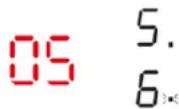
- Once the countdown timer expires, the corresponding zone will switch off. Then it will show the new min. timer and the dot of corresponding zone will flash.

If you want to change the time after the timer is set, you have to start from step 1.
Canceling the timer
- Touching the heating zone selection control that you want to cancel the timer
- Touching the timer control, the indicator flash
- Touch the slider control to set the timer to "00", the timer is canceled.
Installation Instructions
WARNING This user manual must be read! The laws, ordinances, directives and standards in force in the country of use are to be followed (safety regulations, proper recycling in accordance with the regulations, etc.)
IMPORTANT!
Installation may only be carried out by a qualified electrician. The minimum distances to other appliances and units are to be observed.
Anti-shock protection must be provided by the installation, for example drawers may only be installed with a protective floor directly underneath the appliance.
The cut surfaces of the worktop are to be protected against moisture using a suitable sealant. The sealant seals the appliance to the work top with no gap. Do not use silicon sealant between the appliance and the work top.
Avoid installing the appliance next to doors and under windows. Otherwise hot cookware may be knocked off the rings when doors and windows are opened.
WARNING! Risk of injury from electrical current.
- The electrical mains terminal is live.
- Make electrical mains terminal free of voltage.
- Follow connection schematic.
- Observe electrical safety rules.
- Ensure anti-shock protection by installing correctly.
- The appliance must be connected to the electrical supply by a qualified electrician.
- Loose and inappropriate plug and socket connections can make the terminal overheat.
- Have the clamping connections correctly installed by a qualified electrician.
- Use strain relief clamp on cable.
WARNING! The surface temperature exceeds 90°C. To avoid a hazard, under bench access must be restricted.
- Be aware that the glue that join the plastic or wooden material to the furniture, has to resist to temperatures of up to 150^ C, to prevent panelling from unsticking
- The rear wall, adjacent and surrounding surfaces must therefore be able to withstand a temperature of 90^ .
WARNING Once connected to the mains supply check that all cooking zones are ready for use by briefly switching each on in turn at the maximum setting.
- A duplicate rating label is supplied with this unit. For easy identification of this unit after installation, stick it to a readily available surface adjacent to the cooktop.
Applying the seal
- Clean the worktop around the cutout area.
- Stick the single-sided adhesive sealing tape provided on the underside of the cooktop around the outside edge ensuring that it is not stretched. The two ends of the tape should join in the middle of one side. After trimming the tape (allow it to overlap by 2-3 mm), press the two ends together.
INSTALLATION
Cut out the work surface according to the sizes shown in the drawing.
For the purpose of installation and use, a minimum of 5 cm space shall be preserved around the hole.
Be sure the thickness of the work surface is at least 30mm. Please select heat-resistant and insulated work surface material (Wood and similar fibrous or hygroscopic material shall not be used as work surface material unless impregnated) to avoid the electrical shock and larger deformation caused by the heat radiation from the hotplate.
As shown below:
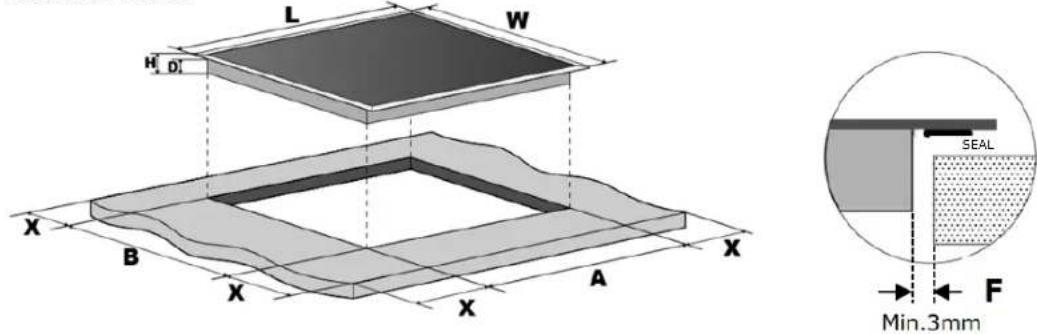
Length: 900mm
Width: 520mm
Height: 60mm
D: 56mm
A: 870+4mm
B: 490+4mm
X: 50mm minimum
F: 3mm minimum
Note: The safety distance between the sides of the cooktop and the inner surfaces of the worktop should be at least 3mm.
Installation Instructions (Continued)
CLEARANCES
Under any circumstances, make sure the induction cooktop is well ventilated and the air inlet and outlet are not blocked. Ensure the induction cooktop is in good working state as shown below.
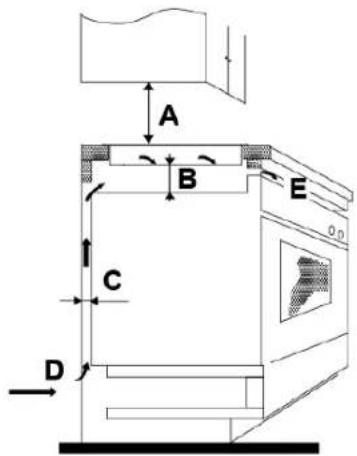
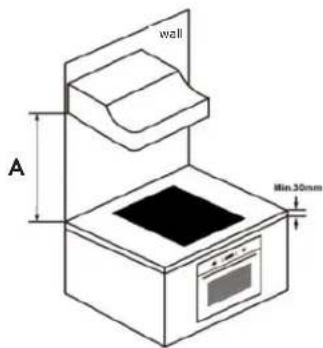
A: Refer to rangehood manual*
B: 50mm minimum
C: 50mm minimum
D: Air Inlet
E: Air Outlet (5mm)
*Please refer to your rangehood's user manual for minimum clearances from the top of the cooktop surface to your rangehood.
WARNING Ensuring Adequate Ventilation
Make sure the induction cooktop is well ventilated and that air inlet and outlet are not blocked. In order to avoid accidental touch with the overheating bottom of the cooktop, or getting unexpected electric shock during working, it is necessary to put a wooden insert, fixed by screws, at a minimum distance of 50mm from the bottom of the cooktop. Follow the requirements on the right.
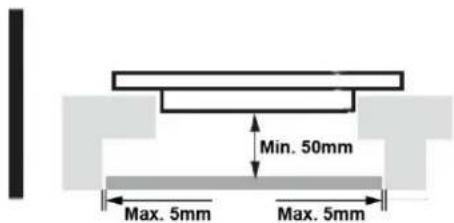
WARNING
There are ventilation holes around outside of the cooktop. YOU MUST ensure these holes are not blocked by the worktop when you put the cooktop into position.
Be aware that the glue that join the plastic or wooden material to the furniture, has to resist to temperature not below 150^ C, to avoid the unstuck of the paneling.
The rear wall, adjacent and surrounding surfaces must therefore be able to withstand an temperature of 90°C.
BEFORE INSTALLING THE COOKTOP, ENSURE
- The work surface is square and level, and no structural members interfere with space requirements.
- The work surface is made of a heat-resistant and insulated material.
- If the cooktop is installed above an oven, the oven has a built-in cooling fan.
- The installation will comply with all clearance requirements and applicable standards and regulations.
- A suitable isolating switch providing full disconnection from the mains power supply is incorporated in the permanent wiring, mounted and positioned to comply with the local wiring rules and regulations.
- The isolating switch must be of an approved type and provide a 3 mm air gap contact separation in all poles (or in all active [phase] conductors if the local wiring rules allow for this variation of the requirements).
- The isolating switch will be easily accessible to the customer with the cooktop installed.
- You consult local building authorities and by-laws if in doubt regarding installation.
- You use heat-resistant and easy-to-clean finishes (such as ceramic tiles) for the wall surfaces surrounding the cooktop.
AFTER INSTALLING THE COOKTOP, ENSURE
- The power supply cable is not accessible through cupboard doors or drawers.
- There is adequate flow of fresh air from outside the cabinetry to the base of the cooktop.
- If the cooktop is installed above a drawer or cupboard space, a thermal protection barrier is installed below the base of the cooktop.
- The isolating switch is easily accessible by the customer.
ADJUSTING THE FIXING BRACKETS
The unit should be placed on a stable, smooth surface (use the packaging or a towel). Do not apply force onto the controls protruding from the cooktop.
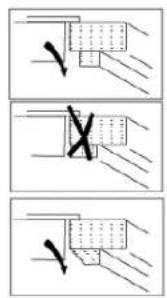
Fix the cooktop on the work surface by screwing two brackets to the bottom of cooktop after installation. Adjust the bracket position to suit for different work surface's thickness.
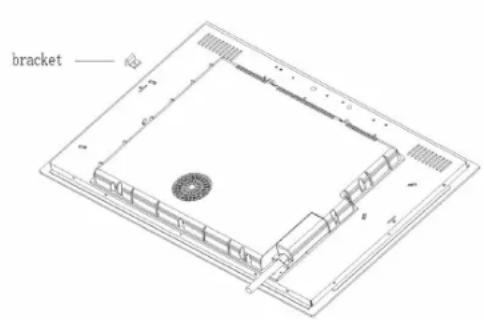
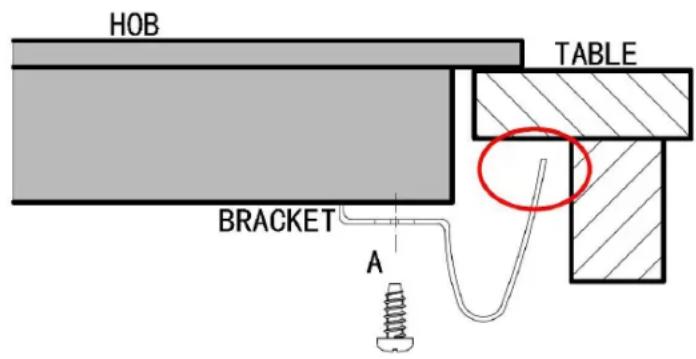
WARNING
Under any circumstances, the brackets cannot touch with the inner surfaces of the worktop after installation (see image above).
Installation Instructions (Continued)
CAUTIONS
- The induction cooktop must be installed by qualified personnel or technicians. We have professionals at your service. Please never conduct the operation by yourself.
- The induction cooktop shall not be mounted to cooling equipment, dishwashers and rotary dryers.
- The induction cooktop shall be installed such that better heat radiation can be ensured to enhance its reliability.
- The wall and induced heating zone above the work surface shall withstand heat.
- To avoid any damage, the sandwich layer and adhesive must be resistant to heat.
- A steam cleaner is not to be used.
ELECTRICAL CONNECTION
IMPORTANT The cooktop must NOT be connected to the mains supply by means of a 10A or 15A plug and socket.
This cooktop must be connected to the mains power supply only by a suitably qualified person.
Before connecting the cooktop to the mains power supply, check that:
-
The domestic wiring system is suitable for the power drawn by the cooktop.
-
The voltage corresponds to the value given in the rating plate
-
The power supply cable sections can withstand the load specified on the rating plate.
To connect the cooktop to the mains power supply, do not use adapters, reducers, or branching devices, as they can cause overheating and fire.
The power supply cable must not touch any hot parts and must be positioned so that its temperature will not exceed 75^ C at any point.
Check with an electrician whether the domestic wiring system is suitable without alterations. Any alterations must only be made by a qualified electrician.
The power supply should be connected in compliance with the relevant standard, or a single-pole circuit breaker. The method of connection is shown in the below wiring diagram.
WIRING DIAGRAM
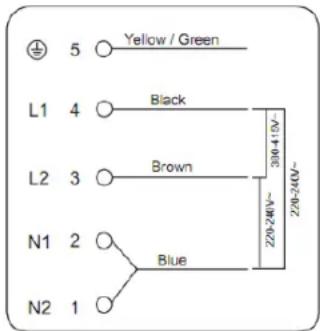
WARNING The bottom surface and the power cord of the cooktop are not accessible after installation.
- If the cable is damaged or needs replacing, this should be done by an after-sales technician using the proper tools, so as to avoid any accidents.
- If the appliance is being connected directly to the mains supply, an omnipolar circuit breaker must be installed with a minimum gap of 3mm between the contacts.
- The installer must ensure that the correct electrical connection has been made and that it complies with safety regulations.
- The cable must not be bent or compressed.
- The cable must be checked regularly and only replaced by a properly qualified person.
- The installer must to use the H05GG-F power cord.
Cleaning & Maintenance
By ensuring proper cleaning and maintenance of your InAlto cooktop, you can ensure that it will have a long and fault free operation.
GENERAL CLEANING INSTRUCTIONS
WARNING Do not start cleaning the cooktop until it has completely cooled.
WARNING Sharp objects and abrasive cleaning materials will damage the appliance. Clean with water and washing up liquid.
- Any residues that are left on the cooktop surface from cleaning agents will damage it. You should remove any residues with warm water mixed with a little washing up liquid.
- Abrasive cleaners or sharp objects will damage the cooktop surface; you should clean it using warm water mixed with a little washing up liquid.
- Although it is easier to clean some deposits whilst the cooktop surface is still warm, you should take care not to burn yourself if cleaning the cooktop surface when it is still warm.
After each use:
- Wipe the cooktop over with a damp cloth.
- Dry the cooktop by rubbing the surface with a clean cloth.
TYPES OF SPILLS
Everyday soiling on glass (fingerprints, marks, stains left by food or non-sugary spillovers on the glass)
- Switch the power to the cooktop off.
- Apply a cooktop cleaner while the glass is still warm (but not hot!)
- Rinse and wipe dry with a clean cloth or paper towel.
- Switch the power to the cooktop back on.
- When the power to the cooktop is switched off, there will be no 'hot surface' indication but the cooking zone may still be hot! Take extreme care.
- Heavy-duty scourers, some nylon scourers and harsh/abrasive cleaning agents may scratch the glass. Always read the label to check if your cleaner or scourer is suitable.
- Never leave cleaning residue on the cooktop: the glass may become stained.
Boil overs, melts, and hot sugary spills on the glass
Remove these immediately with a fish slice, palette knife or razor blade scraper suitable for Induction glass cooktops, but beware of hot cooking zone surfaces:
- Switch the power to the cooktop off at the wall.
- Hold the blade or utensil at a 30° angle and scrape the soiling or spill to a cool area of the cooktop.
- Clean the soiling or spill up with a dish cloth or paper towel.
- Follow steps 2 to 4 for 'Everyday soiling on glass' above.
- Remove stains left by melts and sugary food or spillovers as soon as possible. If left to cool on the glass, they may be difficult to remove or even permanently damage the glass surface.
- Cut hazard: when the safety cove is retracted, the blade in a scraper is razor-sharp. Use with extreme care and always store safely and out of reach of children.
Spillovers on the touch controls
- Switch the power to the cooktop off.
- Soak up the spill
- Wipe the touch control area with a clean damp sponge or cloth.
- Wipe the area completely dry with a paper towel.
- Switch the power to the cooktop back on.
- The cooktop may beep and turn itself off, and the touch controls may not function while there is liquid on them. Make sure you wipe the touch control area dry before turning the cooktop back on.
Troubleshooting
Some minor faults can be fixed by referring to the instructions given below. There is also a self-help section online at www.support.residentiagroup.com.au.
| Problem Possible Cause Solution | ||
| The cooking zones are not functioning or will not switch on | The mains electrical connection may be incorrect or lose.Child lock is switched on.The appliance was left inactive for too long after switching on and has since powered off. | Have your installer check their connection. Check the mains fuse box to ensure a fuse has not been tripped or blown.Check the Child lock is off.Try powering the cooktop on once more. |
| A humming sound is heard when a cooking zone is selected | This is normal for all induction cooktops. | The sound should disappear when the zone has heated up. |
| Pitting of ceramic glass surface. Spill-overs of liquid with high sugar content. | These types of spills must be removed immediately with a special scraper for the glass. If not permanent damage to the cooktop glass can occur which is not covered under warranty. | |
| Red rings, Limescale, water rings, shiny metallic or other discolouration, scratches, shadows, bubbles, or other marks or stains have appeared on the ceramic glass surface | Cooktop surface has not been cleaned correctly. Cleaning/ maintenance of the cooktop surface is not covered under warranty. If a service call is placed to clean the cooktop surface, you will be charged for the visit. | Use a ceramic glass cleaner such as Cerapol available from most supermarkets or for purchase from our Customer Care team. |
| The residual heat indicator is not displaying anything. | The cooking zone was only on for a short time and is therefore not hot. | If the cooking zone is hot and has been in operation for at least 30 seconds and still no residual heat indicator active, call the Customer Service Department. |
| The touch controls are unresponsive. | The controls are locked. Unlock the controls. See section 'Using your induction cooktop' for instructions. | |
| The touch controls are difficult to operate. | There may be a slight film of water over the controls or you may be using the tip of your finger when touching the controls. | Make sure the touch control area is dry and use the ball of your finger when touching the controls. |
| Some pans make crackling or clicking noises. | This may be caused by the construction of your cookware (layers of different metals vibrating differently). | This is normal for cookware and does not indicate a fault. |
| Fan noise coming from the induction cooktop. | A cooling fan built into your induction cooktop has come on to prevent the electronics from overheating. It may continue to run even after you’ve turned the induction cooktop off. | This is normal and needs no action.Do not switch the power to the induction cooktop off at the wall while the fan is running. |
| Pans do not become hot or appear in the display. | The induction cooktop cannot detect the pan because it is not suitable for induction cooking.The induction cooktop cannot detect the pan because it is too small for the cooking zone or not properly centred on it. | Use cookware suitable for induction cooking.Centre the pan and make sure that its base matches the size of the cooking zone. |
| The induction cooktop or a cooking zone has turned itself off unexpectedly, a tone sounds and an error code is displayed (typically alternating with one or two digits in the cooking timer display). | Technical fault. Please note down the | errorletters and numbers, switch the power to the induction cooktop off at the wall, and contact a qualified technician. |
ERROR CODES
If an abnormality comes up, the induction cooktop will automatically enter the protective state and display the corresponding error codes:
| Problem Possible causes W | What to do | |
| F3-F8 Temperature sensor | failure Please contact the supplier. | |
| F9-FE Temperature sensor | of the IGBT failure Please contact the supplier. | |
| E1/E2 Abnormal supply voltage | Please inspect whether power supply is normal.Power on after the power supply is normal. | |
| E3/E4 Abnormal temperature | Please inspect the pot. | |
| E5/E6 Bad induction cooktop | heat radiation Please restart after the induction cooktopcools down. |
The above are the judgment and inspection of common failures. Please do not disassemble the unit by yourself to avoid any dangers and damages to the induction cooktop. Instead contact our customer care team on 1300 11 4357 or visit our self help portal online www.support.residentiagroup.com.au.
Technical Specifications
| MODEL | ICI905TB |
| RATED VOLTAGE | 220-240V~ 50 - 60Hz |
| INSTALLED ELECTRIC POWER | 9400W |
| PRODUCT SIZE (W x D x H mm) | 900 × 520 × 60mm |
| BUILT IN DIMENSIONS (A x B mm) | 874 × 494mm |
Purchase Details
For future reference, please record the following information in the form below. The product details can be found on the rating plate, and purchase details which can be found on your sales invoice.
STORE DETAILS
STORE NAME
ADDRESS
TELEPHONE
PURCHASE DATE
PRODUCT DETAILS
MODEL NO.
SERIAL NO.*
Attach your receipt to this page

Warranty Information
AUSTRALIAN WARRANTY TERMS & CONDITIONS COOKING APPLIANCES
This document sets out the terms and conditions of the product warranties for Residentia Group Appliances. It is an important document. Please keep it with your proof of purchase documents in a safe place for future reference should you require service for your Appliance.
1. IN THIS WARRANTY
(a) 'acceptable quality' as referred to in clause 10 of this warranty has the same meaning referred to in the ACL;
(b) 'ACL' means Trade Practices Amendment (Australian Consumer Law) Act (No.2) 2010;
(c) 'Appliance' means any Residentia Group product purchased by you accompanied by this document;
(d) 'ASR' means Residentia Group authorised service representative;
(e) 'Residentia Group' means Residentia Group Pty Ltd of 165 Barkly Avenue Burnley VIC, ACN 600 546 656 in respect of Appliances purchased in Australia;
(f) 'major failure' as referred to in clause 10 of this warranty has the same meaning referred to in the ACL and includes a situation when an Appliance cannot be repaired or it is uneconomic for Residentia Group, at its discretion, to repair an Appliance during the Warranty Period;
(g) 'Warranty Period' means:
(i) where the Appliance is used for personal, domestic or household use (i.e. normal single family use) as set out in the instruction manual, the Appliance is warranted against manufacturing defects for 24 months (or 36 months where a valid extended warranty registration has occurred), following the date of original purchase of the Appliance;
(h) 'you' means the purchaser of the Appliance not having purchased the Appliance for re-sale, and 'your' has a corresponding meaning.
2. This warranty only applies to Appliances purchased and used in Australia and is in addition to (and does not exclude, restrict, or modify in any way) any non-excludable statutory warranties in Australia.
3. During the Warranty Period Residentia Group or its ASR will, at no extra charge if your Appliance is readily accessible for service, without special equipment and subject to these terms and conditions, repair or replace any parts which it considers to be defective. Residentia Group or its ASR may use remanufactured parts to repair your Appliance. You agree that any replaced Appliances or parts become the property of Residentia Group. This warranty does not apply to light globes, batteries, filters or similar perishable parts.
4. Parts and Appliances not supplied by Residential Group are not covered by this warranty.
5. You will bear the cost of transportation, travel and delivery of the Appliance to and from Residentia Group or its ASR. If you reside outside of the service area, you will bear the cost of:
(a) travel of an authorised representative;
(b) transportation and delivery of the Appliance to and from Residentia Group or its ASR, in all instances, unless the Appliance is transported by Residentia Group or its ASR, the Appliance is transported at the owner's cost and risk while in transit to and from Residentia Group or its ASR.
6. Proof of purchase is required before you can make a claim under this warranty.
7. You may not make a claim under this warranty unless the defect claimed is due to faulty or defective parts or workmanship. Residentia Group is not liable in the following situations (which are not exhaustive):
(a) the Appliance is damaged by:
(i) accident
(ii) misuse or abuse, including failure to properly maintain or service
(iii) normal wear and tear
(iv) power surges, electrical storm damage or incorrect power supply
(v) incomplete or improper installation
(vi) incorrect, improper or inappropriate operation
(vii) insect or vermin infestation
(viii) failure to comply with any additional instructions supplied with the Appliance;
(b) the Appliance is modified without authority from Residential Group in writing;
(c) the Appliance's serial number or warranty seal has been removed or defaced;
(d) the Appliance was serviced or repaired by anyone other than Residentia Group, an authorised repairer or ASR.
-
This warranty, the contract to which it relates and the relationship between you and Residentia Group are governed by the law applicable where the Appliance was purchased.
-
To the extent permitted by law, Residentia Group excludes all warranties and liabilities (other than as contained in this document) including liability for any loss or damage whether direct or indirect arising from your purchase, use or non use of the Appliance.
-
For Appliances and services provided by Residential Group in Australia, the Appliances come with a guarantee by Residential Group that cannot be excluded under the Australian Consumer Law. You are entitled to a replacement or refund for a major failure and for compensation for any other reasonably foreseeable loss or damage. You are also entitled to have the Appliance repaired or
replaced if the Appliance fails to be of acceptable quality and the failure does not amount to a major failure. The benefits to you given by this warranty are in addition to your other rights and remedies under a law in relation to the Appliances or services to which the warranty relates.
- At all times during the Warranty Period, Residential Group shall, at its discretion, determine whether repair, replacement or refund will apply if an Appliance has a valid warranty claim applicable to it.
- Missing parts are not covered by warranty. Residentia Group reserves the right to assess each request for missing parts in a case by case basis. Any parts that are not reported missing in the first week after purchase will not provide free of charge.
- To enquire about claiming under this warranty, please follow these steps:
(a) carefully check the operating instructions, user manual and the terms of this warranty;
(b) have the model and serial number of the Appliance available;
(c) have the proof of purchase (e.g. an invoice) available;
(d) telephone the numbers shown below. - You accept that if you make a warranty claim, Residential Group and its ASR may exchange information in relation to you to enable Residential Group to meet its obligations under this warranty.
IMPORTANT
Before calling for service, please ensure that the steps in point 13 have been followed.
Telephone contact
▶ Service:
Please call 1300 11 HELP (4357)
The Australian Consumer Law requires the inclusion of the following statement with this warranty: Our goods come with guarantees that cannot be excluded under the Australian Consumer Law. You are entitled to a replacement or refund for a major failure and for compensation for any other reasonably foreseeable loss or damage. You are also entitled to have the goods repaired or replaced if the goods fail to be of acceptable quality and the failure does not amount to a major failure.
THIS PAGE IS INTENTIONALLY LEFT BLANK
Warranty Information (Continued)
NEW ZEALAND WARRANTY TERMS & CONDITIONS COOKING APPLIANCES
To help care for your investment, be sure to register your appliance online. Registration will help you if you need to arrange service in the future, and serves as a record of your purchase – including critical information like model number and serial number – that you can refer to at any time.
Simply visit the below website, or ask your retailer for help: www.inalto.house/nz/registration
WARRANTY:
These products are covered by a warranty for a period of 24 months from the date of purchase, subject to the following conditions*. The warranty covers rectification free of charge of any fault arising from defective materials or components, or faulty workmanship or assembly.
The conditions above mentioned are:
- That the purchaser carefully follows all instructions packed with the product;
- That the purchaser and/or installer carefully follows the installation instructions provided and complies with electrical wiring regulations, gas and/or plumbing codes;
- That the purchaser carefully follows instructions provided in the owner's handbook relating to the proper use and care of the product and does not use the product for any purpose other than the domestic use for which it has been designed;
- Commercial use of the product for professional or industrial purposes will void this warranty.;
- That the product was purchased and installed in New Zealand;
- That this warranty does not extend to:
a) optional glass lids for cooktops apart from claims which relate to mechanical or physical damage thereof at the date of purchase;
b) 'consumable' parts such as light bulbs or filters;
c) damage to ceramic glass caused by liquid or solid spill-overs, lack of maintenance, or impact;
d) damage to surface coatings caused by cleaning or maintenance using products not recommended by the owner's handbook;
e) defects caused by normal wear and tear, accident, negligence, alteration, misuse or incorrect installations;
f) a product dismantled, repaired or serviced by any serviceman other than an authorised service agent;
g) a product not in possession of the original purchaser;
h) damage caused by power outages or surges
i) damage caused by pests (eg. rats, cockroaches etc.)
-
That if the product is a freestanding microwave oven or small appliance it must be returned to the dealer/retailer for servicing. These products, unless stated otherwise, have a 12 month warranty from original date of purchase with 24 months on the microwave magnetron; Waste disposers have a 12 month warranty.
-
The provision of service under this warranty is limited by a 25km boundary from the retailer where the product was purchased except for microwaves. Such travelling outside of these limits will incur commercial cost to be paid by you, regulated by the number of kilometres travelled beyond the 25km limit (50km return trip). Microwaves are to be delivered to the nearest authorised service agent by the customer.
Please refer to your user manual for any further conditions that may apply to your specific model.
Nothing herein contained shall be construed in any way as excluding or limiting your rights under the Consumer Guarantees Acts 1993.
For Service please visit www.applico.co.nz/service or contact the dealer/retailer from whom you purchased the product from or call the 0800 number listed below. If you are unable to establish the date of purchase, or the fault is not covered by this warranty, or if the product is found to be in working order, you will be required to bear all service call charges.
Registration of this warranty constitutes acceptance of the terms and conditions of this warranty.
Should you require any assistance, please call Customer Services on 0800 763 448.
Distributed by Applico Ltd. www.applico.co.nz July 2019
After registering your appliance online, we recommend you fill out the below information for your reference and keep this warranty card in a safe place.
THIS WARRANTY IS VALID IN NEW ZEALAND ONLY.
DESIGNED IN MELBOURNE FOR ALL AUSTRALIAN HOMES INALTO
WWW.INALTO.HOUSE
- 90cm Induction Cooktop
- Welcome
- Congratulations on purchasing your new Induction Cooktop!
- Contents
- Customer Care
- Safety Instructions
- IMPORTANT INFORMATION
- WARNING!
- CAUTION
- IMPORTANT
- CONDITIONS OF USE
- BEFORE USING YOUR APPLIANCE
- INSTALLATION
- Cut Hazard
- Electrical Shock Hazard
- Health Hazard
- Hot Surface Hazard
- Important safety instructions
- Safety Instructions (Continued)
- INFORMATION ON DISPOSAL FOR USERS
- Your InAlto Cooktop
- LEGEND
- Before First Use
- SERVICING
- CLEANING
- Using Your Cooktop
- INDUCTION COOKING
- CHOSING THE RIGHT COOKWARE
- Operation Instructions
- TOUCH CONTROLS
- TO START COOKING
- WHEN YOU HAVE FINISHED COOKING
- Operation Instructions (Continued)
- USING THE BOOST FUNCTION
- Activate the boost function
- Cancel the Boost function
- FLEXIBLE AREA
- As one large zone
- As two independent zones
- LOCKING THE CONTROLS
- To lock the controls
- To unlock the controls
- OVER-TEMPERATURE PROTECTION
- AUTOMATIC SHUT-OFF
- USING THE TIMER
- Using the timer as a minute minder timer.
- Setting a timer for an individual zone
- Setting a timer for more than one zone
- Canceling the timer
- Installation Instructions
- IMPORTANT!
- WARNING! Risk of injury from electrical current.
- WARNING! The surface temperature exceeds 90°C. To avoid a hazard, under bench access must be restricted.
- WARNING Once connected to the mains supply check that all cooking zones are ready for use by briefly switching each on in turn at the maximum setting.
- Applying the seal
- Installation Instructions (Continued)
- CLEARANCES
- WARNING Ensuring Adequate Ventilation
- WARNING
- BEFORE INSTALLING THE COOKTOP, ENSURE
- AFTER INSTALLING THE COOKTOP, ENSURE
- ADJUSTING THE FIXING BRACKETS
- CAUTIONS
- ELECTRICAL CONNECTION
- Cleaning & Maintenance
- GENERAL CLEANING INSTRUCTIONS
- After each use:
- TYPES OF SPILLS
- Troubleshooting
- ERROR CODES
- Technical Specifications
- Purchase Details
- STORE DETAILS
- PRODUCT DETAILS
- Warranty Information
- AUSTRALIAN WARRANTY TERMS & CONDITIONS COOKING APPLIANCES
- IN THIS WARRANTY
- Warranty Information (Continued)
- NEW ZEALAND WARRANTY TERMS & CONDITIONS COOKING APPLIANCES
- WARRANTY:
Brand : InAlto
Model : ICI905TB
Category : Cooker