
SweepMop CSM2100 - Vacuum Cleaner Equator - Free user manual and instructions
Find the device manual for free SweepMop CSM2100 Equator in PDF.


| Product Type | Cordless Self-cleaning Sweeper ⊕Mop |
| Model Number | CSM2100 |
| Brand | Equator |
| Dimensions (Powerhead Assembly) | 45.3 x 10.2 x 7.6 inches (HxWxD) |
| Dimensions (Docking Station) | 7 x 12.3 x 10.4 inches (HxWxD) |
| Weight (Powerhead Assembly) | 5 lbs 3 oz (approx. 2.38 kg) |
| Weight (Docking Station) | 5 lbs 1 oz (approx. 2.30 kg) |
| Battery | Rechargeable, 2200 mAh |
| Power Adapter | Input 110-120V AC, Output DC 13.5V 1A |
| Charging Time | Approximately 2 hours |
| Run Time | Up to 1 hour per charge |
| Coverage per Charge | Up to 1500 sq. ft. |
| Functions | Sweep, mop, self-clean, wet/dry spill pickup |
| Roller Type | Sponge Roller (replace every 6-12 months) |
| Self-Clean Cycle | 30 seconds with 2 water flushes |
| Water Tank Capacity (Clean) | Approximately 1 gallon (3.8L) |
| Warranty | 1 year limited (parts and labor) |
| Safety Features | Auto shutdown if jammed; designed for hard floors only |
| Included Accessories | Handle, Connecting Rod, Powerhead, Sponge Roller, Waste Basket, Mini Brush, Docking Station, Adapter Plug |
| FCC Compliance | Class B digital device |
Frequently Asked Questions - SweepMop CSM2100 Equator
User questions about SweepMop CSM2100 Equator
0 question about this device. Answer the ones you know or ask your own.
Ask a new question about this device
Download the instructions for your Vacuum Cleaner in PDF format for free! Find your manual SweepMop CSM2100 - Equator and take your electronic device back in hand. On this page are published all the documents necessary for the use of your device. SweepMop CSM2100 by Equator.
USER MANUAL SweepMop CSM2100 Equator
Cordless Self-cleaning Sweeper ⊕Mop
Model - CSM 2100
natural_image
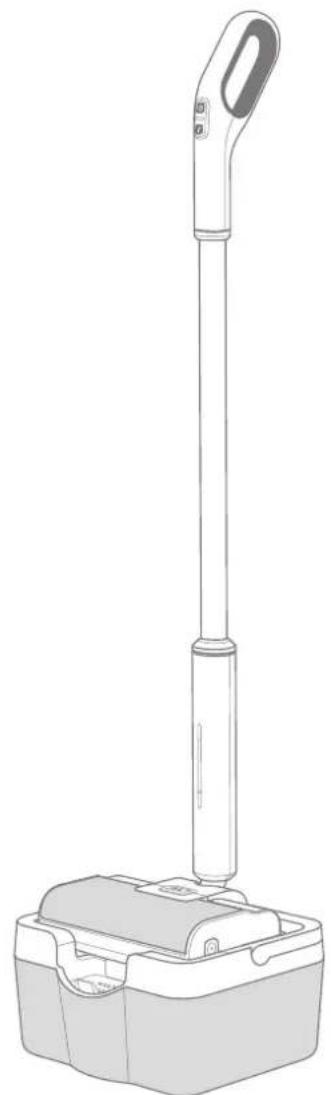
Line drawing of a handheld device with a vertical rod and base (no text or symbols)OWNER'S MANUAL
Warranty
Equator Appliances undertakes to the consumer-owner to repair or, at our option, to replace any part of this product which proves to be defective in workmanship or material under normal personal, family or household use, in the USA and Canada, for a period of one year from the date of original purchase. During this period, we will provide all labor and parts necessary to correct such defect, free of charge, if the appliance has been assembled and operated in accordance with the written instructions with the appliance.
Exclusions
In no event shall Equator Appliances be liable for incidental or consequential damages or for damages resulting from external causes such as abuse, misuse, incorrect voltage or acts of God. This warranty does not cover service calls which do not involve defective workmanship or materials covered by this warranty. Accordingly, diagnosis and repair costs for a service call which does not involve defective workmanship or materials will be the responsibility of the consumer-owner.
Specifically, the following work is not covered under warranty and does not constitute warranty work:
Operation – eg. Using the appliance without water, using dry sponge roller Maintenance –eg. Failing to remove trash and wastewater Mishandling – eg. Breakage, immersing electrical components in water
WARRANTY SERVICE
This warranty is given by:
Equator Appliances
10216 Georgibelle Drive, Suite 900D
Houston, TX 77043-5249
For Customer Service:
Appliance Desk
Business hours: 9:00 am to 5:00 pm weekdays
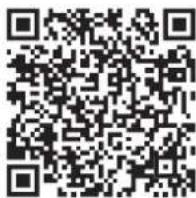
You can register your Warranty by any of the following methods:
-
Mail in the Warranty Registration Card
-
Register online at www.ApplianceDesk.com
-
Scan the QR Code
GENERAL
Since it is responsibility of the consumer-owner to establish the warranty period by verifying the original purchase date, Equator Appliances recommends that a receipt, delivery slip or some other appropriate payment record be kept for that purpose.
This warranty gives you specific legal rights, and you may also have other rights which vary from State to State.
All rights reserved. Manual subject to change without notice.
Safety
Please follow the safety precautions listed below:
This SweepMOP is not intended for use by children or persons with reduced physical, sensory, or mental capabilities, or lack of experience and knowledge. Children should be supervised to ensure that they do not play with the appliance.
Stop using the SweepMOP immediately and unplug it if there is an abnormality or malfunction, including the following:
- The power Adapter Plug or power adapter cord is abnormally hot.
• The machine emits a burnt smell. - Part of the machine is broken, loose, or emits abnormal sounds.
Insert the power Adapter Plug into the socket firmly. If the power adapter is loose after being plugged into a power outlet, please do not use the power outlet.
Before cleaning the Docking Station, please unplug the power adapter to prevent electric shock. Use a dry cloth periodically to remove dust from the power adapter. Do not plug or unplug the power adapter with wet hands.
When opening the Powerhead Cover to replace or clean the Roller or Roller Brush, please pay attention to the sharp blade to prevent injuries.
Do Not:
- Immerse the Docking Station or any electrical component in water.
- Disassemble, repair, or modify the product.
- Put fingers or toes into the machine rotation shaft.
- Touch the Roller while the machine is running.
- Modify, damage, forcibly bend, twist, or clamp the power adapter cord.
- Use a damaged power adapter or power cord.
- Use any third-party battery or power adapter.
Please dispose off this appliance in accordance with local regulations.
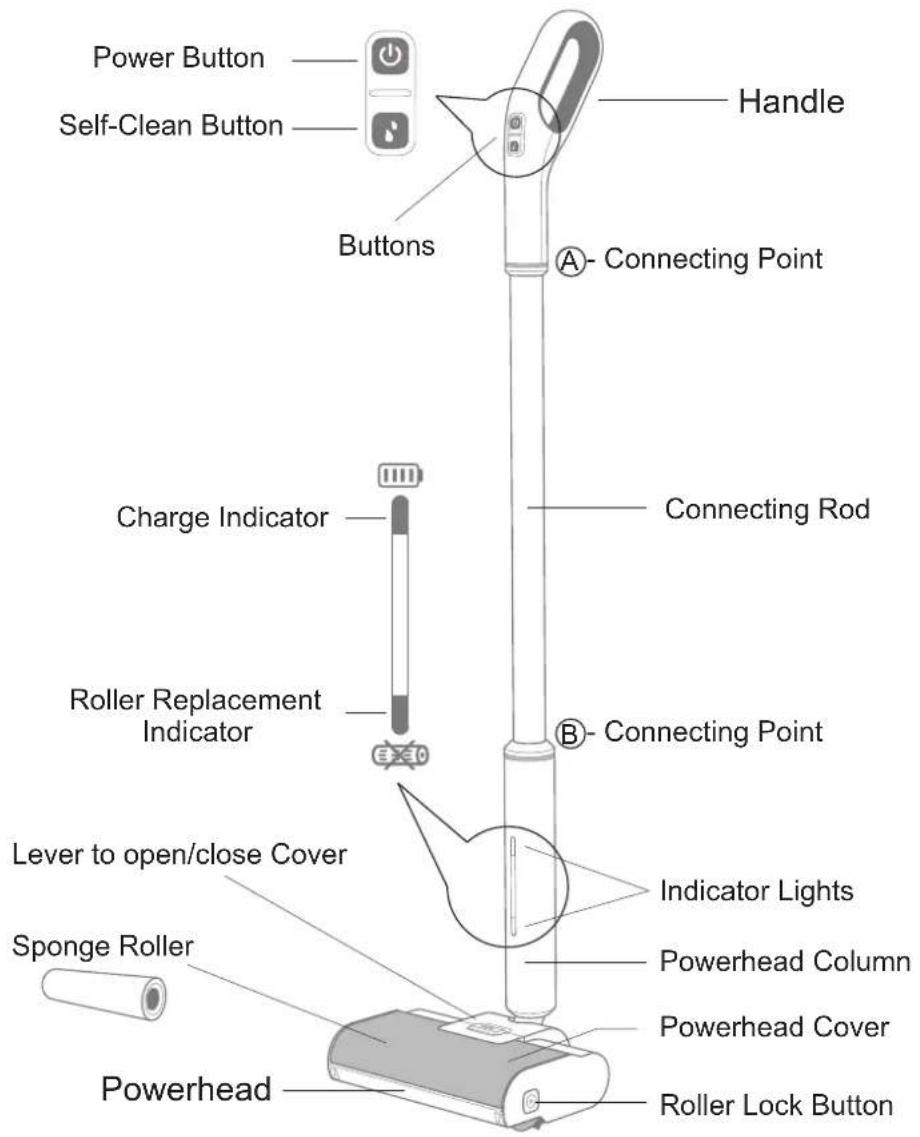
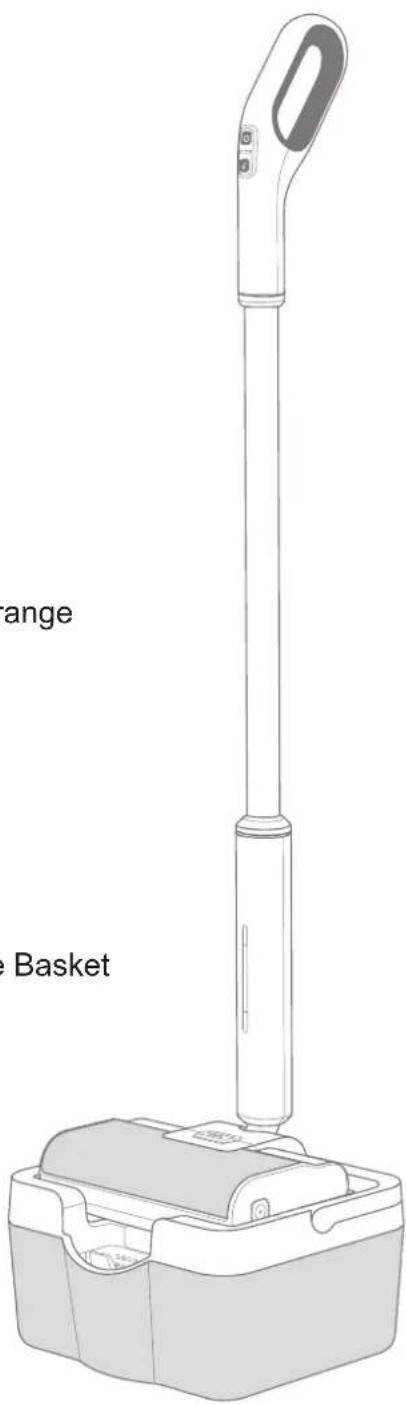
Cordless SweepMOP
Powehead Assembly
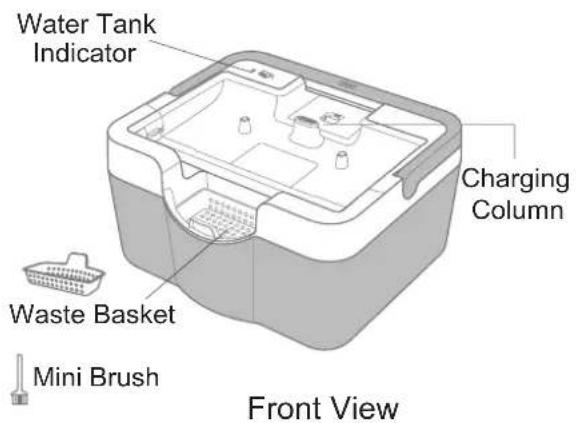
Docking Station
General Instructions
To prevent malfunction, please observe the following:
Place the SweepMOP in an environment below 32°F (0°C) or above 122°F (50°C).
Place the SweepMOP in an area away from direct sunlight and heated surfaces.
Use the SweepMOP on hard surface floors, but not on carpets, rough floors or on the wall. It also should not be used for polishing floors.
It cannot remove large chunks of trash and these should be cleared before using the SweepMOP for normal cleaning.
The Powerhead Cover must be closed when the SweepMOP is running and when it is self-cleaning. After cleaning the floor, the ground may be wet and slippery. Be careful not to fall.
Functions
Your SweepMop is an all-in-one appliance which lets you sweep and mop.
It can also clean itself with the press of a single button.
It can clean both wet and dry spills on floors.
Assembly of SweepMOP
Insert the Handle into the Connecting Rod, as shown at point "A"
Insert the other end of the Connecting Rod into the Powerhead Column, at point "B"
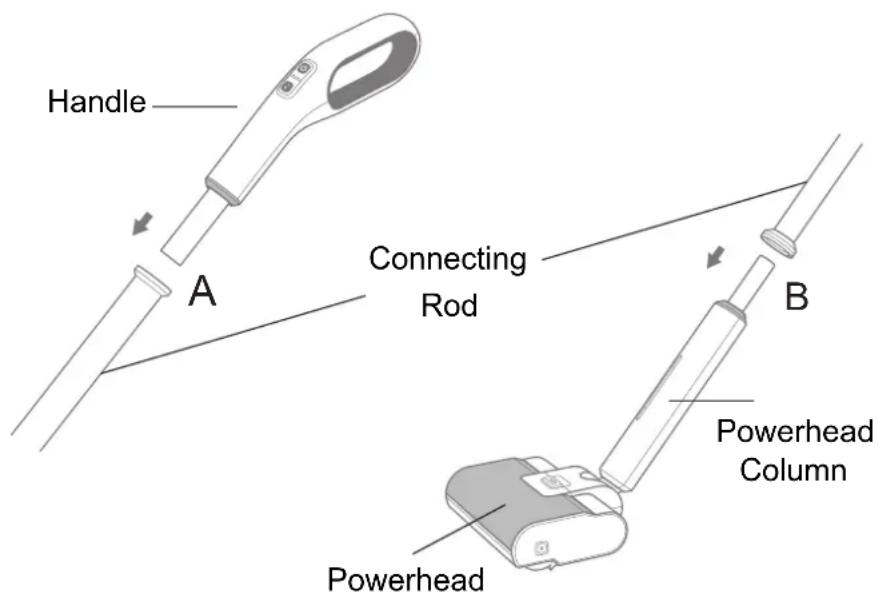
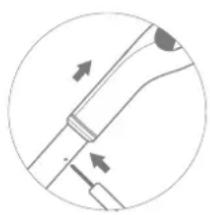
Note: To disassemble, push a pointed tool into the holes on the Connecting Rod (at points A & B) to unlock the piece and pull apart.
natural_image
Pure diagram of a mechanical or electrical component with directional arrows, no text or symbols presentPreparation for use
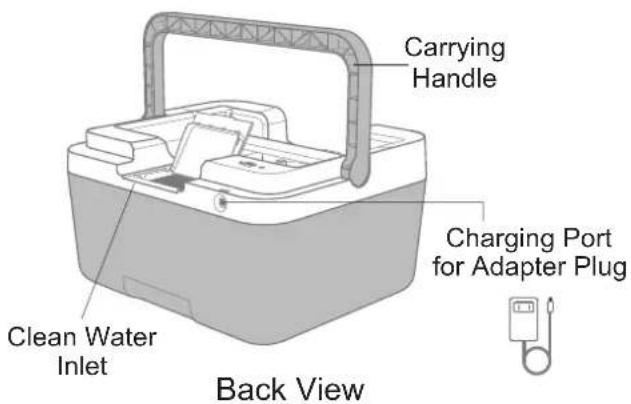
Charge the appliance by attaching the Adapter Plug to the magnetic port at the back of the Docking Station and plugging the other end into a 110 volt electrical outlet. Stand in front of the Docking Station and place the assembled SweepMOP straight down onto the Docking Station and ensure it locks in place on top of the Charging Column.
It will charge automatically, during which time the top Indicator light on the Handle will be orange. When the charging is completed (in about 2 hours) the charging will automatically stop, and the Indicator light will turn white. If the SweepMOP has a low battery, the indicator flashes orange then turns off after 3 seconds. You must then charge the SweepMOP before using it.
Before using the SweepMop for the first time or using after an extended period of non-use (10 days), the Roller must be immersed in room temperature water and soaked for about 2 hours, until completely soft. Squeeze out excess water out of the Roller. This does not need to be done every time you use the SweepMOP if it is being used frequently and the Roller remains wet. Dry Roller will cause damage to the product.
Sponge Roller Installation
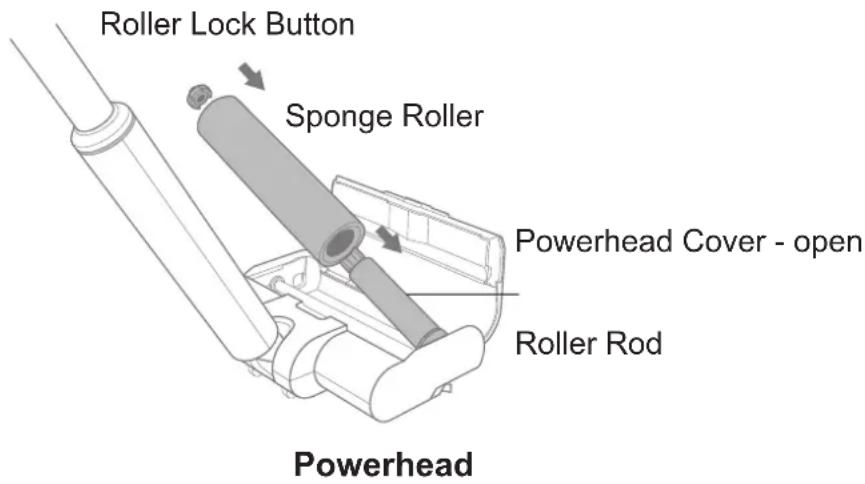
- Remove the fully charged SweepMOP from the Docking Station.
- Lift top cover of the Powerhead by pressing orange Lever and lifting up.
- Connect the small orange magnetic Roller Lock Button to one side of the Roller, while sliding the other end of the Roller onto the Roller Rod.
- Push the Roller firmly down so that it locks into place.
- The Roller Lock Button will pop out and appear through the square hole on the side of the Powerhead.
Note: When you want to remove the Roller for cleaning and replacement, push the Roller Lock Button on the side to release the Roller.
Operating the SweepMOP
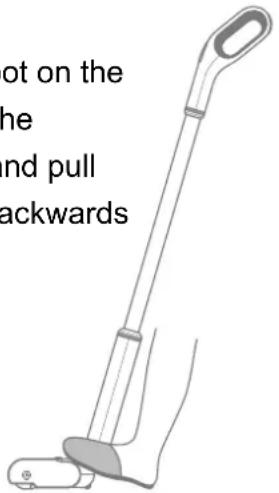
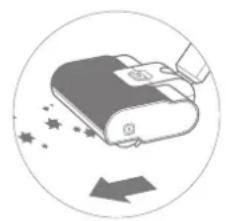
Remove the SweepMOP (with the Roller installed in it) from the Docking Station. The Handle is normally in the standing upright position. Gently place your foot on the back end of the Powerhead and pull the Handle backwards, which allows you to operate the mop easily. You will hear a click, which is the release sound of the lock. Press the top orange button on the Handle to power on. You are now ready to use your SweepMOP. Simply push to sweep and pull to mop.
Place your foot on the back end of the Powerhead and pull the Handle backwards
natural_image
Illustration of a hand cleaning a device with sparkles and a downward arrow (no text or symbols)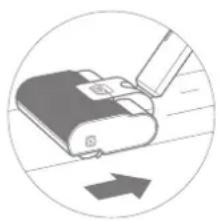
natural_image
Diagram of a device being inserted into a slot, with an arrow indicating direction (no text or symbols present)Push to Sweep Pull to Mop
The SweepMOP is self-propelled so you will feel the motion as you push forward to sweep and pull back to mop.
The angled Handle lets you swivel the unit to clean hard to reach places. For tougher stains or spills, you can move the unit back and forth a few times to clean completely. The areas where you mop will be wet, but will dry quickly. Be careful not to slip.
When using a new Roller, it is normal to feel it hard to push or pull the SweepMOP. After a few uses, the roller will move more easily. There may also be a plastic odor in the initial use, which will gradually disappear with cleaning.
If the SweepMOP stops working and the charge Indicator light flashes orange, it may mean that an object has got stuck in the Roller or Roller Brush and will require you to remove the obstruction manually. Please open the Powerhead Cover to check if the Roller is jammed by some object. Turn the appliance Off before you clear the item stuck in the Powerhead.
The SweepMOP can operate for about 1 hour on a single charge and clean approximately 1500 sq. ft.
When finished, press the Power button to stop. Return the Handle to the upright position. Return the SweepMOP to the Docking Station.
Self-Clean
When you have completed sweeping and mopping the floor, the SweepMOP can be easily cleaned.
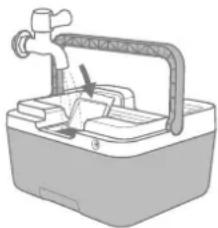
- First, add about a gallon of clean water to the Docking Station clean water tank through the water inlet opening on top (raise Docking Station Carrying Handle to access the opening flap).
- The Water Tank Indicator light on the left rear side of the Docking Station will be orange if the water tank is low or empty.
- Non-foaming or low-foaming cleaning solution can be added to the clean water to provide enhanced cleaning. (One gallon of clean water will allow you to run 3 Self-Clean cycles.)
Fill clean water in Docking Station
natural_image
Illustration of a water tap with handle and outlet (no text or symbols)- Remember to put the small Waste Basket in Docking Station before you begin Self-Clean.
- Place the SweepMOP on the Docking Station, making sure it is locked in place.
- Press the Self-Clean button to start the cleaning process. The Self-Clean procedure takes about 30 seconds, which includes 2 flushes of clean water through the SweepMOP.
- The white Indicator light will be flashing during this process.
- After Self-Clean is over, the cycle will end automatically.
Cleaning Out Waste
- When the cleaning is completed, remove the SweepMOP from the Docking Station.
- Lift out the Waste Basket from the Docking Station, and empty out the trash using the Mini Brush provided.
- Lift the Docking Station and empty the wastewater. Rinse a couple of times as needed.
- Using a paper towel or cloth, wipe up the wet areas on the SweepMOP.
- It is now ready to charge and be ready for the next time you use the SweepMOP.
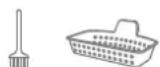
Empty Waste Basket after each use
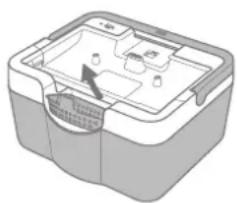
natural_image
3D diagram of a computer case with internal components (no text or symbols)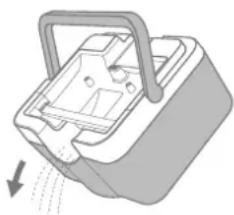
natural_image
Diagram of a mechanical device with a handle and internal components, showing motion direction (no text or symbols)Pour out wastewater after 3 self-clean cycles (When fresh water is empty)
Maintenance
Before cleaning the Docking Station, unplug the Adapter Plug to prevent electric shock. Regularly wipe the magnetic connector on the Adapter and the charging port of the Docking Station with a dry cloth to keep it dry and clean.
It is recommended that you remove and clean these parts regularly:
- Roller: Open the Powerhead Cover, press the orange Roller Lock Button and lift out the Roller.
- Roller Brush: Open the Powerhead Cover, pull out the small black Clip inside the Powerhead to release the Roller Brush.
- Scraper: Turn the Powerhead over so you are facing the under side of the appliance. While pulling down on the Lock Release Button, slide out the Scraper at the same time.
When opening the Powerhead to replace or clean the parts, be careful of sharp parts which could cause injuries.

Top of Powerhead Underside of Powerhead
It is recommended that the Roller be replaced every 6-12 months. After several uses, the Roller Replacement Indicator light will turn orange. After replacing the Roller, press the Power button, then press and hold the Self-Clean button for 5 seconds and the Indicator light for Roller replacement will turn off. The Roller Brush and Scraper can also be replaced when needed.
When there is wastewater in the Docking Station, please empty it in a timely manner to prevent odors. When lifting it, please do not shake it too much to avoid spilling of wastewater.
To prevent blockage, regularly clean the clean water Filter which is at the base of the Docking Station. Pull out the small round Filter, open the Filter Cap and clear the inside of the Filter. Then close the Filter Cap and replace it by pushing the Filter back into the base of the Docking Station.

If the appliance has not been used for a long time, please empty both the clean water tank and wastewater tank in the Docking Station.
If the SweepMOP will not be used for a long period of time, please turn it off after fully charging and store in a cool dry place. Please charge it at least once every three months.
Replacement Parts: Sponge Roller, Brush Roller, Scraper
Technical Specifications
| SPECIFICATIONS | |
| Powerhead Assembly size (HxWxD) | 45.3 x 10.2 x 7.6 (inch) |
| Powerhead size (HxWxD) | 2.5 x 10.2 x 7.6 (inch) |
| Docking Station size (HxWxD) | 7 x 12.3 x 10.4 (inch) |
| Powerhead Assembly weight | 5 lbs 3oz |
| Docking Station weight | 5 lbs 1oz |
| Power cord Length | 6 Feet |
| Battery power | 2200 mAh |
| Rated voltage | DC 12 V |
| Rated current | 1.5 A |
| Power adapter | DC 13.5V 1A |
| Charging time | 2 Hrs |
FCC WARNING :
This equipment has been tested and found to comply with the limits for a Class B digital device, pursuant to part 15 of the FCC Rules. These limits are designed to provide reasonable protection against harmful interference in a residential installation. This equipment generates, uses and can radiate radio frequency energy and, if not installed and used in accordance with the instructions, may cause harmful interference to radio-communications. However, there is no guarantee that interference will not occur in a particular installation. If this equipment does cause harmful interference to radio or television reception, which can be determined by turning the equipment off and on, the user is encouraged to try to correct the interference by one or more of the following measures:
—Reorient or relocate the receiving antenna.
—Increase the separation between the equipment and receiver.
—Connect the equipment into an outlet on a circuit different from that to which the receiver is connected.
—Contact Customer Service for help.
California Proposition 65
WARNING: This product contains chemical known to the State of California to cause cancer and birth defects or other reproductive harm.
Troubleshooting
| Does not charge | Check if the Adapter Plug is connected to the power source.Check if there is water or foreign object on the magnetic connector of the Adapter. Please wipe it dry and clean.Check if the charging connector below the Powerhead and the charging column on the Docking Station has water residue or is covered by a foreign object. |
| SweepMOP does not start | The battery is low. Please charge it.The Roller or Roller Brush is stuck. Please open the Powerhead cover to clean the parts. |
| No water or very little water comes out | Check if the Powerhead is placed on the Docking Station properly.Check if the Indicator for the clean water tank is on.Check if the clean water tank is empty or the waste water tank is full.Check if the clean water filter is blocked.Open the Powerhead Cover and check if the clean water outlet is blocked.Check if the charging connector below the Powerhead and the charging column on the Docking Station has water residue or is covered by a foreign object. |
| Trash not picked up | Open the Powerhead Cover and check if the Waste Basket is full.(The capacity is limited. Please do not clean too much spillage at a time.)Check if the Roller has reached the end of its life (Check Indicator light.)Check if the Roller is broken or dry. If the roller is dry, please immerse it in water till it is completely soft.Check if the Scraper or Roller Brush is broken. |
| Water stain on the floor | Check if the Roller has reached the end of its life (Check Indicator light.)Check if the Roller is broken or dry. If the roller is dry, please immerse it in water till it is completely soft.Check if the Waste Basket cap at the bottom of the Powerhead is completely closed.Check if the Scraper at the bottom of the Powerhead is broken. |
| Wastewater overflows | Check if the wastewater tank is full.Check if the Waste Basket is full or blocked. |
Components Included
All Components packed in this box for the SweepMOP are shown below. Remove and identify each part carefully before discarding the box and packing material.
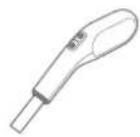
Handle – Used to move the SweepMOP Has the Power and the Self-Clean Buttons
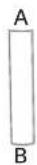
Connecting Rod – Connects the Handle to the Powerhead
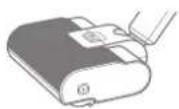
Powerhead – The part of the unit that sweeps and mops the floor
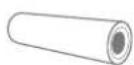
Sponge Roller – Mops the floor and includes orange retractable lock button
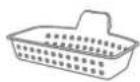
Waste Basket – Collects solid trash after the self-clean operation

Mini Brush – For cleaning out trash from Waste Basket
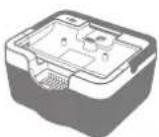
Docking Station – The stationary part of the SweepMOP that is connected to power and is to be filled with clean water
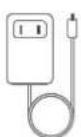
Adapter Plug – Connects easily to a magnetic port at the back of the Docking Station and the other side connects to a 110V outlet
- OWNER'S MANUAL
- Warranty
- Exclusions
- WARRANTY SERVICE
- Equator Appliances
- Appliance Desk
- GENERAL
- Safety
- Please follow the safety precautions listed below:
- Do Not:
- Cordless SweepMOP
- General Instructions
- Functions
- Assembly of SweepMOP
- Preparation for use
- Sponge Roller Installation
- Operating the SweepMOP
- Self-Clean
- Cleaning Out Waste
- Maintenance
- FCC WARNING :
- California Proposition 65
- Troubleshooting
- Components Included
Brand : Equator
Model : SweepMop CSM2100
Category : Vacuum Cleaner