Ampera - Exercise bike LifeSpan - Free user manual and instructions
Find the device manual for free Ampera LifeSpan in PDF.


| Product Type | Office Exercise Bike |
| Brand | LifeSpan |
| Model | Ampera |
| Dimensions | Approx. 479mm x 668mm (no height specified) |
| Weight Capacity | 330 lbs (150 kg) |
| Power Generation | Pedal-powered; max output 65W |
| Resistance Levels | 4 levels (L1–L4), adjustable via app |
| Wireless Charging | 15W Qi-compatible pad |
| USB Charging | USB-C port with Power Delivery up to 65W |
| Seat Height Adjustment | Pneumatic manual; range 32–39 in (80–100 cm) |
| Connectivity | Bluetooth for app connection |
| Display | None on unit; data via smartphone app |
| Noise Level | Under 58 dB at 30 km/h |
| Moving Wheels | 2 front wheels |
| Battery | Lithium battery for Bluetooth module only |
| Operating Temperature | 41–104°F (5–40°C) |
| Warranty | 10 years frame, 2 years parts, 1 year labor, 1 year battery |
| Accessories Included | Extension USB-C cable (71 in), toolkit |
| Maintenance | Clean with mild detergent and damp cloth; dry cloth for charging areas |
Frequently Asked Questions - Ampera LifeSpan
User questions about Ampera LifeSpan
0 question about this device. Answer the ones you know or ask your own.
Ask a new question about this device
Download the instructions for your Exercise bike in PDF format for free! Find your manual Ampera - LifeSpan and take your electronic device back in hand. On this page are published all the documents necessary for the use of your device. Ampera by LifeSpan.
USER MANUAL Ampera LifeSpan
natural_image
Line drawing of a mechanical device with adjustable arms and legs (no text or symbols)LifeSpan Ampera Office Bike
Owner's Manual
Welcome
Congratulations on Purchasing Your LifeSpan Ampera Office Bike!
LifeSpan Products stands behind its commitment to quality and customer satisfaction with robust warranties and a responsive customer service team, ensuring prompt assistance whenever you need it. Our dedication to excellence and innovation has earned us multiple awards and continuous accolades from independent review groups, industry experts, and our valued customers.
With comprehensive warranties and a dedicated customer service department, LifeSpan is your reliable partner for all your needs. Our unwavering dedication to quality and innovation has consistently garnered recognition from independent reviewers, industry authorities, and our satisfied customers.
Thank you for choosing LifeSpan, where quality, exceptional service, and innovation come together to provide you with the best possible experience.
Contents
Welcome
Safety First 4
IMPORTANT SAFETY INSTRUCTIONS
WARNING
Assembling Your Ampera Office Bike ....5
Product Diagram
Toolkit
Assembly Instructions
About Your Ampera Office Bike ....11
Ampera Office Bike Features & Specifications
Wireless Charging
USB Power Delivery
Charging's Impact on Resistance
Power Generation
Seat Height Adjustment
Ampera Office Bike App ....14
App Instruction
Moving 18
Maintenance and Tips ....19
Product Maintenance
Product Warranty
Safety First
IMPORTANT SAFETY INSTRUCTIONS
- Read all instructions before using the product.
- Do not use the product if it is damaged or partially submerged in water.
- Clean the product only with mild detergent and a slightly damp cloth. Do not use solvents. However, when cleaning the areas around the wireless charging pad and type C charging ports, use a dry cloth to prevent water from entering.
- Children should not play with this product and should not clean or maintain it without supervision.
- Keep hands away from all moving parts while using the product.
- Place the product on a sturdy, level surface. Do not operate the product on thick plush or shaq carpet as it may damage the carpet.
- The product is equipped with Bluetooth and can be used even when Bluetooth is turned off.
- This product contains a rechargeable lithium battery. When the battery needs to be replaced, it must be replaced by skilled personnel. The battery must be removed before disposal.
- The product is recommended for use in an ambient temperature range of 41\~104 °F(5\~40 °C) and with a maximum user weight of 330 lbs (150kg).
- The product is an office and fitness product powered while pedaling, and it is not intended for high-intensity cycling or riding. The normal riding speed is 6.2\~18.6 MPH(10\~30 KPH).
WARNING - Reduce the hazard of burns, fire, electric shock, or injury to persons:
- This appliance can be used by children aged from 14 years and above and persons with reduced physical, sensory or mental capabilities or lack of experience and knowledge if they have been given supervision or instruction concerning use of the appliance in a safe way and understand the hazards involved.
- Only use the product for the intended use as described in this manual, and do not use accessories not recommended.
- Do not operate the product with blocked ventilation openings. Always keep the ventilation free of lint, hair, or any other obstructions.
- Do not drop or insert any objects into any openings. If items fall into the product, remove them carefully or contact customer service center.
- Do not use the product outdoors or in areas with high humidity or extreme temperatures.
- Do not use the product in places with aerosol (spray) atmosphere or oxygen delivery.
CAUTION: Hazard of fire and burns. Do not open, squeeze, or heat up to higher than the maximum temperature specified for this product.
SAVE THESE INSTRUCTIONS
Assembling Your Ampera Office Bike
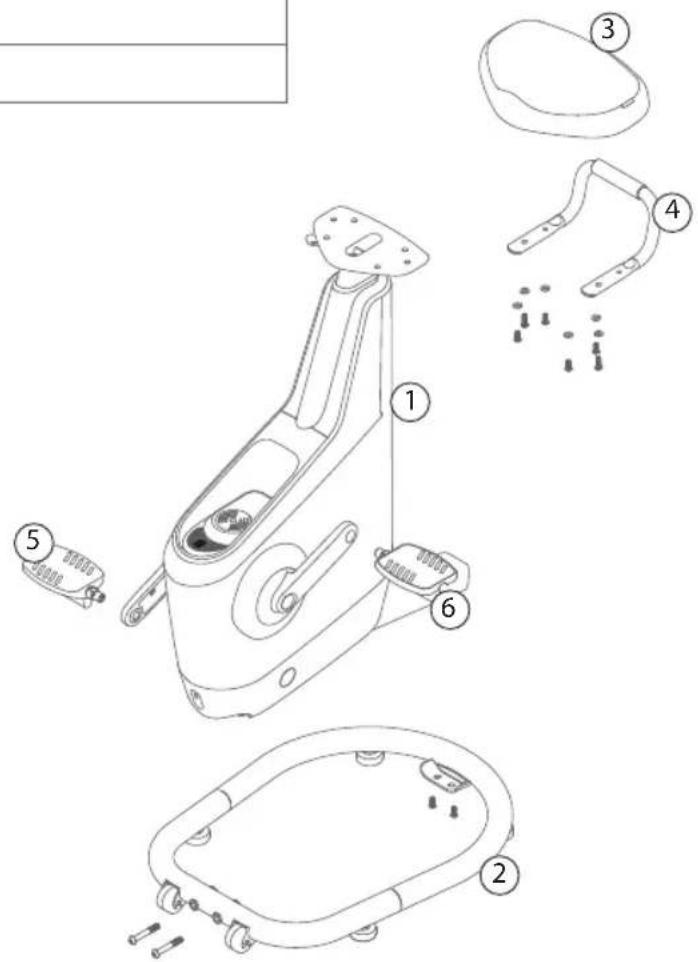
Product Diagram
| Item# Part Description | |
| 1 Main | Body |
| 2 Bottom Frame | |
| 3 Seat | |
| 4 Back | Handle |
| 5 Right | Pedal |
| 6 Left | Pedal |
| Item# Part Description | |
| 1 Main | Body |
| 2 Bottom Frame | |
| 3 Seat | |
| 4 Back | Handle |
| 5 Right | Pedal |
| 6 Left | Pedal |
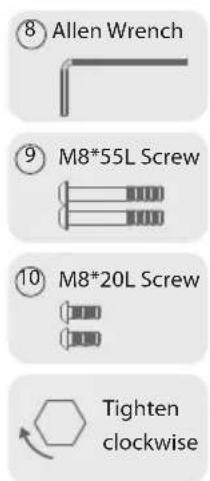
Unpack The Toolkit
| Item# ParQ Description | |||
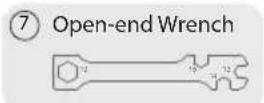
| 7 | 1 | Open-end Wrench |  |
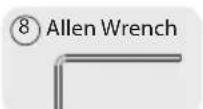
| 8 | 1 | Allen Wrench |  |
| 9M8x55L Screw |  | ||
| 10M8x20L Screw |  | ||
Assembling Your Ampera Office Bike
Assembly Instructions:
- Remove the top of the cartonⒶ.

natural_image
Diagram showing a 3D block transforming into a rectangular box with an arrow indicating transformation (no text or symbols present)- Put the foam Ⓑ back to the top of the carton Ⓐ. You will need to use the carton for assembly later.

natural_image
Technical line drawings of two mechanical components labeled A, B, and C, showing different assembly or installation views (no text or symbols beyond labels)Assembling Your Ampera Office Bike
- Carefully place the bike smoothly and steadily on the top of the carton Ⓐ.

natural_image
Isometric technical diagram of a mechanical assembly with labeled components A, C, and a central component (no text or symbols beyond labels)- Remove the bottom of carton Ⓒ and foam Ⓓ.

Assembling Your Ampera Office Bike
- Use Allen Wrench⑧ to remove the wood board⑨.


- Assemble the Bottom Frame ② with the Main Body ①. Please use Allen Wrench ⑧ to tighten 2xM8*55L screws ⑨ on the wheeled end, and use Allen Wrench ⑧ to tighten 2xM8*20L screws on the other end.
Note :
The lengths of the screws for locking the front and rear ends are different, the correct screws must be used.

Assembling Your Ampera Office Bike
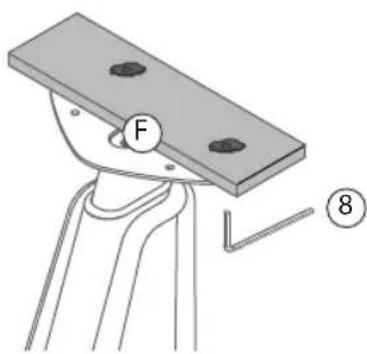
- Carefully and steadily place the bike on the ground and use Allen Wrench ⑧ to remove the Wood Board F.

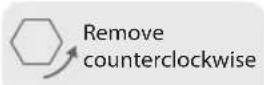
- Use Open-end Wrench ⑦ to remove screws and washers ⑪, and use Allen Wrench ⑧ to remove screws and washers ⑫. Keep the removed screws and washers for later assembly.

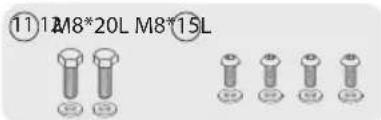

- Use Allen Wrench ⑧ to tighten 4xM8*25L screws with washers ⑫. Only tighten when all four screws are in place.


Assembling Your Ampera Office Bike
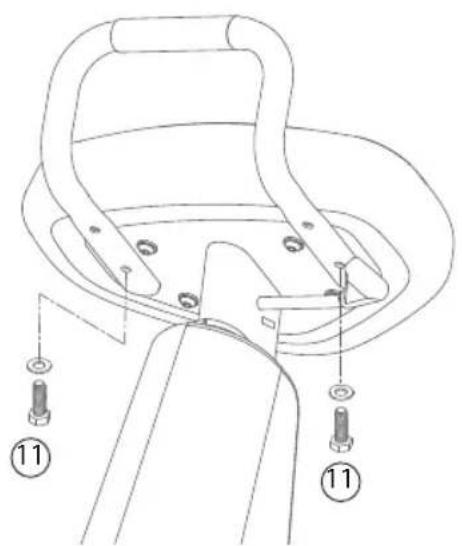
- Use Open-end Wrench⑦ to tighten 2xM8*20L screws with washers⑪.
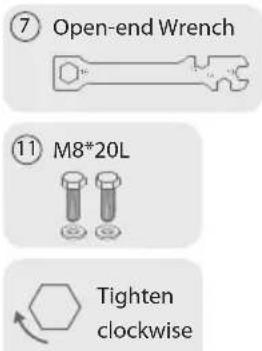
- First, identify the Left and Right Pedals. Left Pedal ⑥ is labeled L, and Right Pedal ⑤ is labeled R. Mount Left Pedal ⑥ to the left crank counterclock wise. Mount Right Pedal ⑤ to the right crank clockwise. Use Open-end Wrench ⑦ to lock the Left and Right Pedals.


Ampera Office Bike Features & Specifications:
| Power Stampede powering | |
| Battery For Bluetooth module only | |
| USB Port Type-C * 1 | |
| USB Extension Cable L shaped | Type-C male/Female * 71 in (180 cm) |
| Stampede Resistance Four-level adjustment (L1~L4) | |
| Wireless Charging Power 15 Watts | |
| Seat Height | Pneumatic manual adjustment, 32 in~39 in (±0.8 in)80 cm~100 cm (±2cm) |
| Power Generation Indicator Circle LED Light Bar *2 | |
| Moving Wheels Front mounted*2 | |
| Noise Decibel Under 58dB (@18.6 MPH (30KPH), in a quiet room) | |
| Output Power Max. 65 watts | |


About Your Ampera Office Bike
Wireless Charging:
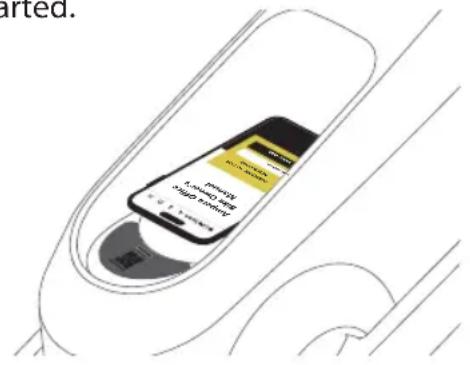
To wirelessly charge your phone, Let the back of your phone flat on the wireless charging pad. In order to get better charging efficiency, align the middle area of your phone with the round wireless charging pad, and remove the protective case, leather case or accessories, and then start pedaling the Bike. At this time, a charging prompt will be displayed on the phone, indicating that charging has been started.
USB Power Delivery:
You can use a double-ended USB type-c to directly connect the USB type-c port of the Bike and the mobile phone to charge, or use one end of the L-shaped USB type-c extension cable that comes with this product to connect to the USB type-c port of the Bike, and the other end is connected to the charging cable of your mobile phone, and then the other end of the mobile phone charging cable is connected to the mobile phone to charge. The extension cord that comes with this product is longer so that when you use the Bike with a desk, it is long enough to pull the extension cable to the desk. Note that you have to pedal to activate the charging function.

natural_image
Illustration of a black USB cable and its connector (no text or symbols)Charging's Impact on Resistance:
When the electrical device to be charged is connected, the resistance of pedaling will be increased. This is a normal phenomenon. Because of the law of conservation of energy, the electrical energy required to charge the electrical device must be converted from the kinetic energy of your pedaling.
About Your Ampera Office Bike
Power Generation
-
When pedaling the Ampera office bike, the LED will flash steadily in the default indigo color, which indicates that the pedaling power generation function is activated.
-
Ampera Office Bike with a 15W wireless charger pad and is designed for mobile phones equipped with wireless charging capabilities. To start charging, simply lay your phone flat on the wireless charging pad and start pedaling.
-
There is a USB-C port under the bike casing, plug in the included extension cable for quick charging of electronic devices. Charging can be activated once riding speed exceeds 30 revolutions per minute (rpm). Capable of delivering up to 65W of power output at speeds above 60 rpm.
-
The USB-C provides Power Delivery when riding at 40 rpm or higher. After 30 minutes of riding, the iPhone 12 can be charged from 0-60%.
-
When pedaling stops or the pedaling speed is less than 30 rpm, power supply will be stopped.
Seat Height Adjustment
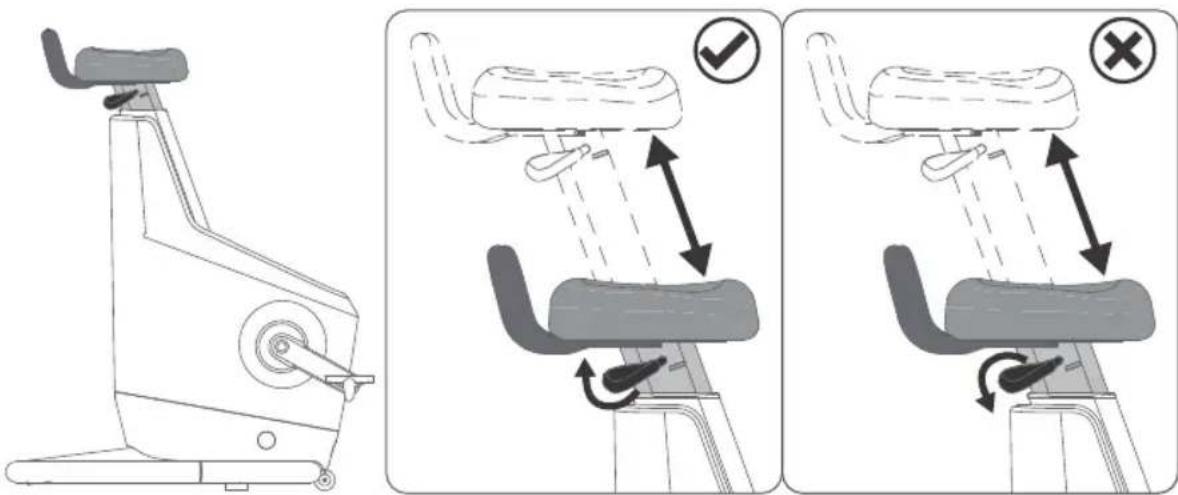
- To adjust seat height, pull up on the lever to raise the seat. To lower the seat, also pull the lever upward.
- To lower the seat height, can use your own weight or your hands to press the seat to the desired height, and then release the lever. The control lever cannot be pushed down to prevent malfunction or damage.
Ampera Office Bike App
App Download & Registration
1. Download App
Scan the QR code sticker which is on the front of the wireless charging pad, or download the App from the website https://www.lifespanfitness.com/pages/app, and install it.

2. Startup & Login/Registration

Click icon to start the App

There are three login account options, Facebook, Google, and Apple ID. The privacy terms need to be checked before clicking Login. If this account has not yet been registered, you will enter the personal information login page after logging in.
After inputting data and registering, you will enter the screen of the App. If this account has been registered, log in directly to the screen of the App.
Ampera Office Bike App
3. Bluetooth Connection

Search equipment, and select the equipment with the same Bluetooth serial number as the QR code sticker on this Bike from the list of searched equipment, for example, AOBC3G-00000, to facilitate connection and communication.
4. App Screen Instruction

(Figure 1)
AOBC3G-00000 : Connected Bluetooth serial number.
≡ : Enter personal information and set language.
Resistance : Pedaling resistance ranges from 1 to 4 levels. + - : adjust pedaling resistance.
Change Light Color : (Figure 2)
End&Sync : (Figure 3)
Guide : App usage instructions.
Calories : The set target value, if there is no activity value set on that day, "-" will be displayed.
kcal : Cumulative calories burned during pedaling exercise.
Power(watt) : Cumulative pedal power generation.
Cadence : Pedaling speed.
31: Display data during pedaling. (Figure 1)
: View today's recorded history data. (Figure 4)
Ampera Office Bike App

(Figure 2)
The user has the flexibility to adjust the color of the Circle LED Light, which serves as a power generation indicator. By default, it comes in indigo, but the user has the option to customize it to their preferred color.

(Figure 3)
Once the user stops pedaling, your recorded summary data is automatically synced with your historical data.

(Figure 4)
The recorded data accumulated today, includes steps, distance, calories burned, power generation, average heart rate, maximum heart rate, and duration. If you also use other our exercise machines today, the data generated by these machine will be accumulated, including steps, distance, calories burned, and duration.
Moving
The moving wheels of Ampera Office Bike are designed on the front of the Bike. If it is a short-distance movement, it is recommended to stand behind or on the side of the Bike, then hold the back handle and lift it up abouts 2 in (5 cm) from the ground to slide. If it is a long-distance movement, it is recommend to stand in front of the Bike, then hold the back handle and pull it upward and toward your body to a tilting position, and then pull and slide it. Be careful not to let the plastic cover touch the ground.

natural_image
Illustration of a person using an outdoor fitness bike with an upward arrow indicating motion (no text or symbols)
natural_image
Side profile illustration of a person standing beside an outdoor stationary bike (no text or symbols)When handling or transporting the Bike, keep it upright and do not lay it flat.

natural_image
Line drawing of a stationary exercise machine with a circular head and side-mounted legs, no text or symbols present.
natural_image
Top-down line drawing of a mechanical device with no visible text or symbolsMaintenance and Tips
Product Maintenance:
Please do not attempt to repair this product yourself, as opening or removing the casing may expose you to dangerous voltages or other risks. For any maintenance service, please contact qualified service technicians.
Seek professional assistance in the following situations:
• If any liquid spills onto the product.
• If the product is exposed to rain or water.
- If the product is dropped or the casing is damaged.
- If the product exhibits obvious performance abnormalities, indicating the need for repairs.
- If the product still fails to function correctly despite following the operating instructions.
Battery maintenance
- Do not attempt to replace the built-in rechargeable battery. The battery must be replaced by an authorized service center. Please follow the product instructions for charging the battery.
- If you plan to store the device for a long time, please keep it in the shady and cool, dry and well-ventilated place shall meet the following conditions:
One month: -4°F to 122°F (-20°C to 50°C); Humidity ≤ 80%
Three months: -4°F to 113°F (-20°C to 45°C); Humidity ≤ 80%
One year: -4°F to 77°F (-20°C to 25°C); Humidity ≤ 75%
In order to reduce self-discharge and preserve the energy stored in the battery, it is recommended that direct sunlight, high temperatures and high humidity should be avoided.
- Do not leave the product's battery completely discharged for an extended period; this may cause battery deformation or damage. We recommend checking and charging the battery to approximately 50% capacity every six months.
- Operating temperature for batteries: 41^ to 104^ (5 to 40^ ).
- the battery must be removed from the Bike before it is scrapped.

Warning
- Mishandling the battery may cause an explosion. Do not disassemble the battery or throw it into a fire.
- Do not short-circuit, crush, puncture, or otherwise damage the battery's external contacts.

When disposing of this electronic device, please do not treat it as regular household waste. To reduce pollution and ensure the protection of the global environment, please recycle this product. For more information on Waste Electrical and Electronic Equipment (WEEE) regulations, please visit
https://www.lifespanfitness.com/.
Maintenance and Tips
Product Warranty
Limited Warranty Scope:
1.1 This Product Warranty Explanation (hereinafter referred to as the "Warranty Explanation") provides specific rights and remedies for consumers (hereinafter referred to as "consumers" or "you") regarding LifeSpan products. Please carefully read this document, and if you make any claims or requests under the warranty explanation, you will be deemed to have understood and accepted its contents. You may have rights and remedies different from the Warranty Explanation with the vendor who sold you the product, which are independent of LifeSpan, but LifeSpan does not limit such rights.
The Warranty Explanation does not exclude, limit, or suspend any legal rights that consumers may have under applicable laws.
1.2 Except as otherwise provided in the Warranty Explanation, LifeSpan warrants that the product and its original parts and components will be free from material and/or workmanship defects under normal use conditions during the warranty period specified in the Warranty Explanation.
When the external box or the safety seal of the product is damaged, you should refuse to accept the product and notify the vendor from whom you purchased the product. If you accept the product with a damaged external box or safety seal, it indicates that the product is not covered by the Warranty Explanation, but this does not limit or exclude other legal rights you may have.
1.3 If you make any claims or requests under the Warranty Explanation, LifeSpan will have the right to choose to use new or factory-refurbished parts to repair or replace any defective product or parts. If LifeSpan chooses to use factory-refurbished parts or products, they will have the same performance characteristics as new products. All replaced components and products under the Warranty Explanation will be the property of LifeSpan.
1.4 The product warranty period starts from the date of the consumer's first purchase of the product ("Purchase Date"). If the consumer cannot provide the original purchase invoice for the product, the product warranty period will start from the manufacturing date corresponding to the serial number on the product.
1.5 Warranty service will be provided in the primary language used in the country/region where the service request is made. Warranty repair services involving system language aspects (e.g., software, user interface) may not be available in any other language used in the country/region where the service request is made.
Maintenance and Tips
Warranty Exclusion Clauses:
LifeSpan does not guarantee that this product will operate without interruption or error. Any technical or other support available during the warranty period, such as telephone consultation on operating methods and product-related settings and information, does not require the presentation of any service manual. This warranty service only covers failures or abnormalities that occur during the warranty period and under normal use conditions.
2.1 Exclusions:
The Warranty Explanation does not apply to:
2.1.1 Any product not manufactured by LifeSpan or not sold by an authorized LifeSpan dealer.
2.1.2 Any product that is damaged or defective for the following reasons:
2.1.2.1 Using the product for purposes other than its normal intended use, including but not limited to using the product contrary to the Quick Start Guide (QSG) provided with the product or damages or abnormalities caused by misuse or other human factors.
2.1.2.2 Modifying the product, including using non-LifeSpan manufactured and/or sold parts.
2.1.2.3 Any service or repair provided by anyone other than LifeSpan or an authorized LifeSpan service provider.
2.1.2.4 Improper transportation or packaging when delivering the product to LifeSpan or an authorized LifeSpan service provider, or improper third-party product installation.
2.1.2.5 Improper charging, storage, or operation, including but not limited to violating the user's product manual, exceeding the prescribed height, weight, and age limits, using on stairs, walls, and curbs, or any extreme sports or exhibition use.
2.1.2.6 Accidents, collisions, crossing obstacles, racing, fires, immersion in water, high-pressure water spraying, freezing, earthquakes, falls, severe oxidation, or chemical solvent corrosion.
2.1.2.7 Pest infestation, such as rodents, cockroaches, ants, geckos, etc.
Maintenance and Tips
2.1.3 Any loss or damage of data, software, programs, or any removable storage devices. You are responsible for saving (backing up) any data, software, or programs or removable storage devices. Please note that LifeSpan may choose to replace the product under warranty with a refurbished product of equal quality; therefore, any data stored on the original product may be permanently unrecoverable.
2.1.4 Consumable components that require regular replacement during the normal use process of the product.
2.1.5 Natural wear and tear of the product or its components.
2.1.6 Failures or damages caused by changing the product's location or moving it after installation.
2.2 Warranty Limitation and Disclaimer:
2.2.1 You understand and agree that LifeSpan has limited warranty liability for the product as described in the Warranty Explanation, but this provision does not exclude or limit LifeSpan's liability for: (i) death or personal injury caused by LifeSpan's negligence; (ii) fraudulent or fraudulent misrepresentations; (iii) liability that cannot be limited or excluded under the law.
How to Obtain Warranty Service:
3.1 Please visit https://www.lifespanfitness.com/ for repair service support. In some countries, you may need to present other supporting documents, such as purchase certificates or import certificates.
3.2 Before sending the product for repair, please ensure that all data is fully backed up and remove any personal, confidential, or proprietary information stored on this product. LifeSpan does not guarantee the preservation of any data, software, or programs installed on the product after repair and is not responsible for recovering such data, software, or programs. You should bear the permanent loss, damage, or misuse of data, software, or programs on your own.
3.3
Please use the original packaging materials to pack the product. The original packaging bag provides better protection for the product during transportation. If the packaging of the product is improper, LifeSpan will not be liable for any damage that occurs during transportation.
Maintenance and Tips
3.4 Except as expressly provided in the Warranty Explanation, you should not rely on any other statements, warranties, or representations. LifeSpan has not authorized any third party, including LifeSpan dealers, agents, or employees, to modify the contents of the Warranty Explanation.
For information on repair service centers, please refer to the website: https://www.lifespanfitness.com/
Warranty Terms:
4.1 The product warranty period is 10 Year Frame /2 Year Parts / 1 Year Labor / 1 Year Battery.
4.2 Within warranty period from the date of sale, if a failure occurs under normal use, LifeSpan will provide free repair or replacement for this product.
4.3 If the warranty period is exceeded, repair service is still available, but it will be a paid warranty, and the price will vary depending on the different parts.
4.4 The complimentary gifts provided are not within the warranty scope.
4.5 Please keep the original purchase invoice, and the invoice date will be the start date of the warranty period. The invoice must clearly indicate the product name, model, and date.
4.6 If you need to return or exchange the product, please contact the original sales outlet or platform with the original purchase certificate.
Precautions before Sending for Repair:
5.1 Please email support@lifespanfitness.com for support. If the online customer service representative confirms that it is a hardware problem, we will arrange inspection and repair.
2.2
LifeSpan reserves the right to modify, explain, and interpret the above product warranty explanation in writing or on the website.
For relevant updates, please visit the LifeSpan website: https://www.lifespanfitness.com/
(No text)
—
|
|
-
The Ground Truth image displays a single, solid horizontal line. According to Rule 2 (UNDERSCORE & LINE RULES), if the GT contains lines used for stylistic emphasis or as background elements (like ruled paper), the OCR result must ignore them. The line in the GT is clearly a stylistic or background line, not a placeholder for text. Therefore, the OCR should not have output any underscores. Outputting `____` constitutes an error under Rule 2, as it hallucinates placeholder symbols where none are semantically intended. Hence, the OCR result is inconsistent with the Ground Truth.
-
[Non-Text]
[Non-Text]
(No text)
—
|
|
-
The Ground Truth image displays a single, solid horizontal line. According to Rule 2 (UNDERSCORE & LINE RULES), if the GT contains lines used for stylistic emphasis or as background elements (like ruled paper), the OCR result must ignore them. The line in the GT is clearly a stylistic or background line, not a placeholder for text. Therefore, the OCR should not have output any underscores. Outputting `____` constitutes an error under Rule 2, as it hallucinates placeholder symbols where none are semantically intended. Hence, the OCR result is inconsistent with the Ground Truth.
-
[Non-Text]
[Non-Text]
LifeSpan Ampera Office Bike
LifeSpan Fitness
785 West 1700 South Suite 1
Salt Lake City, UT. 84104
Phone: (801) 973-9993
www.LifeSpanFitness.com
Ampera Office Bike Patent(s) Pending
Version 1.0
- LifeSpan Ampera Office Bike
- Welcome
- Contents
- Safety First
- IMPORTANT SAFETY INSTRUCTIONS
- WARNING - Reduce the hazard of burns, fire, electric shock, or injury to persons:
- SAVE THESE INSTRUCTIONS
- Assembling Your Ampera Office Bike
- Product Diagram
- Unpack The Toolkit
- Assembly Instructions:
- Note :
- About Your Ampera Office Bike
- Wireless Charging:
- USB Power Delivery:
- Charging's Impact on Resistance:
- Power Generation
- Seat Height Adjustment
- Ampera Office Bike App
- App Download & Registration
- Download App
- Startup & Login/Registration
- Bluetooth Connection
- App Screen Instruction
- Moving
- Maintenance and Tips
- Product Maintenance:
- Battery maintenance
- Warning
- Product Warranty
- Warranty Exclusion Clauses:
- Exclusions:
- Warranty Terms:
- Precautions before Sending for Repair:
- LifeSpan Fitness
Brand : LifeSpan
Model : Ampera
Category : Exercise bike