TP-580CT - Audio/video extender Kramer - Free user manual and instructions
Find the device manual for free TP-580CT Kramer in PDF.


| Product Type | Audio/Video Extender |
| Model | TP-580CT |
| Brand | Kramer |
| Video Interface | HDMI |
| Max Video Resolution | 4K@60Hz (4:2:0) |
| HDCP Support | HDCP 2.2 |
| Transmission Distance | Up to 100m (328ft) over CAT6 |
| Power Supply | 12V DC, 1A |
| Power Consumption | 5W (typical) |
| Dimensions (W x D x H) | 120 x 70 x 25 mm |
| Weight | 200 g |
| Operating Temperature | 0°C to 40°C |
| Storage Temperature | -20°C to 60°C |
| Humidity | 10% to 90% (non-condensing) |
| Input Ports | 1x HDMI, 1x RJ-45 |
| Output Ports | 1x HDMI, 1x RJ-45 |
| EDID Management | Built-in EDID handling |
| LED Indicators | Power, Link, Signal |
| Mounting | Desktop or wall-mountable (bracket included) |
| Cleaning Instructions | Wipe with dry cloth; do not use liquids |
| Safety | Use only supplied power adapter; avoid moisture |
| Spare Parts & Repairability | Contact Kramer support for replacement parts; not user-serviceable |
| Warranty | 2 years (check local regulations) |
| Compliance | CE, FCC, RoHS |
Frequently Asked Questions - TP-580CT Kramer
User questions about TP-580CT Kramer
0 question about this device. Answer the ones you know or ask your own.
Ask a new question about this device
Download the instructions for your Audio/video extender in PDF format for free! Find your manual TP-580CT - Kramer and take your electronic device back in hand. On this page are published all the documents necessary for the use of your device. TP-580CT by Kramer.
USER MANUAL TP-580CT Kramer
Typical Applications 3
Defining TP-580CT 4K USB Transmitter 4
Mounting TP-580CT 5
Connecting TP-580CT 6
Connecting to TP-580CT via RS-232 7
Wiring RJ-45 Connectors 7
Setting the DIP-Switches 7
Powering via USB-C Port 8
Powering TP-580CT 8
Charging a USB-C-Enabled Device 8
Technical Specifications 9
Introduction
Welcome to Kramer Electronics! Since 1981, Kramer Electronics has been providing a world of unique, creative, and affordable solutions to the vast range of problems that confront the video, audio, presentation, and broadcasting professional on a daily basis. In recent years, we have redesigned and upgraded most of our line, making the best even better!
Getting Started
We recommend that you:
- Unpack the equipment carefully and save the original box and packaging materials for possible future shipment.
- Review the contents of this user manual.

Go to www.kramerav.com/downloads/TP-580CT to check for up-to-date user manuals, application programs, and to check if firmware upgrades are available (where appropriate).
Achieving Best Performance
- Use only good quality connection cables (we recommend Kramer high-performance, high-resolution cables) to avoid interference, deterioration in signal quality due to poor matching, and elevated noise levels (often associated with low quality cables).
- Do not secure the cables in tight bundles or roll the slack into tight coils.
- Avoid interference from neighboring electrical appliances that may adversely influence signal quality.
- Position your Kramer TP-580CT away from moisture, excessive sunlight and dust.
Safety Instructions

Caution:
- This equipment is to be used only inside a building. It may only be connected to other equipment that is installed inside a building.
- For products with relay terminals and GPI\O ports, please refer to the permitted rating for an external connection, located next to the terminal or in the User Manual.
- There are no operator serviceable parts inside the unit.

Warning:
- Use only the power cord that is supplied with the unit.
- To ensure continuous risk protection, replace fuses only according to the rating specified on the product label which is located on the bottom of the unit.
Recycling Kramer Products
The Waste Electrical and Electronic Equipment (WEEE) Directive 2002/96/EC aims to reduce the amount of WEEE sent for disposal to landfill or incineration by requiring it to be collected and recycled. To comply with the WEEE Directive, Kramer Electronics has made arrangements with the European Advanced Recycling Network (EARN) and will cover any costs of treatment, recycling and recovery of waste Kramer Electronics branded equipment on arrival at the EARN facility. For details of Kramer's recycling arrangements in your particular country go to our recycling pages at www.kramerav.com/il/quality/environment.
Overview
Congratulations on purchasing your Kramer TP-580CT 4K USB Transmitter.
TP-580CT, which is connected directly to USB-C-enabled chargeable sources, is a high-performance, long-reach HDBaseT transmitter for 4K@60Hz (4:2:0) HDMI video, RS-232 and IR signals over twisted pair.
TP-580CT converts the USB-C input video signal, along with all other input signals, into the transmitted HDBaseT signal. It extends video signals to up to 40m (130ft) over CAT copper cables at up to 4K@60Hz (4:2:0) 24bpp video resolution and provides even further reach for lower HD video resolutions.
TP-580CT provides exceptional quality, advanced and user-friendly operation, and flexible control.
Exceptional Quality
- High-Performance Standard Extender – Professional HDBaseT extender for providing long-reach signals over twisted-pair copper infrastructures. TP-580CT is a standard extender that can be connected to any market-available HDBaseT-compliant extension product. For optimum extension reach and performance, use recommended Kramer cables.
- HDMI Signal Extension – HDCP 2.2 compliant. Supports deep color, x.v.Color™, lip sync, HDMI uncompressed audio channels, Dolby TrueHD, DTS-HD, 2K, 4K, and 3D as specified in HDMI 2.0.
Advanced and User-friendly Operation
- BYOD Ease and Convenience – Connect any DP-Alt-Mode-capable USB-C device as an AV presentation source, while providing the connected device (if PD-2.0-capable) with up to 60 watts of power.
- Easy Installation – Compact DigiTOOLS® fan-less enclosure for dropped-ceiling mounting, TBUS IN-table mounting, or side-by-side mounting of 3 units in a 1U rack space with the recommended rack adapter.
Flexible Connectivity
- Multi-channel Audio Extension – Up to 8 HD channels of digital stereo uncompressed signals for supporting studiograde surround sound.
- EDID signals are passed through between the source and the display.
- Bidirectional RS-232 Extension – Serial interface data flows in both directions, allowing data transmission and device control.
- Bidirectional Infrared Extension – IR interface data flows in both directions, allowing remote control of peripheral devices located at either end of the extended line.
Typical Applications
TP-580CT is ideal for the following typical applications:
- BYOD presentations in enterprise meeting rooms and education classrooms.
- Long-distance AV signal extension in conference rooms, boardrooms, classrooms, and lecturing facilities.
Defining TP-580CT 4K USB Transmitter
This section defines TP-580CT.
flowchart
graph TD
    A["6"] --> B["HDBT OUT"]
    C["7"] --> D["RS-232"]
    E["8"] --> F["IR"]
    G["9"] --> H["SETUP"]
    I["10"] --> J["20V DC"]
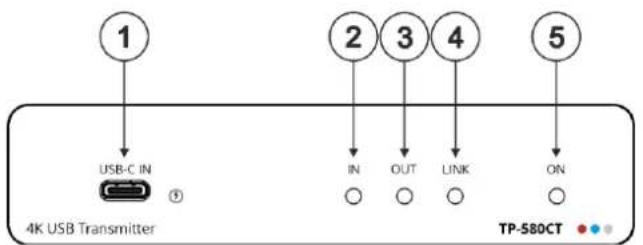
Figure 1: TP-580CT 4K USB Transmitter Front Panel
| # | Feature | Function |
| 1 | USB-C IN Connector | Connect to a USB-C AV source (that supports DisplayPort Alternate Mode). Charges sources (that support USB Power Delivery 2.0) up to 60W.While charging, the charging icon (to the right of the connector) becomes visible and lights orange. |
| 2 | IN LED | Lights blue when a USB-C input device is connected. |
| 3 | OUT LED | Lights blue when an HDMI output device is detected on the receiver side. |
| 4 | LINK LED | Lights green when the HDBT connection is active. |
| 5 | ON LED | Lights green when receiving power. |
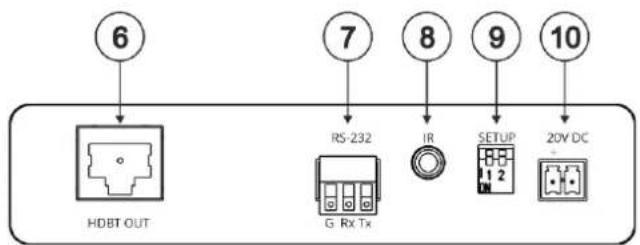
| 6 | HDBT OUT RJ-45 Connector | Connects to the HDBT IN RJ-45 connector on a receiver (for example, TP-580R). |
| 7 | RS-232 3-pin Terminal Block Connector | Connects to a PC/serial controller to control the remote controlled unit (for example, the display on the receiver). |
| 8 | IR 3.5mm Mini Jack | Bidirectional IR connection. Outputs a received IR signal (from the HDBT receiver) to connected IR emitter or transmits an IR signal (from IR sensor) to the HDBT receiver. |
| 9 | SETUP DIP-Switches | Set DIP-switches. (see Setting the DIP-Switches on page 7). |
| 10 | 20V DC | +20V DC 6A connector for powering the unit and charging the connected input device. |
Mounting TP-580CT
This section provides instructions for mounting TP-580CT. Before installing, verify that the environment is within the recommended range:

- Operation temperature – 0° to 40°C (32 to 104°F).
- Storage temperature -40^ to +70^ (-40 to +158^ ).
- Humidity – 10% to 90%, RHL non-condensing.

Caution:
- Mount TP-580CT before connecting any cables or power.

Warning:
- Ensure that the environment (e.g., maximum ambient temperature & air flow) is compatible for the device.
- Avoid uneven mechanical loading.
- Appropriate consideration of equipment nameplate ratings should be used for avoiding overloading of the circuits.
- Reliable earthing of rack-mounted equipment should be maintained.
• Maximum mounting height for the device is 2 meters.
Mount TP-580CT in a rack:
- Use the recommended rack adapter (see www.kramerav.com/product/TP-580CT).
Mount TP-580CT on a surface using one of the following methods:
- Attach the rubber feet and place the unit on a flat surface.
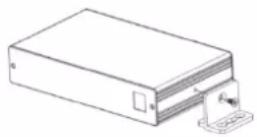
- Fasten a bracket (included) on each side of the unit and attach it to a flat surface. For more information go to www.kramerav.com/downloads/TP-580CT.
Connecting TP-580CT

Always switch off the power to each device before connecting it to your TP-580CT. After connecting your TP-580CT, connect its power and then switch on the power to each device.
flowchart
graph TD
    A["4K USB Transmitter"] -->|USB-C IN| B["Laptop"]
    A -->|IN| C["RS-232"]
    A -->|OUT| D["Display Remote Control"]
    A -->|LINK| E["IR"]
    A -->|ON| F["Power Supply"]
    A -->|TP-580CT| G["TP-580R"]
    B -->|USB-C| H["SL-240C"]
    C --> I["RS-232"]
    D --> J["IR"]
    E --> K["SETUP"]
    F --> L["20V DC"]
    G --> M["HDBT IN"]
    G --> N["HDMI OUT"]
    G --> O["SETUP"]
    G --> P["RS-232"]
    G --> Q["12V DC"]
    H --> R["Display"]
    I --> R
    J --> R
    K --> R
    L --> R
    M --> R
    N --> R
    O --> R
    P --> R
    Q --> R
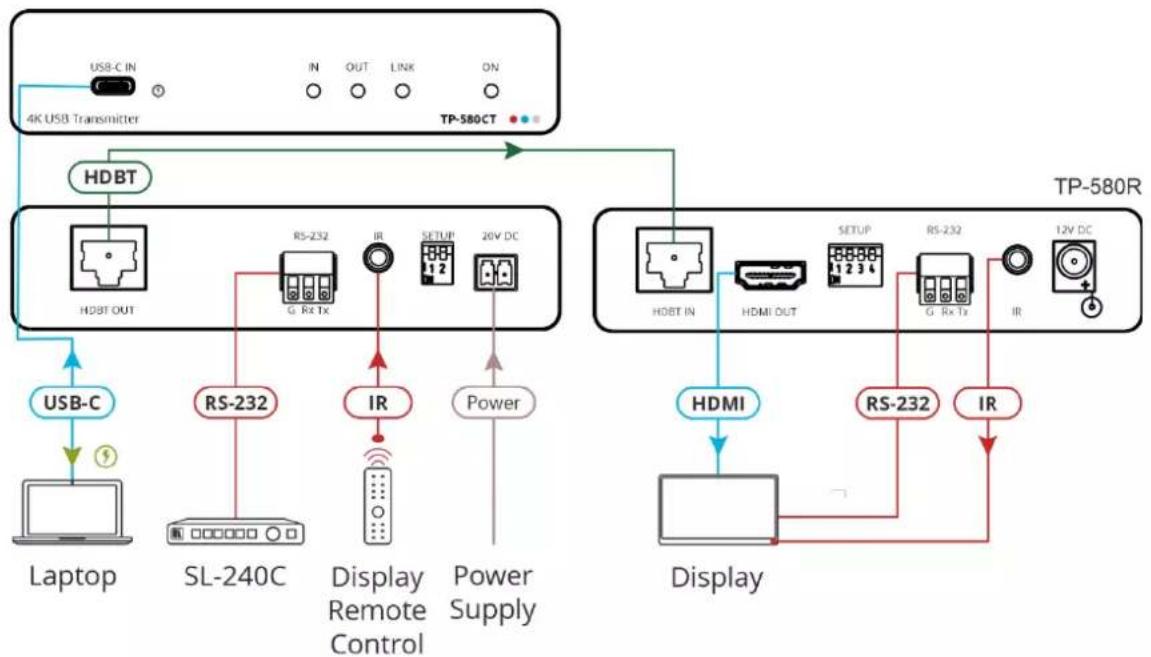
Figure 2: Connecting to the TP-580CT
To connect TP-580CT as illustrated in the example in Figure 2:
- Connect a USB-C source (for example, a laptop) to the USB-C port ☑ on the front panel.
The USB-C port can provide power to the connected source or power the TP-580CT (see Powering TP-580CT on page 8). - Connect the HDBT OUT port ⑥ on the TP-580CT to the HDBT IN port on the receiver side (for example, Kramer TP-580R).
- On the receiver side (TP-580R in this example) connect an acceptor (for example, a display that is connected to the HDMI OUT connector).
- Control the display on the receiver side:
- Connect a room controller (for example, Kramer SL-240C) to the RS-232 3-pin terminal block connector⑦
The display on the receiver side can be controlled by sending serial commands from the controller via HDBT to the display.
- Connect an IR sensor to the IR 3.5mm mini jack ⑧
The display on the receiver side can be controlled by pointing the display IR remote-control transmitter to the IR sensor. The IR signal passes, via HDBT to an IR emitter that is connected to the display.
- Connect the power adapter to TP-580CT and to the mains electricity.
Connecting to TP-580CT via RS-232
You can connect to TP-580CT via an RS-232 connection ⑬ using, for example, a PC.
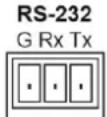
TP-580CT features an RS-232 3-pin terminal block connector allowing the RS-232 to control TP-580CT.
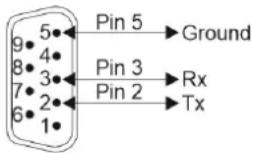
Connect the RS-232 terminal block on the rear panel of TP-580CT to a PC/controller, as follows:
From the RS-232 9-pin D-sub serial port connect:
• Pin 2 to the TX pin on the TP-580CT RS-232 terminal block
- Pin 3 to the RX pin on the TP-580CT RS-232 terminal block
• Pin 5 to the G pin on the TP-580CT RS-232 terminal block
RS-232 Device TP-580CT
Wiring RJ-45 Connectors
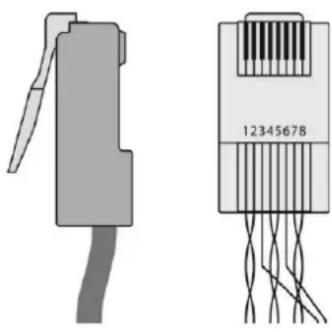
This section defines the HDBT pinout, using a straight pin-to-pin cable with RJ-45 connectors.

For HDBT cables, it is recommended that the cable ground shielding be connected/soldered to the connector shield.
| EIA /TIA 568B | |
| PIN | Wire Color |
| 1 | Orange / White |
| 2 | Orange |
| 3 | Green / White |
| 4 | Blue |
| 5 | Blue / White |
| 6 | Green |
| 7 | Brown / White |
| 8 | Brown |
natural_image
Two types of electronic connectors shown: a gray connector with a handle and a black-and-white package labeled 12345678, connected by wires (no text beyond label)Setting the DIP-Switches
Set DIP-switches. Changes in DIP-switch settings apply immediately.

All DIP-switches are set to OFF (up) by default.
| DIP # | Description | State | |
| 1 | IR output modulation | OFF (up) – default | IR pass-through is disabled (38KHz modulation to IR output signal is added). |
| ON (down) | IR pass-through is enabled. | ||
| 2 | OFF (up) – default | Normal operation. | |
| ON (down) | FW upgrade via RS-232 is enabled. | ||
Powering via USB-C Port
Use USB-C port for:
• Powering TP-580CT on page 8.
• Charging a USB-C-Enabled Device on page 8.
Powering TP-580CT
TP-580CT can be powered by USB-C IN port when a source, that is capable of PD, is connected to the USB-C IN port and TP-580CT is not connected to a power source.
Charging a USB-C-Enabled Device
A chargeable USB-C-enabled source (that supports, at least, USB Power Delivery 2.0) that is connected to the USB-C IN port can be charged (according to USB PD rev. 3.0 rules) when TP-580CT is connected to the 20V DC power adapter, as specified in the following table.
| Device Active Power Supply Source | USB-C Source Charging Voltage | Max Charging Current | Max Total USB Charging Power |
| Connected 20VDC/6A PSU | 5VDC | 3A | 15W |
| 9VDC | 27W | ||
| 15VDC | 45W | ||
| 20VDC | 60W |
Technical Specifications
| Input | 1 USB-C | On a USB type-C connector |
| Output | 1 HDBT | On an RJ-45 connector |
| Ports | 1 IR | On a 3.5mm mini jack |
| 1 RS-232 | On a 3-pin terminal block for serial link extension | |
| Extension Line | Compliance | HDBaseT 1.0 |
| Reach (when using Kramer HDBaseT cables) | Up to 40m (130ft) at 4K @60Hz (4:2:0) | |
| Up to 70m (230ft) at full HD (1080p @60Hz 36bpp) | ||
| Video | Max Bandwidth | 10.2Gbps (3.4Gbps per graphic channel) |
| Max Resolution | 4K UHD @60Hz (4:2:0) 24bpp resolution | |
| Compliance | USB-C DP Alt mode | |
| HDCP signals pass-through | ||
| HDMI Support | Deep color, x.v.ColorTM, lip sync, HDMI uncompressed audio channels, Dolby TrueHD, DTS-HD, 2K, 4K, and 3D as specified in HDMI 2.08, 10, or 12-bit color depth, HDR10, HLG | |
| Controls | Rear Panel DIP-switches | IR output modulation |
| FW Upgrade | ||
| Indication LEDs | Front Panel | Input LED |
| Output LED | ||
| Link LED | ||
| Power on LED | ||
| Charging LED | ||
| Extended IR | Frequency | 20kHz to 100kHz (bi-directional) |
| Extended RS-232 | Baud Rate | 300 to 115200 |
| USB-C Charging | Power | Up to 60W |
| Compliance | PD 3.0 | |
| Power | Consumption | 20V DC, 3300mA Max (when charging 60W) |
| Source | 20V DC, 6A | |
| Environmental Conditions | Operating Temperature | 0° to +40°C (32° to 104°F) |
| Storage Temperature | -40° to +70°C (-40° to 158°F) | |
| Humidity | 10% to 90%, RHL non-condensing | |
| Regulatory Compliance | Safety | CE, UL |
| Environmental | RoHs, WEEE | |
| Enclosure | Size | Tool |
| Type | Aluminum | |
| Cooling | Convection Ventilation | |
| General | Net Dimensions (W, D, H) | 12cm x 7.2cm x 2.4cm (4.7" x 2.8" x 0.9") |
| Shipping Dimensions (W, D, H) | 23.2cm x 13.4cm x 9.7cm (9.1" x 5.3" x 3.8") | |
| Net Weight | 0.24 kg (0.5lbs) approx.. | |
| Shipping Weight | 0.96 kg (2.1lbs) approx. | |
| Accessories | Included | Power adapter and cord |
| Specifications are subject to change without notice at www.kramerav.com | ||
The warranty obligations of Kramer Electronics Inc. ("Kramer Electronics") for this product are limited to the terms set forth below:
What is Covered
This limited warranty covers defects in materials and workmanship in this product.
What is Not Covered
This limited warranty does not cover any damage, deterioration or malfunction resulting from any alteration, modification, improper or unreasonable use or maintenance, misuse, abuse, accident, neglect, exposure to excess moisture, fire, improper packing and shipping (such claims must be presented to the carrier), lightning, power surges, or other acts of nature. This limited warranty does not cover any damage, deterioration or malfunction resulting from the installation or removal of this product from any installation, any unauthorized tampering with this product, any repairs attempted by anyone unauthorized by Kramer Electronics to make such repairs, or any other cause which does not relate directly to a defect in materials and/or workmanship of this product. This limited warranty does not cover cartons, equipment enclosures, cables or accessories used in conjunction with this product.
Without limiting any other exclusion herein, Kramer Electronics does not warrant that the product covered hereby, including, without limitation, the technology and/or integrated circuit(s) included in the product, will not become obsolete or that such items are or will remain compatible with any other product or technology with which the product may be used.
How Long this Coverage Lasts
The standard limited warranty for Kramer products is seven (7) years from the date of original purchase, with the following exceptions:
- All Kramer VIA hardware products are covered by a standard three (3) year warranty for the VIA hardware and a standard three (3) year warranty for firmware and software updates; all Kramer VIA accessories, adapters, tags, and dongles are covered by a standard one (1) year warranty.
- Kramer fiber optic cables, adapter-size fiber optic extenders, pluggable optical modules, active cables, cable retractors, ring mounted adapters, portable power chargers, Kramer speakers, and Kramer touch panels are covered by a standard one (1) year warranty. Kramer 7-inch touch panels purchased on or after April 1st, 2020 are covered by a standard two (2) year warranty.
- All Kramer Calibre products, all Kramer Minicom digital signage products, all HighSecLabs products, all streaming, and all wireless products are covered by a standard three (3) year warranty.
- All Sierra Video MultiViewers are covered by a standard five (5) year warranty.
- Sierra switchers & control panels are covered by a standard seven (7) year warranty (excluding power supplies and fans that are covered for three (3) years).
- K-Touch software is covered by a standard one (1) year warranty for software updates.
- All Kramer passive cables are covered by a lifetime warranty.
Who is Covered
Only the original purchaser of this product is covered under this limited warranty. This limited warranty is not transferable to subsequent purchasers or owners of this product.
What Kramer Electronics Will Do
Kramer Electronics will, at its sole option, provide one of the following three remedies to whatever extent it shall deem necessary to satisfy a proper claim under this limited warranty:
- Elect to repair or facilitate the repair of any defective parts within a reasonable period of time, free of any charge for the necessary parts and labor to complete the repair and restore this product to its proper operating condition. Kramer Electronics will also pay the shipping costs necessary to return this product once the repair is complete.
- Replace this product with a direct replacement or with a similar product deemed by Kramer Electronics to perform substantially the same function as the original product. If a direct or similar replacement product is supplied, the original product's end warranty date remains unchanged and is transferred to the replacement product.
- Issue a refund of the original purchase price less depreciation to be determined based on the age of the product at the time remedy is sought under this limited warranty.
What Kramer Electronics Will Not Do Under This Limited Warranty
If this product is returned to Kramer Electronics or the authorized dealer from which it was purchased or any other party authorized to repair Kramer Electronics products, this product must be insured during shipment, with the insurance and shipping charges prepaid by you. If this product is returned uninsured, you assume all risks of loss or damage during shipment. Kramer Electronics will not be responsible for any costs related to the removal or re-installation of this product from or into any installation. Kramer Electronics will not be responsible for any costs related to any setting up this product, any adjustment of user controls or any programming required for a specific installation of this product.
How to Obtain a Remedy Under This Limited Warranty
To obtain a remedy under this limited warranty, you must contact either the authorized Kramer Electronics reseller from whom you purchased this product or the Kramer Electronics office nearest you. For a list of authorized Kramer Electronics resellers and/or Kramer Electronics authorized service providers, visit our web site at www.kramerav.com or contact the Kramer Electronics office nearest you.
In order to pursue any remedy under this limited warranty, you must possess an original, dated receipt as proof of purchase from an authorized Kramer Electronics reseller. If this product is returned under this limited warranty, a return authorization number, obtained from Kramer Electronics, will be required (RMA number).
You may also be directed to an authorized reseller or a person authorized by Kramer Electronics to repair the product.
If it is decided that this product should be returned directly to Kramer Electronics, this product should be properly packed, preferably in the original carton, for shipping. Cartons not bearing a return authorization number will be refused.
Limitation of Liability
THE MAXIMUM LIABILITY OF KRAMER ELECTRONICS UNDER THIS LIMITED WARRANTY SHALL NOT EXCEED THE ACTUAL PURCHASE PRICE PAID FOR THE PRODUCT. TO THE MAXIMUM EXTENT PERMITTED BY LAW, KRAMER ELECTRONICS IS NOT RESPONSIBLE FOR DIRECT, SPECIAL, INCIDENTAL OR CONSEQUENTIAL DAMAGES RESULTING FROM ANY BREACH OF WARRANTY OR CONDITION, OR UNDER ANY OTHER LEGAL
THEORY. Some countries, districts or states do not allow the exclusion or limitation of relief, special, incidental, consequential or indirect damages, or the limitation of liability to specified amounts, so the above limitations or exclusions may not apply to you.
Exclusive Remedy
TO THE MAXIMUM EXTENT PERMITTED BY LAW, THIS LIMITED WARRANTY AND THE REMEDIES SET FORTH ABOVE ARE EXCLUSIVE AND IN LIEU OF ALL OTHER WARRANTIES, REMEDIES AND CONDITIONS, WHETHER ORAL OR WRITTEN, EXPRESS OR IMPLIED. TO THE MAXIMUM EXTENT PERMITTED BY LAW, KRAMER ELECTRONICS SPECIFICALLY DISCLAIMS ANY AND ALL IMPLIED WARRANTIES, INCLUDING, WITHOUT LIMITATION, WARRANTIES OF MERCHANTABILITY AND FITNESS FOR A PARTICULAR PURPOSE. IF KRAMER ELECTRONICS CANNOT LAWFULLY DISCLAIM OR EXCLUDE IMPLIED WARRANTIES UNDER APPLICABLE LAW, THEN ALL IMPLIED WARRANTIES COVERING THIS PRODUCT, INCLUDING WARRANTIES OF MERCHANTABILITY AND FITNESS FOR A PARTICULAR PURPOSE, SHALL APPLY TO THIS PRODUCT AS PROVIDED UNDER APPLICABLE LAW. IF ANY PRODUCT TO WHICH THIS LIMITED WARRANTY APPLIES IS A "CONSUMER PRODUCT" UNDER THE MAGNUSON-MOSS WARRANTY ACT (15 U.S.C.A. §2301, ET SEQ.) OR OTHER APPLICABLE LAW, THE FOREGOING DISCLAIMER OF IMPLIED WARRANTIES SHALL NOT APPLY TO YOU, AND ALL IMPLIED WARRANTIES ON THIS PRODUCT, INCLUDING WARRANTIES OF MERCHANTABILITY AND FITNESS FOR THE PARTICULAR PURPOSE, SHALL APPLY AS PROVIDED UNDER APPLICABLE LAW.
Other Conditions
This limited warranty gives you specific legal rights, and you may have other rights which vary from country to country or state to state.
This limited warranty is void if (i) the label bearing the serial number of this product has been removed or defaced, (ii) the product is not distributed by Kramer Electronics or (iii) this product is not purchased from an authorized Kramer Electronics reseller. If you are unsure whether a reseller is an authorized Kramer Electronics reseller, visit our web site at www.kramerav.com or contact a Kramer Electronics office from the list at the end of this document.
Your rights under this limited warranty are not diminished if you do not complete and return the product registration form or complete and submit the online product registration form. Kramer Electronics thanks you for purchasing a Kramer Electronics product. We hope it will give you years of satisfaction.




P/N: 2900-301511


Rev: 1

SAFETY WARNING
Disconnect the unit from the power supply before opening and servicing
For the latest information on our products and a list of Kramer distributors, visit our website where updates to this user manual may be found.
We welcome your questions, comments, and feedback.
The terms HDMI, HDMI High-Definition Multimedia Interface, and the HDMI Logo are trademarks or registered trademarks of HDMI Licensing Administrator, Inc. All brand names, product names, and trademarks are the property of their respective owners.
- Introduction
- Getting Started
- Achieving Best Performance
- Safety Instructions
- Caution:
- Warning:
- Recycling Kramer Products
- Overview
- Exceptional Quality
- Advanced and User-friendly Operation
- Flexible Connectivity
- Typical Applications
- Defining TP-580CT 4K USB Transmitter
- Mounting TP-580CT
- Mount TP-580CT in a rack:
- Mount TP-580CT on a surface using one of the following methods:
- Connecting TP-580CT
- To connect TP-580CT as illustrated in the example in Figure 2:
- Connecting to TP-580CT via RS-232
- Wiring RJ-45 Connectors
- Setting the DIP-Switches
- Powering via USB-C Port
- Powering TP-580CT
- Charging a USB-C-Enabled Device
- What is Covered
- What is Not Covered
- How Long this Coverage Lasts
- Who is Covered
- What Kramer Electronics Will Do
- What Kramer Electronics Will Not Do Under This Limited Warranty
- How to Obtain a Remedy Under This Limited Warranty
- Limitation of Liability
- Exclusive Remedy
- Other Conditions
Brand : Kramer
Model : TP-580CT
Category : Audio/video extender