PTC3000 - Heating N'oveen - Free user manual and instructions
Find the device manual for free PTC3000 N'oveen in PDF.


| Product Type | Electric fan heater (PTC ceramic heating) |
| Model | PTC3000 |
| Brand | N'oveen |
| Dimensions | 255 x 255 x 605 mm |
| Weight | 2.35 kg |
| Power Supply | 220-240 V ~ 50 Hz |
| Power Levels | 1000 W (low) / 2000 W (high) |
| Operating Modes | Heating I, Heating II, ECO, Fan only (cooling) |
| ECO Function | Automatic temperature control between 15-35 °C for optimal comfort and energy saving |
| Oscillation | Yes, auto left-right swing |
| Timer | Digital 24-hour timer (1-24 hours) |
| Remote Control | Yes, with CR2025 battery |
| Display | LED digital display showing room temperature and settings |
| Safety Features | Overheating protection, tip-over switch, thermal cutout |
| Cooling Down | Automatic 30-second fan cooling after shutdown |
| Housing Material | Plastic with mesh grille |
| Cleaning | Wipe with damp cloth; vacuum air vents regularly |
| Maintenance | Store in dry place; remove dust from vents periodically |
| Intended Use | Indoor only; not for bathrooms or near water |
| Certification | CE (implied) |
Frequently Asked Questions - PTC3000 N'oveen
User questions about PTC3000 N'oveen
0 question about this device. Answer the ones you know or ask your own.
Ask a new question about this device
Download the instructions for your Heating in PDF format for free! Find your manual PTC3000 - N'oveen and take your electronic device back in hand. On this page are published all the documents necessary for the use of your device. PTC3000 by N'oveen.
USER MANUAL PTC3000 N'oveen
natural_image
White N'OVEEN electric heater with digital display and mesh grille (no visible text or symbols on body)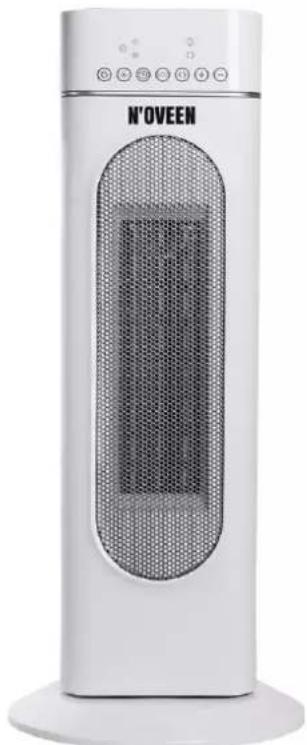
natural_image
White N'OVEEN electric heater with a mesh grille and control panel (no visible text or symbols on the device body)PTC2000 SMART
PTC3000 SMART
1
2
POLSKI....s. 4
ENGLISH....p. 9
DEUTSCH....s. 14
ESPAÑOL....p. 20
PORTUGUÊS....p. 25
ΕΛΛΗΝΙΚΑ....Σ. 30
ROMÂNĂ....p. 36
ČEŠTINA......s. 41
SLOVENSKÝ....S. 46
УКРАЇНСЬКА....C. 51
Thank you for purchasing our product.
Thank you for purchasing our product. Before use, read the instruction manual provided with it. Keep this manual in case you need to use it again. We believe that the Lunch Box will bring comfort and convenience to you and your family thanks to its excellent functionality. If necessary, we encourage you to contact us or our service outlets, we will be happy to help you!
You can find more Noveen brand products at www.noveen.pl.
Read all safety information before use and keep this user manual for later reference.
- This appliance can be used by children aged from 8 years and above and persons with reduced physical, sensory or mental capabilities or lack of experience and knowledge if they have been given supervision or instruction concerning use of the appliance in a safe way and understand the hazards involved. Children shall not play with the appliance. Cleaning and user maintenance shall not be made by children without supervision.
- Children of less than 3 years should be kept away unless continuously supervised.
- Children aged from 3 years and less than 8 years shall only switch on/off the appliance provided that it has been placed or installed in its intended normal operating position and they have been given supervision or instruction concerning use of the appliance in a safe way and understand the hazards involved. Children aged from 3 years and less than 8 years shall not plug in, regulate and clean the appliance or perform user maintenance.
CAUTION - Some parts of this product can become very hot and cause burns. Particular attention has to be given where children and vulnerable people are present.
- If the supply cord is damaged, it must be replaced by the manufacturer, its service agent or similarly qualified persons in order to avoid a hazard.
- CAUTION: In order to avoid a hazard due to inadvertent resetting of the thermal cutout, this appliance must not be supplied through an external switching device, such as a timer, or connected to a circuit that is regularly switched on and off by the utility.
- WARNING: In order to avoid overheating, do not cover the heater.
- The heater must not be located immediately below a socket-outlet.
- Do not use this heater in the immediate surroundings of a bath, a shower or a swimming pool.
- In order to prevent the risks of a fire, an electrical shock, burns and other injuries, it is imperative to observe basic safety measures when using electrical appliances.
-
Please read the following information carefully before using the appliance for the first time for your own safety and to ensure correct use.
-
Always operate the product from a power source of the same voltage, frequency and rating as
indicated on the product identification plate.
- Remove the unit from its packaging and check to make sure it is in good condition before using.
-
Do not let children play with parts of the packing (such as plastic bags)
-
Close supervision is necessary when the product is used by or near children or infirm persons. Do not allow children to use it as a toy.
-
Do not operate any product with a damaged cord or plug, or after the product malfunctions, or is dropped or appears damaged in any way.
-
In case of a malfunction, make contact with service center.
-
Before unplugging the power cord, be sure to turn the power off. When touching the unit, be sure your hands are dry to prevent electrical shock.
-
Ensure the cord is fully extended before use and arrange it so that it is not in contact with any part of the heater.
-
In use, some parts of the heater are hot. When moving, hold the heater only by the handle provided.
-
Do not use the heater in areas such as garages where petrol, paint or other flammable substances are used or stored.
-
Do not use near or point the heater to furniture, animals, curtains or other inflammable objects. Keep combustible materials such as furniture, bedding and any other combustible materials at least 1 metre from the front and sides, and from the rear of the heater.
-
Do not place the cord under carpet or cover with throw rugs or furniture. Arrange the cord so that it cannot be tripped over.
-
Do not place the heater on bedding or on thick and long pile carpet where the openings may be blocked.
-
To reduce the risk of electric shock, do not immerse or expose the product or flexible cord to rain, moisture or any liquid other than those necessary for correct operation of the product.
-
This product should not be used in the immediate vicinity of water, such as bathtub, washbowls, bathroom swimming pool etc. where the likelihood of immersion or splashing could occur.
-
Switch off and unplug from outlet when not in use, before assembling or disassembling parts and before cleaning. Remove by grasping the plug - do not pull on the cord.
-
A common cause of overheating is deposits of dust and fluff entering the heater. Ensure these deposits are removed regularly by unplugging the heater, allowing it to cool and cleaning as described in the Cleaning and Maintenance section.
-
Be sure that no other high current appliances are plugged into the same circuit with your heater as an overload can occur.
-
Avoid the use of an extension cord as the extension cord may overheat and cause a risk of fire.
-
Do not use the appliance for other than its intended use.
-
Do not use outdoors. FOR INDOOR USE ONLY.
- Do not leave the appliance unattended when switched on.
- Do not place objects on the product or allow objects to obstruct the inlet or outlet openings, or operate in close proximity to walls or curtains, etc. Do not cover the unit when in operation.
- Do not locate the heater immediately below a socket-outlet.
- The use of attachments or accessories not recommended or sold by the product distributor may cause personal or property hazards or injuries.
Use this heater as described in this manual. Any other uses, not recommended by the manufacturer, may cause fire, electric shock, or injury to persons and may void the warranty.
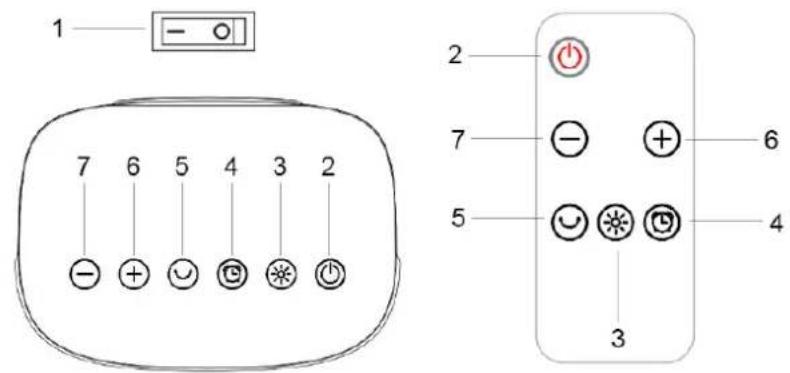
USING THE PTC2000 HEATER See Picture 1
- Before inserting the plug into an electrical outlet, make sure the electrical supply in your area matches that on the rating plate of the device.
- After connecting, turn on the main power switch (1) on the back of the device.
- In standby mode, press (2) on the control panel, the LED display will show the room temperature. Press the (2) button to access the rest of the control panel.
(a) Low power: 1400W (press (3) to turn on, one indicator on)
(b) High power: 2000W (press (3) to turn on, two indicators on)
(c) TIMER: Press the (4) button several times to set the time after which the heater will turn off (from 0 up to 8 hours)
(d) Room temperature control. Temperature setting is in the range of 10-49 °C
Press (6) to increase the desired temperature or (7) to lower the temperature. When the room temperature is 4 lower than the set temperature, the device operates at high power. If°C the temperature is 2 lower, the appliance operates at low power. If the room temperature°C reaches the set temperature, heating stops, the fan remains on until room temperature will be 2 °C lower than set. The device automatically returns to low-power heating. If the room temperature is 4 °C lower than the room temperature, the appliance will automatically start high-power heating.
(e) Oscillation: Press (5) to activate automatic oscillation. Press the button again to cancel.
(f) Press (2) to turn off the heater, the unit will blow cool for 30 seconds after shutdown for protection.
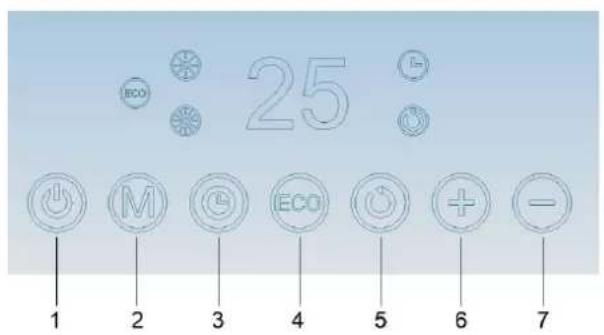
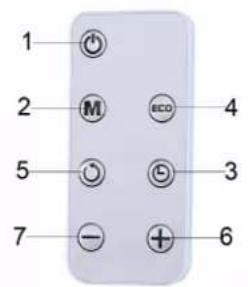
USING THE PTC3000 HEATER See Picture 2
- Connect the plug to a wall socket.
- Turn on the main switch on the back.
- The device beeps (if the sound is on).
-
Press the (1) button to turn on the device. The device will turn on with the fan working.
-
Press the (2) button to select one of the operating modes:
-
Heating I (low power)
- Heating II (high power)
- To distribute the airflow over a larger area, press the oscillation button (5). The device begins to swing left and right. To stop the device in the desired position, simply press the oscillation button (5) again.
- To turn off the device, press the (1) button. The display may show a countdown for approximately 30 seconds (cooling mode).
ECO FUNCTION (PTC3000)
To activate this function, press the ECO button (4). The ECO icon will be displayed.
The ECO function allows you to automatically reach the set temperature in the range of 15-35 °C. Press (6) to increase the desired temperature or (7) to decrease it.
The device will compare the set temperature with the current room temperature and will automatically select the most appropriate heating level to guarantee the optimal level of comfort while reducing energy consumption. When the ECO function is turned on, the machine can automatically switch to a lower or higher heating level, even several times.
The appropriate heating level is always shown on the display.
DIGITAL 24 HOUR TIMER (PTC3000)
This function can be activated from any operating mode.
With the device turned on, press the Timer button (3). The timer icon is displayed together with time remaining until the device is turned off. To set the timer (1 - 2 - 3 - ... - 24 Hours), use the + (6) and - (7) buttons, and then wait a few seconds for the setting to be memorized (the value stops flashing for 2 seconds before it is stored).
When finished, the timer icon is displayed during normal operation to indicate that the timer has been set. After reaching the programmed time, the device switches off automatically.
To return to work without a timer, press the timer button twice. The timer icon disappears from the display.
Caution:
- Before removing the plug from the socket, turn the device off and wait 30-60 seconds. During this time, the fan will blow air to cool internal parts. By not allowing to cool the device down before switching off, you may expose it to permanent damage.
- The remote control uses CR2025 batteries.
PROTECTION AGAINST OVERHEATING
The heater is protected against overheating, which automatically switches the device off in the event of overheating, e.g. due to complete or partial obstruction of the air vents.
In this case, disconnect the device, wait about 30 minutes for it to cool down, and remove the item blocking the vents. Then turn on the device again as described above.
The device should work normally. If the problem persists, contact the service center.
The device is also equipped with a safety switch that turns off the device after falling over. Do not use on thick carpets as the switch may not stay activated.
CLEANING AND MAINTENANCE
Turn off the main power source before cleaning and remove the plug from the socket.
Clean the housing with a slightly damp cloth, vacuum cleaner or dust brush.
Never use flammable or abrasive cleaning agents such as benzene or white spirit for cleaning the device.
Never immerse the device in water!
Clean the air inlet and outlet regularly with a vacuum cleaner.
If the device is not used for a long time, it must be protected against overuse dust and dirt. Dismantle the heater and store it in a dry place away from light sunlight and dirt.
TECHNICAL DATA
Voltage: 220-240V \~Frequency: 50 Hz
Power: 1400/2000W (PTC2000), 1000/2000W (PTC3000)
Dimensions: 175 x 135 x 500 mm (PTC2000), 255 x 255 x 605 mm (PTC3000)
Weight: 1.55 kg (PTC2000), 2.35 kg (PTC3000)
- 1
- 2
- Thank you for purchasing our product.
- Read all safety information before use and keep this user manual for later reference.
- USING THE PTC2000 HEATER See Picture 1
- USING THE PTC3000 HEATER See Picture 2
- ECO FUNCTION (PTC3000)
- DIGITAL 24 HOUR TIMER (PTC3000)
- Caution:
- PROTECTION AGAINST OVERHEATING
- CLEANING AND MAINTENANCE
- TECHNICAL DATA
Brand : N'oveen
Model : PTC3000
Category : Heating