
EH-SC65 - Facial Cleansing Device PANASONIC - Free user manual and instructions
Find the device manual for free EH-SC65 PANASONIC in PDF.


| Type de produit | Nettoyeur visage avec fonction de démaquillage chauffant, massage et brossage |
| Dimensions (approx.) | Hauteur : 20 cm, Largeur : 5 cm, Profondeur : 5 cm |
| Poids (approx.) | 200 g (avec brosse) |
| Alimentation | Adaptateur secteur RE7-87 (tension automatique) |
| Temps de charge | Environ 2 heures |
| Autonomie | Environ 1 semaine (7 utilisations par jour, selon mode) |
| Durée de vie de la batterie | Environ 3 ans (batterie Li-ion intégrée non remplaçable par l'utilisateur) |
| Fonctions principales | Démaquillage chauffant (43°C / 48°C), nettoyage moussant avec massage par rouleau, brossage avec brosse douce ou brosse focus pores, timer de notification (20 s) |
| Accessoires inclus | Embout massage rouleau, brosse douce, brosse focus pores, étui de protection, support, bouchon doseur |
| Entretien et nettoyage | Rincer les embouts et le corps après chaque usage ; sécher à l'air libre ; ne pas tirer sur la partie silicone de la brosse focus pores ; nettoyer le compartiment à nettoyant |
| Sécurité | Arrêt automatique après 1 ou 3 minutes selon le mode ; ne pas utiliser sur les yeux, la gorge ou une peau lésée ; éviter une pression excessive ; ne pas immerger l'adaptateur |
| Pièces détachées et réparabilité | Brosses de rechange : EH-2S01 (douce), EH-2S02 (focus pores), EH-2S03 (normale), EH-2S04 (exfoliante) ; remplacer la brosse douce tous les 3 mois si usage quotidien ; batterie non remplaçable par l'utilisateur ; contacter un centre agréé |
| Informations générales | Usage domestique ; température de fonctionnement recommandée : 5°C à 35°C ; résistant à l'eau (sauf adaptateur) ; ne pas utiliser de nettoyants granuleux ou exfoliants |
Frequently Asked Questions - EH-SC65 PANASONIC
User questions about EH-SC65 PANASONIC
0 question about this device. Answer the ones you know or ask your own.
Ask a new question about this device
Download the instructions for your Facial Cleansing Device in PDF format for free! Find your manual EH-SC65 - PANASONIC and take your electronic device back in hand. On this page are published all the documents necessary for the use of your device. EH-SC65 by PANASONIC.
USER MANUAL EH-SC65 PANASONIC
natural_image
Illustration of a handheld electric shaver with three views of its internal structure (no text or symbols)Panasonic®
Operating Instructions
(Household) Micro-Foaming Cleansing and Massage
Model No. EH-SC65
Contents
Safety precautions 2
Parts identification....8
Charging 9
Before use....10
Q&A 10
How to use....12
Recommended Operation Method .....17
Cleaning 18
Troubleshooting....20
Battery life....23
Remove the built-in rechargeable battery before disposing of the appliance.....23
Replacement accessories ....24
Specifications 24
Thank you for purchasing this Panasonic product.
Before operating this unit, please read these instructions completely and save them for future use.
Safety precautions
To reduce the risk of injury, loss of life, electric shock, fire, and damage to property, always observe the following safety precautions.
Explanation of symbols
The following symbols are used to classify and describe the level of hazard, injury, and property damage caused when the denotation is disregarded and improper use is performed.
| !DANGER | Denotes a potential hazard that will result in serious injury or death. |
| !WARNING | Denotes a potential hazard that could result in serious injury or death. |
| !CAUTION | Denotes a hazard that could result in minor injury or property damage. |
The following symbols are used to classify and describe the type of instructions to be observed.

This symbol is used to alert users to a specific operating procedure that must not be performed.

This symbol is used to alert users to a specific operating procedure that must be followed in order to operate the unit safely.
The illustration in the manual may differ from the real product.

WARNING
▶To prevent skin or health problems

Menstruating or pregnant women, or within one month of childbirth.
- Doing so may cause skin problems due to unstable hormone balance.

The following persons should not use this appliance:
- Persons with neurological disorders of the face
- Persons who have metal, silicon, or plastic implants in their face due to bone fractures or plastic surgery
- Persons who cannot sense heat
- Persons with head and eyes sequelae caused by traffic accidents, etc.
- Doing so may cause accidents or problems.
- Persons with allergic diathesis
• Persons with sensitive skin - Persons with skin diseases or atopic dermatitis
- Doing so may cause problems with the skin or body.

WARNING
Do not use this appliance in the following body area or following cases.
- When you do not feel well
• After drinking alcohol or taking medicine, or when you are very tired - Areas with skin damage, eczema or swelling
- Areas with skin inflammation, severe sunburn or other skin abnormality
• Body parts where epilation was performed on the same day
• Where cosmetic surgery has been performed - Doing so may cause problems with the skin or body.

Roller massage attachment, soft brush and pore focus brush cannot be used for skin around eyes.
- Doing so may cause eye injury.

If you feel pain on your skin or other part of your body, immediately stop using this appliance.
-Failure to do so may cause problems with the skin or body.
Persons who are receiving medical treatment or the following persons must consult the doctor before using the device:
- Persons with therioma
- Persons with surgical site traumas or surgery traces
- Persons with severe disturbance of blood circulation
- Persons with perceptual disturbance due to peripheral circulatory disturbance caused by diabetes
- Persons with osteoporosis, vertebral osteoporosis, sprain, muscle strain, acute pains, etc.
- Doing so may cause physical discomforts.

This appliance is not intended for use by persons (including children) with reduced physical, sensory or mental capabilities, or lack of experience and knowledge,

unless they have been given supervision or instruction concerning use of the appliance by a person responsible for their safety.
Children should be supervised to ensure that they do not play with the appliance.
- Failure to do so may cause an accident or injury.

WARNING
▶ Power supply
Do not immerse the AC adaptor in water or wash it with water. Do not place the AC adaptor over or near water filled sink or bathtub.

Never use the appliance if the AC adaptor is damaged or if the power plug fits loosely in a household outlet. Do not damage the cord.
- Doing so may cause electric shock or fire due to a short circuit.

Do not connect or disconnect the adaptor to a household outlet with a wet hand.
- Doing so may cause electric shock or injury.

Do not damage or modify, or forcefully bend, pull, or twist the cord. Also, do not place anything heavy on or pinch the cord.
- Doing so may cause electric shock or fire due to a short circuit.

Do not use in a way exceeding the rating of the household outlet or the wiring.
- Exceeding the rating by connecting too many plugs to one household outlet may cause fire due to overheating.

Do not use anything other than the supplied AC adaptor (see Page 8.) for any purpose.
Beside, do not use the attached power adaptor to charge other products.
- Doing so may cause scalding or lead to a fire due to short circuit.

Always unplug the adaptor from a household outlet when cleaning.
- Failure to do so may cause electric shock or injury.

Make sure that the operating voltage of the power adaptor complies with its related voltage.
Fully insert the adaptor or power plug.
Failure to do so may cause an electric shock or fire.

Regularly clean the power plug and the appliance plug to prevent dust from accumulating.
- Failure to do so may cause fire due to insulation failure caused by humidity. → Disconnect the adaptor and wipe with a dry cloth.

The supply cord cannot be replaced. If the cord is damaged, the AC adaptor should be scrapped.
- Failure to do so may cause an accident or injury

WARNING
This product
This product has a built-in rechargeable battery.

Do not throw into flame or heat. Do not charge, use, or leave in high temperatures.
- Otherwise, it may cause heating, fire or explosion.

Do not store within the reach of children or infants. Do not let them use it.
- Doing so may cause an accident or injury.

Never disassemble except when disposing of the product.
- Doing so may cause fire, electric shock, or injury.

Do not modify or repair.
- Doing so may cause fire, electric shock, or injury.
→ Contact an authorized service center for repair (battery change etc).

After use, the appliance should be cleaned to avoid the accumulation of grease and other residues.
- Failure to do so may cause skin and body discomfort.
▶ In case of an abnormalities or malfunction
Immediately stop using and remove the adaptor if there is an abnormality or malfunction.
- Using it in such conditions may cause fire, electric shock, or injury.
- The main unit, adaptor or cord is deformed or abnormally hot
- The main unit, adaptor or cord has a burning smell
- There is abnormal sound during use or charging of the main unit, adaptor or cord Immediately request inspection or repair at an authorized service center.


CAUTION
▶ Power supply
Do not allow pins or trash to adhere to the power plug or the appliance plug.

- Doing so may cause electric shock or fire due to a short circuit.

Do not wrap the cord around the adaptor when storing.
- Doing so may cause the wire in the cord to break with the load, and may cause fire due to a short circuit.

CAUTION

Disconnect the adaptor or the appliance plug by holding onto the adaptor or the appliance plug instead of the cord.
- Disconnecting by holding onto the cord may cause electric shock or injury.

Disconnect the adaptor from the household outlet when not charging.
- Failure to do so may cause electric shock or fire due to electrical leakage resulting from insulation deterioration.
▶ Note the following precautions

Do not drop or subject to shock.
- Doing so may cause injury.

Do not use facial soap with a scrub or with peeling effect, or makeup remover.
- Doing so may cause skin damage, color stains or other skin trouble.
Do not use the appliance in the following ways:
- Press strongly on the skin
- Use continuously for an extended period on the same area
• Sharing with your family or others - Doing so may cause injury to the skin, infection, inflammation, bleeding, pigmentation or other trouble, and physical discomforts or symptomatic deterioration due to decreased pulse or blood pressure drop.

Check the brush head, attachment, and warming makeup removal plate for crack, notch, deformation and other damages before use.
- Failure to do so may cause injury to the skin.

Use only to care for the face, chest and neckline (excluding throat). (Excluding the situation where an allergy test is performed on the arm before initial use.)

- Failure to do so may cause injury or inflammation of the skin.
Handling of the removed battery when disposing

DANGER
- The rechargeable battery is exclusively for use with this appliance. Do not use the battery with other products.
- Do not charge the battery after it has been removed from the product.
- Do not throw into fire or apply heat.
- Do not hit, disassemble, modify, or puncture with a nail.
- Do not let the positive and negative terminals of the battery get in contact with each other through metallic objects.
- Do not carry or store the battery together with metallic jewellery such as necklaces and hairpins.
- Do not use or leave the battery where it will be exposed to high temperatures, such as under direct sunlight or near other sources of heat.
- Never peel off the tube.
- Doing so may cause overheating, ignition, or explosion.

WARNING

After removing the rechargeable battery, do not keep it within reach of children and infants.
- The battery will harm the body if accidentally swallowed.
If this happens, consult a physician immediately.

If the battery fluid leaks out and comes in contact with the eyes, do not rub the eyes, and thoroughly rinse with clean water, such as tap water.
- Failure to do so may cause eye injury.
Consult a physician immediately.

CAUTION

If the battery fluid leaks out and comes in contact with the skin or clothes, rinse off with clean water, such as tap water.
Failure to do so may cause inflammation.
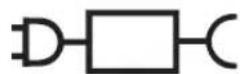
- The following symbol indicates that a specific detachable power supply unit is required for connecting the electrical appliance to the supply mains. The type reference of power supply unit is marked near the symbol.
Parts identification
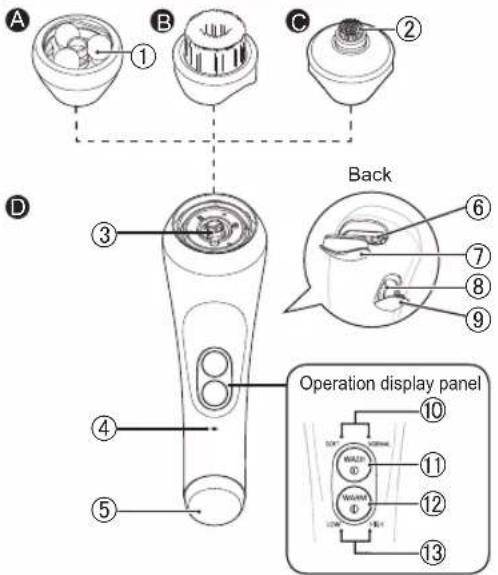
A Roller massage attachment
① Ball
B Soft brush
© Pore focus brush
② Silicone part
D Main body
③ Foam dispenser
④ Charging indication/notification lamp
⑤ Warming makeup removal plate
⑥ Facial cleanser compartment
E
F
G
⑦ Facial cleanser compartment cover
⑧ Socket
⑨ Socket cover
⑩ Facial cleanse mode indicator
⑪ Facial cleanse switch (WASH)
⑫ Makeup removal switch (WARM)
⑬ Warming makeup removal mode indicator
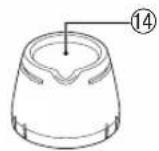
E Brush head protective cover
⑭ Measuring cap
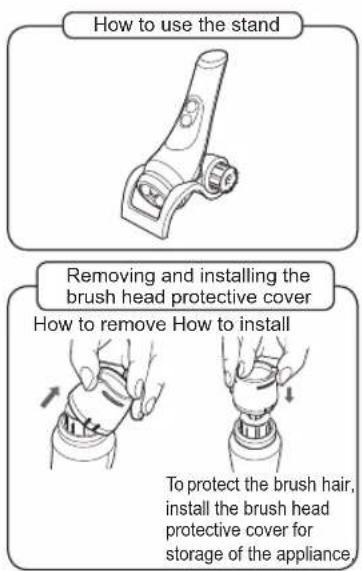
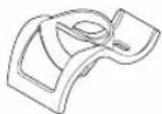
F Stand
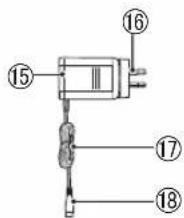
© AC adaptor (RE7-87)
⑮ Adaptor
⑯ Power plug
⑰ Cord
⑱ Appliance plug
Notes
- You can place two attachments or brush heads on the stand.
- To protect the brush hair when the product will not be used for a long time or will be taken with you, install the brush head protective cover on the dry brush beforehand.
Charging
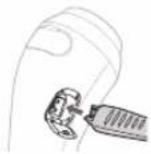
- Open the socket cover and insert the appliance plug into the socket.
- Wipe off any water in the socket.
- Set the main body on the stand.
- Plug in the adaptor into a household outlet.
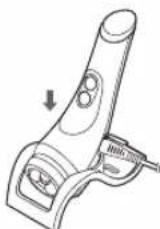
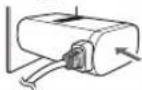
- Check that the charging indication/notification lamp glows.
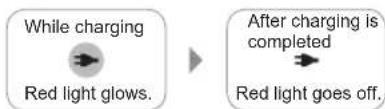
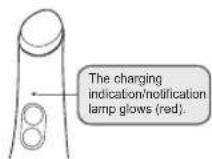
Charging completes in about 2 hours.
- The charging time may vary depending on the charging capacity.
To check if charging is completed
When the power adaptor is connected in the fully charged state, the charge indicator/notification lamp will glow and go out after about 5 seconds.
- After charging is completed, unplug the adaptor from the household outlet, and unplug the appliance plug from the main body.
(for safety and to reduce energy usage)
- It will not cause damage to the main body even if the charging time exceed 2 hours or more.
About charging
The charging time may differ for the first time usage or if it has been idled for half a year or more. The charging indication/notification lamp may not glow during the first few minutes after starting to charge the appliance. Please charge the appliance continuously and the charging status lamp will illuminate shortly.
- This product can be used for one week after being fully charged at a time. (7 repetitions of warm makeup removal, 7 repetitions of foam cleansing or brush cleansing.) This will differ depending on usage.
- Recommended ambient temperature for charging is 15 °C \~ 35 °C. Charging may not be possible out of the recommended temperature.
- If there is noise from the radio or other sources while using or charging the appliance, move to a different location to use the appliance.
Charging indication/notification lamp is flashing
Charging notification

Once per second
• The battery level is low. Charge the appliance.
Abnormal charging

Twice per second
- Charge the appliance within the recommended ambient temperature range 15 °C \~ 35 °C. Please consult the store where you purchased the appliance if it happens repeatedly.
Tips
The product comes with a built-in lithium battery.
• Even if the product is charged before each use, the battery life is not affected.
- Recycle the lithium battery when you disposed of the product.
Before use
- Suggested use frequency for the best skin care
Warm makeup removal… Less than 3 minutes once per day
Massage cleansing……Less than 1 minute once per day
Brush cleansing……Less than 1 minute once per day
Pore focus brush……Less than 1 minute twice per week
Exfoliation brush
(sold separately)......Less than 1 minute once a week
Excessive use may cause an adverse effect on the skin. Use the roller massage attachment and soft brush once a week at the beginning. Later on, make adjustment according to the skin conditions. They cannot be used for more than once a day.
Adjust the number of usage and using duration depending on skin situation.
- Please remove accessories (necklaces, earrings, etc.) before use as they may get caught during use.
- Tie hair or use a hairband or similar items to secure hair so that it does not get caught during use.
Q&A
Question Ansv
Can I use the appliance while taking a bath?

You can use the appliance while taking the bath, excluding the AC adaptor.
| Question Ansv | |
| What facial cleansers can be used with this appliance? | You can use any cream, gel, and liquid foaming facial cleanser. (Do not use handmade facial cleansers, facial cleansers containing coarse materials for scrubbing, or those used for exfoliation.) |
| What makeup removers can be used with this appliance? | You can use whichever oil-, gel-, and cream-based type of makeup remover that works for your skin.Do not use make up removers containing coarse materials for scrubbing or those used for exfoliation. |
| How often does the soft brush need replacing? | When the product is used once per day, replace the brush every three months.When the product is used once per week, replace the brush every year. (See page 24.) |
| Question Ans | |
| How often does the pore focus brush need replacing? | Replace approximately once every 6 months if you use it for 1 minute twice per week. (See page 24.) |
| Is it OK if the inside of the socket cover gets wet? | The socket is waterproof for normal usage. Before charging, however, wipe off any water in the socket. |
| Can I also use this on my chest? | You can use the roller massage attachment and soft brush once per day, about one minute each time. |
Question Ansv
Can I apply massage oil or massage cream with the roller massage attachment?
Yes.
Apply massage oil or massage cream to the cleansed face without makeup (after makeup is removed) ^* before using the product.

(※ Do not inject the oil or cream into the compartment, but apply it to the skin directly) Use only to care for the face, chest and neckline, but not throat. Massage each area for 1 to 2 minutes, three times per week.
How to use
Notes
- Before use, check whether the warming makeup removal plate surface and the ball of roller massage attachment has cracks.
- The appliance will not turn on when the AC adaptor is connected.
- You must disconnect the AC adaptor to use this appliance.
Warm makeup removal
1. Press the makeup removal switch and select the desired temperature.
Warming makeup removal plate temperature Low: approx. 43 °C
High: approx. 48 °C
- Press the makeup removal switch to choose a power option in the following order: 'LOW' → 'HIGH' → 'POWER OFF'. The temperature is always set to 'LOW' when the power turns on.
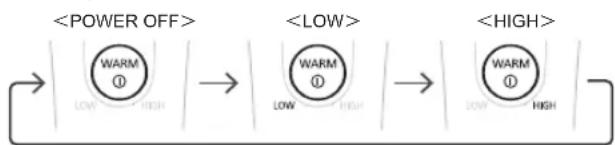
flowchart
graph LR
    A["<POWER OFF>"] --> B["<LOW>"]
    B --> C["<HIGH>"]
    A --> D["WARM ① LOW HIGH"]
    B --> E["WARM ① LOW HIGH"]
    C --> F["WARM ① LOW HIGH"]
- It is recommended to use the appliance at the 'LOW' setting for the first time.
Notes
- The warming makeup removal mode indicator flashes while warming up.
- It takes approximately 30 seconds for the appliance to reach its usable temperature (assuming a room temperature of 25^ ).
-
The power supply will be cut off automatically in about 3 min after the warming makeup removal mode indicator is on.
-
The surface temperature of warming makeup removal plate changes along with the ambient temperature.
- The recommended ambient temperature for operation is not lower than 15 °C.
The appliance may not warm up properly if it is out of the recommended temperature.
2. Apply makeup remover to your forehead, chin, and both cheeks.
- The appliance can be used with makeup remover directly on the warming makeup removal plate.
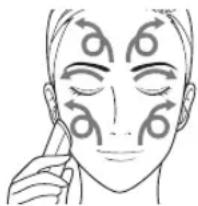
3. Once the warming makeup removal mode indicator starts glowing, apply the warming makeup removal plate to your skin and begin to move it along with your skin.
Gently apply the warming makeup removal plate to your skin and then glide it around your face in a circle from the inside out.
Area with heavy makeup should be left as the last treatment part, so as to prevent the makeup from spreading.
Be particularly gentle when using the appliance on the eyelids.
natural_image
Line drawing of a person's face with arrows indicating motion or movement patterns (no text or symbols)Do not try to force the warming makeup removal plate into hard-to-reach areas. Use your hands to apply makeup remover to these areas.
4. After the makeup remover has loosened the makeup, press the makeup removal switch to power it off.
- Make sure to clean the appliance with a tissue or wash with water after every use. (See Page 19.)
Massage cleansing/Brush cleansing
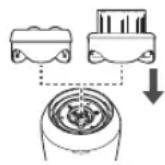
- Attach Massage the roller massage attachment or Brush the soft brush by pressing it until you hear a 'click' sound.
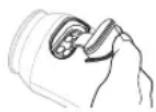
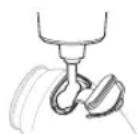
2. Open the facial cleanser compartment and add facial cleanser.
Please inject a recommended amount of facial cleanser into the appliance. (the amount you normally use).
Notes
- Depending on the type of facial cleanser (sticky facial cleansers, etc.) or the amount used, the facial cleanser may not mix properly and clog the appliance. In rare cases, power to the appliance may be interrupted. (See Page 20.)
- Foaming result varies depending on the type of facial cleaner used. Please use a recommended amount indicated on your facial cleaner product.
- Do not add anything other than facial cleanser into this appliance.
(Doing so may cause malfunction.)
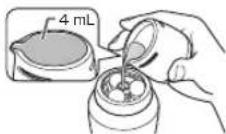
- Inject the liquid or powdery cleanser through the center of the attachment (brush head). (It may flow out of the hole in the front of the main body if injected through the compartment.)
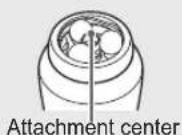
- Fill the brush head protective cover with water (approximately 4 mL) and pour into the center of the attachment.
4. Press the facial cleanse switch and select a mode.
Foam starts to discharge approximately 5 seconds after turning on the appliance.
- Press the facial cleanse switch to choose a power option in the following order: 'NORMAL' → 'SOFT' → 'POWER OFF'.
- The mode is always set to 'NORMAL' when the power is turned on.
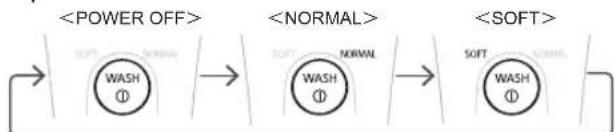
flowchart
graph LR
    A["<POWER OFF>"] --> B["WASH ①"]
    B --> C["<NORMAL>"]
    C --> D["WASH ①"]
    D --> E["<SOFT>"]
- Wash off any excess facial cleanser on your hands.
Notes
- The recommended ambient temperature for operation is not lower than 5 °C. The appliance might not be usable out of the recommended temperature range.
- The power supply is cut off automatically in about 1 minute after the power switch is turned on.
Notification timer feature
Notifies you of the recommended washing time by stopping and restarting every 20 seconds.
5. Wash your face.
- Do not apply the appliance to the same area for extended periods of time.
- Wash your face in three sections as illustrated in the following figure for approximately 20 seconds per section. (For notification timer feature, see page 14.)
- Do not apply it to the skin around eyes.
- You can use this appliance on your neck and upper chest, but do not apply it to your throat.
For massage cleansing
When the roller massage attachment is filled with foam, glide the attachment slowly along your facial skin to spread a thin layer of foam on your face.
Do not forcefully operate on parts that are difficult to access. Instead, use a finger to clean them.
- To protect skin, preferably reduce the force when using the product on the forehead and jawbone skin or around the cheekbone.
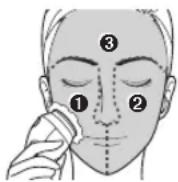
For brush cleansing
Do not press the soft brush hard. Use the soft brush to touch your facial skin gently, and glide by drawing circles.
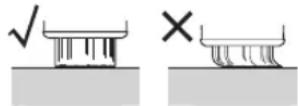
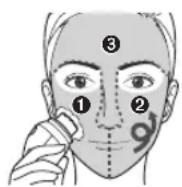
If you feel irritation even if you are not pressing the brush into the skin, stop using the brush as it does not match your skin type or condition.
6. After you have finished washing your face, press
WASH ① the facial cleanse switch to turn off the power.
- Make sure to wash brush with clean after use. (See page 19.)
Follow the same operation procedure when replacing the [normal brush] and [exfoliation brush]. (See page 24.)
Pore focus brush cleansing
Use approximately 2 times per week on rough areas or clogged pores such as around the nose and chin that concern you.
After completing the massage cleansing or the brush cleansing process, continue to use this option while the foam is still on your skin.
- Rinse the inside of the main body gently before using the pore focus brush. (The product will stop automatically to protect the main body if a significant amount of facial cleanser remains in the main body.)
- Install the pore focus brush
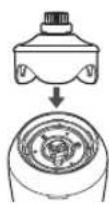
-
Press the facial cleanse switch and select a mode.
-
Wash off any excess facial cleanser on your hands.
-
The power will automatically turn off approximately 1 minute after the power turns on.
-
Wash your face
Use the pore focus brush to touch your facial skin gently, and glide by drawing circles.
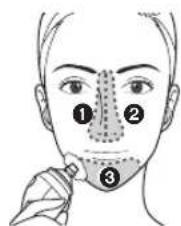
- Wash your nose and chin (① to ③) for approximately 20 seconds each. (Notification timer feature (see page 14.))
- Do not use the brush around your eyes.
-
Do not apply the appliance to the same area for extended periods of time.
-
After you have finished washing your face, press

the button to cut off the power supply.
• Make sure to wash the appliance after use.(See page 19.)
Recommended Operation Method
Massage Cleansing
- To protect your skin, touch the skin at the forehead and jawbone and around the cheekbone gently.
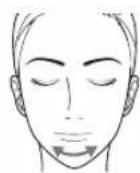
1. Cleansing the middle of cheeks
Make the roller massage attachment cling to the skin. Do not move it so that it can be cleanse your skin by vibration massage.
2. Overall cleansing of the cheeks
Move the product from the bottom up slowly in a lifting way according to the sequence of ① to ④
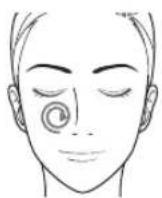
About 20 seconds
① Facial contour line
② Chin to the lower part of ear
③ Mouth corner to the area near ear
④ Area near nosewing to the sideburn
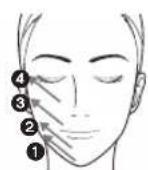
3.Complete steps 1 and 2 at the other side of the face
4.Cleansing the forehead
Move the product from the forehead middle to the two sides in a spiral way.
5.Cleansing the nose
Move the product leftward and rightward at the nosewing. Complete the same steps at the other side.
- Do not contact the cartilage area of nosewing.
6.Cleansing the chin
Move the product leftward and rightward.
- Use your tongue to lift the lower lip so that the chin concave can be cleaned conveniently and thoroughly.
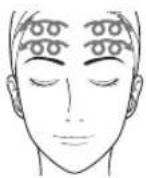
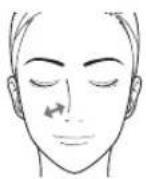
About 20 seconds
About 20 seconds
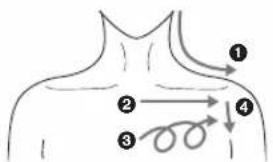
Chest and neck
Move slowly and gently according to the sequence of 1 to 4.
① Lower part of ear to the shoulder curve
② Center at the lower part of clavicle to two sides
③ Chest center to two sides Move by drawing large circles
④ Clavicle to the shoulder joint
- Complete the same steps at the other side.
- Do not use the product at the throat.
Notes
• To use the product for the face, chest and neck, it is advised to use it for the chest and neck first.
About 1 min
Cleaning
- Rinse off any foam on the surface with water, then remove the attachment or brush vertically.
- Open the facial cleanser compartment cover, begin pouring water into the foam dispenser, and then press

the facial cleanse switch to e.
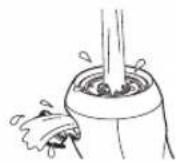
- If a significant amount of facial cleanser remains, the power may turn off a few seconds after pressing the facial cleanse switch or appliance may not operate smoothly. In such cases, use warm water to clean and remove the excess cleanser.
- Press the facial cleanse switch to turn off the power.
4. Thoroughly rinsing the residue of makeup remover or cleanser.
Main body
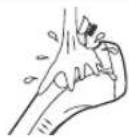
Roller massage attachment
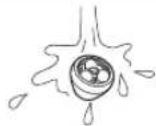
Nearby the injection port
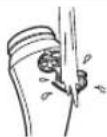
Soft brush
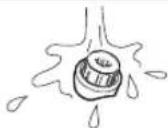
Warning makeup removal plate
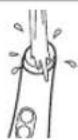
- Clean the facial cleanser compartment thoroughly as facial cleanser tends to accumulate in this area.
- Do not pull forcefully the Silicone part of pore focus brush.
Reinstall the Silicone part when it falls off.
- When oily or cream cleanser is used, use warm water to clean it.
5. Shake the main body to remove excess water.
- When shake the main body to remove excess water, do not bump into the wash table or other objects; otherwise it may cause malfunction.
6. Lightly wipe it with a towel or similar cloth and place it on the stand to dry.
- Leave the facial cleanser compartment cover opened to dry.
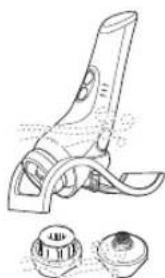
- You can store up to 2 attachments etc. on the stand. Place brushes face up to dry them.
• After cleaning, store in a location with low humidity. (Storing the appliance in an enclosed bathroom may cause condensation and rust inside the body which may cause malfunction.)
natural_image
Technical line drawing of a mechanical device with two circular components (no text or symbols)Troubleshooting
| Problem Poss | cause Action | |
| The power does not turn on. | The appliance has not been charged. Charge the appliance. (See Page 9.) | |
| The AC adaptor is connected. | Disconnect the AC adaptor before use. | |
| The power turns off during use. | There is no power remaining in the battery. | Charge the appliance. (See Page 9.) |
| Appliance is clogged with facial cleanser. | Use warm water to clean and remove the cleanser. | |
| Too much facial cleanser or sticky facial cleanser or other inappropriate cleanser is used. | Clean and remove the cleanser and then try reducing the amount of facial cleanser. (See Page 18.) | |
| Stops automatically when the mode ends.Warm makeup removal: about 3 min.Roller massage attachment and soft brush: about 1 min.Pore focus brush: about 1 min.The product pauses every about 20 seconds during cleansing. (See page 14.)This does not indicate a failure. | ||
| Problem Poss | cause | Action |
| The charging indication/notification lamp turns off. | This lamp turns off after charging is complete. (See Page 9.) | |
| The charging indication/notification lamp does not glow. | The adaptor is not inserted into the household outlet correctly. | Correctly insert the adaptor into the household outlet. |
| The appliance plug is not firmly inserted into the socket. | Firmly insert the appliance plug into the socket. | |
| The appliance can only be used for a few minutes after charging. | The battery has reached the end of its life. (approximately 3 years) (See Page 23.) | Please contact the store where you purchased it. (Customers cannot replace the battery as doing so may cause malfunction.) |
| The quality or quantity of foam is poor. | There is too much or too little water. | Use the brush head protective cover to fill the correct amount of water. |
| There is too much or too little facial cleanser. | Adjust the amount of facial cleanser. | |
| You are using a facial cleanser that does not foam well when using the recommended amount. | Check the type of facial cleanser used. (See Page 11.) | |
| Problem Poss | cause Action | |
| The warming makeup removal plate does not warm. | The appliance was used out of the recommended usage temperature range. | It is recommended to use the appliance at the ambient temperature not lower than 15 °C. (See page 13.) |
| The rotation slows down when the pore focus brush is used after brush cleansing. | The foam inside of the main body is too thick. | Lightly rinse the inside of the main body. |
| Water or foam come out around the facial cleanser compartment, main body holes or gaps. | Too much waterToo little facial cleanserThe main body was not dried after washing with water. | Please adjust the mixture, such as reducing the amount of water or increasing the amount of facial cleanser. (See page 14.)In addition, dry the main body thoroughly after washing with water. (See page 19.) |
| The main body has gaps in order to allow air in to create bubbles. This means that water and bubbles may come out. There is no problem with waterproofness. | ||
If the problems still cannot be solved, contact the store where you purchased the unit or a service center authorized by Panasonic for repair.
Battery life
The battery service life is about three years. The battery in this appliance is not intended to be replaced by consumers. Contact the authorized service center to replace the battery.
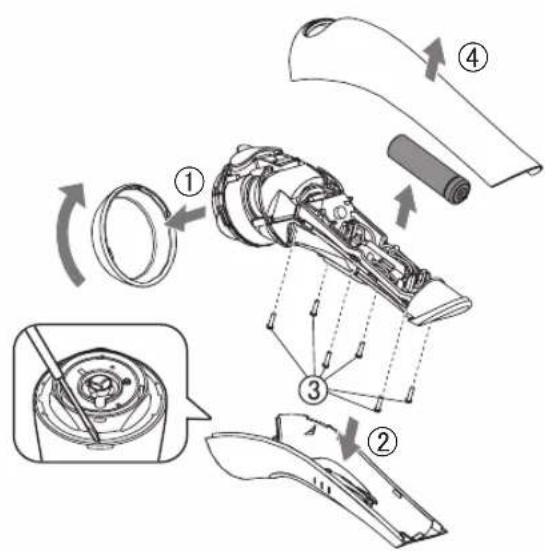
Remove the built-in rechargeable battery before disposing of the appliance
The battery must be disposed of safely. Please make sure that the battery is disposed of at an officially designated location if there is one.
This figure must only be used when disposing of the appliance, and must not be used to repair it. If you dismantle the appliance yourself, it will no longer be waterproof, which may cause it to malfunction.
- Remove the appliance from the AC adaptor.
- Use the battery until it fully discharges if there is any charge remaining.
- Follow the procedure below, using a screwdriver to disassemble the appliance.
Perform steps ① to ④ and lift the battery, and then remove it. - Take care not to short circuit the positive and negative terminals of the removed battery, and insulate the terminals by applying tape to them.
For environmental protection and recycling of materials
This appliance contains a Li-ion battery. Please make sure that the battery is disposed of at an officially assigned location, if there is one in your country.
Replacement accessories
Replacement parts are available at your dealer or Service Center.
| Part Name | Brush Type and Purpose | Recommended Replacement Time | |
| EH-2S01 Soft brush | 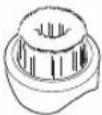 | Applicable to all kinds of skin, felt soft | The brush should be replaced every 3 months if it is used once per day, and every one year if it is used once per week. |
| EH-2S02 Pore focus brush |  | Applicable to areas such as nosewing and chin where pores are easily blocked.※Silicone brush hair | The brush should be replaced every six months if it is used twice per week |
| EH-2S03Normal brush | 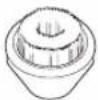 | Applicable when deep cleansing is needed | The brush should be replaced every 3 months if it is used once per day, and every one year if it is used once per week. |
| EH-2S04Exfoliation brush |  | Applicable to regular cleaning of aged keratin ※Silicone brush hair included | The brush should be replaced every one year if it is used once per week. |
Select the corresponding brush according to your cleaning demands. Please replace the brush according to the recommended frequency.
Specifications
| Power supply | See the name plate on the AC adaptor. (Automatic voltage conversion) |
| Charging time | Approx. 2 hour |
This product is intended for household use only.
MEMO
MEMO
MEMO
Panasonic Corporation
http://www.panasonic.com
© Panasonic Corporation 2018
© EN
Printed in China
EH9700SC651541 S0518-0
- Panasonic®
- Contents
- Safety precautions 2
- Safety precautions
- Explanation of symbols
- WARNING
- ▶ Power supply
- This product
- ▶ In case of an abnormalities or malfunction
- CAUTION
- Handling of the removed battery when disposing
- DANGER
- Parts identification
- A Roller massage attachment
- B Soft brush
- © Pore focus brush
- D Main body
- E Brush head protective cover
- F Stand
- © AC adaptor (RE7-87)
- Notes
- Charging
- Charging completes in about 2 hours.
- To check if charging is completed
- About charging
- Charging indication/notification lamp is flashing
- Charging notification
- Abnormal charging
- Tips
- Before use
- Q&A
- Question Ansv
- How to use
- Warm makeup removal
- Press the makeup removal switch and select the desired temperature.
- Apply makeup remover to your forehead, chin, and both cheeks.
- Once the warming makeup removal mode indicator starts glowing, apply the warming makeup removal plate to your skin and begin to move it along with your skin.
- After the makeup remover has loosened the makeup, press the makeup removal switch to power it off.
- Massage cleansing/Brush cleansing
- Open the facial cleanser compartment and add facial cleanser.
- Press the facial cleanse switch and select a mode.
- Notification timer feature
- Wash your face.
- For massage cleansing
- For brush cleansing
- After you have finished washing your face, press
- Pore focus brush cleansing
- Recommended Operation Method
- Massage Cleansing
- Cleansing the middle of cheeks
- Overall cleansing of the cheeks
- 3.Complete steps 1 and 2 at the other side of the face
- 4.Cleansing the forehead
- 5.Cleansing the nose
- 6.Cleansing the chin
- Chest and neck
- Cleaning
- Thoroughly rinsing the residue of makeup remover or cleanser.
- Shake the main body to remove excess water.
- Lightly wipe it with a towel or similar cloth and place it on the stand to dry.
- Battery life
- Remove the built-in rechargeable battery before disposing of the appliance
- For environmental protection and recycling of materials
- Replacement accessories
Brand : PANASONIC
Model : EH-SC65
Category : Facial Cleansing Device