
43239 - Headphones MONOPRICE - Free user manual and instructions
Find the device manual for free 43239 MONOPRICE in PDF.


| Product Type | Over-Ear Active Noise Cancelling Headphones |
| Model | 43239 |
| Driver Size | 40mm |
| Driver Material | Titanium |
| Frequency Response | 20Hz ~ 20kHz |
| Sensitivity | 95dB ±3dB/1mW (SPL @ 1kHz) |
| Impedance | 32Ω |
| Bluetooth Version | 5.0 |
| Bluetooth Chipset | Qualcomm® QCC3003 |
| Bluetooth Range | Up to 32 feet (10 meters) |
| Active Noise Cancellation | Up to 28dB ±3dB |
| Microphone | Built-in with Qualcomm® cVc™ 8.0 noise suppression |
| Battery Type | Lithium-ion (internal) |
| Playback Time (ANC off) | Up to 25 hours |
| Playback Time (ANC on) | Up to 12 hours |
| Charging Time | About 2~3 hours |
| Charging Port | USB-C® |
| Input Power | 5 VDC, 1A |
| Weight | 11.2 oz (318g) |
| Package Contents | Headphones, Storage Box, USB-C® Cable, 3.5mm Audio Cable, User Manual |
| Cleaning | Use a soft, dry cloth only |
| Safety | Do not use while driving; avoid prolonged high volume; do not expose to water |
Frequently Asked Questions - 43239 MONOPRICE
User questions about 43239 MONOPRICE
0 question about this device. Answer the ones you know or ask your own.
Ask a new question about this device
Download the instructions for your Headphones in PDF format for free! Find your manual 43239 - MONOPRICE and take your electronic device back in hand. On this page are published all the documents necessary for the use of your device. 43239 by MONOPRICE.
USER MANUAL 43239 MONOPRICE
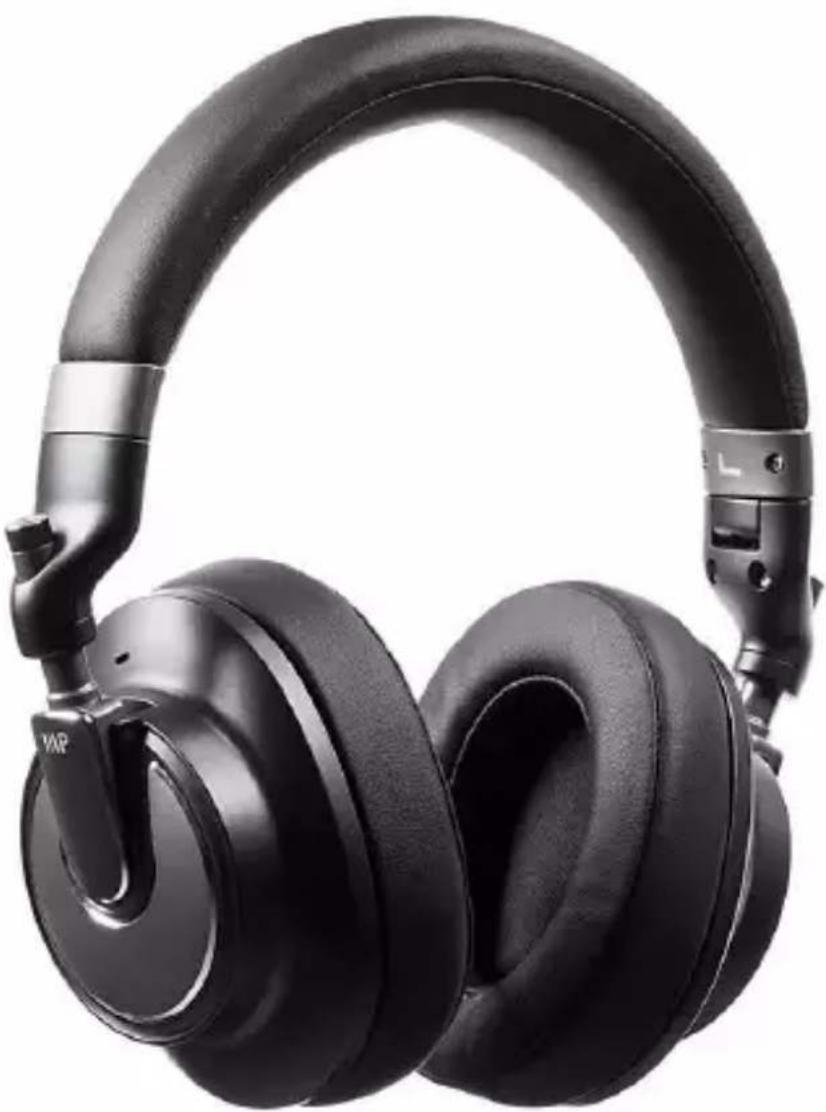
SonicSolace™ II Active Noise Cancelling (ANC) Over Ear Headphones
natural_image
Black outdoor headphones with black earbuds and metallic clamps (no visible text or symbols)P/N 43239
User's Manual
SAFETY WARNINGS AND GUIDELINES
Please read this entire manual before using this device, paying extra attention to these safety warnings and guidelines. Please keep this manual in a safe place for future reference.
- Do not expose this device to water or moisture of any kind.
- Do not expose this device to excessively high temperatures.
- Do not expose this device to excessive vibration, extreme force, shock, or fluctuations in temperature or humidity.
- Do not use this device while operating a motor vehicle, heavy equipment, walking in traffic, or any other situation in which situational awareness is a key to safety.
- Avoid prolonged exposure to excessive volume levels, which could cause hearing damage. Reduce the volume to minimum before wearing these headphones, then increase the volume to a comfortable listening level.
- This device contains a Lithium battery. Dispose of this device only in accordance with local, state, or federal regulations for electronic waste.
- Charge the battery before first use and at least once every three months to keep it fresh and capable of holding a full charge.
- Clean using a soft, dry cloth only. Do not use chemical cleaners, solvents, or detergents. For stubborn deposits, moisten the cloth with warm water.
- This device has no user serviceable parts. Do not attempt to open, service, or modify this device.
CUSTOMER SERVICE
The Monoprice Customer Service department is dedicated to ensuring that your ordering, purchasing, and delivery experience is second to none. If you have any problem with your order, please give us an opportunity to make it right. You can contact a Monoprice Customer Service representative through the Live Chat link on our website www.monoprice.com or via email at support@monoprice.com. Check the website for support times and links.
PACKAGE CONTENTS
Please take an inventory of the package contents to ensure you have all the items listed below. If anything is missing or damaged, please contact Monoprice Customer Service for a replacement.
1x SonicSolace™ II Headphones
1x Storage Box
1x USB-C ^® Charging Cable
1x 3.5mm Audio Cable
1x User's Manual
PRODUCT OVERVIEW
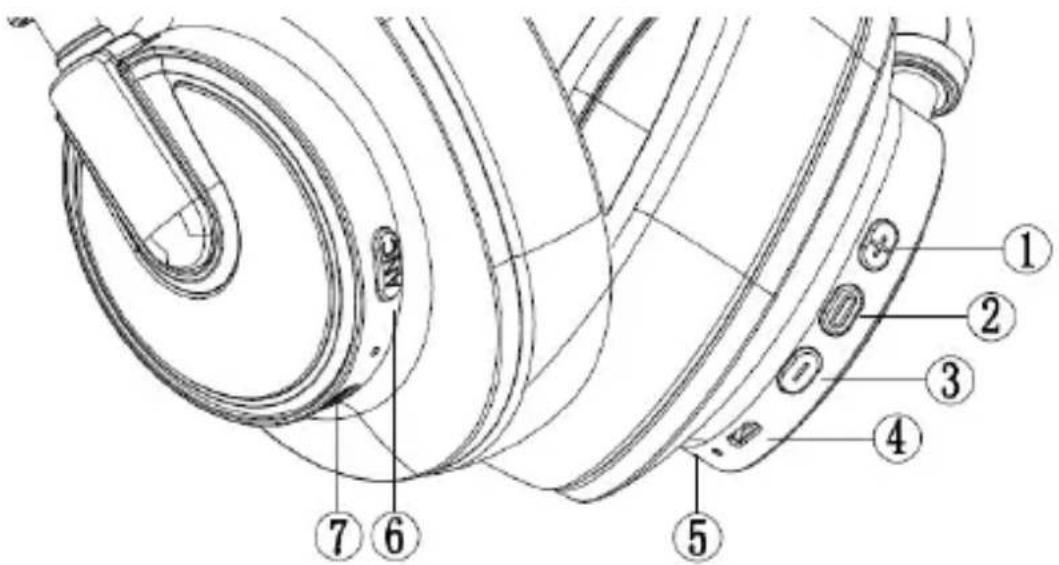
- Volume+/Next Track Button
- Multifunction Button (MFB)
- Volume-/Previous Track Button
- USB-C® Charging Port
- Microphone
- Active Noise Cancelling (ANC) Button
- 3.5mm Audio Jack
Notes:
- The "dot" pictured above between the USB-C® Charging Port and the Microphone is the Bluetooth® LED.
- The "dot" pictured above between the ANC Button and the 3.5mm Audio Jack is the ANC LED.
CHARGING
When the headphones say Battery low, the battery is low and needs to be charged. Perform the following steps to charge the battery.
- Plug one end of the included USB-C® Charging Cable into the USB-C Charging Port on the headphones, then plug the other end into a USB power source, such as a computer, wall charger, power bank, etc. (not included). The Bluetooth LED will illuminate solid red, indicating that charging is in progress. It will take about 2\~3 hours for a full charge.
Note that if the headphones are powered on, they will automatically turn off when connected to a USB charging source.
-
When charging is complete, the Bluetooth LED will illuminate solid blue, indicating that charging is complete.
-
Unplug the USB-C Charging Cable from the headphones and the USB power source.
PAIRING
-
With the headphones powered off, press and hold the MFB for 5 seconds to turn the headphones on and put them into Bluetooth® pairing mode. The Bluetooth LED will flash red and blue alternately, indicating that the headphones are in Bluetooth® pairing mode.
-
Open the Bluetooth settings on your mobile device and scan for nearby Bluetooth devices.
-
Locate and select the MP43239 entry. If prompted for a passcode, enter 0000 (four zeros). Once connected, the Bluetooth LED will
flash blue, indicating that the headphones are successfully paired to your device.
Note: If no Bluetooth devices are paired within 5 minutes, the headphones will automatically turn off.
OPERATION
- With the headphones powered off, press and hold the MFB until the Bluetooth LED flashes blue and the headphones turn on.
- With the headphones powered on, press and hold the MFB until the Bluetooth LED will flashes red and the headphones turn off.
- With the headphones powered off, press and hold the MFB for 5 seconds to turn the headphones on and put them into Bluetooth pairing mode. The Bluetooth LED will flash red and blue alternately, indicating that the headphones are in Bluetooth pairing mode. Note that if they are not paired within 5 minutes, the headphones will automatically turn off.
- With audio playing, momentarily press the MFB to pause audio playback.
- With audio playback paused, momentarily press the MFB to resume audio playback.
- When an incoming call is received, momentarily press the MFB to answer the call.
- When an incoming call is received, press and hold the MFB for at least 2 seconds to reject the call.
• While a call is in progress, momentarily press the MFB to hang up. -
Double press the MFB to turn your voice assistant on.
-
With audio playing, momentarily press the Volume+/Next Track Button to increase the volume level.
- With audio playing, momentarily press the Volume-/Previous Track Button to decrease the volume level.
- With audio playing, press and hold the Volume+/Next Track Button to skip forward to the next track.
- With audio playing, press and hold the Volume-/Previous Track Button to skip back to the previous track.
- Use the Active Noise Cancelling (ANC) Button to turn ANC on or off. The ANC LED illuminates solid green when ANC is on.
TECHNICAL SUPPORT
Monoprice is pleased to provide free, live, online technical support to assist you with any questions you may have about installation, setup, troubleshooting, or product recommendations. If you ever need assistance with your new product, please come online to talk to one of our friendly and knowledgeable Tech Support Associates. Technical support is available through the online chat button on our website www.monoprice.com or through email by sending a message to tech@monoprice.com. Check the website for support times and links.
To download the latest drivers, firmware, manuals, etc., go to www.monoprice.com and type the P/N into the search bar. If available, support files are linked at the bottom of the product page.
SPECIFICATIONS
| P/N | 43239 |
| Driver Size | 40mm |
| Driver Material | Titanium |
| Frequency Response | 20Hz ~ 20kHz |
| Sensitivity | 95dB ±3dB/1mw (SPL @ 1kHz) |
| Nominal Impedance | 32Ω |
| Bluetooth® Version | 5 |
| Bluetooth Chipset | Qualcomm® QCC3003 |
| Bluetooth Range | Up to 32 feet (10 meters) |
| Bluetooth Frequency | 2400 ~ 2480 MHz |
| Bluetooth Maximum Output Power | 3.51dBm |
| Bluetooth Pairing Name | MP43239 |
| Microphone Noise Suppression | Qualcomm cVcTM 8.0 |
| Noise Cancelling | 28dB ±3dB |
| Input Power | 5 VDC, 1A |
| Playback/Talk Time (ANC off) | Up to 25 hours |
| Playback/Talk Time (ANC on) | Up to 12 hours |
| Charging Time | About 2~3 hours |
| Weight | 11.2 oz. (318g) |
REGULATORY COMPLIANCE
Notice for FCC

This device complies with Part 15 of the FCC rules. Operation is subject to the following two conditions: (1) this device may not cause harmful interference, and (2) this device must accept any interference received, including interference that may cause undesired operation.
Modifying the equipment without Monoprice's authorization may result in the equipment no longer complying with FCC requirements for Class B digital devices. In that event, your right to use the equipment may be limited by FCC regulations, and you may be required to correct any interference to radio or television communications at your own expense.
This equipment has been tested and found to comply with the limits for a Class B digital device, pursuant to Part 15 of the FCC Rules. These limits are designed to provide reasonable protection against harmful interference in a residential installation. This equipment generates, uses and can radiate radio frequency energy and, if not installed and used in accordance with the instructions, may cause harmful interference to radio communications. However, there is no guarantee that interference will not occur in a particular installation. If this equipment does cause harmful interference to radio or television reception, which can be determined by turning the equipment off and on, the user is encouraged to try to correct the interference by one or more of the following measures:
- Reorient or relocate the receiving antenna.
- Increase the separation between the equipment and receiver.
- Connect the equipment into an outlet on a circuit different from that to which the receiver is connected.
- Consult the dealer or an experienced radio/TV technician for help.
Radio Notice for FCC
Caution
This FCC Part 15 radio device operates on a non-interference basis with other devices operating at this frequency. Any changes or modification to said product not expressly approved by Monoprice, including the use of non-approved antennas, could void the user's authority to operate this device.
This device complies with Part 15 of the FCC Rules. Operation is subject to the following two conditions: (1) this device may not cause harmful interference, and (2) this device must accept any interference received, including interference that may cause undesired operation.
EU/UK Compliance
Hereby, Monoprice Inc. declares that the radio equipment type Bluetooth Headphones is in compliance with Directives 2014/53/EU and Radio Equipment Regulations 2017. The full text of the declaration of Conformity is available at the following internet address: https://www.monoprice.eu/.


Disposal and Recycling Information
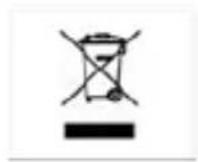
The symbol indicates that this product should be disposed of separately from regular household waste streams. It is your responsibility to dispose of this and other electrical and electronics products via designated collection facilities appointed by the government or local authorities. Correct disposal and recycling will help prevent potential negative consequences to the environment and human health. For more detailed information about the disposal of your unwanted product, please contacts your local authorities, waste disposal service, or the shop where you purchased the product.
Monoprice™, SonicSolace™, and all Monoprice logos are trademarks of Monoprice Inc.
USB Type-C ^® and USB-C ^® are registered trademarks of USB Implementers Forum.
The Bluetooth ^® word mark and logos are registered trademarks of Bluetooth SIG, Inc.
Qualcomm ^® is a trademark of Qualcomm Incorporated, registered in the United States and other countries. cVc ^™ Echo Cancelling and Noise Suppression is a trademark of Qualcomm Technologies International, Ltd. Qualcomm ^® cVc ^™ Echo Cancelling and Noise Suppression is a products of Qualcomm Technologies International, Ltd.
Brand : MONOPRICE
Model : 43239
Category : Headphones