
DS-K2M062 - Système de contrôle d'accès de sécurité Hikvision - Free user manual and instructions
Find the device manual for free DS-K2M062 Hikvision in PDF.


| Product Type | Access Control Terminal / Door Station |
| Brand | Hikvision |
| Model | DS-K2M062 |
| Dimensions (W x H x D) | 150 mm x 80 mm x 30 mm |
| Weight | 0.5 kg |
| Power Supply | 12 V DC |
| Power Consumption | ≤ 5 W |
| Communication Interface | RS-485, Ethernet (RJ-45) |
| Card Reader Type | RFID (13.56 MHz) |
| Video Intercom | Yes, with camera |
| Audio | Two-way audio (microphone and speaker) |
| Mounting Type | Surface mount |
| Material | Aluminum alloy |
| IP Rating | IP65 |
| Operating Temperature | -30 °C to +60 °C |
| Tamper Alarm | Yes |
| Wiegand Interface | Support (26/34 bit) |
| Number of Users | Up to 100,000 |
| Event Log | Up to 200,000 |
| Certification | CE, FCC |
| Cleaning Instructions | Wipe with a soft, dry cloth. Do not use solvents. |
| Repairability | Not user-serviceable; contact qualified technician. |
Frequently Asked Questions - DS-K2M062 Hikvision
User questions about DS-K2M062 Hikvision
0 question about this device. Answer the ones you know or ask your own.
Ask a new question about this device
Download the instructions for your Système de contrôle d'accès de sécurité in PDF format for free! Find your manual DS-K2M062 - Hikvision and take your electronic device back in hand. On this page are published all the documents necessary for the use of your device. DS-K2M062 by Hikvision.
USER MANUAL DS-K2M062 Hikvision
©2022 Hangzhou Hikvision Digital Technology Co., Ltd. All rights reserved.
About this Manual
The Manual includes instructions for using and managing the Product. Pictures, charts, images and all other information hereinafter are for description and explanation only. The information contained in the Manual is subject to change, without notice, due to firmware updates or other reasons. Please find the latest version of this Manual at the Hikvision website (https://www.hikvision.com/).
Please use this Manual with the guidance and assistance of professionals trained in supporting the Product.
Trademarks
HIKVISION and other Hikvision's trademarks and logos are the properties of Hikvision in various jurisdictions.
Other trademarks and logos mentioned are the properties of their respective owners.
Disclaimer
TO THE MAXIMUM EXTENT PERMITTED BY APPLICABLE LAW, THIS MANUAL AND THE PRODUCT DESCRIBED, WITH ITS HARDWARE, SOFTWARE AND FIRMWARE, ARE PROVIDED "AS IS" AND "WITH ALL FAULTS AND ERRORS". HIKVISION MAKES NO WARRANTIES, EXPRESS OR IMPLIED, INCLUDING WITHOUT LIMITATION, MERCHANTABILITY, SATISFACTORY QUALITY, OR FITNESS FOR A PARTICULAR PURPOSE. THE USE OF THE PRODUCT BY YOU IS AT YOUR OWN RISK. IN NO EVENT WILL HIKVISION BE LIABLE TO YOU FOR ANY SPECIAL, CONSEQUENTIAL, INCIDENTAL, OR INDIRECT DAMAGES, INCLUDING, AMONG OTHERS, DAMAGES FOR LOSS OF BUSINESS PROFITS, BUSINESS INTERRUPTION, OR LOSS OF DATA, CORRUPTION OF SYSTEMS, OR LOSS OF DOCUMENTATION, WHETHER BASED ON BREACH OF CONTRACT, TORT (INCLUDING NEGLIGENCE), PRODUCT LIABILITY, OR OTHERWISE, IN CONNECTION WITH THE USE OF THE PRODUCT, EVEN IF HIKVISION HAS BEEN ADVISED OF THE POSSIBILITY OF SUCH DAMAGES OR LOSS.
YOU ACKNOWLEDGE THAT THE NATURE OF THE INTERNET PROVIDES FOR INHERENT SECURITY RISKS, AND HIKVISION SHALL NOT TAKE ANY RESPONSIBILITIES FOR ABNORMAL OPERATION, PRIVACY LEAKAGE OR OTHER DAMAGES RESULTING FROM CYBER-ATTACK, HACKER ATTACK, VIRUS INFECTION, OR OTHER INTERNET SECURITY RISKS; HOWEVER, HIKVISION WILL PROVIDE TIMELY TECHNICAL SUPPORT IF REQUIRED.
YOU AGREE TO USE THIS PRODUCT IN COMPLIANCE WITH ALL APPLICABLE LAWS, AND YOU ARE SOLELY RESPONSIBLE FOR ENSURING THAT YOUR USE CONFORMS TO THE APPLICABLE LAW. ESPECIALLY, YOU ARE RESPONSIBLE, FOR USING THIS PRODUCT IN A MANNER THAT DOES NOT INFRINGE ON THE RIGHTS OF THIRD PARTIES, INCLUDING WITHOUT LIMITATION, RIGHTS OF PUBLICITY, INTELLECTUAL PROPERTY RIGHTS, OR DATA PROTECTION AND OTHER PRIVACY RIGHTS. YOU SHALL NOT USE THIS PRODUCT FOR ANY PROHIBITED END-USES, INCLUDING THE
DEVELOPMENT OR PRODUCTION OF WEAPONS OF MASS DESTRUCTION, THE DEVELOPMENT OR PRODUCTION OF CHEMICAL OR BIOLOGICAL WEAPONS, ANY ACTIVITIES IN THE CONTEXT RELATED TO ANY NUCLEAR EXPLOSIVE OR UNSAFE NUCLEAR FUEL-CYCLE, OR IN SUPPORT OF HUMAN RIGHTS ABUSES.
IN THE EVENT OF ANY CONFLICTS BETWEEN THIS MANUAL AND THE APPLICABLE LAW, THE LATTER PREVAILS.
Data Protection
During the use of device, personal data will be collected, stored and processed. To protect data, the development of Hikvision devices incorporates privacy by design principles. For example, for device with facial recognition features, biometrics data is stored in your device with encryption method; for fingerprint device, only fingerprint template will be saved, which is impossible to reconstruct a fingerprint image.
As data controller, you are advised to collect, store, process and transfer data in accordance with the applicable data protection laws and regulations, including without limitation, conducting security controls to safeguard personal data, such as, implementing reasonable administrative and physical security controls, conduct periodic reviews and assessments of the effectiveness of your security controls.
Regulatory Information
FCC Information
Please take attention that changes or modification not expressly approved by the party responsible for compliance could void the user's authority to operate the equipment.
FCC compliance: This equipment has been tested and found to comply with the limits for a Class B digital device, pursuant to part 15 of the FCC Rules. These limits are designed to provide reasonable protection against harmful interference in a residential installation. This equipment generates, uses and can radiate radio frequency energy and, if not installed and used in accordance with the instructions, may cause harmful interference to radio communications. However, there is no guarantee that interference will not occur in a particular installation. If this equipment does cause harmful interference to radio or television reception, which can be determined by turning the equipment off and on, the user is encouraged to try to correct the interference by one or more of the following measures:
—Reorient or relocate the receiving antenna.
—Increase the separation between the equipment and receiver.
—Connect the equipment into an outlet on a circuit different from that to which the receiver is connected.
—Consult the dealer or an experienced radio/TV technician for help
This equipment should be installed and operated with a minimum distance 20cm between the radiator and your body.
FCC Conditions
This device complies with part 15 of the FCC Rules. Operation is subject to the following two conditions:
- This device may not cause harmful interference.
- This device must accept any interference received, including interference that may cause undesired operation.
EU Conformity Statement

This product and - if applicable - the supplied accessories too are marked with "CE" and comply therefore with the applicable harmonized European standards listed under the EMC Directive 2014/30/EU, the RoHS Directive 2011/65/EU

2012/19/EU (WEEE directive): Products marked with this symbol cannot be disposed of as unsorted municipal waste in the European Union. For proper recycling, return this product to your local supplier upon the purchase of equivalent new equipment, or dispose of it at designated collection points. For more information see: www.recyclethis.info
2006/66/EC (battery directive): This product contains a battery that cannot be disposed of as unsorted municipal waste in the European Union. See the product documentation for specific battery information. The battery is marked with this symbol, which may include lettering to indicate cadmium (Cd), lead (Pb), or mercury (Hg). For proper recycling, return the battery to your supplier or to a designated collection point. For more information see:www.recyclethis.info
Industry Canada ICES-003 Compliance
This device meets the CAN ICES-3 (B)/NMB-3(B) standards requirements.
This device complies with Industry Canada licence-exempt RSS standard(s). Operation is subject to the following two conditions:
- this device may not cause interference, and
- this device must accept any interference, including interference that may cause undesired operation of the device.
Under Industry Canada regulations, this radio transmitter may only operate using an antenna of a type and maximum (or lesser) gain approved for the transmitter by Industry Canada. To reduce potential radio interference to other users, the antenna type and its gain should be so chosen that the equivalent isotropically radiated power (e.i.r.p.) is not more than that necessary for successful communication.
This equipment should be installed and operated with a minimum distance 20cm between the radiator and your body.
- In the use of the product, you must be in strict compliance with the electrical safety regulations of the nation and region.
- Never place the equipment in an unstable location. The equipment may fall, causing serious personal injury or death.
- CAUTION: To reduce the risk of fire, replace only with the same type and rating of fuse.
- The socket-outlet shall be installed near the equipment and shall be easily accessible.
- An all-pole mains switch shall be incorporated in the electrical installation of the building.
- Do not connect several devices to one power adapter as adapter overload may cause over-heat or fire hazard.
- If smoke, odors or noise rise from the device, turn off the power at once and unplug the power cable, and then please contact the service center.
- If the product does not work properly, please contact your dealer or the nearest service center. Never attempt to disassemble the device yourself. We shall not assume any responsibility for problems caused by unauthorized repair or maintenance.
Cautions
- Use only power supplies listed in the user manual or user instruction.
- The serial port of the equipment is used for debugging only.
- No naked flame sources, such as lighted candles, should be placed on the equipment.
- Please keep all wrappers after unpack them for future use. In case of any failure occurred, you need to return the device to the factory with the original wrapper. Transportation without the original wrapper may result in damage on the device and lead to additional costs.
Available Models
Product
| Product Name Product Model | |
| Secure Door Control Unit DS-K2M062 |
Power Supply
| Model Manufacturer Standard | |
| ADS-12FG-12N 12012EPCU Shenzhen Honor Electronic Co., Ltd PCU | |
| ADS-12FG-12N 12012EPG Shenzhen Honor Electronic Co., Ltd PG |
Contents
Chapter 1 Overview ...... 1
1.1 Product Introduction .... 1
1.2 Appearance Introduction ...... 2
Chapter 2 Wiring Description .... 3
Appendix A. Dimension 5
Appendix B. Communication Matrix and Device Command 6
Chapter 1 Overview
1.1 Product Introduction
natural_image
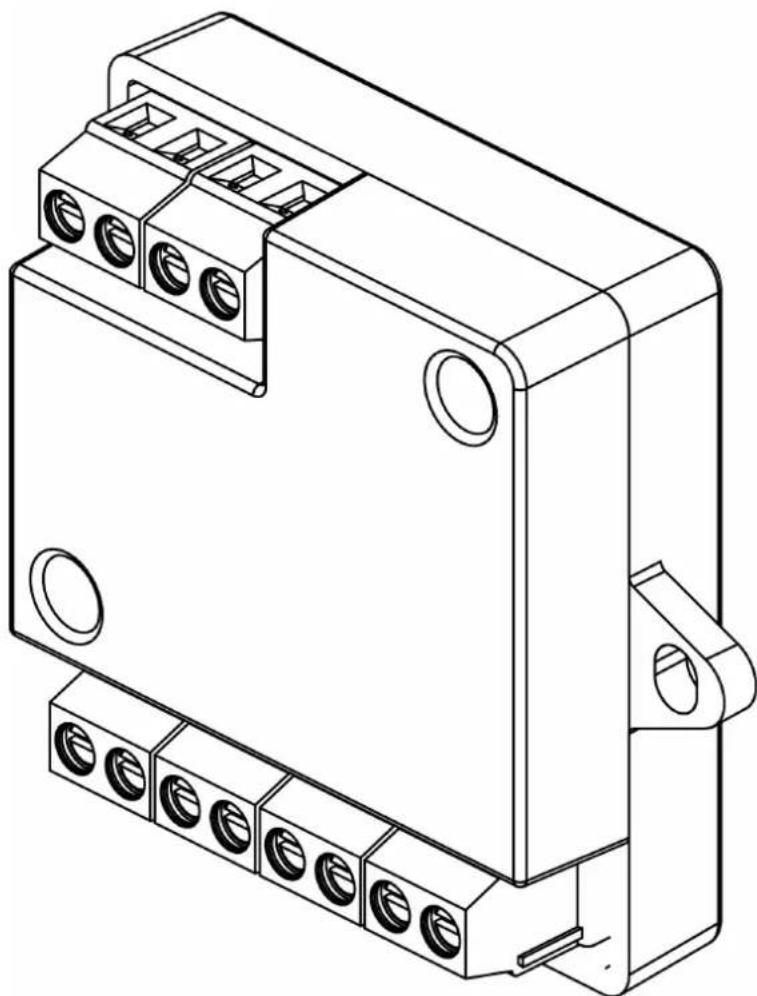
Technical line drawing of an electrical connector housing (no text or symbols)Figure 1-1 Appearance
Secure door control unit (hereinafter referred as "unit") is designed to keep the door in the status before the access control terminal is crashed when the access control terminal is crashed or damaged by external force.
Secure door control unit is the middle layer between access control terminal and door lock in the access control system. The top side can be connected to exitbutton, and the bottom side can be connected to lock control, door contact and access control terminal. Equipped with access control equipment, it is safer to control the door.
1.2 Appearance Introduction
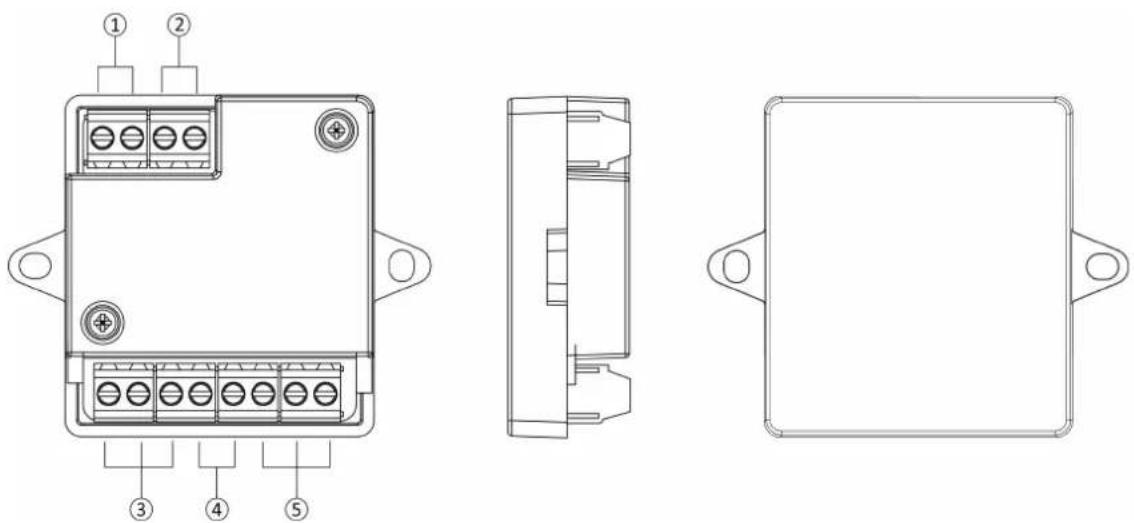
Figure 1-2 Appearance Description
Table 1-1 Appearance Description
| No. Description | |
| 1 Power Input | |
| 2 Exit Button | |
| 3 Lock | |
| 4 Door Contact | |
| 5 RS-485 |
Chapter 2 Wiring Description
The wiring of external devices is as following.
External Devices Wiring
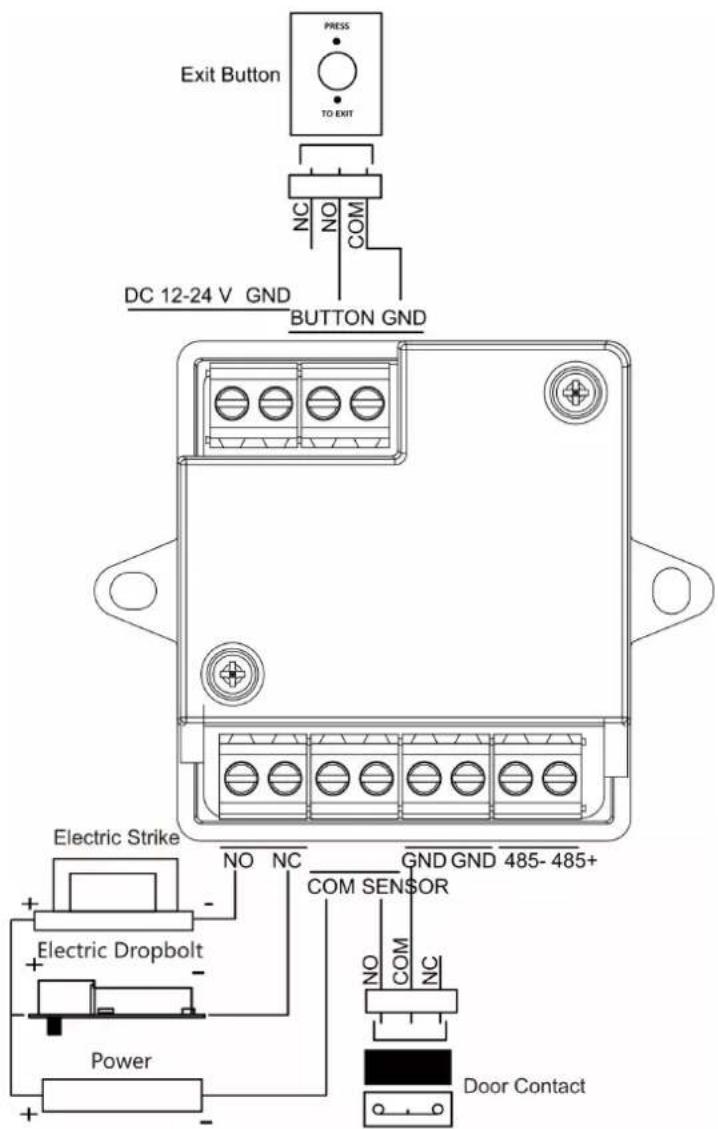
Figure 2-1 External Devices Wiring Description
Application
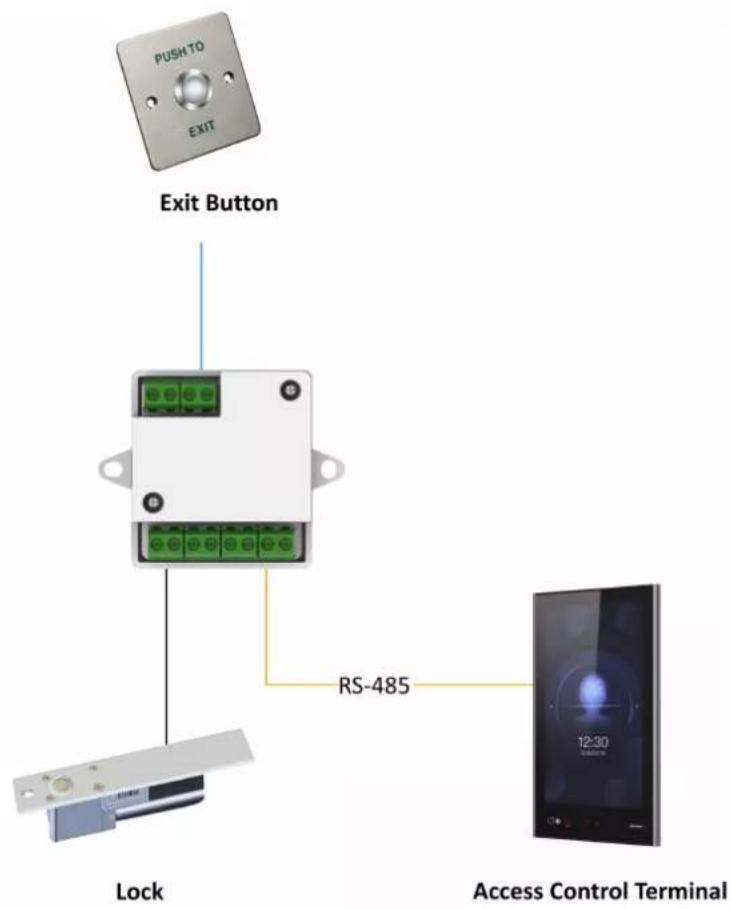
Figure 2-2 Topology
Appendix A. Dimension
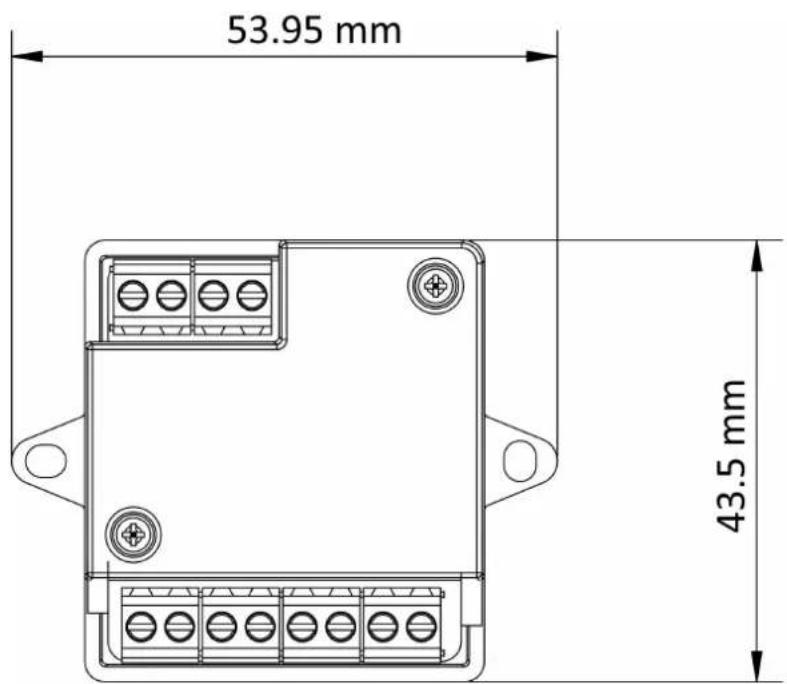
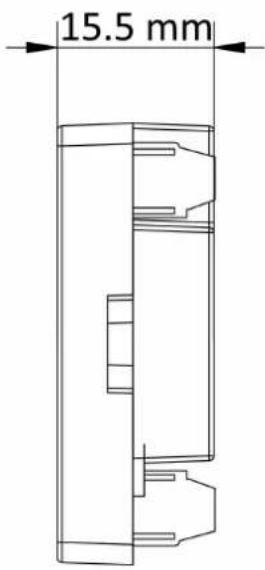
Figure A-1 Dimension
Appendix B. Communication Matrix and Device Command
Communication Matrix
Scan the following QR code to get the device communication matrix.
Note that the matrix contains all communication ports of Hikvision access control and video intercom devices.
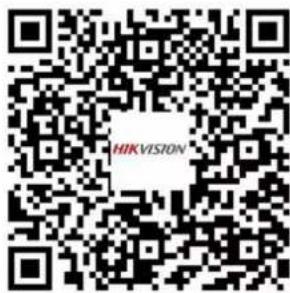
Figure B-1 QR Code of Communication Matrix
Device Command
Scan the following QR code to get the device common serial port commands.
Note that the command list contains all commonly used serial ports commands for all Hikvision access control and video intercom devices.
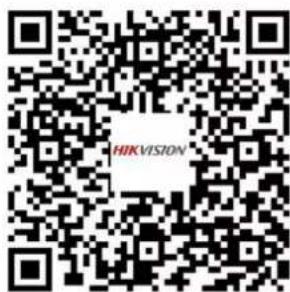
Figure B-2 Device Command

See Far, Go Further
- About this Manual
- Trademarks
- Disclaimer
- Data Protection
- Regulatory Information
- FCC Information
- EU Conformity Statement
- Industry Canada ICES-003 Compliance
- Cautions
- Available Models
- Product
- Power Supply
- Contents
- Chapter 1 Overview ...... 1
- Chapter 2 Wiring Description .... 3
- Appendix A. Dimension 5
- Appendix B. Communication Matrix and Device Command 6
- Chapter 1 Overview
- Product Introduction
- Appearance Introduction
- Chapter 2 Wiring Description
- External Devices Wiring
- Application
- Appendix A. Dimension
- Appendix B. Communication Matrix and Device Command
- Communication Matrix
- Device Command
Brand : Hikvision
Model : DS-K2M062
Category : Système de contrôle d'accès de sécurité