
VB-PEN-007 - Graphic tablet VIEWSONIC - Free user manual and instructions
Find the device manual for free VB-PEN-007 VIEWSONIC in PDF.


| Product Type | Presenter Pen / Graphic Tablet |
| Model Number | VS19566 |
| Part Number | VB-PEN-007 |
| Wireless Connection | RF 2.4 GHz, 802.11b |
| Wireless Range | 30 m (98.43 ft) |
| Battery Type | Li-ion Polymer, 170mAh |
| Battery Life | 50 days standby; 4 hours continuous use |
| Charging Time | 10 min for 1 hour use; full charge in about 1 hour |
| Input Power | 5V/210mA, 1.05W |
| Pen Nibs Included | Fine nib, Thick nib, Conductive nib |
| Dimensions (Pen) | 153.5 x 18.7 x 18.3 mm (6.04 x 0.74 x 0.72 in) |
| Weight (Pen) | 21 g (0.46 lb) |
| Operating Temperature | 40°C (104°F) maximum |
| Compatible OS | Windows, Android, macOS, Linux |
| Sleep Mode | After 20 minutes of inactivity |
| Package Contents | Presenter Pen, USB Receiver, USB Cable, Fine Nib, Thick Nib, Conductive Nib, Quick Start Guide |
| Safety | Do not disassemble; avoid water; use specified charger; keep away from heat sources |
| Maintenance | Replace nibs when worn; store in cool, dry place; clean with dry cloth |
| Reparability | No user-serviceable parts; contact qualified service for repairs |
| Regulatory Approvals | FCC, IC, CE, RoHS2, WEEE |
Frequently Asked Questions - VB-PEN-007 VIEWSONIC
User questions about VB-PEN-007 VIEWSONIC
0 question about this device. Answer the ones you know or ask your own.
Ask a new question about this device
Download the instructions for your Graphic tablet in PDF format for free! Find your manual VB-PEN-007 - VIEWSONIC and take your electronic device back in hand. On this page are published all the documents necessary for the use of your device. VB-PEN-007 by VIEWSONIC.
USER MANUAL VB-PEN-007 VIEWSONIC
natural_image
Line drawing of a handheld electronic device with ports and buttons (no text or symbols)IMPORTANT: Please read this User Guide to obtain important information on installing and using your product in a safe manner, as well as registering your product for future service. Warranty information contained in this User Guide will describe your limited coverage from ViewSonic® Corporation, which is also found on our web site at http://www.viewsonic.com in English, or in specific languages using the Regional selection box of our website.
Model No. VS19566
P/N: VB-PEN-007
Thank you for choosing ViewSonic®
As a world-leading provider of visual solutions, ViewSonic® is dedicated to exceeding the world's expectations for technological evolution, innovation, and simplicity. At ViewSonic®, we believe that our products have the potential to make a positive impact in the world, and we are confident that the ViewSonic® product you have chosen will serve you well.
Once again, thank you for choosing ViewSonic®!
Safety Precautions
Please read the following Safety Precautions before you start using the device.
- Keep this user guide in a safe place for later reference.
- Read all warnings and follow all instructions.
- Do not immerse the pen in water and store it in a cool, dry environment when not in use.
- Avoid exposing the pen to direct sunlight or other continuous heat sources. Do not place the pen in close proximity to heat sources such as: heat sinks, heaters, or other sources of continuous heat.
- When charging this product, please use a dedicated charger/cord.
- This product contains a polymer lithium-ion battery. Do not attempt to disassemble and replace the internal parts.
- Do not use this product alone with infants or children to avoid accidents.
- Do not put liquids near the pen. If liquid is spilled into or on the pen, it may cause the pen to malfunction. If the pen becomes wet, please disconnect the power and call your local service center to repair the pen.
- If the product emits an odor, becomes hot, discolored or deformed, or if any abnormalities occur during use, storage or charging, discontinue use immediately.
- If the battery leaks and the electrolyte gets into your eyes, please do not rub it, use water to flush your eyes, and contact a medical professional immediately.
- Use only the accessories specified by the manufacturer.
- This product has no parts which can be repaired by the user. Any damage caused by the user's own disassembly is not covered by warranty. Repair operations should be performed by qualified professionals.
Contents
Safety Precautions....3
Introduction .... 5
Package Contents ....5
Product Overview....6
Initial Setup....7
Charging the VB-PEN-007 7
Powering ON and Pairing the VB-PEN-007 8
Re-Pairing the VB-PEN-007....9
Using the VB-PEN-007 10
Pen Nibs....10
Replacing Pen Nibs.... 10
Using the Presentation Function....11
Appendix....12
Presenter Pen Specifications ....12
USB Receiver Specifications....12
LED Indicator Status....13
Regulatory and Service Information 14
Compliance Information....14
FCC Compliance Statement.... 14
FCC Radiation Exposure Statement.... 15
IC Warning Statement.... 15
CE Conformity for European Countries 16
Declaration of RoHS2 Compliance.... 17
Indian Restriction of Hazardous Substances 18
Product Disposal at End of Product Life 18
Copyright Information....19
Customer Service 20
Introduction
Package Contents

Presenter Pen USB Receiver USB Cable


Fine Pen Nib Thick Pen Nib Conductive Pen Nib
Quick Start Guide
NOTE: The package contents may vary by region.
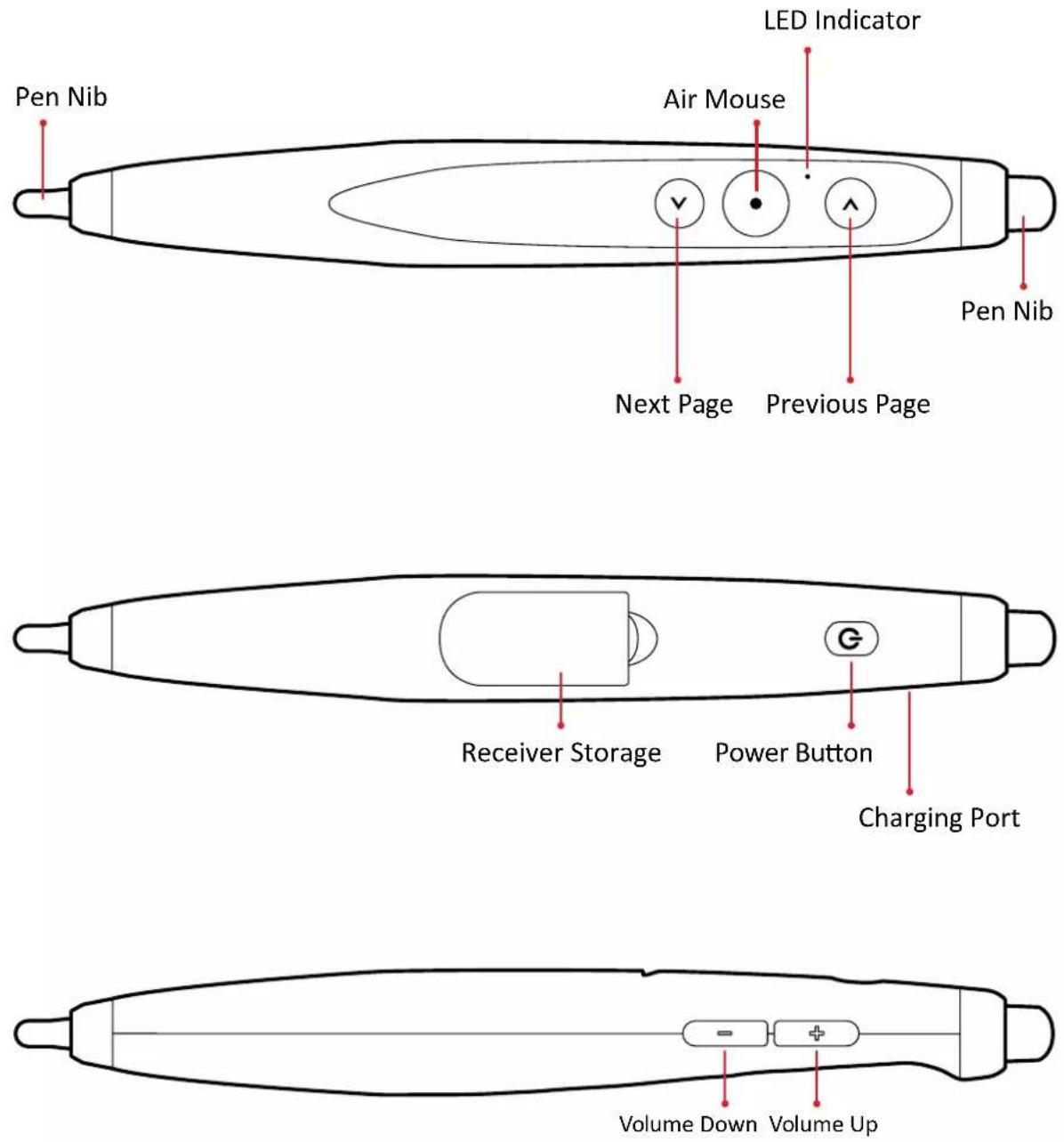
Product Overview
Initial Setup
Charging the VB-PEN-007
NOTE: Fully charge the VB-PEN-007 before its first use.
-
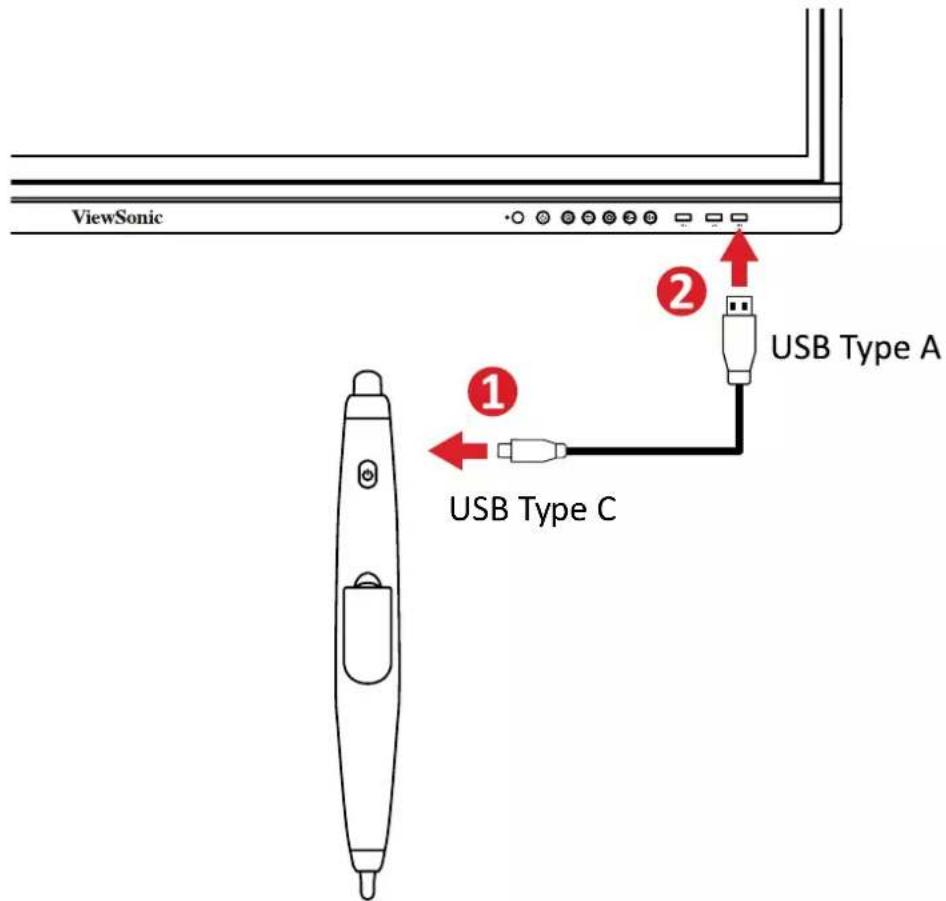
Connect the USB Type C end of the included USB cable to the Charging Port of the VB-PEN-007.
-
Then connect the other end, the USB Type A, of the cable to a USB Type A port of a display or other power delivering device.
-
When charging, the LED Indicator will emit a constant red light. When fully charged, the VB-PEN-007 can provide four (4) hours of use.
NOTE: A short, 10 minute charge can provide one (1) hour of use.
Powering ON and Pairing the VB-PEN-007
- Plug the USB Receiver into a USB Type A port of a display device.
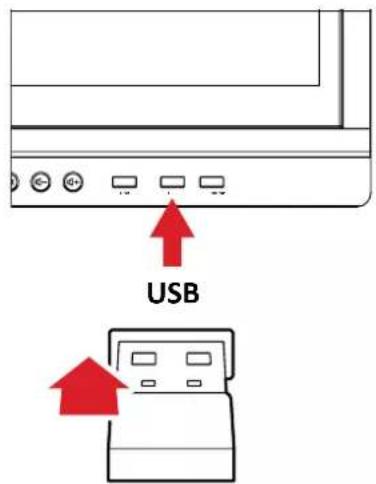
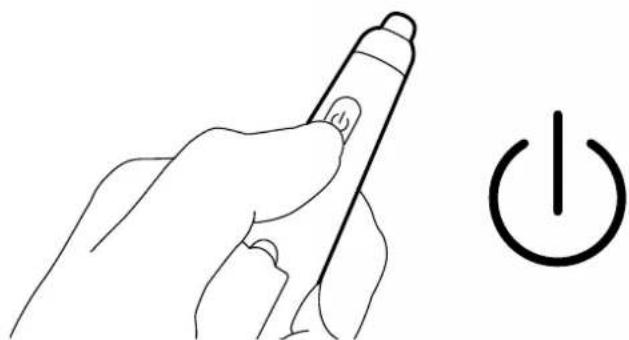
- Press and hold the VB-PEN-007's Power Button for three (3) seconds to begin pairing.
NOTE: When in pairing mode, the LED Indicator will emit a blue flashing light.
natural_image
Line drawing of a hand holding a pen with a power button symbol nearby (no text or labels)- After successfully Powering ON and pairing the VB-PEN-007, the LED Indicator will emit a constant blue light.
Re-Pairing the VB-PEN-007
If the VB-PEN-007 needs to be re-paired, please follow the steps below:
- Remove the USB Receiver from the display device.
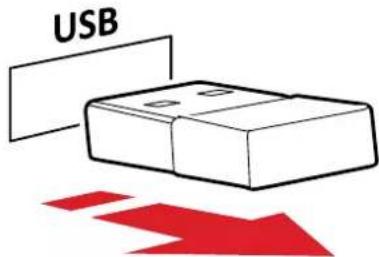
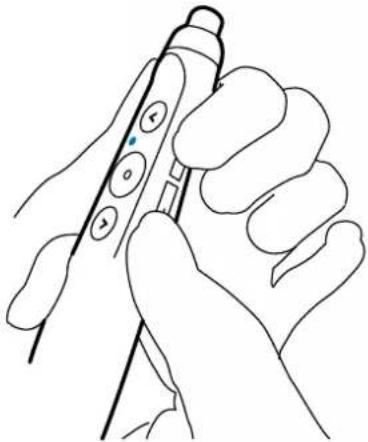
- Press and hold both the Volume Up and Volume Down buttons on the VB-PEN-007 for three (3) seconds to enter pairing mode.
NOTE: When in pairing mode, the LED Indicator will emit a blue flashing light.
natural_image
Line drawing of a hand holding a pen with buttons, no text or symbols present
- Plug the USB Receiver into a USB Type A port of the display device.
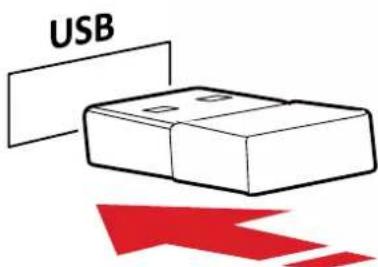

- When paired successfully, the LED Indicator will emit a constant blue light.
Using the VB-PEN-007
Pen Nibs
The VB-PEN-007 is equipped with two (2) pen nibs.
Fine Nib Thick Nib

natural_image
Simple line drawing of a curved shape with a red vertical stripe (no text or symbols)
natural_image
Simple line drawing of a stylized eye with red, blue, and white stripes (no text or symbols)Pen nib for infrared (IR) screens. Conductive pen nib for infrared (IR) and capacitive screens.
NOTE: After 20 minutes of non-use, the pen will shut down and enter sleep mode. Please press the Power Button for three (3) seconds to re-enable it.
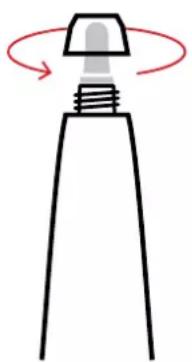
Replacing Pen Nibs
When the pen nib develops a sharp or rough edge, it can be replaced with replacement nibs. To replace a nib:
natural_image
Simple line drawing of a mechanical component with a rotating arrow indicating rotation (no text or symbols)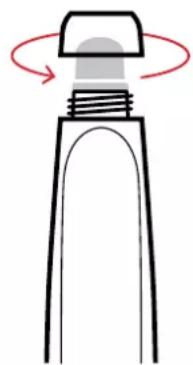
natural_image
Simple line drawing of a mechanical component with a curved base and a top, showing rotational motion (no text or symbols)- Rotate the pen nib holder counterclockwise and remove the old pen nib.
- Insert the new pen nib and turn the pen nib holder clockwise to secure it.
Using the Presentation Function
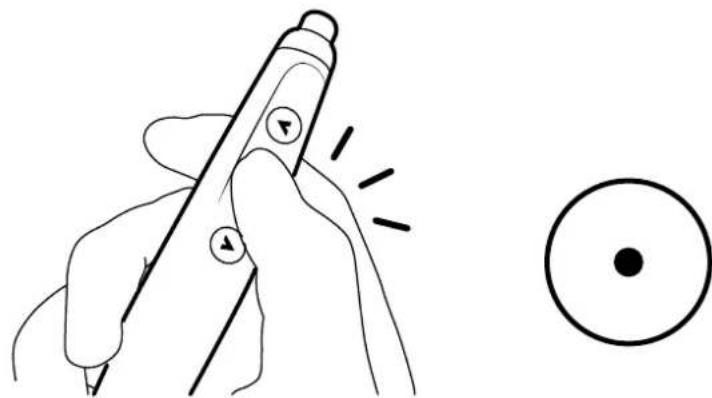
You can press and hold the Air Mouse button to use the VB-PEN-007 as an on-screen cursor, use the and buttons as a previous page and next page switch, and the side Volume Up and Down buttons to control the volume level.
natural_image
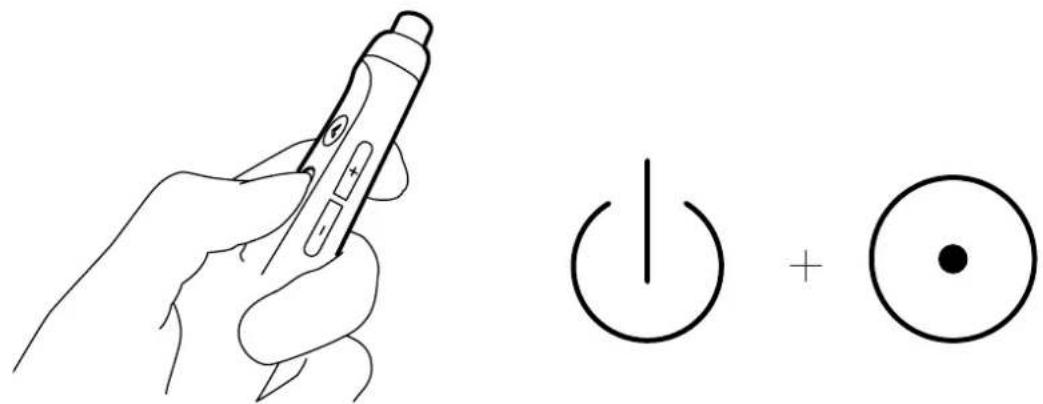
Illustration of a hand holding a pen with a pointer and a circular target symbol nearby (no text or labels)Pressing the Air Mouse button and Power Button at the same time will function as a left mouse click button.
Appendix
Presenter Pen Specifications
| ItemSpecifications | |
| Model No. | VS19566 |
| P/N | VB-PEN-007 |
| Wireless Connection Type | RF 2.4 GHz, 802.11b |
| Wireless Connection Distance | 30 m (98.43 ft) |
| Indicator Type | Air Mouse |
| Battery Type | Li-ion Polymer Battery, ALP500950, 170mAh |
| Battery Life | 50 days (Rechargeable) |
| Input Power Rating | 5V/210mA, 1.05W |
| Antenna Type | Chip Antenna |
| Automatic Sleep Mode | 20 minutes of inactivity |
| Operating Temperature | 40°C (104°F) |
| Operating System Compatibility | Windows/Android/MacOS/Linux |
| Dimensions | 153.5 x 18.7 x 18.3 mm(6.04 x 0.74 x 0.72 in) |
| Weight | 21 g (0.46 lb) |
USB Receiver Specifications
| ItemSpecifications | |
| Model No. | VS19567 |
| P/N | VB-PEN-007-2 |
| Wireless Connection Type | RF 2.4 GHz, 802.11b |
| Wireless Connection Distance | 30 m (98.43 ft) |
| Supported USB | USB 1.1 compatible with USB 2.0 and 3.0 |
| Input Power Rating | 5V/16mA, 0.08W |
| Antenna Type | PIFA |
| Dimensions | 21.1 x 12.1 x 4.7 mm(0.83 x 0.48 x 0.19 in) |
| Weight | 1.5 g (0.003 lb) |
LED Indicator Status
| Indicator Light Description | |
| Blue (Steady) | Powered ON and paired |
| Blue (Flashing Quickly) | Pairing in progress |
| Blue (Flashing Slowly) | Low battery |
| Red (Steady) | Charging |
Regulatory and Service Information
Compliance Information
This section addresses all connected requirements and statements regarding regulations. Confirmed corresponding applications shall refer to nameplate labels and relevant markings on the unit.
FCC Compliance Statement
This device complies with part 15 of FCC Rules. Operation is subject to the following two conditions: (1) this device may not cause harmful interference, and (2) this device must accept any interference received, including interference that may cause undesired operation. This equipment has been tested and found to comply with the limits for a Class B digital device, pursuant to part 15 of the FCC Rules.
These limits are designed to provide reasonable protection against harmful interference in a residential installation. This equipment generates, uses, and can radiate radio frequency energy, and if not installed and used in accordance with the instructions, may cause harmful interference to radio communications. However, there is no guarantee that interference will not occur in a particular installation. If this equipment does cause harmful interference to radio or television reception, which can be determined by turning the equipment off and on, the user is encouraged to try to correct the interference by one or more of the following measures:
- Reorient or relocate the receiving antenna.
- Increase the separation between the equipment and receiver.
- Connect the equipment into an outlet on a circuit different from that to which the receiver is connected.
- Consult the dealer or an experienced radio/TV technician for help.
Warning: You are cautioned that changes or modifications not expressly approved by the party responsible for compliance could void your authority to operate the equipment.
Industry Canada Statement
CAN ICES-003(B) / NMB-003(B)
Presenter Pen: VS19566(VB-PEN-007)
FCC ID: GSS-VS19566
IC ID: 4280A-VS19566
USB Receiver: VS19567(VB-PEN-007-2)
FCC ID: GSS-VS19567
IC ID: 4280A-VS19567
FCC Radiation Exposure Statement
This equipment complies with FCC radiation exposure limits set forth for an uncontrolled environment. This equipment should be installed and operated with a minimum distance of 20 cm between the radiator & your body.
Validity of using the module certification:
In the event that these conditions cannot be met (for example certain laptop configurations or co-location with another transmitter), then the FCC authorization for this module in combination with the host equipment is no longer considered valid and the FCC ID of the module cannot be used on the final product. In these circumstances, the OEM integrator will be responsible for re-evaluating the end product (including the transmitter) and obtaining a separate FCC authorization.
Custom design antennas may be used, however the OEM installer must following the FCC 15.21 requirements and verify if new FCC approval will be necessary.
IC Warning Statement
This device complies with Industry Canada license- exempt RSS standard(s). Operation is subject to the following two conditions: (1) this device may not cause interference, and (2) this device must accept any interference, including interference that may cause undesired operation of the device.
CE Conformity for European Countries

The device complies with the EMC Directive 2014/30/EU, Low Voltage Directive 2014/35/EU and Radio Equipment Directive 2014/53/EU.
https://www.viewsonicglobal.com/public/products_download/safety_compliance/acc/VS19566_CE_DoC.pdf
https://www.viewsonicglobal.com/public/products_download/safety_compliance/acc/VS19567_CE_DoC.pdf
The following information is only for EU-member states:
The mark shown to the right is in compliance with the Waste Electrical and Electronic Equipment Directive 2012/19/EU (WEEE). The mark indicates the requirement NOT to dispose of the equipment as unsorted municipal waste, but use the return and collection systems according to local law.

Declaration of RoHS2 Compliance
This product has been designed and manufactured in compliance with Directive 2011/65/EU of the European Parliament and the Council on restriction of the use of certain hazardous substances in electrical and electronic equipment (RoHS2 Directive) and is deemed to comply with the maximum concentration values issued by the European Technical Adaptation Committee (TAC) as shown below:
| Substance | Proposed Maximum Concentration | Actual Concentration |
| Lead (Pb) 0.1% < 0.1% | ||
| Mercury (Hg) 0.1% < 0.1% | ||
| Cadmium (Cd) 0.01% < 0.01% | ||
| Hexavalent Chromium (Cr6+) 0.1% < 0.1% | ||
| Polybrominated biphenyls (PBB) 0.1% < 0.1% | ||
| Polybrominated diphenyl ethers (PBDE) | 0.1% < 0.1% | |
| Bis(2-ethylhexyl) phthalate (DEHP) 0.1% < 0.1% | ||
| Butyl benzyl phthalate (BBP) 0.1% < 0.1% | ||
| Dibutyl phthalate (DBP) 0.1% < 0.1% | ||
| Diisobutyl phthalate (DIBP) 0.1% < 0.1% |
Certain components of products as stated above are exempted under the Annex III of the RoHS2 Directives as noted below:
• Copper alloy containing up to 4% lead by weight.
- Lead in high melting temperature type solders (i.e. lead-based alloys containing 85% by weight or more lead).
- Electrical and electronic components containing lead in a glass or ceramic other than dielectric ceramic in capacitors, e.g. piezoelectronic devices, or in a glass or ceramic matrix compound.
Indian Restriction of Hazardous Substances
Restriction on Hazardous Substances statement (India). This product complies with the “India E-waste Rule 2011” and prohibits use of lead, mercury, hexavalent chromium, polybrominated biphenyls or polybrominated diphenyl ethers in concentrations exceeding 0.1 weight % and 0.01 weight % for cadmium, except for the exemptions set in Schedule 2 of the Rule.
Product Disposal at End of Product Life
ViewSonic ^® respects the environment and is committed to working and living green. Thank you for being part of Smarter, Greener Computing. Please visit the ViewSonic ^® website to learn more.
USA & Canada:
https://www.viewsonic.com/us/go-green-with-viewsonic
Europe:
https://www.viewsonic.com/eu/go-green-with-viewsonic
Taiwan:
Copyright© ViewSonic® Corporation, 2023. All rights reserved.
Macintosh and Power Macintosh are registered trademarks of Apple Inc.
Microsoft, Windows, and the Windows logo are registered trademarks of Microsoft Corporation in the United States and other countries.
ViewSonic® and the three birds logo are registered trademarks of ViewSonic® Corporation.
VESA is a registered trademark of the Video Electronics Standards Association. DPMS, DisplayPort, and DDC are trademarks of VESA.
ENERGY STAR ^® is a registered trademark of the U.S. Environmental Protection Agency (EPA).
As an ENERGY STAR ^® partner, ViewSonic ^® Corporation has determined that this product meets the ENERGY STAR ^® guidelines for energy efficiency.
Disclaimer: ViewSonic® Corporation shall not be liable for technical or editorial errors or omissions contained herein; nor for incidental or consequential damages resulting from furnishing this material, or the performance or use of this product.
In the interest of continuing product improvement, ViewSonic® Corporation reserves the right to change product specifications without notice. Information in this document may change without notice.
No part of this document may be copied, reproduced, or transmitted by any means, for any purpose without prior written permission from ViewSonic® Corporation.
VB-PEN-007_UG_ENG_1a_20231012
Customer Service
For technical support or product service, see the table below or contact your reseller.
NOTE: You will need the product's serial number.
| Country/ Region | Website | Country/ Region | Website |
| Asia Pacific & Africa | |||
| Australia | www.viewsonic.com/au/ | Bangladesh | www.viewsonic.com/bd/ |
| 中国 (China) | www.viewsonic.com.cn | 香港(繁體中文) | www.viewsonic.com/hk/ |
| Hong Kong (English) | www.viewsonic.com/hk-en/ | India | www.viewsonic.com/in/ |
| Indonesia | www.viewsonic.com/id/ | Israel | www.viewsonic.com/il/ |
| 日本 (Japan) | www.viewsonic.com/jp/ | Korea | www.viewsonic.com/kr/ |
| Malaysia | www.viewsonic.com/my/ | Middle East | www.viewsonic.com/me/ |
| Myanmar | www.viewsonic.com/mm/ | Nepal | www.viewsonic.com/np/ |
| New Zealand | www.viewsonic.com/nz/ | Pakistan | www.viewsonic.com/pk/ |
| Philippines | www.viewsonic.com/ph/ | Singapore | www.viewsonic.com/sg/ |
| 臺灣 (Taiwan) | www.viewsonic.com/tw/ | ประเทศไทย | www.viewsonic.com/th/ |
| Việt Nam | www.viewsonic.com/vn/ | South Africa & Mauritius | www.viewsonic.com/za/ |
| Americas | |||
| United States | www.viewsonic.com/us | Canada | www.viewsonic.com/us |
| Latin America | www.viewsonic.com/la | ||
| Europe | |||
| Europe | www.viewsonic.com/eu/ | France | www.viewsonic.com/fr/ |
| Deutschland | www.viewsonic.com/de/ | Қазақстан | www.viewsonic.com/kz/ |
| Россия | www.viewsonic.com/ru/ | España | www.viewsonic.com/es/ |
| Türkiye | www.viewsonic.com/tr/ | Україна | www.viewsonic.com/ua/ |
| United Kingdom | www.viewsonic.com/uk/ | ||

natural_image
Illustration of three colorful birds perched on a branch, with 'ViewSonic' branding below (no other text or symbols)- Thank you for choosing ViewSonic®
- Safety Precautions
- Contents
- Safety Precautions....3
- Introduction .... 5
- Initial Setup....7
- Using the VB-PEN-007 10
- Appendix....12
- Regulatory and Service Information 14
- Introduction
- Package Contents
- Initial Setup
- Charging the VB-PEN-007
- Powering ON and Pairing the VB-PEN-007
- Re-Pairing the VB-PEN-007
- Using the VB-PEN-007
- Pen Nibs
- Replacing Pen Nibs
- Using the Presentation Function
- Appendix
- Regulatory and Service Information
- Compliance Information
- FCC Compliance Statement
- Industry Canada Statement
- FCC Radiation Exposure Statement
- Validity of using the module certification:
- IC Warning Statement
- CE Conformity for European Countries
- The following information is only for EU-member states:
- Declaration of RoHS2 Compliance
- Certain components of products as stated above are exempted under the Annex III of the RoHS2 Directives as noted below:
- Indian Restriction of Hazardous Substances
- Product Disposal at End of Product Life
- USA & Canada:
- Europe:
- Taiwan:
- Customer Service
Brand : VIEWSONIC
Model : VB-PEN-007
Category : Graphic tablet