
MPA 38 Pro - Satellite antenna XORO - Free user manual and instructions
Find the device manual for free MPA 38 Pro XORO in PDF.


| Brand | Xoro |
| Model | MPA 38 Pro |
| Product Type | Satellite Antenna |
| Antenna Type | Offset parabolic reflector |
| Reflector Diameter | 38 cm |
| Frequency Range | 10.7 – 12.75 GHz (Ku-band) |
| Polarization | Linear (H/V) |
| Gain | 34 dBi (typical) |
| LNB Type | Universal Ku-band LNB (single output) |
| LNB Noise Figure | 0.3 dB (typical) |
| Mount Type | Wall or pole mount (included) |
| Dimensions (antenna only) | 420 x 380 x 150 mm |
| Weight (antenna with LNB) | 2.8 kg |
| Power Supply | 12V DC via LNB (from satellite receiver) |
| Connector Type | F-type female |
| Cable Length (included) | 1.5 m |
| Operating Temperature | -20°C to +60°C |
| Storage Temperature | -30°C to +70°C |
| Waterproof Rating | IP54 |
| Compliance | CE, RoHS |
| Included Accessories | LNB, mounting bracket, bolts, instruction manual |
| Warranty | 2 years |
Frequently Asked Questions - MPA 38 Pro XORO
User questions about MPA 38 Pro XORO
0 question about this device. Answer the ones you know or ask your own.
Ask a new question about this device
Download the instructions for your Satellite antenna in PDF format for free! Find your manual MPA 38 Pro - XORO and take your electronic device back in hand. On this page are published all the documents necessary for the use of your device. MPA 38 Pro by XORO.
USER MANUAL MPA 38 Pro XORO
INSTALLATION AND OPERATING MANUAL
GENERAL....3
SAFETY INSTRUCTIONS....3
PACKING LIST ....3
SET-UP LOCATION 4
CONNECTION SCHEME....5
INSTALLATION 5
FRONT PANEL 6
REAR PANEL 6
OPERATING INSTRUCTIONS....7
WARRANTY TERMS 8
GENERAL
The portable Antenna System is designed to be used for receiving and watching satellite broadcasting in any outdoor environments. Once you have made all the connections and start the system, it can automatically find the satellite and set the connection for your satellite receiver.
Note:
Not suitable for the reception of the encoded Swiss TV-channels SRF1, SRF2 etc.
SAFETY INSTRUCTIONS
Do not open the cover of the unit. No user-serviceable parts inside. To open the covers cancels the guarantee of the unit. Refer to authorized technical service.
This system is not suitable for using while in motion.
The control box is designed to be installed into the dashboard of the vehicles. If dashboard installation is not possible for vehicles, make sure to determine an installation place with moderate heat as over heat may cause dangerous situations.
Do not use the control box without appropriate fuse. Using an inappropriate fuse or bypassing the fuse may cause dangerous situations
PACKING LIST
1) Antenna Unit XORO MPA 38 Pro
2) Control Box
3) Control Panel
4) 1x 8 meters RG6-U-4 Coax cable (Connection between Control box and Antenna unit)
5) 1x 1.5 meters RG6-U-4 Loop out cable (Connection between Control box and external receiver)
6) 220 V power supply unit
7) Manual
SET-UP LOCATION
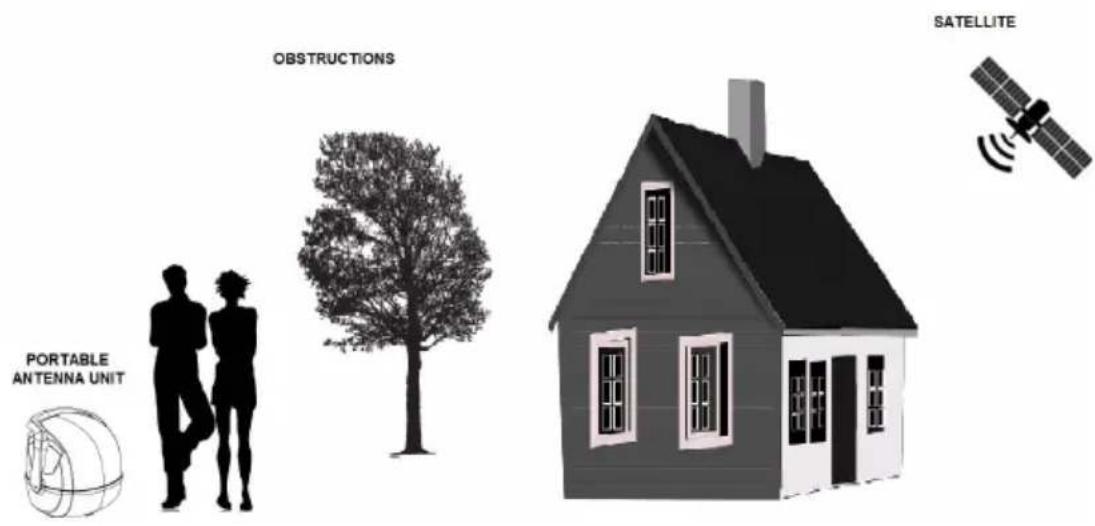
Make sure there are no physical obstacles between the antenna and line of sight to satellite which may prevent to get the signals. Any tall objects will block the signal. The antenna unit requires “direct line of sight” to satellites for optimal signal reception. The signal receiving performance of the system may decrease during heavy rainfall or snowfall. It also happens if the antenna is covered by snow. In such case, remove gently the snow off the antenna.
CONNECTION SCHEME

flowchart
graph TD
    A["Computer"] --> B["External Receiver"]
    B --> C["Sat IN LNB IN"]
    C --> D["Loop OUT"]
    D --> E["Control Panel"]
    E --> F["+12...24V Battery"]
    F --> G["Antenna INPUT"]
    G --> H["Motor"]
INSTALLATION
- Make sure the control box is switched off while connecting all the cables.
- Use the RG-6 coaxial (long) cable to connect the antenna unit's DCR-port with "ANTENNA IN" of the control box. Then use the second coaxial (short) cable to connect "LOOP-OUT" jack of the control box with the LNB/SAT-IN input of your satellite receiver. The loop jack passes the complete receiving signal coming from the satellite to your receiver through or TV set.
- Connect 12-24 V DC supply voltage to the input of the control box via 5 amp thermal fuse. The fuse protects it from damages caused by e.g. a shortcut or cable fire.
NOTE:
The XORO MPA 38 Pro has an auto skew functionality that automatically sets the polarization angle for the LNB and a GPS-receiver for accurate and quick positioning.
FRONT PANEL

| 1 ON/OFF Switch |
| 2 Power LED Indicator |
| 3 USB LED Indicator |
| 4 USB Port |
REAR PANEL
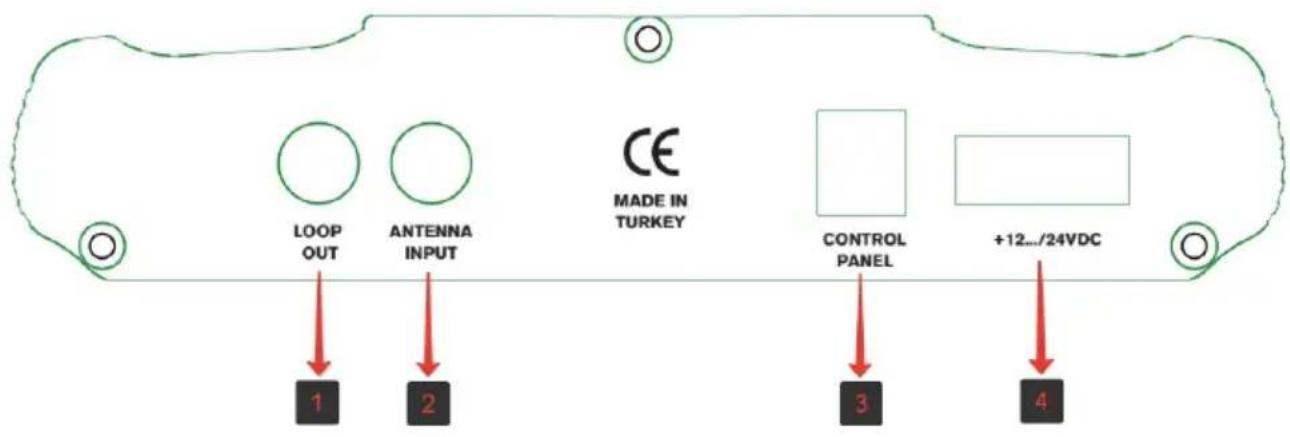
| 1 Loop-out connection for external receiver |
| 2 Antenna-in connection for antenna unit |
| 3 Control panel connection |
| 4 12/24V Power connection |
OPERATING INSTRUCTIONS
Operating the system
Make sure all the connections between antenna system and control box and between receiver and control box using the loop out port are connected properly.
Make sure the handle of the antenna points towards the floor while in operation in order to prevent a limited signal reception.
Turn on the system
"Turn on" the On/Off switch on the front of the control box. The LED on the front panel will turn on and the system will start to operate. You can see on the control panel what satellite the system is set to.
The system will automatically search for the satellite. This will take about 30-60 seconds. After the satellite has been found the signal will be transferred to your receiver or TV set via the loop out port of the control box.
You can use the control panel to switch between the preprogrammed satellite positions.
Turn off the system
To turn off the system, press the “◎button located on the front of the control panel. When the antenna system is totally closed, the LED indicator will be turned off on the control panel.
Operating the antenna via DiSEqC
The antenna unit can be directly controlled by user's receiver without requiring the control panel through DiSEqC(1.1/1.0) bus communication
When diseqc feature is enabled the control box behaves like DiSEqC switch each DiSEqC port will be representing correspond number satellite as shown in the following table
| Port A - Satellite 1 (Astra 1 – 19,2° East) |
| Port B - Satellite 2 (Astra 2 – 28,2° East) |
| Port C - Satellite 3 (Astra 3 – 23,5° East) |
| Port D - Satellite 4 (Hotbird – 13,0° East) |
| Port E - Satellite 5 (Eutelsat 9,0° East) |
| Port F - Satellite 6 (Turksat 42,0° East) |
WARRANTY TERMS
If the products, at the time of the passing of risk, do not have the agreed quality or otherwise have a defect within, the MAS Elektronik AG shall be entitled to remedy the defect or replace the defect. In the event of defect removal / replacement delivery, MAS Elektronik AG acquires ownership of the removed / replaced components / devices with the expansion / replacement. MAS Elektronik AG uses spare parts or components, which are new or as new, in accordance with the respective industry standard in the context of production as well as for the removal of defects / replacement.
MAS Elektronik AG is not liable for any loss of data received by the customer. MAS Elektronik AG reserves the right to restore the factory settings when the devices are sent. Please make a note of your personal settings. MAS Elektronik AG is not liable for product-related accessories (eg DVDs, hard disks, flash memory, batteries) shipped by the customer with the device.
The claims for defects are fulfilled according to the current legal warranty. The warranty applies only in the country where the product was purchased. The following is excluded from warranty: damage to the polish, accessories, batteries, accidental damage, damage caused by misuse, dirt, water, battery spillage, counterfeiting. Also excluded are damage caused by unauthorized agency repair work and damage caused by installing a firmware upgrade, unless it was necessary to install the upgrade to ensure that the properties are safe.
MAS Elektronik AG is not liable for damage caused by loss, improper use of the device (separately or with other devices), for injuries to the customer due to the use of the device or due to force majeure or other reasons.
If possible, keep the original packaging of your device, so that, in the case of returning the device for maintenance, it can be shipped originally packed including all accessories, with a copy of the purchase slip, a fault description and the RMA number to the following adress:
ERS GmbH Electronic Repair Service
Weidegrund 3
21614 Buxtehude
Germany
Free call-back service (please visit our homepage)
www.xoro.de/service
Customer service
E-mail: support@ersservice.de
Notes
TECHNICAL SPECIFICATIONS
Antenna motion: Two axis; azimuth and elevation
Satellite search: Automatic at stationary position only
Connection: Through single coax cable
Azimuth moving range: 0° \~ 380° limited
Elevation moving range: 0^ 80^
Operating voltage: 12-24V DC
Operating power consumption: 30W
Dimensions (in closed position): 45x48x46( LxWxH in cm)
Weight: 5,5 kg
Storage temperature: -30^ +70^
Operating temperature: -15^ +50^
Operating relative humidity range: 0 \~ 98 %
The manufacturer reserves the right to change specifications without notice.
CE


Brand : XORO
Model : MPA 38 Pro
Category : Satellite antenna