KIT-903JC - Car Installation Kit ALPINE - Free user manual and instructions
Find the device manual for free KIT-903JC ALPINE in PDF.


| Product Type | Steering Wheel Control Interface Installation Kit |
| Brand | Alpine |
| Model | KIT-903JC |
| Compatible Vehicles | Jeep Compass with VP2/VP2 NAV original radio (2017 and later) |
| Kit Contents | SWC interface, wiring harness, FM antenna adapter, DAB antenna adapter |
| Key Functions | Steering wheel button control (source, seek, volume, mute, call, voice); interface settings (date/time, language, lights, sensors, HVAC, etc.) |
| Installation Requirements | Must be installed by a qualified professional. ESD prevention: connect WHEEL REMOTE JACK before vehicle connectors. |
| Electrical Specifications | Red wire (underkey) max 500 mA; yellow wire (permanent) for accessories; black wire (GND) |
| Steering Wheel Button Functions | Source, Seek up/down, Accept call, Voice, Reject call, Volume up/down, Mute |
| Settings Available | Date & time, language, ambient light, courtesy lights, parking sensors, lane assist, blind spot, rain sensors, brake maintenance, HVAC (MAX AC, DUAL) |
| Special Features | Buzzer cable for sound; AUX input; camera input; antenna signal support; delayed reverse; guide lines |
| Safety Precautions | Professional installation only; ESD damage prevention; manufacturer not liable for incidental damages |
| Maintenance | No specific maintenance instructions; keep connectors clean and dry |
| Repairability | No user-serviceable parts; contact professional installer for issues |
Frequently Asked Questions - KIT-903JC ALPINE
User questions about KIT-903JC ALPINE
0 question about this device. Answer the ones you know or ask your own.
Ask a new question about this device
Download the instructions for your Car Installation Kit in PDF format for free! Find your manual KIT-903JC - ALPINE and take your electronic device back in hand. On this page are published all the documents necessary for the use of your device. KIT-903JC by ALPINE.
USER MANUAL KIT-903JC ALPINE
Steering wheel control interface installation kit for:
JEEP
Model: Compass with VP2/VP2 NAV original RADIO;
Year: 2017>
Kit content: SWC interface
wiring harness
FM antenna adapter
DAB antenna adapter
Customer code:
natural_image
Electrical wiring harness with various colored wires and connectors, no visible text or symbolsINSTALLATION MANUAL
All installation work must be performed by a qualified professional installer only. The manufacturer / dealer is not liable for any kind of incidental or indirect damages. 10/2019 ALL RIGHTS RESERVED. Technical changes possible. No liability for misprints.
All installation work must be performed by a qualified professional installer only. The manufacturer / dealer is not liable for any kind of incidental or indirect damages. 10/2019 ALL RIGHTS RESERVED. Technical changes possible. No liability for misprints.
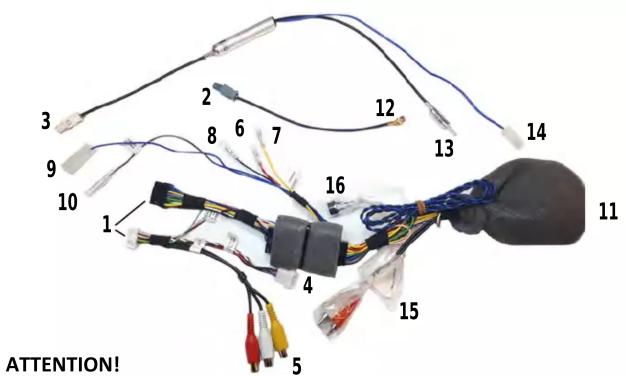
In order to prevent ESD damage, the WHEEL REMOTE JACK must be connected before plugging in the connectors on car side.
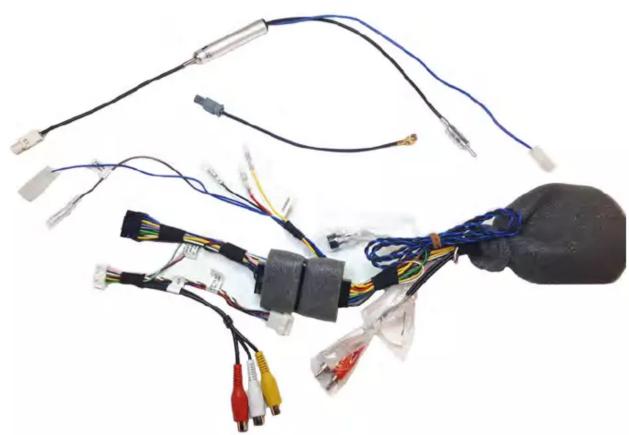
Connect cables to as follow:
1- to RADIO CONNECTOR
2- to CAR ANTENNA CONNECTOR
3- to CAR ANTENNA CONNECTOR (with iLX-702D, X802D-U, INE-W710D, iLX-F903D Radio)
4- to CAMERA IN
5- to AUX IN
6- Red wire UNDERKEY - available for external accessories MAX 500 mA
7- Yellow wire PERMANENT - available for external accessories
8- Black wire GND - available for external accessories
9- AUT ANTENNA SIGNAL
10- to CAMERA CONTROL
11- to CAR CONNECTOR
12- to RADIO ANTENNA CONNECTOR
13- to RADIO ANTENNA CONNECTOR (with iLX-702D, X802D-U, INE-W710D, iLX-F903D Radio)
14 - to the point n°9 (AUT ANTENNA SIGNAL)
NOTE: 15- Connect to point n°4 only if original RVC installed
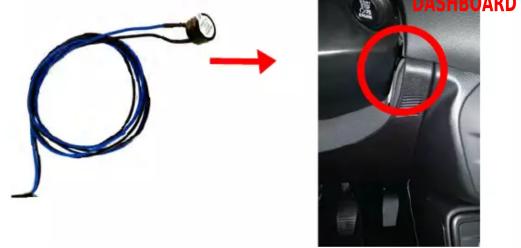
NOTE: 16- Find near the steering wheel the area where air grille is placed (highlighted in the picture).
NOTE: 17- Connect to point n°5 (White and Red RCA connectors) for VP2 with AUX only.
We suggest to place the buzzer behind this area for a better sound diffusion.
BUZZER CABLE
natural_image
Close-up of a blue cable with a sensor attached to a car's head panel, showing a red arrow and a red circle highlighting the dashboard (no text or symbols on the main subject)copy for the vehicle owner
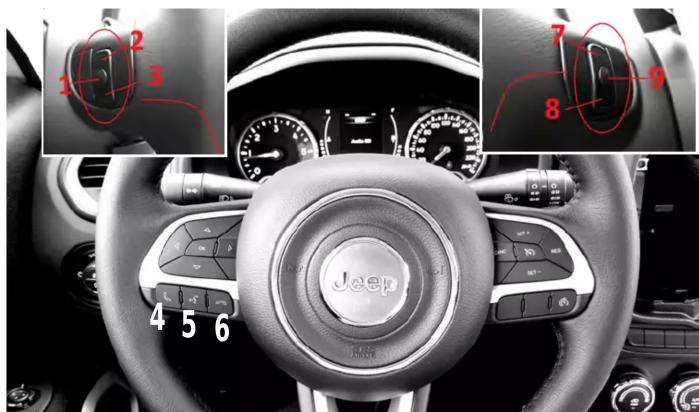
The steering wheel buttons perform the following functions (if supported by the radio):
1- Source
2- Seek up
3- Seek down
4- Accept incoming call
5- Voice
6- Reject incoming call
7- Volume up
8- Volume down
9- Mute
If your vehicle has the configuration shown in the picture, the buttons can carry out the functions listed below:
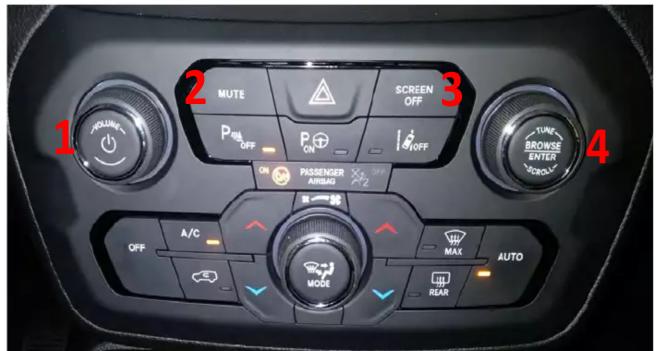
- 1 Left => decrease Volume
- 1 Rigth => increase Volume
- 1 Press => toggle ignition
- 2 Press => mute
- 3 Press => toggle ignition
- 4 Left => seek
- 4 Rigth => seek +
- 4 Press => toggle ignition
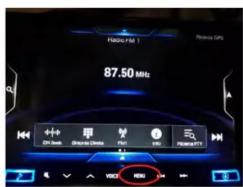
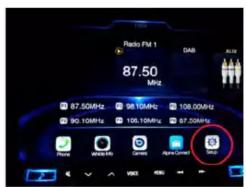
NOTE: Access the interface setting menu as shown in the pictures.
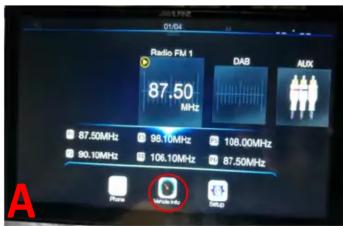
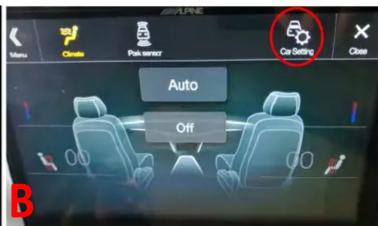
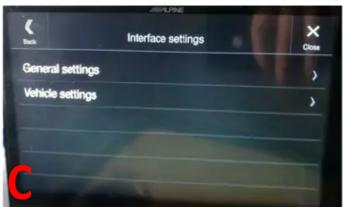
The available settings are (if the related optional is equipped by the car):
- Date & Time change
- Language change
- Follow me settings
- delayed reverse
• delayed reverse temporization
• camera guide lines visualization
• measure unit change
• temperature unit change
• pressure unit change - ambient light intensity change
- courtesy lights setting
• cornering light setting
• light management at shutdown - automatic high beam
• doors automatic closing setting
• passive entry setting
• door unlock selection
• automatic parking brake management
• anticollision warning setting - parking sensor setting
• radio mute on parksensor setting - lane assist settings
- lane assist strength
- blind spot warning management
• side sense management - rain sensor settings
- brake maintenance
AUTO HVAC (Heat Ventilation Air conditioning and Cooling) ONLY
MAX AC: this function is not carried out by the vehicle buttons.
- The user must set the desired function MAX AC manually, by using the wheel
and the buttons on the vehicle;
DUAL : this function is not carried out by the vehicle buttons.
- The user must press the OFF button twice to use the sync command;
Alpine H/U displays AC profile. This information can not be changed.
- Middle is displayed. Choices are: Low, Middle, High.
NOTE
Jeep Compass parking sensors can be displayed in the dashboard display.
Parking Distance Control is active and emits sounds only if the vehicle is moving.
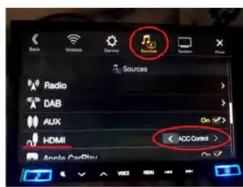
NOTE: In order to display on the monitor IMPORTANT information, please set the HDMI
to "accessory mode" even if the HDMI cable is not present.