
Explorer 110 - Earphones PLANTRONICS - Free user manual and instructions
Find the device manual for free Explorer 110 PLANTRONICS in PDF.


| Product Type | Bluetooth wireless earphones |
| Brand | Plantronics |
| Model | Explorer 110 |
| Weight | 7.8 g |
| Talk Time | Up to 7 hours |
| Standby Time | Up to 11 days |
| Charge Time | 2 hours for full charge |
| Battery Type | Rechargeable non-replaceable lithium-ion polymer |
| Bluetooth Version | Bluetooth v4.1 |
| Bluetooth Profiles | HFP v1.6, HSP v1.2, SSP |
| Operating Range | Up to 33 ft (10 m) |
| Charge Connector | Micro USB |
| Moisture Protection | No |
| Operating Temperature | 32°F - 102°F (0 - 40°C) |
| Storage Temperature | 32°F - 102°F (0 - 40°C) |
| Power Requirements | 5V DC, 150 mA |
| Main Functions | Answer/end calls, volume control, mute, redial, voice control (Siri/Google Now/Cortana), music playback control (play/pause, skip tracks), voice prompts, DeepSleep mode |
| Care and Cleaning | Wipe with dry cloth; avoid moisture |
| Safety | Do not expose to excessive heat or moisture; use only approved charger; follow local regulations |
| Spare Parts and Repairability | Not user-serviceable; contact Plantronics support or visit plantronics.com/support |
| General Information | Includes headset, car vent clip, vehicle power charger, 2-in-1 combo cable, micro USB cable, optional earloop; supports Plantronics Hub app |
Frequently Asked Questions - Explorer 110 PLANTRONICS
User questions about Explorer 110 PLANTRONICS
0 question about this device. Answer the ones you know or ask your own.
Ask a new question about this device
Download the instructions for your Earphones in PDF format for free! Find your manual Explorer 110 - PLANTRONICS and take your electronic device back in hand. On this page are published all the documents necessary for the use of your device. Explorer 110 by PLANTRONICS.
USER MANUAL Explorer 110 PLANTRONICS
Decipher the lights 8
Voice prompts 8
DeepSleep mode 8
Install the app 8
Specifications9
Support 10
What's in the box
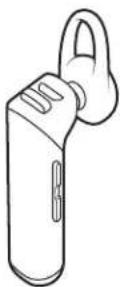
Headset Car vent clip*
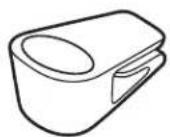
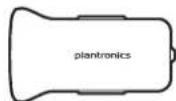
Vehicle power charger*
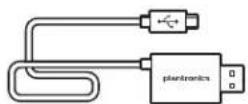
2-in-1 combo cable*
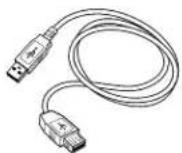
Micro USB cable* Optional earloop
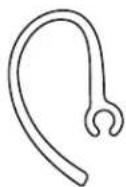
NOTE *Accessories may vary by product.
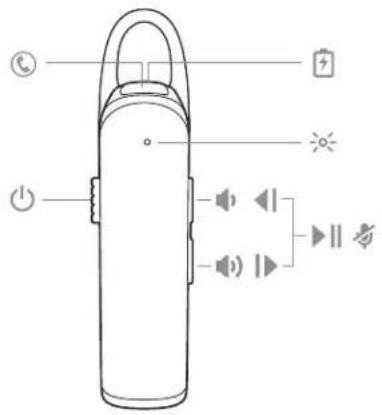
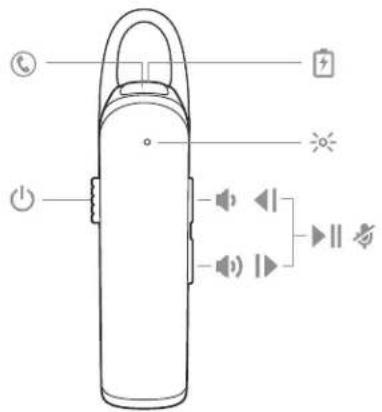
Headset overview
⑤
Call button
+
Charge port
[Non-Text]
Headset LED (indicator light)
(1)
Power button
(1)
Volume up
#
Volume down
◀
Track back
|
Track forward
▶||
Play/pause
尚
Mute
Pair
Get paired
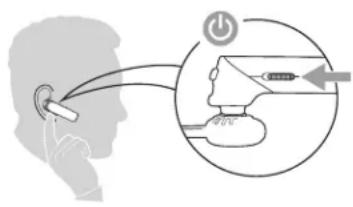
The first time you power on your headset, the pairing process begins.
1 Slide the power switch on. You hear "pairing" and the indicator ✦ light flashes red and blue.
2 Activate Bluetooth ^® on your phone and set it to search for new devices.
- iPhone Settings > Bluetooth > On*
- Android Settings > Bluetooth: On > Scan for devices*
NOTE *Menus may vary by device.
3 Select "PLT E100 Series."
If necessary, enter four zeros (0000) for the passcode or accept the connection.
Once successfully paired, you hear "pairing successful" and the indicator light stops flashing.
Pair mode
While wearing your headset, power it on. Press and hold the Call button until you hear "pairing." You can pair up to 2 devices to your headset.
Basics
| Answer or end a call | Tap the Call button. |
| Adjust the volume | Tap the Volume up or Volume down button. |
| Mute | During a conversation, press both the Volume up and Volume down buttons for 2 seconds until you hear "mute on" or "mute off." |
| Redial | Double-tap the Call button to call the last number you dialed. |
| Voice control | Siri, Google NowTM, Cortana Press the Call button for 2 seconds and wait for the phone prompt to activate voice dialing, search, and other smartphone voice controls. |
| Select language | Press and hold the Volume up and down buttons together until you hear "welcome." Follow the voice-guided prompts to select the headset language.*NOTE *Language selection not available in Europe, Russia and Africa. |
| Pair mode | While wearing your headset, power it on. Press and hold the Call button until you hear "pairing." You can pair up to 2 devices to your headset. |
Charge and fit
Charge
It takes 2 hours to fully charge the headset; the indicator light turns off once charging is complete.
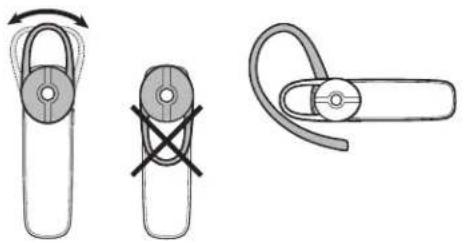
Adjust the fit
The universal-fit eartip has a thin loop that bends to gently tuck into the contours of either ear. To adjust the fit, you can rotate the eartip on the headset or add the optional clip-on earloop.
natural_image
Three technical diagrams showing a pulley mechanism with no text or symbolsHeadset Features
| Music and more | Listen to your music, podcasts, navigation and other streaming audio on your headset. |
| Play or pause audioPress both Volume buttons at the same time. | |
| Skip to next trackPress the Volume up button for 2 seconds. | |
| Play previous trackPress the Volume down button for 2 seconds to restart current track. Press the button twice (each button press 2 seconds) to go to previous track. | |
| Decipher the lights | Your headset has an indicator light that flashes in response to a change in status or after a button press.Some examples of what you will see are:Solid red until charging complete and then solid blueFlashing red and blue during pairingDouble red flash when battery lowDouble blue flash at incoming call |
| Voice prompts | Your headset tells you about status changes. For example:"Power on""Pairing successful""Phone 1 connected""Talk time (x) hours""Mute on""Answering call""Recharge headset" |
| DeepSleep mode | If you leave your headset powered on but out of range of your paired phone for more than 120 minutes, your headset will conserve its battery power by entering into a DeepSleep® mode.Once back in range with your phone, press any button to exit DeepSleep mode. If your phone is also ringing, tap the Call button again to answer your call. |
| Install the app | Get the most from your headset by installing our free mobile app, Plantronics Hub for iOS/Android. Explore all of your headset's features, view instructions, and contact Plantronics support easily from your smartphone. |

App Store

Google Play
Specifications
| Talk Time | Up to 7 hours |
| Standby Time | Up to 11 days |
| Operating Distance (Range) | Up to 33 feet (10 meters) from phone or table, Class II |
| Headset Weight | 7.8 grams |
| Charge Connector | Micro USB charging |
| Battery Type | Rechargeable non-replaceable lithium ion polymer |
| Charge Time (Maximum) | 2 hours for full |
| DeepSleep mode | Provides up to 180 days |
| Power Requirements | 5V DC – 150 mA |
| Bluetooth Version | Bluetooth v4.1 |
| Bluetooth Profiles | Hands-Free Profile v1.6 (HFP), Headset Profile v1.2 (HSP), Simple Secure Pairing (SSP) |
| Moisture Protection | No |
| Operating Temperature | 32°F - 102°F (0 - 40°C) |
| Storage Temperature | 32°F - 102°F (0 - 40°C) |
| Charging Temperature | 32°F - 104°F (0 - 40°C) |
| EN0800 410014 | FI0800 117095 | NO80011336 |
| AR+44 (0)1793 842443* | FR0800 945770 | PL+44 (0)1793 842443* |
| CS+44 (0)1793 842443* | GA1800 551 896 | PT800 84 45 17 |
| DA80 88 46 10 | HE+44 (0)1793 842443* | RO+44 (0)1793 842443* |
| DEDeutschland 0800 9323 400Österreich 0800 242 500Schweiz 0800 932 340 | HU+44 (0)1793 842443* | RU8-800-100-64-14+44 (0)1793 842443* |
| EL+44 (0)1793 842443* | IT800 950934 | SV0200 21 46 81 |
| ES900 803 666 | NLNL 0800 7526876BE 0800 39202LUX 800 24870 | TR+44 (0)1793 842443* |
*Support in English
For warranty details, go to plantronics.com/warranty.
NEED MORE HELP?
plantronics.com/support
plantronics®
Simply Smarter Communications™
Plantronics, Inc.
345 Encinal Street
Santa Cruz, CA 95060
United States
Plantronics BV
South Point Building C
Scorpius 140
2132 LR Hoofddorp, Netherlands
© 2016 Plantronics, Inc. DeepSleep and Plantronics are trademarks of Plantronics, Inc. registered in the US and other countries. Explorer, Find MyHeadset, Plantronics Hub and PLT are trademarks of Plantronics, Inc. Bluetooth is a registered trademark of Bluetooth SIG, Inc. and any use by Plantronics is under license. Apple, the Apple logo, iPhone, and Siri are trademarks of Apple Inc., registered in the U.S. and other countries. All other trademark are the property of their respective owners.
Patents: US 9,264,792; D717,771; patents pending.
206923-06 (04.16)
Brand : PLANTRONICS
Model : Explorer 110
Category : Earphones