
SoundSticks 4 - Pregnant HARMAN KARDON - Free user manual and instructions
Find the device manual for free SoundSticks 4 HARMAN KARDON in PDF.


| Product Type | Wireless Speaker System (2.1) |
| Model | SoundSticks 4 |
| Brand | Harman Kardon |
| System Frequency Range | 44 Hz – 20 kHz |
| Power Consumption | 4 W idle, 65 W maximum |
| Power Supply | External adapter: 16 V DC, 1.5 A minimum |
| Subwoofer Transducer | 6" (152 mm) woofer |
| Subwoofer Amplifier Output Power | 20 W RMS |
| Subwoofer Dimensions (W x H) | 232 mm × 258 mm (9-3/16" × 10-3/16") |
| Subwoofer Weight | 2.2 kg (4 lb) |
| Satellite Transducers | 4 × 1" (25 mm) full-range per channel |
| Satellite Amplifier Output Power per Channel | 10 W RMS |
| Satellite Dimensions (W x H) | 51 mm × 254 mm (2" × 10") |
| Satellite Weight (per speaker) | 0.7 kg (1.5 lb) |
| Wireless Connectivity | Bluetooth |
| Audio Input | 3.5 mm auxiliary (via subwoofer) |
| Controls | Touch volume (+/−) on satellite; subwoofer knob (power/volume) |
| Mute Function | Touch both + and − simultaneously |
| Cleaning | Wipe with a dry cloth only |
| Safety | Do not expose to water or moisture; unplug during storms |
| Mounting | Place satellites beside monitor; subwoofer under desk |
Frequently Asked Questions - SoundSticks 4 HARMAN KARDON
User questions about SoundSticks 4 HARMAN KARDON
0 question about this device. Answer the ones you know or ask your own.
Ask a new question about this device
Download the instructions for your Pregnant in PDF format for free! Find your manual SoundSticks 4 - HARMAN KARDON and take your electronic device back in hand. On this page are published all the documents necessary for the use of your device. SoundSticks 4 by HARMAN KARDON.
USER MANUAL SoundSticks 4 HARMAN KARDON
SOUNDSTICKS® WIRELESS
Setup Guide
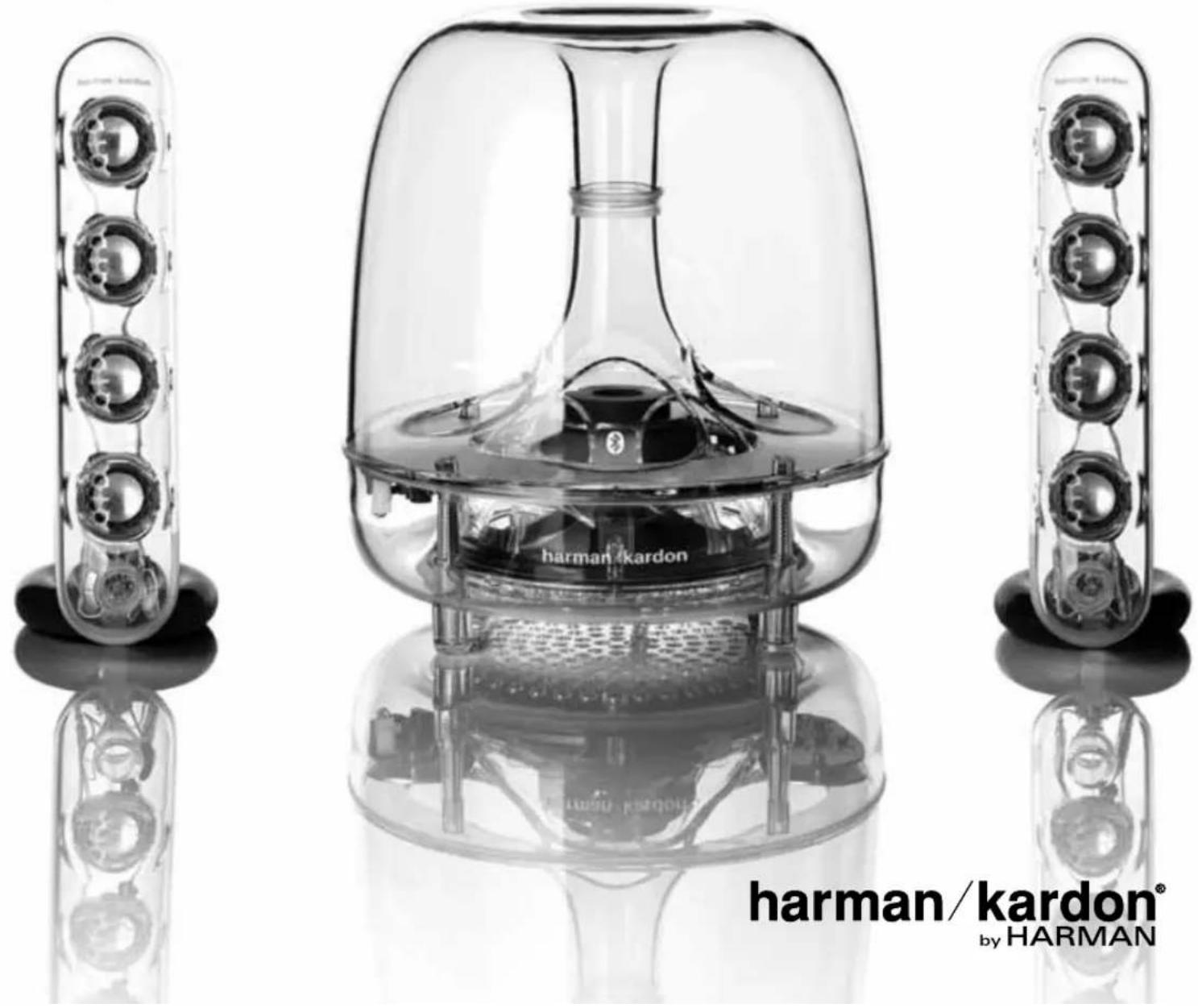
harman/kardon®
by HARMAN
SOUNDSTICKS® WIRELESS
- Read these instructions.
- Keep these instructions.
- Heed all warnings.
- Follow all instructions.
- Do not use this apparatus near water.
- Clean only with a dry cloth.
- Do not block any ventilation openings. Install in accordance with the manufacturer's instructions.
- Do not install near any heat sources such as radiators, heat registers, stoves or other apparatus (including amplifiers) that produce heat.
- Do not defeat the safety purpose of the polarized or grounding-type plug. A polarized plug has two blades with one wider than the other. A grounding-type plug has two blades and a third grounding prong. The wide blade or the third prong is provided for your safety. If the provided plug does not fit into your outlet, consult an electrician for replacement of the obsolete outlet.
- Protect the power cord from being walked on or pinched, particularly at plugs, convenience receptacles and the point where they exit from the apparatus.
- Only use attachments/accessories specified by the manufacturer.
- Use only with the cart, stand, tripod, bracket or table specified by the manufacturer or sold with the apparatus. When a cart is used, use caution when moving the cart/apparatus combination to avoid injury from tip-over.
- Unplug this apparatus during lightning storms or when unused for long periods of time.
-
Refer all servicing to qualified service personnel. Servicing is required when the apparatus has been damaged in any way, spilled or objects have fallen into the apparatus, the apparatus has been exposed to rain or moisture, does not operate normally, or has been dropped.
-
Do not expose this apparatus to dripping or splashing and ensure that no objects filled with liquids, such as vases, are placed on the apparatus.
- To completely disconnect this apparatus from the AC Mains, disconnect the power supply cord plug from the AC receptacle.
- The mains plug of the power supply cord shall remain readily operable.
- Do not expose batteries to excessive heat such as sunshine, fire or the like.
- Do not place naked flame sources, such as lighted candles, on the apparatus.
| CAUTION |  | |
| THE LIGHTNING FLASH WITH AN ARROWHEAD SYMBOL, WITHIN AN EQUILATERAL TRIANGLE, IS INTENDED TO ALERT THE USER TO THE PRESENCE OF UNIN- SULATED "DANGEROUS VOLTAGE" WITHIN THE PRODUCT'S ENCLOSURE THAT MAY BE OF SUF- FICIENT MAGNITUDE TO CONSTITUTE A RISK OF ELECTRIC SHOCK TO PERSONS. | RISK OF ELECTRIC SHOCK DO NOT OPEN | THE EXCLAMATION POINT WITHIN AN EQUILATERAL TRIANGLE IS INTENDED TO ALERT THE USER TO THE PRESENCE OF IMPOR- TANT OPERATING AND MAINTENANCE (SER- VICING) INSTRUCTIONS IN THE LITERATURE ACCOMPANYING THE PRODUCT. |
| WARNING: TO REDUCE THE RISK OF FIRE OR ELECTRIC SHOCK, DO NOT EXPOSE THIS APPARATUS TO RAIN OR MOISTURE. | ||
SOUNDSTICKS® WIRELESS
Specifications*
System
Frequency range: 44Hz – 20kHz
Power consumption: 4W idle,
65W maximum
Subwoofer
Transducer (1): 6" woofer
Amplifier output power: 20W RMS
Dimensions (W x H): 9–3/16" x 10–3/16" (232mm x 258mm)
Weight: 4 lb (2.2kg)
Satellite
Transducers (4): 1" full-range per channel
Amplifier output power: 10W RMS
per channel
Dimensions (W x H): 2" x 10"
(51mm × 254mm)
Weight: 1.5 lb (0.7kg)
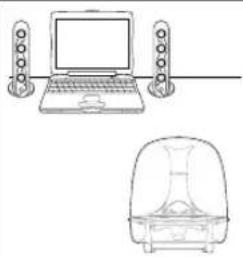 | 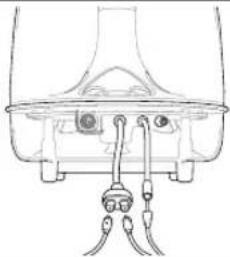 | 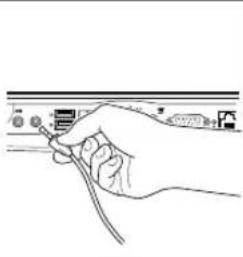 | 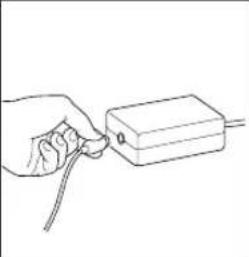 |
| Step 1. Place individual SoundSticks (satellites) beside monitor/computer. Place subwoofer as desired, but placement under desk provides best performance. | Step 2. Connect satellite cables to the dual subwoofer cable. Also connect the input cable to the subwoofer input cable jack. | Step 3. Insert SoundSticks input cable into the computer or other audio device. | Step 4. Plug power cord into power adapter. |
| Troubleshooting | ||
| Symptom Possible problem Solution | ||
| No sound from SoundSticks speaker system. | No power to subwoofer.Power adapter plug not inserted correctly.No volume or low volume. | Ensure power supply is connected to live power source and is properly connected to subwoofer. Please note: When subwoofer is powered, a power LED should light.Place plug with arrow symbol facing UP into the subwoofer.Touch the volume “Up” (+) pad on the volume control satellite to unmute and/or increase the system volume level.Note: Touching the volume “Down” (−) pad lowers the system volume.Touching both (+) and (−) volume control pads at the same time will mute the system. |
*These specifications are subject to change without notice.
Easy Setup Guide
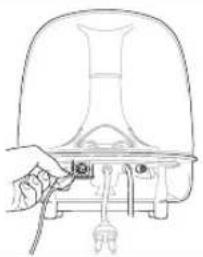 | 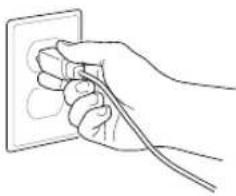 | 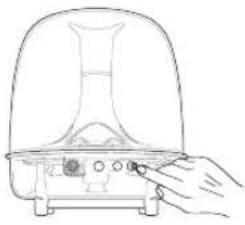 | 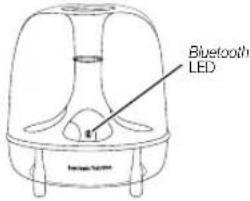 | 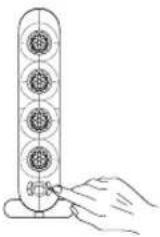 |
| Step 5. Plug power adapter into subwoofer. | Step 6. Plug power cord into wall receptacle. | Step 7. Push the subwoofer volume knob/power ON/OFF button. Unit is on when the LED is lit. Use the subwoofer volume knob to balance the subwoofer's volume with that of the satellites. | Step 8. Turn on Soundsticks Wireless.(Unit will automatically enter pairing mode.) PutBluetooth-enabled device in pairing mode. Select “Soundsticks Wireless” on device's pairing list.Passcode (if required) is0000.When pairing is successful, Soundsticks Wireless’Bluetooth LED will illuminate. | Step 9. Adjust volume level by touching + or – button. Touching both the + and – buttons mutes the audio. When muted, touching either button unmutes the audio. |
| www.harmankardon.com | ||
| Symptom Possible problem Solution | ||
| No sound from subwoofer, only satellites. | Subwoofer volume control set at minimum. | Rotate subwoofer volume control clockwise until relative volume level is appropriate. |
| No sound from satellites, only subwoofer. | Satellites not connected to subwoofer. | Check connection of satellites to subwoofer. |
| High frequencies sound dull. | Satellites not positioned properly. | Position and tilt (angle) loudspeakers toward listener. The sound from the satellites is very directional due to the four-element linear array design. |
| No sound from Bluetooth device. | Device not paired. | Pair device with Soundsticks Wireless. Bluetooth LED illuminates when pairing is successful. |
This product is intended to be supplied by a listed direct plug-in power unit marked "Class 2" and output rated 16V DC minimum 1.5 A.
*Audio from a paired Bluetooth device will mix with the audio from a connected audio device. To listen to only one device, stop play on the other device.
harman/kardon®
HARMAN
HARMAN International Industries, Inc. 8500 Balboa Boulevard, Northridge, CA 91329 USA
www.harmankardon.com
Made in P.R.C.
© 2012 HARMAN International Industries, Incorporated. All rights reserved.
Features, specifications and appearance are subject to change without notice.
Harman Kardon and SoundSticks are trademarks of HARMAN International Industries, Incorporated, registered in the United States and/or other countries.
The Bluetooth word mark and logo are registered trademarks and are owned by the Bluetooth SIG, Inc., and any use of such marks by HARMAN International Industries, Incorporated, is under license.
Part No. 950-0454-001 Rev. A
Brand : HARMAN KARDON
Model : SoundSticks 4
Category : Pregnant