
EW-7833AXP - Network Card/Adapter Edimax - Free user manual and instructions
Find the device manual for free EW-7833AXP Edimax in PDF.


| Product Type | Wireless AX3000 Dual-Band Router/AP |
| Brand | Edimax |
| Model | EW-7833AXP |
| Processor | Intel GRX350 800 MHz dual-core |
| Wireless Standards | IEEE 802.11ax/ac/a/b/g/n |
| Frequency Bands | 2.4 GHz (up to 574 Mbps) and 5 GHz (up to 2402 Mbps) |
| Antennas | 4 internal antennas with beamforming |
| Operating Modes | AP mode and Router mode (toggle switch) |
| Ethernet Ports | 4 LAN ports (10/100/1000Mbps), 1 WAN port |
| Buttons | WPS button, Reset button, Toggle switch |
| LED Indicators | Power (Red/Green/Blue), 2.4G, 5G, WPS, LAN, WAN |
| Power Supply | 12V DC adapter (included) |
| Package Contents | EW-7833AXP, Quick Installation Guide, Power Adapter, Ethernet Cable |
| Management | Web-based UI, default IP 192.168.2.1, default username admin, unique password on sticker |
| Security | WPA2, WPS, Access Control, Port Forwarding, DMZ, Remote Management |
| Parental Control | Yes (schedule-based) |
| Guest Network | Yes (separate SSID) |
| Firmware Update | OTA and manual upload |
| Backup/Restore | Yes |
| System Requirements | Existing cable/DSL modem & router, computer with web browser |
| Safety | Indoor use only in 5 GHz band, keep 2.5 cm distance from antenna |
| Standards Compliance | FCC Part 15, CE RED |
Frequently Asked Questions - EW-7833AXP Edimax
User questions about EW-7833AXP Edimax
0 question about this device. Answer the ones you know or ask your own.
Ask a new question about this device
Download the instructions for your Network Card/Adapter in PDF format for free! Find your manual EW-7833AXP - Edimax and take your electronic device back in hand. On this page are published all the documents necessary for the use of your device. EW-7833AXP by Edimax.
USER MANUAL EW-7833AXP Edimax
No. 278, Xinhu 1st Rd., Neihu Dist., Taipei City, Taiwan
Email: support@edimax.com.tw
Edimax Technology Europe B.V.
Fijenhof 2, 5652 AE Eindhoven, The Netherlands
Email: support@edimax.nl
Edimax Computer Company
3444 De La Cruz Blvd., Santa Clara, CA 95054, USA
Email: support@edimax.com
Contents
I. Product Informaon .... 1
II. Package Contents ...... 2
II-1. System Requirements 2
II-2. Hardware Overview....3
II-3. LED Status....4
III. Hardware Installaon...... 5
III-1. AP Mode....6
III-2. Router Mode....7
IV. Quick Setup 9
V. Wi-Fi Sengs 12
V-1. Main Wi-Fi.... 12
V-2. Guest Wi-Fi 14
V-3. WPS 15
VI. Internet....17
VI-1. WAN 18
VI-2. LAN 21
VI-3. DDNS 22
VI-4. Fix DHCP 23
VII. Parental Control ....24
VIII. Administraon ......26
VIII-1. System Informaon 27
VIII-2. Password 27
VIII-3. Firmware Upgrade....28
VIII-4. Backup and Restore 30
VIII-5. System Log.... 34
VIII-6. Stasc....36
VIII-7. Time Zone 37
VIII-8. Restart Schedule 37
IX. Security 39
IX-1. Access Control 39
IX-2. Port Forwarding....41
IX-3. DMZ 42
IX-4. Remote Management.... 43
X. Easy Setup 44
X-1. DHCP 45
X-2. Stac IP....46
X-3. PPPoE 48
I. Product Informaon
The Edimax BR-6473AX smart Wi-Fi AP/Router with Intel GRX350 (800MHz dual-core) and fast dual band speeds up to 574Mbps (2.4 GHz) and 2402Mbps (5 GHz) is well suited for your home.
The BR-6473AX with beamforming + 4X internal antennas delivers fast and reliable long range Wi-Fi coverage to every corner of your home.
With the simple and intuitive web UI interface, you can easily set up the AP/router and remotely control through the browser or phone.
You can nd all supporting documents from the link below or via QR Code:
hps://www.edimax.com/download

(Once you've visited the Edimax ocial website, please enter the model no. "BR-6473AX" into the search box to search for your product.)
Download
To select your product and find related download materials, enter the model number into the search box on the right side or follow the simple steps below:
*Feel free to contact us anytime if you need help or if you can't find your product.
II. Package Contents
Before start using this product, please check if there is anything missing in the package, and contact your dealer to claim the missing item(s):
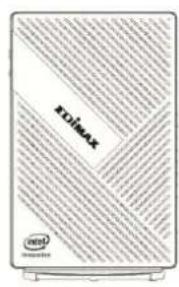
BR-6473AX

Quick Installaon Guide
natural_image
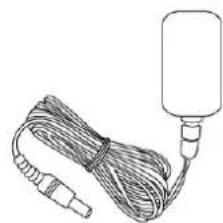
Line drawing of a cable with connectors and a cylindrical device attached (no text or symbols)Power Adapter (12V)
natural_image
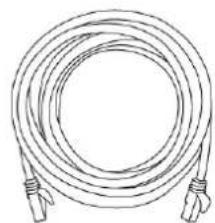
Line drawing of a coiled cable with connectors (no text or symbols)Ethernet Cable
II-1. System Requirements
- Exisng cable/DSL modem & router
- Computer with web browser for AP conguraon
II-2. Hardware Overview
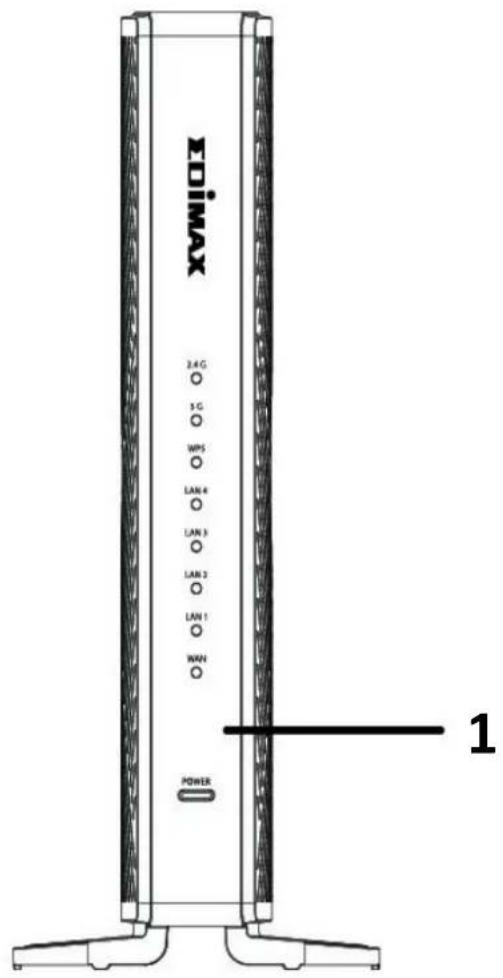
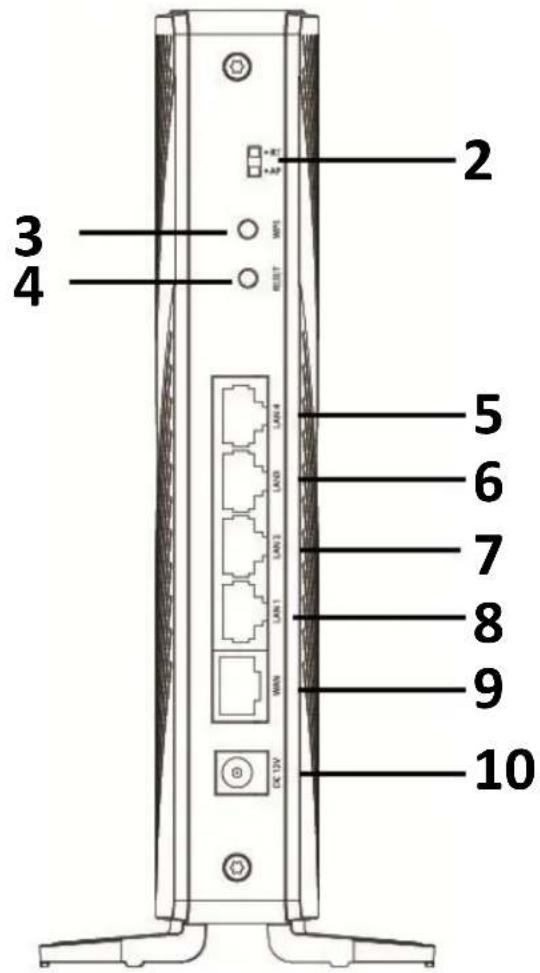
| No. | Descripon |
| 1 | LED (2.4G, 5G, WPS, LAN1, LAN2, LAN3, LAN4, WAN, POWER) |
| 2 | Toggle Switch (Router and AP mode) |
| 3 | WPS Buon |
| 4 | RESET Buon |
| 5 | LAN4 Port |
| 6 | LAN3 Port |
| 7 | LAN2 Port |
| 8 | LAN1 Port |
| 9 | WAN Port |
| 10 | DC Power Jack |
II-3. LED Status
| Funcon | Color | Status | Descripon |
| 2.4GH & 5GHz | Blue | On | Internet conncon is ready. |
| O | Wi-Fi not acve. | ||
| Flashing | Acvity. Sending or receiving data. | ||
| WPS | Blue | Blinking | WPS conncon established.(WPS LED blinks for 2 seconds to indicate a successful conncon) |
| LAN | Blue | On | LAN port is connected. |
| O | LAN port is not connected. | ||
| WAN | Blue | On | WAN port is connected. |
| O | WAN port is not connected, or no Internet. | ||
| Power | Red | Blinking | Upgrading rmware or reset. |
| Green | On | Router mode. (Power on) | |
| Blue | On | AP mode. (Power on) |
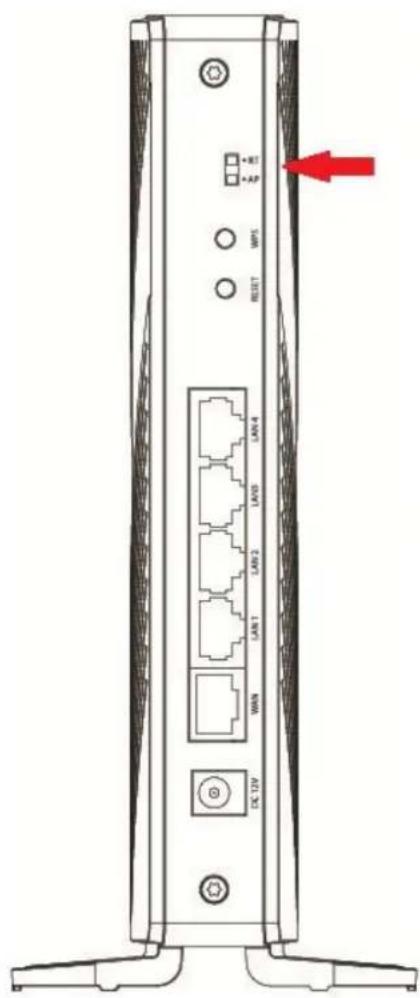
This secon will guide you through the steps to set up the BR-6473AX in AP and router mode.
You can change the operaon mode via the toggle switch behind the BR-6473AX.
Move the toggle switch to change the operaon mode (AP, router mode).
NOTE:
- Please unplug the AC adapter when changing the operaon mode.
- Please backup your sengs before changing the operaon mode.
III-1. AP Mode
-
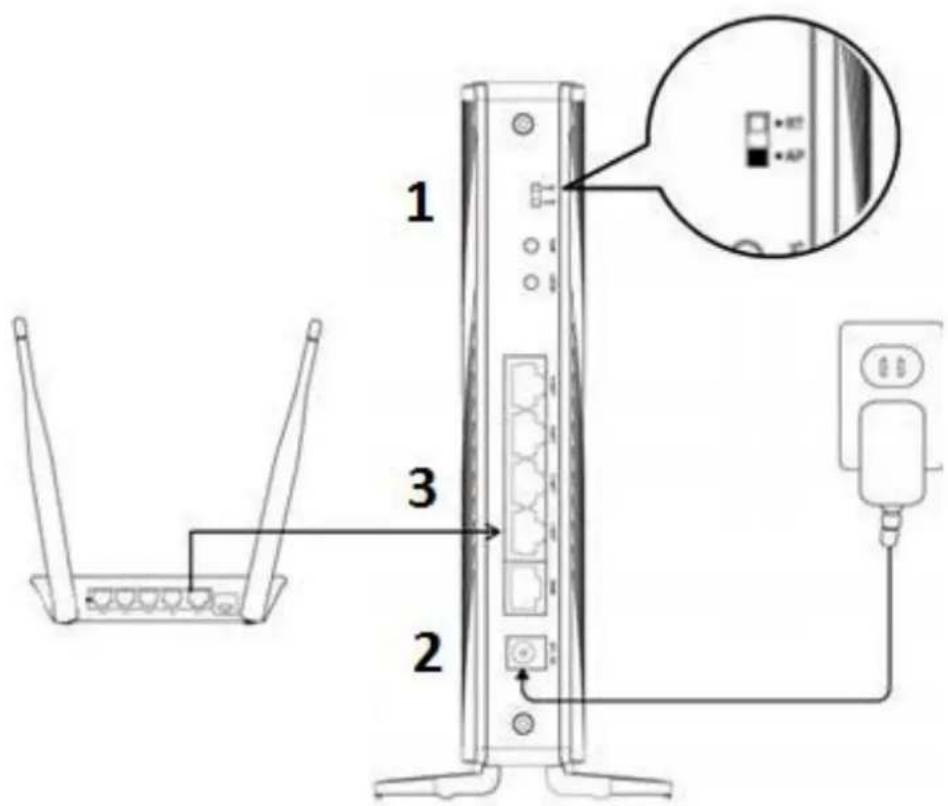
Check if the toggle switch is in AP mode.
-
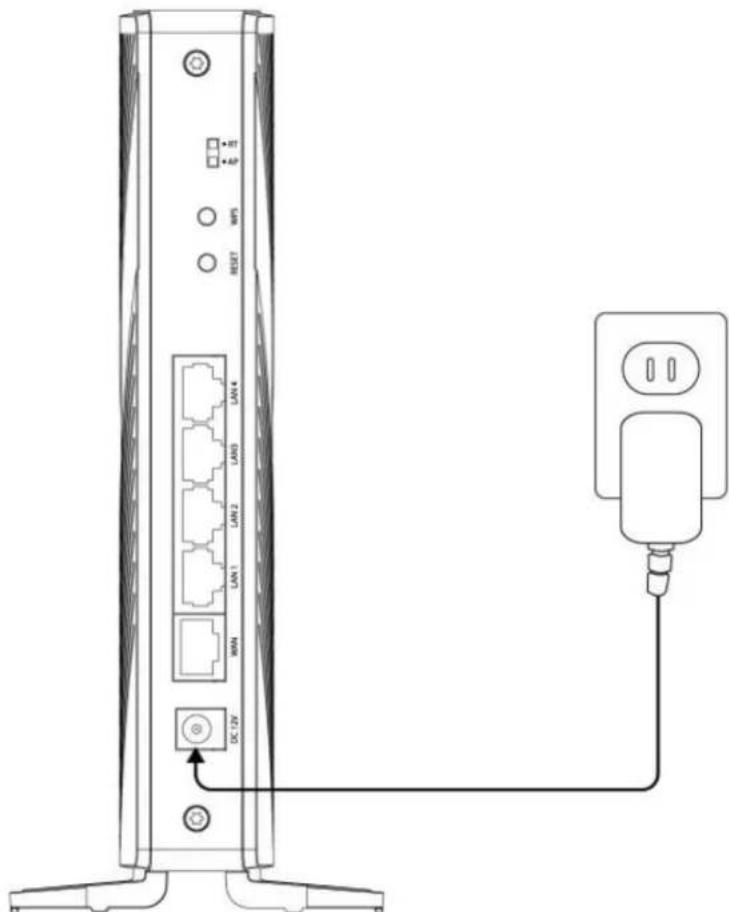
Plug the included AC adapter into the AP/router's power jack and the other end into an electrical socket.
Note: Ensure the "POWER" LED lights on Blue (AP Mode). If not, the device is not properly connected.
- Connect your router with an Ethernet cable to the BR-6473AX of the "LAN" port.
NOTE: Ensure the "LAN" LED lights on BLUE.
III-2. Router Mode
-
Move the toggle switch on the BR-6473AX to router mode.
-
Plug the included AC adapter into the AP/router's power jack and the other end into an electrical socket.
Note: Ensure the "POWER" LED lights on Green (Router Mode). If not, the device is not properly connected.
- Connect your modem with an Ethernet cable to the BR-6473AX of the "WAN" port.
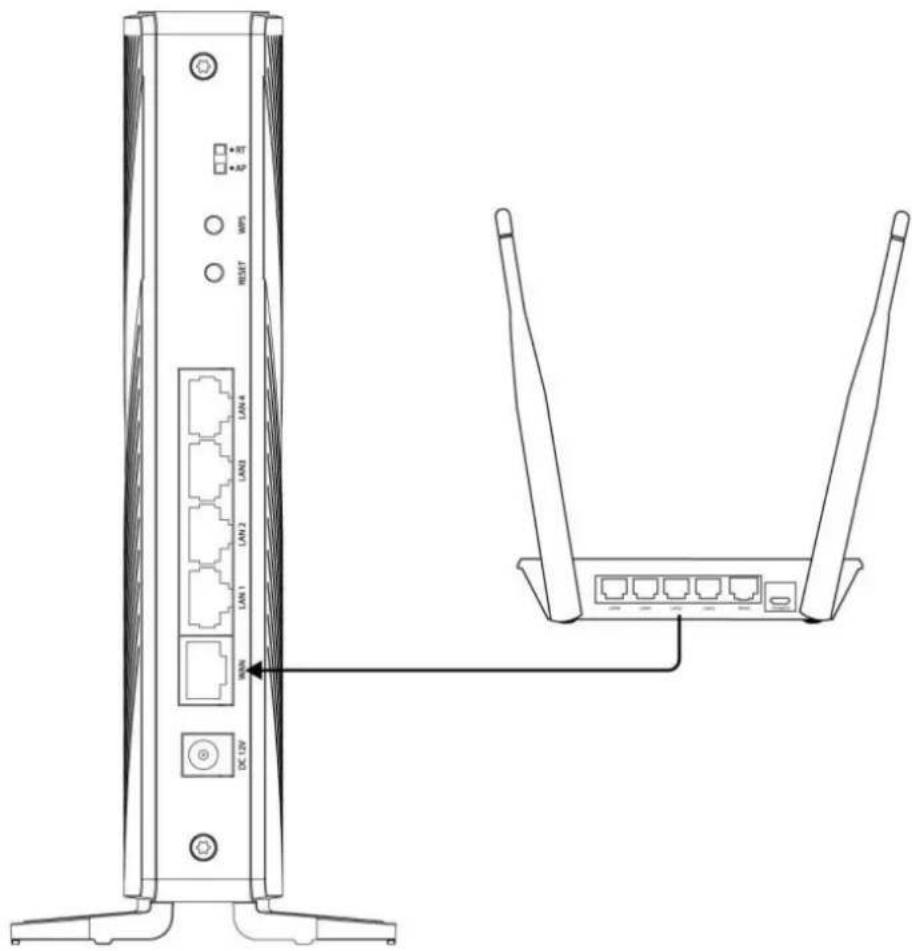
NOTE: Ensure the "WAN" LED lights on BLUE.
This quick installaon secon will help you setup your AP/Router in its default AP mode and congregate its basic sengs.
Please follow the steps below:
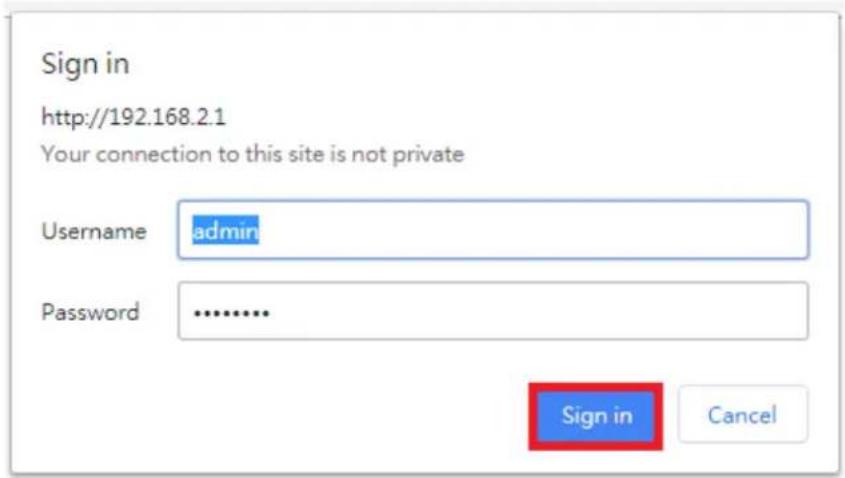
- Please nd the default User Name "admin" and unique 8 digits default Password "XXXXXXXXX" of your AP/ router on the scker.
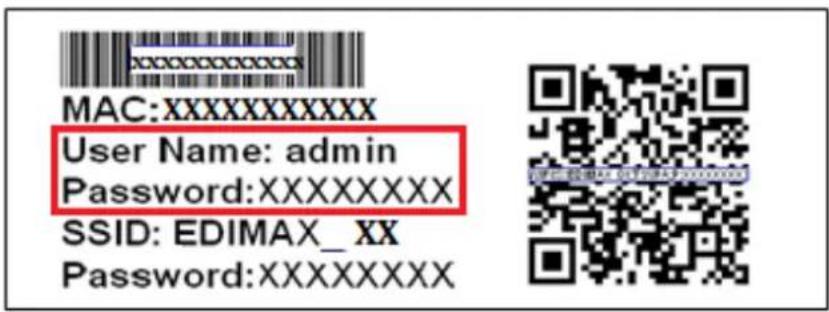
NOTE: If you are using iOS 11 or later version, you can easily connect your smart phone to the AP/ router using the QR code on the scker.
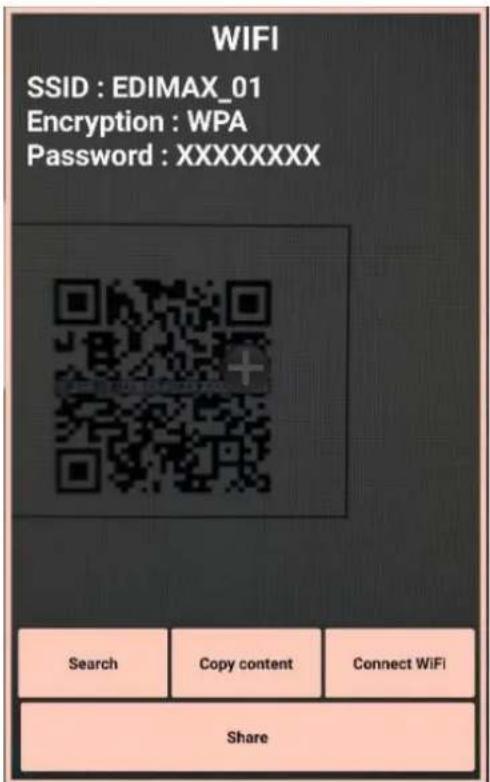
- Open a web browser, and enter the default IP 192.168.2.1.
- You will be prompted for a username and password. Enter the Username and the password. Click the "Sign in" buon.
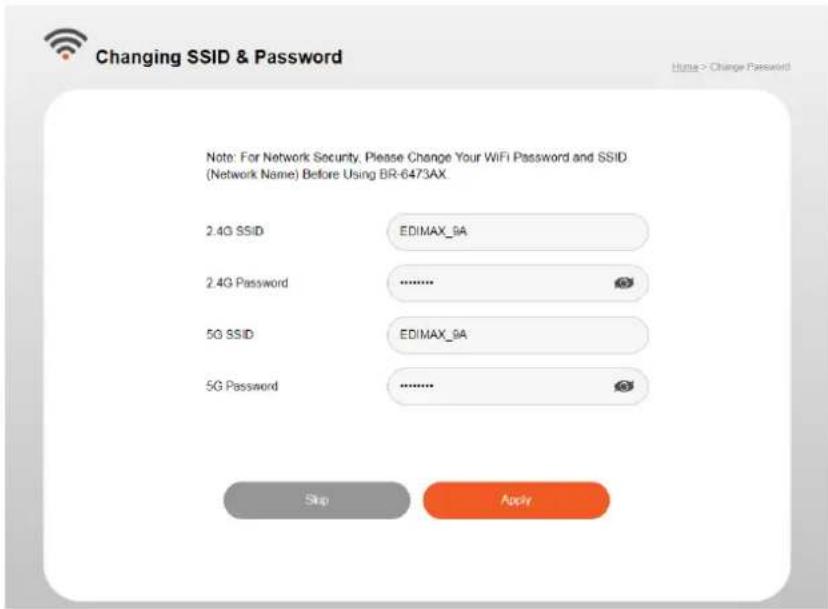
- For rst me users, please reset your 2.4G SSID/5G SSID name and password.
5. Wait for 60 seconds.

Applying Settings
Home > WiFi > Applying Settings
Please wait 58 seconds...
Do not turn off or reboot the Device during this time.
ΣDIMAX
BR-6473AX
Wi-Fi

2.4GHz
SSID EDIMAX_9A
5GHz
SSID EDIMAX_9A
Internet

WAN
Type DHCP
IP 192.168.10.39
Mask 255.255.255.128
LAN
IP 192.168.2.1
Mask 255.255.255.0
Parental Control

Security

Administration

Easy Setup

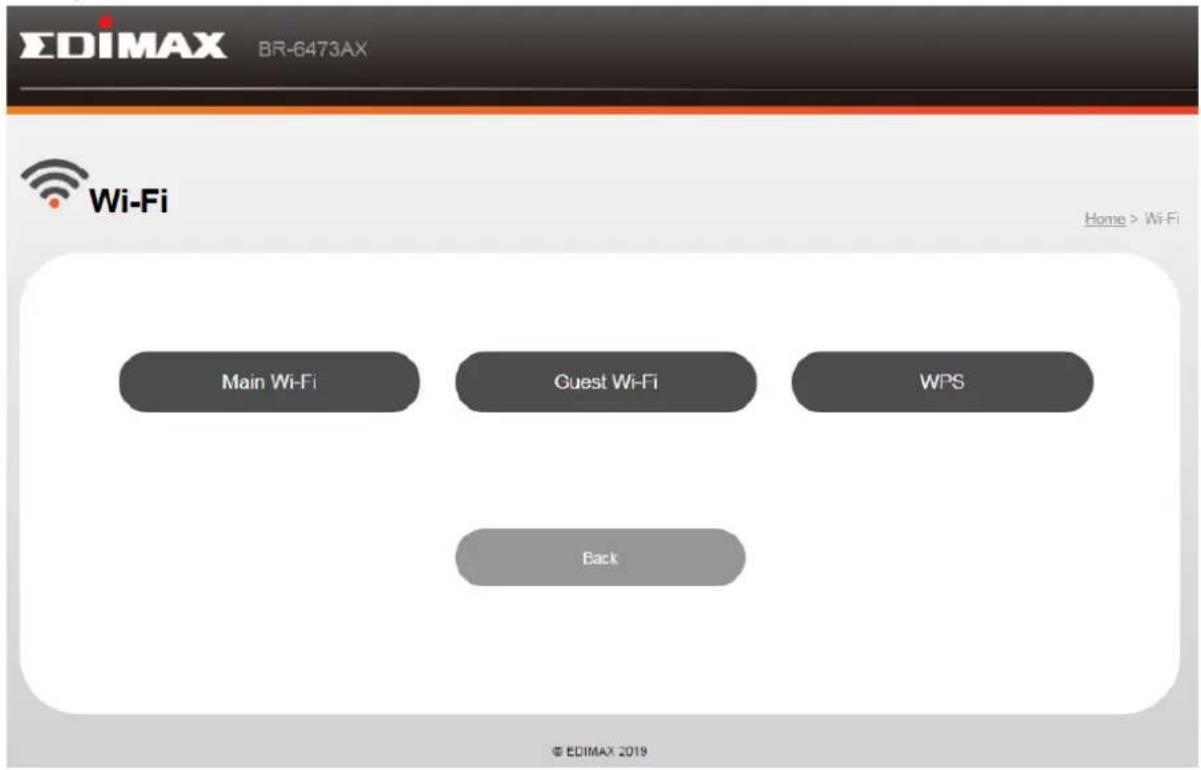
V. Wi-Fi Sengs
In this page allows you to congregate the Wi-Fi, guest Wi-Fi and WPS sengs that suit your needs.
V-1. Main Wi-Fi
You can change the basic sengs for 2.4GHz and 5GHz.
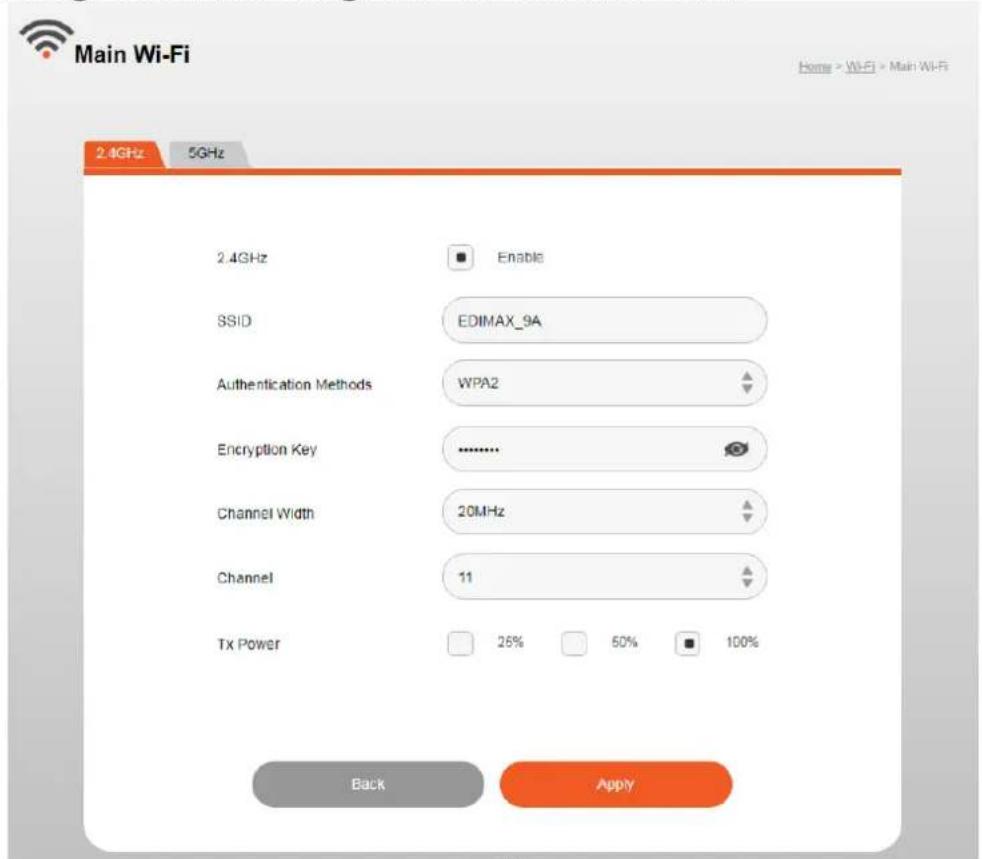
| Wireless 2.4GHz (5GHz) / SSID | |
| 2.4GHz/ 5GHz | Enable/ Disable |
| SSID | Displays the SSID name(s) for the specied frequency. |
| Authencao n Methods | Displays the authencaon method for the specied SSID. |
| Encrypon Key | Displays the encrypon type for the specied SSID. |
| Channel | Set the channel width:2.4 GHz:- 20MHz (lower performance but less interference).- 40MHz (higher performance but potentially higher interference)- Auto (automacally select based on interference level).5GHz:- 20MHz (lower performance but less interference).- 40MHz- 80MHz-160MHz (higher performance but potentially higher interference)- Auto (automacally select based on interference level). |
| Channel | 2.4 GHz:Select a wireless channel from 1 – 11 or auto.5GHz:Select a wireless channel from 36 – 140 or auto. |
| Tx Power | Set the power output of the wireless radio. You may not require 100% output power. Seng a lower power output can enhance security since potentially malicious/unknown users in distant areas will not be able to access your signal. |
V-2. Guest Wi-Fi
You can setup an additional “Guest” Wi-Fi network so guest users can enjoy Wi-Fi connecvity without accessing your primary networks.
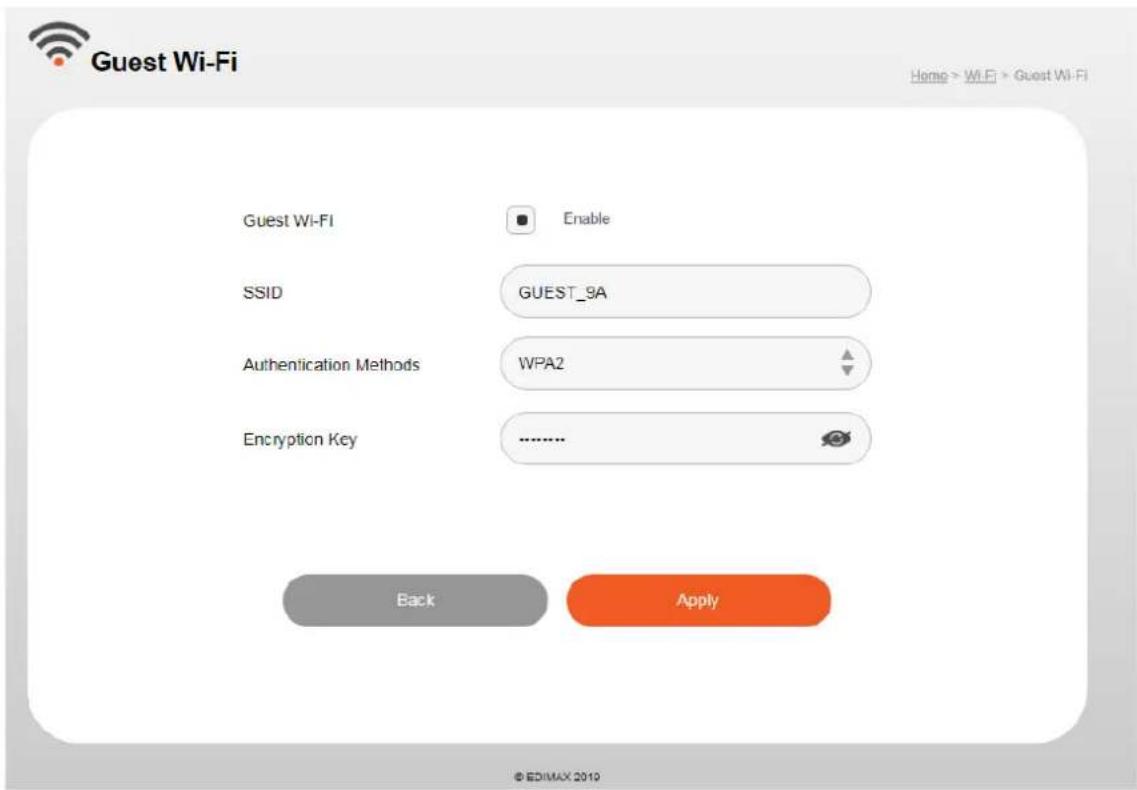
| Guest Wi-Fi | |
| Guest Wi-Fi | Enable/ Disable |
| SSID | Displays the SSID name(s) for the guest Wi-Fi. |
| Authencao n Methods | WPA2 or open. Displays the authencaon method for the specied SSID. |
| Encrypon Key | Displays the encrypon type for the guest Wi-Fi. |
V-3. WPS
WPS is a simple way to establish connecons between WPS compatible devices. WPS can be acvated on compatible devices by pushing a WPS buon on the compatible device or from within the compatible device's rmware / conguraon interface (known as PBC or “Push Buon Conguraon”).
When WPS is acvated in the correct manner and at the correct me for two compatible devices, they will automacally connect.
"PIN code WPS" is a variaon of PBC which includes the additional use of a PIN code between the two devices for vericaon.
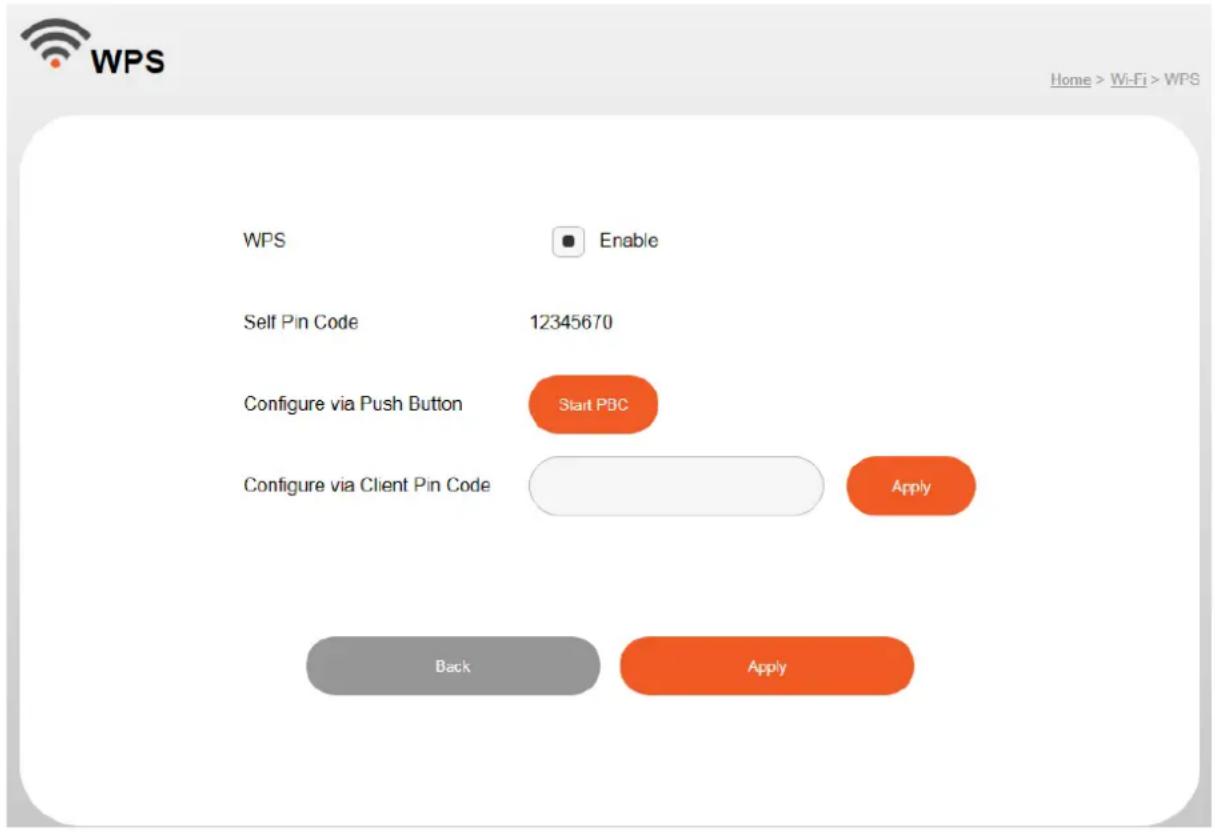
| WPS | |
| WPS | Check/uncheck this box to enable/disable WPS funconality. |
| Self Pin Code | Displays the WPS PIN code of the device, used for PIN code WPS. You will be required to enter this PIN code into another WPS device for PIN code WPS. Click “Generate PIN” to generate a new WPS PIN code. |
| Congure via Push Buon | Click “Start PBC” to acvate WPS. |
| Congure via Client Pin Code | Enter the PIN code of another WPS device and click “Apply” to aempt to establish a WPS conncon. |
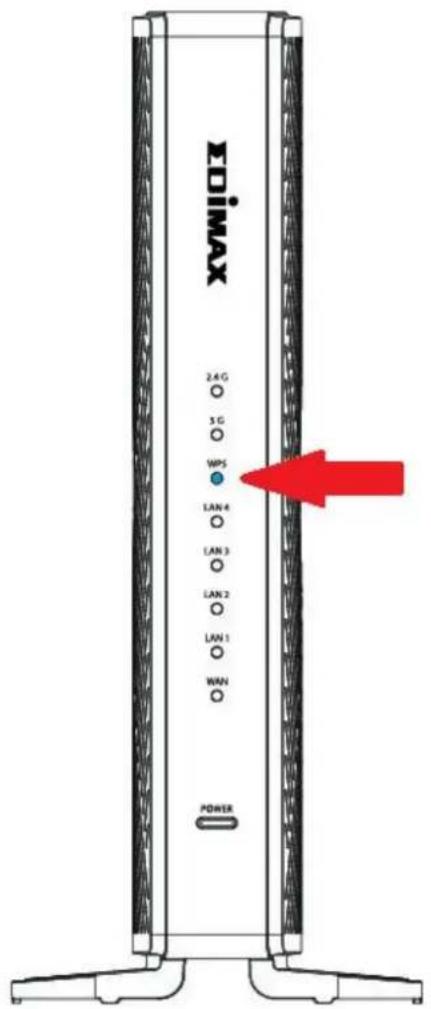
You can also acvate WPS via hardware,
- Press and hold the WPS buon for 2 seconds to acvate WPS.
- WPS feature is enabled on your router when the WPS LED blinking BLUE light.
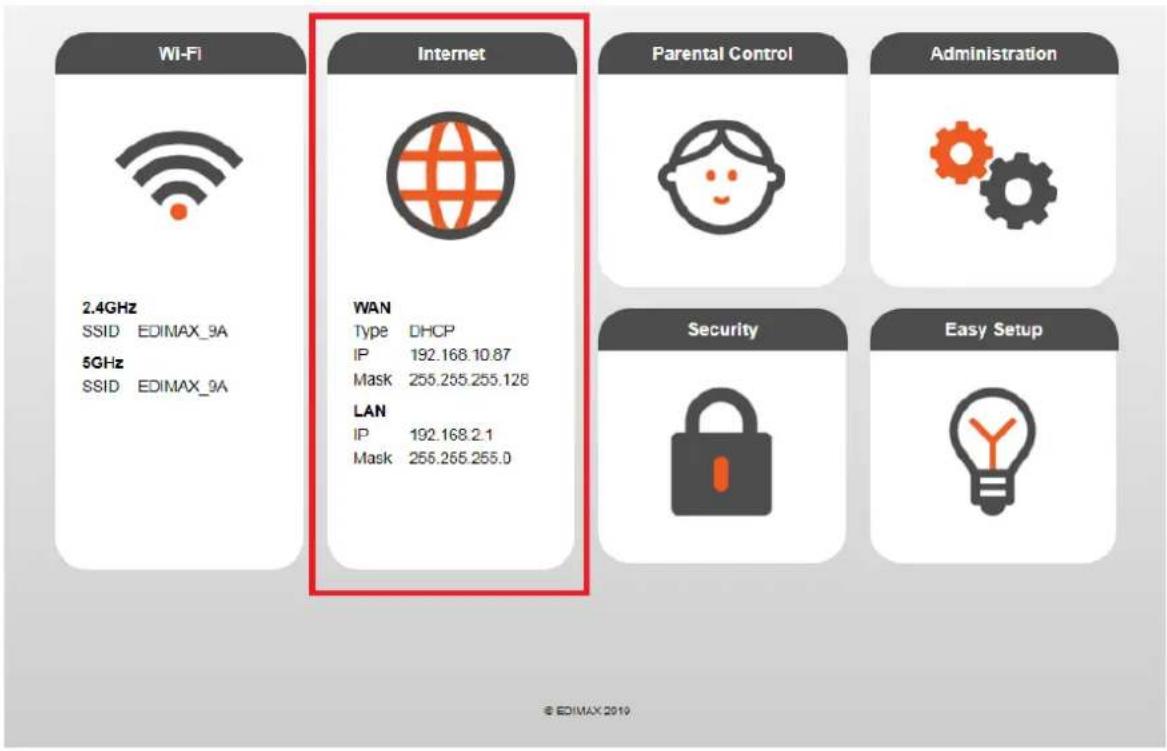
From the main page of the Internet allows you to customize and set up WAN, LAN, DDNS and Fixed DHCP
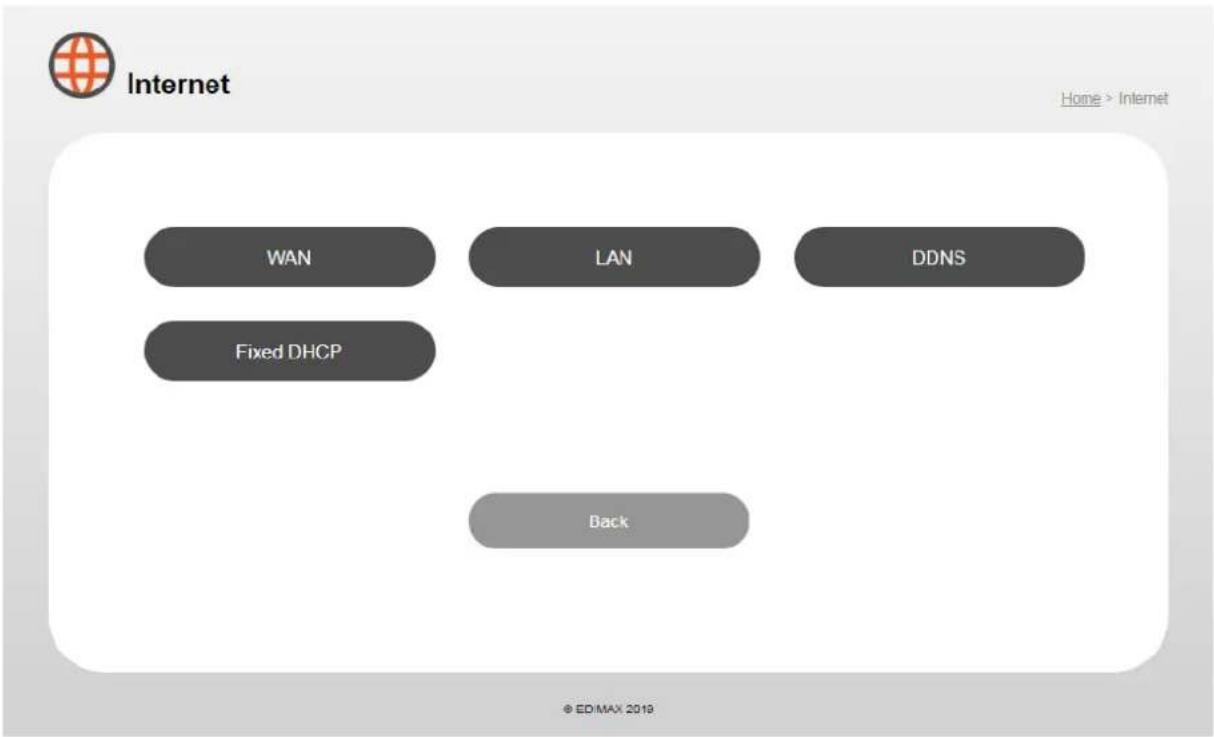
flowchart
graph TD
    A["WAN"] --> B["Fixed DHCP"]
    C["LAN"] --> D["Back"]
    E["DDNS"] --> F["Home > Internet"]
VI-1. WAN
To congregate the sengs for the WAN, click the WAN buon on Internet page.
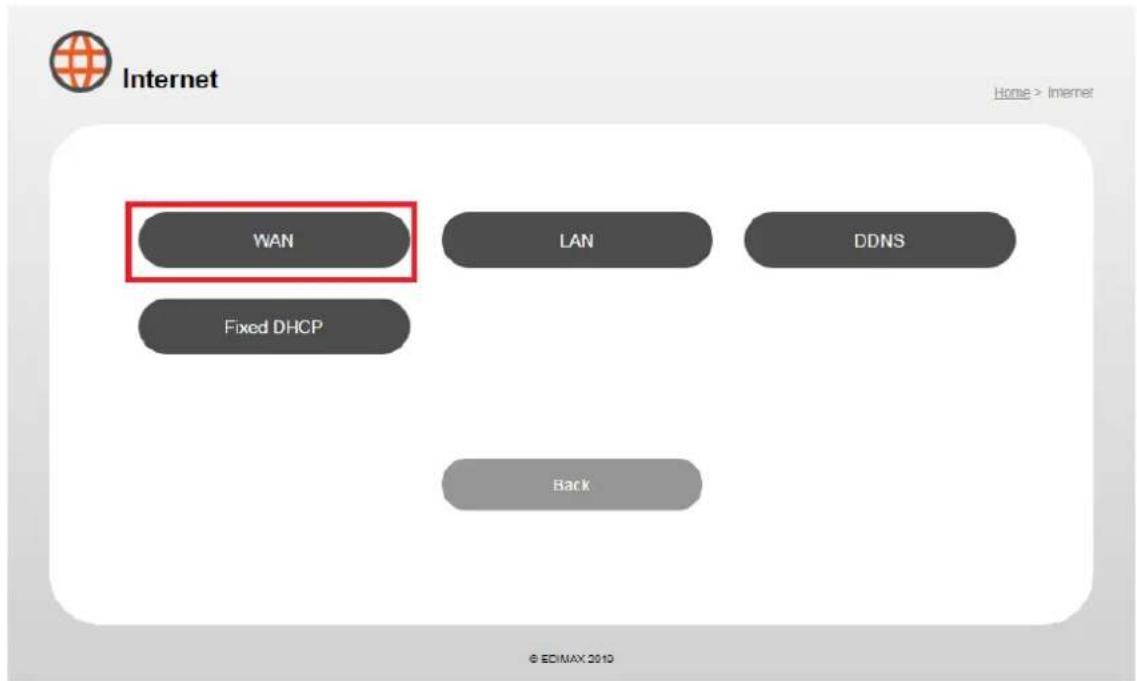
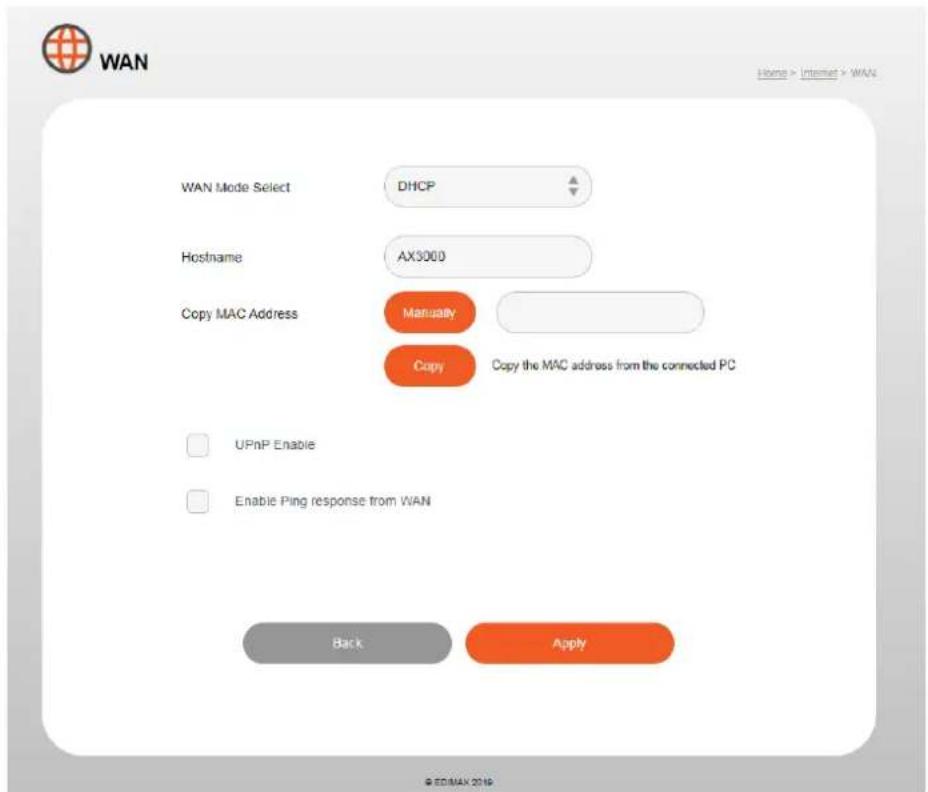
WAN mode (DHCP):
| WAN | |
| Wan Mode Select | DHCP, Stac IP and PPPoE |
| Hostname | You can set a hostname to DHCP server |
| Copy MAC Address | Copy device unique MAC address to the input eld |
| UPnP | Universal plug-and-play (UPnP) is a set of networking protocols which enables network devices to communicate and automacally establish working conguraons with each other. Select “Enable” or “Disable”. |
| Ping Response | Do not enable this funcon, this funcon is for developer only. |
WAN mode (Stac IP):
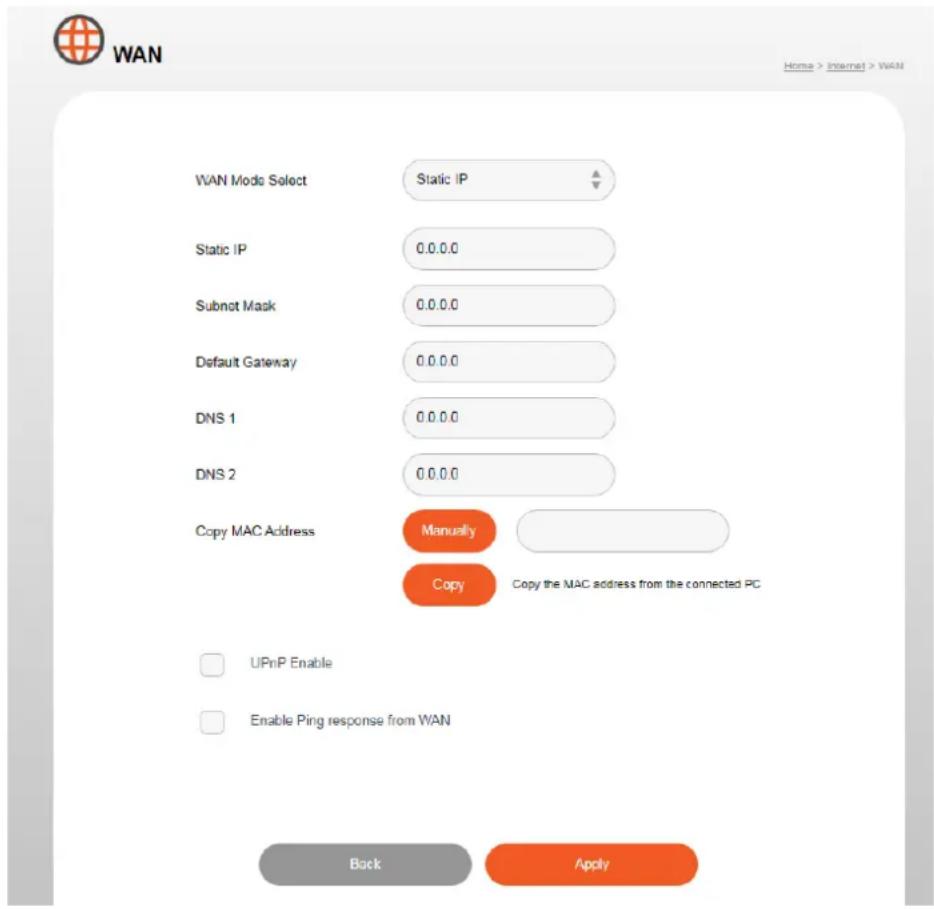
| Stac IP | |
| Stac IP | A stac Internet Protocol (IP) address (stac IP address) is a permanent number assigned to a computer by an Internet service provider (ISP) |
| Subnet Mask | Specify a subnet mask. The default value is 255.255.255.0. |
| Default Gateway | Displays the IP address of the default gateway. |
| DNS1 | For stac IP users, the default value is blank. |
| DNS2 | For stac IP users, the default value is blank. |
WAN mode (PPPoE):
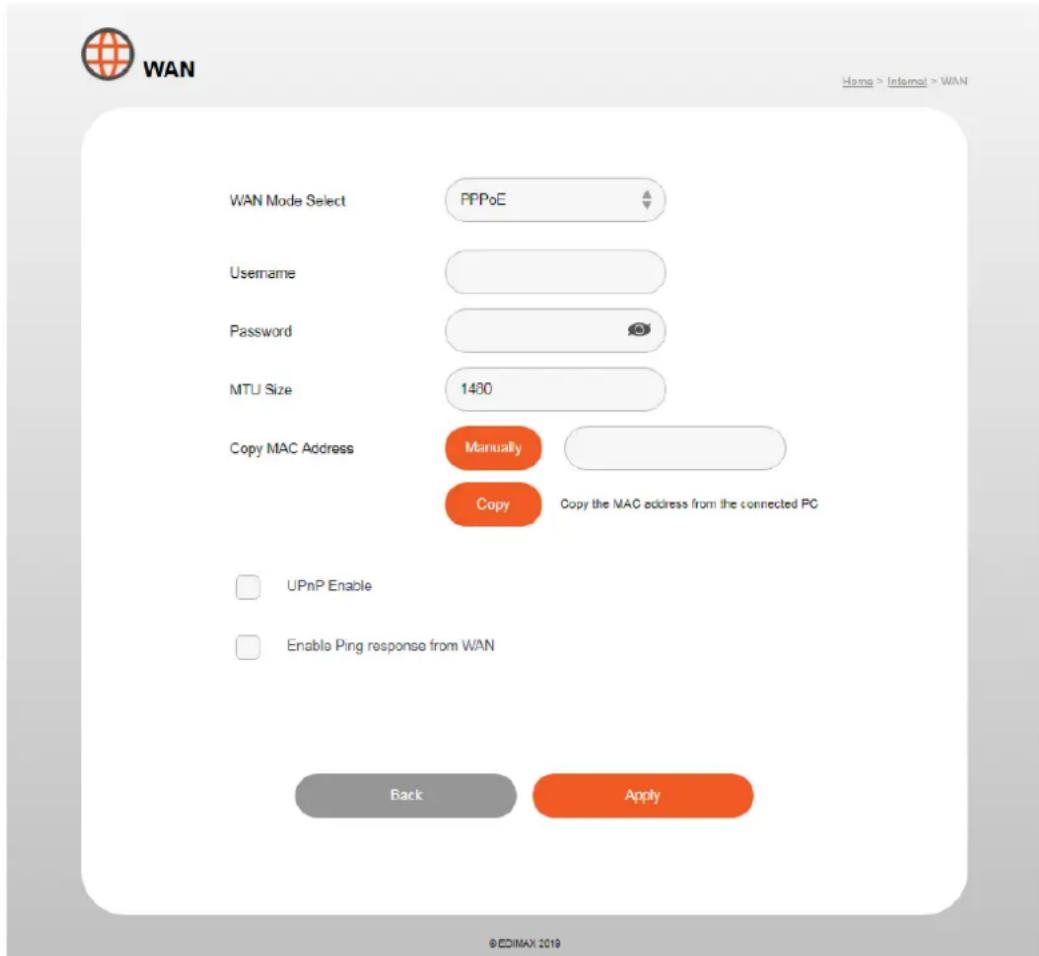
| PPPoE | |
| Username | Enter the user name assigned by your ISP here |
| Password | Enter the password assigned by your ISP here |
| MTU Size | Enter the maximum transmission unit (MTU) value of your network conncon. The default value is 1480 |
| Copy MAC Address | Copy device unique MAC address to the input eld |
VI-2. LAN
You can congregate your Local Area Network (LAN) on this page. You can enable the router to dynamically allocate IP addresses to your LAN clients, and you can modify the IP address of the device. The device's default IP address is 192.168.2.1.
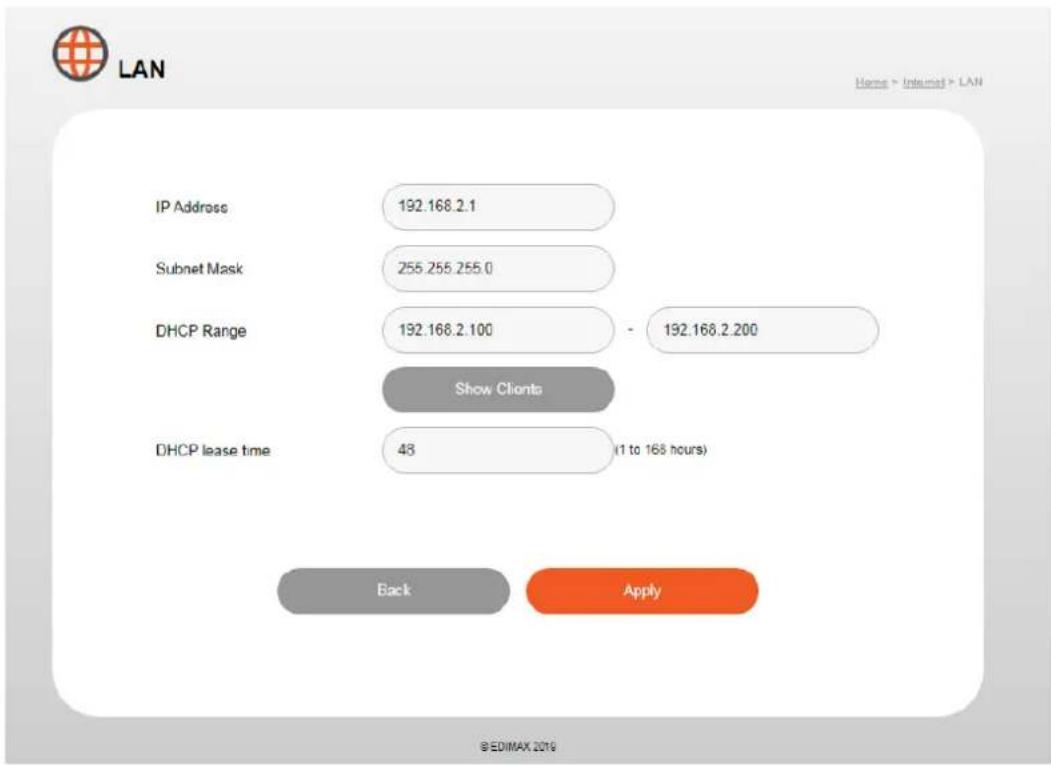
| IP Address | Displays the Router’s LAN IP address. |
| Subnet Mask | Displays the Router’s LAN subnet mask. |
| DHCP Range | Dene range of numbers |
| DHCP lease me | Select a lease me for the DHCP leases here. The DHCP client will obtain a new IP address aer the period expires. |
VI-3. DDNS
Dynamic DNS (DDNS) is a service which provides a hostname-to-IP service for dynamic IP users. The changing nature of dynamic IPs means that it can be difficult to access a service provided by a dynamic IP user; a DDNS service though can map such dynamic IP addresses to a xed hostname, for easier access.
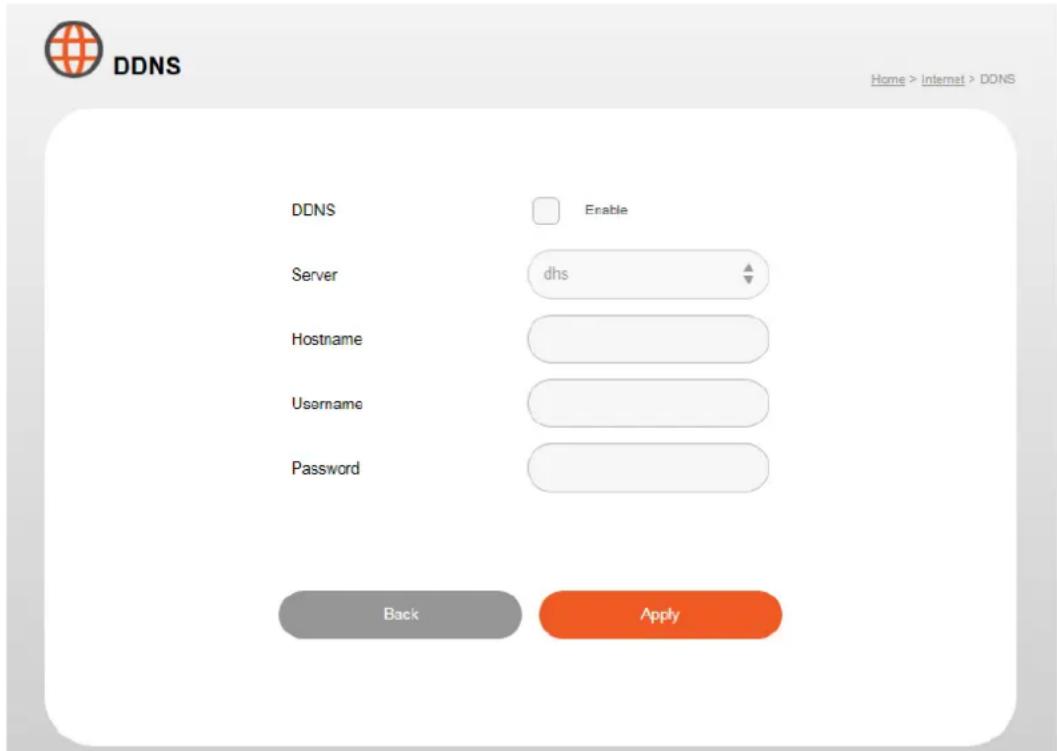
| DDNS | |
| Enable/Disable | Enable or disable DDNS |
| Server | Select a DDNS service, dhs, or dyns |
| Hostname | Enter the eecve registered hostname. |
| Username | Enter the username that you use to register from the DDNS provider. |
| Password | Enter the password that you use to register from the DDN provider. |
VI-4. Fix DHCP
Informaon about xed DHCP clients is shown in the table, which displays the DHCP server assigned IP address, MAC address and me expired for each computer or device on the local network.
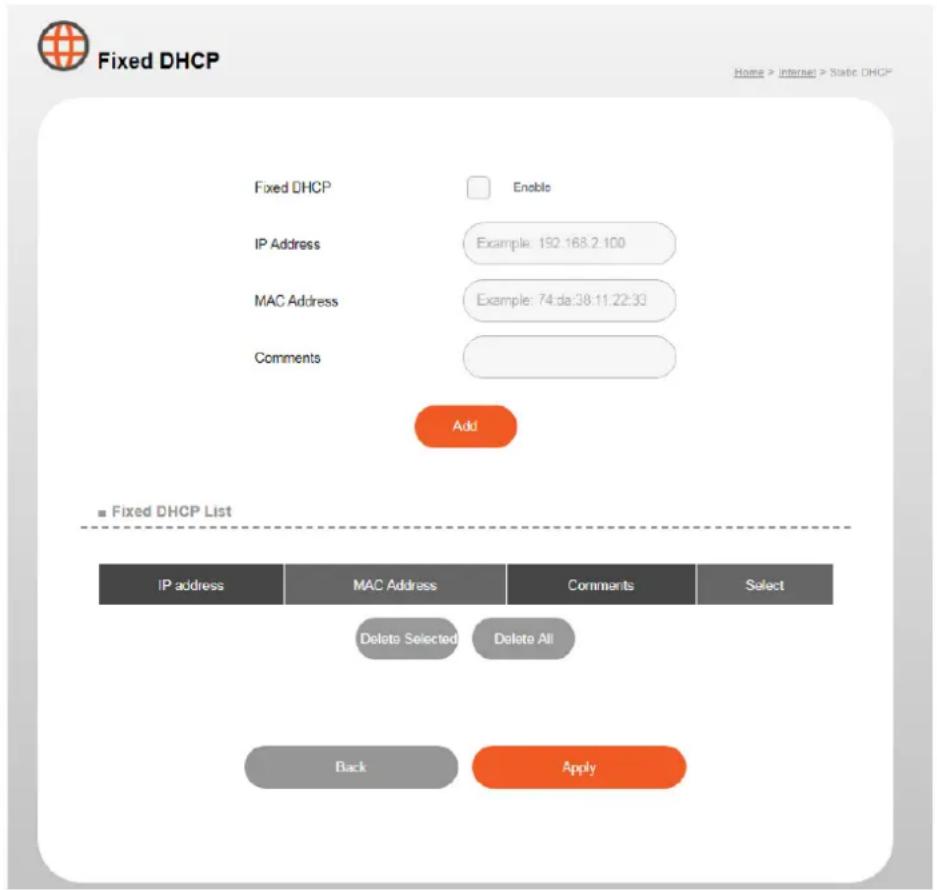
| Fixed DHCP | |
| Enable/Disable | Enable or disable xed DHCP |
| IP Address | Assign a IP address for the specied network device here. |
| Mac Address | Enter the specied network device’s MAC address here. |
| Comments | Enter a comment for reference/idencaon consisng of up to 16 alphanumerical characters. |
VII. Parental Control
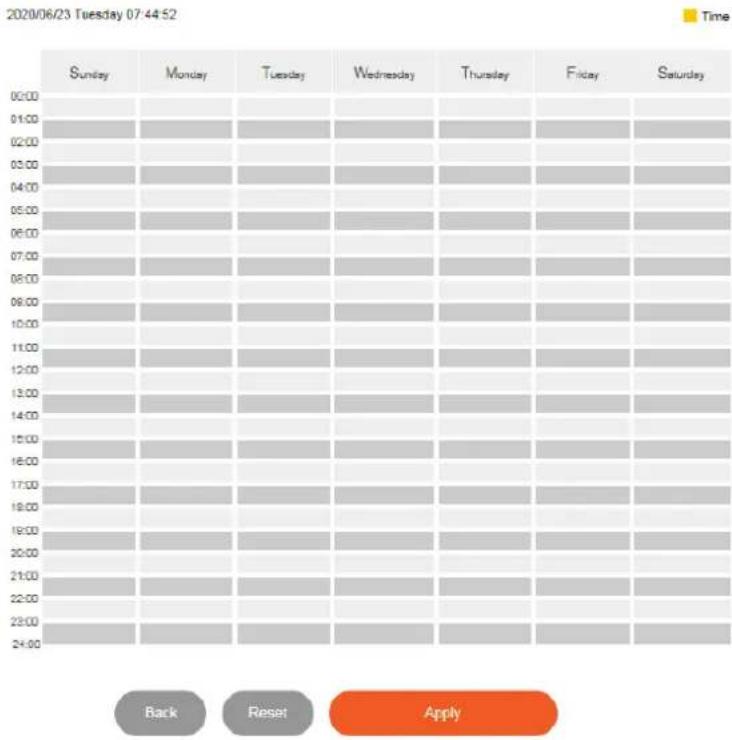
You can use your parental controls to manage (set mer or schedule) and control what your kids do on the internet.
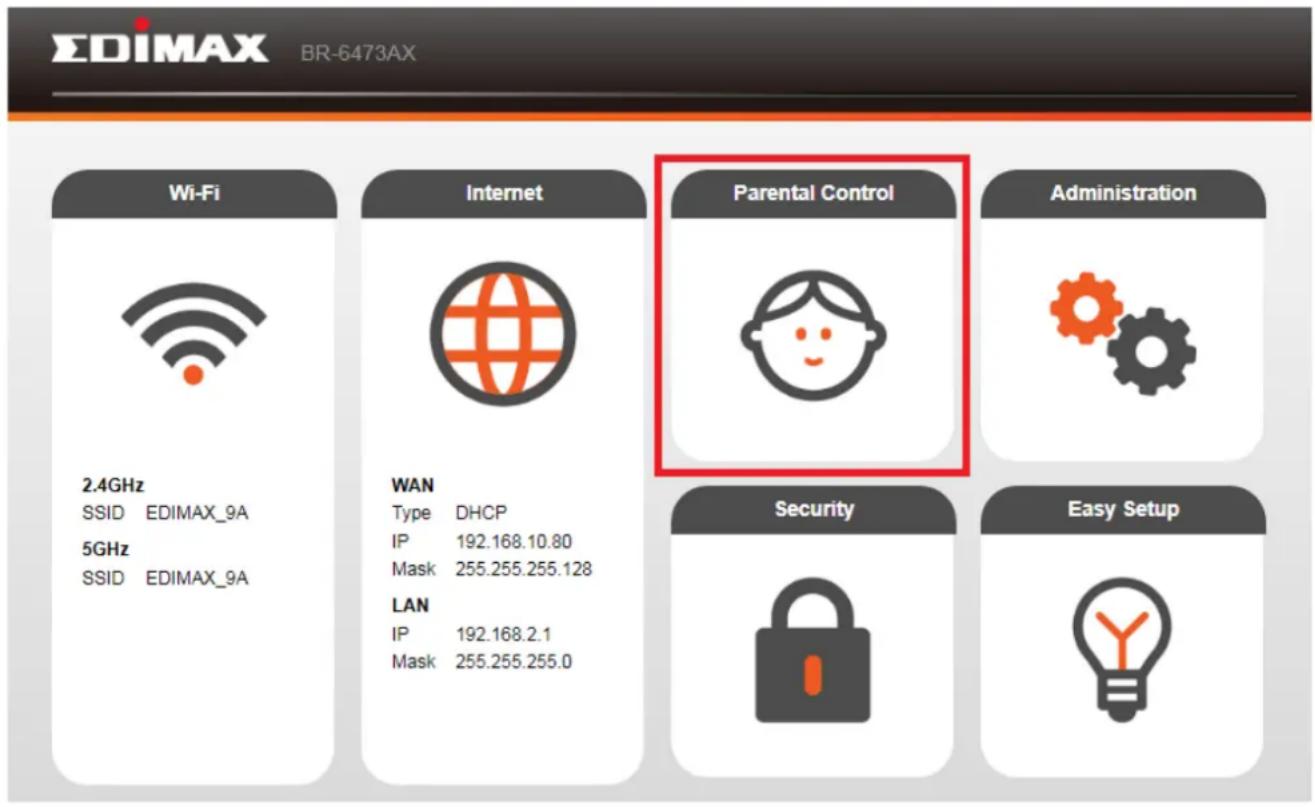

Parental Controls
Home > Parental Control
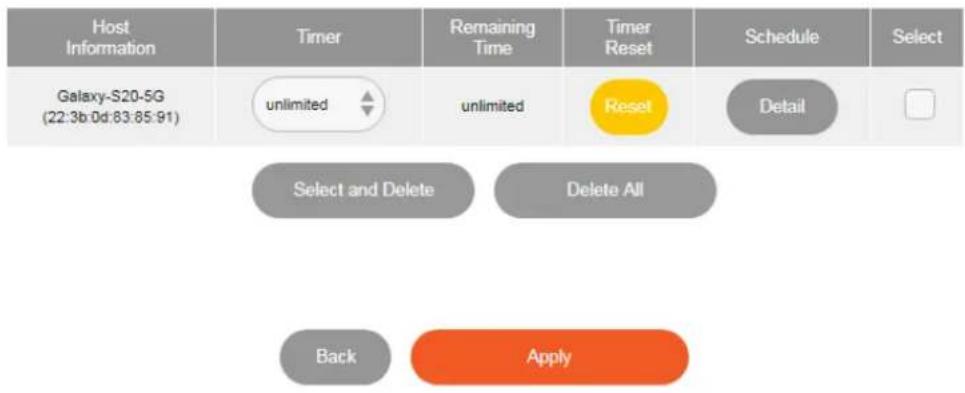
© EDIMAX 2019
By Schedule:

Parental Controls
Homing > Parential Central
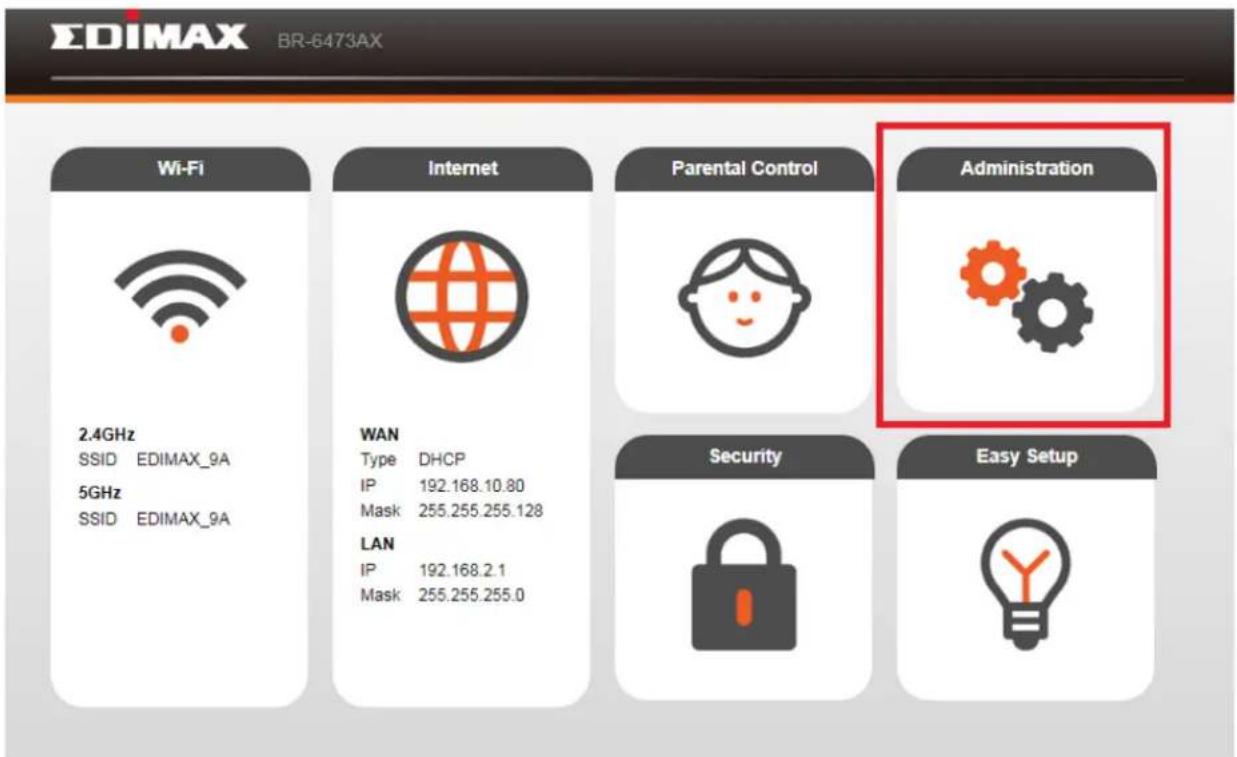
Centralized administraon makes setup and management fast and easy. In this page you can check system informaon, system log and stascs etc..
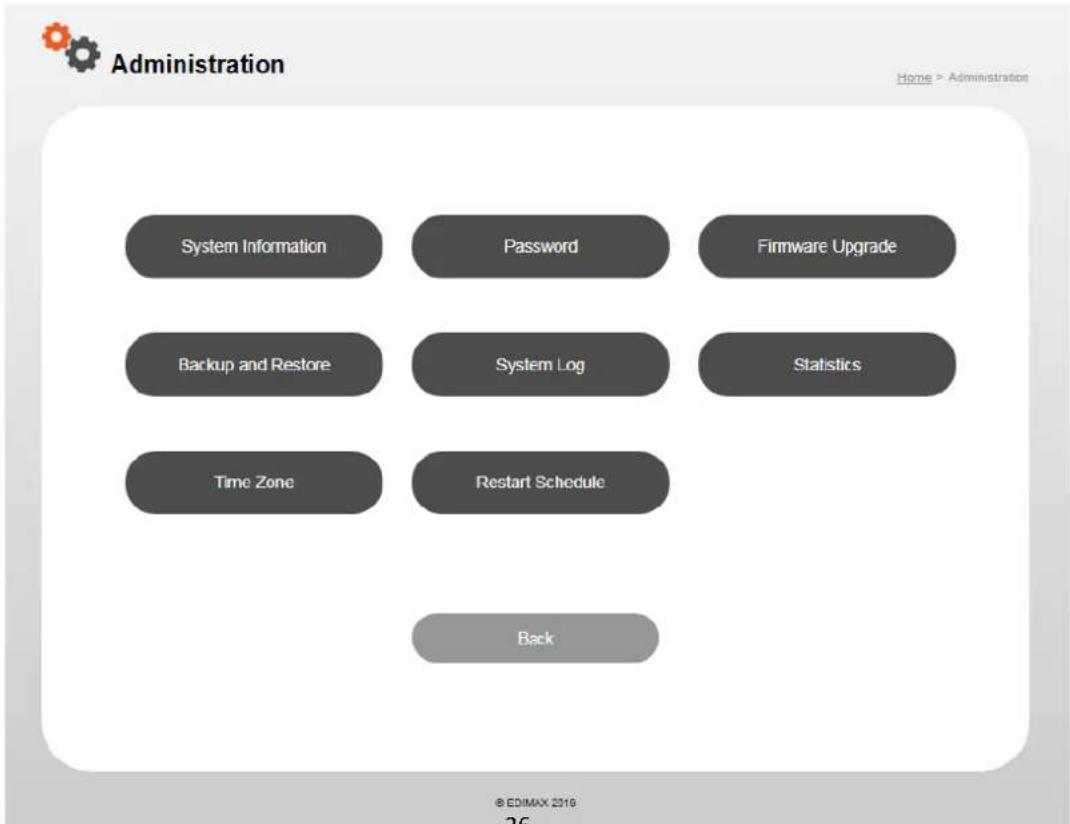
flowchart
graph TD
    A["System Information"] --> B["Password"]
    B --> C["Firmware Upgrade"]
    D["Backup and Restore"] --> E["System Log"]
    E --> F["Statistics"]
    G["Time Zone"] --> H["Restart Schedule"]
    I["Back"] --> J["End"]
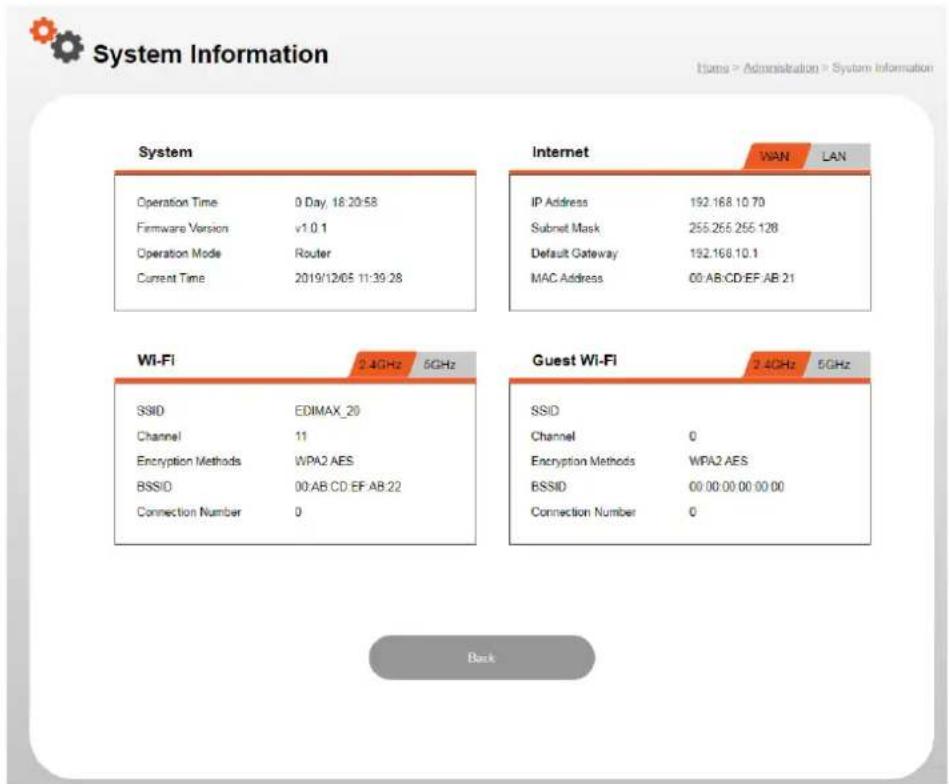
VIII-1. System Informaon
“System Informaon” page displays basic system informaon, internet informaon and Wi-Fi & guest 2.4GHz/5GHz informaon.
VIII-2. Password
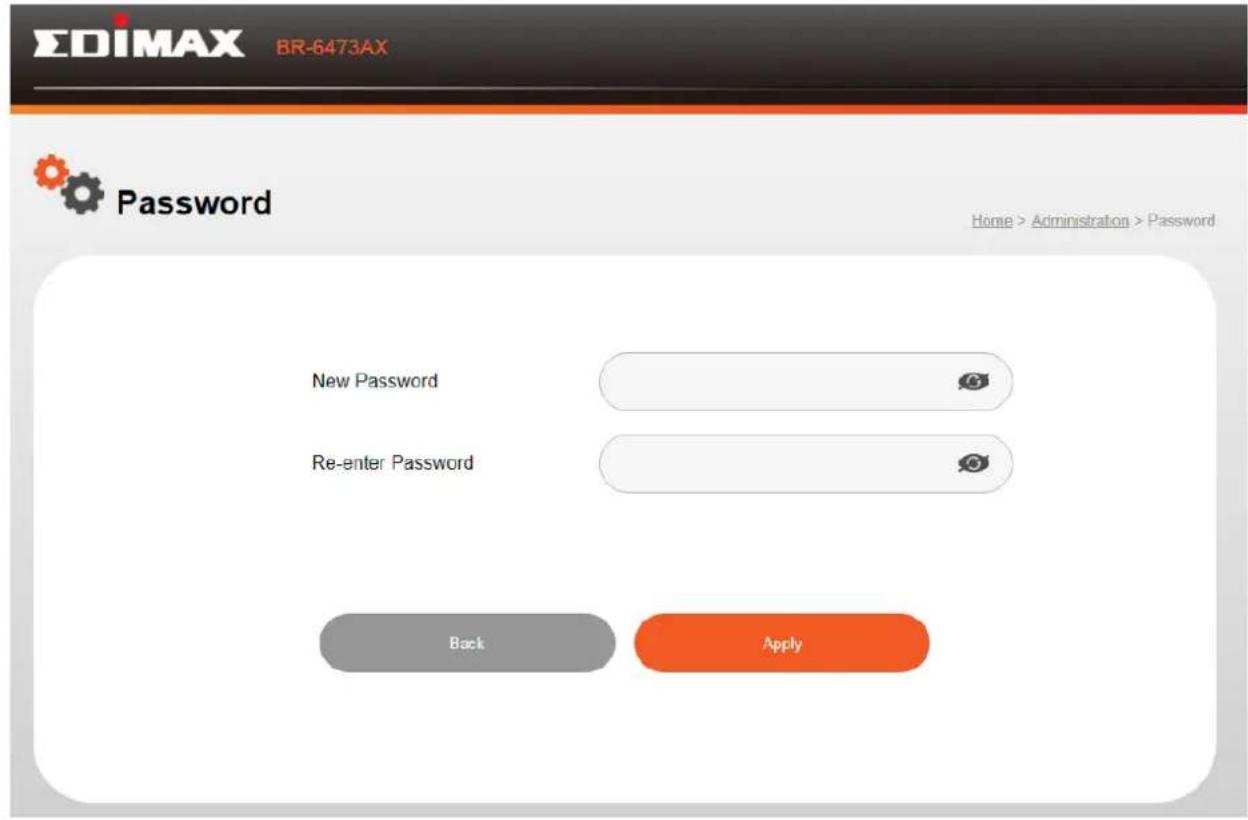
In this page you can reset the password of your router.
Please follow the steps below to reset the password,
- Enter the new password.
- Conrm your password.
- Click the "Apply" buon to save the change.
VIII-3. Firmware Upgrade
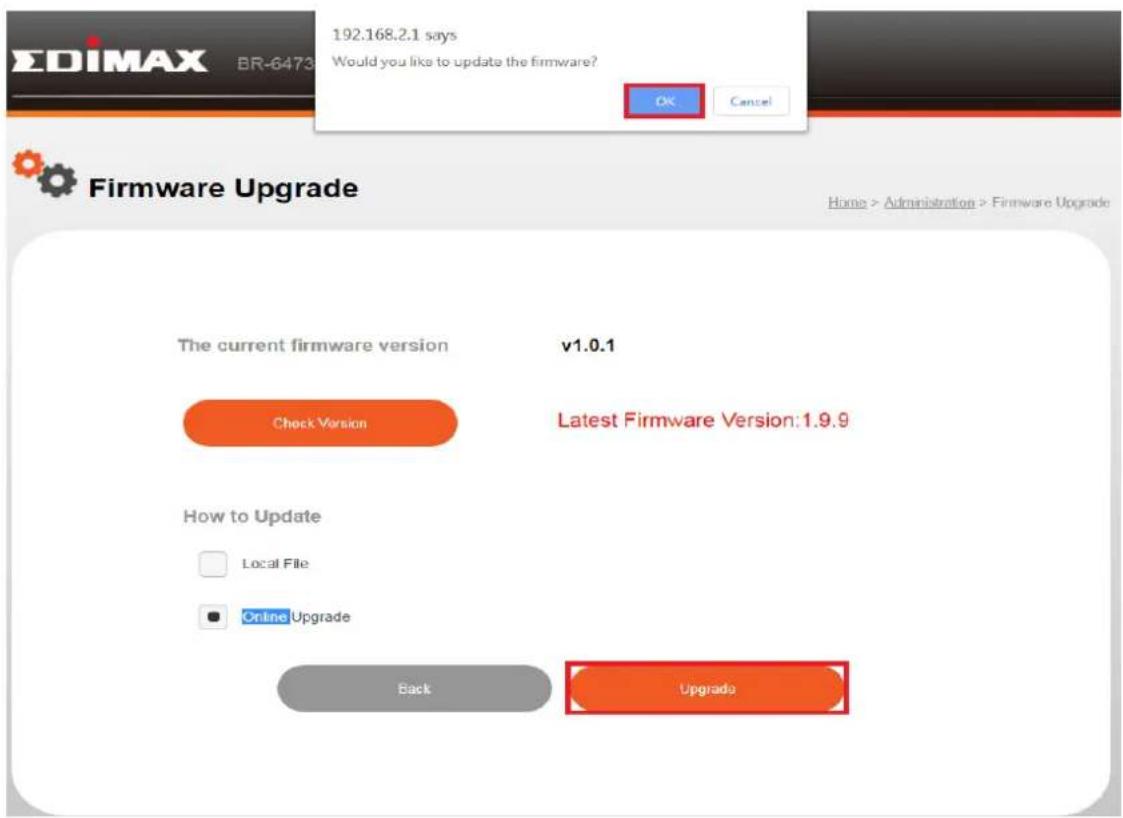
You can upgrade rmware on router by either OTA or manual update.
Please follow the steps below to upgrade rmware.
-
Click "Check Version" to check if the current rmware is up to date or not.
-
Select "Local File" to upload the rmware le to the router.
- Select Online Upgrade to update the rmware via OTA.
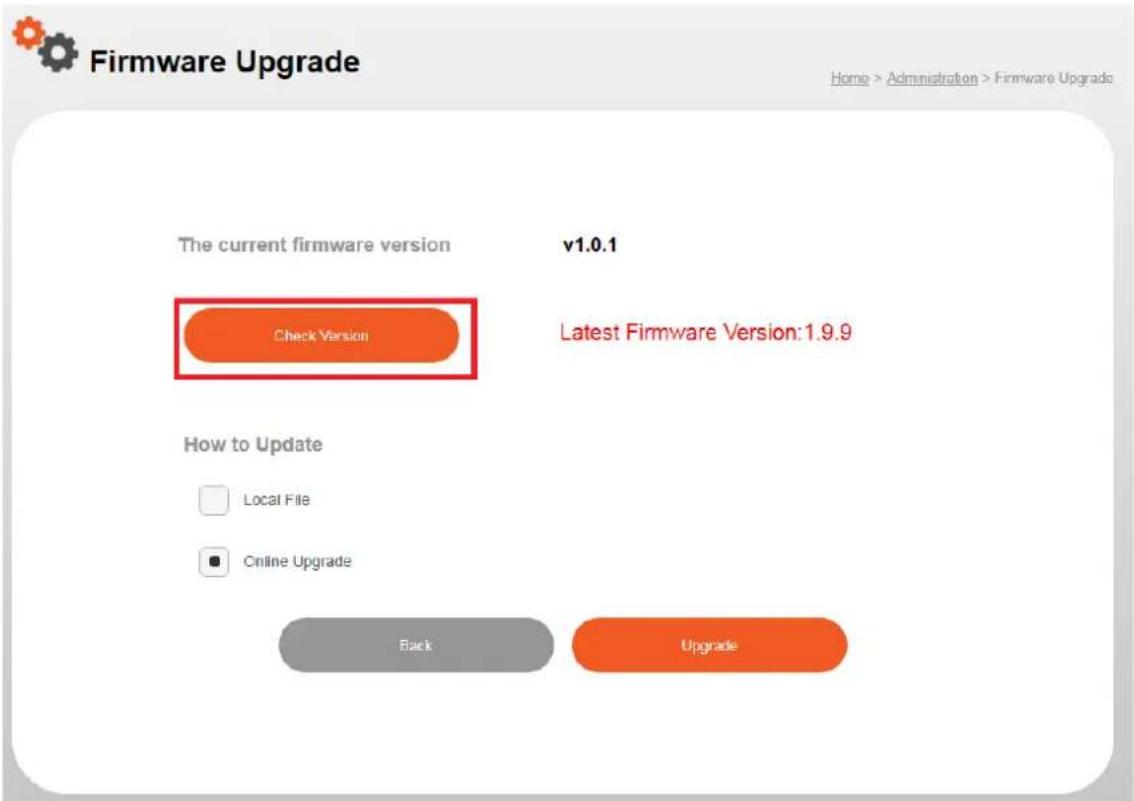
- Click the "Upgrade" and "OK" button to start upgrading the rmware.
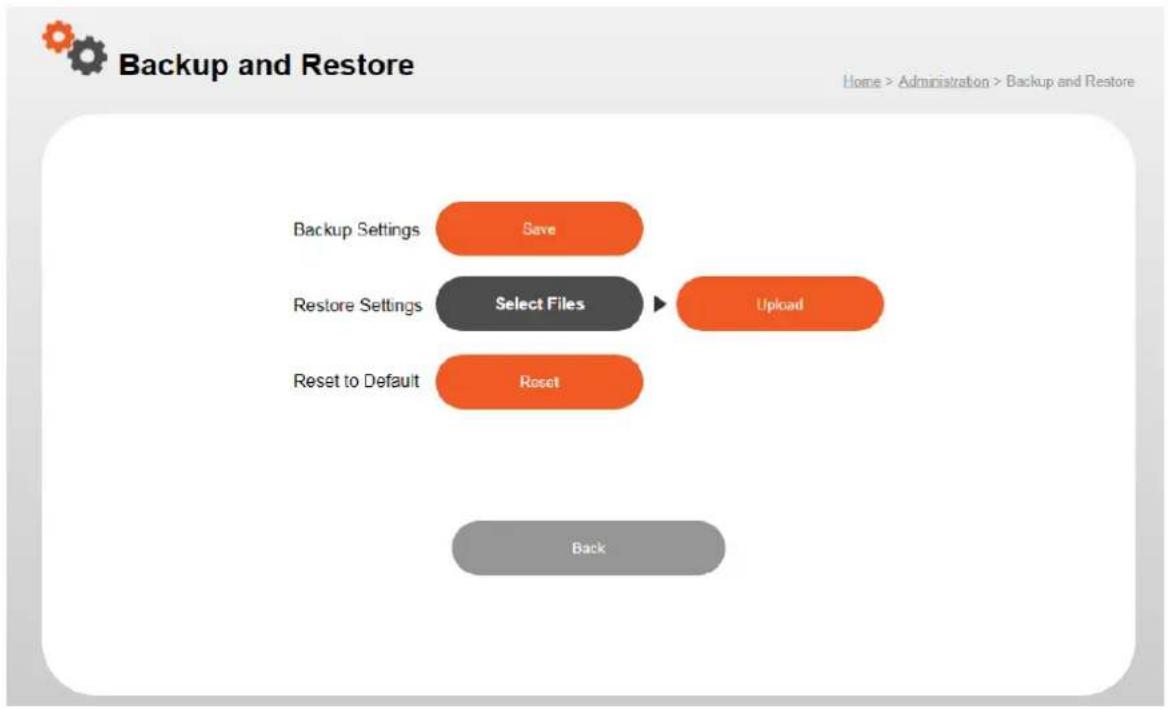
In this page you can reset the router to factory sengs, backup and restore all the sengs on the router.
flowchart
graph TD
    A["Backup Settings"] --> B["Save"]
    C["Restore Settings"] --> D["Select Files"]
    E["Reset to Default"] --> F["Reset"]
    G["Upload"] --> H["Back"]
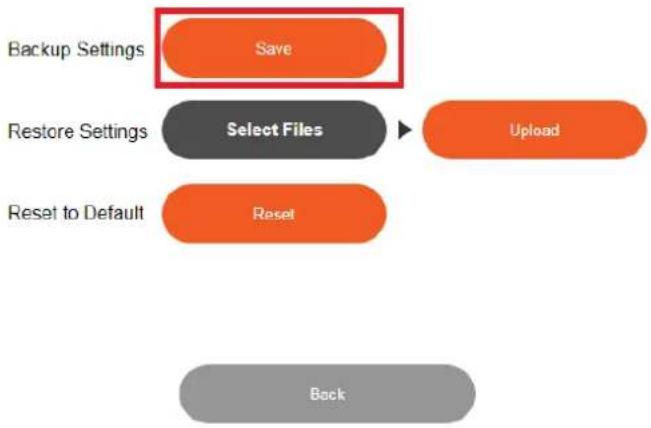
Please follow the steps below to back up and restore the sengs on you router,
- Click the "Save" buon to backup all the sengs.

db-backup.tar.gz

flowchart
graph TD
    A["Backup Settings"] --> B["Save"]
    C["Restore Settings"] --> D["Select Files"]
    E["Reset to Default"] --> F["Reset"]
    G["Upload"] --> H["Back"]
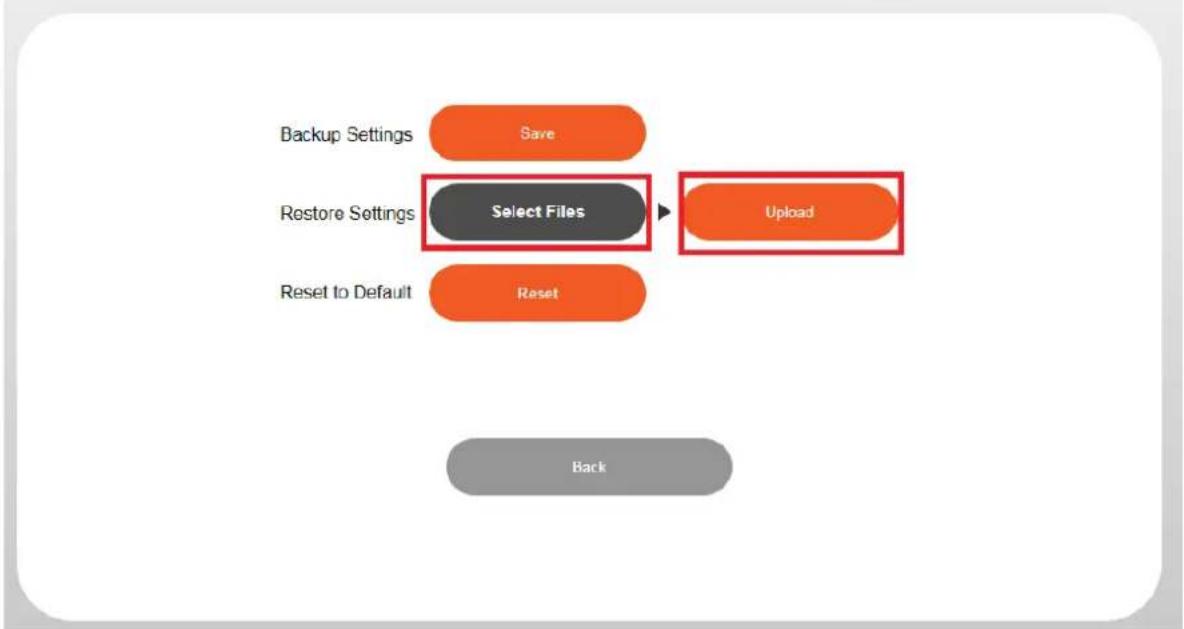
- Click the "Select Files" buon, and select the backup file that you want to upload.
- Click the "Upload" buon.

Backup and Restore
Home > Administration > Backup and Restore
flowchart
graph TD
    A["Backup Settings"] --> B["Save"]
    C["Restore Settings"] --> D["Select Files"]
    E["Reset to Default"] --> F["Reset"]
    G["Upload"] --> H["Back"]
If you experience problems with your router, you can reset the device back to its factory sengs.
There are 2 ways to reset the device.
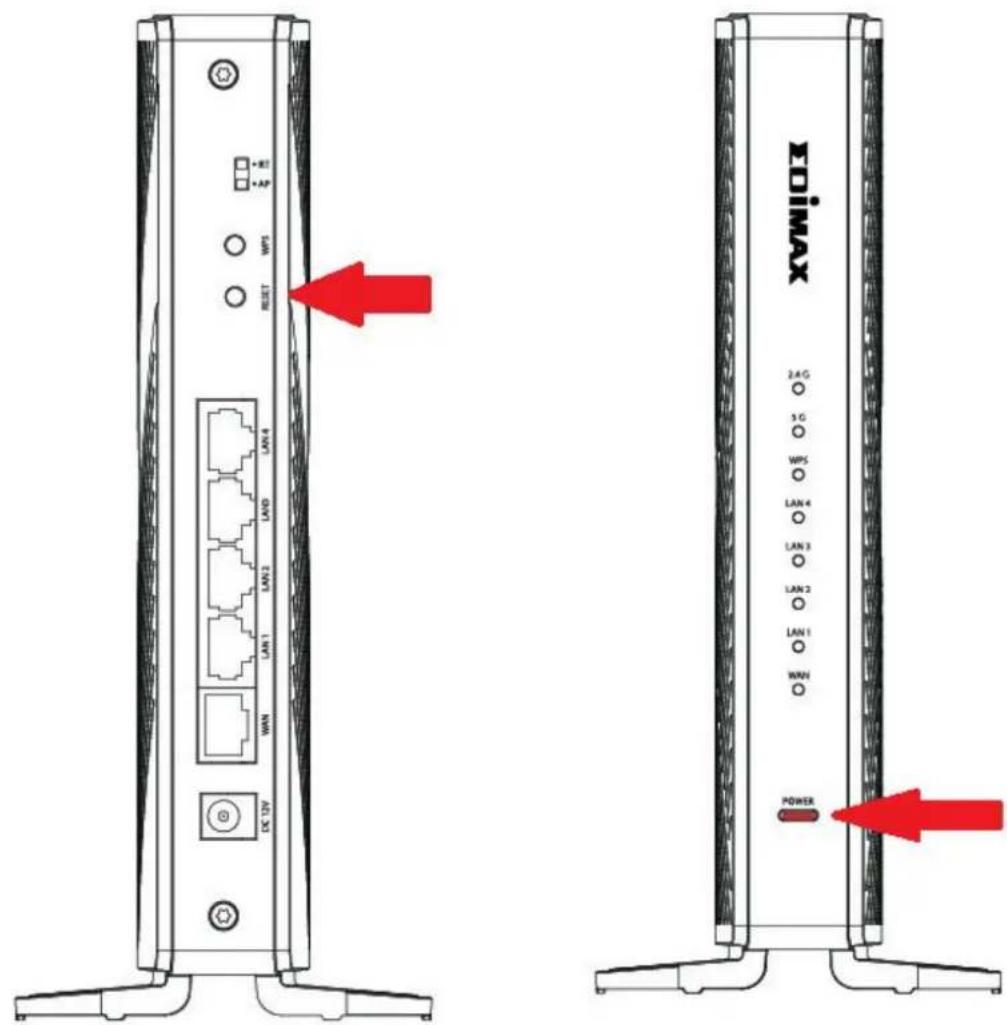
Hardware Reset:
-
Press and hold the reset buon on the router for at least 5 seconds then release the buon. Please wait a few minutes for the router to restart. When the device restarts, all sengs will be reset.
-
Wait for the router to restart. The router is ready for setup when the power LED blinking RED light.
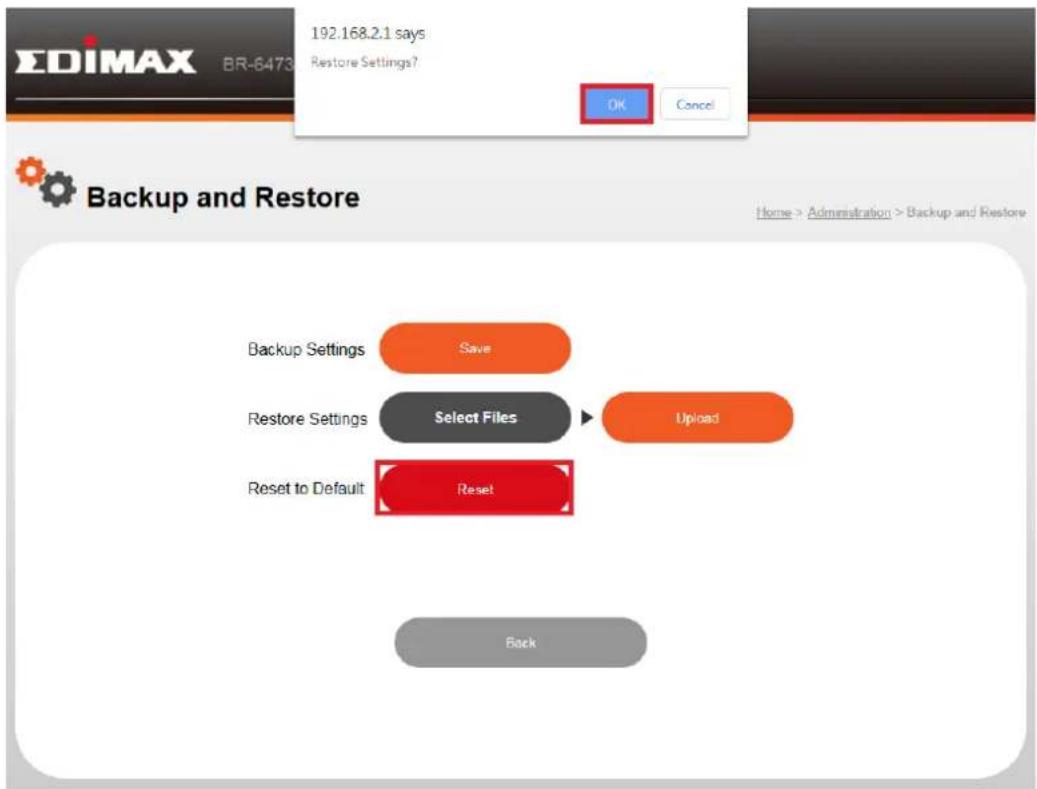
Web-Based Setup Page:
Click the "Reset" and "OK" buon to reset the router to factory sengs.
VIII-5. System Log
“System log” displays system operaon informaon such as up me and conncon processes. This informaon is useful for administrators.
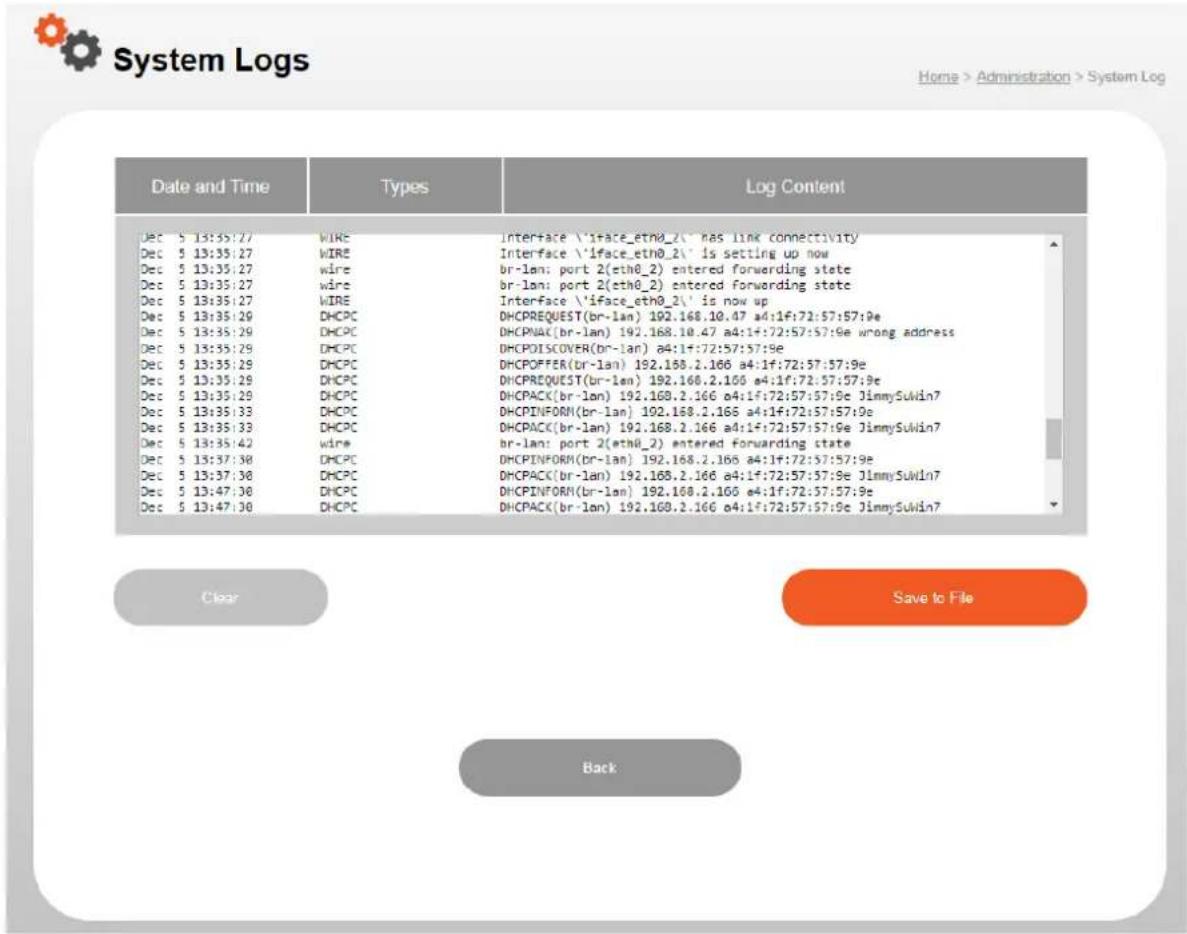
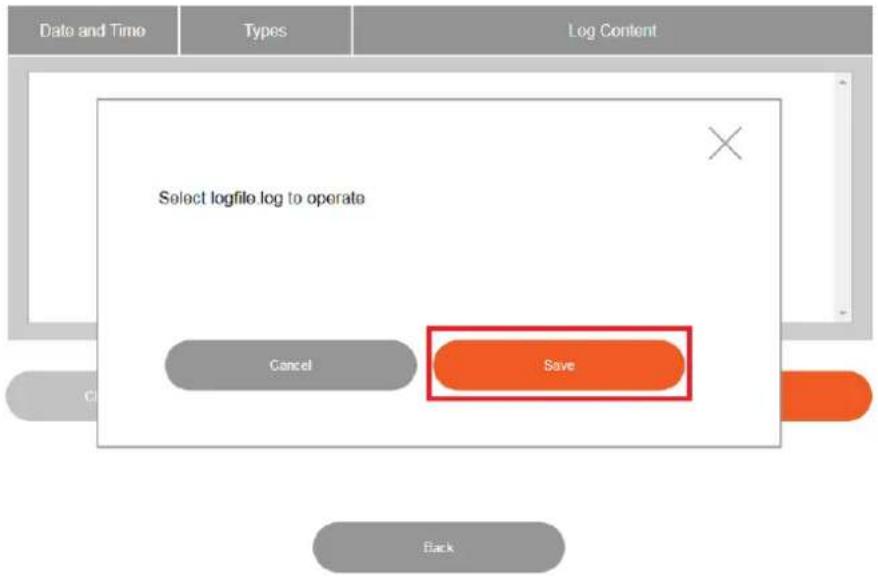
To backup the system log, please click the "Save to File" buon and press "Save".

System Logs
Home > Administration > System Log
To clear the system log, please click the "Clear" buon.

System Logs
Home > Administration > System Log
| Date and Time | Types | Log Content |
| Dec 5 13:35:27 | VIRE | Interface \iface_eth0_2\ has link connectivity |
| Dec 5 13:35:27 | VIRE | Interface \iface_eth0_2\ is setting up now |
| Dec 5 13:35:27 | wire | or-lan: port 2(eth0_2) entered forwarding state |
| Dec 5 13:35:27 | wire | or-lan: port 2(eth0_2) entered forwarding state |
| Dec 5 13:35:27 | VIRE | Interface \iface_eth0_2\ is now up |
| Dec 5 13:35:29 | DHCPC | DHCPREQUEST(br-lan) 192.168.10.47 a4:1f:72:57:57:9e |
| Dec 5 13:35:29 | DHCPC | DHCPNAX(br-lan) 192.168.10.47 a4:1f:72:57:57:9e wrong address |
| Dec 5 13:35:29 | DHCPC | DHCPDISCOVER(br-lan) a4:1f:72:57:57:9e |
| Dec 5 13:35:29 | DHCPC | DHCPFERR(br-lan) 192.168.2.168 a4:1f:72:57:57:9e |
| Dec 5 13:35:29 | DHCPC | DHCPREQUEST(br-lan) 192.168.2.166 a4:1f:72:57:57:9e |
| Dec 5 13:35:29 | DHCPC | DHCPACK(br-lan) 192.168.2.166 a4:1f:72:57:57:9e JimmySuWin7 |
| Dec 5 13:35:33 | DHCPC | DHCPINFORM(br-lan) 192.168.2.166 a4:1f:72:57:57:9e |
| Dec 5 13:35:33 | DHCPC | DHCPACK(br-lan) 192.168.2.166 a4:1f:72:57:57:9e JimmySuWin7 |
| Dec 5 13:35:42 | wire | or-lan: port 2(eth0_2) entered forwarding state |
| Dec 5 13:37:30 | DHCPC | DHCPINFORM(br-lan) 192.168.2.166 a4:1f:72:57:57:9e |
| Dec 5 13:37:30 | DHCPC | DHCPACK(br-lan) 192.168.2.166 a4:1f:72:57:57:9e JimmySuWin7 |
| Dec 5 13:47:30 | DHCPC | DHCPINFORM(br-lan) 192.168.2.166 a4:1f:72:57:57:9e |
| Dec 5 13:47:30 | DHCPC | DHCPACK(br-lan) 192.168.2.166 a4:1f:72:57:57:9e JimmySuWin7 |



VIII-6. Stasc
Your router stats can be found in this page, such as Ethernet LAN/WAN, 2.4GHz/5GHz Wireless.

Statistics
Home > Administration > Statistics
| Interface | Send | Receive | ||
| Normal | Error | Normal | Error | |
| Ethernet LAN | 45588 | 0 | 36210 | 0 |
| Ethernet WAN | 7620 | 0 | 68124 | 0 |
| 2.4GHz Wireless | 0 | 0 | 0 | 0 |
| 5GHz Wireless | 0 | 0 | 0 | 0 |
Back
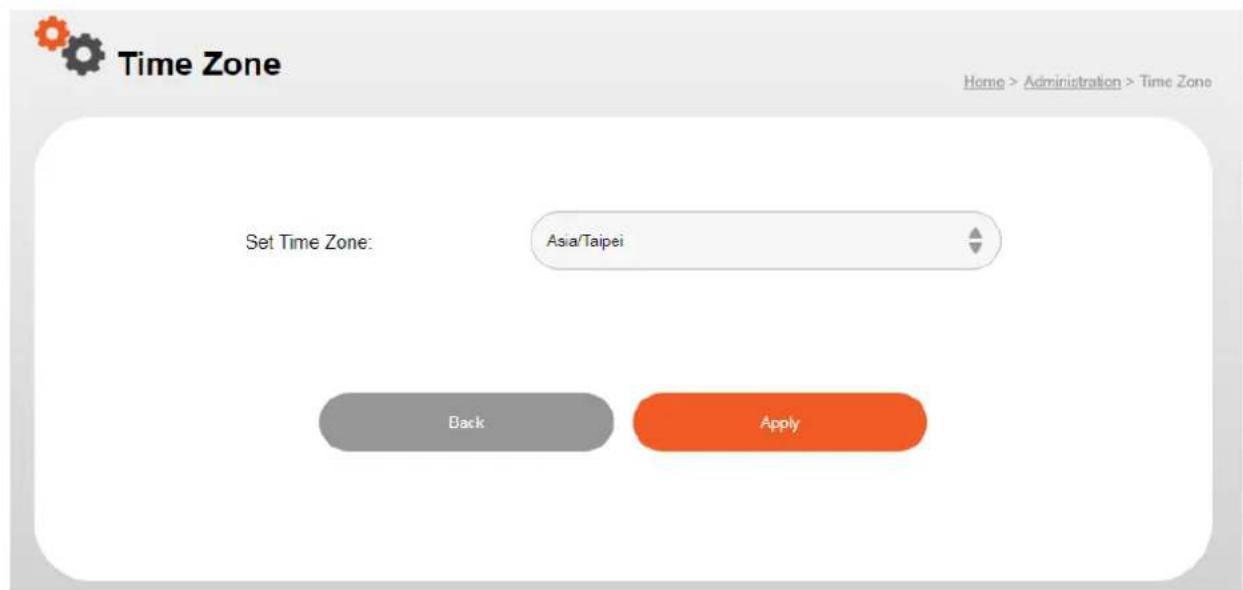
VIII-7. Time Zone
Select the me zone of your country/region. If your country/region is not listed, please select another country/region whose me zone is the same as yours.
VIII-8. Restart Schedule
The schedule feature allows your router to automacally reboot on a schedule. Check/uncheck the box “Restart Schedule” to enable/disable the router. And press “Apply” button to save changes.
Restart Schedule

Enable
Schedule
Monday

4:00

Back
Apply
© EDIMAX 2019

Applying Settings
Home > Administration > Applying Settings
System Processing
Please wait 20 seconds...
Do not turn off or reboot the Device during this time.
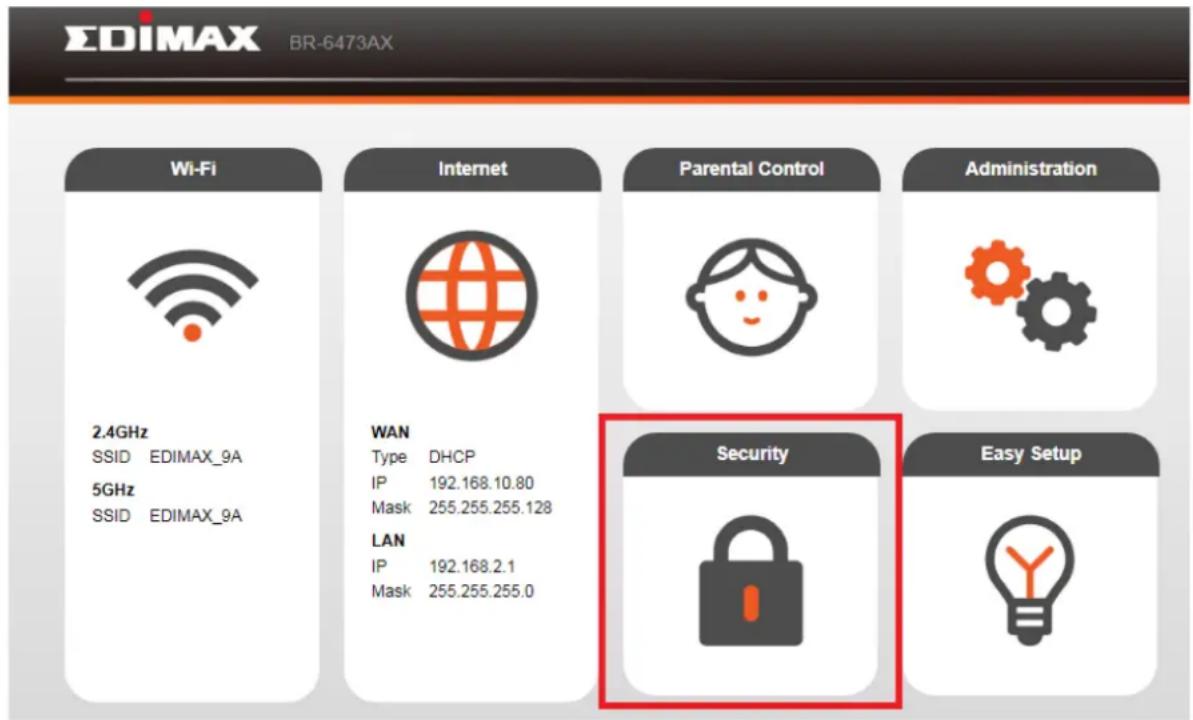
The router provides various security opons, for example, access control and DMZ.

It is essenal to conjure security in order to prevent unauthorised access to your network.
IX-1. Access Control
MAC Access Control is a security feature that can help to prevent unauthorized users from connecng to your router.
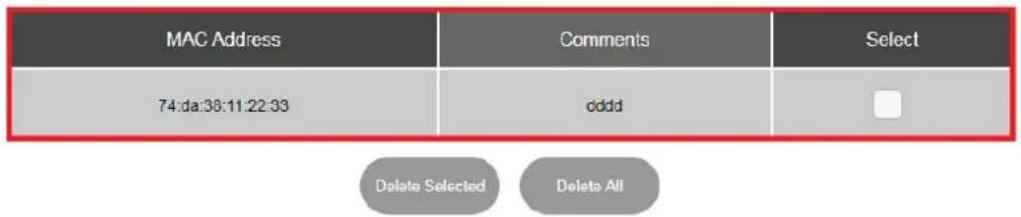
This funcon allows you to dene a list of network devices permied to connect to the router. Devices are each idened by their unique MAC address. If a device not on the list of permied MAC addresses aempts to connect to the router, it will be denied. The Access Control panel displays informaon about MAC Access Control & MAC Access Control Groups and Groups and allows you to add or edit MAC Access Control & MAC Access Control Group sengs.
Access Control

Enable
MAC Address
Example: 74da38112233
Comments
■ Access Control List
Back
Apply
| Access Control | |
| Enable Access Control | Check the box to enable access control. |
| MAC Address | Enter a MAC address of computer or network device manually without dashes or colons e.g. for MAC address ‘aa-bb-cc-dd-ee-’ enter ‘aabbccddee’. |
| Comment | Enter a comment for reference/idencaon consisng of up to 16 alphanumerical characters. |
| Add | Click “Add” to add the MAC address |
IX-2. Port Forwarding
A port forward opens specific ports on your router and is a way of making a computer network accessible to any networking applicaon.
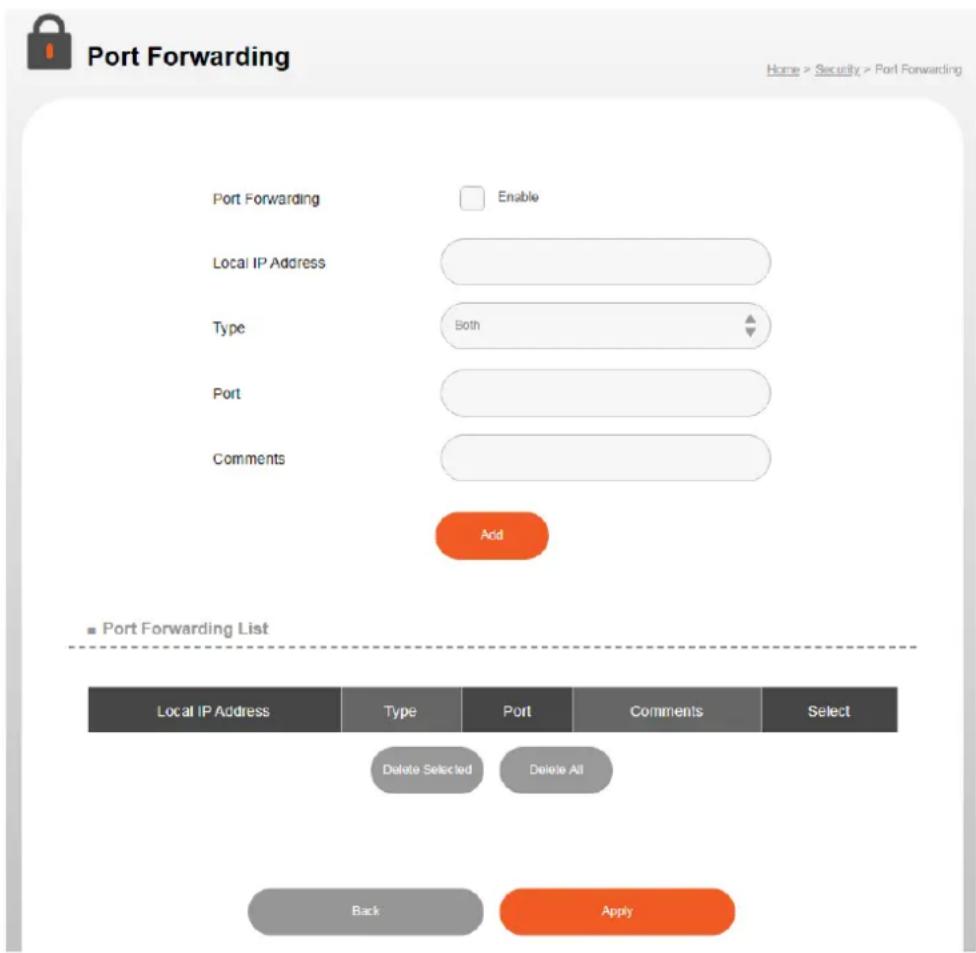
| Port forwarding | |
| Enable/Disable | Enable or disable port forwarding. |
| Local IP Address | Enter the IP address of the computer on the local network. |
| Type | Select the type of conncon, “TCP”, “UDP” or “Both”. |
| Port | Input the port number in the eld. |
| Comments | Enter a comment for reference/idencaon consisng of up to 16 alphanumerical characters. |
IX-3. DMZ
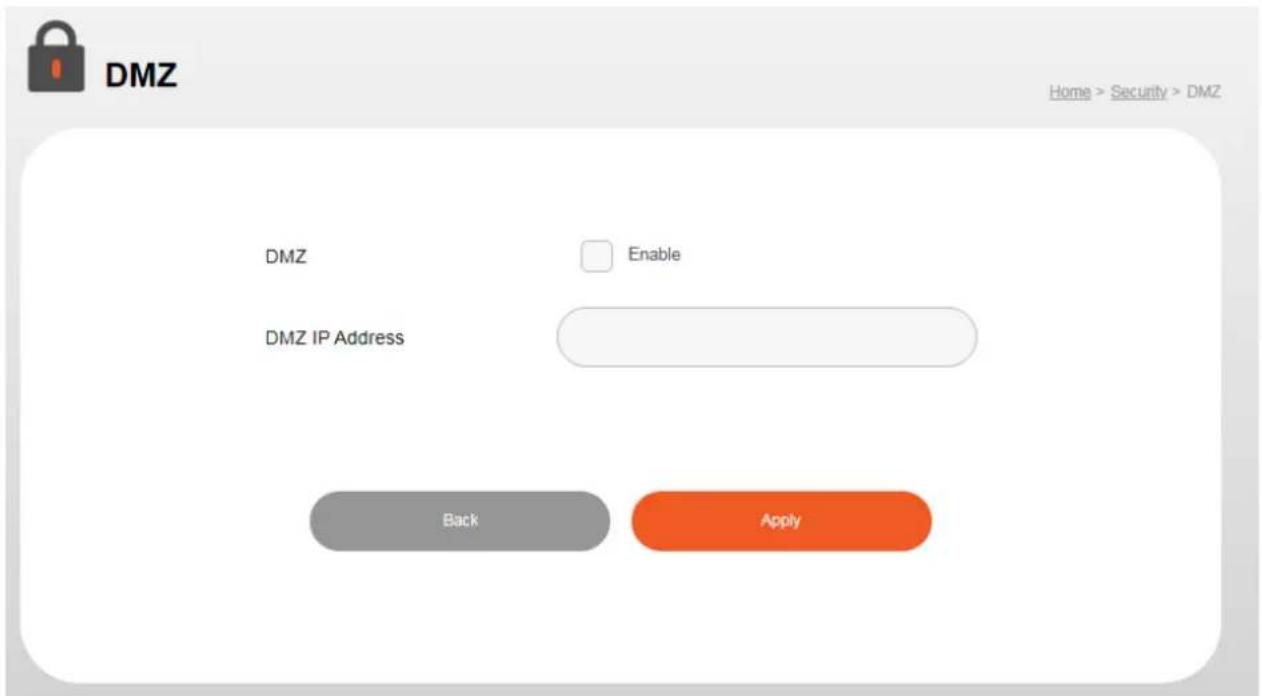
DMZ Network exists to protect the hosts most vulnerable to aack and as a subnetwork containing an organizaon's exposed, outward-facing services. It acts as the exposed point to an untrusted network, commonly the Internet. Please follow the steps below to setup DMZ on your router,
- Enable DMZ.
- Enter the DMZ IP address.
- Click the "Apply" buon.
IX-4. Remote Management
Check “Enable” to enable the remote access feature via WAN and then enter the appropriate values.
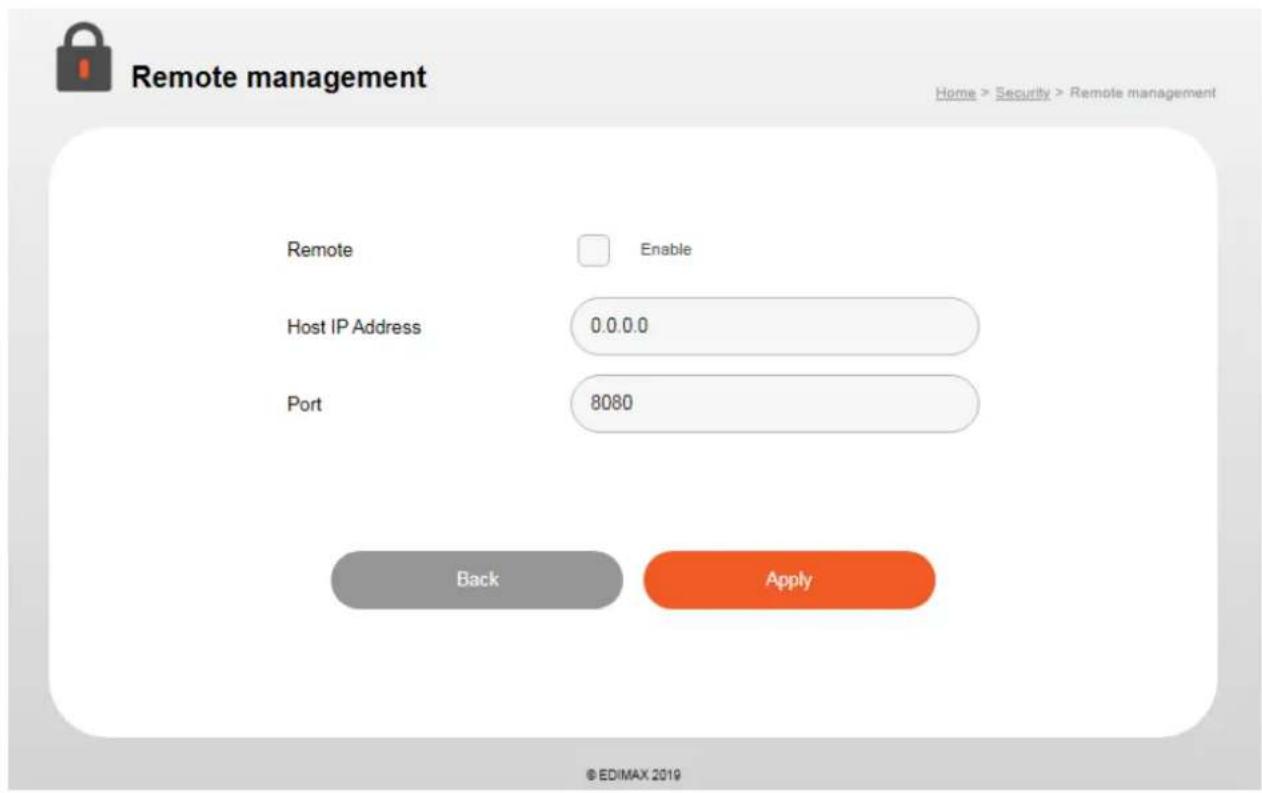
| Remote Management | |
| Host IP Address | Specify the IP address which is allowed remote access. |
| Port | Specify a port number (0–65535) used for remote access. |
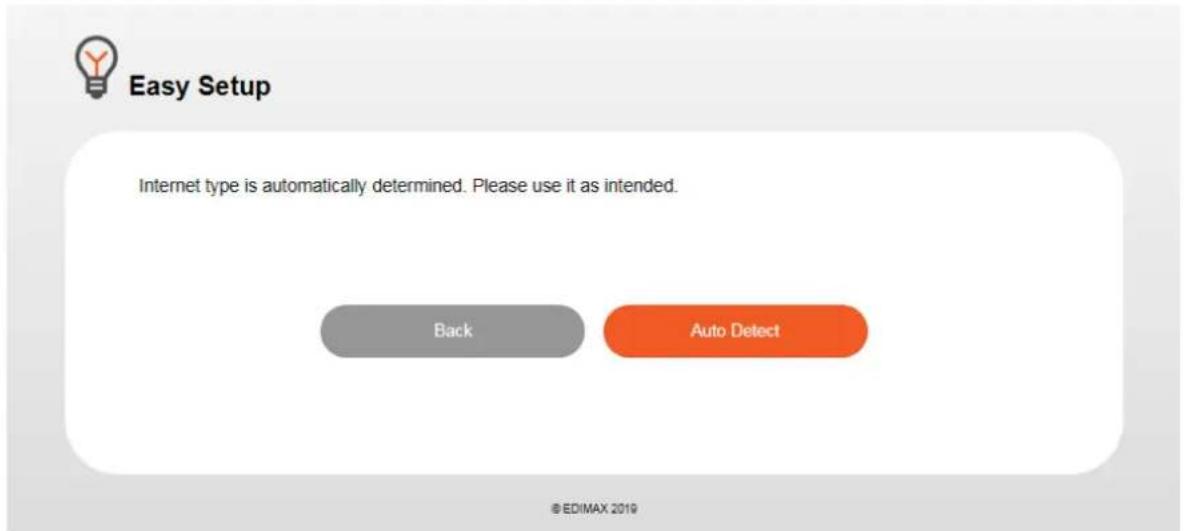
Users can follow the simple steps below for conguring your router and wireless network.
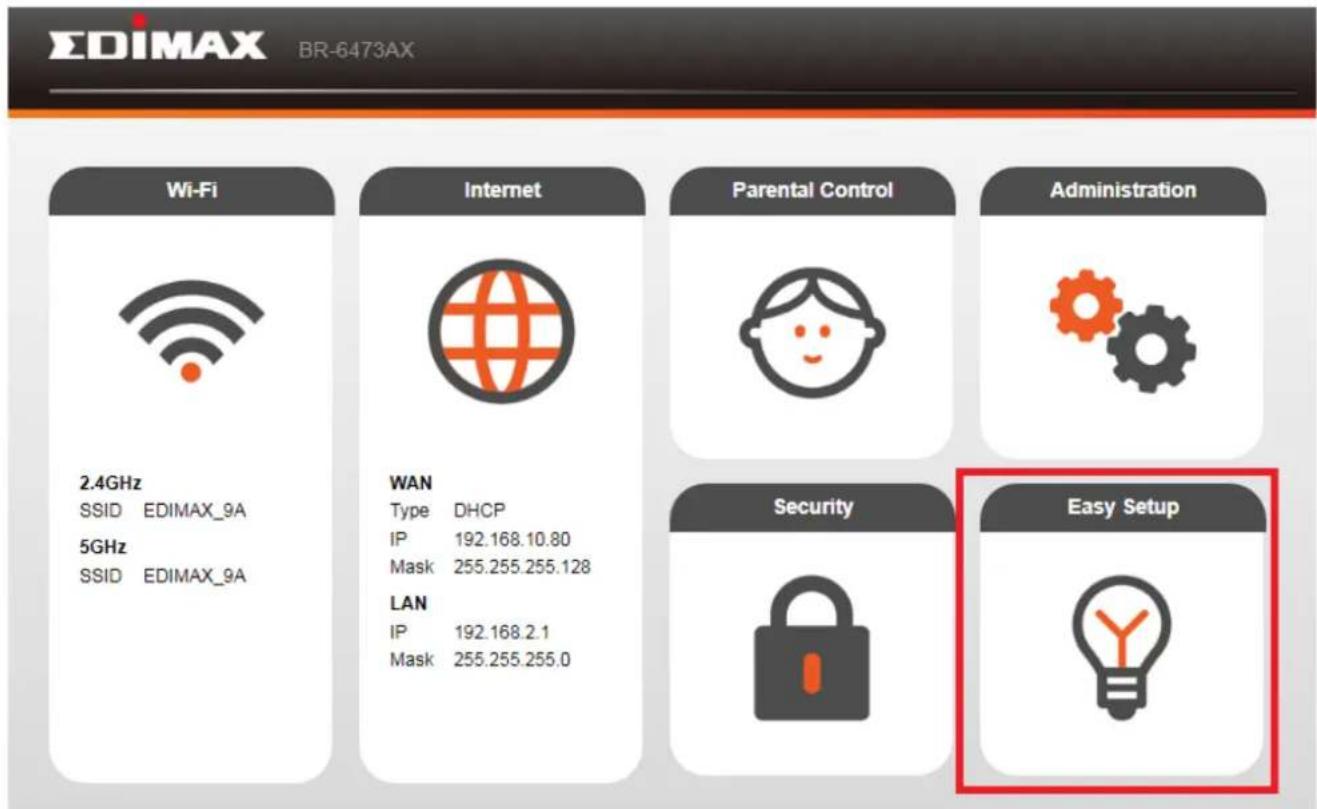
Please press "Auto Detect" buon to connue.
X-1. DHCP
If you use DHCP, please wait while the router seng is completed.

Easy Setup
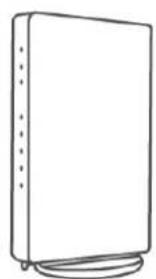
Detecting
The process may take a while, please wait...
natural_image
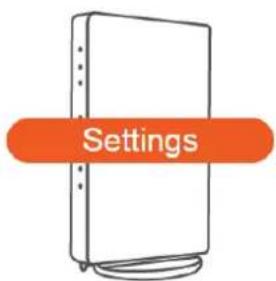
Line drawing of a rectangular electronic device with ports and cables (no text or symbols)DHCP Setting...

Easy Setup
Currently building the production line. Please wait until the process is complete.
Remaining 57 second.
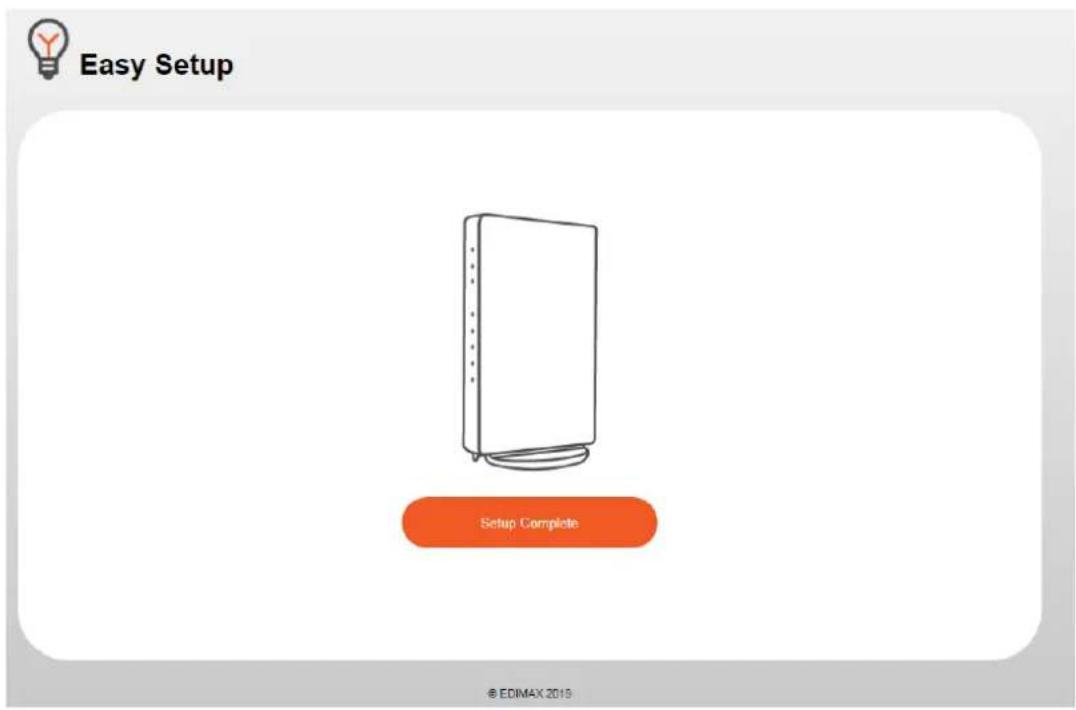
Click the "Setup Complete" buon to complete the setup.
X-2. Stac IP
When a router is connected to a DSL or modem, it usually automacally give you a xed IP address, subnet mask, gateway address, and DNS address from the Internet service provider (ISP), and will ask you to use this IP address to establish conncon with your ISP.

Easy Setup
Scheduled fixed IP delivery. Enter messages under each section and click "next", If the selected static IP does not show on the display, please check the DHCP/PPPoE and then click on the "back" button until the manual setting function appears, then choose the appropriate connection setting in the internet selection option under "manual settings"
IP Address
Default Gateway
Subnet Mask
DNS1
DNS2
natural_image
Four horizontal rounded rectangular shapes with no text or symbolsBack
next
| IP Address | Displays the IP address of this router. |
| Default Gateway | Displays the IP address of the default gateway. |
| Subnet Mask | Specify a subnet mask. The default value is 255.255.255.0. |
| DNS1 | Enter the IP address of DNS that provided by your ISP. |
| DNS2 | Enter the IP address of DNS that provided by your ISP. |

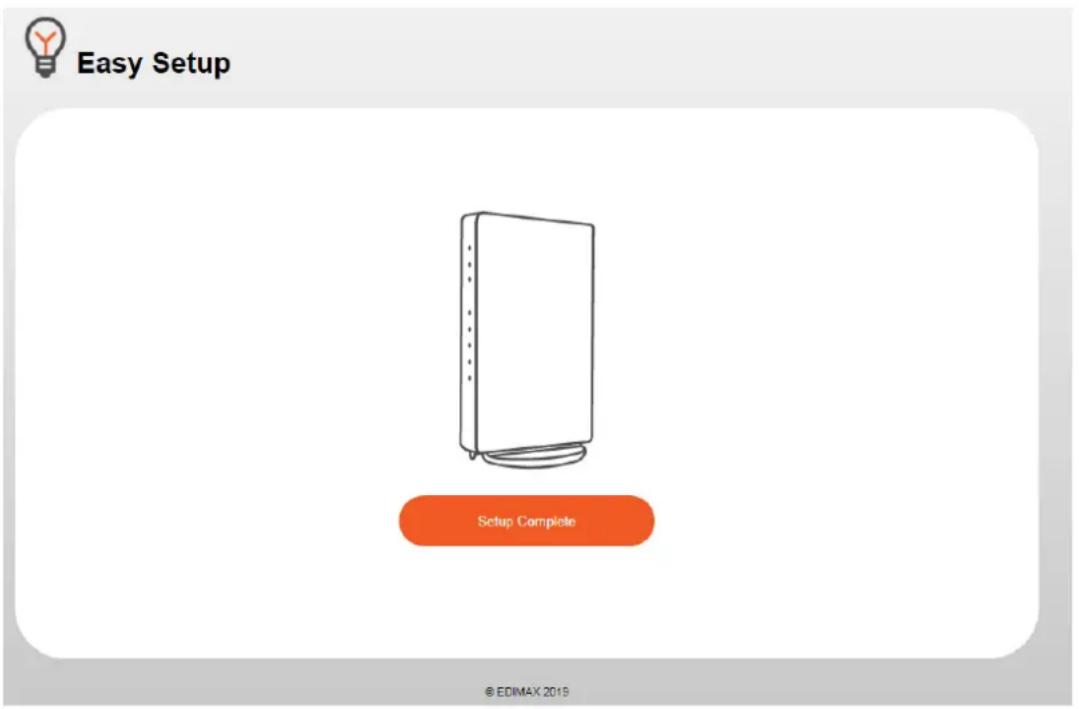
Easy Setup
Currently building the production line. Please wait until the process is complete.
Remaining 67 second.
Click the "Setup Complete" buon to complete the setup.
X-3. PPPoE
If your ISP requires you to establish Internet conneccon by PPPoE
(Point-to-Point Protocol over Ethernet), you can use this conncon type to establish Internet conncon.
Please enter the Username / Password and click the "next" buon.

Easy Setup
Type in the provided internet connection ID (username) and user identity password (password). Click next. Username must input after the "@" sign.
※You can use the following characters in the user name and password.
"Characters halfwidth font a\~z, A\~Z, 0\~9, space, ..., @, \$, : , .", #, %, /, -, +, !, ="
※Max Characters is set to within 57 characters or symbols.
Username
Password
Back
next

Easy Setup
Currently building the production line. Please wait until the process is complete.
Remaining 57 second.
Click the "Setup Complete" buon to complete the setup.
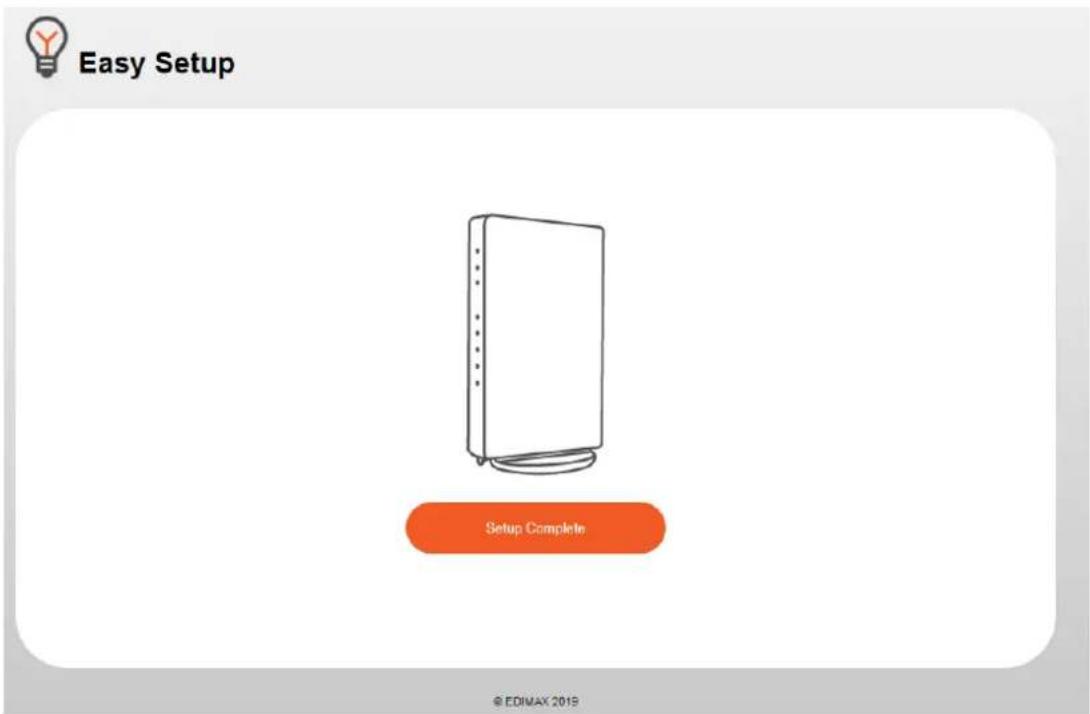
If sengs failed or Ethernet cable is not connected properly, you will be prompted to check the following sengs below,

Easy Setup
- Setting fail, please check again.
•The Product Terminal is Not On.
Ensure Every Device is On.
•The Product and Terminal is not connected.
Make sure the product and cable is connected correctly.
•Communication with the modem is interrupted.
Switch off the modem and this product. Switch on after 10 min
•The auto connection is different to the user connection.
Have your connection type checked by the provider (DHCP/ PPPoE/ Static IP), then select the appropriate connection type manually.
-User login username or password are incorrect.
Contact the provider to check further.
• To cancel, please close the browser.
Back
COPYRIGHT
Copyright © Edimax Technology Co., Ltd. all rights reserved. No part of this publicaon may be reproduced, transmied, transcribed, stored in a retrieval system, or translated into any language or computer language, in any form or by any means, electronic, mechanical, magnec, opcal, chemical, manual or otherwise, without the prior written permission from Edimax Technology Co., Ltd.
Edimax Technology Co., Ltd. makes no representaons or warranes, either expressed or implied, with respect to the contents hereof and specifically disclaims any warranes, merchantability, or tness for any parcular purpose. Any soware described in this manual is sold or licensed as is. Should the programs prove defecve following their purchase, the buyer (and not this company, its distributor, or its dealer) assumes the enre cost of all necessary servicing, repair, and any incidental or consequential damages resulting from any defect in the soware. Edimax Technology Co., Ltd. reserves the right to revise this publicaon and to make changes from me to me in the contents hereof without the obligaon to nofy any person of such revision or changes.
The product you have purchased and the setup screen may appear slightly dierent from those shown in this QIG. The soware and specicaons are subject to change without noce. Please visit our website www.edimax.com for updates. All brand and product names menoned in this manual are trademarks and/or registered trademarks of their respective holders.
| AT | BE | BG | HR | CY | CZ | DK | |
| EE | FI | FR | DE | EL | HU | IE | |
| IT | LV | LT | LU | MT | NL | PL | |
| PT | RO | SK | SI | ES | SE | UK |
The device is restricted to indoor use only when operating in the 5150 to 5350 MHz frequency range.
Federal Communicaon Commission Interference Statement
This equipment has been tested and found to comply with the limits for a Class B digital device, pursuant to Part 15 of FCC Rules. These limits are designed to provide reasonable protecon against harmful interference in a residential installaon. This equipment generates, uses, and can radiate radio frequency energy and, if not installed and used in accordance with the instrucons, may cause harmful interference to radio communicaons. However, there is no guarantee that interference will not occur in a parcular installaon. If this equipment does cause harmful interference to radio or television recepon, which can be determined by turning the equipment o and on, the user is encouraged to try to correct the interference by one or more of the following measures:
- Reorient or relocate the receiving antenna.
- Increase the separaon between the equipment and receiver.
- Connect the equipment into an outlet on a circuit dierent from that to which the receiver is connected.
- Consult the dealer or an experienced radio technician for help.
FCC Cauon
This device and its antenna must not be co-located or operang in conjuncon with any other antenna or transmier. This device complies with Part 15 of the FCC Rules. Operaon is subject to the following two conditions: (1) this device may not cause harmful interference, and (2) this device must accept any interference received, including interference that may cause undesired operaon. Any changes or modicaons not expressly approved by the party responsible for compliance could void the authority to operate equipment.
Federal Communicaons Commission (FCC) Radiaon Exposure Statement
This equipment complies with FCC radiaon exposure set forth for an uncontrolled environment. In order to avoid the possibility of exceeding the FCC radio frequency exposure limits, human proximity to the antenna shall not be less than 2.5cm (1 inch) during normal operaon.
The equipment version marketed in US is restricted to usage of the channels 1-11 only. This equipment is restricted to indoor use when operated in the 5.15 to 5.25 GHz frequency range.
RED Compliance Statement
Compliance with 2014/53/EU Radio Equipment Directive (RED)
In accordance with Arcle 10.8(a) and 10.8(b) of the RED, the following table provides informaon on the frequency bands used and the maximum RF transmit power of the product for sale in the EU:
| Frequency range (MHz) | Max. transmit power (dBm) |
| 2400-2483.5 | 19.98 dBm |
| 5150-5250 | 22.99 dBm |
| 5250-5350 | 22.99 dBm |
| 5470-5725 | 29.98 dBm |
A simplified DoC shall be provided as follows: Arcle 10(9)
Hereby, Edimax Technology Co., Ltd. declares that the radio equipment type AX3000 Dual-Band Router is in compliance with Directive 2014/53/EU
The full text of the EU declaraon of conformity is available at the following internet
address: hp://www.edimax.com/edimax/global/
Safety
This equipment is designed with the utmost care for the safety of those who install and use it. However, special aenon must be paid to the dangers of electric shock and stac electricity when working with electrical equipment. All guidelines of this and of the computer manufacture must therefore be allowed at all mes to ensure the safe use of the equipment.
EU Countries Intended for Use
The ETSI version of this device is intended for home and oce use in Austria, Belgium, Bulgaria, Cyprus, Czech, Denmark, Estonia, Finland, France, Germany, Greece, Hungary, Ireland, Italy, Latvia, Lithuania, Luxembourg, Malta, Netherlands, Poland, Portugal, Romania, Slovakia, Slovenia, Spain, Sweden, Turkey, and United Kingdom. The ETSI version of this device is also authorized for use in EFTA member states: Iceland, Liechtenstein, Norway, and Switzerland.
EU Countries Not Intended for Use
None
EU Declaraon of Conformity
English: This equipment is in compliance with the essenal requirements and other relevant provisions of Direcve 2014/53/EU, 2014/35/EU.
WEEE Dircve & Product Disposal

At the end of its serviceable life, this product should not be treated as household or general waste. It should be handed over to the applicable collecon point for the recycling of electrical and electronic equipment, or returned to the supplier for disposal.
Declaraon of Conformity
We, Edimax Technology Co., Ltd., declare under our sole responsibility, that the equipment described below complies with the requirements of the European Radio Equipment directives.
Equipment: AX3000 Dual-Band Router
Model No.: BR-6473AX
The following European standards for essenal requirements have been followed:
Direcves 2014/53/EU
Spectrum : EN 300 328 V2.1.1 (2016-11)
EN 301 893 V2.1.1 (2017-05)
EMC : EN 301 489-1 V2.2.0 (2017-03), Class B
Edimax Technology Europe B.V. a company of :
Fijenhof 2, Edimax Technology Co., Ltd.
5652 AE Eindhoven, No. 278, Xinhu 1st Rd.,
The Netherlands Neihu Dist., Taipei City,
Taiwan
Signature:
Printed Name: David Huang
Title: Director
Edimax Technology Europe B.V.

Date of Signature: Dec., 2019
Signature:

Printed Name: Albert Chang
Title: Director
Edimax Technology Co., Ltd.
Noce According to GNU General Public License Version 2
This product includes soware that is subject to the GNU General Public License version 2. The program is free soware and distributed without any warranty of the author. We oer, valid for at least three years, to give you, for a charge no more than the costs of physically performing source distribuon, a complete machine-readable copy of the corresponding source code.
Version 2, June 1991
Copyright (C) 1989, 1991 Free Soware Foundaon, Inc. 51 Franklin Street, Fih Floor, Boston, MA 02110-1301, USA Everyone is permitted to copy and distribute verbam copies of this license document, but changing it is not allowed.
Preamble
The licenses for most soware are designed to take away your freedom to share and change it. By contrast, the GNU General Public License is intended to guarantee your freedom to share and change free soware--to make sure the soware is free for all its users. This General Public License applies to most of the Free Soware Foundaon's soware and to any other program whose authors commit to using it. (Some other Free Soware Foundaon soware is covered by the GNU Lesser General Public License instead.) You can apply it to your programs, too.
When we speak of free soware, we are referring to freedom, not price. Our General Public Licenses are designed to make sure that you have the freedom to distribute copies of free soware (and charge for this service if you wish), that you receive source code or can get it if you want it, that you can change the soware or use pieces of it in new free programs; and that you know you can do these things.
To protect your rights, we need to make restricons that forbid anyone to deny you these rights or to ask you to surrender the rights. These restricons translate to certain responsibilities for you if you distribute copies of the soware, or if you modify it.
For example, if you distribute copies of such a program, whether gratis or for a fee, you must give the recipients all the rights that you have. You must make sure that they, too, receive or can get the source code. And you must show them these terms so they know their rights.
We protect your rights with two steps: (1) copyright the soware, and (2) oer you this license which gives you legal permission to copy, distribute and/or modify the soware.
Also, for each author's protecon and ours, we want to make certain that everyone understands that there is no warranty for this free soware. If the soware is modified by someone else and passed on, we want its recipients to know that what they have is not the original, so that any problems introduced by others will not react on the original authors' reputaons.
Finally, any free program is threatened constantly by soware patents. We wish to avoid the danger that redistributors of a free program will individually obtain patent licenses, in eect making the program proprietary. To prevent this, we have made it clear that any patent must be licensed for everyone's free use or not licensed at all.
The precise terms and conditions for copying, distribuon and modicaon follow.
TERMS AND CONDITIONS FOR COPYING, DISTRIBUTION AND MODIFICATION
- This License applies to any program or other work which contains a noce placed by the copyright holder saying it may be distributed under the terms of this General Public License. The ““Program””, below, refers to any such program or work, and a ““work based on the Program”” means either the Program or any derivative work under copyright law: that is to say, a work containing the Program or a poron of it, either verbam or with modicaons and/or translated into another language. (Hereinaer, translaon is included without limitaon in the term ““modicaon””.) Each licensee is addressed as ““you””.
Acvies other than copying, distribuon and modicaon are not covered by this License; they are outside its scope. The act of running the Program is not restricted, and the output from the Program is covered only if its contents constute a work based on the Program (independent of having been made by running the Program). Whether that is true depends on what the Program does.
- You may copy and distribute verbam copies of the Program's source code as you receive it, in any medium, provided that you conspicuously and appropriately publish on each copy an appropriate copyright noce and disclaimer of warranty; keep
intact all the noces that refer to this License and to the absence of any warranty; and give any other recipients of the Program a copy of this License along with the Program.
You may charge a fee for the physical act of transferring a copy, and you may at your opon oer warranty protecon in exchange for a fee.
- You may modify your copy or copies of the Program or any poron of it, thus forming a work based on the Program, and copy and distribute such modifications or work under the terms of Secon 1 above, provided that you also meet all of these conditions:
a) You must cause the modified les to carry prominent noces stang that you changed the les and the date of any change.
b) You must cause any work that you distribute or publish, that in whole or in part contains or is derived from the Program or any part thereof, to be licensed as a whole at no charge to all third pares under the terms of this License.
c) If the modified program normally reads commands interactively when run, you must cause it, when started running for such interactive use in the most ordinary way, to print or display an announcement including an appropriate copyright notice and a notice that there is no warranty (or else, saying that you provide a warranty) and that users may redistribute the program under these conditions, and telling the user how to view a copy of this License. (Excepon: if the Program itself is interactive but does not normally print such an announcement, your work based on the Program is not required to print an announcement.)
These requirements apply to the modified work as a whole. If idenable sections of that work are not derived from the Program, and can be reasonably considered independent and separate works in themselves, then this License, and its terms, do not apply to those seconds when you distribute them as separate works. But when you distribute the same seconds as part of a whole which is a work based on the Program, the distribution of the whole must be on the terms of this License, whose permissions for other licensees extend to the entire whole, and thus to each and every part regardless of who wrote it.
Thus, it is not the intent of this secon to claim rights or contest your rights to work wrien enrely by you; rather, the intent is to exercise the right to control the distribuon of derivave or collecve works based on the Program.
In addition, mere aggregaon of another work not based on the Program with the Program (or with a work based on the Program) on a volume of a storage or distribuon medium does not bring the other work under the scope of this License.
- You may copy and distribute the Program (or a work based on it, under Secon 2) in object code or executable form under the terms of Secons 1 and 2 above provided that you also do one of the following:
a) Accompany it with the complete corresponding machine-readable source code, which must be distributed under the terms of Secons 1 and 2 above on a medium customarily used for soware interchange; or,
b) Accompany it with a wrien oer, valid for at least three years, to give any third party, for a charge no more than your cost of physically performing source distribuon, a complete machine-readable copy of the corresponding source code, to be distributed under the terms of Secons 1 and 2 above on a medium customarily used for soware interchange; or,
c) Accompany it with the informaon you received as to the oer to distribute corresponding source code. (This alternate is allowed only for noncommercial distribuon and only if you received the program in object code or executable form with such an oer, in accord with Subsecon b above.)
The source code for a work means the preferred form of the work for making modicaons to it. For an executable work, complete source code means all the source code for all modules it contains, plus any associated interface denion les, plus the scripts used to control compilaon and installaon of the executable. However, as a special exception, the source code distributed need not include anything that is normally distributed (in either source or binary form) with the major components (compiler, kernel, and so on) of the operang system on which the executable runs, unless that component itself accompanies the executable.
If distribuon of executable or object code is made by oering access to copy from a designated place, then oering equivalent access to copy the source code from the same place counts as distribuon of the source code, even though third pares are not compelled to copy the source along with the object code.
-
You may not copy, modify, sublicense, or distribute the Program except as expressly provided under this License. Any aempt otherwise to copy, modify, sublicense or distribute the Program is void, and will automatically terminate your rights under this License. However, pares who have received copies, or rights, from you under this License will not have their licenses terminated so long as such pares remain in full compliance.
-
You are not required to accept this License, since you have not signed it. However, nothing else grants you permission to modify or distribute the Program or its derivative works. These acons are prohibited by law if you do not accept this License. Therefore, by modifying or distributing the Program (or any work based on the Program), you indicate your acceptance of this License to do so, and all its terms and conditions for copying, distribution or modifying the Program or works based on it.
-
Each me you redistribute the Program (or any work based on the Program), the recipient automatically receives a license from the original licensor to copy, distribute or modify the Program subject to these terms and conditions. You may not impose any further restricons on the recipients' exercise of the rights granted herein. You are not responsible for enforcing compliance by third pares to this License.
-
If, as a consequence of a court judgment or allegaon of patent infringement or for any other reason (not limited to patent issues), condions are imposed on you (whether by court order, agreement or otherwise) that contradict the condions of this License, they do not excuse you from the condions of this License. If you cannot distribute so as to sasfy simultaneously your obligaons under this License and any other pernent obligaons, then as a consequence you may not distribute the Program at all. For example, if a patent license would not permit royalty-free redistribuon of the Program by all those who receive copies directly or indirectly through you, then the only way you could sasfy both it and this License would be to refrain enrely from distribuon of the Program.
If any poron of this secon is held invalid or unenforceable under any parcular circumstance, the balance of the secon is intended to apply and the secon as a whole is intended to apply in other circumstances.
It is not the purpose of this secon to induce you to infringe any patents or other property right claims or to contest validity of any such claims; this secon has the sole purpose of protecng the integrity of the free soware distribuon system, which is implemented by public license pracces. Many people have made generous contribuons to the wide range of soware distributed through that system in reliance on consistent applicaon of that system; it is up to the author/donor to decide if he or she is willing to distribute soware through any other system and a licensee cannot impose that choice.
This secon is intended to make thoroughly clear what is believed to be a consequence of the rest of this License.
-
If the distribuon and/or use of the Program is restricted in certain countries either by patents or by copyrighted interfaces, the original copyright holder who places the Program under this License may add an explicit geographical distribuon limitaon excluding those countries, so that distribuon is permied only in or among countries not thus excluded. In such case, this License incorporates the limitaon as if wrien in the body of this License.
-
The Free Soware Foundaon may publish revised and/or new versions of the General Public License from me to me. Such new versions will be similar in spirit to the present version, but may differ in detail to address new problems or concerns.
Each version is given a disguishing version number. If the Program species a version number of this License which applies to it and “any later version”, you have the opon of following the terms and condions either of that version or of any later version published by the Free Soware Foundaon. If the Program does not specify a version number of this License, you may choose any version ever published by the Free Soware Foundaon.
- If you wish to incorporate parts of the Program into other free programs whose distribuon conditions are dierent, write to the author to ask for permission. For soware which is copyrighted by the Free Soware Foundaon, write to the Free Soware Foundaon; we somemes make excepons for this. Our decision will be guided by the two goals of preserving the free status of all derivatives of our free soware and of promong the sharing and reuse of soware generally.
NO WARRANTY
-
BECAUSE THE PROGRAM IS LICENSED FREE OF CHARGE, THERE IS NO WARRANTY FOR THE PROGRAM, TO THE EXTENT PERMITTED BY APPLICABLE LAW. EXCEPT WHEN OTHERWISE STATED IN WRITING THE COPYRIGHT HOLDERS AND/OR OTHER PARTIES PROVIDE THE PROGRAM "AS IS" WITHOUT WARRANTY OF ANY KIND, EITHER EXPRESSED OR IMPLIED, INCLUDING, BUT NOT LIMITED TO, THE IMPLIED WARRANTIES OF MERCHANTABILITY AND FITNESS FOR A PARTICULAR PURPOSE. THE ENTIRE RISK AS TO THE QUALITY AND PERFORMANCE OF THE PROGRAM IS WITH YOU. SHOULD THE PROGRAM PROVE DEFECTIVE, YOU ASSUME THE COST OF ALL NECESSARY SERVICING, REPAIR OR CORRECTION.
-
IN NO EVENT UNLESS REQUIRED BY APPLICABLE LAW OR AGREED TO IN WRITING WILL ANY COPYRIGHT HOLDER, OR ANY OTHER PARTY WHO MAY MODIFY AND/OR REDISTRIBUTE THE PROGRAM AS PERMITTED ABOVE, BE LIABLE TO YOU FOR DAMAGES, INCLUDING ANY GENERAL, SPECIAL, INCIDENTAL OR CONSEQUENTIAL DAMAGES ARISING OUT OF THE USE OR INABILITY TO USE THE PROGRAM (INCLUDING BUT NOT LIMITED TO LOSS OF DATA OR DATA BEING RENDERED INACCURATE OR LOSSES SUSTAINED BY YOU OR THIRD PARTIES OR A FAILURE OF THE PROGRAM TO OPERATE WITH ANY OTHER PROGRAMS), EVEN IF SUCH HOLDER OR OTHER PARTY HAS BEEN ADVISED OF THE POSSIBILITY OF SUCH DAMAGES.
- Contents
- Product Informaon .... 1
- Package Contents ...... 2
- Hardware Installaon...... 5
- Quick Setup 9
- Wi-Fi Sengs 12
- Internet....17
- Parental Control ....24
- Administraon ......26
- Security 39
- Easy Setup 44
- Product Informaon
- Download
- Package Contents
- II-1. System Requirements
- II-2. Hardware Overview
- NOTE:
- III-1. AP Mode
- III-2. Router Mode
- Wait for 60 seconds.
- Applying Settings
- ΣDIMAX
- BR-6473AX
- Wi-Fi Sengs
- V-1. Main Wi-Fi
- V-2. Guest Wi-Fi
- V-3. WPS
- VI-1. WAN
- WAN mode (PPPoE):
- VI-2. LAN
- VI-3. DDNS
- VI-4. Fix DHCP
- Parental Control
- VIII-1. System Informaon
- VIII-2. Password
- VIII-3. Firmware Upgrade
- Backup and Restore
- Hardware Reset:
- Web-Based Setup Page:
- VIII-5. System Log
- System Logs
- VIII-6. Stasc
- VIII-7. Time Zone
- VIII-8. Restart Schedule
- IX-1. Access Control
- IX-2. Port Forwarding
- IX-3. DMZ
- IX-4. Remote Management
- X-1. DHCP
- Easy Setup
- X-2. Stac IP
- X-3. PPPoE
- COPYRIGHT
- Federal Communicaon Commission Interference Statement
- FCC Cauon
- Federal Communicaons Commission (FCC) Radiaon Exposure Statement
- RED Compliance Statement
- Compliance with 2014/53/EU Radio Equipment Directive (RED)
- Safety
- EU Countries Intended for Use
- EU Countries Not Intended for Use
- EU Declaraon of Conformity
- WEEE Dircve & Product Disposal
- Declaraon of Conformity
- Direcves 2014/53/EU
- Signature:
- Noce According to GNU General Public License Version 2
- Preamble
- TERMS AND CONDITIONS FOR COPYING, DISTRIBUTION AND MODIFICATION
- NO WARRANTY
Brand : Edimax
Model : EW-7833AXP
Category : Network Card/Adapter