
PCI 16S1 - Refrigerator PRIVILEG - Free user manual and instructions
Find the device manual for free PCI 16S1 PRIVILEG in PDF.


| Product Type | Fridge-freezer |
| Brand | Privileg |
| Model | PCI 16S1 |
| Refrigerator Capacity | Approx. 200 L |
| Freezer Capacity | Approx. 90 L |
| Height x Width x Depth | 1750 x 540 x 600 mm |
| Weight | 60 kg |
| Power Supply | 220-240 V, 50 Hz |
| Energy Consumption | Approx. 250 kWh/year |
| Climate Class | SN-T |
| Temperature Control | Electronic with LED indicators, 5 settings from High (less cold) to Low (colder) |
| Fan | Optional on/off via base button; recommended when ambient >27°C or condensation on glass shelves |
| Stop Frost System | Removable accessory to collect frost, reducing defrost time |
| Antibacterial Filter | Included (positioned in fan as per packaging) |
| Interior Light | LED |
| Door Alarm | Audible when refrigerator door left open; press button to silence |
| Temperature Alarm | Audible if temperature too high; press button to silence |
| Freezing Zone | Lower drawer for freezing fresh food |
| Storage Zones | Temperate, Cool, Coolest, Fruit & Vegetable drawer, Freezer drawers |
| Defrost | Automatic defrost in refrigerator; manual defrost in freezer with Stop Frost accessory |
| Maintenance | Clean Stop Frost accessory under running water; clean defrost water drain regularly |
| Spare Parts | Available via Technical Assistance Service |
| Service Information | Visit docs.whirlpool.eu or scan QR Code; contact after-sales service with product identification plate codes |
Frequently Asked Questions - PCI 16S1 PRIVILEG
User questions about PCI 16S1 PRIVILEG
0 question about this device. Answer the ones you know or ask your own.
Ask a new question about this device
Download the instructions for your Refrigerator in PDF format for free! Find your manual PCI 16S1 - PRIVILEG and take your electronic device back in hand. On this page are published all the documents necessary for the use of your device. PCI 16S1 by PRIVILEG.
USER MANUAL PCI 16S1 PRIVILEG
THANK YOU FOR BUYING OUR PRODUCT.

Before using the appliance carefully read the Safety Instruction.
PRODUCT DESCRIPTION
FIRST TIME USE
Wait at least two hours, after the installation, before connecting the appliance to the power supply. Connect the appliance to the power supply it starts the operation automatically. The ideal storage temperatures for the food are preset in the factory.
After turning the appliance on, you must wait for 4-6 hours for the correct storage temperature to be reached for a normally filled appliance. Position the antibacterial anti-odour filter in the fan as demonstrated in the filter packaging (if available). If the audible signal sounds, it means that the temperature alarm has intervened: press the button to switch off the acoustic alarms.
CONTROL PANEL
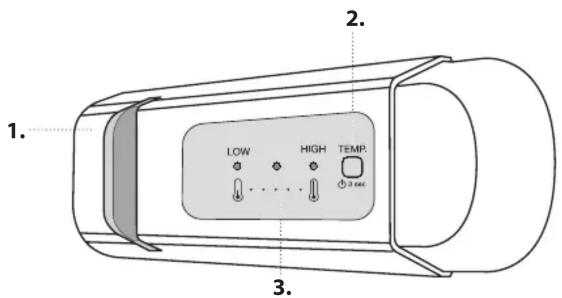

ON/STAND-BY
Press the button for 3 seconds to turn the appliance off. In
Stand-by mode the light in the refrigerator compartment does not turn on. Press the button again briefly to reactivate the appliance.
Note: this does not disconnect the appliance from the power supply.
FREEZER AND REFRIGERATOR COMPARTMENT TEMPERATUR
The three LED indicators indicate the refrigerator compartment set temperature.
It is possible to set a different temperature of the appliance with the button.
The following adjustments are possible:
LEDs lit Set temperature

High (less cold)
Medium-high
Medium
Medium-low
Low (colder)


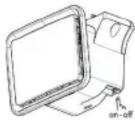
FAN*
You can turn the Fan on/off by pressing the button on the base (as shown in the figure). If the ambient temperature exceeds
27°C, or if drops of water are present on the glass shelves, it is essential that the fan is on to ensure the proper preservation of the food. Deactivation of the fan allows energy consumption to be optimised.
FREEZING FRESH FOOD
Place the fresh food to be frozen in the FREEZING ZONE in the freezer compartment avoiding the direct contact with the food that is already frozen. To optimize the freezing speed, the lower drawer can be removed and the food can be placed directly on the bottom of the compartment.
STOP FROST SYSTEM*
The STOP FROST SYSTEM facilitates the defrost procedure for the freezer compartment.
The STOP FROST accessory is designed to collect some of the frost that forms in the freezer compartment and it is easy to remove and clean, therefore reducing the time needed to defrost the freezer compartment.
PROCEDURE TO CLEAN THE STOP FROST ACCESSORY
- Open the freezer compartment door and remove the upper drawer.

- Unfasten the STOP FROST accessory and remove it, taking care not to drop it on the glass shelf below.
Note: if the accessory is jammed or difficult to remove, do not keep trying to remove it, but proceed with the complete defrost of the freezer compartment.

-
Close the door of the freezer compartment.
-
Remove the frost on the accessory by rinsing it under running (not hot) water.

HOW TO STORE FOOD AND BEVERAGE

** For models with "0 ° ZONE" COMPARTMENT the "coolest area" is the one highlighted in the legend
*** Only for CB310 e CB380 models (refer to the Rating plate located at side of Fruit and vegetable drawer)
* Available only on certain models
To remove the frost on the STOP FROST accessory follow the cleaning procedure demonstrated below.
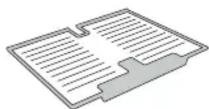
- Let the accessory drip dry and dry the plastic parts with a soft cloth.

- Reinsert the accessory by placing the back part on the projections shown in figure, then refasten the handle of the accessory to the clasps above.

- Reinsert the upper drawer and close the door of the freezer compartment.
It is possible to clean the STOP FROST accessory on its own without completely defrosting the freezer compartment.
Cleaning the STOP FROST accessory regularly helps to reduce the need to completely defrost the freezer compartment.
Note: the product specifications, including volume and energy, are calculated without the STOP FROST accessory.
Legend
TEMPERATE ZONE Suggested for storage of tropical fruit, cans, drink, eggs, sauces, pickles, butter, jam
COOL ZONE Suggested for storage of cheese, milk, daily food, delicatessen, yoghurt
COOLEST AREA Suggested for storage of cold cuts, desserts, meat and fish
FRUIT & VEGETABLE DRAWER
FREEZER DRAWERS
FREEZING ZONE DRAWER (Max cool zone) Suggested to freeze fresh/cooked food
What to do if... Possible reasons Solutions
| The control panel is switched off, the appliance does not work. | There may be an appliance power supply problem. | Check that:there is not a power outage;the plug is properly inserted in the power socket and the mains double-pole switch (if present) is in the correct position (i.e. allows the appliance to be powered);the household electrical system protection devices are efficient;the power cable is not damaged. |
| The appliance could be in On/stand by mode. | Turn the appliance on by briefly pressing the "Temp." button (see On/ Stand-by function). | |
| The inside light does not work. | The light may need to be replace.Malfunction of a technical component. | Disconnect the appliance from the power supply and contact the Technical Assistance Service if you need a replacement. |
| The inside light flashes. Door alarm active.It is activated when the refrigerator compartment door remains open for a prolonged period of time. | To stop the alarm, close the refrigerator door.On reopening the door, check the light works. | |
| The temperature inside the compartments is not low enough. | There could be various causes (see "Solutions"). | Check that:the doors close properly;the appliance is not installed near a heat source;the set temperature is adequate;the circulation of air through the vents at the bottom of the appliance is not obstructed (see installation section). |
| There is water on the bottom of the refrigerator compartment. | The defrost water drain is blocked. | Clean the defrosting water drain (see section "Cleaning and Maintenance"). |
| Excessive amount of frost in the freezer compartment | The door of the freezer compartment does not close properly. | Check that there is nothing preventing the door from closing properly.Defrost the freezer compartment.Make sure the appliance has been correctly installed. |
| The front edge of the appliance, at the door striker seal, is hot. | This is not a defect. It prevents condensation from forming. | No solution is necessary. |
| One or more green symbols are flashing continuously and it is not possible to change the temperature set. | Malfunction alarm.The alarm indicates a fault in a technical component. | Contact Technical Assistance Service. |
| The temperature of the refrigerator compartment is too cold. | The set temperature is too cold.A large amount of fresh food may have been placed in the freezer compartment. | Try to set a less cold temperature.If fresh food has been placed in the freezer compartment, wait until it has fully frozen.Turn off the fan (if present) following the procedure described in the paragraph "FAN". |
* Available only on certain models

Policies, standard documentation and additional product information can be found by:
- Visiting our website docs.whirlpool.eu
- Using QR Code
• Alternatively, contact our After-sales Service (See phone number in the warranty booklet). When contacting our After-sales Service, please state the codes provided on your product's identification plate. The model information can be retrieved using the QR-Code reported in the energy label. The label also includes the model identifier that can be used to consult the portal of the registry at https://eprel.ec.europa.eu

Brand : PRIVILEG
Model : PCI 16S1
Category : Refrigerator