
eMOTUS5PB - Loudspeaker Ecler - Free user manual and instructions
Find the device manual for free eMOTUS5PB Ecler in PDF.


| Product Type | Powered Loudspeakers - Stereo Kit (active + passive) |
| Brand | Ecler |
| Model | eMOTUS5PB |
| Available Colors | White (RAL 9003) - eMOTUS5PB; Black (RAL 9005) and White (RAL 9003) - eMOTUS5P |
| Dimensions (WxHxD) without brackets | 173 x 180 x 181 mm (6.81 x 7.09 x 7.13 in) |
| Dimensions (WxHxD) with brackets | 173 x 180 x 249 mm (6.81 x 7.09 x 9.80 in) |
| Weight (eMOTUS5PB, without accessories) | 4.8 kg |
| Weight (eMOTUS5PB, with accessories) | 5.3 kg |
| Power Output | 2 x 25 W RMS |
| Frequency Response | 85 Hz - 20 kHz (±10 dB) |
| Maximum SPL @ 1m | 91 dB |
| Input Sensitivity / Impedance | 525 mV / 22 kΩ |
| Power Supply | 115 / 230 VAC, selectable, 50/60 Hz |
| Power Consumption (1/8 power @ 8Ω) | ≤ 10.5 W |
| Power Consumption (Standby) | ≤ 3 W |
| Bluetooth Version | Bluetooth 4.0, Class II, range up to 10 m |
| Supported Audio Codecs | aptX, SBC, MP3, AAC |
| Remote Control Battery | Lithium Cell CR2025 3V |
| Enclosure Material | Reinforced ABS, aluminium grill |
| Installation | Wall-mountable with included articulated brackets |
| Included Accessories | 2 brackets, 2 safety lines, Allen key, Euroblock connectors, link cable, adhesive legs, power cable, remote control (eMOTUS5PB only), quick start guide, warranty card |
| Maintenance | Clean with dry cloth only. Do not block ventilation openings. |
| Safety Features | Class I construction with earthing connection. Auto standby. Anti-clip system. Fuse protection. |
| Spare Parts Availability | Fuse (identical replacement), remote control battery (CR2025) |
Frequently Asked Questions - eMOTUS5PB Ecler
User questions about eMOTUS5PB Ecler
0 question about this device. Answer the ones you know or ask your own.
Ask a new question about this device
Download the instructions for your Loudspeaker in PDF format for free! Find your manual eMOTUS5PB - Ecler and take your electronic device back in hand. On this page are published all the documents necessary for the use of your device. eMOTUS5PB by Ecler.
USER MANUAL eMOTUS5PB Ecler
eMOTUS5P / eMOTUS5PB
SURFACE MOUNT CABINETS
Powered Loudspeakers - Stereo kit
natural_image
Exterior view of a modern office building (no signage)USER MANUAL
INDEX
- IMPORTANT REMARK .... 3
- IMPORTANT SAFETY INSTRUCTIONS .... 3
- IMPORTANT NOTE ....5
- INTRODUCTION 5
- KEY FEATURES....5
- POSITIONING AND FITTING......6
- START UP 8
7.1. eMOTUS5P 8
7.2. eMOTUS5PB 8
7.2.1. Wireless connection....8
7.2.2 Configuring Bluetooth PIN and Device ID with the Ecler eMOTUSBT app (Only applies to the eMOTUS5PB model) 9
7.2.3. Remote control (Only applies to the eMOTUS5PB model)....11
7.2.4. Remote port (Only applies to the eMOTUS5PB model)....12 - REAR PANEL....13
- TECHNICAL SPECIFICATIONS....14
- PACKING CONTENT....15
1. IMPORTANT REMARK

WARNING: SHOCK HAZARD - DO NOT OPEN
AVIS: RISQUE DE CHOC ÉLECTRIQUE - NE PAS OUVRIR

The lightning flash with arrowhead symbol, within an equilateral triangle, is intended to alert the user to the presence of uninsulated “dangerous voltage” within the product’s enclosure that may be of sufficient magnitude to constitute a risk of electric shock to persons.

The exclamation point within an equilateral triangle is intended to alert the user to the presence of important operating and maintenance (servicing) instructions in the literature accompanying the appliance.
WARNING (If applicable): The terminals marked with symbol of “/” may be of sufficient magnitude to constitute a risk of electric shock. The external wiring connected to the terminals requires installation by an instructed person or the use of ready-made leads or cords.
WARNING: To prevent fire or shock hazard, do not expose this equipment to rain or moisture.
WARNING: An apparatus with Class I construction shall be connected to a mains socket-outlet with a protective earthing connection.
2. IMPORTANT SAFETY INSTRUCTIONS
- Read these instructions.
- Keep these instructions.
- Heed all warnings.
- Follow all instructions.
- Do not use this apparatus near water.
-
Clean only with dry cloth.
-
Do not block any ventilation openings. Install in accordance with the manufacturer's instructions.
-
Do not install near any heat sources such as radiators, heat registers, stoves, or other apparatus (including amplifiers) that produce heat.
- Do not defeat the safety purpose of the polarized or grounding type plug. A polarized plug has two blades with one wider than the other. A grounding type plug has two blades and a third grounding prong. The wide blade or the third prong are provided for your safety. If the provided plug does not fit into your outlet, consult an electrician for replacement of the obsolete outlet.
- Protect the power cord from being walked on or pinched particularly at the plugs, convenience receptacles, and at the point where they exit from the apparatus.
- Only use attachments/accessories specified by the manufacturer.
- Unplug the apparatus during lightening sorts or when unused for long periods of time.
- Refer all servicing to qualified personnel. Servicing is required when the apparatus has been damaged in any way, such as power supply cord or plug is damaged, liquid has been spilled or objects have fallen into the apparatus, the apparatus has been exposed to rain or moisture, does not operate normally, or has been dropped.
- Disconnecting from mains: Switching off the POWER switch all the functions and light indicators of the amplifier will be stopped, but fully disconnecting the device from mains is done unplugging the power cord from the mains input socket. For this reason, it always shall remain readily operable.
- Equipment is connected to a socket-outlet with earthing connection by means of a power cord.
- The marking information is located at the bottom of apparatus.
- The apparatus shall not be exposed to dripping or splashing and that no objects filled with liquids, such as vases, shall be placed on apparatus.
NOTE: This equipment has been tested and found to comply with the limits for a Class A digital device, pursuant to part 15 of the FCC Rules. These limits are designed to provide reasonable protection against harmful interference when the equipment is operated in a commercial environment. This equipment generates, uses, and can radiate radio frequency energy and, if not installed and used in accordance with the instruction manual, may cause harmful interference to radio communications. Operation of this equipment in a residential area is likely to cause harmful interference in which case the user will be required to correct the interference at his own expense.

WARNING: This product must not be discarded, under any circumstance, as unsorted urban waste. Take to the nearest electrical and electronic waste treatment centre.
NEEC AUDIO BARCELONA, S.L. accepts no liability for any damage that may be caused to people, animal or objects due to failure to comply with the warnings above.
3. IMPORTANT NOTE
Thank you for choosing our Ecler eMOTUS5P / eMOTUS5PB Powered Loudspeakers - Stereo kit!
It is VERY IMPORTANT to carefully read this manual and to fully understand its contents before any connection in order to maximize your use and get the best performance from this equipment.
To ensure optimal operation of this device, we strongly recommend that its maintenance be carried out by our authorised Technical Services.
All ECLER products are covered by warranty, please refer to www.ecler.com or the warranty card included with this product for the period of validity and conditions.
4. INTRODUCTION
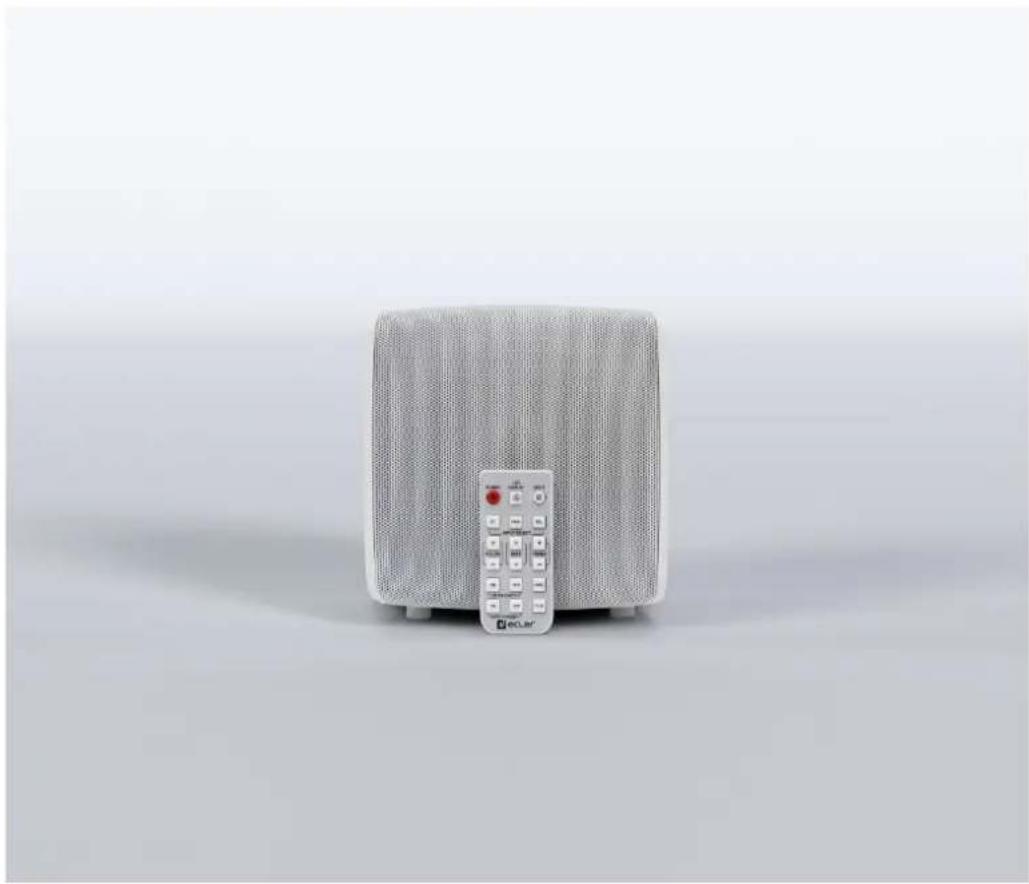
The eMOTUS5P / eMOTUS5PB is a kit of loudspeakers including an active and a passive acoustic box. The eMOTUS5PB includes a wireless BT receiver, remote control and remote control volume port (0-10 VDC). Is a compact, professional stereo kit, easy to handle and at a very attractive price. Its fantastic performance and unique design ensure that it can easily be integrated into a wide range of multimedia applications: lecture halls, meeting rooms, outlets, etc. The eMOTUS5P is available in black and white. The eMOTUS5PB model is available in white.
5. KEY FEATURES
- Stereo 2-way loudspeaker stereo kit – powered loudspeaker + passive loudspeaker
• Full range: 5" woofer and 1" tweeter - Integrated amplifier 2 x 25 WRMS (MASTER unit)
• Volume control and tone control (bass & treble) in the MASTER unit - Euroblock balance stereo input on the MASTER UNIT
• Non-balanced RCA input on the MASTER UNIT - Wireless BT stereo input (only on the eMOTUS5PB)
- Mono/Stereo switch
- Link between the MASTER and the SLAVE unit via Euroblock connectors.
- Integrated power supply source (MASTER unit)
- Selectable power voltage 115 V/230 V (MASTER unit)
-
Auto standby function (automatic standby mode / energy saving without the need to turn the system on or off each day)
-
Integrated Anti-Clip System
- LED activity display
- Reinforced ABS construction
- BT wireless connection, remote control port (0-10 VDC – RJ45 connector) and remote control (eMOTUS5PB)
- Ecler eMOTUSBT app (available for iOS and Android) that allows users to configure the Bluetooth PIN and Device ID (eMOTUS5PB only).
- eMOTUS5P is available in black (RAL 9005) and white (RAL 9003).
• eMOTUS5PB is available in white (RAL 9003).
6. POSITIONING AND FITTING
In the packing of the eMOTUS systems, you will find all you need to complete installation of the two units.
The following should be observed as general rules:
• Always install on solid, firm surfaces.
- For good sound reproduction, there should be no hindrance between the units and the audience.
- Adjust the levels of sound pressure to reproduction requirements. Despite its small size, the eMOTUS5P / eMOTUS5PB has a performance far higher than that of domestic loudspeakers.
Procedure for installing on a surface:
-
Make three 6 mm screw holes in the wall, aligned with the position of the holes in the bracket.
-
Insert three 6 mm wall plugs into the holes.
-
Fasten the safety line on the rear of the bracket.
-
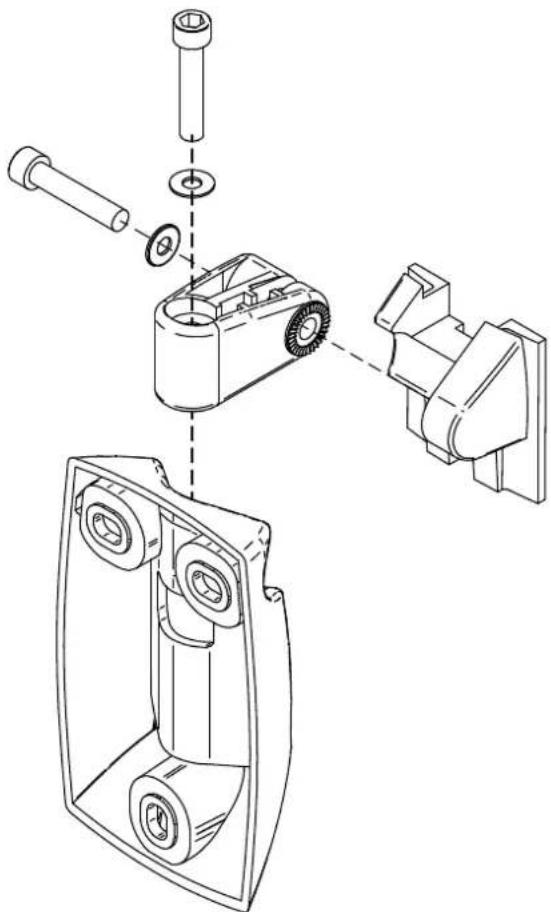
Fit the bracket in place, after threading the line and loudspeaker wire through the square hole in the bracket. Secure the bracket to the wall:
natural_image
Exploded view diagram of a mechanical assembly showing exploded and assembled parts (no text or labels)-
Connect the power supply cables, signal input and link between the two units to the connectors on the rear part of the housing. Ensure correct polarity in the Euroblock terminals.
-
Place the acoustic box in its final position, sliding it vertically downwards so that the rear side of the rail slots into the bracket rail.
-
Secure the safety wire on the rear part of the acoustic box to ensure that it does not accidentally fall and cause any material and/or personal damage.
-
Orientate the box to achieve the required position on the vertical and horizontal axes. Tighten up the Allen screws on the bracket to fasten this position on both axes.
7. START UP
7.1. eMOTUS5P
To start up the system, turn on the MASTER (L) unit with the switch on the rear panel and adjust the volume and equalizer to the required settings.
You can select the audio source (balanced or non-balanced input) by pressing the rotating volume encoder.
7.2. eMOTUS5PB
To start up the system, turn on the MASTER (L) unit with the switch on the rear panel and adjust the volume and equalizer to the required settings. Pressing the rotating volume encoder, the unit will be muted.
You can select the audio source (balanced, non-balanced input or wireless connection) by pressing the rotating volume encoder or the relevant button on the remote control: BAL, UNBAL or BT.
7.2.1. Wireless connection
Press the BT key to select the wireless connection mode. For pairing the BT, the eMOTUS5PB is displayed on other devices as the eMOTUS5 (password:"0000"). Once paired with the emitting device, the eMOTUS5PB will act as a receiver/reproducer of the audio emitted by the former.
Note: To safeguard the system from any possible power surges in the electrical supply, there is a network fuse in the MASTER unit, located in a screw mount fuse holder in the rear panel. In the event of this blowing, disconnect the device, remove it from the wall bracket, unscrew the fuse holder, take out the fuse and replace it with another with identical characteristics. If the new fuse blows straight away, consult our Technical Department.
7.2.2 Configuring Bluetooth PIN and Device ID with the Ecler eMOTUSBT app (Only applies to the eMOTUS5PB model)
The Ecler eMOTUSBT app allows you to easily customize your device by changing the Bluetooth PIN and Device ID, enhancing both usability and security.
Available for iOS and Android.
Click the appropriate icon below to download the app free of charge from the official app store.


To enable BLE wireless connection mode and allow changes to the Bluetooth PIN or ID of the eMOTUS5PB device, follow the steps below:
1 Ensure the unit is in Standby mode, with red LED steadily lit.
2 Press and hold the Volume button for 5 seconds until the blue LED begins to blink.
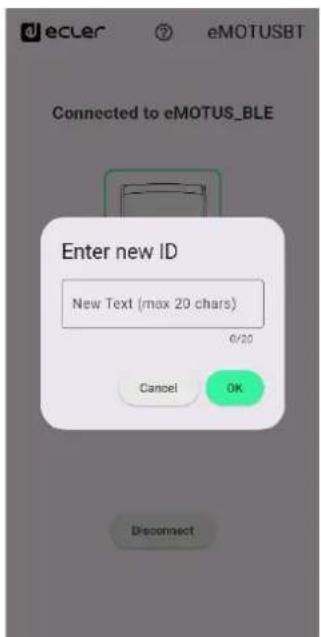
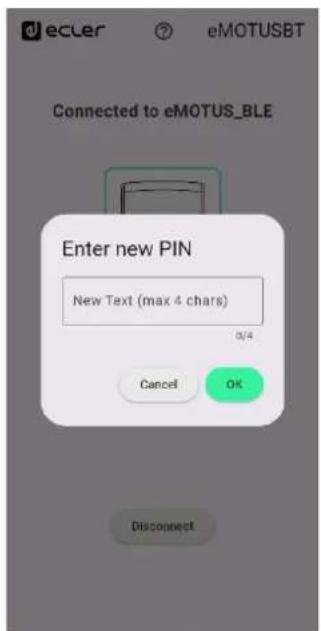
3 Open the Ecler eMOTUSBT app and tap the Scan button to locate your device. The device will appear in the list as eMOTUS5PB.
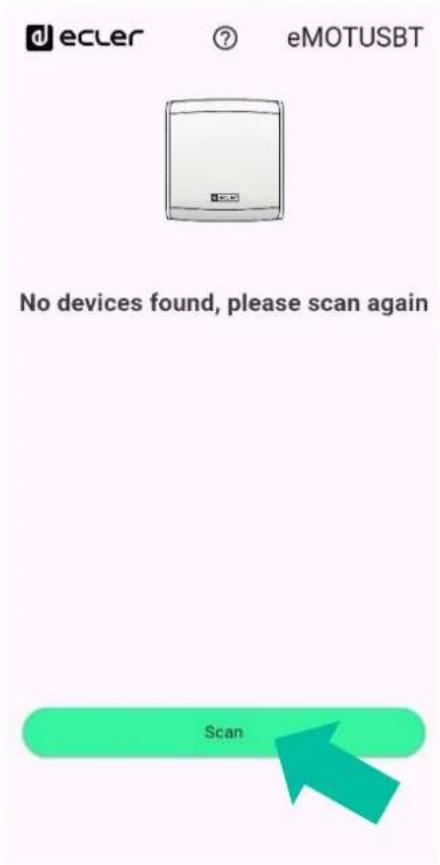
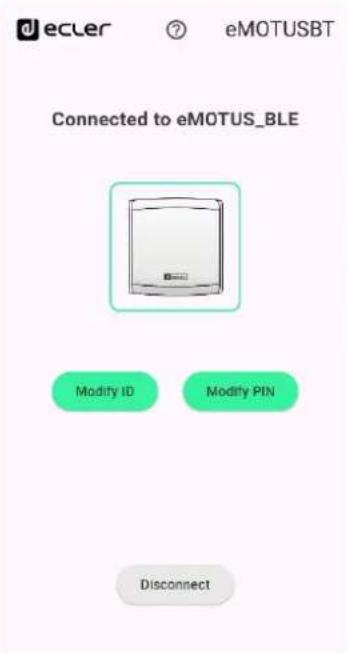
4 Tap the Connect button, then choose either Modify ID or Modify PIN to update one of them (uppercase, lowercase and numbers are accepted, with a maximum of 20 characters for ID and 4 characters for PIN).
Note:
- The PIN and ID cannot be modified simultaneously.
- After making a change, the unit will automatically restart, and the app will return to its home screen.
- To modify another parameter, repeat the entire process from the beginning.
7.2.3. Remote control (Only applies to the eMOTUS5PB model)
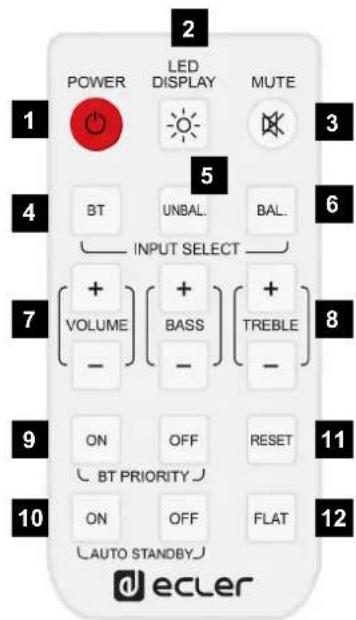
- Turn on: on/off. The green LED display lights up when the unit is on. When off, no LED is displayed.
- LED display: turn on/off the LEDs while the unit is operating. When restarting the unit, this function returns to its default value: LEDs on.
- MUTE. The red LED blinks on and off when the unit is muted.
- BT: wireless connection. The blue LED light turns on when there is a BT connection by pressing the BT key.
- UNBAL: select the stereo unbalanced RCA input as the audio input source.
- BAL: select the stereo balanced Euroblock input as the audio input source.
- Volume: increase/decrease the volume in 1 step (range available in 0-36 steps). This only operates when the unit is on.
- Bass & Treble: increases/decreases by 1 dB (range available of -7 to +7dB) in bass/treble.
- BT priority: if priority is activated, whenever it detects a wireless connection available, this will take priority over the other audio inputs and will automatically switch over to this.
- Auto Standby: keep pressed (for 2 secs.) to activate/deactivate the auto standby function. If this is activated, after 2'30" with no audio in the inputs and if the remote controlled is not used, the unit will switch to standby mode.
- Reset: keep pressed (for 5 secs.) to reset the system to its default values: BT priority ON, volume = 30 bass; treble = 0.
- Flat: keep pressed (for 5 secs.) to reset the system to its default equalizer values: bass = 0; treble = 0.
Note: Reset and Flat buttons only act if the default values have been changed
7.2.4. Remote port (Only applies to the eMOTUS5PB model)
REMOTE port: the RJ-45 REMOTE type connector makes it possible to connect from a type WPaVOL wall control panel (control 0-10 VDC) for adjusting the general output volume. The connection is made by a standard CAT5 cable between the WPaVOL wall panel and the REMOTE connector on the MASTER unit.
As there is an eMOTUS5PB kit along with a type WPa control and other types of control (rotating control on the rear panel, remote control or control via remote port), at all times, the latest adjustments made using one or another method will prevail. For instance, if the volume is adjusted using a WPaVOL wall panel connected to the REMOTE port, and then said parameters are altered using the control on the rear panel, the latest adjustment will prevail. In this case, when the position of the wall panel is altered again, the eMOTUS5PB kit will retake the values that this indicates, and so on.
Note: the green LED light will keep on whenever the unit is on. It will blink on and off when there is activity in the remote controls (remote control or 0-10VDC port).
8. REAR PANEL
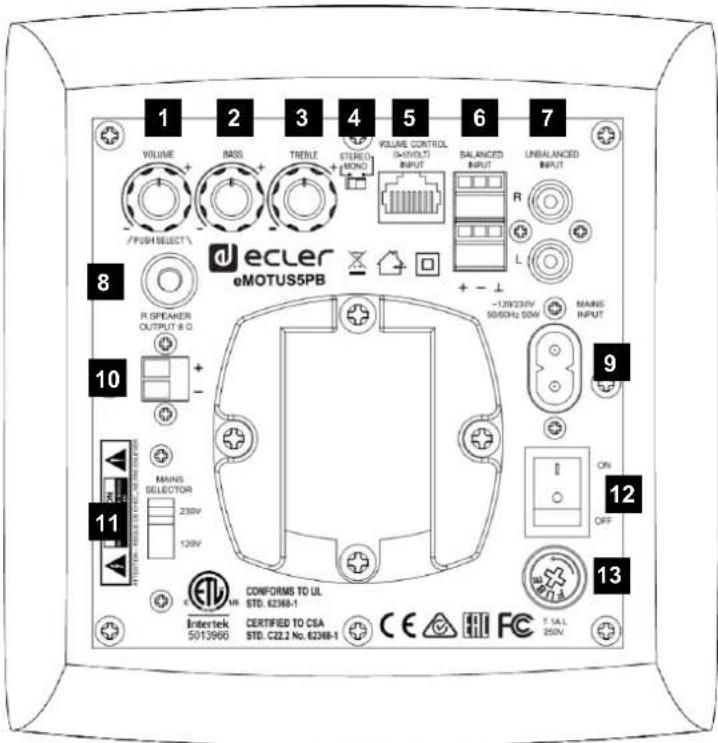
- Output volume control
- Bass control
- Treble control
- Stereo-mono switch
- Remote input RJ-45. (Only applies to the eMOTUS5PB model)
- Balanced audio input - Euroblock connectors
- Non-balanced audio input – RCA connectors
- Attachment point for the safety cable
- Socket base
- Amplified output right channel R
- Mains selector (115V / 230V)
- Start up switch
- Fuse holder
9. TECHNICAL SPECIFICATIONS
eMOTUS5PB / eMOTUS5P
| Power | 2 x 25W RMS |
| Impedance | 8 Ω |
| Frequency response (±10dB) | 85Hz - 20kHz |
| Maximum SPL @ 1m | 91dB |
| THD + Noise @ 1kHz Full PWR | ≤0.5% |
| Inputs sensitivity nom/impedance | 525mV/22k Ω |
| CMRR - Line Bal | ≥80dB |
| Tone control response | ±14dB |
| Mains voltage | 115 / 230VAC (selectable) |
| Power consumption (pink noise, 1/8 power @ 8ohm) | ≤10.5W |
| Power consumption (pink noise, 1/3 power @ 8ohm) | ≤23W |
| Power consumption Standby Construction | ≤3W |
| Aluminium grill, ABS cabinet | |
| Finished colour | ▪ eMOTUS5P: available in black (RAL 9005) and white (RAL 9003). |
| ▪ eMOTUS5PB: available in white (RAL 9003). | |
| Dimensions (WxHxD) | Not including brackets:173 x 180 x 181mm / 6.81 x 7.09 x 7.13 in. Including brackets:173 x 180 x 249 mm / 6.81 x 7.09 x 9.80 in. |
| Weight eMOTUS5PB | 4.8 kg - Not including accessories; 5.3 kg - Including accessories |
| Weight eMOTUS5P | 4.2 kg - Not including accessories; 4.5 kg - Including accessories |
BT module (eMOTUS5PB)
| Bluetooth® 4.0 CompliantClass II Range up to 10 MetersSupported Bluetooth® Profiles: A2DP v1.2,AVRCP v1.4, HFP v1.6, HSP v1.2aptX, SBC, MP3 and AAC decoder support |
Remote Control (eMOTUS5PB)
| fosc | 455 kHz |
| Carrier frequency | 38 kHz NEC format |
| Battery | Lithium Cell CR2025 3V |
10. PACKING CONTENT
- eMOTUS5P / eMOTUS5PB loudspeaker kit (one active unit + one passive unit)
- 2 x articulated brackets for wall mounting
- 5mm Allen key
- 2 x metal safety lines against any possible flaking off, with corresponding screws and lock washers.
- 2 x Euroblock connectors with three terminals for balanced stereo input
- Connectors / ACTIVE unit link cable – PASSIVE unit
- 8 x adhesive legs for positioning the loudspeakers on a desktop
• Power cable for the MASTER unit - The eMOTUS5PB kit also includes a remote control (battery included)
- Quick start Guide
- Warranty card

ecler
All product characteristics are subject to variation due to production tolerances. NEEC AUDIO BARCELONA S.L. reserves the right to make changes or improvements in the design or manufacturing that may affect these product specifications.
For technical queries contact your supplier, distributor or complete the contact form on our website, in Support / Technical requests.
Motors, 166-168 | 08038 Barcelona, Spain | Tel. (+34) 932238403 | information@ecler.com | www.ecler.com
- eMOTUS5P / eMOTUS5PB
- USER MANUAL
- INDEX
- IMPORTANT REMARK
- IMPORTANT SAFETY INSTRUCTIONS
- IMPORTANT NOTE
- INTRODUCTION
- KEY FEATURES
- POSITIONING AND FITTING
- START UP
- eMOTUS5P
- eMOTUS5PB
- Wireless connection
- Configuring Bluetooth PIN and Device ID with the Ecler eMOTUSBT app (Only applies to the eMOTUS5PB model)
- Note:
- Remote control (Only applies to the eMOTUS5PB model)
- Remote port (Only applies to the eMOTUS5PB model)
- REAR PANEL
- TECHNICAL SPECIFICATIONS
- PACKING CONTENT
- ecler
Brand : Ecler
Model : eMOTUS5PB
Category : Loudspeaker