
Mi Action Camera 4K - Video camera Xiaomi - Free user manual and instructions
Find the device manual for free Mi Action Camera 4K Xiaomi in PDF.


| Product Type | Action Camera |
| Model | YDXJ01FM |
| Dimensions | 2.81 x 1.68 x 1.16 inches (71.4 x 42.7 x 29.5 mm) |
| Weight (with battery) | 3.49 oz (99 g) |
| Maximum Photo Resolution | 3840 x 2160 (8 MP) |
| Maximum Video Resolution | 3840 x 2160p at 30 fps (4K) |
| Aperture | F2.8 |
| Focal Length | 3.2 mm |
| Wide Angle | 145° |
| Screen | 2.4-inch touch screen |
| Wireless Connectivity | Wi-Fi IEEE 802.11b/g/n, Bluetooth 4.1 |
| Storage | MicroSD card up to 64 GB (UHS-3 recommended for 4K) |
| Battery | Removable lithium-ion, capacity not specified |
| Charging | 5V=1A via Micro-USB (adapter, PC, or power bank) |
| Operating Temperature | 32°F to 104°F (0°C to 40°C) |
| Storage Temperature | -4°F to 140°F (-20°C to 60°C) |
| Audio | Dual microphones, built-in speaker |
| Indicators | Front and top LEDs: power, recording, charging, errors |
| Mounting | 1/4-inch thread hole for tripod |
| Waterproof | Only with optional waterproof case (not included) |
| App Control | Mi Home App for remote control and firmware updates |
| File System | FAT32; maximum single video file size 4 GB |
| Cleaning | Use professional brush and lens blower; avoid scratches |
| Safety | FCC and ISED compliant; SAR value 0.144 W/kg (body) |
| Spare Parts & Repairability | Battery and MicroSD card replaceable; refer to manual for service |
| Manufacturer | Beijing FIMI Technology Co., Ltd. (for Xiaomi) |
Frequently Asked Questions - Mi Action Camera 4K Xiaomi
User questions about Mi Action Camera 4K Xiaomi
0 question about this device. Answer the ones you know or ask your own.
Ask a new question about this device
Download the instructions for your Video camera in PDF format for free! Find your manual Mi Action Camera 4K - Xiaomi and take your electronic device back in hand. On this page are published all the documents necessary for the use of your device. Mi Action Camera 4K by Xiaomi.
USER MANUAL Mi Action Camera 4K Xiaomi
natural_image
Simple line drawing of a rectangular device with a circular button and a small mark (no text or symbols)Mi Action Camera 4K x 1
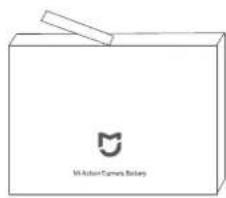
Battery × 1
natural_image
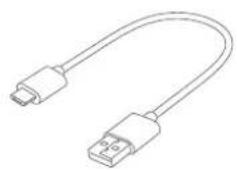
Line drawing of a USB cable with two connectors (no text or symbols)
User manual x 1USB cable x 1
2. Product Overview
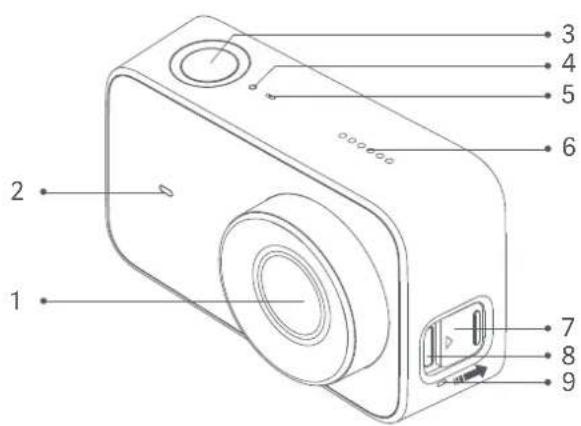
1 Lens Top Indicator Port Protective Cover 7
2 Front Indicator Microphone Micro-USB Port 8
3 Function Button 6 Speaker Microphone9
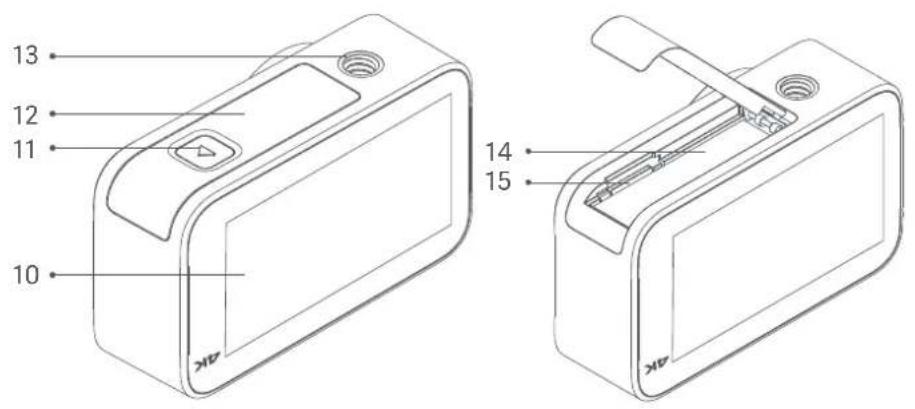
10 Touch Screen 12
14 BatteryBattery Cover
11 Lock Button 13 1/4-inch Thread Hole MicroSD Card Slot
3. Install and Disassemble
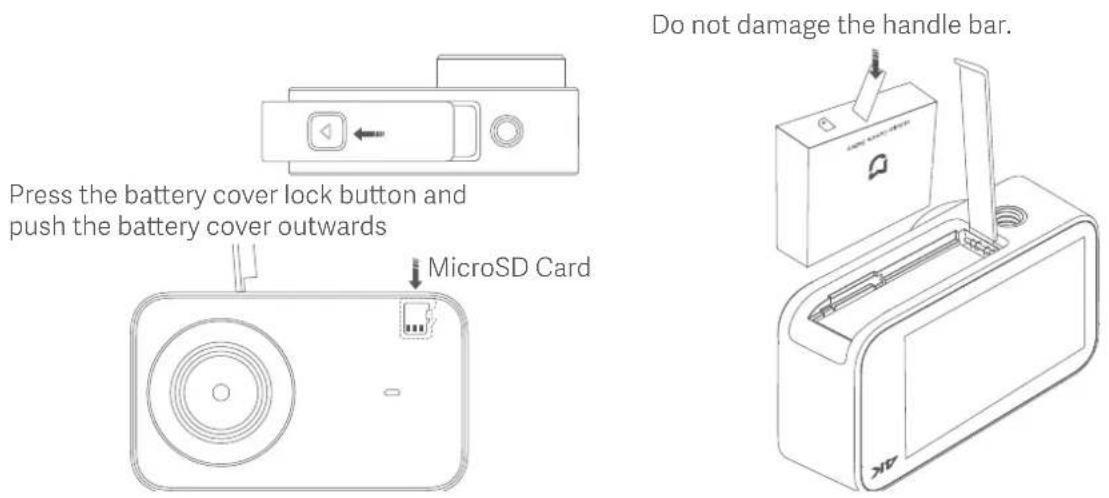
a. Remove the battery cover (as shown in the figure), align the battery pins with the direction of the lens, and insert the battery. To remove the battery, gently pull the handle bar on the battery.
b. Keep the label side of the MicroSD card towards the back of the camera body, and insert the card into the card slot. To remove the MicroSD card, gently press the top edge of the card to eject it from the slot.
4. Battery Charging
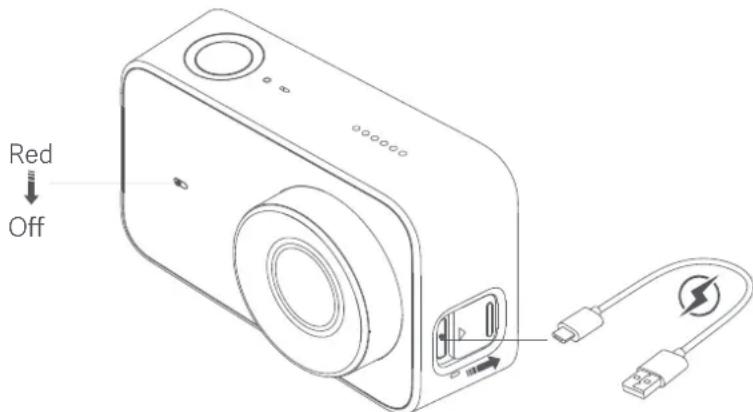
a. You can use a 5V=1A power adapter, PC, or mobile power bank to charge the camera via a data cable. It is recommended to turn off the camera during charging.
b. The front indicator is solid red while charging, and turns off automatically when the battery is fully charged.
Note:
It is recommended to remove the battery if you connect the camera to a power supply for a prolonged period during use.
5. Operating Instructions
a. Power-on/Power-off
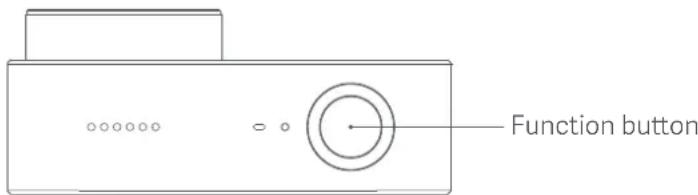
Power-on: Press and hold the function button for about 3 seconds, followed by a power-on sound.
Power-off: Press and hold the function button for about 3 seconds, followed by a power-off sound.
b. Photo
Select the photo mode, and press the function button to take photos.
c. Video
Select the video mode, and press the function button to start the recording.
Press the function button again to stop the recording.
Note:
- When shooting a 4K-video, it is recommended to use a main brand UHS-3 MicroSD card with a capacity not less than 16 GB.
- Video files are stored in the FAT32 format. The maximum size of a single video file is 4 GB. A video file exceeding 4GB will be fragmented for storage.
d. Operating screen
The preview page is displayed after the camera is powered on (in screen lock mode, you can double-tap the screen or press the function button to wake up the camera).
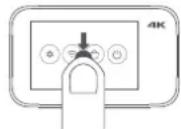
Camera setup
On the preview page, slide down to enter setup page. Slide the screen in the reverse direction or press the function button to return to the preview page.
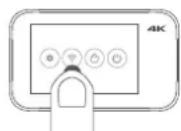
Wi-Fi setup / Bluetooth device connection
Tap ✦ to enable or disable the Wi-Fi function.
Select the bluetooth device in the setup page, and connect according to the prompt
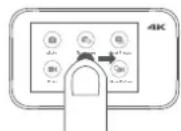
Mode selection
On the preview page, slide rightward to enter mode selection page.
Slide the screen in the reverse direction or press the function button to return to the preview page.
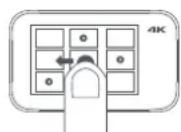
Media library
On the preview page, slide leftward to enter media library preview page. Slide the screen in the reverse direction or press the function button to return to the preview page.
Note: A MicroSD card needs to be installed.
6. Quick Setup
Control your device and interact it with other smart home devices in Mi Home App.
a. Download Mi Home App
Scan the QR code or go to App store to download and install Mi Home App.

b. Add and connect a Mi Action Camera 4K
- Open Mi Home App, tap "+" on the upper right to add your device, and your device will appear in the homepage. Install the plug-in and follow prompts to add the device.
- Open the Mi Action Camera 4K plug-in.
- Turn on Mi Action Camera 4K and slide down to access the shortcut menu page. Enable the Wi-Fi function.
- Tap "Connect" on the App, and follow the instructions to complete the Wi-Fi connection.
Note:
- The GPS must be activated for some certain phones when searching for the Mi Action Camera 4K via Wi-Fi.
- After the App is connected to the camera successfully, Android phones disconnect the Internet and a prompt indicating no Internet connection is displayed on some certain phones. In this case, choose to maintain the current connection.
- To upgrade the camera firmware, you need to maintain the phone's connection to the Internet.
7. Indicator Status
| Status Description | |
| Front indicator On | Powered on indicator |
| Front/Top indicator Slow blinking | Photo shooting/Video recording |
| Front indicator Fast blinking red | No card/Card error |
| Front/Top indicator Fast blinking alternately | Upgrading |
Note: When the front indicator is blue, the unit is fully charged; when it is yellow, the battery is adequate; when it is red, the battery is low.
8. Specifications
Product name: Mi Action Camera 4K
Dimensions: 2.81 x 1.68 x 1.16 inches
Net weight: 3.49 ounces (including battery)
Operating temperature: 32°F\~104°F
Storage temperature: -4°F\~140°F
Wireless connections: Wi-Fi IEEE 802.11b/g/n
Maximum photo resolution: 3840 x 2160
Maximum video resolution: 3840 x 2160p at 30 fps
Model: YDXJ01FM
Aperture: F2.8
Focal length: 3.2 mm
Wide angle: 145°
Bluetooth version: Bluetooth 4.1
Recording: dual microphone
MicroSD card: maximum 64GB
Screen: 2.4"
9. Precaution
a. Do not put the battery into fire or smash the battery. The capacity of the lithium battery shrinks substantially at low temperature. Therefore, do not use it in an environment below 32^ F.
b. Keep the product properly and keep the lens away from scratches and dirt. Use a professional brush and lens blower to clean the product. Protect the product against dirt and damp during storage.
c. In case of waterproof case is not mounted, please don't use the camera in harsh environments such as underwater, rain, dust and severe cold etc.
CAUTION
RISK OF EXPLOSION IF BATTERIES IS REPLACED BY AN INCORRECT TYPE.
DISPOSE OF USED BATTERIES ACCORDING TO THE INSTRUCIONS.
Environmentally friendly disposal

Old electrical appliances must not be disposed of together with the residual waste, but have to be disposed of separately. The disposal at the communal collecting point via private persons is for free. The owner of old appliances is responsible to bring the appliances to these collecting points or to similar collection points. With this little personal effort, you contribute to recycle valuable raw materials and the treatment of toxic substances.
This device complies with Part 15 of the FCC Rules. Operation is subject to the following two conditions:
(1) this device may not cause harmful interference, and
(2) this device must accept any interference received, including interference that may cause undesired operation.
Please note that changes or modifications not expressly approved by the party responsible for compliance could void the user's authority to operate the equipment.
This equipment has been tested and found to comply with the limits for a Class B digital device, pursuant to Part 15 of the FCC Rules. These limits are designed to provide reasonable protection against harmful interference in a residential installation.
This equipment generates, uses and can radiate radio frequency energy and, if not installed and used in accordance with the instructions, may cause harmful interference to radio communications. However, there is no guarantee that interference will not occur in a particular in-stallation.
If this equipment does cause harmful interference to radio or television reception, which can be determined by turning the equipment off and on, the user is encouraged to try to correct the interference by one or more of the following measures:
-- Reorient or relocate the receiving antenna.
-- Increase the separation between the equipment and receiver.
-- Connect the equipment into an outlet on a circuit different from that to which the receiver is connected.
-- Consult the dealer or an experienced radio/TV technician for help.
This device complies with Industry Canada license-exempt RSS standard(s). Operation is subject to the following two conditions: (1) this device may not cause interference, and
This equipment complies with FCC radiation exposure limits set forth for an uncontrolled environment. End user must follow the specific operating instructions for satisfying RF exposure compliance. This transmitter must not be co-located or operating in conjunction with any other antenna or transmitter.
The portable device is designed to meet the requirements for exposure to radio waves established by the Federal Communications Commission (USA). These requirements set a SAR limit of 1.6 W/kg averaged over one gram of tissue. The highest SAR value reported under this standard during product certification for use when properly worn on the body.
During testing, this product are set to their highest transmission levels and placed in positions that simulate uses against the body with 5mm separation.
This equipment complies with ISED radiation exposure limits set forth for an uncontrolled environment. End user must follow the specific operating instructions for satisfying RF exposure compliance. This transmitter must not be co-located or operating in conjunction with any other antenna or transmitter.
The portable device is designed to meet the requirements for exposure to radio waves established by the ISED. These requirements set a SAR limit of 1.6 W/kg averaged over one gram of tissue. The highest SAR value reported under this standard during product certification for use when properly worn on the body.
The highest SAR value for this YDXJ01FM camera when properly worn on the body is 0.144 W/kg, for ICNIRP recommendation. SAR is measured against head and with the device at a separation of 5 mm to the body, while transmitting at the highest certified output power level in all frequency bands of the mobile device.
Read this manual carefully before use, and retain it for future reference.
Principal: Xiaomi Communications Co., Ltd.
Manufacturer: Beijing FIMI Technology Co., Ltd.
For further information, please go to www.mi.com/en/
Address: No.348, Floor 3, 1# Complex Building, Yongtaiyuan jia, Qinghe, Haidian District, Beijing, China





Brand : Xiaomi
Model : Mi Action Camera 4K
Category : Video camera