
Citation Amp - Amplifier HARMAN KARDON - Free user manual and instructions
Find the device manual for free Citation Amp HARMAN KARDON in PDF.


| Product Type | Stereo Amplifier with Wi-Fi and Bluetooth |
| Model | Citation Amp |
| Brand | Harman Kardon |
| Dimensions (W x H x D) | 8.5 x 3 x 9 inches (215 x 75 x 230 mm) |
| Rack Height | 2RU |
| Weight | 5.3 lb (2.4 kg) |
| Power Supply | 100-240 V ~ 50/60 Hz |
| Power Consumption | 125 W |
| Standby Power | 2.0 W (networked standby) |
| Rated Output Power (8 ohms) | 125 W RMS per channel |
| Rated Output Power (4 ohms) | 200 W RMS per channel |
| Minimum Impedance | 4 ohms |
| Total Harmonic Distortion (THD) | 0.05% |
| Frequency Response | 20 Hz – 20 kHz +/- 0.5 dB |
| Signal to Noise Ratio | >110 dB A-Weighted |
| Connectivity | HDMI ARC, Optical, Coaxial, AUX (RCA), Ethernet, Bluetooth 4.2, Wi-Fi 802.11 a/b/g/n/ac |
| Audio Inputs | 1 Analog (Stereo RCA), 1 Digital (HDMI ARC/Coax/Optical) |
| Audio Outputs | 1 Line Out, 1 Subwoofer Out, Speaker Out (L/R) |
| Wireless Speaker Pairing | Compatible with Citation Sub/Sub S and Citation Surround |
| Controls | Volume, Source, Power, Bass, Surround, Mute |
| LED Indicator | White (Wi-Fi), Purple (TV), Green (AUX), Blue (Bluetooth), Amber (settings), Red (error) |
| Supported Audio Formats | PCM, Dolby Digital |
| Safety | Do not open cabinet; use only supplied power cord; maintain ventilation |
| Cleaning | Unplug, wipe with soft cloth |
| Repairability | No user-serviceable parts; contact authorized service center |
Frequently Asked Questions - Citation Amp HARMAN KARDON
User questions about Citation Amp HARMAN KARDON
0 question about this device. Answer the ones you know or ask your own.
Ask a new question about this device
Download the instructions for your Amplifier in PDF format for free! Find your manual Citation Amp - HARMAN KARDON and take your electronic device back in hand. On this page are published all the documents necessary for the use of your device. Citation Amp by HARMAN KARDON.
USER MANUAL Citation Amp HARMAN KARDON
IMPORTANT SAFETY INSTRUCTIONS
Verify Line Voltage Before Use
The Citation Amp has been designed for use with 100-240 volt, 50/60 Hz AC current. Connection to a line voltage other than that for which your product is intended can create a safety and fire hazard and may damage the unit. If you have any questions about the voltage requirements for your specific model or about the line voltage in your area, contact your selling dealer before plugging the unit in to a wall outlet.
Do Not Use Extension Cords
To avoid safety hazards, use only the power cord supplied with your unit. We do not recommend that extension cords be used with this product. As with all electrical devices, do not run power cords under rugs or carpets, or place heavy objects on them. Damaged power cords should be replaced immediately by an authorized service center with a cord that meets factory specifications.
Handle the AC Power Cord Gently
When disconnecting the power cord from an AC outlet, always pull the plug; never pull the cord.
If you do not intend to use your speaker for any considerable length of time, disconnect the plug from the AC outlet.
Do Not Open the Cabinet
There are no user-serviceable components inside this product. Opening the cabinet may present a shock hazard, and any modification to the product will void your warranty. If water accidentally falls inside the unit, disconnect it from the AC power source immediately, and consult an authorized service center.
Maintain Proper Air Ventilation
To ensure proper heat dispersion, maintain at least 1" (25 mm) around the unit. Do not place the product in an enclosed space without proper ventilation. Do not block the top-panel ventilation holes.
Use Proper Wires to Connect Speakers
Any speakers must be connected to the product using class II wires (i.e. no connection to Earth should be made). Failure to observe this precaution may cause the product to become damaged.

TABLE OF CONTENTS
IMPORTANT SAFETY INSTRUCTIONS....2
INTRODUCTION....5
WHAT'S IN THE BOX....6
PRODUCT OVERVIEW....7
PLACEMENT....11
CONNECTING TO TV....13
CONNECTING TO ANALOG DEVICES....16
CONNECTING SPEAKERS....17
OTHER WIRED CONNECTIONS....20
POWER ON 24
CONNECTING TO INTERNET 25
WIRELESS SPEAKER SETUP (OPTIONAL)....27
USING YOUR CITATION AMP 29
ADVANCED SETTINGS....33
SETTINGS....40
SPECIFICATIONS....41
TROUBLESHOOTING 43
COMPLIANCE 45
OPEN SOURCE LICENSE NOTICE 46
TRADEMARKS 47
/ INTRODUCTION
This manual includes information of the Citation Amp. We encourage you to take a few minutes to read this manual, which describes the products and includes step-by-step instructions to help you set up and get started. Read and understand all the safely instructions before using your product.
This product must be connected to a home network before operation. Audio inputs and streaming will not function before network setup. See the Connecting to Internet section for more details.
Design and specifications are subject to change without notice.
If you have any questions about these products, their installation or their operation, please contact your Harman Kardon retailer or customer service, or visit us at www.harmankardon.com
/ WHAT'S IN THE BOX
Carefully unpack the box and check if the following parts are included. If any part is damaged, do not use it, contact your Harman Kardon retailer or customer service.
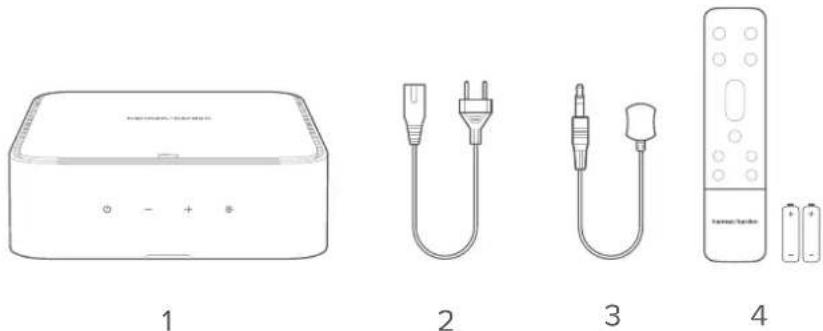
- Main unit
- Power cord*
- IR extender
- Remote control (with 2 AAA batteries)
* Power cord quantity and plug type vary by regions.
Inserting batteries before using the remote control (AAA batteries x 2)
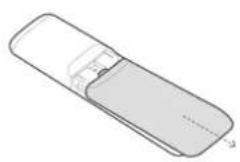
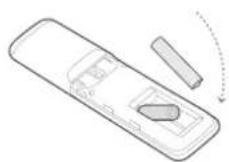
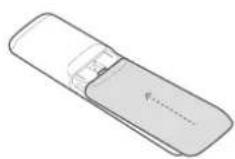
Slide the battery cover in the direction of the arrow until it is completely removed. Insert 2 AAA batteries (1.5V) oriented so that their polarity is correct. Slide the battery cover back into position.

PRODUCT OVERVIEW
Top and Front Panels
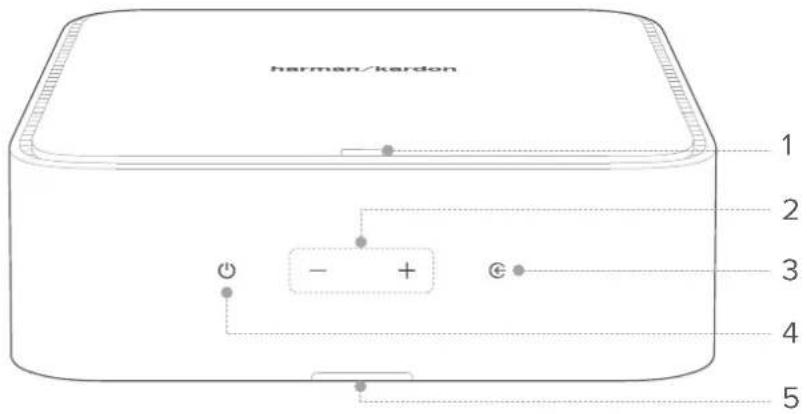
- LED indicator
| ○ | Solid white | • Wi-Fi connected |
| [S43A] | Solid purple | • TV source selected |
 | Solid green | • AUX source selected |
 | Solid blue | • Bluetooth connected |
 | Flashing blue | • Bluetooth pairing mode |
 | Flashing green | • Reaching “0” point during bass or surround level adjustment |
 | Flashing amber | • Reaching maximum or minimum setting during bass or surround level adjustment |
 | Solid red | • Abnormal status |
2. Volume +/-
- Increase or decrease the volume level.
- Press both buttons simultaneously to mute or unmute.
3.
- Select an input source: TV (HDMI/OPTICAL/COAXIAL), Bluetooth, or AUX.
4. ⏻
• Power on or switch to standby.
5. Infrared (IR) Receiver
- Receives commands from remote control.
Back Panel
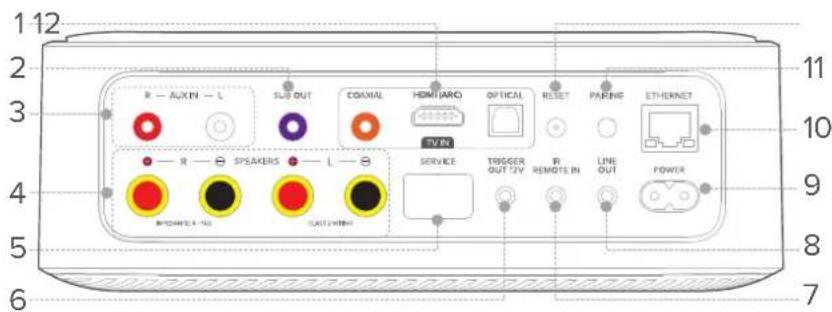
1. TV IN group
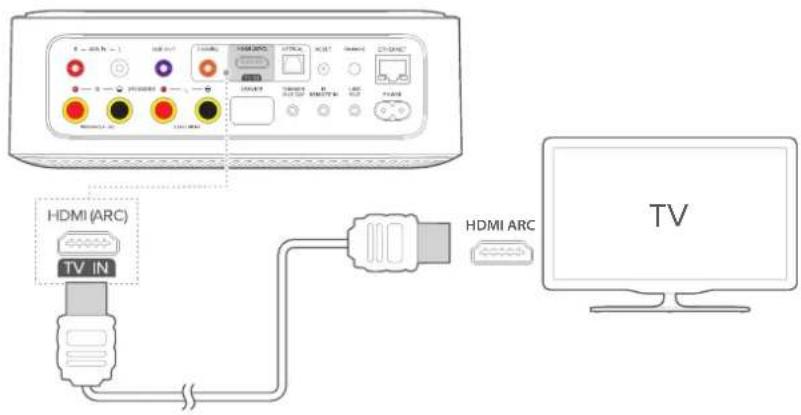
- HDMI (TV ARC): Connect to the HDMI (ARC) input on your TV.
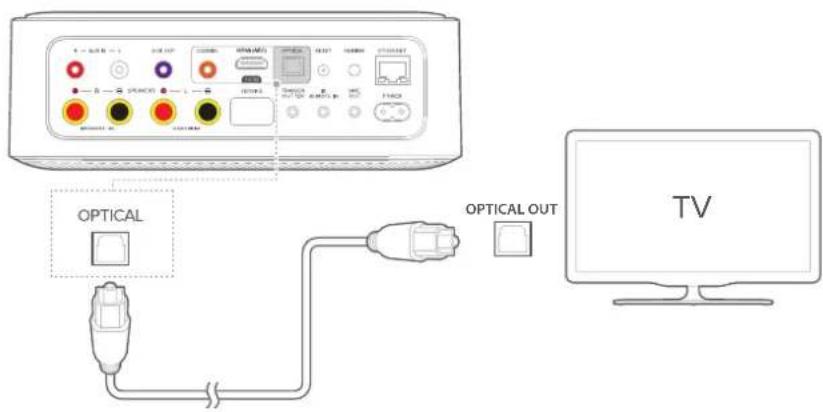
• OPTICAL: Connect to an optical audio output on your TV or a digital device.
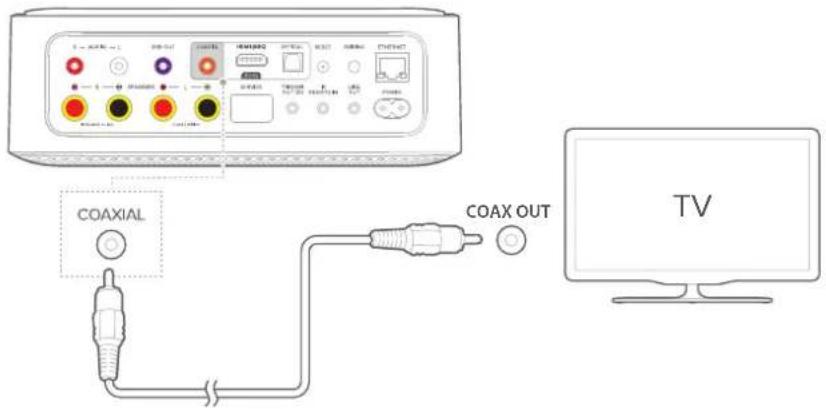
• COAXIAL: Connect to a coaxial audio output on your TV or a digital device.
NOTE:
- When the HDMI cable and optical or coax cables are connected, the HDMI signal is received first.
2. SUB OUT
- Connect to a subwoofer.
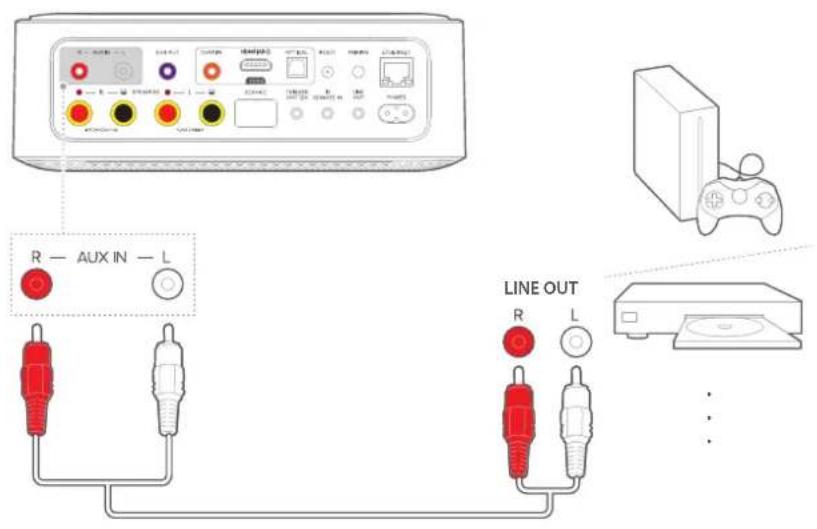
3. AUX IN (L/R)
- Connect to RCA audio outputs on an external device.
4. SPEAKER OUT (L/R)
- Connect to a pair of loudspeakers.
5. SERVICE (for technical personnel only)
6. TRIGGER OUT 12V
- Connect to the 12V trigger input on an external device.
7. IR REMOTE IN
- Connect to the IR extender.
8. LINE OUT
- Connect to audio input on an external device.
9. POWER
- Connect to the power cable.
10. ETHERNET
- Connect to the Internet (RJ45 connector).
11. PAIRING
- Pair with a Harman Kardon wireless subwoofer and / or surround speakers (such as Citation Tower, Sub / Sub S and Citation Surround).
12. RESET
- Press and hold for 5 seconds to restore the factory settings.
Remote Control
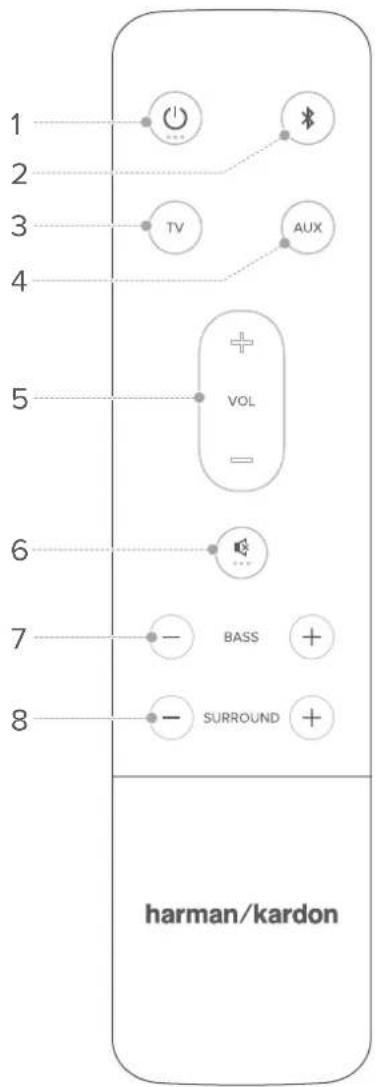
1. (Power)
• Power on or switch to standby.
2.
- Press to select the Bluetooth input source.
- Press and hold for 3 seconds to pair with a new device.
3. TV
- Select the TV input source.
4. AUX
- Select the AUX input source.
5. VOL +/-
- Increase or decrease the volume level.
6.
- Mute or unmute the sound output.
7. BASS - / +
- (No subwoofer connected) Decrease or increase the bass level of the left and right speakers.
- (Subwoofer connected) Decrease or increase the bass level of the subwoofer.
8. SURROUND -/+
- Decrease or increase the surround sound speaker level (Must be paired with Citation Surround wireless surround speakers).

PLACEMENT
NOTE:
• Make sure that there is an AC (mains) outlet nearby.
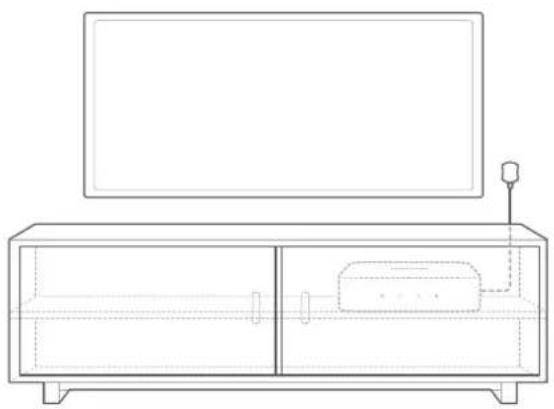
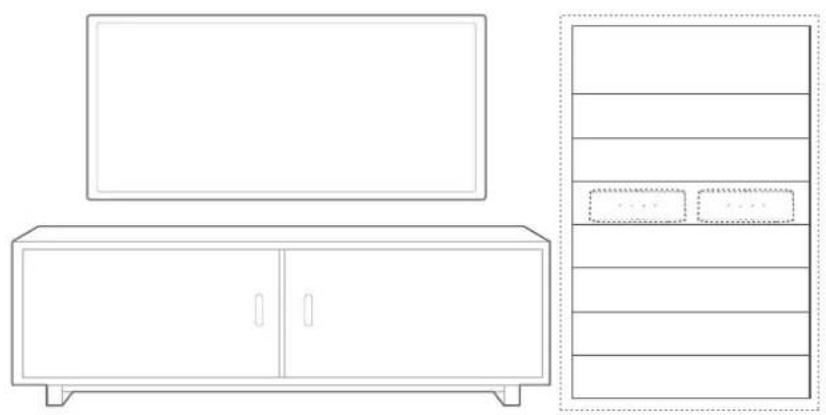
Desktop placement
Place your Citation Amp on a stable and level surface. You can hide the product out of sight, and control it with the included IR extender.
natural_image
Line drawing of a modern TV set with a monitor and antenna (no text or symbols)Rack mounting
You can also mount your Citation Amp in a 2RU rack space. Two units can fit side by side on a standard rack (installation kits not included).
natural_image
Line drawing of a modern office setup with a TV and cabinet (no text or symbols)Wall mounting
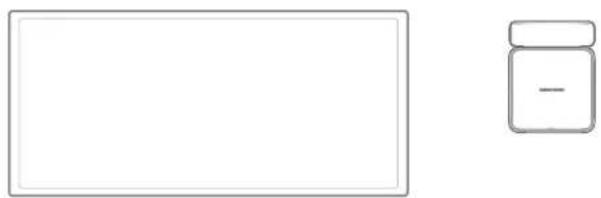
You can wall-mount the Citation Amp with a wall-mount bracket (For more information, visit our partners at www.soundxtra.com).
natural_image
Simple line drawing of a rectangular frame and a small jar with a minus sign (no text or symbols)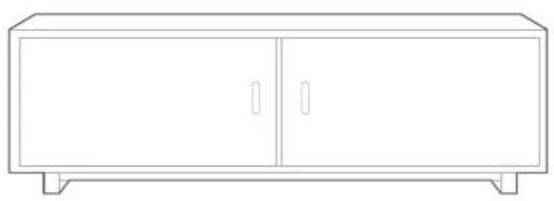
natural_image
Line drawing of a simple cabinet with two doors and two legs (no text or symbols)Wireless speaker distance
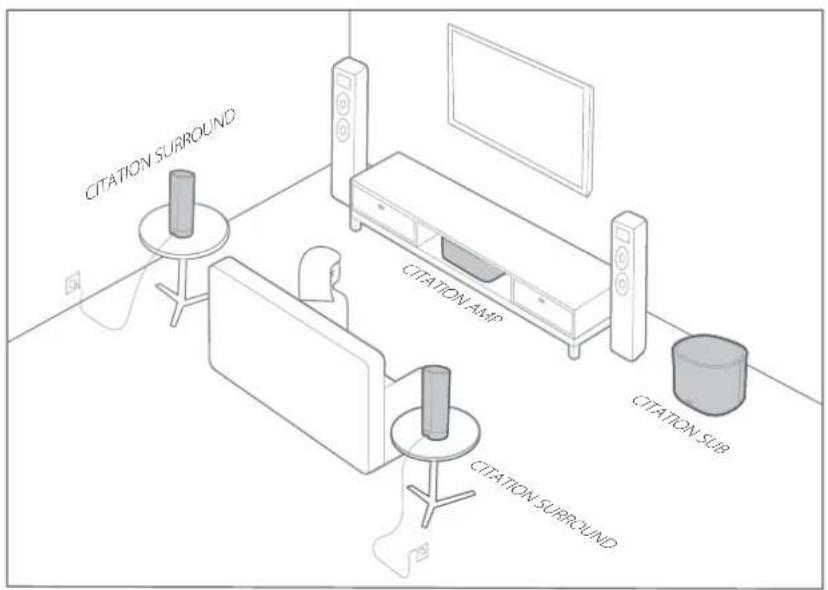
You can create a 4.1 surround sound system with the Citation Amp. Keep a maximum distance of 5 meters (16.4 feet) between the Citation Amp and your Citation speakers.
/ CONNECTING TO TV
NOTES:
- If you want to enjoy sound only from your Citation speakers, make sure to set your TV audio settings to support external speakers and disable the built-in TV speakers.
- Before you make or change any connections, make sure that all devices are disconnected from the power outlet.
- When the HDMI cable and optical or coax cables are connected, the HDMI signal is received first.
HDMI (Preferred)
1) Connect an HDMI cable (not provided) from the HDMI (TV ARC) connector on the back of this product to the HDMI IN (ARC) connector on your TV.
2) Press Ⓔ on the main unit or press TV on the remote control to select the TV ARC mode.
NOTES:
- If your TV features an HDMI ARC you can enjoy the TV audio through your Citation system by using a single HDMI cable.
- On your TV, turn on HDMI-CEC operations. HDMI-CEC is a feature that enables CEC compliant devices that are connected through HDMI to be controlled by a single remote control, such as volume control for both the TV and the Citation Amp. See the user manual of your TV for details.
Optical
NOTE:
• Make sure you have removed the protective cap from both ends of the optical cable.
1) Connect the OPTICAL br on this product to the OPTICAL OUT connector of your TV with an optical cable (not provided).
2) Press 6n the main unit or press of the remote control to select the OPTICAL
Coaxial
1) Connect the COAXIAL on this product to the COAX OUT connector of your TV with a coaxial cable (not provided).
2) Press On the main unit or press of the remote control to select the COAXIAL

CONNECTING TO ANALOG DEVICES
AUX IN
1) Connect the AUX IN (R/L) connectors on this product to the LINE OUT connectors of the source device by using a pair of RCA audio cables (not provided).
2) Press © on the main unit or press AUX on the remote control to select the AUXde.

CONNECTING SPEAKERS
IMPORTANT:
- Speaker power ratings are recommended to be at least 125 W for 8 Ohms, and at least 200 W for 4 Ohms.
- Do not connect speakers or loads less than 4 Ohms.
Connecting One Pair of Speakers
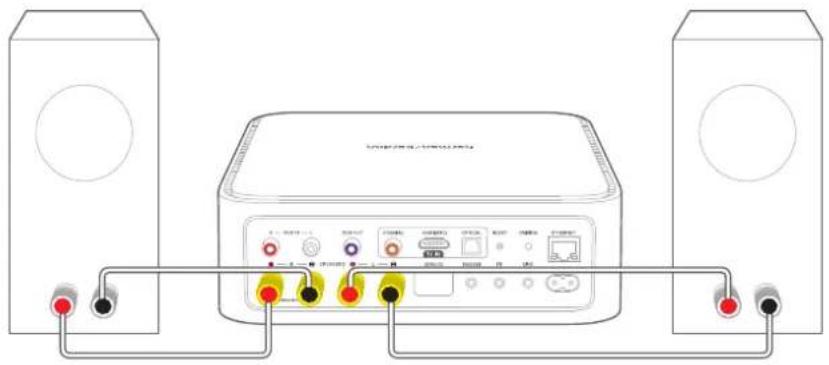
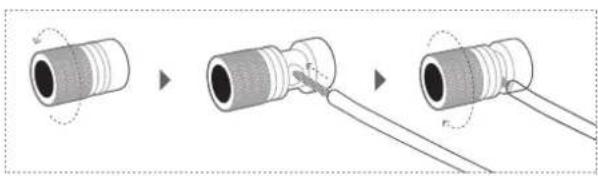
1) Unscrew the speaker connectors on Citation Amp and speakers (not provided).
2) Fully insert the speaker wires into the connectors by matching left and right, and colors / polarities (red: +; black: -).
3) Screw the connectors to secure the wires.
natural_image
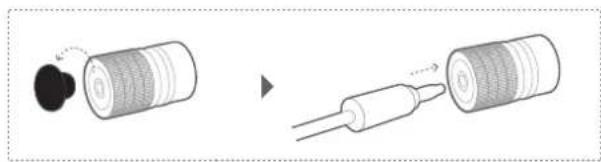
Three-step diagram showing a cylindrical connector being inserted into a cable, with no text or symbols present.You can also use banana plugs to connect speaker wires.
1) Attach banana plugs (not provided) to the speaker wires.
2) Carefully pry out the caps on speaker connectors.
3) Fully insert the banana plugs into the holes in the connectors by matching left and right, and colors / polarities (red: +; black: -).
natural_image
Diagram showing a cylindrical object being inserted into a wire, with no visible text or symbols.NOTE:
- A tool may be needed to remove the banana plug connector.
Connecting Two Pairs of Speakers
NOTE:
- You are recommended to connect speakers in parallel rather than in series to ensure optimal sound quality.
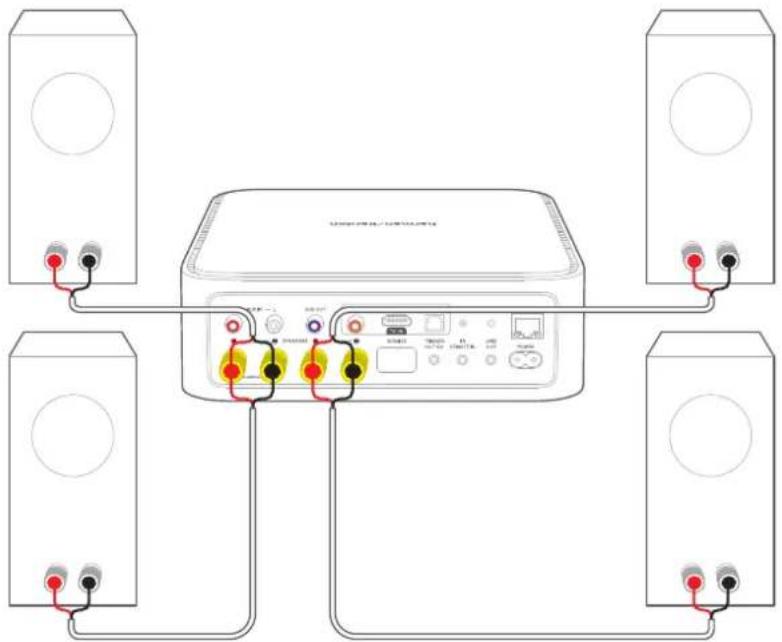
1) Group the four speakers with the same impedance into two pairs: left and right.
2) Unscrew the speaker connectors on Citation Amp and speakers.
3) Fully insert the speaker wires into the connectors by matching left and right, and colors / polarities (red: +; black: -).
4) Screw the connectors to secure the wires.

OTHER WIRED CONNECTIONS
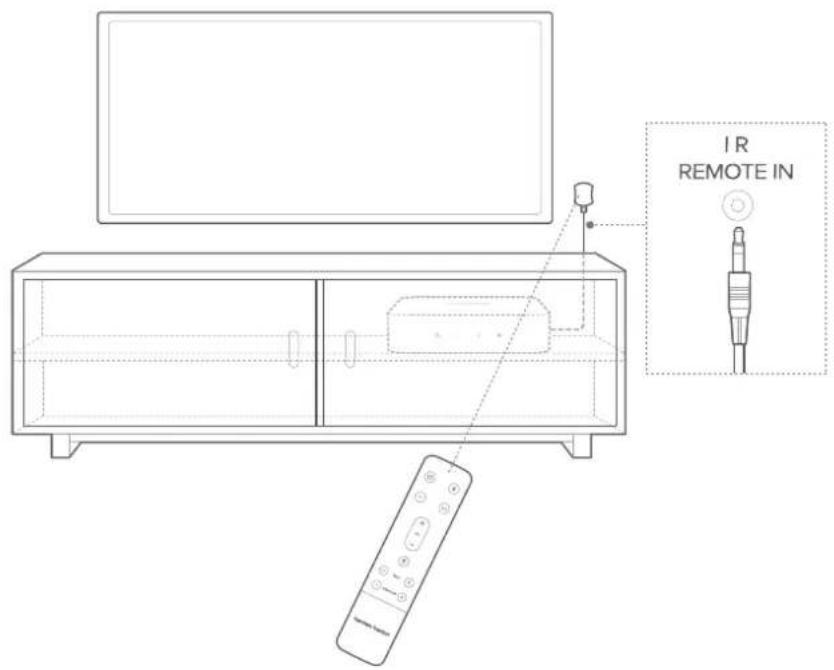
TV IR Extender
1) Connect the IR extender to IR REMOTE IN on the Citation Amp.
2) Make sure to keep a direct line of sight between the IR extender and remote control.
Wired Subwoofer
You can connect a wired subwoofer to the Citation Amp with an RCA cable (not provided).
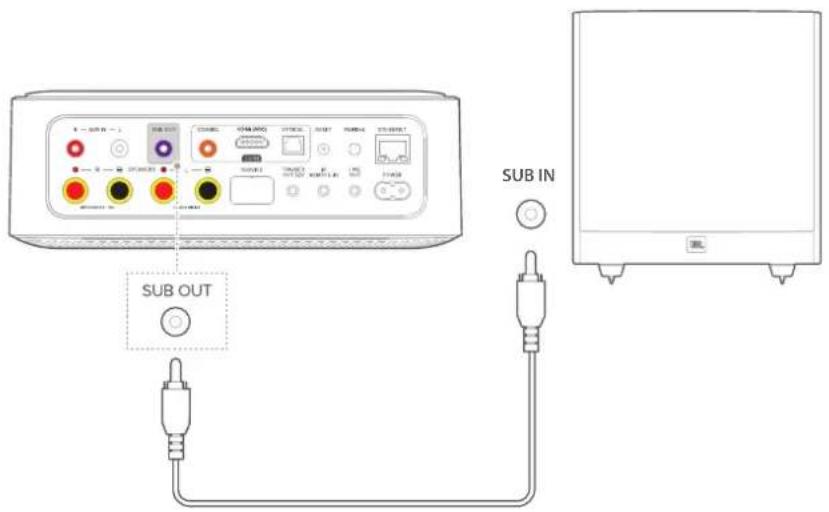
NOTE:
- If a wireless subwoofer is connected to the amp, the SUB OUT connector will be disabled.
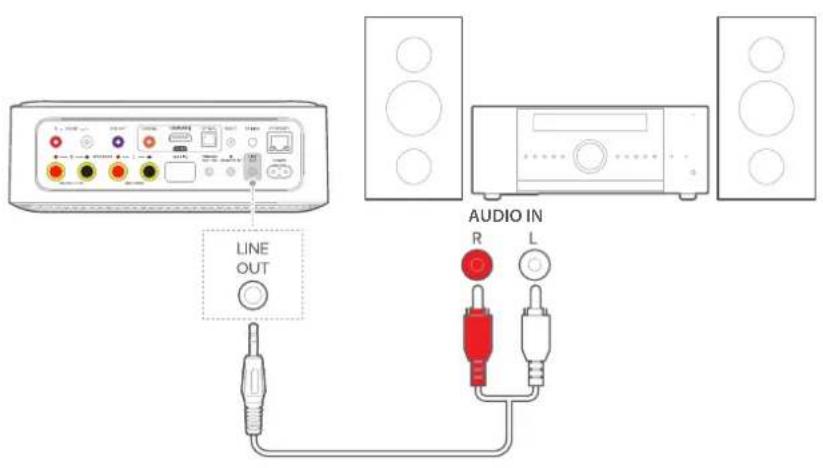
Line Output
You can connect the Citation Amp to an audio system through AUX connection.
The Line Output volume level defaults as "fixed" and does not change with the Citation Amp Volume Level. It can be changed to "Variable" and change with the Citation Amp Volume level. See the Advanced Settings page for more details.
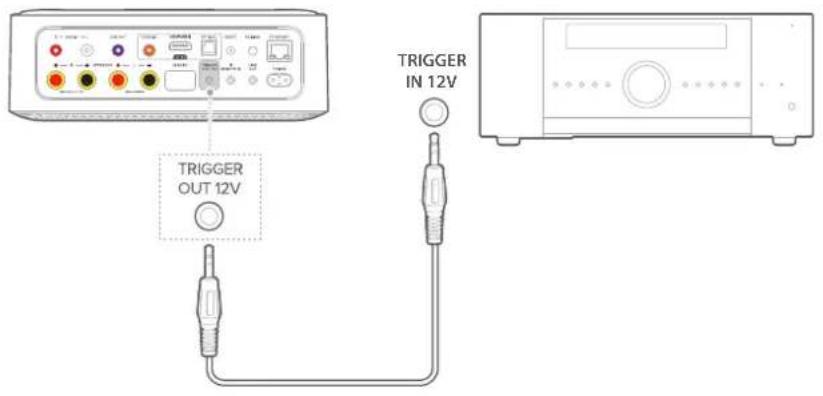
12V Trigger
You can connect an external device with a 12V trigger input socket to the Citation Amp through a 3.5mm mono cable (not provided). This connection enables synchronized power on / off with the external device remotely.
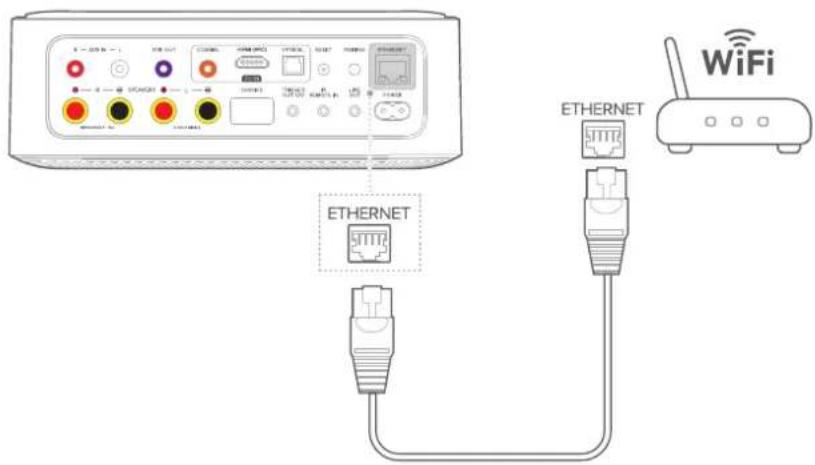
Ethernet
You can connect the Citation Amp to the Internet through a network cable (RJ45 connector; not provided). Ignore this connection if you are going to use your home Wi-Fi network.

POWER ON
NOTES:
• Use the provided power cord only.
- Before connecting the power cord, make sure all other wired connections have been completed.
- When you disconnect the power cord, always pull the plug, never the cable.
- Do not connect this product or other components to an AC outlet until all connections between components are complete.
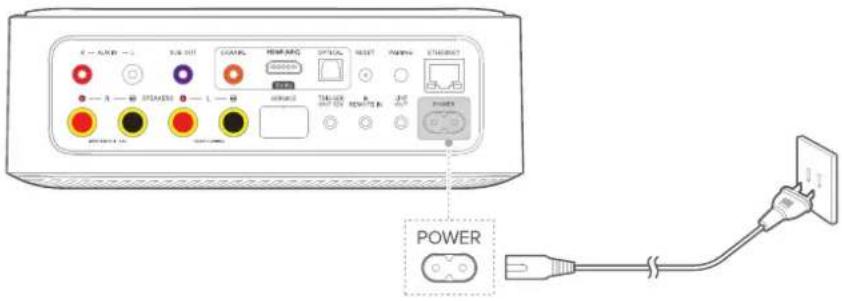
1) Plug one end of the AC power cord into the POWER connector on the back of this product.
2) Plug the other end of the power cord into a live AC (mains) outlet. The Citation Amp will automatically power on. Alternatively, press 📋 on the main unit or remote control to power on or switch to standby.
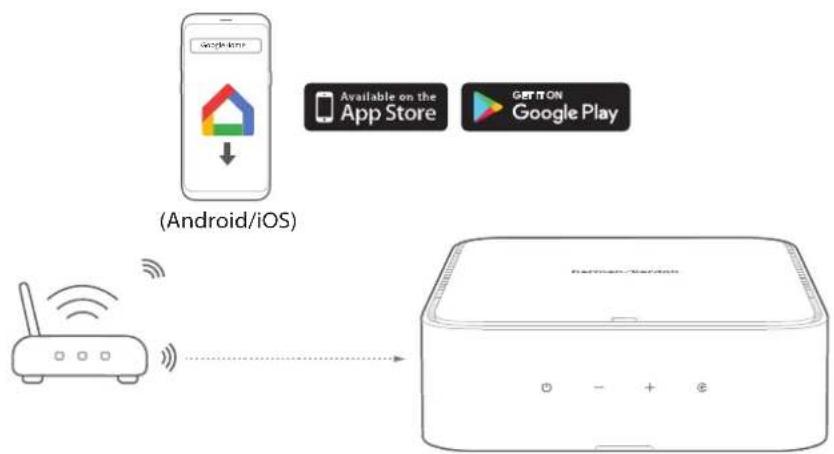
You can connect your Citation Amp to your home network with the Google Home app or your iOS device.
NOTE:
- If you want to use the Internet with Ethernet, make sure to connect the Ethernet cable before plugging in the power cord.
LED Indicator
| Flashing white/green | • Updating | |
| ○ | Solid white | • Updated successfully, ready to use |
Setup via Google Home
1) Download the Google Home app on your smartphone or tablet.
2) Power on your Citation Amp.
3) Run the Google Home app and set up your Citation Amp as instructed in the app. Always follow the instructions in the app to complete the Internet setup.
4) Sign in with your Google Account. If you do not have, create a new one.
flowchart
graph LR
    A["Android/iOS"] --> B["Available on the App Store"]
    A --> C["GET ON Google Play"]
    D["Router"] --> E["+ - + -"]
Setup via AirPlay
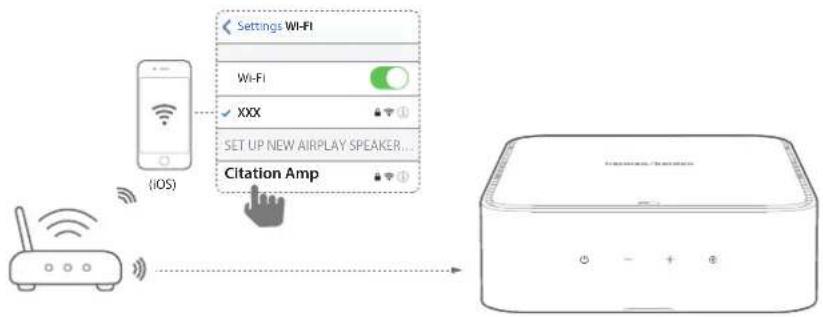
1) On your iOS device, go to Settings > Wi-Fi and select "Citation Amp" under SET UP NEW AIRPLAY SPEAKER ...
2) Follow the onscreen instructions to complete setup.
flowchart
graph LR
    A["iOS"] --> B["Settings Wi-Fi"]
    B --> C["Wi-Fi"]
    C --> D["XXX"]
    D --> E["SET UP NEW AIRPLAY SPEAKER..."]
    E --> F["Citation Amp"]
    F --> G["Output Device"]
NOTE:
- Chromecast built-in and Bluetooth will require additional setup with the Google Home app.
/ WIRELESS SPEAKER SETUP (Optional)
You can wirelessly pair your Citation Amp with:
- Citation Sub / Sub S: to set up a 2.1 channel surround sound system.
• Citation Surround: to set up a 4.1 surround sound system.
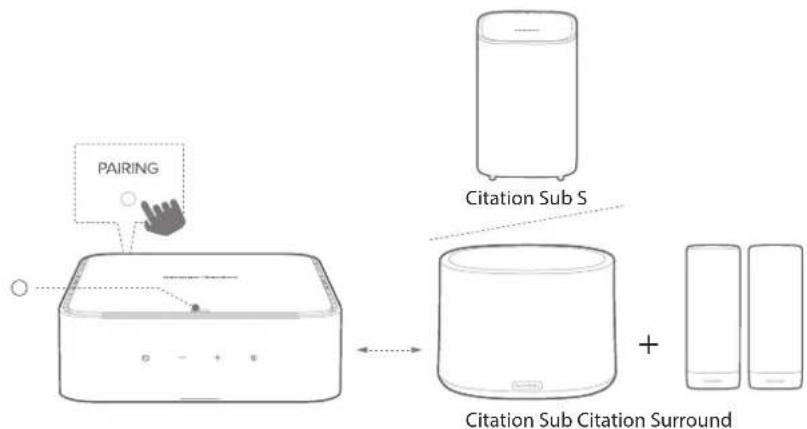
flowchart
graph TD
    A["PAIRING"] --> B["Citation Sub S"]
    B --> C["Citation Sub Citation Surround"]
    C --> D["Mobile devices"]
NOTES:
- If the Citation Amp is powered off, the Citation speakers and subwoofer will enter standby mode.
- If you use a device that uses the same frequency (2.4GHz or 5GHz) as the Citation Amp nearby, interference may cause some sound interruption.
- The maximum transmission distance of the wireless signal between the Citation Amp and Citation speakers and subwoofer may vary depending on your operating environment.
• To avoid any interference, keep a minimum distance of 16.4 feet (5 meters) between the Citation Amp and your Wi-Fi router.
1) Power on your Citation Amp, Citation Surround, or / and Citation Sub / Sub S.
2) Press PAIRING on the back of the Citation Amp to enter pairing mode.
→ You will hear a pairing chime once successfully connected.
→ If no speakers are found, make sure to power on every speaker and retry the setup.
→ Citation Surround rear speakers will be automatically programmed as surround left or right channels. You will hear a left or right channel sound.
3) Press Ⓔ and - on the Citation Amp at the same time to hear both the left and right channel sounds from the Citation Surround rear speakers.
→ If the Citation Surround left and right channels are reversed, simply unplug and swap the speaker positions, or re-start the pairing process.
4) To remove the setup, hold PAIRING on the back of the Citation Amp for more than 5 seconds again, or reset the Citation Amp.
LED Indicator
| ○ | Solid white | • Connection with Citation speakers successful |
| Flashing red | • Connection with Citation speakers failed |

USING YOUR CITATION AMP
Stream the entertainment you love from your phone, tablet or laptop to your speaker[s]
With Chromecast built into Citation Amp speakers you can stream music, tunes, podcasts, and playlists from hundreds of apps to your speakers by simply tapping the Cast button.
1) Run the Chromecast enabled app on your smartphone or tablet.
2) Press the silicon in the app and select the Citation Amp.
3) Press "Play" in the app.
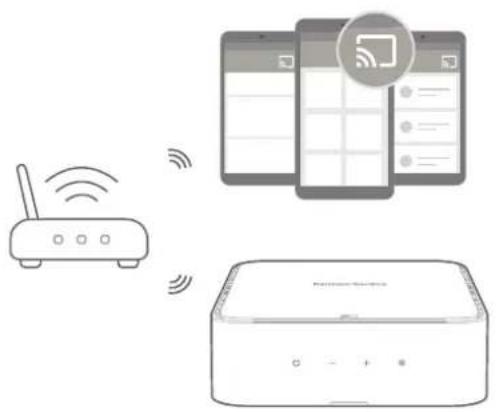
NOTES:
• The name of this product is assigned during the Wi-Fi setup.
- The Citation Amp can support audio streaming but not video streaming.
Play Music through AirPlay
With AirPlay, you can stream music on your iOS device to the Citation Amp.
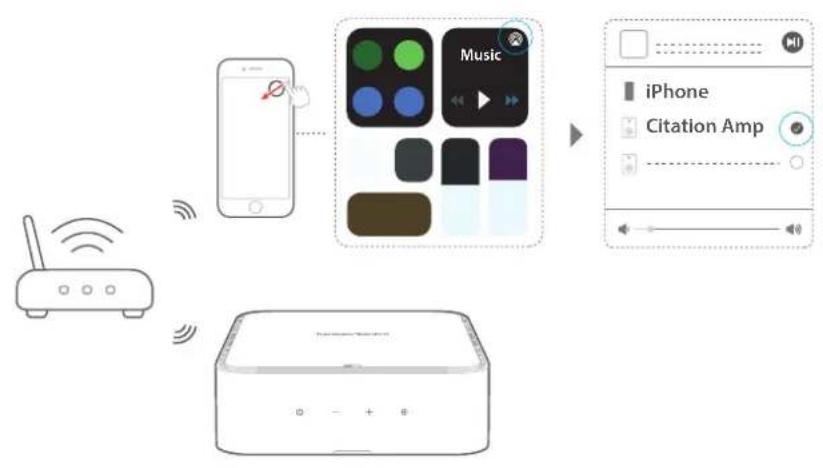
flowchart
graph TD
    A["Router"] -->|Wireless Signal| B["Smartphone"]
    B --> C["Music App"]
    C --> D["iPhone"]
    D --> E["Citation Amp"]
1) Check that your iOS device has been connected to the same network as the Citation Amp.
2) To enter the Control Center on an iOS device, swipe down from the upper right corner (iOS 12 or later) or swipe up from the bottom edge (iOS 11 or earlier). Tap ☐ to select the connected Citation Amp and then, start audio streaming from an app.
3) To exit from the music playback, switch to other sources.
Play Music through Bluetooth
You can use your Citation Amp with your Bluetooth enabled smartphone or tablet.
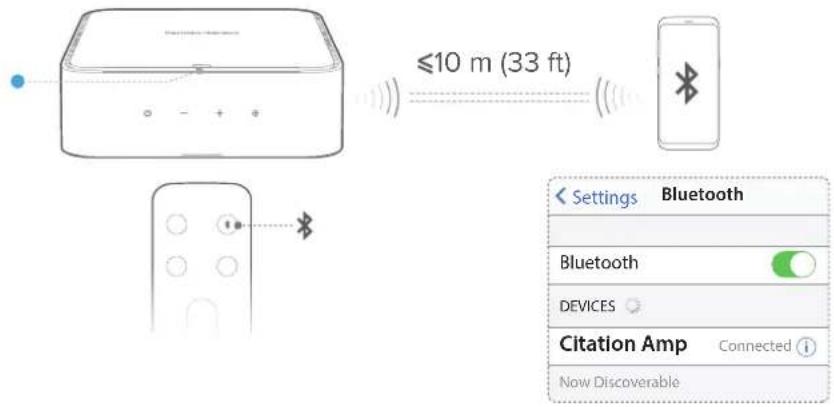
1) Press Gn the main unit or press on the remote control to enter Bluetooth pairing mode.
→ During the 10 seconds of reconnection period, or until a successful connection, the status indicator will flash blue.
2) On your smartphone or tablet, select "Citation Amp" to connect. You will hear a pairing chime once connected.
NOTES:
- If you have already connected the Citation Amp to Wi-Fi and changed the device name, then select the new device name.
• To exit the Bluetooth mode, choose other sources. - To disconnect and pair another device, press and hold ✝ for 3 seconds on the remote control.
• This product automatically turns off after 20 minutes of inactivity. - Bluetooth performance can be affected by the distance between this product and your Bluetooth device and the environment of operation.
- Keep a maximum distance of 10 meters (33 feet) between this product and your Bluetooth device to avoid disconnection.
Respond to TV Remote Control
HDMI CEC
If you are using an HDMI ARC connection to your television, then your TV remote control will automatically operate the Citation Amp for standard commands such as power on/off and volume control. The amp supports HDMI CEC and will interoperate with compatible TV's (check your TV owner's manual for HDMI CEC compatibility)
TV Remote Learning
You can manually program the Citation Amp to respond to your TV remote control.
1) Press and hold + and Ⓤ on the Citation Amp for 5 seconds to enter learning mode.
→ The LED indicator turns solid amber.
2) Press ⏻ button on the Citation Amp and press POWER on your TV remote control.
→ The LED indicator flashes amber, then turns solid green to confirm it received the IR command.
3) Follow the same procedure for volume down and volume up. To mute, press both + and - on the Citation Amp and press MUTE on your TV remote control.
4) Press and hold + and ☑ in the Citation Amp again, and now the Citation Amp responds to your TV remote control.
Dolby Night Mode
This feature allows you to decrease the volume of loud sounds (available only for Dolby Digital soundtracks).
Hold for 3 seconds, then press VOL - within 2 seconds to turn the night mode (Dynamic Range Control) on or off for Dolby Digital soundtracks.
LED Indicator
| Flashing purple | • Night mode on | |
| Flashing amber | • Night mode off |

ADVANCED SETTINGS
NOTE:
- Some settings are only available when the related speaker is connected and enabled on the setting page.
Access advanced settings
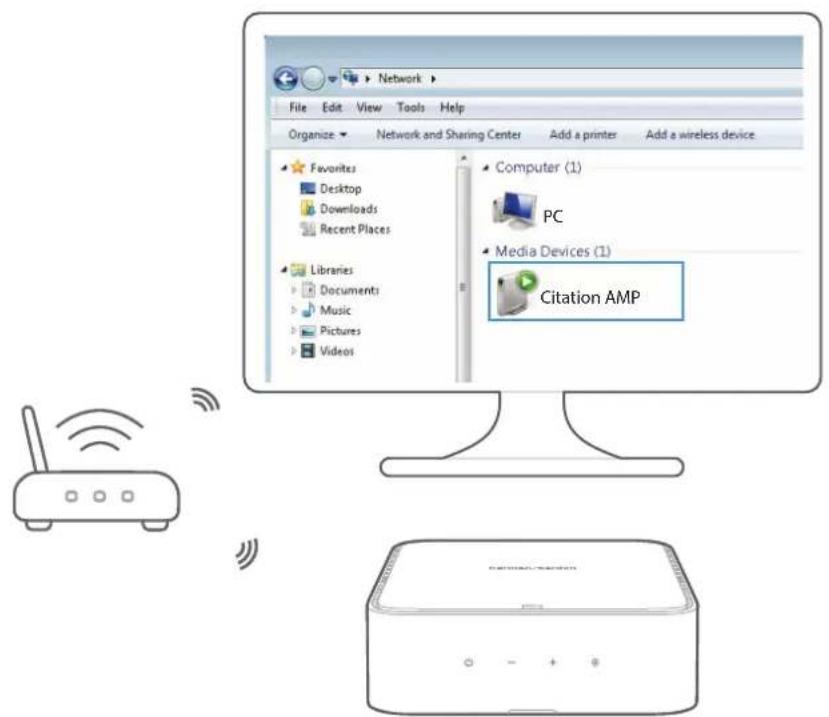
You can access the Citation Amp advanced settings from a Windows PC or the Google Home app. The Citation Amp must be on the same network.
Windows
1) Open the Network folder.
2) Select the device icon under Media Devices.
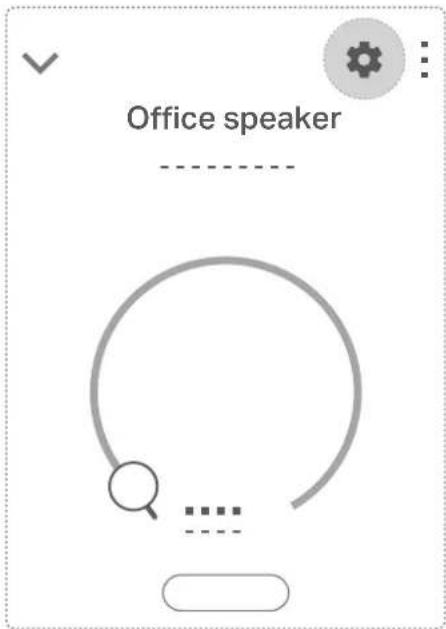
Google Home app
1) Select the Amp.
2) Tap ✿ to go to Device settings.
3) Find IP Address.
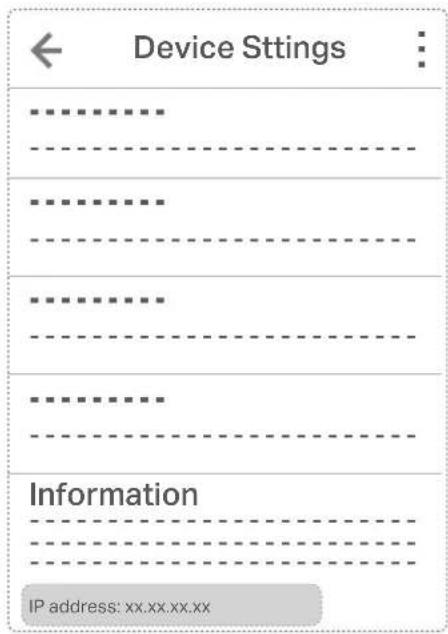
4) Copy/paste IP address into web browser on your PC/Mac.
Subwoofer & Bass EQ
Move the slider to adjust the bass level for the left and right speakers. If a subwoofer is connected then the slider will control the subwoofer level.

line
| Subwoofer | Bass | | --------- | ---- | | -10 | 0 | | -5 | 0 | | 0 | 0 | | 5 | 0 | | +10 | 0 |Treble EQ
Move the slider to adjust the treble level of the left and right speakers.
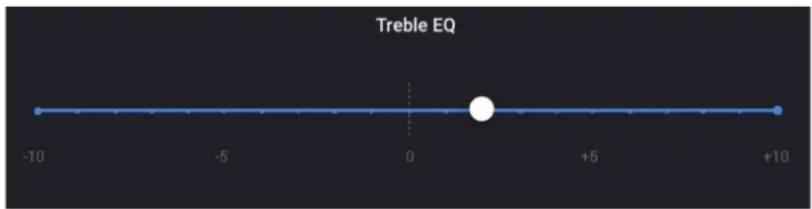
line
| Position | Value | | -------- | ----- | | Start | -10 | | Mid | 0 | | End | +10 |Subwoofer Crossover Setting
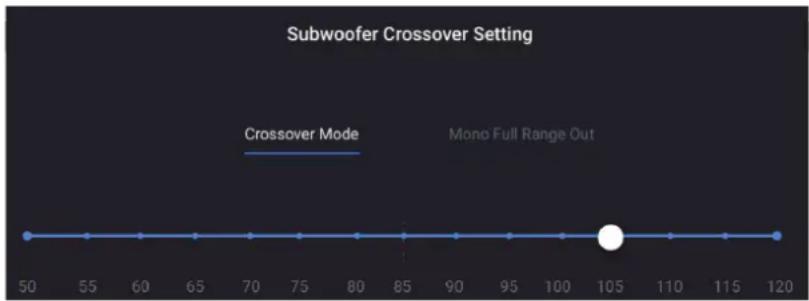
Select Crossover Mode to enable crossover setting. Move the slider to set high frequencies you want to filter out.
Select Mono Full Range Out to output full range signal without filtering.
line
| x | y | | ---- | ----- | | 50 | 105 | | 120 | 105 |NOTE:
- Crossover mode is only available when a wired or wireless subwoofer is connected.
Audio Sync Delay
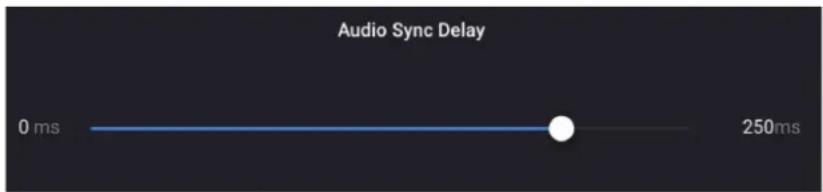
If the audio and video are not synchronized, move the slider to delay the audio to match the video.
Surround Channel Level
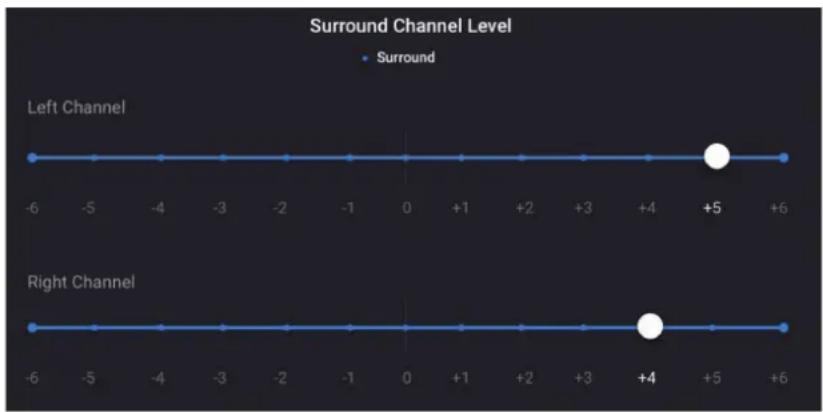
Move the sliders to adjust the left and right surround sound volume respectively.
You can also use the SURROUND -/+ buttons on the remote control to adjust the left and right surround sound volume at the same time.
line
Surround Channel Level | Channel | Value | | :--- | :--- | | Left Channel | -6 | | Left Channel | +5 | | Right Channel | -6 | | Right Channel | +4 |Dual Mono Mode
This option allows you to combine the left and right input channels and feed mono signal to both speakers.

Maximum Volume Settings
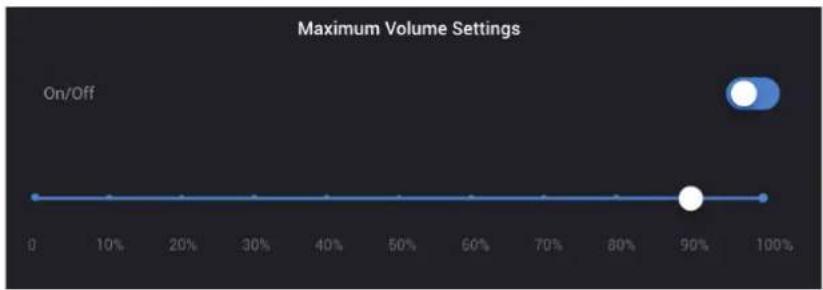
Move the slider to set the maximum sound output of the Citation Amp.
line
| Volume Setting | On/Off | | -------------- | ------ | | On | 90% |Line Output Settings
This option allows you to set the analog line output of the Citation Amp to Fixed or Variable.

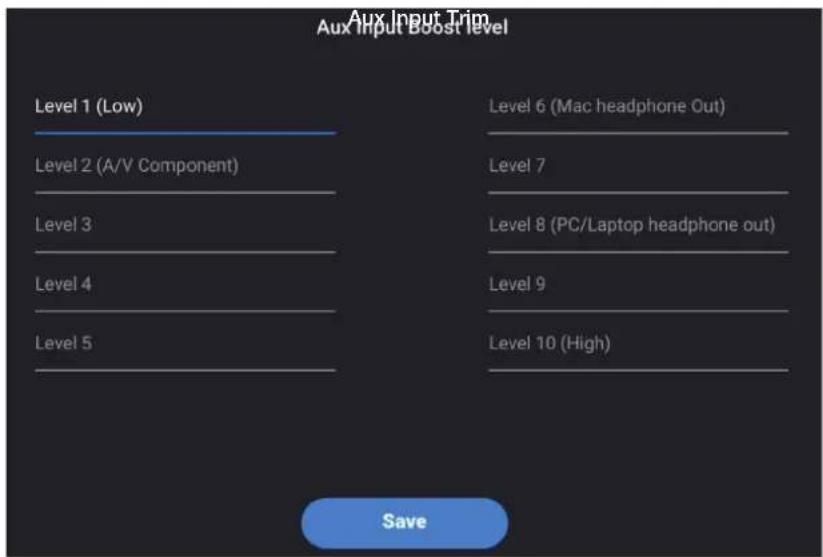
Aux Input Boost Level
This setting allows you to set input levels for various audio sources.

SETTINGS
Software Upgrade
The software of your Citation Amp will be automatically upgraded to the latest version when it is connected to the Internet via a Wi-Fi network or Ethernet connection.
To restore the default settings programmed at the factory:
- Press and hold the RESET on the back of your Citation Amp for 5 seconds.
When the factory settings are restored, the Citation Amp will automatically power off and restart. Any stored information or settings will be erased.
Cleaning and Maintenance
To keep the exterior surface of your Citation Amp clean, unplug the AC power cord from the speaker first, wipe the exterior surfaces gently with a clean, soft cloth.
/
SPECIFICATIONS
• Model Name: Citation Amp
- Analog Input: 1 Aux (Stereo RCA connector)
• Digital Input: 1 Digital (HDMI ARC, Coax or Optical connector)
• Audio Outputs: 1 Line Out, 1 Subwoofer Out
- Other Connections: Ethernet, IR Remote Input, 12 V trigger output
- Rated Output Power (8 ohms): 125 W RMS per channel
- Rated Output Power (4 ohms): 200 W RMS per channel
• Minimum Impedance: 4 ohms
• Total Harmonic Distortion (THD): 0.05%
• Frequency Response: 20 Hz – 20 kHz +/- 0.5 dB
• Signal to Noise: >110 dB A-Weighted
• Analog Input Maximum Input Level: 2 V RMS
• Digital Input Formats: PCM, Dolby Digital
• Tone Controls: Bass, Treble
• Maximum Volume Control: 0 – 100 % of maximum power
• Left/Right Channel Mono Summing: Yes
- Subwoofer output: Mono Summing or Crossover Mode
- Subwoofer Crossover Frequencies: 50 – 120 Hz
- Bluetooth version: 4.2
- Bluetooth Frequency Range: 2402 MHz – 2480 MHz
- Bluetooth Transmitter power: ≤ 10 dBm (EIRP)
- Bluetooth Transmitter modulation: GFSK, n/4 DQPSK, 8DPSK
• Wi-Fi network compatibility: 802.11 a/b/g/n/ac
- 2.4G Wi-Fi Frequency Range: 2412 – 2472 MHz (USA and Canada 11 Channels, Europe and others 13 Channels)
• 2.4G Wi-Fi Transmitter power: ≤ 20 dBm (EIRP)
• 2.4G Wi-Fi modulation: DBPSK, DQPSK, CCK, QPSK, BPSK, 16QAM, 64QAM
- 5G Wi-Fi transmitter power: ≤ 23 dBm (EIRP)
- 5G Wi-Fi modulation: QPSK, BPSK, 16QAM, 64QAM, 256QAM
- 5G Wi-Fi transmitter frequency range: 5.15 \~ 5.35 GHz, 5.470 \~ 5.725 GHz, 5.725 \~ 5.825 GHz
- 5G WISA transmitter power: ≤ 14 dBm (EIRP)
• 5G WISA modulation: OFDM, BPSK, QPSK, 16QAM
- 5G WISA transmitter frequency range: 5.15 5.35 GHz, 5.470 5.725 GHz, 5.725 5.825 GHz
• Power Supply: 100 – 240 V \~ 50/60 Hz
• Power Consumption: 125 W
- Dimensions (W x H x D):
8.5" x 3" x 9" (215 x 75 x 230 mm)
- Rack Height: 2RU
• Weight: 5.3 lb (2.4 kg)
- Packaging Dimensions (W x H x D): 12.8" x 11" x 4.8" (326 x 280 x 121 mm)
• Packaging Weight (Gross): 6.8 lb (3.1 kg)
/
TROUBLESHOOTING
Never try to repair the product yourself. If you have any problems using this product, check the following points before you request a service.
Sound
No sound or poor sound from the wired speakers or subwoofer.
- Ensure that the Citation Amp is not muted.
- Check the wired connection. Ensure that the connection is correct and secure.
No sound from Citation Surround or Citation Sub / Sub S.
- Ensure that the Citation Amp is not muted.
- Check if the subwoofer or the speaker's LED is in solid white. A blinking LED means a disconnection. Manually pair them with the Citation Amp.
Distorted sound or echo.
- If you play audio from the TV through the system, make sure the TV is muted.
Audio and video are not synchronized.
- Go to advanced settings and adjust the value under Audio Sync Delay (see "Audio Sync Delay" for details).
• Make sure the TV delay is set to 0.
Bluetooth
A device cannot connect with the Citation Amp.
- Check if you enable the Bluetooth function of the device.
- The Citation Amp is already connected to another Bluetooth device. Press and hold ✝ for 3 seconds on the remote control to disconnect and pair with a new device.
Poor audio quality from a connected Bluetooth device.
- The Bluetooth reception is poor. Move the device closer to the Citation Amp, or remove any obstacle between them.
Internet
Failed to connect to Wi-Fi.
- Check if your router works.
- Follow the instructions in the Google Home app to complete the Wi-Fi setup.
- Make sure that you have selected the right network and entered the correct password.
- Make sure that your router or modem is turned on and within the range.
- Make sure that your Citation Amp is connected to the same wireless LAN as your smartphone or tablet.
The Google Home app cannot find the device.
• Make sure that your Citation Amp is powered on.
- Make sure that your network (Wi-Fi or Ethernet) is working properly.
- Make sure that your router or modem is powered on and within the range.

COMPLIANCE
1) Information on power consumption.
This equipment complies with European Commission Regulation (EC) No 1275/2008 and (EU) No 801/2013.
Networked standby: 2.0 W
2) The period of time after which the power management function switches the equipment automatically into; the device shall enter 2.0 W networked Standby automatically in 20 minutes.
How to activate wireless network connections;
- Set up product according to instruction
- Switch into wireless mode (Bluetooth, Wi-Fi)
- Connect with energy using product(s)
How to deactivate wireless network connections;
- The device is intended for use in wireless connections, it is inappropriate to deactivate any wireless connections.

OPEN SOURCE LICENSE NOTICE
This product contains open source software. For your convenience, the source code and relevant build instruction for software licensed under the GPL is available at http://www.harmankardon.com/ opensource. You may also obtain this information by contacting us at OpenSourceSupport@Harman.com

TRADEMARKS

Bluetooth®
The Bluetooth® word mark and logos
are registered trademarks owned by Bluetooth SIG, Inc. and any use of such marks by HARMAN International Industries, Incorporated is under license. Other trademarks and trade names are those of their respective owners.
Wi Fi®
CERTIFIED
The Wi-Fi CERTIFIED Logo is a certification
mark of the Wi-Fi Alliance

Dolby Audio
Manufactured under license from Dolby
Laboratories, Dolby, Dolby Audio, Pro Logic, and the double-D symbol are trademarks of Dolby Laboratories.
HDMI™
HIGH-DEFINITION MULTIMEDIA INTERFACE
The terms HDMI, HDMI High-Definition
Multimedia Interface, and the HDMI logo are trademarks or registered trademarks of HDMI Licensing Administrator, Inc.

Chromecast built-in
Google, Google Play, Google Home and
Chromecast built in arc trademarks of Google LLC.
Apple AirPlay iPad iPad Air iPad Pro.

Works with Apple AirPlay
and iPhone are trademarks of Apple Inc., registered in the U.S. and other countries. Use of the Works with Apple badge means that an accessory has been designed to work specifically with the technology identified in the badge and has been certified by the developer to meet Apple performance standards. To control this AirPlay 2 enabled speaker, iOS 1.4 or later is required.
harman/kardon®
by HARMAN
- IMPORTANT SAFETY INSTRUCTIONS
- Verify Line Voltage Before Use
- Do Not Use Extension Cords
- Handle the AC Power Cord Gently
- Do Not Open the Cabinet
- Maintain Proper Air Ventilation
- Use Proper Wires to Connect Speakers
- TABLE OF CONTENTS
- / INTRODUCTION
- / WHAT'S IN THE BOX
- PRODUCT OVERVIEW
- Volume +/-
- 3.
- ⏻
- Infrared (IR) Receiver
- TV IN group
- NOTE:
- SUB OUT
- AUX IN (L/R)
- SPEAKER OUT (L/R)
- SERVICE (for technical personnel only)
- TRIGGER OUT 12V
- IR REMOTE IN
- LINE OUT
- POWER
- ETHERNET
- PAIRING
- RESET
- (Power)
- 2.
- TV
- AUX
- VOL +/-
- 6.
- BASS - / +
- SURROUND -/+
- PLACEMENT
- Desktop placement
- Rack mounting
- Wall mounting
- Wireless speaker distance
- / CONNECTING TO TV
- NOTES:
- HDMI (Preferred)
- Optical
- Coaxial
- CONNECTING TO ANALOG DEVICES
- AUX IN
- CONNECTING SPEAKERS
- IMPORTANT:
- Connecting One Pair of Speakers
- You can also use banana plugs to connect speaker wires.
- Connecting Two Pairs of Speakers
- OTHER WIRED CONNECTIONS
- TV IR Extender
- Wired Subwoofer
- Line Output
- 12V Trigger
- Ethernet
- POWER ON
- Setup via Google Home
- Setup via AirPlay
- / WIRELESS SPEAKER SETUP (Optional)
- USING YOUR CITATION AMP
- Stream the entertainment you love from your phone, tablet or laptop to your speaker[s]
- Play Music through AirPlay
- Play Music through Bluetooth
- Respond to TV Remote Control
- HDMI CEC
- TV Remote Learning
- Dolby Night Mode
- ADVANCED SETTINGS
- Access advanced settings
- Windows
- Google Home app
- Subwoofer & Bass EQ
- Treble EQ
- Subwoofer Crossover Setting
- Audio Sync Delay
- Surround Channel Level
- Dual Mono Mode
- Maximum Volume Settings
- Line Output Settings
- Aux Input Boost Level
- SETTINGS
- Software Upgrade
- Cleaning and Maintenance
- /
- SPECIFICATIONS
- TROUBLESHOOTING
- Sound
- Bluetooth
- Poor audio quality from a connected Bluetooth device.
- Internet
- Failed to connect to Wi-Fi.
- The Google Home app cannot find the device.
- COMPLIANCE
- How to activate wireless network connections;
- How to deactivate wireless network connections;
- OPEN SOURCE LICENSE NOTICE
- TRADEMARKS
- Bluetooth®
- Wi Fi®
- Dolby Audio
- HDMI™
- Chromecast built-in
- Works with Apple AirPlay
Brand : HARMAN KARDON
Model : Citation Amp
Category : Amplifier