
SCF 3200WH - Cooker SENCOR - Free user manual and instructions
Find the device manual for free SCF 3200WH SENCOR in PDF.


| Product Type | Convection Heater |
| Brand | Sencor |
| Model | SCF 3200WH |
| Power Supply | 220-240 V~, 50/60 Hz |
| Power Output | 750 W (low), 1500 W (high) |
| Temperature Range | 15 to 35 °C |
| Protection Class | IP24 |
| Operating Modes | Comfort, Power Saving, Frost-Free |
| Installation Options | Freestanding with wheels or wall-mounted |
| Control Type | Electronic with LED display and buttons |
| Child Safety Lock | Yes |
| Programming Function | Yes, customizable weekly schedule with 3 presets |
| Open Window Detection | Yes |
| Thermal Protection | Auto shut-off on overheating |
| Room Size Recommendation | Not less than 6 m² |
| Cleaning | Wipe with a dry cloth; do not immerse |
| Weight | Not specified (approx. 5 kg) |
| Dimensions (W x H x D) | Not specified (approx. 60 x 40 x 20 cm) |
| Accessories Included | Travel wheels, wall mounting set |
Frequently Asked Questions - SCF 3200WH SENCOR
User questions about SCF 3200WH SENCOR
0 question about this device. Answer the ones you know or ask your own.
Ask a new question about this device
Download the instructions for your Cooker in PDF format for free! Find your manual SCF 3200WH - SENCOR and take your electronic device back in hand. On this page are published all the documents necessary for the use of your device. SCF 3200WH by SENCOR.
USER MANUAL SCF 3200WH SENCOR
natural_image
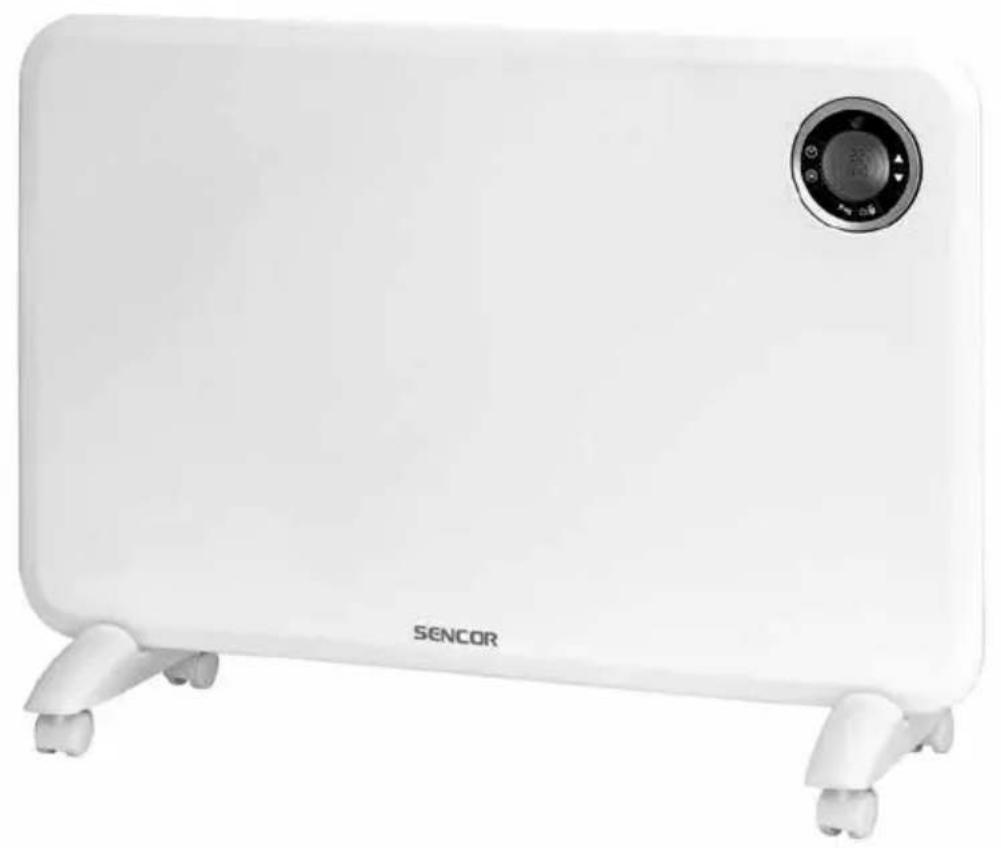
White outdoor heater with a circular display and 'SENCOR' branding (no additional text or symbols visible)EN • Convection heater
Translation of the original manual
This product is suitable only for well insulated areas or for infrequent use.
Information relating to local electric heaters according to Commission Directive EU 2015/1188 is provided in the attachment to this user's manual.
EN
Convection heater
Important safety instructions
■This appliance may be used by children 8 years of age and older and by persons with physical or mental impairments or by inexperienced persons, if they are properly supervised or have been informed about how to use the product in a safe manner and understand the potential dangers.
■ Children must not play with the appliance. Cleaning and maintenance performed by the user must not be performed by unsupervised children.
- In the event that the power cord is damaged, have it repaired at a professional service centre to prevent causing a dangerous situation. It is forbidden to use the appliance if it has a damaged power cord.
■ Children younger than 3 years of age should be prevented from accessing the appliance unless they are under constant supervision.
- Children from 3 to 8 years of age must only turn this appliance on/off under the condition that it is located or installed in its intended normal operating position and that they are under supervision or were informed about the safe operation of the appliance and understand the potential hazards. Children from 3 to 8 years of age must not insert the plug into the power socket, regulate or clean the appliance or carry out maintenance performed by the user.

ATTENTION:
Certain parts of this product may become very hot and cause burns. Special attention should be paid when children and handicapped people are present.
WARNING:
Do not cover. To prevent overheating, do not cover the convection heater.
- This appliance must not be located directly underneath a power socket.
- Do not use this appliance in the direct vicinity of a bath, shower or swimming pool.
- When installing the appliance, follow the instructions in this user's manual precisely. For a wall-mounted installation of the appliance, only use the supplied screws, or screw recommended and approved by the manufacturer.
■ Children must not play with the appliance.
■ This appliance is designed for household use only.
- This appliance is not intended for outdoor use or for commercial purposes such as, for example use at a construction site.
■ Before connecting the appliance to a power socket, check that the nominal voltage on its rating label matches the voltage in the power socket to which you wish to connect it.
- Connect the appliance only to a properly grounded socket. Do not connect it to an extension cord or two way adapter.
- Do not handle the appliance or its power cord when you have wet hands.
- Do not use this appliance in a bathroom, laundry or in rooms with an elevated level of humidity, or place it in such locations, where there is a risk of water being poured on it or where it could come into contact with sprayed water.
- Do not locate the appliance in the vicinity of an open fire.
- Do not use the appliance in rooms with high dustiness or in locations where explosive or flammable substances are used or stored, e.g. petrol, paints, aerosols, etc., or where explosive or toxic fumes could be present, or in industrial surroundings.
- Do not place the appliance on inclining or unstable surfaces such as carpets with very long and thick fibres, couches, etc. Only place the appliance on a horizontal, dry, clean, smooth and stable surface.
- Do not place any objects into the openings of the appliance. This could lead to an electrical short circuit, fire or damage to the appliance.
- During operation there needs to be sufficient free space around the appliance. Leave at least 1 m of free space in front of the appliance, and leave at least 0.5 m free space on its sides.
- Do not use the appliance in the vicinity of curtains, drapes or other flammable materials. During operation, the appliance must be located at least 1 m away from flammable materials.
■ We do not recommend using this appliance in a room measuring less than 6 m^2 .
- This appliance must not be used with a programming device, timer switch, a remote control system or any other device which switches the appliance on automatically, because there is a danger of a fire if the appliance is covered or incorrectly located.
- Increased attention and supervision must paid when the appliance is used in the vicinity of animals.
- The appliance must not be left without supervision when it is in operation. Do not leave the appliance in operation when feeling sleepy or during sleep.
- Do not use the appliance for drying clothing.
- To turn off the appliance, use the On/Off button, then set the main switch to the 0 position. Then disconnect the power cord from the power socket.
- Always turn off the appliance and disconnect it from the power socket when not using it, when leaving it without supervision, before moving or cleaning it and before performing maintenance. Do not move the appliance during operation. Allow the appliance to cool down before moving it, cleaning it or before carrying out maintenance.
- Keep the appliance clean. Clean it according to the instructions in chapter Cleaning and maintenance. Do not perform any maintenance on the appliance apart from the cleaning procedure described in chapter Cleaning and maintenance.
- To prevent potential injury by electrical shock, do not submerge this appliance or its power cord in water or in any other liquid.
- Locate the power cord in such a way that it cannot be tripped over, that it is not in contact with a hot surface or sharp objects. Do not locate it under a carpet, carpet runner, etc.
- Disconnect the appliance from the power socket by gently pulling the plug of the power cord, and not the power cord itself. Otherwise, this could damage the power cord or the socket.
- Do not use the appliance when it is not functioning correctly or after it has fallen on the floor, been submerged in water or is damaged in any other way. Hand it over to an authorised service centre for inspection or repair.
- Never repair the appliance yourself or make any adjustments to it. To prevent a dangerous situation from arising, have all repairs performed at an authorised service centre. By tampering with the appliance, you risk voiding your legal rights arising from unsatisfactory performance or quality warranty.
- The manufacturer is not responsible for any damages caused by the incorrect use of this appliance.
A
EN
Convection heater
User's manual
- Prior to using this appliance, please read the user's manual thoroughly, even in cases where you have previously familiarised yourself with the operation of similar types of appliances. Only use the appliance in the manner described in this user's manual. Keep this user's manual in a safe place where it can be easily retrieved for future use.
- We recommend saving the original cardboard box, packaging material, purchase receipt and responsibility statement of the vendor or warranty card for at least the duration of the legal liability for unsatisfactory performance or quality. In the event of transportation, we recommend that you pack the appliance in the original box from the manufacturer.
DESCRIPTION OF THE APPLIANCE
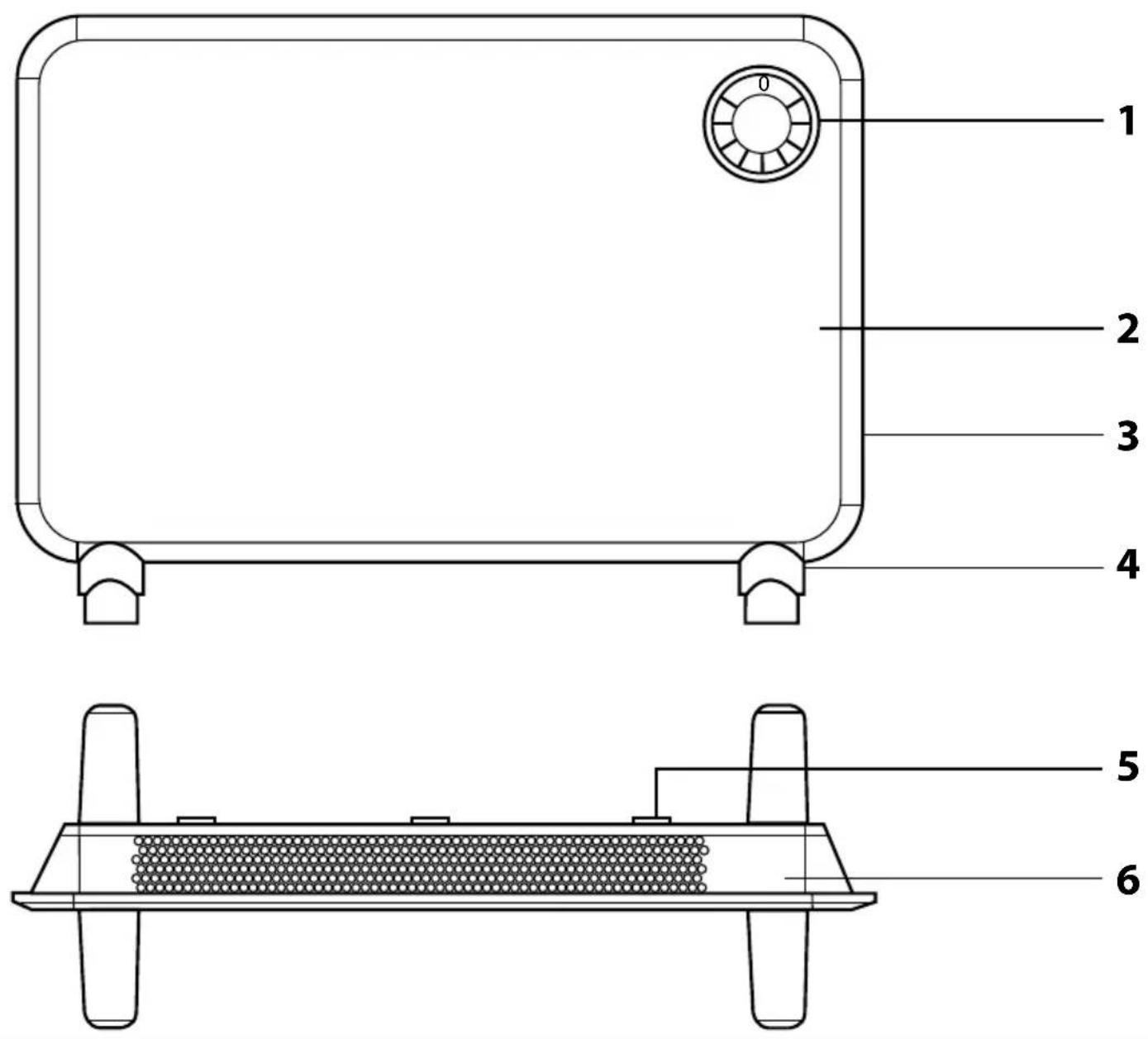
A1 Display with control elements
A2 Front panel
A3 Main power switch (located on the side)
A4 Travel wheels
A5 Wall mounting hooks
A6 Rear panel
A7 Wall mounting set (not shown)
DESCRIPTION OF THE CONTROL PANEL
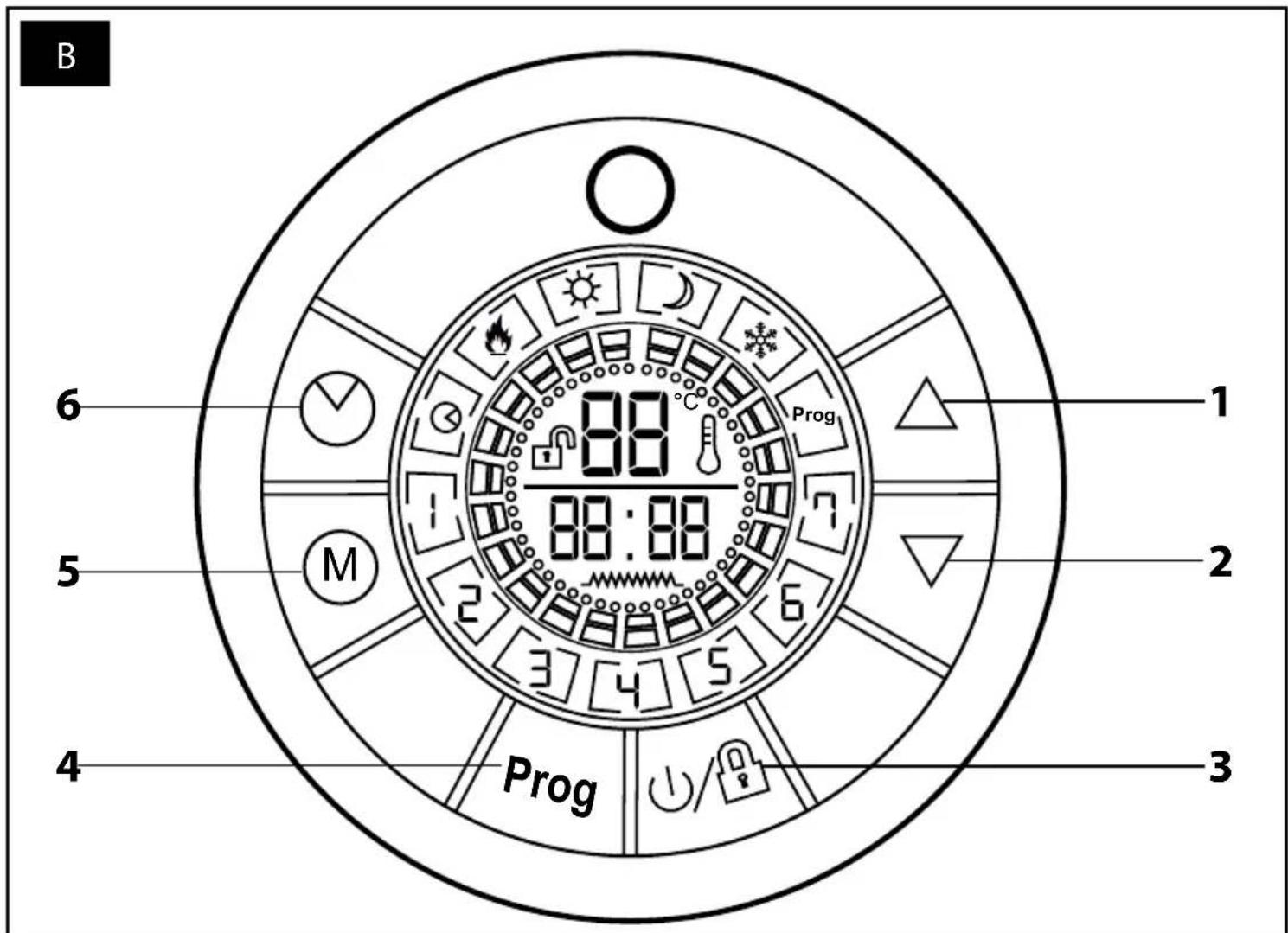
B1 Button ▲ B2 Button ▼
B3 On/Off/Child safety lock button
B4 Programming button
B5 Operating mode button
B6 Day of the week and hour setting button
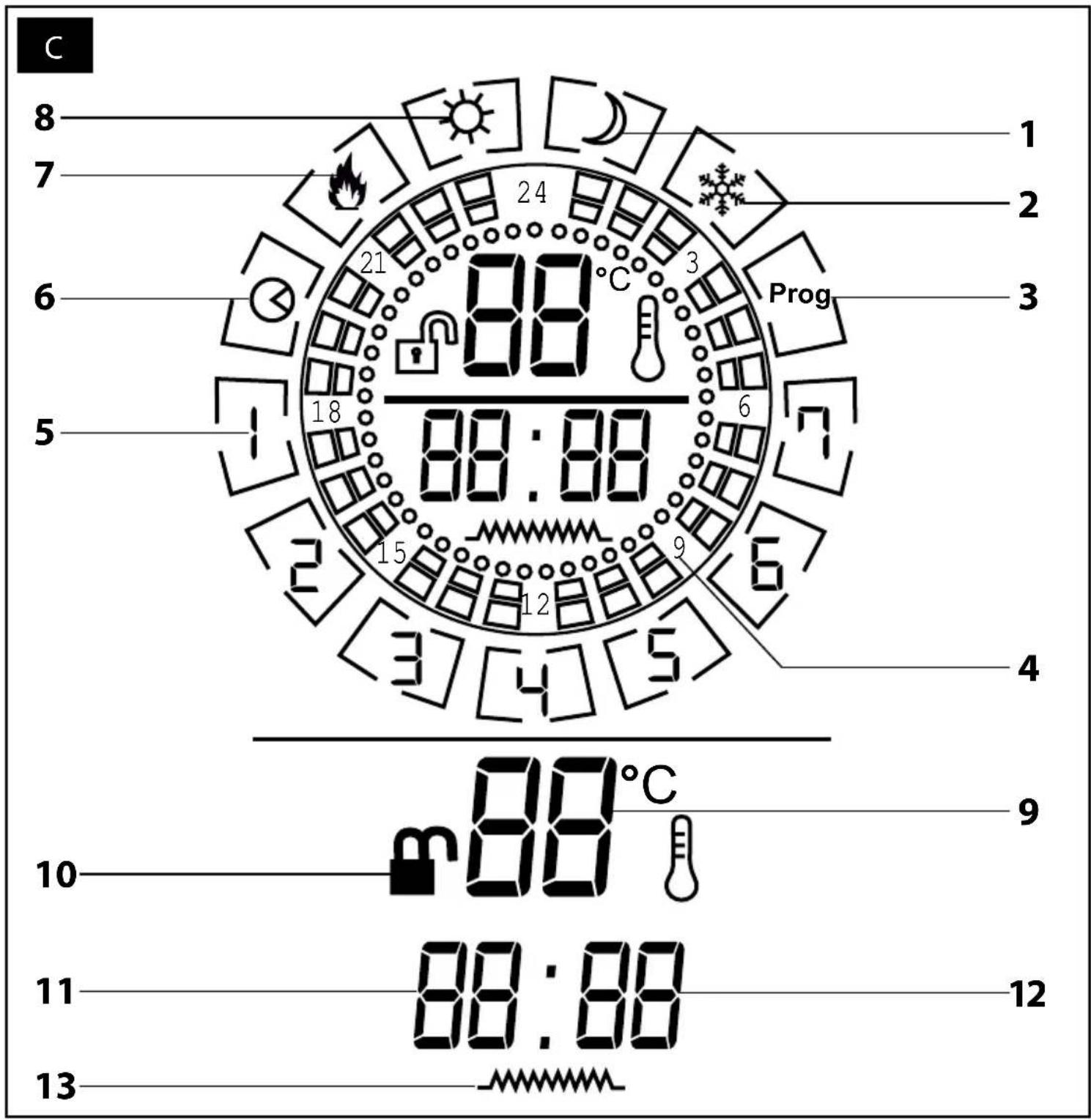
DESCRIPTION OF THE DISPLAY
C1 Power saving mode icon
C2 Frost-free mode icon
C3 Programming icon
C4 Hours
C5 Day of the week icon
C6 Timer icon
C7 Heating icon
C8 Comfort mode icon
C9 Temperature display
C10 Lock icon
C11 Hour icon
C12 Minute icon
C13 Heating display
BEFORE FIRST USE
- Before first use, take the appliance and its accessories out of the packaging material and remove all promotional labels and stickers. Check that neither the appliance nor any of its parts is damaged.
INSTALLATION
- The convection heater may be used as a mobile heat source (necessary to install the travel wheels A4) or it may be mounted on a wall (travel wheels A4 must be removed).

Warning:
Before any type of installation, always make sure that the power plug is disconnected from the power socket.
Installing the travel wheels
- Put a blanket or another soft underlay on the floor. Then place the convection heater upside down on to this blanket.
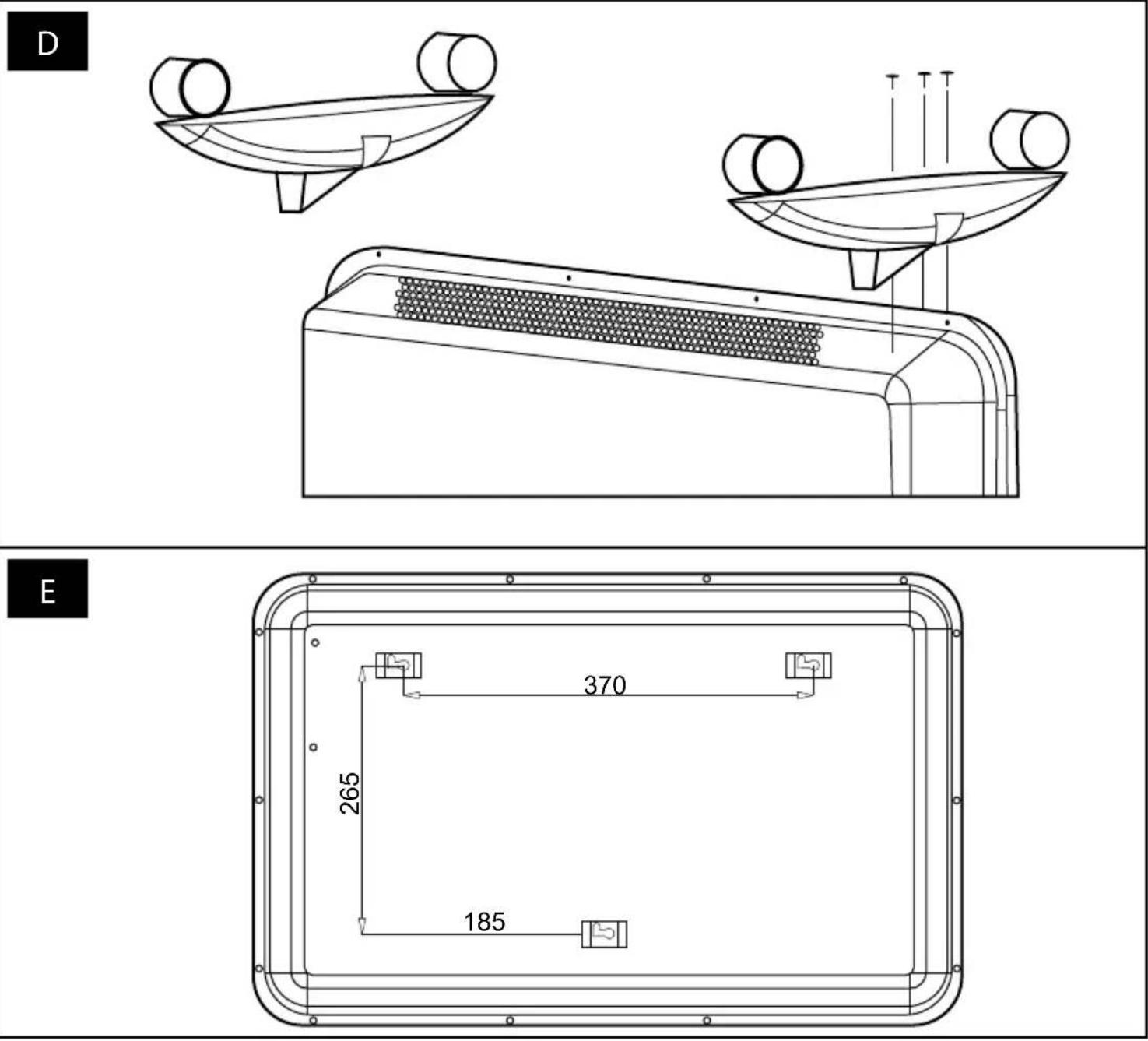
- On the underside of the convection heater there are three drilled holes on either side. Align these holes with the holes in the travel wheels A4 and, using the supplied self-tapping screws, screw them to the underside of the convection heater – see figure D. Tighten securely. Check that the travel wheels A4 are correctly attached to the convection heater.
- Turn the convection heater over and carefully put it down on the travel wheels A4. Check that the wheels move freely and that they are not blocked in any way.
Wall mounted installation
- Before mounting the convection heater on a wall, it is important that you check that the installation location has no wires, conduits, pipes, etc. in the wall.
- Likewise, prior to installation, remove the travel wheels A4 if they are installed.
- Prior to installation, also check that the installation location is at a sufficient distance from the power socket.

Warning:
Only use the supplied set of screws and dowels for the installation. Under no condition should dowels and screws be used that have a different diameter, different specifications and which are not approved by the manufacturer as suitable for the installation of this type of product.
- Drill holes of 8 mm diameter 40 mm deep into the wall as shown in figure E.
- Insert the plastic dowel into the drilled hole and then the screw. Using a screwdriver, secure the screw and leave it protruding out approximately 6 mm.
- Put the convection heater on to the wall by sliding the screw heads into the holes on the hanging hooks A5.

Warning:
The convection heater must be installed at least 15 cm above the ground and 50 cm from the ceiling. The convection heater must be installed horizontally. Any electrical installations must be performed by a qualified electrician. The convection heater must not be installed behind doors or in an outdoor environment.
USING THE CONVECTION HEATER
- Prior to first use, check that the voltage in your power socket corresponds to the voltage on the rating label.
- Insert the power plug into a power socket.
- Set the main switch A3 to position I (On). A sound will be made and the display A1 will be lit for a short moment. As soon as the display A1 turns off, the convection heater will automatically switch to the stand-by mode.
Turning the convection heater on/off
- If the open lock icon is lit on the display, press the On/Off button B3 to turn the convection heater on.
- If the closed lock icon is lit on the display, hold down the On/Off button B3 for approximately 3 seconds to cancel the child lock function. When the icon changes to the open lock, press the On/Off button B3 to turn the convection heater on.
- When the convection heater is turned on, the temperature, time, day icon, child lock icon and heating icon will be lit.
- When you have finished using it, press the On/Off button B3 and the convection heater will turn itself off, however, it will remain in stand-by mode. To completely turn off the convection heater, set the main switch A3 to position 0 (Off) and disconnect the power plug from the power socket.
Note:
Upon first use or after it has not been used for an extended period of time, a slight odour may be sensed or a small amount of smoke may be emitted from the convection heater. This is completely normal and will quickly disappear. In the event of a power outage, the appliance will start in the stand-by mode after power is restored.
Child safety lock
- The child safety lock function enables the display with the control elements A1 to be locked and prevents accidental changes to your settings.
- To turn on the lock function, hold down the On/Off button B3 for approximately 3 seconds. The closed lock icon will be lit on the display. All the control buttons will be disabled.
- To cancel the child safety lock function, hold down the On/Off button B3 for approximately 3 seconds, until the icon changes to the open lock.
Note:
The child safety lock function can be used even when the convection heater is running, or alternatively when it is turned off in the stand-by mode.
Selecting an operating mode
- The convection heater has three operating modes: comfort mode, power saving mode and Frost-free mode.
- Repeatedly press the button B5 to toggle between the individual modes. The icon of the selected mode (C1, C2 or C8) will be lit on the display A1.
- When the convection heater is turned on, it will run in the power saving mode and icon C1 will be lit.
Note:
If the heating icon C7 is lit on the display A1, this means that the convection heater is running and is heating to the set temperature. As soon as the temperature is reached, the heating icon C7 will turn off and only the icon of the selected mode will remain lit. The icon C7 will intermittently turn on and off while the convection heater is running. This is normal. The convection heater is heating to the set temperature.
Comfort mode – when the room temperature falls 2 °C below the set temperature, the heating icon C7 will be lit and the convection heater will start. The heating icon C7 will remain continuously lit while the appliance is heating. When the temperature rises 2 °C above the set temperature, the heating icon C7 will turn off and the convection heater will switch to the stand-by mode. In the comfort mode, the convection heater operates with a heating output of 1500 W.
Power saving mode - when the room temperature falls 4^ below the set temperature, the heating icon C7 will be lit and the convection heater will start. The heating icon C7 will remain continuously lit while the appliance is heating. When the temperature rises 4^ above the set temperature, the heating icon C7 will turn off and the convection heater will switch to the stand-by mode.
Frost-free mode – this mode prevents the freezing of the convection heater and cooling of the room in which it is located. The convection heater will start automatically when the ambient temperature falls to 5 °C. As soon as the temperature rises above 7 °C, the convection heater will turn itself off. In the Frost-free mode, the convection heater operates with a heating output of 750 W.
Setting the temperature
- The buttons ▲/▼ are used to set the operating temperature. Press button ▲ or ▼ and the numerical temperature value will start flashing. Use the buttons ▲/▼ to set the desired temperature. To save the temperature, press the On/Off button B3 or wait approximately 10 seconds until the temperature value stops flashing. The convection heater will automatically save the temperature setting.
- You can set the temperature in the range from 15 to 35 °C.
Temperature can only be set in the energy saving mode and the comfort mode. It is not possible to set the temperature in the Frost-free mode.
Setting the day of the week and the clock
- Hold down the button B6 until the day of the week icon starts flashing. Use the buttons ▲/▼ to select the appropriate day of the week. Number "1" represents "Monday", number "7" represents "Sunday".
- Once the correct day of the week is selected, hold down button B6 until the hour digit starts flashing. Use the buttons ▲/▼ to set the current hours.
- Hold down the button B6 until the minute icon starts flashing. Use the ▲/▼ buttons to set the current minutes.
- To save the day of the week and the clock settings, press button On/Off B3 or wait approximately 10 seconds and the convection heater will automatically save your settings.
Convection heater operation programming function
This function makes it possible to program the convection heater to start on any day of the week at a given time for a set period in the mode of your choice.
- Press the programming button B4. The programming icon C3 and the weekday icon will start flashing on the display A1.
- Use the buttons ▲/▼ to select the day of the week and confirm your selection by pressing the programming button B4.
- The hour digits will start flashing. Use the buttons ▲/▼ to set the hour (60 minutes), when the convection heater is to run.
- Repeatedly press the button B5 to select the operating mode in which the convection heater is to run in the given time. The selected operating mode will be graphically shown on the display A1 – see table below.
- To save your settings, press the On/Off button B3 or wait approximately 10 seconds and the convection heater will automatically save your settings. And one hour (60 minutes) of operation will be programmed.
Repeat steps 1 – 5 to program the operation of the convection heater for other hours of the day also for other days of the week.
Graphical display of the operating modes
| Stand-by mode– the convection heater will be turned off. | Frost-free mode(power output 750 W) | Power saving mode | Comfort mode(power output 1500 W) |
- As soon as you finish programming operation for every day of the week, hold down the programming button B4 for approximately 3 seconds. "P0" will start flashing on the display A1 and to save the programming, press the On/Off button B3 or wait 10 seconds and the convection heater will save the program automatically.
- To start the program, press the day and hour setting button B6. The timer icon C6 will appear on the display.
Note:
Steps 1 – 5 always program only a single hour (60 minutes) of operation of the convection heater.
If you need to adjust the set operation of the convection heater, it is necessary to perform steps 1 – 5 below in the respective days and hours and then save the program as P0.
- The convection heater is also equipped with three preset programs – P1/P2/P3.
- Hold down the programming button B4 until "P0" starts flashing. Using buttons ▲/▼ to select a program.
| Program P1 | Monday - Sunday | 00:00 – 01:00 Comfort mode |
| 01:00 – 08:00 Power saving mode | ||
| 08:00 – 24:00 Comfort mode | ||
| Program P2 | Monday - Friday | 00:00 – 01:00 Comfort mode |
| 01:00 – 05:00 Power saving mode | ||
| 05:00 – 09:00 Comfort mode | ||
| 09:00 – 19:00 Power saving mode | ||
| 19:00 – 24:00 Comfort mode | ||
| Weekend | 00:00 – 01:00 Comfort mode | |
| 01:00 – 08:00 Power saving mode | ||
| 08:00 – 11:00 Comfort mode | ||
| 11:00 – 13:00 Power saving mode | ||
| 13:00 – 16:00 Comfort mode | ||
| 16:00 – 20:00 Power saving mode | ||
| 20:00 – 24:00 Comfort mode | ||
| Program P3 | Monday - Friday | 00:00 – 01:00 Comfort mode |
| 01:00 – 05:00 Power saving mode | ||
| 05:00 – 09:00 Comfort mode | ||
| 09:00 – 12:00 Power saving mode | ||
| 12:00 – 16:00 Comfort mode | ||
| 16:00 – 18:00 Power saving mode | ||
| 18:00 – 24:00 Comfort mode | ||
| Weekend | 00:00 – 01:00 Comfort mode | |
| 01:00 – 05:00 Power saving mode | ||
| 05:00 – 24:00 Comfort mode |
Restoring factory settings
- In the event that it is necessary to cancel all your settings and programming, hold down both the B4 and B5 buttons at the same time for approximately 3 seconds. This will restore the factory settings and all your settings and programming will be deleted.
Open window detection
- The convection heater is equipped with a sensor that measures the room temperature. When the temperature suddenly falls by at least 5^ , the convection heater will turn off automatically to reduce power consumption. A sudden fall in the temperature is usually caused by a window or door being opened.
Thermal protection
- The appliance is equipped with a thermal fuse that automatically turns it off upon overheating.
- Should such a situation occur, turn the appliance off and disconnect it from the power socket. Then allow it to cool down for at least 15 minutes.
■ Before you put the appliance back into operation, check that its vents are not blocked. - If you are unsuccessful putting the appliance back into operation, please contact an authorised service centre.
CLEANING AND MAINTENANCE
- Disconnect the power plug from the power socket and allow the appliance to cool down before cleaning it.
- For cleaning, do not use cleaning products with an abrasive effect, solvents, etc. that could damage the surface of the appliance.

Warning:
To prevent the risk of injury by electrical shock, do not submerge the appliance, power cord or power plug in water or any another liquid.
- Keep the appliance in a clean condition. Clean the appliance regularly to ensure dust does not accumulate inside.
- To clean the outer surface of the of the appliance, use a clean, dry cloth. To remove dust from the outer surface, you may also use a vacuum cleaner.
Storage
- When not using the appliance for an extended period of time, disconnect the power plug from the power socket, allow the appliance to cool down and clean it according to the instructions in chapter "Cleaning and maintenance".
- Before storing it, check that the appliance and all its accessories are thoroughly clean and dry.
- Store the appliance in a dry, clean and well-ventilated location not exposed to extreme temperatures and out of children's reach.
TECHNICAL SPECIFICATIONS
Rated voltage range 220 - 240 V\~
Rated frequency....50/60 Hz
Rated power input 1500 W
Temperature range 15 – 35 °C
Protection class IP24
Power output (low / high heat)....750 W / 1500 W
We reserve the right to change text and technical specifications.
INSTRUCTIONS AND INFORMATION REGARDING THE DISPOSAL OF USED PACKAGING MATERIALS
Dispose of used packaging material at a site designated for waste in your municipality.
DISPOSAL OF USED ELECTRICAL AND ELECTRONIC EQUIPMENT
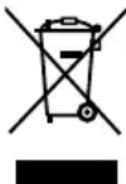
This symbol on products or original documents means that used electric or electronic products must not be added to ordinary municipal waste. For proper disposal, renewal and recycling hand over these appliances to determined collection points. Alternatively, in some European Union states or other European countries you may return your appliances to the local retailer when buying an equivalent new appliance.
Correct disposal of this product helps save valuable natural resources
and prevents potential negative effects on the environment and human health, which could result from improper waste disposal. Ask your local authorities or collection facility for more details.
In accordance with national regulations penalties may be imposed for the incorrect disposal of this type of waste.
For business entities in European Union states
If you want to dispose of electric or electronic appliances, ask your retailer or supplier for the necessary information.
Disposal in other countries outside the European Union.
This symbol is valid in the European Union. If you wish to dispose of this product, request the necessary information about the correct disposal method from the local council or from your retailer.

This product meets all the basic requirements of EU directives related to it.
- EN • Convection heater
- EN
- Convection heater
- Important safety instructions
- ATTENTION:
- WARNING:
- User's manual
- DESCRIPTION OF THE APPLIANCE
- DESCRIPTION OF THE CONTROL PANEL
- DESCRIPTION OF THE DISPLAY
- BEFORE FIRST USE
- INSTALLATION
- Installing the travel wheels
- Wall mounted installation
- USING THE CONVECTION HEATER
- Turning the convection heater on/off
- Note:
- Child safety lock
- Selecting an operating mode
- Setting the temperature
- Setting the day of the week and the clock
- Convection heater operation programming function
- Restoring factory settings
- Open window detection
- Thermal protection
- CLEANING AND MAINTENANCE
- Storage
- TECHNICAL SPECIFICATIONS
- INSTRUCTIONS AND INFORMATION REGARDING THE DISPOSAL OF USED PACKAGING MATERIALS
- DISPOSAL OF USED ELECTRICAL AND ELECTRONIC EQUIPMENT
- For business entities in European Union states
- Disposal in other countries outside the European Union.
Brand : SENCOR
Model : SCF 3200WH
Category : Cooker